
.webp)
RESTful API Integration: CRM and Marketing Tools



If your form-to-CRM flow is slow, messy, or drops records, the fix usually comes down to three things: sync method, field mapping, and rate-limit handling. This article looks at Reform, HubSpot, Salesforce, Marketo, Pardot, Zoho, and Dynamics 365 through five stages of the lead flow: lead capture, enrichment, routing, nurturing, and reporting.
I’d sum it up like this:
- Use webhooks or direct REST calls for fast lead routing and sales follow-up
- Use batch APIs for backfills, large imports, and repair jobs
- Use upserts, dedupe rules, and external IDs to keep contact data clean
- Return HTTP 200 fast and process async so webhook timeouts do not create retries
- Watch rate limits, token expiry, and schema drift before they turn into data loss
The article also shows a plain trade-off that applies across every platform: speed alone is not enough. Teams with connected systems report 36% higher customer retention and 38% higher sales win rates, but only when the integration can handle retries, mapping, and failure recovery without breaking.
Here’s the platform list covered in the article:
- Reform for form intake and webhook delivery
- HubSpot for CRM objects, associations, and marketing context
- Salesforce CRM and Marketing Cloud for enterprise sync patterns, bulk jobs, and event streams
- Marketo for flat person-based records and polling-heavy sync
- Pardot (Account Engagement) for Salesforce-linked prospect sync
- Zoho CRM and Zoho Marketing Automation for journeys, module-based sync, and regional endpoints
- Dynamics 365 Dataverse for Microsoft-based REST, metadata, and queue-driven flows
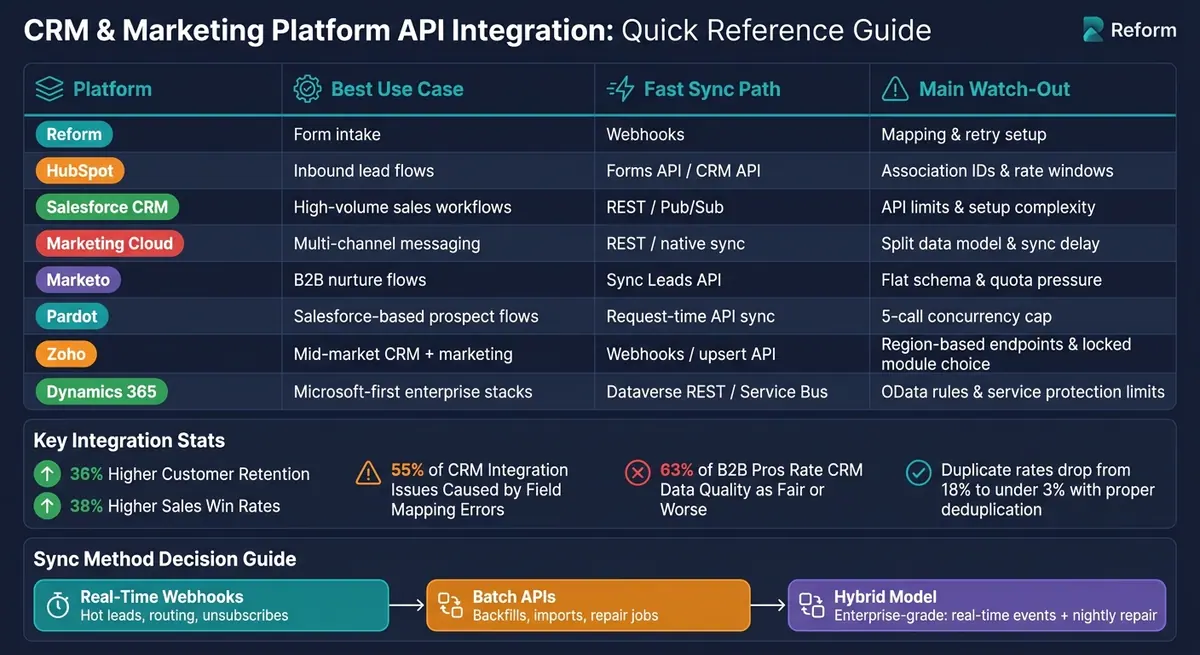
CRM & Marketing Platform API Integration Comparison
Adding a REST API Function to Zoho CRM
sbb-itb-5f36581
Quick Comparison
| Platform | Best use | Fast sync path | Main watch-out |
|---|---|---|---|
| Reform | Form intake | Webhooks | Mapping and retry setup |
| HubSpot | Inbound lead flows | Forms API / CRM API | Association IDs and rate windows |
| Salesforce CRM | High-volume sales workflows | REST / Pub/Sub | API limits and setup complexity |
| Marketing Cloud | Multi-channel messaging | REST / native sync | Split data model and sync delay |
| Marketo | B2B nurture flows | Sync Leads API | Flat schema and quota pressure |
| Pardot | Salesforce-based prospect flows | Request-time API sync | 5-call concurrency cap |
| Zoho | Mid-market CRM + marketing | Webhooks / upsert API | Region-based endpoints and locked module choice |
| Dynamics 365 | Microsoft-first enterprise stacks | Dataverse REST / Service Bus | OData rules and service protection limits |
Bottom line: I’d use near-real-time APIs for hot leads, batch jobs for heavy data work, and a hybrid setup when I need both fast writes and a nightly repair pass.
1. Reform
Reform records the first lead event and passes a clean payload to downstream CRM and marketing APIs. That process starts with the form submission payload.
Lead flow model
Reform uses a REST-based, event-driven webhook model for lead delivery. When someone submits a form, Reform sends a POST request with a JSON payload to a set receiver endpoint. The receiver validates the payload, checks for idempotency, and queues it for async create-or-update processing.
Some teams need logic between the form and the CRM. In that case, middleware can sit between Reform and the destination system to handle routing or enrichment before the data moves on. Reform also supports headless forms for custom API workflows.
Data sync latency
Webhook delivery is near real time. In well-tuned pipelines, leads usually show up in the CRM within two seconds of submission.
The safest pattern is simple: return HTTP 200 right away, then handle the CRM write asynchronously. CRM API calls often take 200–1,000 ms, while webhook senders usually time out after 5–10 seconds. If you process everything synchronously, you're more likely to hit timeouts and trigger retries you didn't need.
Schema and mapping depth
A field like email_address has to map cleanly to a CRM property like Email. In the same way, a SINGLE_SELECT field type has to convert into the right dropdown field or tag. When that mapping is off, things break fast. Data mapping mismatches account for about 55% of issues in CRM integration projects.
Each CRM record should include a small core set of fields:
- First Name
- Email Address
- Lead Source
- Submission Timestamp
Using email as the main deduplication key, then checking for an existing contact before creating a new one, can cut duplicate rates from 18% to under 3%.
That mapping layer has a direct effect on whether downstream CRM objects stay usable.
Security and rate controls
Verify webhook authenticity with HMAC-SHA256, use OAuth 2.0 with PKCE for CRM access, and encrypt traffic with TLS 1.3.
You also need to respect the destination API's limits. If you get a 429 response, retry with exponential backoff by doubling the wait time after each failure: 1s, 2s, 4s, and so on. That gives the system room to recover without piling on more traffic.
"If your retry logic doesn't know why a request failed, it isn't resilience. It's traffic amplification." - Buildform
With clean intake in place, the next piece is how CRM and marketing APIs accept, normalize, and route that data.
2. HubSpot CRM and Marketing APIs
HubSpot’s edge is context built right into the system. Its APIs keep associations, lifecycle stages, and marketing signals in place, so sales and marketing data doesn’t lose the thread.
Lead flow model
HubSpot’s REST API splits CRM data across separate object endpoints: Contacts, Companies, Deals, and Leads. Those objects connect through the Associations API. Common association type IDs include Contact → Company (1), Deal → Contact (3), and Deal → Company (5). If you use the wrong IDs, records can end up disconnected, which breaks the relationship data that sales and marketing workflows rely on.
There’s also an important API choice here. Use the Forms API (v3) when submission context and tracking matter. Use the Contacts API for backend sync. The Forms API keeps HubSpot’s tracking cookie (hutk) and analytics context, which helps native workflows and lead scoring trigger on their own. A direct Contacts API call can skip that context.
Lifecycle stage changes are straightforward. To move a contact from lead to salesqualifiedlead, send a PATCH request that updates the lifecyclestage property.
That context only pays off if the data gets where it needs to go fast enough for routing and scoring.
Data sync latency
HubSpot webhooks send event data within seconds. If delivery fails, HubSpot retries up to 10 times over 24 hours with exponential backoff. The best move is simple: return HTTP 200 fast, then handle the payload async. Once volume starts climbing, queue webhook traffic right away because HubSpot expects a response in 2–3 seconds.
Analytics data moves on a slower clock. Page views and email performance usually lag by 15 to 60 minutes. Email opens and clicks often appear in 5 to 15 minutes, while delivery bounces can take 1 to 4 hours to show up in the API.
Schema and mapping depth
HubSpot supports custom properties with set type and fieldType values. That includes enumeration for dropdowns, booleancheckbox for yes/no fields, and calculation_equation for derived values. To find custom properties on the fly, use the Properties API: GET /crm/v3/properties/{object}.
For deduplication, use HubSpot’s Record ID, hs_object_id, instead of email addresses. HubSpot also allows up to 10 unique ID properties per object. You can use those with the idProperty parameter for cross-system contact matching, which helps stop the same person from being created more than once across connected platforms.
Security and rate controls
HubSpot has phased out legacy API keys. Private Apps are now the right fit for single-portal internal tools, while OAuth 2.0 is the path for multi-tenant integrations. OAuth access tokens expire every 30 minutes, so refresh them about 60 seconds before they expire to avoid 401 errors in background workers.
HubSpot rate limits depend on subscription tier and run on a rolling 10-second window.
| Tier | Requests / 10 sec | Daily Limit |
|---|---|---|
| Free / Starter | 100 | 250,000 |
| Professional | 200 | 500,000 |
| Enterprise | 400 | 1,000,000 |
These limits are tier-based and enforced on that rolling 10-second window. Search queries count as 4 requests. For bulk work, batch endpoints like /batch/read can handle up to 100 records per request, which can cut rate-limit use by up to 99%. If you hit a 429 error, back off with jitter starting at 1 second and double from there.
Next, compare that object model with Salesforce’s broader CRM and marketing cloud API structure.
3. Salesforce CRM and Marketing Cloud APIs
Salesforce splits integrations across Sales Cloud and Marketing Cloud. That means your API choice depends on three things: how much data you’re moving, how fast it needs to move, and which system owns the record.
HubSpot gives you one CRM object model. Salesforce doesn’t. Sales Cloud and Marketing Cloud live in different lanes, so the right setup changes based on the job.
Lead flow model
Salesforce gives you four main paths: Marketing Cloud Connect, REST/SOAP for real-time tasks, Bulk API 2.0 for high-volume loads, and Pub/Sub for event-based change tracking.
Marketing Cloud Connect syncs Contacts and Leads automatically every 15 minutes. That’s handy when you want a native sync and can live with some delay. If you need action right away, use REST. A common example is sending a welcome email right after a form submission.
For batch work, Bulk API 2.0 is built for scale. It can process up to 150 million records per rolling 24-hour period asynchronously. And if you need to react to record changes as they happen, Pub/Sub API is the current option. Streaming API is still around, but it’s the older route.
| Use Case | Recommended API | Sync Type |
|---|---|---|
| Form-triggered events | REST API | Synchronous |
| Small CRUD jobs (<2,000 records) | REST API | Synchronous |
| Bulk imports (>10,000 records) | Bulk API 2.0 | Asynchronous |
| Record-change notifications | Pub/Sub API | Event-driven |
| Large data drops (1M+ contacts) | Bulk API 2.0 | Asynchronous |
That split between native sync, REST, bulk, and event streams shapes the rest of the trade-offs.
Data sync latency
REST APIs give you near-immediate results, but Marketing Cloud caps them at 50,000 calls per day. The native connector is easier to set up, though it can add as much as a 15-minute delay. SFTP works well for huge datasets, but it can push delivery back by 1 to 3 days.
Before you kick off batch jobs, check /services/data/vXX.0/limits so you don’t run into avoidable limit errors.
Schema and mapping depth
In Marketing Cloud, Data Extensions are the main format used for REST API data exchange. Field mapping happens through Import Definitions or Synchronized Data Sources, with each field matched to the right Marketing Cloud Data Extension data type.
For lead management, focus first on the fields that matter for nurture flows and reporting:
- lead source
- lifecycle stage
- campaign ID
When you query large objects, use keyset pagination with WHERE Id > 'Last_Seen_Id' instead of offset pagination. Offset pagination stops at 2,000 records. Salesforce also limits concurrent long-running requests, meaning requests that run for 20+ seconds, to 25 on production orgs.
If you need to reshape large amounts of data, SQL Query Activities in Automation Studio usually do the job better than trying to handle transformations through API calls.
Once mapping is in place, the next pressure points are auth and rate limits.
Security and rate controls
After field mapping, access control and throughput planning move to the front of the line. For backend integrations, use JWT Bearer flow. It’s certificate-based, and it removes the need for human logins or manual token refreshes.
Avoid Username-Password OAuth. Salesforce is retiring it.
Use separate Installed Packages for each integration purpose so you can keep scope control tight. On limits, Enterprise Edition orgs start with 1 million API calls per day, while Developer Edition orgs are limited to 15,000.
For short bursts, Composite API can help. It batches up to 200 sObject records into a single HTTP call, and Salesforce counts that as one API call.
4. Marketo REST API

Marketo uses a flatter data model and puts more weight on metadata discipline than the systems above.
At the center is a single Person record. In practice, that means Lead and Contact live in one flat object model. Storage is simpler, but CRM-to-Marketo mapping can get messy fast.
Lead flow model
The main sync path is the Sync Leads endpoint (POST /rest/v1/leads.json). It handles creates, updates, and upserts through the action parameter: createOnly, updateOnly, or createOrUpdate, along with dedupeBy. By default, Marketo deduplicates by email, but it can also use the Marketo ID or other custom dedupe fields.
That detail matters when expert form strategies, scoring, and CRM updates all touch the same person record. If more than one source can write to Marketo, fuzzy identity rules can turn into a headache.
Because Marketo's object model is flat, teams should map the CRM's primary key to a dedicated custom field in Marketo to keep upserts clear and stable. For standard syncs, use two-way polling. Use webhooks only when near-real-time updates matter.
Data sync latency
Marketo groups latency into three tiers.
| Latency Class | Acceptable Latency | Preferred Method | Use Case |
|---|---|---|---|
| Low | < 10 seconds | Sync Leads API | Immediate sales follow-up |
| Medium | 10 seconds – 60 minutes | Batched sync APIs | Standard inbound data integrations |
| High | > 60 minutes | Bulk import/export | Large migrations or daily activity updates |
Native CRM connectors for Salesforce and Dynamics usually run on polling intervals in the 5-to-12-minute range. If that delay works for your use case, the native connector is the simpler path. If not, you'll usually need custom middleware.
Schema and mapping depth
Marketo's schema is dynamic and user-extensible, so the Describe Lead endpoint is the source of truth for available fields. Refresh schema metadata during each sync cycle to catch new fields early. If you skip that step, field drift can break mappings and throw off downstream reporting.
Custom Objects extend the schema even more and support 1:N or N:N relationships with leads or companies. There's one catch: if a native Salesforce or Dynamics integration is enabled, the Company, Opportunity, and Sales Person APIs are disabled in Marketo, so those records must be managed through the CRM.
Cache results from Describe calls, Activity Types, and partition data for at least a day.
Security and rate controls
Use OAuth 2.0 Client Credentials, send tokens in the Authorization: Bearer header, and move any SOAP workflows before July 31, 2026.
Most subscriptions get a daily quota of 50,000 API calls, and it resets at 12:00 AM CST. Throughput is also limited to 100 calls per 20 seconds, with a concurrency cap of 10 simultaneous calls. Those limits are shared across all integrations on the instance.
To save quota and cut failure rates:
- Batch records up to 300 per call
- Aim for about 50 calls per 20 seconds
- Keep concurrent requests at five or fewer
When limits are hit, use exponential backoff for 606 rate-limit errors and 602 concurrency errors.
That makes Marketo a useful setup for the next comparison: a Salesforce-native API stack. Next comes Pardot, where the API model ties much more closely to Salesforce.
5. Pardot API
When Salesforce owns both the CRM and the marketing automation stack, Account Engagement handles prospect capture, sync, and nurture inside the same ecosystem. Version 5 is the latest and preferred API version.
Lead flow model
Account Engagement has two main paths for lead intake: native Pardot forms for known prospects and Form Handlers for external forms. The upsertLatestByEmail method updates an existing prospect by email or creates one if no match exists.
Prospects can link to Salesforce records through salesforceId, salesforceLeadId, or salesforceContactId. The salesforceLastSync field shows the most recent sync time between the two systems, so it’s a good field to watch when you’re checking for stalled syncs.
If AMPSEA is turned on, the API defaults to updating the record with the newest activity. In bidirectional sync setups, it helps to fingerprint outbound payloads so you don’t get stuck in update loops.
That same sync path also affects how fast prospect changes move from one system to the other.
Data sync latency
Request-time integrations usually land around 400–800 ms at P50 and 1–3 s at P95, including platform overhead and API response time. For live workflows like sales assist or lead routing, direct request-time sync is a better fit than depending on the native Salesforce connector polling interval.
Schema and mapping depth
The V5 API supports standard CRUD operations and query across objects such as Prospects, Lists, and Custom Fields. You can also query the CustomField object to pull field metadata inside a given business unit.
One catch: the Prospect Query endpoint does not return multi-select or checkbox fields. If you need the full schema, use the Prospect Read endpoint instead.
Custom fields follow Salesforce’s __c suffix pattern, like Food_Preference__c. Renames or deletions that don’t match between Salesforce and Pardot can break field mappings in Account Engagement, because each system keeps its own schema definition.
Security and rate controls
Use Salesforce OAuth 2.0, and include both of these headers on every request:
Authorization: Bearer <ACCESS_TOKEN>Pardot-Business-Unit-Id: <BUSINESS_UNIT_ID>
The Business Unit ID makes sure the request goes to the right business unit, which matters because one Salesforce org can contain multiple business units.
Daily API request limits vary by Account Engagement edition.
| Edition | Daily API Requests |
|---|---|
| Growth | 25,000 |
| Plus | 50,000 |
| Advanced | 100,000 |
| Premium | 100,000 |
Pardot also applies a hard cap of 5 concurrent API requests. If you go over that, you’ll get error code 66. If you hit the daily limit, you’ll get error code 122.
A few guardrails help here: use a token bucket rate limiter, honor Retry-After headers, and give each integration its own Salesforce user so tracing is easier.
Zoho takes a different path, with separate CRM and marketing automation APIs.
6. Zoho CRM and Zoho Marketing Automation APIs
Zoho keeps CRM and marketing automation separate. That means your Journeys setup and your module choice have a big effect on how the integration works. Compared with some other stacks, Zoho also adds regional endpoint rules and a few hard setup limits that can shape your design from day one.
Lead flow model
Zoho Marketing Automation sends qualified records to Zoho CRM through Journeys. These are automated workflows that trigger when a contact reaches a score threshold - for example, a score above 80 - and then create a Deal or assign a follow-up Task in the CRM.
A smart setup is to sync all contacts as Non-Marketing at first, then use Journeys to move only qualified contacts to Marketing status. That helps reduce Marketing Contact usage and can cut cost.
Duplicate records usually show up because of field mapping mistakes or weak unique identifiers. Phone numbers are a common problem when formatting isn't consistent. To handle deduplication, use PUT /crm/v6/MODULE/upsert with duplicate_check_fields=Email. That lets you dedupe and insert or update in a single call.
Data sync latency
For near-real-time lead capture, use webhooks. For historical loads, use the Bulk Read and Bulk Write APIs.
Schema and mapping depth
Module selection is locked after setup. If you choose to sync Contacts instead of Leads as your main module, you can't change that later unless you disconnect the integration completely. So this decision needs to happen before any live data starts moving.
Zoho CRM exposes almost every object as a REST resource, including custom modules and layouts. The COQL (Zoho CRM Object Query Language) endpoint supports SQL-like queries and can join across modules in one call. That cuts down on extra requests.
Field mapping also has a few gotchas. Picklist and Lookup fields need specific record IDs, not plain text values. It's a small detail, but it's the kind of thing that can quietly break a sync if you miss it.
Security and rate controls
Zoho uses OAuth 2.0. For server-to-server integrations, Self-Client is a good fit because it avoids redirect URLs and issues long-lived refresh tokens. Access tokens expire after 3,600 seconds, so cache them and refresh them before they expire instead of requesting a new token on every call.
Zoho also runs on a regional architecture. Your API base URL has to match the data center where the org was created - zohoapis.com for the US, zohoapis.eu for the EU, and so on. Even a valid token will fail if the request goes to the wrong regional endpoint. That affects token reuse and deployment setup, so it's better to build the base URL from config instead of hard-coding it.
Rate limits are enforced across the whole organization, both per day and by concurrent request count. Cache tokens, refresh them ahead of expiry, and back off when throttling hits.
Those limits shape the main trade-offs around sync speed, data quality, and reliability.
7. Dynamics 365 Dataverse Web API
Dynamics 365 is the most enterprise-focused option in this comparison. With Dataverse, you also get Microsoft-native metadata, queues, and tight service limits. It uses the Dataverse Web API, Microsoft’s RESTful OData v4 API for CRM entities like Leads, Contacts, and Accounts.
Lead flow model
For marketing-to-CRM lead flows, the common setup is a mix of direct REST calls, webhooks, and Power Automate. Webhooks send an HTTP POST to your endpoint after an event, but there’s a catch: your endpoint has to respond within 5 seconds. Power Automate works well for simple triggers, though it’s not a good fit for high-volume sync jobs.
For durable, asynchronous, high-volume flows, Microsoft points to Azure Service Bus. That matters because once you start mixing REST, orchestration, and queues, payload structure and schema handling can get messy fast.
Data sync latency
Latency depends on the pattern you choose. Power Automate and webhook-based flows usually finish within 60 seconds. If you use Link to Microsoft Fabric, sync is near real time and usually lands within a few minutes, with CRM data written to OneLake as Delta Parquet files.
For incremental polling, use the odata.track-changes header so you only pull changed records instead of reprocessing everything. That one choice can save a lot of wasted API calls.
Schema and mapping depth
Dataverse is metadata-driven, which is a big deal for integrations. Instead of hard-coding tables or columns, you can query EntityDefinitions at runtime. That gives your integration more room to handle schema changes without falling apart.
For lookups, use OData navigation syntax like _parentcustomerid_value in filters. And be selective with fields: use $select to request only what you need. Pulling all columns can increase export time by over 500%.
A few field-mapping limits to plan for:
- Pages top out at 5,000 records
- Your client should follow
@odata.nextLinkfor pagination - Lookup fields need OData navigation syntax, not just plain column references
Security and rate controls
Authentication runs through Microsoft Entra ID with OAuth 2.0. For service-to-service integrations, use Application Users. Access tokens usually expire after 60 minutes, so it’s smart to refresh them 5 to 10 minutes before they expire.
Dataverse also applies service protection limits, and these shape your design more than many teams expect. The platform allows 6,000 requests per user within a 5-minute sliding window, enforces a 20-minute execution-time cap, and permits up to 52 concurrent requests. If you hit a 429 response, honor Retry-After and try again later.
For bulk work, batch operations can pack up to 1,000 individual operations into one HTTP request, which is handy during initial data loads.
Trade-Offs: Real-Time Sync, Data Quality, and Reliability
Across the platforms above, the same pattern shows up again and again. The main choice isn’t real-time vs. batch in some absolute sense. It’s about picking the sync pattern that gives you the right mix of speed, data quality, and recovery. That choice shapes how you handle retries, field mapping, and failure recovery.
Near real-time sync makes sense for time-sensitive actions like lead routing, demo requests, and unsubscribe propagation. If events get dropped, you need replay support or dead-letter handling.
Batch sync works better for backfills, reconciliation, and bulk updates. The trade-off is lag, which can stretch from minutes to hours.
A hybrid model uses both. Webhooks handle the immediate write, and a nightly poll picks up anything that slipped through. It’s a solid setup on paper, but it’s also the hardest one to maintain.
| Approach | Latency | Best For | Main Risk |
|---|---|---|---|
| Near Real-Time | Sub-second | Lead routing, transactional alerts | Dropped events require replay or dead-letter handling |
| Batch | Minutes to hours | Engagement backfill, engagement scoring, bulk updates | Data lag; sync conflicts on busy intervals |
| Hybrid | Real-time for events; daily for repair | Enterprise-grade CRM and marketing automation integrations | Hardest to maintain |
Sync speed falls apart when mapping is weak. That’s where many integrations quietly go off the rails. In fact, 63% of B2B professionals rate their CRM data quality as "fair or worse", often because of integration issues rather than the CRM itself.
The fix starts at the mapping layer. Normalize fields before the record reaches the CRM, not after. So if a source system sends "enterprise", convert it to "Enterprise" before write-in. For U.S. lead data, normalize phone numbers, validate ZIP and state pairs, and keep UTM fields intact so attribution doesn’t get lost. Use upsert operations with unique external IDs and a tiered matching setup: email first, then a composite key like first name + last name + company domain, with phone number as a third check.
HTTP status codes don’t tell the whole story when something fails. You need to log the intent behind the call, the request identity, and the retry count for every failed request. A dead-letter queue (DLQ) is a must for failures that won’t clear after retries, so nothing vanishes without a trace. If failures aren’t visible, retries can turn into silent data loss.
| Feature | Standard Practice | Key Detail |
|---|---|---|
| Rate-Limit Handling | Adaptive throttling | Monitor response headers; cap internal calls at 90% of the documented limit |
| Bulk Support | Batch/Bulk API endpoints | Use for bulk transfers to reduce API calls |
| Retry Strategy | Exponential backoff with jitter | Double wait times per retry; enforce a max of 5 attempts |
| Logging Visibility | Immutable audit logs | Log source IP, payload hash, status, and retry count |
These controls matter most when an integration hits a partial failure and still needs to recover cleanly.
Pros and Cons
No platform wins on every criterion. The best pick depends on your workflow, how fast data needs to move, how much control your team wants, and what you can afford to maintain.
This table turns the earlier platform details into buying criteria you can actually use.
| Platform | Strengths | Limitations | Best-Fit Scenario |
|---|---|---|---|
| Reform | Conversion-first intake with enrichment and spam prevention; requires a downstream CRM | Not a full CRM; requires a downstream platform for lead management | SaaS lead capture: High-quality form capture before CRM intake |
| HubSpot | Developer-friendly REST v3; native webhooks for real-time sync; lifecycle context preserved across objects | Burst limits on OAuth apps; Search API throughput caps | Content-led inbound SaaS: Modern B2B companies focusing on content and inbound forms |
| Salesforce CRM | Built for enterprise scale; Change Data Capture supports real-time event streaming | Complex governor limits; steep learning curve | Enterprise sales handoff: High-volume, complex routing across global sales teams |
| Salesforce Marketing Cloud | Specialized REST API for transactional messaging and real-time journey triggers; strong multi-channel orchestration | Legacy subscriber operations still depend on SOAP | Multi-channel enterprise marketing: High-volume SMS, push, and email campaigns at enterprise scale |
| Marketo | Strong multi-channel orchestration; flat Person model simplifies storage | Schema drift and rate-limit sensitivity require careful management | Complex B2B MOps: Multi-channel campaign orchestration and lead scoring workflows |
| Zoho CRM | COQL reduces payload size; flexible custom modules; regional architecture supports localized deployments | Daily request ceiling can become a bottleneck for large-scale global operations | Multi-brand, multi-region operations: Mid-market firms running diverse operations across multiple brands or geographies |
| Dynamics 365 | Tight Microsoft ecosystem integration; metadata-driven Dataverse schema supports runtime adaptability | Complex authentication setup for non-Microsoft stacks; often requires middleware for cross-platform integrations | Microsoft-standardized enterprise: Organizations standardized on Azure and the broader Microsoft stack |
On the ground, integration architecture usually matters more than a feature checklist. A platform can look great in a demo and still become a headache once you deal with latency, retries, field mapping, and schema changes.
So the final call is less about which tool has the longest feature list and more about what your team can handle day to day: latency, recovery logic, and schema control.
Conclusion
The choice comes down to volume, speed, and control.
Native form integrations make sense for lower-volume setups, especially when the form tool and CRM come from the same vendor. Direct REST APIs are a better fit for higher-volume workflows that need custom routing. For teams in the middle, middleware gives you a solid balance between flexibility and implementation effort.
Speed matters most when a form needs to trigger an immediate sales action. Lead qualification drops fast after the first few minutes, so real-time webhook sync is the best move for urgent lead routing. Batch sync works better for tasks that don't need instant action, like scoring, enrichment, and dedupe.
Reform sits at the front of the stack: capture the lead cleanly, then send it down the right API path.
FAQs
When should I use real-time sync instead of batch APIs?
Use real-time sync through webhooks when timing matters, like lead capture, instant routing, notifications, or time-sensitive personalization. It updates your CRM right away instead of making you wait for the next scheduled batch.
Use batch APIs for periodic reconciliation, historical backfills, or when the source system doesn't support webhooks in a reliable way. A lot of teams use both.
How can I prevent duplicate leads across CRM and marketing tools?
Use deduplication logic before creating any new CRM record.
A simple way to do this is to set a matching rule with the email address as the main key. Then use backup checks, like the person’s name and company domain, to catch cases where the email is missing or different.
If a match already exists, update only empty fields. Don’t create a new record, and don’t overwrite data that’s already there.
An upsert operation tied to a unique identifier helps keep data clean across marketing and sales systems.
What causes API integrations to drop or delay lead records?
Lead records often get dropped or delayed because of system limits and messy data handoffs. The usual culprits are API rate limits, throttled or rejected requests, and short network outages or timeouts.
Things can also go sideways when there’s no single system of record. That’s when you start seeing sync loops, overwrites, or updates that get ignored. Duplicate contact creation, gaps in partial-failure handling, and webhook delivery or ordering issues can break the integration too.
Related Blog Posts
Get new content delivered straight to your inbox

The Response
Updates on the Reform platform, insights on optimizing conversion rates, and tips to craft forms that convert.




Drive real results with form optimizations
Tested across hundreds of experiments, our strategies deliver a 215% lift in qualified leads for B2B and SaaS companies.
