
.webp)
How API Triggers Improve Lead Quality



If you wait hours to act on a lead, you lose leads. I’d sum up the research like this: API triggers help you get lead data into Salesforce Marketing Cloud in seconds, which improves response time, cuts bad data, trims duplicate records, and helps sales follow up while intent is still high.
Here’s the short version:
- I can send form submissions and product events into SFMC right away instead of waiting for hourly or daily imports.
- That faster flow matters because leads answered in under 5 minutes can reach a 32% MQL-to-SQL rate, while leads answered after 24+ hours drop to 8%.
- I can check fields at the moment of submission, block bad emails, and update existing records instead of making duplicates.
- I can use live behavior, like pricing-page actions or product milestones, to improve lead scoring and routing.
- I can trigger nurture emails, sales handoffs, consent logging, and attribution updates as soon as the lead acts.
A few numbers stand out:
- One study found that replying within 5 minutes instead of 30 minutes led to 100x higher contact odds and 21x higher qualification odds.
- Many B2B teams still take 42 to 47 hours to reply.
- Case studies cited in the article show results like 7x more contact conversions, 2x lead conversion, and 80% lower development costs.
| Area | Batch imports | API triggers |
|---|---|---|
| Response time | Minutes to hours | Seconds |
| Data checks | After import | At submission |
| Duplicates | More common | Lower with upsert logic |
| Scoring | Static or delayed | Based on live behavior |
| Routing | Slower handoff | Near-immediate handoff |
So if I had to put the whole article into one plain takeaway, it would be this: better timing plus cleaner data leads to better lead quality. The rest of the article shows how that plays out in SFMC across scoring, routing, nurture, and form setup.
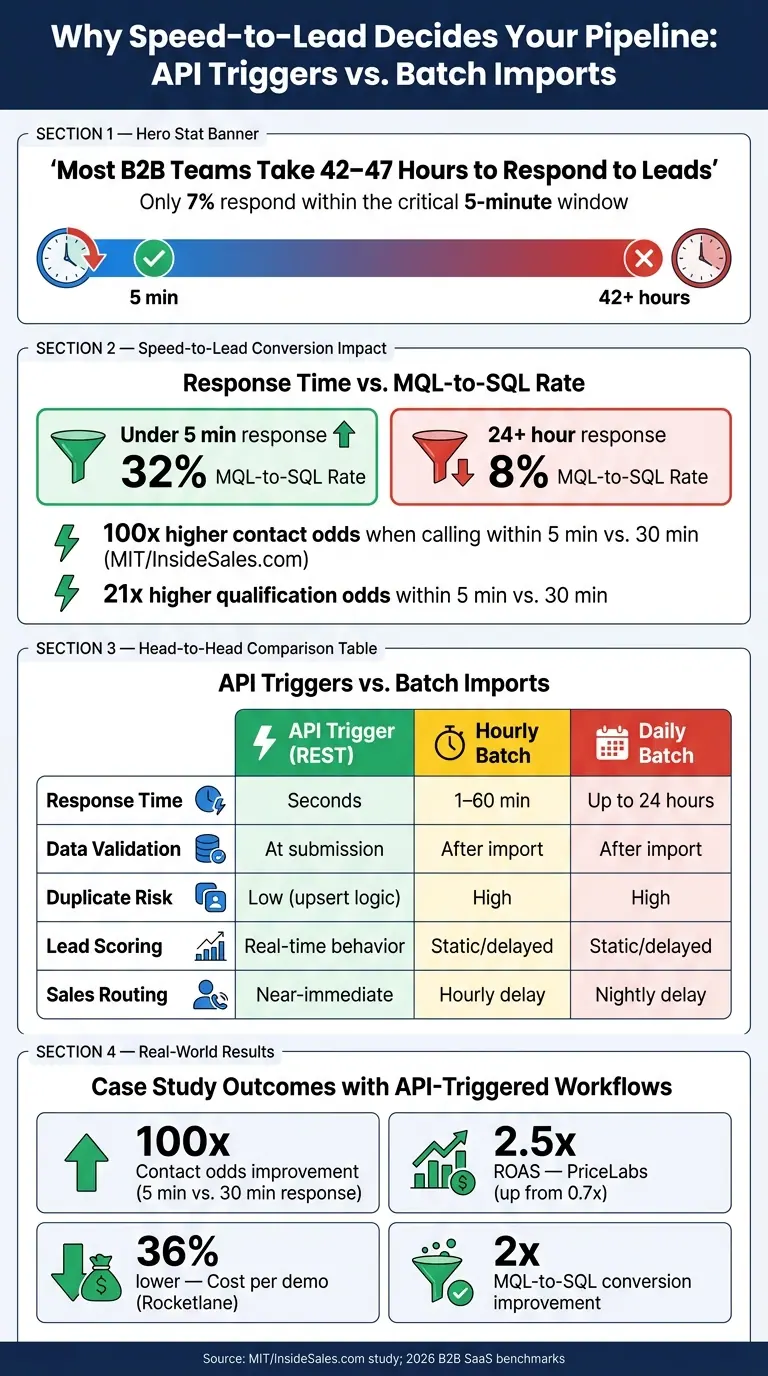
API Triggers vs. Batch Imports: Speed-to-Lead Stats That Impact Conversion
What the Research Says About Response Time and Conversion
Speed-to-Lead Studies Show Better Contact and Qualification Rates
The data is blunt: even a short delay can cost you the lead.
A 2007 MIT/InsideSales.com study found that calling a lead within 5 minutes instead of 30 minutes increased the odds of making contact by 100x and the odds of qualification by 21x. For demo and pricing requests, that kind of gap can be the difference between pipeline and dead air.
More recent 2026 benchmarks show the same thing in B2B SaaS. Leads that get a response in under 5 minutes see a 32% MQL-to-SQL conversion rate. When the response takes more than 24 hours, that number drops to 8%.
You can see the business impact in actual results. In 2026, PriceLabs increased ROAS from 0.7x to 2.5x and doubled MQL-to-SQL conversion. Rocketlane cut cost per demo by 36% and reached 3.4x ROAS.
Here’s the problem: most B2B teams still take 42 to 47 hours to respond, and only 7% make it inside the 5-minute window. That gap leaves a lot of room for teams that can move first. And that’s where API-triggered workflows start to matter in a measurable way.
Why API-Triggered Journeys Outperform Batch Imports
Batch imports put a hard limit on response speed. If lead data sits in an hourly or daily sync, the clock is still ticking while buyer intent fades.
API triggers remove that bottleneck. With a REST API call, you can create or update the contact record and kick off a Journey Builder workflow in near real time. That matters because fast follow-up isn’t just nice to have. It shapes whether sales gets a warm lead or a cold one.
There’s also a technical reason behind the speed gap. SFMC's REST API uses JSON payloads, which are lighter than XML. That makes REST faster and a better fit for high-volume, real-time integrations than SOAP.
The integration method sets the pace:
| Integration Method | Typical Response Time | Effect on Qualification | Effect on Conversion |
|---|---|---|---|
| API Trigger (REST) | Near-real-time / Seconds | High: Captures lead interest at peak intent | High: Minimizes lead decay and drop-off |
| Hourly Batch Import | 1–60 minutes | Lower: Lag can cause speed-to-lead misses | Lower: Competitors may reach the lead first |
| Daily Batch Import | Up to 24 hours | Poor: Lead is often cold or has found another solution | Poor: High risk of total conversion loss |
API-triggered automation also cuts down on manual handoff mistakes that can leave leads untouched before scoring even begins.
And that speed doesn’t just help outreach. It also improves the data flowing into scoring and routing.
sbb-itb-5f36581
How API Triggers Improve Data Quality and Lead Scoring
Speed matters. But clean inputs decide whether that speed helps scoring or just pushes bad data through the system faster.
Validation, Enrichment, and Deduplication at the Point of Capture
With batch imports, bad data usually shows up late. A team runs a cleanup job, removes duplicates, and flags bounced emails only after those records have already flowed into scoring models and journey logic. API-triggered capture flips that process.
Using server-side validation in the form handler, you can check email format, phone number, and field type before writing to a Data Extension. That stops bad records from getting into scoring, routing, and nurture flows in the first place. The REST API upsert endpoint adds one more safeguard: it matches incoming records against a defined primary key and updates existing contacts instead of creating duplicates. Hidden fields can capture source, SubscriberKey, and CreatedDate without adding friction to the form. Integration logic can also pass real-time enrichment data into the lead record at the moment of submission.
The payoff is simple: less cleanup work, more accurate scoring, and a shorter path from form fill to handoff.
How Behavioral Data Makes Scoring More Predictive
Once capture is clean, real-time events add the next signal layer.
Static fields tell you who a lead is. Behavioral events tell you what that lead is doing right now. When a contact downloads a pricing guide, hits a product usage milestone, or takes another high-intent action, that event can update the lead score in real time. Journey Builder's "Wait Until API Event" activity pushes this further. A journey can pause until a specific behavioral signal happens, such as a form submission or product milestone, before moving the lead to the next stage. So the score reflects current engagement, not just what happened on day one.
That gap becomes clear in the numbers:
| Metric | Batch Import | API-Triggered Capture |
|---|---|---|
| Field Completeness | Often low; limited by form friction | High; progressive profiling supported |
| Invalid Email Rate | High; cleaned post-entry | Low; blocked at capture via List Detective |
| Duplicate Rate | High; requires manual dedupe | Low; automated upsert via primary keys |
| Enrichment Coverage | Limited; requires manual REST calls | High; automated via integration logic |
| Average Lead Score | Less predictive; based on static data | Highly predictive; uses real-time behavior |
Validated, deduplicated, and enriched data gives SFMC cleaner inputs. That means segmentation and scoring can run on dependable signals instead of cleanup work.
How Real-Time Triggers Improve Routing, Nurture, and Sales Handoffs
Once your inputs are clean and your scores are up to date, the next thing that shapes lead quality is speed. Clean data and predictive scoring don't do much if SFMC waits too long to act. Intent fades fast, and timing can make the difference between a live opportunity and a missed one.
Behavior-Based Messaging Improves Engagement and Lead Progression
When a lead takes a high-intent action, the response needs to happen while that interest is still active. That's where real-time triggers help. They keep messaging tied to the exact moment a lead shows intent.
API-triggered sends move welcome emails and follow-up messages into the buyer's active window. Triggered sends queue right away, which cuts the gap between the action and the response.
Journey Builder's Exit Criteria also helps keep things clean. It lets you remove a contact the moment they convert, which stops irrelevant follow-up from going out.
That same fast response doesn't just help nurture. It also speeds up lead assignment and sales follow-up.
Automated Routing Reduces Lag and Handoff Errors
API-triggered routing removes the manual work that often slows lead assignment. When a Sales Cloud Lead becomes Qualified or an Opportunity closes, SFMC moves the contact into the right journey within minutes. The handoff happens automatically, with no manual intervention.
| Process Metric | API-Triggered Routing | Batch-Based Routing |
|---|---|---|
| Time to Assignment | Seconds to minutes | Hourly or nightly delays |
| Manual Effort | Fully automated via API/CRM event | Requires Automation Studio/Import jobs |
| SLA Adherence | High; immediate routing | Variable; dependent on batch frequency |
Batch-based routing can still work. But it leaves more room for delay, missed SLAs, and handoff mistakes. Real-time routing cuts that lag and keeps the process moving when the lead is still warm.
Consent and Attribution Captured in Real Time
Real-time triggers also help with compliance and attribution at the moment of capture. API-triggered forms record consent and source attribution when the form is submitted, which keeps compliance and reporting aligned in real time.
Putting the Research Into Practice With Conversion-Focused Forms
Why Better Forms Produce Better SFMC Inputs
Real-time API triggers work best when the form collects complete and accurate data from the start. If the form is messy, SFMC gets messy inputs. If the form is clear and well-structured, API-triggered capture begins with data your team can actually use.
Multi-step forms and conditional routing help cut friction while still collecting the qualification details SFMC needs.
That’s why the form builder matters so much. Field setup and validation shape what SFMC receives.
How Reform Supports Cleaner API-Triggered Lead Capture
Reform supports multi-step forms, conditional routing, email validation, spam prevention, lead enrichment, and analytics. The goal is simple: help teams send cleaner records into SFMC.
Here’s how that can work in practice:
- A visitor fills out a multi-step Reform form on your site.
- Reform validates the email address and runs spam checks, including honeypot fields that catch bot submissions without adding friction for real users.
- The form sends a validated payload to the SFMC REST API with exact field mapping, including hidden routing metadata like the Journey Builder event key, so the lead reaches the right Journey Builder event and Data Extension.
That kind of upstream control improves the quality of every downstream trigger.
Reform also gives teams real-time analytics that show where drop-off happens. That makes it easier to tune form steps over time. For teams sending data into Salesforce, this means fewer malformed records, fewer API failures caused by field mismatches, and more contacts entering journeys with complete, accurate data.
Conclusion: The Clearest Patterns Across the Studies
Across the studies, the pattern is simple: cleaner forms lead to cleaner SFMC inputs. That improves scoring, routing, and nurture while cutting down on manual cleanup.
FAQs
How do API triggers improve lead quality?
API triggers can improve lead quality because they let you respond to customer actions in real time. That makes your messages more timely, relevant, and personal instead of delayed or generic. In Salesforce Marketing Cloud, for example, triggered emails can go out right after someone takes an action like making a purchase or signing up.
They also give marketers a way to update customer interactions through code and track engagement as it happens. That means your messaging can reflect what people are doing right now, not what they did days ago. The result is a clearer view of which leads are more engaged and more qualified, which can help drive higher conversion rates.
What data should be validated at form submission?
Validate data like email addresses, first names, last names, date/time values, and specific form field values when the form is submitted.
This helps make sure each field matches the expected format and data type, including email format, date/time format, and boolean values.
Which SFMC workflows benefit most from real-time triggers?
SFMC workflows get the most out of real-time triggers when the interaction is time-sensitive. That usually means CRM-driven actions such as lead conversions, purchase confirmations, service updates, and customer support responses.
It also applies to journeys that need an immediate response after an external event happens or when data changes.
Related Blog Posts
Get new content delivered straight to your inbox

The Response
Updates on the Reform platform, insights on optimizing conversion rates, and tips to craft forms that convert.


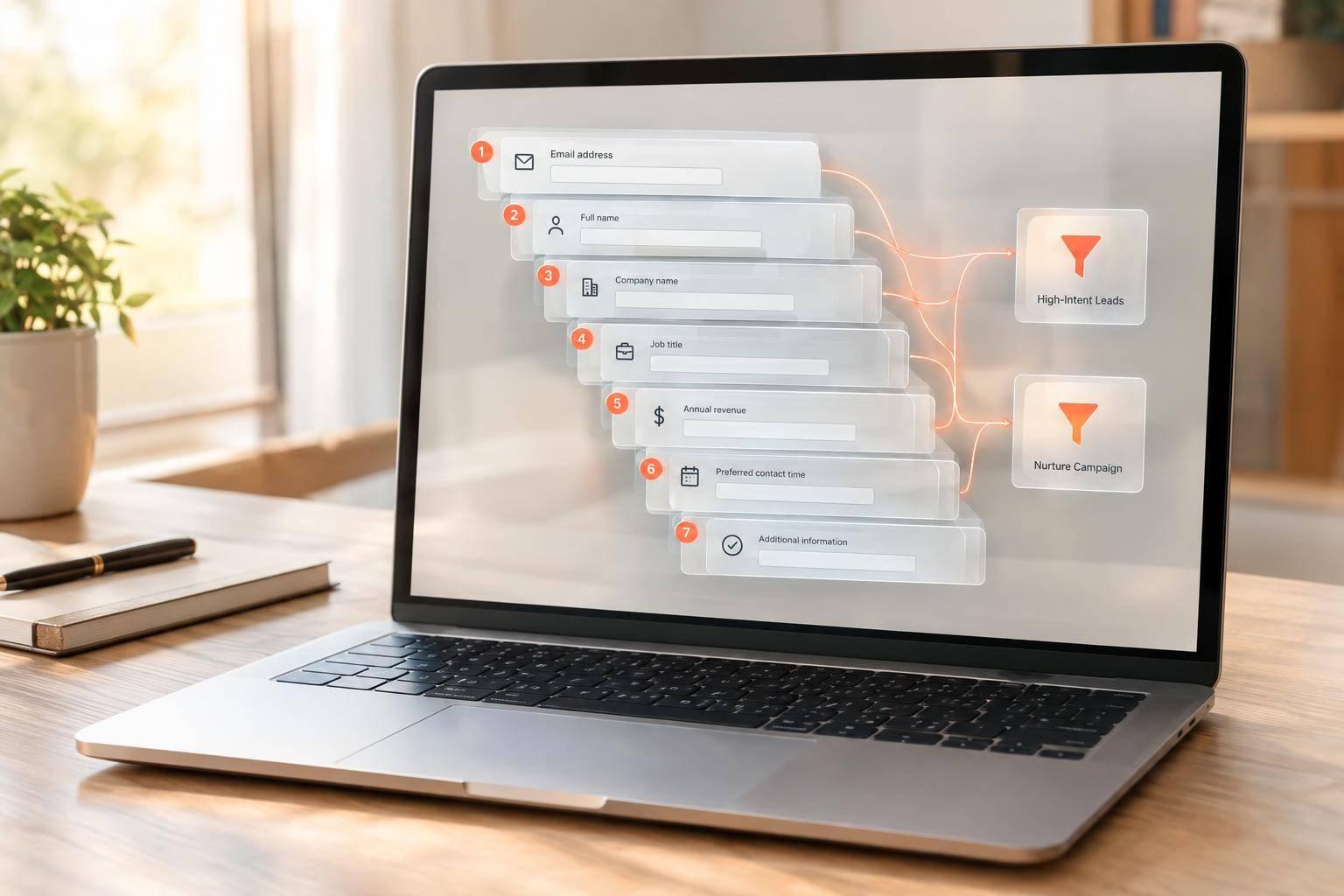

Drive real results with form optimizations
Tested across hundreds of experiments, our strategies deliver a 215% lift in qualified leads for B2B and SaaS companies.
