
.webp)
Dynamic Email Content: CRM Integration Guide


Want to make your emails more effective? Dynamic email content powered by CRM data is the key. Here's why it matters:
- Personalized Emails Work: They achieve 6x higher transaction rates and can boost revenue by up to 760% compared to generic campaigns.
- CRM Data Drives Results: Use customer details like demographics, purchase history, and preferences to tailor subject lines, offers, and visuals.
- Automation Saves Time: Behavior-triggered emails see 70.5% higher open rates and 152% higher click-through rates.
This guide shows you how to clean your CRM data, map fields for personalization, connect your CRM to email tools, and build automated campaigns that adjust to each recipient’s needs. Done right, these strategies can transform your email marketing and drive real results.
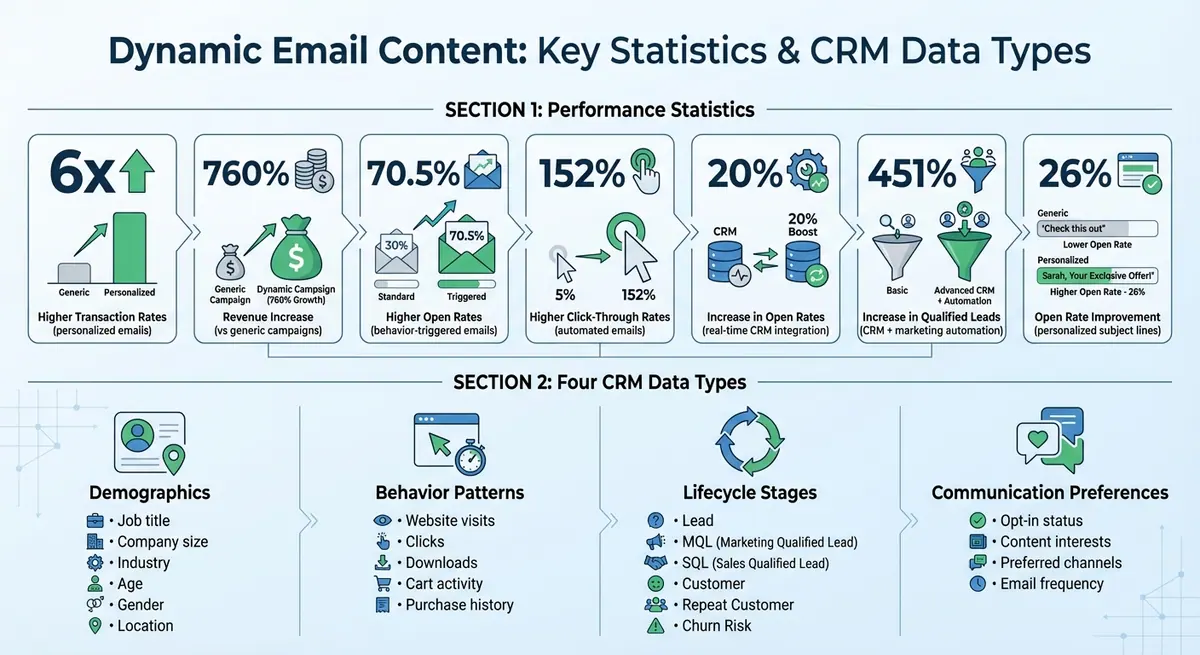
Dynamic Email Content Performance Statistics and CRM Data Types
CRM-Driven Dynamic Email Content: The Basics
What Dynamic Email Content Means
Dynamic email content refers to elements within an email - such as subject lines, body sections, calls-to-action, images, or offers - that change based on CRM data for each recipient. This goes beyond simple personalization like adding a first name. Instead, CRM-driven dynamic content can swap entire sections and customize messaging based on detailed profiles, including demographics, behaviors, and lifecycle stages.
What sets dynamic content apart is how and when these adjustments are made. Modern systems use modular blocks that adapt in real time, drawing insights from user behavior, context, or AI analysis. This means two recipients of the same email campaign might see completely different product recommendations, testimonials, or promotions, all tailored to their individual CRM profiles.
CRM Data Types for Email Personalization
Your CRM holds four main types of data that fuel email personalization:
- Demographics: Details like job title, company size, industry, age, gender, and location can influence visuals and messaging. For instance, you might show a location-specific image or promote a regional event.
- Behavior Patterns: Information such as website visits, clicks, downloads, cart activity, and purchase history enables targeted recommendations based on recent actions.
- Lifecycle Stages: Whether someone is a lead, MQL (Marketing Qualified Lead), SQL (Sales Qualified Lead), customer, repeat customer, or at risk of churning, this data helps guide the timing and type of communication - like onboarding emails for new customers or win-back offers for those who haven’t engaged in a while.
- Communication Preferences: Opt-in status, content interests, preferred channels, and email frequency settings ensure recipients only get the updates they care about.
Integrating CRM data with email tools in real time can increase open rates by up to 20%. The quality of your CRM data directly impacts your ability to personalize effectively. Tools like Reform help by capturing high-quality, structured data through conversion-focused forms. This ensures your CRM gets clean, mapped, and compliant information, making it easier to create precise dynamic email rules without needing custom development.
Real-World Applications of Dynamic Email Content
Dynamic email content can transform campaigns in many ways. For example:
- Subject Lines: Embed personalized details like product categories or goals (e.g., "Your next step in {{Industry}} compliance") to grab attention immediately.
- Hero Sections: Swap out images and copy to match audience segments, such as showing different banners for small businesses versus enterprise clients.
- Offer Blocks: Use purchase history and lifecycle data to tailor promotions - like loyalty discounts for repeat customers or introductory offers for new leads.
- Testimonials and Case Studies: Select examples relevant to the recipient’s industry, ensuring they see relatable success stories.
- Footer Content: Customize details like office addresses and legal disclaimers based on the recipient’s region, pulled directly from your CRM.
Automated workflows also shine here. For instance, emails can be triggered by CRM events like form submissions or purchases, with conditional logic determining the content (e.g., "if industry = Healthcare, send track A; otherwise, send track B"). One entertainment venue operator used unified CRM data to run dynamic campaigns, achieving a 135% revenue increase. Imagine a lead receiving an email with a personalized demo link or scheduling URL - this is CRM-driven dynamic email content in action.
These examples highlight how dynamic email content can elevate your campaigns when paired with well-structured CRM data.
Preparing Your CRM Data for Email Campaigns
Cleaning and Standardizing Your Data
Before using your CRM data for dynamic email campaigns, it’s crucial to ensure it’s clean and well-organized. Start by removing duplicate records through exact and fuzzy matching techniques, such as matching first name, last name, and ZIP code. Most CRMs offer built-in deduplication tools to simplify this process.
Next, focus on standardizing your data. For example, dates should follow the MM/DD/YYYY format, phone numbers should look like (555) 555-5555, and state codes should use the two-letter USPS format (e.g., CA). Consistent formatting is key because dynamic content rules depend on exact matches. If your database has variations like "California", "CA", or "Calif.", location-based segments may not work correctly.
It’s also important to remove invalid entries, such as placeholder emails (e.g., test@test.com) or fake phone numbers. For incomplete records, you have two options: either fill in missing fields with reasonable defaults (e.g., using "Valued Customer" when a first name is unavailable) or place these profiles in a separate segment to avoid personalization errors. Tools like Reform can help ensure accurate and structured data during the collection process.
Mapping CRM Fields for Email Use
Organize your CRM fields based on their purpose to make email personalization easier. For instance:
- Identity fields: First and last names
- Behavior fields: Last purchase date, browsing interests
- Location fields: City, state, ZIP code
These fields should map directly to merge tags like {{contact.first_name}} in your email templates.
If your CRM doesn’t already include the fields you need for personalization, consider adding custom fields. Examples of useful custom fields include:
- A "lifecycle stage" field to categorize contacts as New Subscriber, Trial User, Customer, or Churn Risk
- Content preference flags for interests like product updates or educational materials
- A calculated "VIP tier" field to group contacts into clear segments
Storing logic in custom fields simplifies email templates and reduces the chance of errors. Be sure to document these mappings so your team can easily access and understand them.
Managing Consent and Compliance
Every contact in your CRM should have clear, up-to-date consent information. This includes fields for subscription status (e.g., subscribed, unsubscribed, bounced), opt-in source (like web form, in-store, or event), and opt-in timestamp. If legal requirements apply, ensure you also track the legal basis for communication.
To respect individual preferences, maintain separate flags for different types of emails - such as newsletters, promotions, and product updates. This ensures your campaigns honor recipients’ specific choices.
Bi-directional synchronization is essential for keeping consent data accurate. For example, if someone clicks an unsubscribe link, that change should reflect in your CRM within minutes to prevent future emails from being sent. Tools like Reform can streamline this process by syncing consent records in real time. Regularly reconciling your CRM with your email platform will help you catch and fix any synchronization issues before launching a campaign.
Up next, we’ll explore how to connect your clean and organized CRM data to your email platform for smooth dynamic content delivery.
How Does CRM Email Integration Personalize Campaigns? - TheEmailToolbox.com
Connecting Your CRM to Your Email Platform
Once your CRM data is prepared and mapped, the next step is to establish a solid connection with your email platform.
Integration Options and Tools
There are three main ways to link your CRM with your email platform: native integrations, API connections, or middleware solutions.
- Native integrations are built-in connectors designed for specific tools, such as HubSpot CRM with HubSpot Marketing or Salesforce with Marketing Cloud. These are perfect for small to mid-sized teams looking for an easy setup, user-friendly interfaces, and vendor support - no developers needed.
- API connections offer custom control, allowing you to decide exactly which fields sync and when. However, setting up APIs requires developer expertise to handle authentication, field mapping, and webhooks.
- Middleware solutions like Zapier, Make, or Workato act as intermediaries, enabling marketers to tweak integration logic without writing code. These are particularly helpful for connecting multiple tools or managing complex workflows.
The choice depends on your needs. For basic newsletters and lifecycle emails, native integrations usually suffice. Teams dealing with high email volumes or advanced automation - like ecommerce stores or SaaS companies - might find middleware or APIs better suited to handle intricate triggers and data flows. Tools such as Reform can also enhance your CRM by feeding structured lead data, including multi-step form responses and conditional logic, to improve email personalization.
What Data to Sync and How
Start with the essentials: identity fields (like email, name, and phone), demographic fields (city, state, ZIP code, job title, etc.), and consent fields (subscription status, opt-in source, email preferences). These are the building blocks for dynamic email campaigns.
Next, include behavioral and transactional data such as purchase history, last purchase date, order value, products viewed, website activity, and major events like sign-ups or trial activations. Custom fields from your CRM - like plan type, customer tier, or favorite product category - should map to personalization tokens in your email platform. This allows you to craft tailored emails with personalized copy, images, and calls-to-action.
For syncing frequency, use real-time syncing for time-sensitive emails like welcome messages, cart abandonment reminders, or alerts. Scheduled syncing (e.g., every 15 minutes, hourly, or daily) works well for newsletters and promotions. Many teams combine a nightly full sync for all contacts with real-time syncing for critical lifecycle events, balancing data accuracy with API usage and costs.
Don’t forget to sync engagement metrics like opens, clicks, bounces, and unsubscribes. This data helps sales and customer success teams track email interactions and trigger follow-ups based on engagement. According to HubSpot, companies that integrate their CRM with marketing automation see a 451% increase in qualified leads, while Campaign Monitor reports segmented campaigns (powered by CRM sync) can drive up to a 760% boost in revenue compared to non-segmented emails.
Once your data is synced, it’s time to test everything thoroughly.
Testing Your Integration
Testing ensures your integration works as expected and avoids costly errors.
Start by creating test contacts that represent different scenarios, such as varying locations, industries, or purchase histories. Sync these contacts to confirm field mapping accuracy. Build a test email template that uses personalization tokens (like name, location, or plan type) and conditional blocks (e.g., different CTAs for customers versus prospects).
Use the preview feature to check how dynamic content appears for different contacts or segments. Send test emails to verify that all personalization tokens and conditional blocks work correctly. Review the integration logs for any errors or inconsistencies.
Lastly, test unsubscribe and bounce handling to ensure these updates flow back to your CRM. This step is critical for keeping your data clean, maintaining compliance, and avoiding emails to invalid addresses.
sbb-itb-5f36581
Building Dynamic Email Campaigns
Your CRM is connected, and now it's time to create campaigns that adjust to each recipient. Here's the process: define your goals, identify relevant CRM fields, design templates with dynamic blocks, add merge tokens, set conditional rules, and configure triggers. From there, you can refine how to embed and manage dynamic content elements to create a personalized experience.
Adding Merge Fields and Personalization Tokens
Merge fields allow you to pull personalized data directly from your CRM into your emails. Start with basic identity fields like first name, company, or location. For example, a subject line might say: "Hey {{contact.firstname}}, your December order is on its way!" using tokens like {{contact.firstname}}, [[FIRST_NAME]], or {$firstName}, depending on your platform.
You can go deeper with behavioral and transactional data in the email body. For instance: "Since you purchased {{last_product_name}} on {{last_purchase_date}}, we're offering you a 15% discount on an upgrade!" This approach ties the message to the recipient's history. Preheaders are another great way to personalize: "We’ve picked these events near {{contact.city}} just for you" or "Your {{contact.plan_type}} plan benefits, simplified."
Always set fallback values for missing data. If a first name isn’t available, default to something friendly like "there" to avoid displaying raw tokens (e.g., {{contact.firstname}}). For U.S. campaigns, you can also use tokens to auto-fill your CAN-SPAM–compliant sender postal address from your CRM account records. Focus on using clean, consistently maintained fields, and steer clear of sensitive or intrusive data like detailed browsing history or cross-device tracking.
Creating Conditional Content Rules
Conditional content lets you tailor specific sections of your email to different audience segments - all within the same message. Match your segments to CRM fields such as lifecycle stage, customer tier, or last purchase category. Then, set up IF/THEN rules for individual blocks. For example:
- If
lifecycle_stage = "Lead", show a call-to-action (CTA) for an educational ebook. - If
lifecycle_stage = "Customer", display an upsell offer. - If
lifecycle_stage = "Churn Risk", include a win-back discount with a limited-time code.
You can also personalize visuals. Show a hero image promoting a 10% discount for new customers (customer_type = "New") or a $20 loyalty credit for repeat buyers (total_orders > 1). Behavioral data works well here too: if last_site_action = "Viewed pricing page 3+ times", swap in a "Talk to sales" CTA instead of a generic product tour.
Always define a fallback block for when no condition is met, so your email doesn’t end up with blank sections. Keep personalization broad enough to feel helpful - like recommending "running gear" instead of listing every product someone browsed. Before sending, preview all variations with test contacts to confirm the right content appears for each segment. Once your dynamic blocks are ready, you can automate the sequence using CRM triggers.
Setting Up Automated Email Triggers
Automated triggers use your CRM data to send relevant emails at just the right time. Here’s the general setup: ensure the event (like a purchase or form submission) is tracked in the contact record, define the "Start when…" condition in your automation tool, add branching logic based on CRM fields, set timing and send windows, and configure exit criteria.
Here are a few examples:
- Welcome series: Triggered when
lead_status = Newor after a signup form submission. - Abandoned cart follow-ups: Sent when
cart_status = Abandonedfor more than two hours. - Renewal reminders: Scheduled for 30, 14, and 7 days before the
renewal_date.
For B2B campaigns, schedule sends between 8 a.m. and 5 p.m. in the recipient’s time zone, avoiding weekends. Limit the number of emails per week to prevent fatigue.
Branching logic can help you tailor nurture tracks. For instance, after a demo request form is submitted, send one sequence to enterprise prospects (company_size > 500) and another to small businesses (company_size < 50). Use exit rules to remove contacts who convert, upgrade, or unsubscribe.
Tools like Reform (https://reform.app) can make this process even smoother by feeding structured lead data - like multi-step form responses and enriched contact details - straight into your CRM. This gives you more precise fields to power your triggers and personalization.
Before launching, test your automation with internal contacts representing various profiles. Check that triggers, merge fields, conditional blocks, and exit rules work as intended. Also, verify that engagement metrics (opens, clicks, unsubscribes) sync back to your CRM to keep future campaigns and sales follow-ups accurate. Personalized emails can achieve transaction rates up to 6× higher than non-personalized ones, and automated sequences like welcome and cart abandonment emails consistently outperform generic newsletters in both open and click-through rates.
Tracking and Improving Email Performance
Fine-tuning dynamic emails is essential for using CRM data to create personalized customer experiences. Once your campaigns are live, it's crucial to measure their effectiveness, experiment with different approaches, and ensure your CRM integration remains seamless. Focus on metrics that directly connect to revenue and customer behavior.
Metrics That Matter for Dynamic Emails
To evaluate your email campaigns, track metrics like open rate, click-through rate (CTR), click-to-open rate (CTOR), conversion rate, and revenue per email. For CRM-driven campaigns, dig deeper by analyzing these metrics by segment, personalization rule, and dynamic content block. This approach helps identify which variations resonate most with your audience. For instance, if you're sending tailored offers to high-value customers versus new leads, compare the conversion rates and revenue generated per recipient in each group.
It's also important to monitor list health metrics such as unsubscribe rates, bounce rates, spam complaints, and the percentage of inactive contacts. Consistently high bounce rates (over 2%) or spam complaints (above 0.1–0.2%) could indicate deliverability problems that may affect inbox placement. Keep an eye on data quality metrics too - like the completeness of key CRM fields (e.g., first name, lifecycle stage, location) and duplicate records. Poor or incomplete data can disrupt personalization and skew your reporting.
Connect email performance directly to revenue using CRM attribution. Leverage UTM parameters and unique campaign IDs to track clicks and link them to opportunities, pipeline stages, and closed-won deals. Create reports that break down revenue by campaign, segment, and personalization rule to pinpoint which strategies are driving actual revenue, not just clicks. According to multiple case studies from email service providers, automated lifecycle and trigger-based emails can account for 20–30% of total email revenue.
Once you've established these metrics, refine your personalization strategy by conducting targeted A/B tests.
Testing Personalization Elements
A/B testing is a powerful way to elevate your campaigns. Start with a clear hypothesis rooted in your CRM data, such as, "Including the recipient's job title in the subject line will boost open rates by 5% for Director-level contacts and above." Test one variable at a time - whether it's the subject line, greeting, hero image, offer, or call-to-action (CTA) - while keeping other dynamic rules constant to accurately measure its impact.
Use your email platform's A/B testing tools and divide your audience randomly within the same CRM-defined segment, like U.S.-based prospects in a specific pipeline stage. Allow the test to run long enough to achieve statistical significance rather than stopping prematurely based on small fluctuations. Research shows that personalized subject lines can improve open rates by up to 26% [16, 11]. Testing elements like offer relevance or product recommendations often delivers the most noticeable impact on conversions.
For conditional content rules, try experimenting with different logic thresholds. For example, compare conversion rates when defining a "high-value customer" as someone with $5,000 in lifetime purchases versus $10,000. Similarly, test whether behavioral triggers like "viewed pricing page 3+ times" outperform demographic triggers like "company size" for driving a "Talk to sales" CTA. Update your CRM with the winning test results using custom fields or tags to track long-term effects on opportunities and revenue. Once you've identified a winning strategy, implement it as the new standard before testing another element.
Maintaining Your CRM-Email Integration
To keep your CRM-email integration running smoothly, perform regular audits - monthly or quarterly. Check API logs, sync dashboards, and error reports to ensure contacts, custom fields, and events are syncing properly without delays or failures. Confirm that field mappings are accurate, especially after any CRM schema changes, and ensure data types, naming conventions, and default values are consistent.
Periodically review automation rules and triggers to ensure they align with your current lifecycle definitions and sales processes. For example, if your team updates the definition of an "MQL" or "Customer", make sure the corresponding workflow conditions reflect these changes. Also, verify that unsubscribe, bounce, and spam complaint data sync back to your CRM to maintain compliance with regulations like CAN-SPAM.
Accurate CRM data is the backbone of effective personalization. Standardize formatting for key fields - for example, use "CA" consistently for California, ensure phone numbers follow a uniform format, and adopt MM/DD/YYYY for dates. Regularly merge duplicate records, especially when multiple forms or channels feed into your CRM. Tools like Reform (https://reform.app) can help capture clean, validated lead data from the start. Finally, identify stale records - contacts with no engagement (opens, clicks, or site activity) for six to twelve months - and decide whether to suppress, attempt re-engagement, or archive them. This practice keeps your metrics accurate and protects your sender reputation.
Conclusion
Creating effective CRM-driven dynamic emails hinges on three key elements: clean data, seamless integration, and thoughtful personalization. Start by ensuring your data is accurate and up-to-date - tools like Reform can help eliminate duplicates and enforce proper data validation from the beginning. Next, establish a smooth connection between your CRM and email platform. Proper field mapping and rigorous testing will ensure everything works as it should. With this setup, you can craft dynamic campaigns that automatically adjust to each recipient’s stage in the customer journey - whether they’re a fresh lead, an engaged customer, or a lapsed contact.
When it comes to personalization, go beyond surface-level tactics like inserting first names. Use CRM data to deliver content that aligns with your business goals and resonates with your audience. According to Campaign Monitor, personalized and segmented campaigns can drive a staggering 760% increase in revenue compared to generic, non-segmented emails. Apply this approach to high-impact campaigns, such as abandoned cart reminders or tailored product recommendations, to see meaningful results.
Finally, track the metrics that matter - open rates, click-through rates, conversions, and revenue per email. Regularly test your personalization strategies by comparing dynamic content with static alternatives, experimenting with different segmentation criteria, and implementing improvements incrementally. Keep your integration running smoothly with monthly audits, prompt updates to field mappings, and diligent monitoring for sync errors or duplicate records. Clean, well-maintained data is the backbone of any successful dynamic email strategy.
FAQs
How does integrating CRM data improve email personalization?
Integrating CRM data allows you to craft emails that feel personal and relevant by tapping into detailed, real-time insights about your audience. With this information, you can adjust your content, offers, and messaging to align with individual preferences, behaviors, and needs.
When you use CRM insights effectively, your emails become more engaging and tailored, which can lead to higher open rates, increased click-through rates, and better overall conversions. This level of personalization ensures your communication resonates with your audience and keeps the focus on their unique needs.
How can I clean and standardize CRM data effectively?
Keeping your CRM data organized and consistent is key to its effectiveness. Start by eliminating duplicates and making sure all email addresses are current and valid. Stick to consistent formats for things like dates, currency, and other fields to ensure everything stays uniform. Clear naming conventions are also essential, and regularly updating or removing outdated information helps prevent unnecessary clutter.
You can save a lot of time and improve accuracy by automating data checks and updates. Tools that integrate directly with your CRM make this process smoother, keeping your data reliable and ready to use.
What’s the best way to integrate my CRM with my email platform for dynamic content?
To connect your CRM with your email platform smoothly, rely on tools that support automated data syncing and allow for customizable field mapping. These features help ensure your data stays accurate and up-to-date while cutting down on manual mistakes. You can also use webhooks and APIs to simplify data transfer and handle duplicate entries with ease.
Keep an eye on how things are running by using real-time analytics, and make adjustments as needed to keep everything optimized. A well-integrated system lets you create more personalized email content, which can lead to better engagement with your audience.
Related Blog Posts
Get new content delivered straight to your inbox

The Response
Updates on the Reform platform, insights on optimizing conversion rates, and tips to craft forms that convert.



Drive real results with form optimizations
Tested across hundreds of experiments, our strategies deliver a 215% lift in qualified leads for B2B and SaaS companies.
