
.webp)
Hotel Booking Forms: 8 Data Points That Score Leads


I use hotel booking forms to decide who should respond - and how soon - not which inquiries to reject. Start with dates and room needs, check availability and rate fit, and send group or event requests to sales even when details are missing.
These 8 data points help guide that decision:
- Travel dates: Check availability, flexibility, and time until arrival.
- Property interest: Identify the hotel, room, or venue the guest wants.
- Guest and room counts: Measure lodging demand, not just headcount.
- Budget: Compare the guest’s range with rates and event costs.
- Event needs: Check space, services, and deadlines.
- Company and booking role: Identify repeat travel and account needs.
- Referral source: Add context without letting the channel outweigh booking details.
- Device and location: Guide contact timing and routing - not assumptions about intent.
My approach: use multi-step forms to keep the process short, use separate scoring rules for leisure, corporate, and group inquiries, and treat missing answers as unknown. Connect each answer to your CRM, explain what you collect, and review scores against bookings, revenue, and cancellations. <u>A high score calls for human follow-up - not an assumed booking.</u>
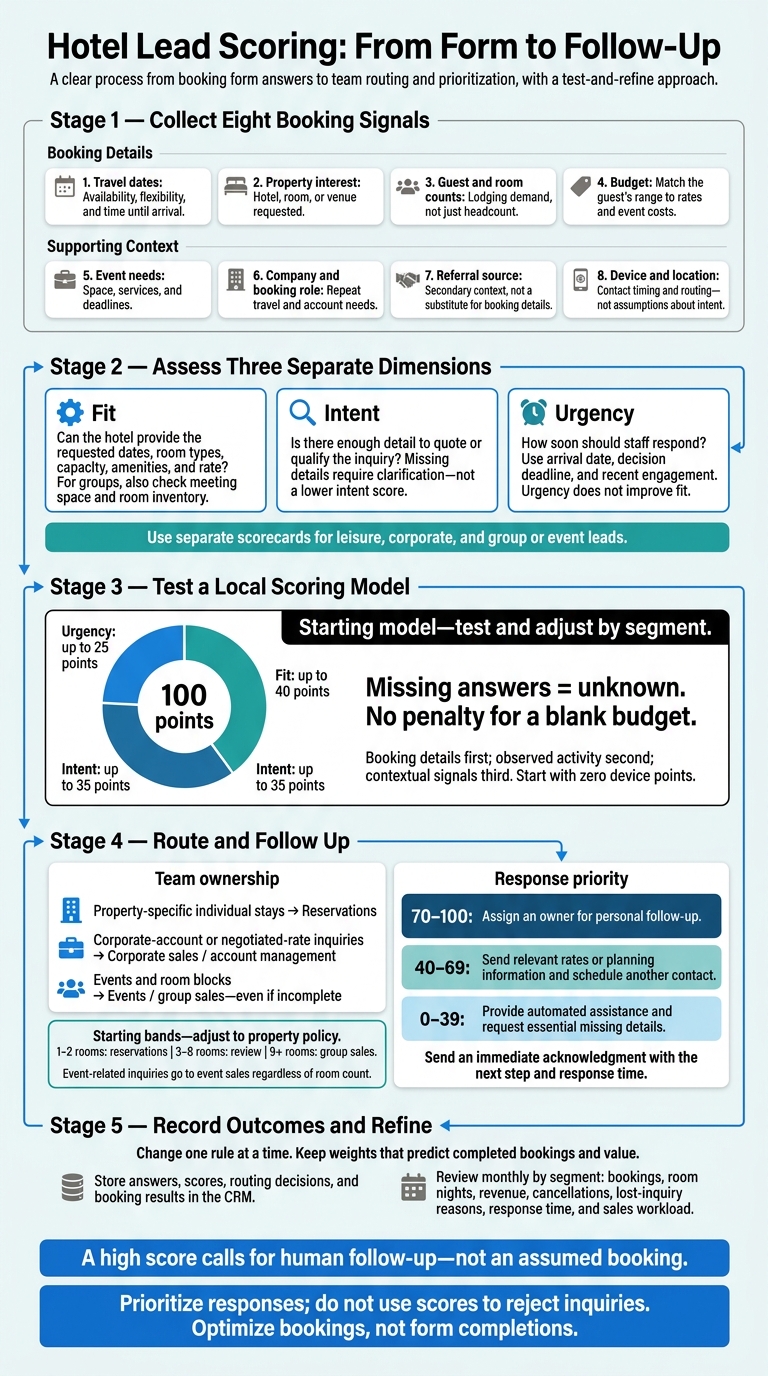
Hotel Lead Scoring: From Form to Follow-Up
Define Booking Fit, Intent, and Urgency
Fit: Can the hotel provide the stay on the requested dates, with the right room types, capacity, amenities, and rate? For groups, also check meeting space and room inventory.
Intent: Does the form give staff enough detail to quote or qualify the lead? Exact dates, room counts, budget, and a quote or proposal request make an inquiry actionable. Missing details need clarification - not a lower intent score.
Urgency: How soon should staff respond? Look at the arrival date, decision deadline, and recent engagement. A reply or an opened proposal can signal urgency, but neither improves fit. Start with these time bands: 0–14, 15–60, 61–180, and 180+ days. Then adjust by segment. Use fit, intent, and urgency to score the fields that follow.
Use separate scorecards for leisure, corporate, and group or event leads. Leisure scoring focuses on room needs, dates, and rate fit. Corporate scoring considers the booking role, recurring travel, and negotiated-rate potential. Group scoring needs room nights, meeting space, food and beverage requirements, and proposal deadlines - not just headcount.
Review scores alongside occupancy forecasts, seasonal demand, holidays, and local events. For groups, add a displacement check before deciding which inquiries to answer first.
These definitions guide the weights for the eight form fields below: travel dates, property interest, guest count, budget, event needs, company name, referral source, and device or location signals.
sbb-itb-5f36581
1. Travel Dates
Fields to Collect
Ask for arrival date, departure date, and date flexibility:
“Exact dates,” “Flexible by 1–2 days,” “Flexible by 3–7 days,” or “Flexible by more than a week.”
Calculate the stay length and booking window behind the scenes.
Qualification Signal
Dates matter when they line up with inventory and demand. Check forecast occupancy, projected bookings, and booking pace to spot availability gaps early.
Flag holidays, local events, and graduation weekends, which affect both availability and response priority. For graduations, check university calendars and historical pickup to spot demand months ahead.
Scoring and Routing
Add 5 points for exact arrival and departure dates, 5 points for arrival within 14 days, and 2 points when flexibility makes an alternate-date offer possible.
Send near-term inquiries to reservations, flexible inquiries to alternate-date offers, and long-range inquiries to nurture. After scoring dates, move to property interest.
Weighting Cautions
Give extra points for longer stays or high-demand dates only when inventory, rates, and stay restrictions support them. If forecast occupancy is near sellout, confirm room type availability before giving the lead priority.
A flexible stay that fills low-occupancy nights can outrank an urgent request you can’t accommodate.
2. Property Interest
Fields to Collect
Collect the property or destination, room type, rate type, and any event-space or venue interest. For multi-property brands, provide a searchable property list using multi-step design. For a single property, offer area, building, or room-type choices. Include this option:
Not sure - recommend a property
Also ask whether the guest would consider a nearby property.
Qualification Signal
Specific selections help with routing, but budget and availability still need checking. Once dates set the booking window, property interest tells you what the guest wants to book. That helps narrow inventory, rate, and routing choices.
Follow up based on the selection:
- Specific hotel: Ask about location priorities. For destination-only interest, ask about preferred neighborhoods and travel distance.
- Room type: Ask about bed configuration or exact-room requirements.
- Rate type: Check eligibility.
- Event space: Route to group qualification rather than room questions.
Scoring and Routing
Start with +1 for destination-only interest or +3 for a specific hotel - not both. Add +2 for a matched room category, +1 for a rate type, and +1 if the visitor accepts a comparable room or nearby property. Cap property-interest points at 10 so duplicate selections don’t inflate the score.
Send property-specific room requests to reservations, negotiated-rate requests to corporate sales or account management, and event inquiries to the group and events team. This narrows routing before guest count and budget scoring.
Weighting Cautions
A suite preference may point to higher revenue, but budget, dates, and availability must support it. If the requested option isn’t available, offer a comparable room or property. Save both the original request and the accepted alternative in the CRM.
Use ‘not sure’ selections to guide recommendations, not to judge lead quality.
3. Guest and Room Counts
Once you know the dates and property of interest, room count helps you assess fit, estimate booking size, and send the inquiry to the right team.
Fields to Collect
Ask for adults, children, and rooms separately. For meetings, weddings, conferences, sports, or group travel, show an attendee field and ask how many attendees need rooms. For room blocks, collect room nights by date, rooms per night, room type, and whether the count is confirmed or estimated.
Qualification Signal
Room nights paired with dates show inventory demand better than headcount. Knowing whether counts are confirmed or estimated also helps staff gauge how firm the request is.
Scoring and Routing
Score individual stays and group inquiries separately. Route 1–2 rooms to reservations, 3–8 rooms to review, and 9+ rooms to group sales. Adjust these bands to match your property’s policy. Send meeting, wedding, corporate travel, and other event-related inquiries to event sales, even when only a few guests need lodging.
Score room volume only when the requested dates have availability and the rate meets your margin requirements. Then check whether the lead’s budget matches the stay.
Weighting Cautions
Large requests may call for steep discounts, leave expected bookings uncertain, or compete with higher-value bookings. Use room count to decide how soon to respond - not to judge lead quality. Track requested rooms separately from booked rooms in the CRM.
Keep room demand separate from total attendance.
4. Budget and Rate Fit
Once you know the dates, property, and room count, budget helps you check whether the inquiry is a financial fit.
Fields to Collect
Ask for an estimated nightly room budget in USD ($), with ranges that suit the property:
Under $150, $150–$249, $250–$399, $400–$599, or $600+ per room, per night.
For group and event inquiries, also ask for an estimated total event budget:
Under $5,000, $5,000–$14,999, $15,000–$49,999, or $50,000+.
Include a Not sure yet option and ask whether the budget is flexible.
Keep room-rate budget and total event budget in separate form fields and CRM fields. Using a multi-step lead generation form can help organize these fields without overwhelming the user. Add one optional field asking what the budget covers - rooms only, rooms plus meeting space, or food and beverage - and whether it includes taxes and fees.
Qualification Signal
Score budget fit, not budget size. Compare the selected range with the hotel’s current best available rate, negotiated rates, package rates, and seasonal rates for the requested dates.
For events, check the total budget against room-block requirements, meeting-room rental, food and beverage minimums, audiovisual costs, and service charges. Assess whether the budget covers the requirements: a large total event budget doesn’t automatically support a higher nightly room rate.
Scoring and Routing
Start with these scoring rules:
+20 points for clear price overlap; +15 for a slightly lower budget with flexibility; +10 for an event budget that covers the likely room block and minimum spend but needs a custom quote; 0 for an unknown budget.
Send straightforward stays with availability to reservations with a booking link. Route qualified events to sales for a custom quote. For mid-fit leads, offer lower room categories, value packages, alternate dates, or other suitable options instead of rejecting them.
Weighting Cautions
A low selected range may reflect early planning, unclear fees, or an assumption that taxes and fees are already included. A high budget doesn’t establish authority or urgency. Don’t promise a rate based on a budget answer.
Review budget ranges against quote acceptance, booked room nights, realized ADR, event revenue, response time, and lost-business reasons. Then adjust the scoring weights.
If the inquiry includes a meeting or group stay, move next to event requirements.
5. Event Requirements
Fields to Collect
Start with event type: wedding, meeting, conference, corporate room block, social event, or Other. Reuse the dates already collected. Ask separately for estimated attendance and guest rooms needed per night, and offer “Not sure yet” for both.
Show follow-up fields only when they apply:
- Weddings: ceremony, reception, catering, and setup details.
- Social events: private space, meal service, and bar service.
- Meetings and conferences: seating style, breakout rooms, audiovisual support, catering, and setup times.
- Corporate room blocks: arrival and departure dates, rooms per night, booking method, and billing preferences.
For complex conferences, collect attendance by function and day - not just a single total.
Qualification Signal
For group or event inquiries, score the logistics next: Do the space, services, and timing fit the request?
Scoring and Routing
Use these details to route the inquiry promptly. Apply a separate group-and-events score, with thresholds for room-block size, space fit, complete requirements, and the decision deadline.
Route weddings and social events to wedding or catering sales, meetings and conferences to group sales, and corporate blocks to corporate sales or group reservations. Create an immediate task for high-scoring inquiries and set a four-hour response target during staffed hours.
Weighting Cautions
Don’t award maximum points just because someone selects “Wedding” or “Conference.” Check the weights against proposals issued, contracts signed, and events actually held. Missing details call for clarification - not rejection.
Route the lead using these requirements before collecting company and source details.
6. Company Name and Booking Role
Fields to Collect
Require company name for corporate, group, and negotiated-rate inquiries. Keep the path shorter for personal bookings by creating high-converting lead forms that adapt to the user. Use a short dropdown for booking role:
Employee or individual traveler; corporate travel manager; executive assistant; meeting or event planner; travel agency; procurement or purchasing; owner, executive, or decision-maker; other.
For travel agencies, ask whether they’re booking for one client or multiple clients. Send meeting or event planners to the group-sales path.
For relevant business inquiries, offer optional travel frequency and estimated annual room nights fields. Use these annual room-night ranges:
Fewer than 25; 25–99; 100–299; 300 or more room nights per year.
Qualification Signal
Once the stay fits, company and role help distinguish a one-off booking from an account opportunity. Travel managers, planners, procurement contacts, agencies, and executive assistants may bring repeat or group business - even if they don’t have final booking authority. Focus on annual room nights and rate fit, not company size.
Scoring and Routing
Give priority to recurring travel with 100+ projected annual room nights when dates and rates fit. Send corporate-account leads to corporate sales, agency inquiries to the agency or partnerships team, and event or room-block requests to group sales. Route lower-volume individual business bookings to reservations or an automated follow-up sequence. Set thresholds based on bookings and revenue.
Weighting Cautions
A senior title doesn’t prove buying authority. Use company and email-domain enrichment to suggest a match, then confirm it if the company name is ambiguous. Store the source and date of enriched data, allow corrections, and treat personal emails and unmatched records as unknown.
Use the same logic to compare company details with referral source in the next step.
7. Referral Source
Fields to Collect
Ask:
“How did you hear about us?”
Offer these options: search engine, paid ad, email, social media, partner or travel agency, corporate referral, online travel agency, prior stay, and direct visit.
For agency, corporate referral, or other partner selections, show an optional partner-name field. Separately collect UTM source, medium, campaign, landing page, and referring URL in hidden fields. Map both sets of data to the CRM.
Qualification Signal
Once fit and booking details are clear, source can help prioritize follow-up through lead qualification. Self-reported source is not tracked attribution. Keep both records without overwriting either, and treat source as a secondary priority signal.
Scoring and Routing
Use source to fine-tune priority after you know fit, intent, and urgency. Keep source bonuses small:
+8 for a named strategic partner or corporate referral, +6 for a qualified travel agency or group partner, and +4 for a returning guest.
Source should support routing, not decide it. Strong booking details should carry more weight than a low source bonus.
Each month, review results by property and segment. Track lead-to-booking conversion, booking value, revenue from completed stays, cancellations, and acquisition cost.
Weighting Cautions
Don't score leads based on traffic volume or last-click attribution alone.
“Direct” can mean missing tracking, not stronger intent.
Don't give two separate bonuses for a self-reported referral and its campaign attribution. Mark missing or conflicting attribution as unknown. Privacy controls, missing cookies, cross-device browsing, and offline calls can all leave gaps.
Treat source as a soft signal, with device and location adding the final context.
8. Device and Location Signals
Fields to Collect
Collect only the context you need to qualify or route leads: country, state, metro area, origin market, device type, and time zone. Group devices as mobile, tablet, or desktop. Label CRM fields as provided by the guest or inferred by the system. Skip precise GPS coordinates and device IDs.
Qualification Signal
After source, use device and location to fine-tune routing - not to judge intent. Compare the guest’s broad origin with the property’s historical demand. Location supports booking fit; time zone supports follow-up timing. Neither proves intent.
Even guests from a target origin market need to provide dates, property interest, and room requirements. Device type adds context, but it isn’t a reason to favor desktop leads over mobile leads.
Scoring and Routing
Start with zero device points. Add a small bonus only if your own booking results show a lift. Use time zone to schedule contact during reasonable local hours, and country or state to send leads to the right sales territory.
These signals should never outweigh stronger booking details: dates, property, room count, and budget.
Weighting Cautions
An IP address may point to a VPN, corporate network, or temporary travel - not the guest’s home. Explain what you collect and how you use it in your privacy notice, and get consent where required. Precise location comes with stricter privacy obligations and isn’t needed for most lead scoring.
Review a representative sample of comparable leads. Compare qualified inquiries, bookings, cancellations, and revenue by device and origin market, accounting for property, dates, channel, and trip type. Drop weights that don’t improve bookings or revenue.
Store the signal, score, routing decision, and booking result in the CRM. Use these context signals in the scoring rules and follow-up steps that follow.
Set Scoring Rules and Follow-Up Steps
Turn the eight form data points into a clear plan for how soon to respond and who owns the lead. Set separate rules for transient, corporate, wedding, meeting, and group leads. Keep fit, intent, and urgency visible. Score only what each field proves, document every rule, and record why points were added.
Score form answers first, observed site activity second, and contextual signals third. Give direct requests and recent booking activity more weight than passive browsing, but don’t award points for frequency alone. Label form answers and site activity separately.
Permitted first-party activity may include repeat visits, rate-page views, email clicks or replies, and booking-engine searches. Use only signals allowed by your privacy notice. Treat missing answers as unknown: a blank budget gets no budget-fit points, but it doesn’t earn a penalty either. Ask for that detail during follow-up.
Start with a local test model: allocate up to 40 points for fit, 35 for intent, and 25 for urgency. At 70–100 points, assign an owner for personal follow-up; at 40–69, send relevant rates or planning information and schedule another contact; at 0–39, provide automated assistance and request essential missing details.
Test the model by segment, and adjust it only after reviewing booked outcomes. Let low scores prompt follow-up questions about missing details.
Route event and room-block inquiries to events or group sales, even if the form is incomplete. Send an immediate acknowledgment that states the next step and response time. Keep response handling separate from pricing decisions: an acknowledgment confirms receipt, nothing more. Aim to send detailed replies to high-priority leads within two business hours during staffed hours. Handle after-hours inquiries the next business day.
Review results monthly with reservations, sales, revenue management, and marketing. Track booked, lost, canceled, no response, duplicate, and unqualified outcomes, along with room nights, revenue, response time, and sales workload. Compare results within each segment, channel, booking window, and season.
Reduce points for stale activity and change one rule at a time so you can measure the results. Reward signals tied to completed bookings that deliver value - not just frequent activity. Use those results to tune the eight form signals rather than add more fields.
Build a Short Form and Connect Your CRM
Once you’ve set the scoring rules, turn them into a short form that collects only what you need to qualify and route each lead.
Use a two-step form. Step 1 collects inquiry type, name, email, travel dates, and property interest. Allow flexible dates so planners can proceed before their dates are final.
In Step 2, show fields based on the inquiry: company name and booking role for corporate travel; room and guest counts for groups; and attendee count, meeting-space needs, catering, and budget for events. Clearly mark optional fields. This puts the most useful qualification fields first and leaves additional details for the second step or follow-up.
Use persistent labels, large mobile controls, and keyboard-accessible date pickers. Show text error messages that explain how to fix a problem - don’t rely on color alone - and preserve answers already entered. Make formats explicit:
MM/DD/YYYY; $150–$249 per room, per night; 1,000 attendees.
State the property’s time zone for callbacks and event schedules.
Validate email structure without rejecting legitimate addresses that use uncommon characters or newer domains. Add accessible spam prevention, such as honeypot fields, rate limiting, and bot detection. Reform supports multi-step forms, conditional routing, email validation, spam prevention, analytics, and CRM integrations.
Configure scoring rules, field mappings, consent handling, and follow-up logic in the workflow. Then map each answer to the CRM fields used for scoring and routing.
Give each answer its own CRM field with a defined type and allowed values so you retain the exact qualification inputs. Store dates separately, counts as numbers, and budget ranges as standardized choices. Preserve the submission timestamp and distinguish Unknown, Not provided, Not applicable, and No.
Keep enriched values separate from guest-provided answers, and campaign attribution separate from the stated referral source. Before publishing, test every inquiry path on mobile and desktop to check field mapping, consent records, and routing.
Disclose automatic collection of device type, approximate location, referral URL, and submission time beside a linked privacy notice. Collect only what the hotel needs, limit access, and set retention periods.
Have privacy and legal teams determine which consent requirements apply to analytics, location processing, promotional email, and texts. Keep marketing permission separate from the booking and quote request so consent, routing, and follow-up stay aligned without adding friction to the booking request.
Conclusion: Refine Scores With Booking Outcomes
Treat the eight fields as one score. Dates show timing; property, room count, budget, and event needs show feasibility. Company details, source, device, and location add context.
Send qualified inquiries promptly to reservations, corporate sales, or events. Keep forms short, and score each segment separately: individual stays, corporate travel, and group or event bookings. A high score calls for fast human review - not an assumed booking.
Review results by segment and score band. Compare confirmed bookings, revenue, cancellations, lost-inquiry reasons, and response times. Check booking rates across score bands, and look for high-value bookings the model scored too low.
Use those results to adjust the model. Reduce weights that overpredict bookings, and keep signals that consistently predict them. Log booking availability so an inquiry lost due to unavailable rooms isn’t mistaken for a bad lead. Optimize bookings, not form completions.
FAQs
How do I set lead-scoring weights for my hotel?
Use a 0–100 scale to sort leads into hot, warm, or cold groups. Award points based on how closely each lead matches your ideal guest profile. That might mean larger parties, requests for specific room types, or bookings within 14 days. Subtract points for low-intent or irrelevant submissions.
Set your weights using 6–12 months of conversion data, giving more weight to recent trends. Review your thresholds regularly, and retrain your model quarterly to keep pace with changes in the market and traveler behavior.
How can I tell if my scoring model misses valuable leads?
Compare predicted scores with actual bookings and revenue to find high-value leads your model scores too low. If top-scoring leads aren’t bringing in the revenue you expect, the model may need adjustment. Review traveler segments by location, device type, or trip type to check whether scores reflect historical bias rather than current intent.
Track how many leads enter your catch-all routing path and how often they’re reassigned. These numbers can help you spot routing gaps where high-value leads may slip through.
How should I handle repeat booking inquiries?
Track repeat visits to spot returning prospects and gauge their engagement. Use your CRM to merge duplicate entries and standardize data so each lead has one clean record. Keep original attribution data, including the source and UTM tags, across return visits using first-party cookies or local storage.
Use conditional logic to adjust the form based on past interactions. This makes it easier to complete while collecting updated intent or trip details.
Related Blog Posts
Get new content delivered straight to your inbox

The Response
Updates on the Reform platform, insights on optimizing conversion rates, and tips to craft forms that convert.



Drive real results with form optimizations
Tested across hundreds of experiments, our strategies deliver a 215% lift in qualified leads for B2B and SaaS companies.
