
.webp)
M2M Token Setup for CRM and Form Integrations



I keep M2M tokens on the server - not in public forms. For CRM and form integrations, I use OAuth 2.0 client credentials so a background worker can act as an application, with only the access its tasks need.
My setup follows four steps:
- Limit access: Give each workflow its own service identity, separate production from testing, and assign an owner.
- Protect tokens: Store credentials in secret storage and cache tokens using the provider’s expiry value. I start with a configurable 60-second buffer, not an assumed one-hour lifetime.
- Control delivery: Verify webhooks before saving work, prevent duplicate actions, and use bounded retries and checkpoints.
- Test recovery: Check token failures, missing permissions, duplicate events, and outages. Monitor queue delays and failed jobs without logging secrets or personal data.
My launch rule: <u>prove delivery and recovery before going live</u>. A token is only one part of the setup; I also check that each submission reaches the right record with the right consent and attribution.
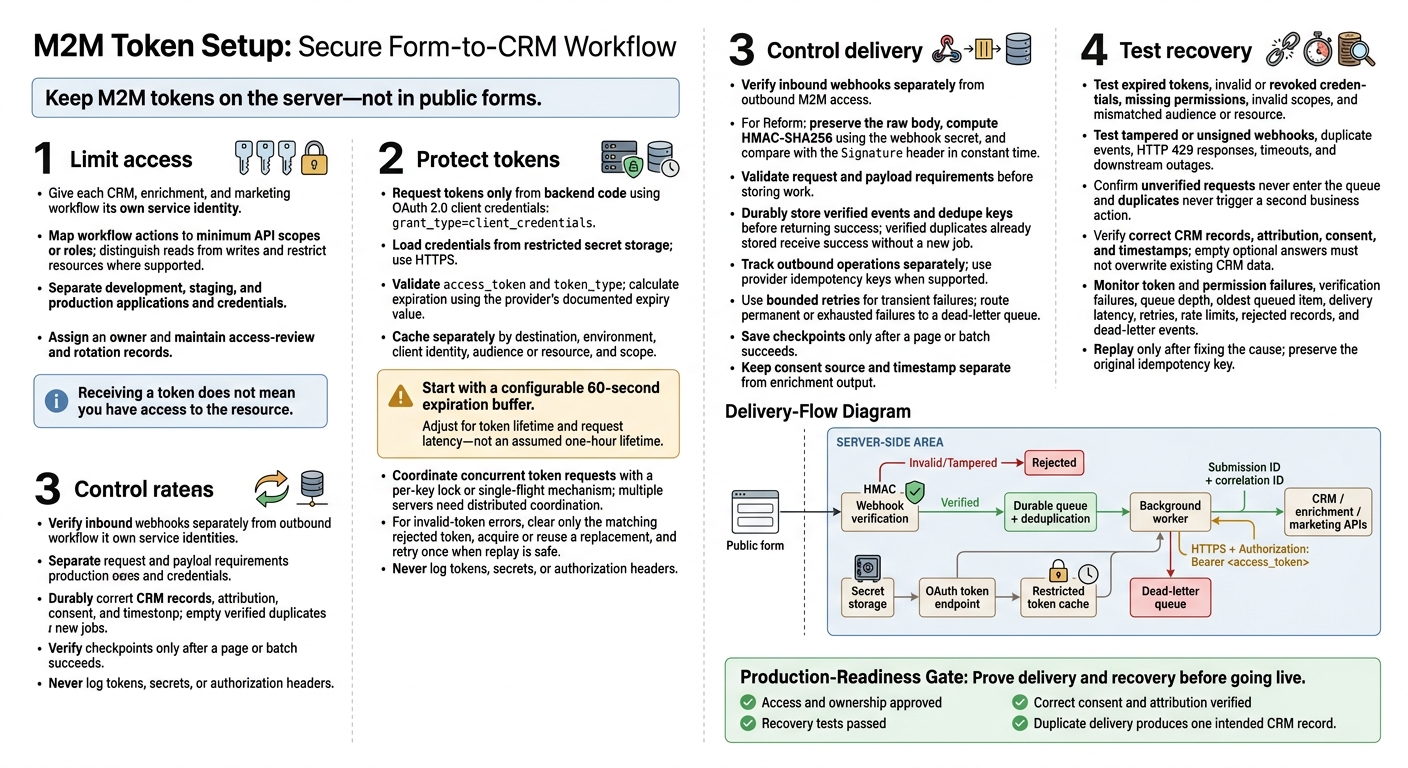
M2M Token Setup: Secure Form-to-CRM Workflow
OAuth 2.0 Client Credentials Flow | Practical Example | How to implement oAuth2.0 Client Cred Flow?
sbb-itb-5f36581
Step 1: Set Up Service Identities and Permissions
Use the provider details you gathered to give each CRM, enrichment, and marketing workflow its own service identity. Check whether the provider ties authorization to the OAuth app or to a linked service account with workspace or resource-level access. When an integration must act on a user’s behalf, use delegated authorization.
Match Workflow Actions to API Permissions
Before requesting access, map each form workflow to the minimum permissions it needs. Build a permission matrix that separates reads from writes and uses the provider’s documented scopes or roles. Record any required admin approval for each grant. Receiving a token does not mean you have access to the resource.
Example permission matrix:
Form workflow action API operation Required scope or role Environment Service identity Contact upsert Create or update contact record contacts.writeProduction forms-crm-prodContact lookup Search contact by email or external ID contacts.readStaging forms-crm-stagingCampaign enrollment Add contact to campaign or list campaigns.writeProduction forms-marketing-prodEnrichment read Read enrichment attributes enrichment.readProduction lead-enrichment-prodConsent write Write consent status and timestamp consent.writeProduction forms-compliance-prodAttribution write Write source and campaign metadata attribution.writeDevelopment forms-crm-dev
Limit both the actions an identity can perform and the resources it can access. Where supported, restrict access to approved accounts, pipelines, campaigns, and fields - a scope alone may not limit which records are available. Block enrichment workers from changing consent records, and retain the original submission ID. After approval, test permitted actions in a sandbox and check that an action outside the granted permissions fails.
Separate Environments and Assign Owners
Create separate applications and credentials for development, staging, and production. Tie each to its matching account or workspace so test form syncs cannot write to production records. Use synthetic test data. This ensures that even complex multi-step forms are validated without risking real lead data. Keep each environment’s resource grants and approvals separate, so revoking test access does not interrupt production delivery.
Keep an inventory of each identity’s purpose, provider tenant, environment, permitted resources, approved scopes or roles, approval date, credential storage location, owner, backup owner, and rotation contact. Use a team mailbox or on-call group for service contacts.
Record the last permission review and the next review date. Review access after workflow changes, and disable retired identities. Dedicated identities keep workflows running when employees change roles or leave.
Step 2: Request, Cache, and Protect Tokens
Request Access Tokens on the Server
Once permissions are defined, the worker can exchange its service identity for a token. Client credentials authenticate your application; access tokens authorize API calls. Request tokens only from backend code. Record the provider’s token endpoint, client authentication method, required scopes, and any audience or resource parameter.
Before requesting a token, verify the approved destination and environment. Then load the service identity’s credentials from restricted secret storage.
Send the request over HTTPS with grant_type=client_credentials, using the provider’s required authentication method and request format. Validate access_token and token_type, then calculate expiration from expires_in or the provider’s documented expiry field.
Use the token for outbound CRM, enrichment, or marketing API calls over HTTPS with Authorization: Bearer <access_token>.
function getToken(connection):
    key = (
        connection.destination,
        connection.environment,
        connection.clientIdentity,
        connection.audienceOrResource,
        canonicalScopeSet(connection.scopes)
    )

    with lock(key):
        token = cache.get(key)
        if token exists and now < token.expiresAt - buffer:
            return token

        credentials = secrets.read(connection.credentialReference)
        response = HTTPS_POST(
            connection.tokenEndpoint,
            authentication = providerRequiredAuth(credentials),
            encoding = connection.requiredEncoding,
            body = {
                grant_type: "client_credentials",
                scope: connection.scopes,
                audience: connection.audience,
                resource: connection.resource
            }
        )

        validateSuccessfulResponse(response)
        require response.access_token
        require lowercase(response.token_type) == "bearer"

        expiresAt = now + response.expires_in
        token = { value: response.access_token, expiresAt: expiresAt }
        cache.put(key, token, until = expiresAt - buffer)
        return token

token = getToken(connection)
response = HTTPS_REQUEST(
    request.method, approvedApiUrl,
    headers = { Authorization: "Bearer " + token.value },
    body = request.body
)
Include scope, audience, and resource parameters only when the provider requires them. Cache the token based on its documented expiry, allowing for the buffer described below. Use the expiration information the provider returns. Don’t assume every token is a JWT or try to decode an opaque token to determine when it expires.
Cache Tokens Before They Expire
Reuse tokens in memory or a restricted memory cache. Keep separate entries for each destination, environment, client identity, audience or resource, and scope.
Start with a configurable 60-second expiration buffer, then adjust it for token lifetime and request latency. A per-key lock or single-flight mechanism lets concurrent jobs share one replacement request. Multiple servers need distributed coordination. Shared caches cut repeated token requests across queued form-sync jobs, keeping token refresh off the critical path for form delivery and sync jobs.
When an invalid-token error occurs, clear only the matching cache entry - and only if it still holds the rejected token. Under the same lock, reuse another worker’s replacement or request one. Retry once when replay is safe, and stop on non-auth errors.
Don’t treat permission errors, rate limits, or timeouts as token-expiration failures. Log the request ID, destination, environment, status, and provider error code, never the token.
Store and Rotate Credentials Safely
Choose storage based on how long the worker needs to reuse each secret.
| Item | Storage | Runtime handling | Retention | Rotation or revocation |
|---|---|---|---|---|
| Client ID and client secret | Managed secret storage or encrypted hosting configuration | Inject only into the server-side process | While the integration is active | Scheduled and immediately after exposure |
| Access tokens | Memory or restricted memory cache | Send only over HTTPS as Authorization: Bearer <access_token>; redact from logs, traces, screenshots, and error reports |
Until expiration or revocation | Request a replacement near expiration; clear only matching rejected tokens |
| Enrichment API key or credential | Managed secret storage or encrypted configuration | Restrict credential access to the worker that uses it | While the integration is active | Scheduled and after exposure; test the replacement first |
Use managed secret storage. Keep secrets out of browser code, source control, and support tickets, and redact tokens and authorization headers by default. Document a rotation schedule, rotate credentials on that schedule, and revoke and replace exposed credentials immediately.
When credentials can overlap, deploy and test the replacement before revoking the old one. Otherwise, coordinate a cutover and queue dependent jobs. Check whether revocation also invalidates tokens that have already been issued.
Step 3: Secure Webhooks and Run Background Sync
Once service identities and tokens are set up, use them only for outbound sync jobs. Keep webhook intake separate, and verify each request before accepting work.
Verify Webhooks Before Queuing Work
Verify inbound requests separately from outbound M2M access. For Reform webhooks, leave the raw body unchanged. Compute HMAC-SHA256 using the form’s webhook secret, then compare the result with the Signature header in constant time.
If the provider supplies a timestamp, reject requests outside its documented tolerance. Delivery time is not event time. Before storing work, validate the request method, content type, payload size, event type, account IDs, and required fields.
Return success only after durable acceptance. Store the verified event and dedupe key in a durable queue or database. Add a unique constraint on the provider event ID or submission ID to prevent duplicate intake. If a verified duplicate is already stored, return success without creating another job.
Protect stored payloads with encryption, restricted access, and a retention limit. Only then pass the event to the worker.
Track each outbound operation separately so retries don’t repeat completed marketing actions or CRM writes. Use provider idempotency keys when supported. Retry transient failures within set limits. Send permanent failures or those that exhaust their retries to a dead-letter queue, along with the event ID and a redacted error.
Track Progress in Background Sync Jobs
Reuse the same permission map and cached M2M token in webhook workers and scheduled jobs. Map Reform answers by their unique IDs to email, company, attribution, and consent fields. Upsert records using stable external identifiers.
Keep consent data - including its source and timestamp - separate from enrichment output. Apply these same rules to scheduled backfills.
Fetch every page through the provider’s pagination or cursor mechanism. Save checkpoints only after a page or batch succeeds. Record job IDs, cursors, counts, and separate per-record retry states so recovery can replay unfinished work.
Limit worker concurrency and honor rate limits. Schedule reconciliation using the same mapping rules. When permissions fail, pause the affected work for an access review instead of retrying it repeatedly.
Step 4: Test Delivery and Monitor Failures
Once permissions, tokens, webhooks, and sync jobs are in place, test how the full delivery path handles failures.
Test Token and Delivery Failures
Use non-production multi-step forms, sandbox credentials, and test CRM records. Follow each submission from verification through CRM delivery. Record the HTTP status, event ID, correlation ID, queue state, and CRM record ID. Compare attribution, consent, timestamp, and enrichment fields with the original submission. Confirm that empty optional answers do not overwrite existing CRM data.
Deliberately test token failures. Try an expired access token, invalid or revoked credentials, an incorrect token endpoint, an invalid scope, and a mismatched audience or resource. An expired token should trigger one controlled reacquisition and a safe retry - not a flood of token requests. Invalid credentials or permissions should stop the affected work and alert its owner. Start with the minimum intended permissions, then remove one to confirm that the failure is clear and controlled.
Test tampered webhook bodies, missing or invalid signatures, malformed submissions, duplicate events, HTTP 429 responses, timeouts, and downstream outages. Confirm that unverified requests never enter the queue and duplicates never trigger a second business action. Keep a test matrix that records expected behavior, observed behavior, recovery action, and final outcome.
Monitor Errors and Diagnose Failed Requests
Use the same submission ID and correlation ID across webhook intake, token requests, queue jobs, and CRM delivery.
Measure the full delivery path, not just the final API call. Track token failures, auth and permission errors, webhook verification failures, queue depth, the oldest queued item, delivery latency, retries, rate limits, rejected records, and dead-letter events. Record the destination’s request ID when available.
Log statuses and error categories - not tokens, secrets, authorization headers, full payloads, or unnecessary personal data. Base alerts on your test baseline rather than an assumed benchmark.
Before replaying work, check the token endpoint, client auth method, credential status, expiration, audience or resource, scopes, and service-account permissions. Then inspect the API method, headers, schema, field mapping, and consent values. OAuth errors such as invalid_client and invalid_scope point to configuration problems; repeated token requests won’t fix them.
Check whether the destination record already exists, then review the dedupe key and retry state. Replay only after fixing the cause, and preserve the original idempotency key.
Conclusion: Check Production Readiness
Once you’ve tested delivery and failure handling, run this final production-readiness check. If you use Reform, keep public forms token-free. The server-side integration should handle authentication and CRM writes.
Complete the Launch Checklist
Before go-live, check who owns access, where credentials are stored, and how the system recovers from failures.
Approve access and ownership. Check the permission matrix for every service identity used for CRM, enrichment, and marketing sync. Use separate credentials for production and nonproduction, and keep secrets and cached tokens in protected server-side storage. Assign one owner for access reviews, rotation, incident response, and emergency revocation.
Require recovery evidence. Save passing test results for token cache behavior, expiration, controlled reacquisition, and concurrent workers. Confirm webhook verification, background sync recovery after a restart, bounded retries, alerts, and a replay path that operators can access for failed events.
Document the approval. Retain the submission ID, CRM object ID, and field-by-field validation results. Show that duplicate webhook delivery still produces just one intended CRM record with correct attribution and consent. Store the permission matrix, rotation record, and recovery-test results with that evidence. Leave out credentials and unnecessary personal data.
FAQs
When should I use M2M instead of delegated access?
Use machine-to-machine (M2M), or app-only, access when your integration runs without an active human user. This includes nightly CRM lead synchronization, batch enrichment, and automated lead exports.
Use delegated access when an application acts on behalf of a specific signed-in user and must follow that user's permissions and identity. M2M has no user context, so it requires explicit administrator approval and least-privilege permissions.
How do I rotate credentials without losing submissions?
Keep both old and new credentials active during an overlap window. First, list every place tokens are stored, including secrets managers, environment variables, and integration settings. Update staging and test end-to-end delivery before deploying to production.
Check logs for HTTP 401 or 403 errors. Revoke the old credential only after the logs show it’s no longer being used. If errors occur, queue failed submissions for retry.
How do I prevent duplicates after a CRM timeout?
Make downstream actions idempotent so retries after a CRM timeout don’t create duplicate records. Store a unique event ID for each submission, then check that ID before processing the record.
Use upsert operations to update existing records instead of creating duplicates. Match records using a unique identifier, such as an email address or CRM object ID. Run these checks in your middleware before requests reach your CRM.
Related Blog Posts
Get new content delivered straight to your inbox

The Response
Updates on the Reform platform, insights on optimizing conversion rates, and tips to craft forms that convert.




Drive real results with form optimizations
Tested across hundreds of experiments, our strategies deliver a 215% lift in qualified leads for B2B and SaaS companies.
