
.webp)
Client Credentials Flow for Server-to-Server APIs



If your backend needs to call an API without a signed-in user, use the client credentials flow. In plain terms, your service proves who it is with a client ID and secret, gets a bearer token, caches it until it is close to expiry, and uses that token for API calls.
Here’s the short version:
- I use this flow for cron jobs, webhooks, backend workers, and service-to-service calls
- I do not use it for SPAs or mobile apps because they can’t keep a secret safe
- I register the app as a confidential client and turn on
client_credentials - I set the right audience/resource so the token is meant for one API
- I ask for only the scopes the service needs, like
contacts.readororders.post - I store secrets in a vault, not in code, Git, or production
.envfiles - I rotate secrets every 90 days
- I cache tokens and refresh them 30–60 seconds before expiry
- I retry once on 401, check scope or tenant on 403, and slow down on 429
- I never log client secrets, bearer tokens, or
Authorizationheaders
A few facts matter here. OAuth access tokens often last minutes to hours, not forever. A 30–60 second refresh buffer helps avoid failed requests near expiry. And if I run many replicas, a shared cache like Redis can cut token stampedes that lead to 429 responses.
This flow is simple on paper, but setup mistakes cause most failures. In most cases, the trouble comes from one of four things: the grant type is off, the audience is wrong, the scope does not match, or the secret was stored badly.
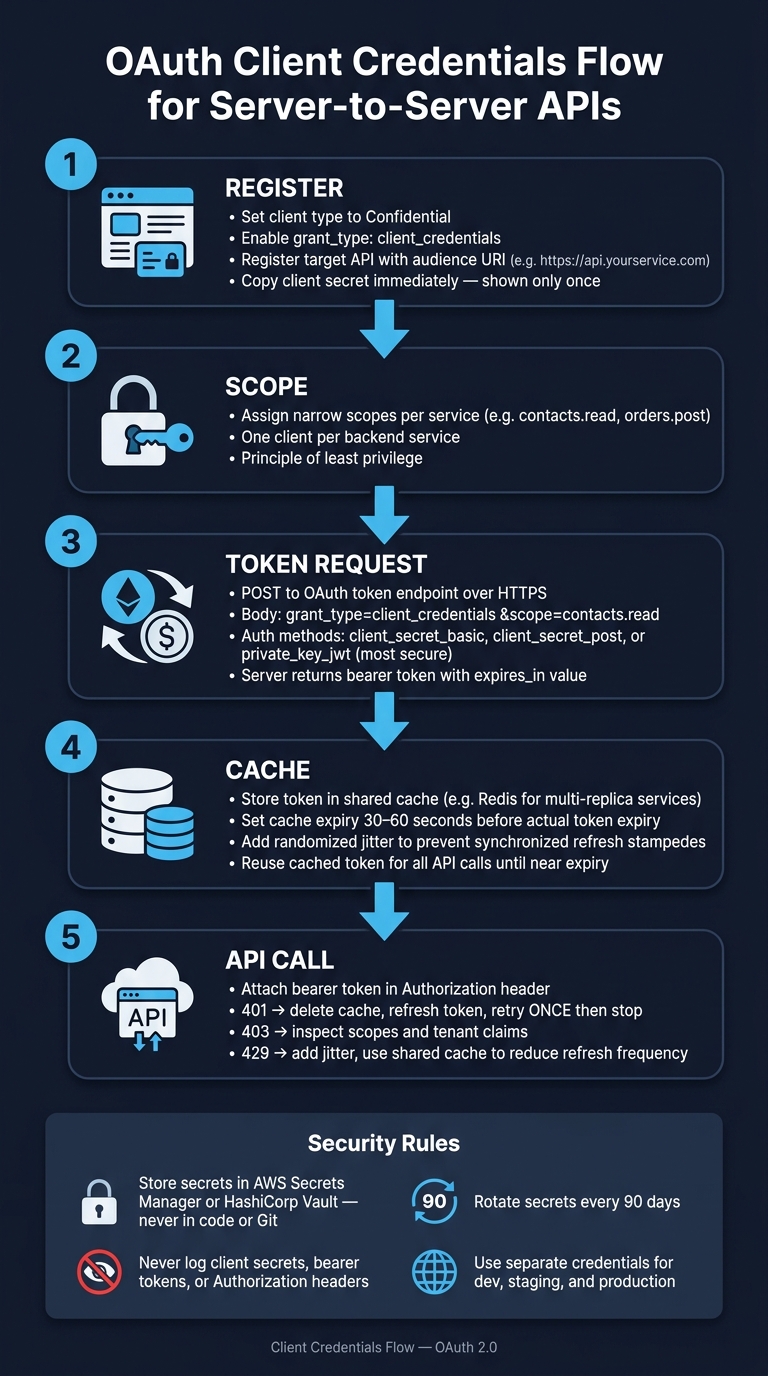
OAuth Client Credentials Flow: Server-to-Server API Authentication
OAuth 2.0 Client Credentials Flow Explained 🔐 | Machine-to-Machine Auth in Depth
sbb-itb-5f36581
Quick comparison
| Topic | What I do | What I avoid |
|---|---|---|
| Client type | Confidential client | Public client |
| App type | Backend service | SPA or mobile app |
| Token request | grant_type=client_credentials over HTTPS |
Sending secrets over unsafe channels |
| Access control | Narrow scopes per service | One client with broad access |
| Secret storage | AWS Secrets Manager, HashiCorp Vault, CI/CD protected vars | Hardcoding secrets or committing them to Git |
| Token handling | Cache, refresh early, retry once on 401 | Refreshing on every request or retry loops |
If you want the flow to work with fewer token errors, the playbook is simple: register the app and API correctly, keep scopes tight, store secrets safely, and handle token refresh with care.
Register the application and enable client credentials
Registration is where client credentials setups usually go right or go off the rails. If you set things up correctly here, you’ll deal with far fewer token endpoint errors later.
Create a confidential client for the backend service
When you register your backend service with an identity provider, set it up as a confidential client. You also need to turn on the client_credentials grant type. If that grant isn’t enabled for the app, the token endpoint can return unauthorized_client.
Once you save the app, the provider gives you a client ID and client secret. Copy the secret right away. Many providers show it only once.
Here are the minimum fields you’ll usually fill in during registration:
| Registration Field | Purpose | Requirement |
|---|---|---|
| Client Type | Confirms the app can store a secret | Must be "Confidential" |
| Grant Type | Sets the token request method | Must include client_credentials |
| Client Secret | Used to authenticate the service | Generated by the provider |
| Audience / Resource | Limits the token to a specific API | Required |
Register the resource API and audience value
The audience tells the authorization server which API the token is meant for. Setting a specific audience ties token issuance to one API instead of allowing broad API access.
When you register the target API, you assign it a unique identifier. In many cases, that’s a URI such as https://api.yourservice.com. Your backend sends this value in the token request, and the server issues a token for that resource.
If the audience is missing or doesn’t match, the API can return 403 even when the token itself is valid.
With the client and API in place, the next step is to define the scopes and token request.
Set up a form-to-backend integration path
Reform sends form submissions to your backend through a webhook, and your backend uses client credentials to call downstream APIs. From there, the backend can request scoped tokens for each API action.
Design scopes and configure the token endpoint
Create scopes that match specific API actions
After registration, scopes decide what each token can do. They keep access tight by limiting each client to the exact API actions it needs, such as contacts.read, contacts.write, inventory.read, or orders.post. Each integration should ask for only the scopes it needs to do its job.
It helps to register a separate client for each backend service and give it only the scopes it needs. A reporting service doesn’t need write access. A sync job shouldn’t touch financial transactions. That kind of separation cuts down the blast radius if one set of credentials is ever exposed.
Once your scopes are set, send the token request in the format your provider expects.
Send the token request to the OAuth token endpoint
Use Content-Type: application/x-www-form-urlencoded and always call the endpoint over HTTPS. The body must include grant_type=client_credentials, and scope is optional as a space-separated string:
grant_type=client_credentials
&scope=contacts.read inventory.read
The authorization server returns only the scopes the client is allowed to use.
Comparison table: client authentication methods for token requests
Pick the client authentication method your provider supports that lines up with your security needs. Each option comes with its own tradeoff between security and setup effort.
| Method | Security Strength | Setup Complexity | Common Support |
|---|---|---|---|
| client_secret_basic | Moderate | Low | Universal; credentials sent in the Authorization header |
| client_secret_post | Moderate | Low | High; credentials sent in the request body |
| private_key_jwt | High | High | Growing; uses asymmetric keys and signed assertions; no client secret sent over the wire |
If your provider supports private_key_jwt, it’s usually the better pick. It keeps secrets off the wire, but it also adds key-management work.
The method you choose also shapes how you store and protect the credential material.
Store secrets safely and manage backend credentials
Once the token endpoint works, the next job is simple: lock down the credentials used to request those tokens.
Keep client secrets out of code and version control
Never put client secrets in application code or commit them to version control. And while .env files are common, they should be used only for local development.
In production, store secrets in CI/CD protected variables or a managed secret vault like AWS Secrets Manager or HashiCorp Vault. These tools encrypt secrets at rest, control who can access them, and keep detailed access logs.
Also, never log secrets or access tokens - not even in debug mode. One stray log entry can leak credentials into your app logs or a log management platform. That’s a small mistake with a big blast radius.
Rotate secrets and retire unused clients on a schedule
Client secrets shouldn’t sit around forever. Rotate them every 90 days:
- Create a new secret
- Update the backend
- Verify token requests still work
- Revoke the old secret
It also helps to review your OAuth clients on a regular schedule and delete any that are no longer in use. And don’t reuse the same credentials across environments. Give development, staging, and production their own separate credentials.
Comparison table: secret storage options for backend services
| Storage Option | Security Posture | Operational Effort | Auditing Capability |
|---|---|---|---|
| Environment Variables | Low; no encryption at rest | Low | Minimal |
| Encrypted App Configuration | Medium; encrypted at rest | Medium | Limited |
| Managed Secret Vaults (e.g., AWS Secrets Manager, HashiCorp Vault) | High; encrypted, access-controlled, auditable | Higher | Full |
For production backend services, managed secret vaults are the best choice. They do add more setup and maintenance, but they give you tighter control over backend credentials and a much clearer audit trail.
With credentials locked down, the backend is in a safer position to request tokens in the next step.
Call third-party APIs from backend workflows and handle tokens correctly
Cache tokens for server-side API calls
With credentials stored securely, the backend can request and reuse access tokens at runtime.
When a backend job needs to call an external API, check for a valid cached token first and attach it to the request. If there isn't one, or the token is close to expiring, request a new token from the OAuth token endpoint. In client credentials flows, you'll usually need a new access token once the old one expires.
Set the cache to expire 30–60 seconds before the token's actual expires_in value. That buffer helps avoid race conditions where a token dies in the middle of a request. If you're running multiple service replicas, use a shared token cache such as Redis. Without a shared cache, each replica refreshes on its own, which can line them all up and flood the identity provider at the same time. Add a small randomized delay to refreshes too, so retries don't all hit at once.
Caching helps, but it doesn't solve everything. Expired or revoked tokens can still fail, so your API error handling needs to be explicit.
Handle 401 responses, retries, and safe logging
If you get a 401 Unauthorized, delete the cached token, request a new one, and retry once. That's it. Don't loop forever. Infinite retries can burn through rate limits and turn debugging into a mess.
A 403 Forbidden usually means the token is valid, but it doesn't have the right scope or tenant. A 429 Too Many Requests often points to synchronized refreshes or plain rate limiting.
| Error Code | Likely Cause | Recommended Action |
|---|---|---|
| 401 Unauthorized | Token expired, revoked, or clock skew | Refresh and retry once; stop if it fails again |
| 403 Forbidden | Insufficient scope or tenant mismatch | Inspect token claims; verify scopes match the resource |
| 429 Too Many Requests | Synchronized refreshes or rate limiting | Add jitter and use a shared token cache |
Token handling only works if your logs stay clean. Log request IDs, status codes, and timestamps only. Scrub Authorization headers, bearer tokens, and client secrets before anything gets written to logs.
Conclusion: setup and security checklist
Use client credentials only for trusted server-to-server communication. At runtime, cache tokens with a short expiry buffer, use a shared cache across replicas, retry once on 401 and then stop, and never let credentials leak into your logs.
FAQs
When should I use client credentials flow?
Use client credentials when your backend needs automated, server-to-server access and no user is present to log in. A common case is syncing form submissions to a CRM or pulling data for dynamic fields.
Here’s how it works: your service uses its own client ID and secret to request an access token. Then it uses that token to call the third-party API, with only the scopes it needs.
These tokens are usually short-lived, so your backend requests new ones when needed.
What causes client credentials flow to fail?
Client Credentials flow usually breaks for a simple reason: something in the setup doesn’t line up.
A common issue is an incorrect or expired client ID or client secret. When that happens, you’ll often see a 401 Unauthorized error.
A 403 Forbidden response usually points to a permission problem. In plain English, the app is asking for something it doesn’t have access to. That can mean a required scope is missing, resource access hasn’t been granted, or both.
Other causes include:
- Using the wrong grant type
- Pointing to the wrong authentication domain
- Working with revoked credentials
- Sending the request to an endpoint that doesn’t support machine-to-machine tokens
How should I cache and refresh access tokens?
Centralize token acquisition in a middleware service, then cache tokens by scope and audience. That gives you one place to manage refresh logic instead of scattering it across apps and servers.
When you receive a token, calculate its expiration right away by adding expires_in to the current time. Then refresh it 5 to 10 minutes early so you don’t get hit with 401 errors at the worst moment.
In multi-server setups, use distributed locking so two or more servers don’t try to refresh the same token at once. Add jitter too. It helps prevent refresh storms, where a bunch of instances all wake up and refresh at nearly the same time.
As for storage, keep tokens only in encrypted server-side storage or a secrets vault. Never put them in browser local storage.
Related Blog Posts
Get new content delivered straight to your inbox

The Response
Updates on the Reform platform, insights on optimizing conversion rates, and tips to craft forms that convert.




Drive real results with form optimizations
Tested across hundreds of experiments, our strategies deliver a 215% lift in qualified leads for B2B and SaaS companies.
