
.webp)
5 Request Flows for CCPA Identity Checks


If I verify too little, I risk sending someone’s data to the wrong person. If I verify too much, I create a new privacy problem. That’s the core issue this article solves.
Here’s the short version: I should use the lightest check that fits the request, keep data requests small, and log each step. For most cases, that means matching 2 data points already on file. For more sensitive requests, I may need 3 data points and, in some cases, a declaration under penalty of perjury. I also need to remember one rule that stands out: opt-out requests should not go through identity verification.
The article breaks CCPA request handling into 5 clear flows:
- Direct Email for requests sent to a privacy inbox
- Portal for logged-in users
- Partner Relay for requests passed by a third party
- Authorized Agent when someone acts for the consumer
- High-Risk for sensitive data or cases with a high risk of harm
A few points matter most:
- Use what I already have before asking for more
- Match the verification level to the request type
- Escalate when records don’t match or the data is sensitive
- Track dates, including the 10-day acknowledgment and 45-day response window
- Document everything: intake method, matched records, messages, and final result
How to Submit and Complete a DSAR | Step-by-Step Guide
sbb-itb-5f36581
Quick Comparison
| Flow | Best fit | Basic check | When to escalate |
|---|---|---|---|
| Direct Email | Email requests | Email + 2 matched records | Mismatched details or sensitive data |
| Portal | Logged-in users | Active session + records on file | Sensitive data or account concerns |
| Partner Relay | Partner-passed requests | Match partner details to internal records | Conflicts in data or sensitive data |
| Authorized Agent | Requests by a representative | Verify the agent and the consumer | Missing proof of authority or sensitive data |
| High-Risk | Sensitive or harm-heavy requests | Extra checks such as security questions or ID review | Used when lower-check flows are not enough |
So if I had to sum it up in one line, it would be this: pick the least intrusive flow that still fits the risk, then record why I used it.
What Reasonable Verification Means Under the CCPA
The CCPA asks for reasonable certainty, not perfect certainty. That matters because verification shouldn’t turn into a bigger privacy problem than the request itself.
Use the lower standard - matching at least two data points against existing records - for general requests. Use the higher standard - matching at least three data points, and in some cases a signed declaration under penalty of perjury - when the request involves specific or sensitive data.
For deletion requests, the right level of verification depends on the stakes. Look at how sensitive the data is and the risk of someone deleting it without permission before you pick the verification tier.
Keep data collection tight. Start with records you already have, like account numbers, transaction history, email addresses, or dates of birth. Only ask for what you need to verify the request. For a basic opt-out request, a business generally should not ask for a driver’s license photo or other government ID.
Just as important: write down what you did. Record the method used, the data points matched, the request date, and the verification tier. If the process is ever audited or challenged, that paper trail matters.
| Documentation Category | What to Record |
|---|---|
| Intake Method | How the request arrived - webform, email, phone, or mail |
| Verification Logic | Which data points were matched, such as email plus a recent transaction date |
| Deadlines | Date received, 10-day acknowledgment, and 45-day fulfillment deadline |
| Decision Justification | Why a higher verification tier was used, if applicable |
| Messages | All correspondence, including extension notices or follow-up requests |
Use these thresholds to choose the lightest request flow that still fits the risk.
How to Choose the Right Flow for Each Request
Pick the lightest flow that fits the situation. The right path depends on four things: the request channel, the request type, where the data lives, and who’s making the request.
A request sent through a logged-in account portal is not the same as one that lands in a general email inbox. The first one can rely on existing credentials. The second means you need to confirm identity through a reasonable method. Those signals help you route each request into the five flows below.
Sensitivity matters too. Deleting a name and email address calls for less checking than giving access to sensitive financial records. The CPPA’s guidance says verification should be proportionate to the risk of harm posed by an unauthorized request.
Account status is usually the fastest routing signal. If the consumer has an account, start there and use those existing credentials first. If they don’t have an account, use a reasonable method and collect only the minimum information needed.
Two other factors can push you into a more involved flow.
- If the request touches data stored across internal systems or with partners, you need one workflow that reaches every repository holding that data. That lines up with the partner relay and authorized agent flows.
- If an authorized agent submits the request, there’s an extra step: verify both the consumer and the agent.
One point is simple: do not verify identity for opt-out requests to sell or share personal information. The five flows below apply to every other request type.
1. Direct Email Flow
Use this flow when a request comes in by email and you need to confirm identity using records you already have. The direct email flow starts when a consumer emails your monitored privacy inbox, such as privacy@company.com, and your team confirms their identity before taking action.
For standard access or deletion requests, match the email to two existing records already on file, such as:
- a phone number
- a physical address
- a transaction ID
Only confirm against records already on file. If the request involves sensitive data, or the records don’t match, move it to a higher-assurance flow. If you can’t verify a deletion request, treat it as an opt-out request for sale or sharing.
Log the intake source, matched data points, follow-up messages, and final outcome - fulfilled, denied, or partially fulfilled. That record helps keep the process consistent across channels.
If the request is higher risk, route it to the high-risk flow below.
2. Portal Flow
Use this flow for requests sent through a logged-in privacy portal. Under the article’s “least intrusive” rule, this is the lightest path for people who are already signed in.
If the consumer is logged in, rely on the session plus two matching data points already on file for standard access or deletion requests. Do not make the person create a new account just to send a privacy request.
Some requests need tighter checks. If the request involves sensitive personal information - Social Security numbers, biometrics, or financial records - send it to the high-risk flow. In that case, require a signed declaration under penalty of perjury along with the login.
Log each portal request from intake through fulfillment in one central record. That keeps the process auditable and helps avoid collecting extra data you don’t need.
If the request touches data held by vendors or other internal systems, move it to the partner relay flow.
3. Partner Relay Flow
Use this flow when a partner passes along a consumer request. Since the request comes through a third party, your identity check should match the level of risk. Stick with the same minimal-data approach, but make sure you also track the partner source.
For routine requests, verify the person with records you already have on file, like an account number, physical address, or date of birth. Ask only for the data needed to confirm the request. If the request only involves a name and email address, don't ask for a driver's license.
You also need to log the source, verification steps, any escalation, and fulfillment. The table below shows the exact record set for partner-relay requests:
| Documentation Category | Required Data Points | Purpose |
|---|---|---|
| Request Source | Partner ID, intake channel | Proof of origin and partner role |
| Timestamps | Date received, date verified, date fulfilled | Compliance with the 45-day response window |
| Verification Audit | Matched data points, escalation triggers used | Proof of the identity check |
| Fulfillment Log | Systems updated, action taken (delete/access) | Evidence of rights exercise |
Escalate the request if partner-supplied identifiers don't match your records. Do the same if the request involves sensitive data. In those cases, move it to the high-risk flow.
Keep all partner-relay records in one repository. A structured intake form helps you track requests and kick off downstream workflows.
If the request comes from someone acting on the consumer's behalf, use the authorized agent flow.
4. Authorized Agent Flow
Use this flow when an authorized agent sends the request. If a representative is involved, don't rely on source checks alone. Move to dual verification instead. That means you need to confirm two things: the agent has permission to act, and the consumer is who they say they are.
For the agent, ask for proof that they can act on the consumer's behalf, such as signed authorization or power of attorney. For the consumer, start with records you already have on file before asking for anything extra. You can also ask the consumer to confirm that the agent was allowed to submit the request.
The table below shows the minimum verification steps for each request type:
| Request Type | Verification Level | Recommended Data Points |
|---|---|---|
| Deletion (Non-Sensitive) | Reasonable certainty | 2–3 matched data points (e.g., email, last purchase date) |
| General access | Reasonable certainty | Existing authentication data (e.g., account number, DOB) |
| Specific access | High degree of certainty | Escalated verification (e.g., security questions, supporting documents) |
| Correction | Reasonable certainty | Data points relevant to the specific information being corrected |
Keep a detailed audit trail for the full request lifecycle, including:
- The agent's authorization
- The consumer verification steps
- Any escalation decisions
- The final fulfillment action
That record helps show you used a reasonable validation process before taking action on the request.
If the agent's authority is unclear, or the request touches sensitive personal information, send it to the high-risk flow.
5. High-Risk Flow
Use this flow when a request involves sensitive personal information, or when the wrong person getting access could lead to financial loss, reputational damage, or physical harm. This is the escalation endpoint after the lighter flows no longer make sense. In your routing system, it should be the final path when direct email, portal, partner relay, or authorized agent flows don’t fit.
Use escalated verification that matches the sensitivity of the request. Start with data points already on file, then add extra checks as needed, such as security questions, an ID upload, or an identity verification service. The goal is simple: verify the person without asking for more identity evidence than the request calls for.
For high-risk requests, connect your audit trail to the full request lifecycle: intake, verification, escalation decision, and fulfillment. Record what data was at stake, why the request moved into escalation, which verification steps were completed, and when each action happened. Keep these records ready for compliance audits.
The table below shows the main escalation triggers and what each one calls for:
| Escalation Trigger | Verification Method | Documentation Required |
|---|---|---|
| Sensitive personal information | Security questions plus ID upload or an identity verification service | Risk assessment, matched data points, approval record |
| High risk of harm if fulfilled for the wrong person | Escalated verification matched to request sensitivity | Verification method rationale, outcome record |
| Consumer has no existing account | Non-account verification method without requiring account creation | Non-account verification method used, data minimization rationale |
Use the same minimization rules when designing the intake form that routes requests into the right flow.
Form Design Tips for Privacy Request Intake
Once you’ve picked the right verification flow, the next step is simple: make the intake form send each request to that flow on its own.
A privacy email inbox sounds easy. In practice, it’s messy. Requests can slip through the cracks, follow-ups turn into manual work, and there’s often no clear record of what was collected or when. A structured web form fixes that. It can collect the right verification details, route requests by type, and keep a clear audit trail.
The key is to ask for only the minimum data needed for that specific request. For access or deletion requests, use data points you already have when they’re enough, like a name, email, or account record. Don’t ask for a government ID if you don’t need it.
Conditional routing also makes a big difference. Instead of building separate forms for every case, one form can sort requests into the right path:
- standard requests
- agent requests
- high-risk requests
That keeps the form matched to the request type, supports data-minimization rules, and connects intake straight to the verification tiers described above.
Reform supports multi-step forms, conditional routing, email validation, spam prevention, and CRM integrations for privacy request intake. If your form handles routing and validation from the start, your team can intake privacy requests without manual sorting.
Side-by-Side Comparison of the 5 Flows
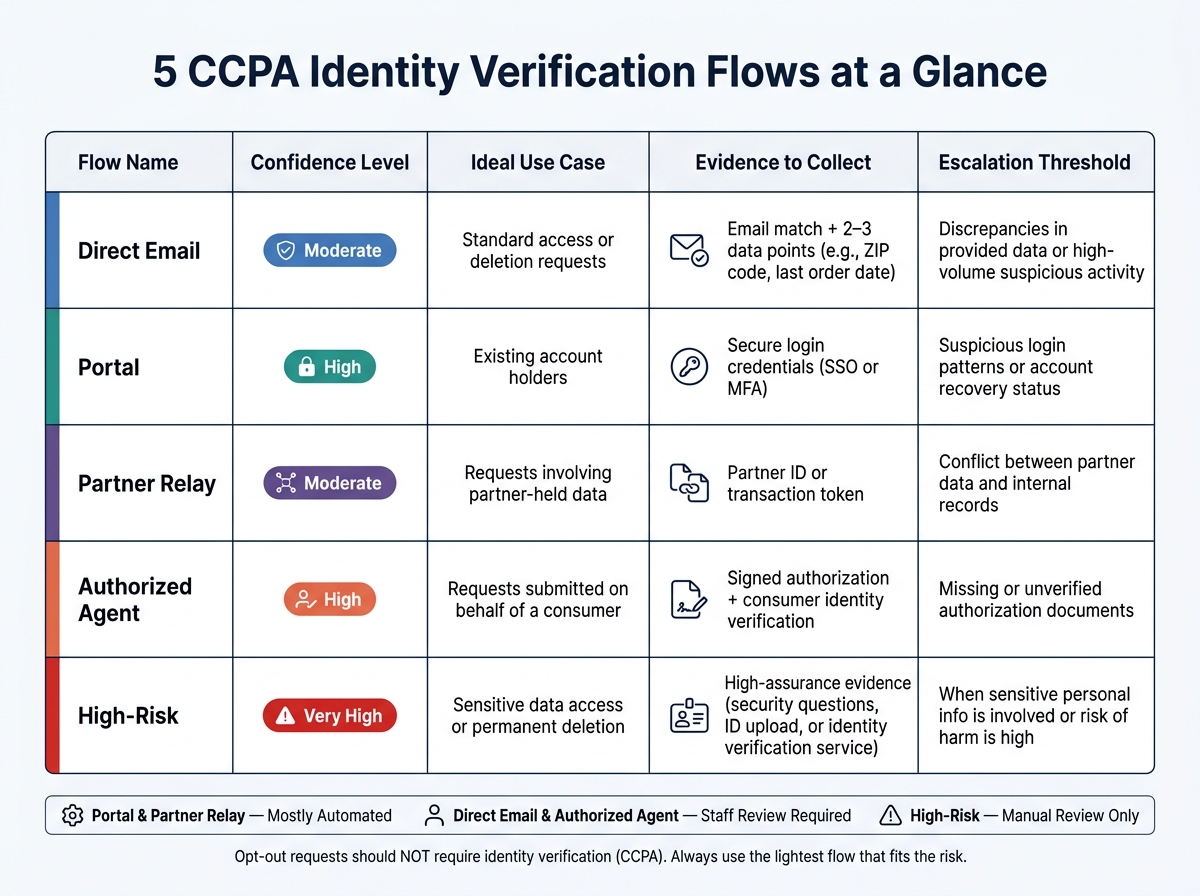
5 CCPA Identity Verification Flows: Quick Reference Guide
Use this matrix to send each request to the right verification flow. It gives you a quick read on where each flow fits, what proof to gather, and when to move the case up for review.
| Flow | Confidence Level | Ideal Use Case | Evidence to Collect | Escalation Threshold |
|---|---|---|---|---|
| Direct Email | Moderate | Standard access or deletion requests | Email match plus 2–3 data points (e.g., ZIP code, last order date) | Discrepancies in provided data or high-volume suspicious activity |
| Portal | High | Existing account holders | Secure login credentials (SSO or MFA) | Suspicious login patterns or account recovery status |
| Partner Relay | Moderate | Requests involving partner-held data | Partner ID or transaction token | Conflict between partner data and internal records |
| Authorized Agent | High | Requests submitted on behalf of a consumer | Signed authorization plus consumer identity verification | Missing or unverified authorization documents |
| High-Risk | Very High | Sensitive data access or permanent deletion | High-assurance evidence | When sensitive personal info is involved or risk of harm is high |
There’s a simple pattern here. Portal and Partner Relay are mostly automated. Direct Email and Authorized Agent need staff review. High-Risk should stay manual.
The amount of proof you ask for should match the sensitivity of the request. That’s the common-sense rule. If someone wants a simple name-and-email record deleted, the bar shouldn’t be the same as it is for a request tied to sensitive personal data. As the CPPA has noted, a business should not require a driver's license photo to delete a simple name and email record.
If any trigger shows up, send the request to manual review. That includes mismatched details, odd login behavior, missing agent paperwork, or a clash between partner data and your own records.
Mistakes to Avoid When Verifying CCPA Requests
Once you've picked the right flow, the next problem is execution. A solid process can still go sideways if your team asks for too much data or uses a loose check during shared data request verification.
Don't treat an email address as proof of identity. An email alone isn't enough. Before you do anything, match the request to records already in your system.
Collect only what is necessary. The CPPA's Enforcement Advisory says businesses should collect only what is necessary to respond to consumer requests.
Don't act on partner-submitted requests until the partner's details match your internal records. If something is off, pause the request and escalate it.
Verify both the agent's authority and the consumer's identity before processing the request.
Don't use the same verification standard for every request. Lower-risk requests call for less scrutiny, and opt-out requests should not require identity verification.
Conclusion
Strong CCPA identity verification comes down to three things: collect as little data as possible, match the check to the level of risk, and document the process from start to finish.
More data doesn't automatically make verification safer. In many cases, it does the opposite. It adds risk.
These five flows give teams a practical way to match verification strength to the request in front of them. The simple rule is this: use the lightest flow that still fits the risk.
That kind of consistency matters. Weak verification can lead to compliance trouble. So can verification that asks for too much. Clear intake steps, trained staff, and solid audit trails help cut avoidable risk and keep the process on track.
Choose the lightest flow that fits the request, record why it was used, and make the process repeatable. When the flow matches the risk, the process stays defensible and efficient.
FAQs
How do I choose the right verification flow?
Choose the verification flow by balancing security with data minimization. Think about how sensitive the requested data is and what could happen if the wrong person got access.
Use a tiered approach. For routine requests, rely on existing account credentials. For sensitive data, or when something feels off, step up to multi-factor authentication or document verification. And before you ask for more proof, start with the data you already have on file.
When should a request move to the high-risk flow?
A request should move to the high-risk flow when identity verification needs tighter checks than the usual process. That often happens when sensitive personal information is involved or when the chance of unauthorized access is higher.
In those cases, tiered authentication should step up to stronger checks before the request is completed. That can include multi-factor authentication or ID verification.
What should I document for each CCPA request?
Document the full lifecycle of each CCPA request from start to finish. That means logging the date received, the requester’s details, the type of request, the identity verification methods used, the outcome of that verification, assignment history, follow-up communications, the basis for the final decision, and the closure date.
It also helps to keep a clear audit log for each milestone. For every step, note the team member responsible and when the action happened. Keep these records for at least 24 months.
Related Blog Posts
Get new content delivered straight to your inbox

The Response
Updates on the Reform platform, insights on optimizing conversion rates, and tips to craft forms that convert.



Drive real results with form optimizations
Tested across hundreds of experiments, our strategies deliver a 215% lift in qualified leads for B2B and SaaS companies.
