
.webp)
Data-Driven Attribution: Common Questions



Most SaaS teams should not trust data-driven attribution right away. If you have fewer than 30–50 conversions a month for a main goal, weak UTM setup, or gaps between forms and your CRM, the model can send you in the wrong direction.
Here’s the short answer:
- DDA spreads credit across many tracked touchpoints
- It works best with higher volume, often 100–200+ monthly conversions
- Small teams usually need a simpler model first
- Forms, CRM stages, and revenue links matter more than the model itself
- DDA only counts tracked actions, so offline and word-of-mouth still get missed
If your form data is messy or your CRM does not connect leads to deals, DDA will not fix that. It will just spread bad data across more touchpoints.
Quick comparison:
| Model | Best for | Data needed | Main drawback |
|---|---|---|---|
| First-touch | Finding demand sources | Low | Ignores later touches |
| Last-touch | Seeing what drove the final step | Low | Misses most of the journey |
| Linear / time-decay | Basic multi-touch reporting | Low to medium | Same rules for every path |
| Data-driven attribution | Higher-volume funnels with clean tracking | High | Can get noisy fast |
I’d treat DDA as a reporting layer you add after your form tracking, CRM sync, and revenue reporting are in place.
Marketing Measurement for Beginners | Part 2 - Data-Driven MTA (Multi-Touch Attribution)
sbb-itb-5f36581
What data-driven attribution means
Data-driven attribution (DDA) is an algorithmic model that learns from past conversion paths across multi-touch SaaS journeys. It assigns credit based on how each touchpoint changes the odds of a conversion. Instead of giving all the credit to one interaction, it spreads fractional credit across the full journey based on observed contribution.
Some DDA models go a step further and estimate each touchpoint’s marginal contribution by comparing many possible paths. That’s what sets DDA apart from fixed-rule models.
How data-driven attribution differs from rules-based models
Rules-based models use the same logic for every journey, no matter what your data says.
- First-touch gives credit to the earliest interaction.
- Last-touch gives credit to the final one.
- Linear splits credit evenly.
- Time-decay puts more weight on recent touches.
DDA works differently. It adjusts to your funnel. Rules-based models don’t.
That means it can show that a LinkedIn prospecting ad, a nurture email sequence, or branded search may play very different roles depending on the buyer’s path. A touchpoint doesn’t need to be the last click to matter. In some journeys, a channel that rarely appears at the end still helps because paths that include it convert more often. That kind of flexibility is useful, but only if the model has enough data to learn from.
What data-driven attribution can and cannot tell you
DDA is useful for budget allocation and channel reporting. It can highlight channels that last-touch tends to undervalue, like upper-funnel paid social, non-branded search, and nurture email. It can also show which channels tend to contribute most across the funnel.
But there’s a catch: DDA is still correlational, not causal. It shows which touchpoints show up alongside conversions in your past data. It does not prove those touchpoints caused the conversion.
If you want to know what would happen if you cut a channel altogether, you need incrementality testing, not an attribution report. And like any model, DDA is only as good as the data behind it. Its reliability depends on how much conversion data it has to learn from.
The next question is how much data the model needs before those patterns settle down.
How much data data-driven attribution needs to work reliably
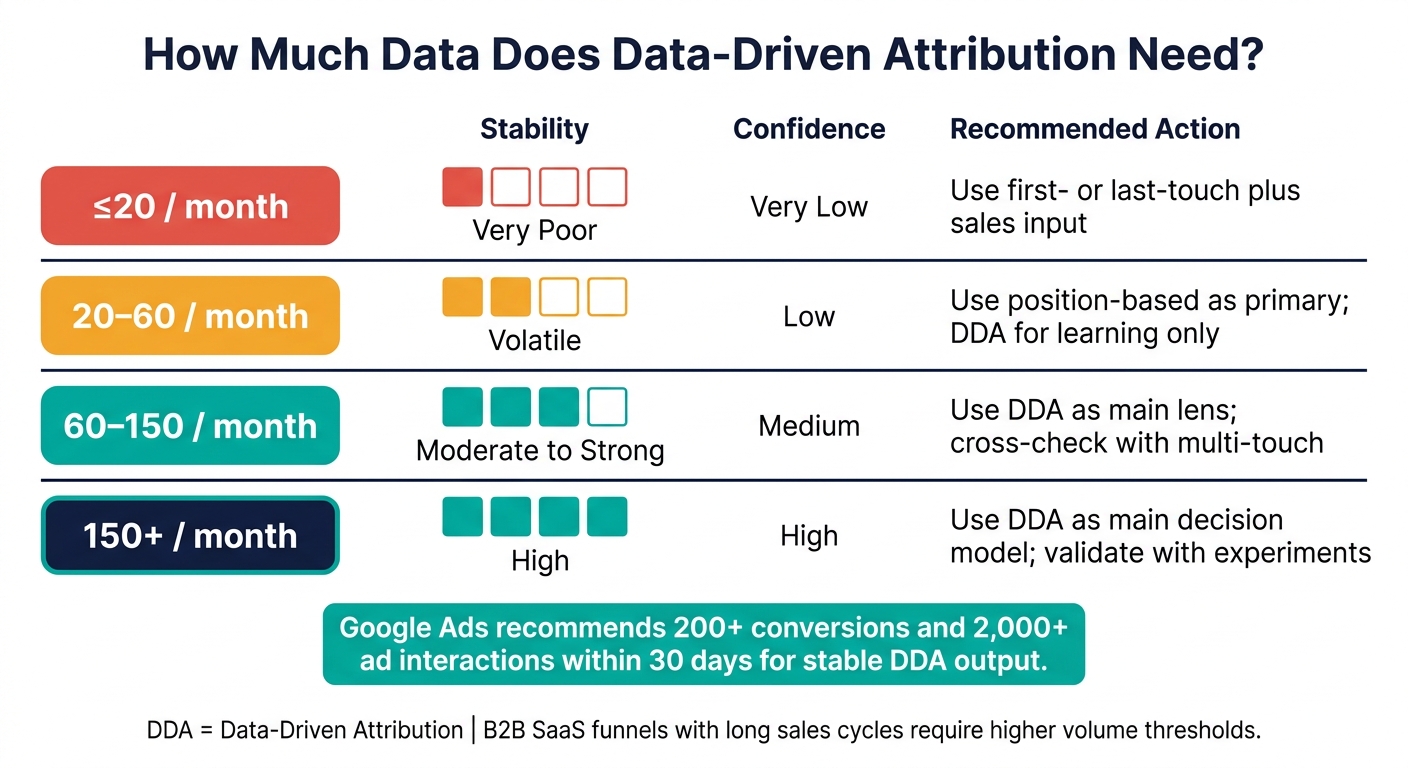
Data-Driven Attribution: Monthly Conversion Volume Guide for SaaS Teams
You can switch on DDA at low volume. The catch is simple: low volume often leads to shaky credit assignment. So the issue isn't whether DDA runs. It's whether the output is steady enough to move budget around without guessing.
That’s why volume matters in a practical sense, not just a technical one.
Minimum volume vs. comfortable volume for stable attribution
A usable signal often begins at about 30–50 conversions per month for each main conversion type, such as demo requests, SQLs, or closed-won deals. Below that level, a single enterprise deal can throw off the monthly picture. Once you’re in the 30 to 50 range, patterns may start to repeat. But those patterns are better treated as working ideas, not budget decisions.
If you want to shift 10–20% of spend with some confidence, the bar is usually higher: 100–200+ monthly conversions, along with tracked touches across multiple channels like form fills, paid, organic, partner, email, direct, and sales-led activity. Google’s own guidance says account-specific DDA is most accurate at 200+ conversions and 2,000+ ad interactions in 30 days.
| Monthly conversions | Stability | Confidence | Best use |
|---|---|---|---|
| ≤20 | Very poor | Very low | Use first- or last-touch plus sales input |
| 20–60 | Volatile | Low | Use position-based as primary; DDA for learning only |
| 60–150 | Moderate to strong | Medium | Use DDA as the main lens; cross-check with multi-touch |
| 150+ | High | High | Use DDA as the main decision model; validate with experiments |
Why low-volume B2B funnels are noisy
B2B funnels make this messier because the timeline stretches out. Someone might read content in January, book a demo in March, and sign in June. If your attribution setup uses a short lookback window, those early touches can vanish from the record. Then credit gets pushed toward whatever happened right before the form fill.
There’s another issue: each funnel stage cuts the pool down. By the time you get to closed-won deals, the number of usable events is often much smaller than top-of-funnel traffic. That makes patterns harder to trust.
UTM problems add even more noise. When campaigns reuse the same tags, or when utm_source is missing, traffic that should stay separate gets lumped together. At that point, the model can’t tell which campaign actually helped.
Offline actions muddy the water too. Outbound calls, partner intros, and conference meetings may play a big part in the sale. But if they never make it into the CRM, the model leans too hard on the last digital touch before the form submission. That can make some paid channels look much stronger than they are.
For small SaaS teams, the next step is figuring out whether the tracking setup is solid enough for DDA to be useful at all.
Should small SaaS teams use data-driven attribution now
Usually, not yet.
Small SaaS teams are ready for data-driven attribution when conversion volume is steady, tracking is clean, and leadership wants multi-touch insight. For form-driven SaaS funnels, the bigger issue is simpler: does submission data reach the CRM cleanly enough to trust the model?
So the choice usually isn’t just about DDA. It’s about whether your form data, CRM data, and lifecycle data are complete enough to support it.
The tracking foundation small teams need before switching models
Before you trust any attribution model, especially a machine-learned one, five tracking pieces need to be in good shape:
- Clean conversion events: Track each key action as one separate event.
- Standardized UTM naming: Use one UTM taxonomy across campaigns.
- CRM sync: Sync form, lead, and opportunity data into the CRM automatically.
- Lifecycle stage tracking: Track lead, MQL, SQL, and won deal stages.
- Revenue fields tied to opportunities: Tie revenue to opportunities so attribution can optimize for dollars, not just conversions.
If one of these breaks, the model can point you in the wrong direction. It’s a bit like building a forecast on messy spreadsheet tabs. The math may look fine, but the inputs are off.
When a simpler model is the better choice
For high-value, low-volume deals, first-touch and last-touch models often work better. They’re easier to explain, they don’t need much data, and they answer clear questions.
First-touch shows which channels bring in net-new demand. Last-touch shows what tends to close the loop right before conversion.
Rules-based multi-touch models, like linear or time-decay, add a little more detail without needing statistical modeling. That can help when you want to give some credit to mid-funnel content or retargeting, but you don’t have enough conversion volume for DDA.
| Rules-Based (First/Last/Linear) | Data-Driven Attribution | |
|---|---|---|
| Interpretability | High - easy to explain to leadership | Lower - harder to audit |
| Data requirements | Low - works with limited volume | High - needs sustained conversion volume |
| Reporting confidence | Stable, even with limited data | Can be volatile at low volume |
| Risk of overreacting to noise | Low - consistent logic applied to every path | High - individual deals can skew the model |
| Best fit | High-value, low-volume B2B | High-volume, multi-channel SaaS funnels |
For most small teams, the practical move is to run a simple rules-based model for 60–90 days, fix the obvious tracking gaps that show up, and then add DDA only when a higher-volume conversion action, like trial signups, can support it. Once that base is set, optimizing for high-converting lead forms becomes the next step.
How form tracking feeds data-driven attribution
Once your tracking setup is in place, attribution often falls apart at the form.
That’s the moment a visitor turns into an identifiable lead through a demo request, trial signup, or contact form. If that handoff isn’t tracked cleanly, the data goes sideways fast. And once that happens, no attribution model can sort it out later. So when attribution looks off, the form is usually the first place to check.
What form data to capture at submission
The most important attribution fields are usually the ones people never see: hidden fields.
These include utm_source, utm_medium, utm_campaign, utm_content, utm_term, referrer URL, landing page URL, click IDs like gclid or fbclid, form ID, and timestamp. The user doesn’t type these in. They’re captured automatically in the background.
Why does that matter? Because hidden fields preserve the original source across later visits. Without that, a later session can overwrite the first touchpoint, and the model ends up giving credit to the wrong channel.
Once you’ve captured the source data, the next job is getting it into the CRM without losing anything along the way.
How CRM and lifecycle tracking complete the attribution chain
Capturing the data at submission is only half the work. That data needs to stay attached to the lead through each stage of the funnel.
If UTMs and click IDs make it into the CRM but never link to a deal or opportunity, attribution still can’t connect the first source to revenue. It’s like having the first page of the story and losing the ending.
The table below shows how the data needs to move across three layers for attribution to work end to end:
| Layer | Key Data Points | Purpose |
|---|---|---|
| Form layer | UTMs, referrer, landing page, click IDs, form ID, timestamp | Captures source context at the moment of conversion |
| CRM / automation layer | Contact ID, lifecycle stage (MQL/SQL), deal stage, opportunity value | Connects the lead to pipeline and account history |
| Analytics / attribution layer | Revenue, close date, campaign metadata, attribution model output | Calculates which touchpoints influenced conversion and pipeline |
Map each submission to the same contact or account as it moves from lead to MQL, SQL, opportunity, and closed-won. When that chain stays intact, attribution can tie a form fill back to revenue.
Where Reform fits in for cleaner attribution data
A lot of attribution issues start right at the form. Reform helps teams collect cleaner lead data with no-code forms, hidden fields, conditional routing, lead enrichment, spam prevention, email validation, real-time analytics, and integrations with marketing and CRM tools.
| DDA Prerequisite | Reform Capability |
|---|---|
| Capture UTMs and referrer data | Hidden-field support with automatic parameter capture |
| High-quality, valid leads | Real-time email validation and spam prevention |
| Lead segmentation by intent | Conditional routing for demo requests vs. other form types |
| CRM data continuity | Native integrations that sync fields to contact and deal records |
| Lead context for high-value accounts | Lead enrichment with firmographic data |
| Conversion visibility | Real-time analytics |
Cleaner form data gives DDA a clearer signal to work with.
Conclusion: When data-driven attribution is worth using
Data-driven attribution is not an automatic step up. It works best when your tracking is clean and your conversion volume is high enough to support steady patterns. After your form data and CRM records are connected, the next thing to check is simple: does DDA have enough signal to be trusted?
It only works when conversion volume stays high enough for the model to learn. Google Ads recommends at least 200 conversions and 2,000 ad interactions within 30 days for stable output. Below that, the data gets noisy, and the results are hard to trust.
Clean, connected tracking also improves attribution coverage and cuts down on missing-source errors. That matters even more in form-driven SaaS funnels, where missing source data weakens every report that comes after it.
If your team is closing only a few dozen opportunities each month, or your tracking still has gaps, a simpler model will usually serve you better for now. Use DDA only after volume and tracking are stable. For SaaS teams, that means DDA makes sense after form capture and CRM reporting are dependable.
Related Blog Posts
Get new content delivered straight to your inbox

The Response
Updates on the Reform platform, insights on optimizing conversion rates, and tips to craft forms that convert.




Drive real results with form optimizations
Tested across hundreds of experiments, our strategies deliver a 215% lift in qualified leads for B2B and SaaS companies.
