
.webp)
HIPAA-Compliant Lead Forms: 7 Key Rules


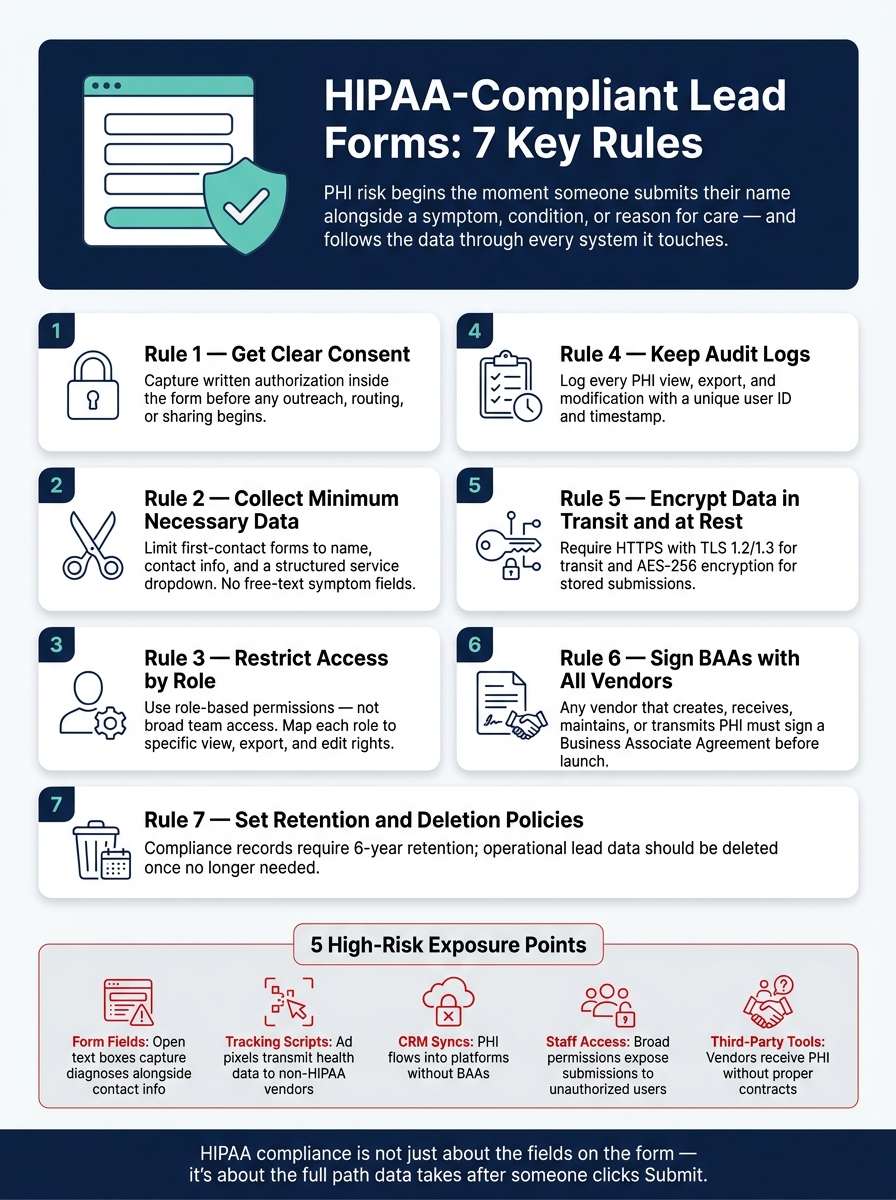
A healthcare lead form can create HIPAA risk the moment someone submits their name with a symptom, condition, or reason for care. If you collect that kind of data, I’d treat the form, the tools behind it, and the follow-up process as part of one HIPAA workflow.
Here’s the short version of what matters most:
- Get clear permission before using health-related form data for outreach beyond treatment, payment, or healthcare work
- Ask for less and keep first-contact forms limited to basic follow-up details by using multi-step forms
- Limit staff access by role, not by convenience
- Track activity so each view, export, and edit has a user trail
- Encrypt data in transit and at rest
- Sign BAAs with any vendor that handles PHI
- Set deletion rules so submissions do not sit in inboxes, dashboards, or spreadsheets longer than needed
A few points stand out. HIPAA documentation often needs to be kept for at least 6 years, but that does not mean every lead submission should sit around that long. And OCR has warned that pixels, cookies, and third-party scripts on health-related pages can create HIPAA problems when they receive PHI.
If I were checking a healthcare lead form fast, I’d ask:
- When using a lead gen multi-step template, ensure it is configured for compliance. Does the form collect health details tied to a person?
- Do any tags, CRMs, emails, or routing tools touch that data?
- Does every vendor in that path have a BAA?
- Can only the right staff view or export submissions?
- Is there a written plan for storage and deletion?
That’s the whole point of this article: HIPAA for lead forms is not just about the fields on the page. It’s about the full path the data takes after someone clicks submit.
HIPAA-Compliant Lead Form: 7 Rules for Healthcare Data Safety
Creating a HIPAA Compliant Web Form
sbb-itb-5f36581
Why Healthcare Lead Forms Carry Compliance Risk
In healthcare, a lead form can create ePHI at almost every step: the form itself, the tools connected to it, who on staff can see it, and the vendors tied into the workflow.
When a form links contact details or an IP address to health information - like symptoms, medications, or a request for a visit - it can create PHI. And the risk doesn’t stop once someone hits submit. It follows the data into every system that touches it: the database, email alerts, CRM, marketing automation platform, analytics tags, and ad pixels on the page.
HHS's Office for Civil Rights has warned that tracking tools like pixels, cookies, and third-party scripts on pages with health-related forms can collect PHI and trigger HIPAA duties. That means each connected tool is part of the compliance chain. One weak link can turn a simple form into a serious problem.
Any third party that receives PHI through a form integration - a form builder, CRM, call tracking tool, or agency - becomes a Business Associate and needs a BAA.
Broad access creates another problem. Submissions can drift into CSV exports, consumer messaging apps, and personal email. In many cases, the issue isn’t the software. It’s the process. That’s why access control should be part of the first compliance review, not something you deal with later.
| Risk Area | What Goes Wrong |
|---|---|
| Form fields | Open text boxes collect symptoms or diagnoses alongside contact info, creating ePHI |
| Tracking scripts | Ad pixels and analytics tags transmit health-related page visits and form data to non-HIPAA vendors |
| CRM and email syncs | PHI flows into non-compliant platforms without BAAs in place |
| Staff access | Broad permissions let unauthorized personnel view or export sensitive submissions |
| Third-party tools | Third-party tools receive PHI without proper contracts or security controls |
These exposure points map directly to the seven rules below, starting with consent.
1. Get Clear Patient Consent and Authorization
Health-related form submissions can turn into ePHI the moment someone hits submit. So the first rule is simple: get authorization right away.
HIPAA allows general consent for treatment, payment, and healthcare operations. But if you want to use PHI for marketing, you need separate written authorization. That step should happen inside a multi-step form flow itself, not later through email or a staff follow-up.
Any disclosure of PHI for marketing or other non-clinical uses needs prior written authorization. That authorization should be captured before any follow-up, routing, or sharing starts.
The consent language on the form should say, in plain English, what data is being collected, how it will be used, who may contact the person submitting the form, and what happens if they opt out. While compliance is the priority, you can still create high-converting lead forms by balancing legal requirements with clear design. Phrases like "by submitting this form, you agree to our terms" are too vague and don't give people a clear picture of what they're agreeing to.
Store the consent flag with the submission record in your CRM. That gives your team a clear record before any outreach or sharing happens. Just as important, store the consent record with the submission itself so staff can check permission before they contact anyone.
2. Collect Only the Minimum Necessary Data
HIPAA's Minimum Necessary Standard, codified at 45 CFR §164.502(b) and §164.514(d), says covered entities and business associates should limit the use, disclosure, and request of PHI to what's needed for the task in front of them. For a first-contact form, that usually means confirming interest and setting up follow-up, not doing a full clinical intake. The examples below show how that standard applies to common lead-generation forms.
When a landing page form asks for detailed diagnoses, medication lists, or member IDs, the risk goes up fast. If there's a breach, you're exposing more sensitive information than you needed to collect in the first place. More data also means a bigger blast radius.
Use the least detailed field set that still supports the first follow-up.
| Lead Form Use Case | Minimum Necessary Fields | Fields to Avoid at First-Contact Stage |
|---|---|---|
| New patient inquiry | Name, preferred contact method, phone number, and a short reason for reaching out | Medical history, medication lists, diagnoses |
| Appointment request | Name, contact info, preferred provider or location, preferred date/time, and visit type | Symptom narratives, prior test results, imaging |
| Insurance inquiry | Carrier name, plan type (e.g., PPO) | Member ID, Social Security Number |
To keep forms lean and easier to defend, swap open-text fields like "Describe your condition" for broad choices such as "New symptoms", "Follow-up care", or "Medication questions." Add help text that tells users not to enter detailed medical information in the form, and make it clear that needed health details will be collected later through a secure intake process.
It also helps to keep a field justification log for every active lead form. A one-line reason tied straight to the form's purpose is enough. If a field doesn't serve a direct purpose, cut it.
3. Restrict Access with Role-Based Permissions
Once you've limited what the form collects, the next step is simple: limit who can see it. HIPAA's Access Control Standard says only authorized users can access ePHI. For lead forms, that means role-based access, not broad team access.
Set access by job function. A marketing analyst who runs campaign reports has no valid reason to look at individual lead submissions.
Give each person a unique account with role-based permissions. Build a role-to-permission matrix for marketing, clinical, and admin users, and document it. That matrix should map straight to who can:
- view form submissions
- open CRM records
- export lead lists
If someone leaves the company or moves into a new role, update or revoke access right away through a formal offboarding process.
Also, pair role-based access with audit logs so every record view and permission change is traceable.
4. Keep Detailed Audit Logs
Access controls decide who gets in. Audit logs show what they did after that. Under HIPAA's Security Rule, systems that handle ePHI must record and review system activity.
For lead forms, that means tracking activity across submission, storage, export, and sync. Log every view, export, and change with a timestamp and a unique user ID. This gets even more important when several teams or outside vendors can reach the same submissions. Marketing, intake, and vendor staff may all touch one record. Audit logs give you a clear trail and help spot unauthorized access, changes, or deletion.
| What to Log | Why It Matters |
|---|---|
| Unique user ID per access event | Every action must trace back to one person; shared logins are not compliant |
| Every PHI view or export | Detects unauthorized access by staff or vendors |
| Any modification to lead data | Identifies tampering or unauthorized changes with timestamps |
Those records only help if you can still review them later. Keep audit logs long enough to meet HIPAA documentation retention requirements. Also check that your form tool and host keep logs for a period that meets those HIPAA documentation requirements.
Once logging is set up, the next step is to lock down how the data is stored and who can process it.
5. Encrypt Data in Transit and at Rest
Encryption protects ePHI both in transit and at rest.
HIPAA's Technical Safeguards address both. When a prospective patient submits a form, that data travels from the browser to your server. If it isn't encrypted, someone could intercept it along the way.
Encryption in transit means your site uses HTTPS with TLS 1.2 or 1.3. Encryption at rest means the database that stores those form submissions uses a standard like AES-256. So if a server is compromised, the data stays unreadable without the decryption key. Put those two together, and you shut down two major points of risk.
For healthcare websites, encryption is expected for any form that collects PHI. That includes:
- Appointment scheduling forms
- Contact-a-specialist forms
- Public-facing pages that collect health-related information
It also helps to keep records of your SSL/TLS setup and your form vendor's encryption standards. And if form data moves through an API or webhook into a CRM or EHR, that transfer needs encryption too.
Once encryption is set, the next issue is who else can access or process the data.
6. Review Vendors and Sign Business Associate Agreements
Encryption protects data while it moves and while it sits in storage. BAAs deal with the people and companies allowed to touch that data. Under HIPAA, if a vendor creates, receives, maintains, or transmits PHI for you, you need a Business Associate Agreement (BAA) before any data is shared. That includes form submissions sent to a vendor through embeds, webhooks, or integrations. In plain terms, this can cover your form builder, CRM, marketing automation platform, hosting provider with access to PHI, and any analytics or routing tool that processes submissions.
This part is easy to miss, and that's where teams get into trouble. No BAA means noncompliance, even if no breach happens. OCR has fined organizations when vendors had access to PHI without a BAA in place.
A proper BAA should spell out what the vendor can do with PHI and ban use outside those limits. It should also require safeguards, breach reporting, and the same terms for subcontractors. That last piece matters a lot for lead forms. If your form platform passes submissions through another integration, that downstream system needs to be covered too.
Before any lead form sends PHI into outside tools, review the full path the data takes. Check that a BAA is signed, then look at the vendor's encryption, access controls, audit logs, and incident response process. If that review doesn't hold up, the safer move is to change the form so it doesn't collect PHI at all.
7. Set Clear Record Retention and Deletion Policies
After access controls and vendor checks, retention is often the last weak spot. If you don't have a clear policy, PHI and form submissions can sit around far too long in form dashboards, CRM systems, shared inboxes, and exported spreadsheets. And when the same submission lives in several tools at once, the risk grows.
HIPAA requires covered entities and business associates to keep certain compliance records for at least 6 years from the date they were created or last in effect, whichever is later. That includes consent language, authorization records, business associate agreements, privacy and security policies, and risk or incident records. But that rule applies to compliance records, not every single submission. That's the key difference. Compliance records need long-term storage. Operational lead data should be deleted once it's no longer needed for the purpose it was collected for.
A simple example is a "request an appointment" landing page. That form may collect enough health-related detail to create compliance risk. But the marketing team usually only needs that submission long enough to route the inquiry and pass it to scheduling. After that handoff, the active submission should move to restricted storage or be deleted. It shouldn't keep sitting in a shared inbox or a form tool's export folder.
A deletion policy needs to cover the full data path. If a lead form submission flows through a form builder, a CRM, an email platform, a cloud export, or other downstream tools, each stop has to be accounted for. If full deletion isn't possible because of immutable backups or legal retention duties, the policy should spell out that exception, limit access, and assign a fixed deletion date.
The most useful version of this is a written retention matrix for each form type. It should spell out:
- what data is collected
- where it is stored
- who can access it
- how long it is kept
- how deletion is confirmed
That gives marketing, compliance, and IT one shared source of truth.
What Healthcare Lead Forms Should and Should Not Ask Early
The next step is deciding which fields belong on the first screen and which should wait for secure intake. This is the practical version of the minimum-necessary rule for website forms. For first-touch forms, that means making clear, field-by-field choices.
At this stage, stick to the basics. Name, email, phone number, preferred contact method, and ZIP code help your team follow up and route the inquiry to the right place. A dropdown for service interest also makes sense here, with set options like "schedule an appointment", "learn about services," or "billing question."
One thing to avoid early on: free-text fields. They seem harmless, but they often lead people to type symptoms, diagnoses, or medication names without being asked.
| Form field | Ask early? | Why |
|---|---|---|
| Name | Yes | Contact capture and follow-up |
| Email address | Yes | Follow-up and confirmation |
| Phone number | Yes | Callback and scheduling |
| Preferred contact method / time | Yes | Outreach routing |
| ZIP code / city | Yes | Location-based routing |
| Date of birth | Defer to secure intake | Only if needed for identity matching |
| Reason for visit (free text) | No | Use structured choices instead |
| Symptoms / diagnosis | Defer to secure intake | Clinical detail; not needed for first contact |
| Current medications | Defer to secure intake | Clinical detail; not needed for first contact |
| Insurance provider / plan details | Defer to secure intake | Collect only if needed for coverage checks |
| SSN | Do not collect on a lead form | No valid use case at first touch |
The best approach is simple: keep the first step short, then move sensitive questions into secure intake. That keeps first contact fast and helps maintain HIPAA alignment.
High-Risk vs. HIPAA-Aligned Lead Form Practices
The biggest problem usually isn't the form by itself. It's what happens around the form. Pixels, scheduling tools, routing systems, and follow-up messages can all expose PHI.
Here’s the plain-English version: a form can look harmless on the surface, but the workflow behind it can still create risk. And that same standard applies to every step after submission too, including tracking, routing, and confirmation.
| Use Case | High-Risk Practice | HIPAA-Aligned Alternative |
|---|---|---|
| Website contact forms | Open-ended "Message" or "symptoms" / "medical history" text fields on standard hosting | Structured dropdowns with general categories (e.g., "New Patient", "Billing", "General Inquiry") hosted in a HIPAA-compliant environment |
| Paid campaign landing pages | Sending treatment details through URL parameters; Meta or Google pixels running in the browser on PHI-collecting pages | Server-side tracking or a conversions API that strips PHI before sending data to ad platforms; no PHI in URL strings |
| Referral funnels | Transmitting patient referrals via unencrypted email or storing them in a non-HIPAA CRM | Encrypted submission portals; all CRM and database vendors must sign a BAA before any data flows through |
| Online scheduling requests | Syncing appointment details - including patient names and visit reasons - to consumer calendar apps that are not HIPAA-compliant; displaying procedure types on public confirmation pages | Healthcare-specific scheduling tools with unique user IDs, MFA, and encrypted storage; confirmation pages show only a reference number and a link to a secure portal |
| Post-submission follow-up | Automated emails that repeat submitted symptoms or conditions | Generic "We received your request" messages that direct users to a HIPAA-compliant message center |
A lot of teams focus on the form fields and stop there. That's not enough. If a pixel fires on a page that collects PHI, it can send that data to third-party ad platforms. That creates compliance risk even when the form itself looks fine.
So the next job is simple: check whether your form tool can support these controls without exposing PHI.
How to Choose and Configure Form Tools for HIPAA Alignment
Once you've checked the vendor chain, the next step is picking a form tool that can enforce those controls inside the workflow itself. And this is where teams often trip up: setup matters just as much as native features. A platform may offer encryption and audit logs out of the box, but if your team leaves role-based access off or sends fields into the wrong CRM path, you've still opened a gap HIPAA won't forgive.
Start with the first gate: the vendor must be willing to sign a Business Associate Agreement (BAA). If the vendor creates, receives, maintains, or transmits PHI on your behalf, that BAA has to be in place before launch. No BAA? Then PHI should not move through that tool. Simple as that.
From there, check the core controls before you deploy any form for healthcare lead capture:
- Encryption in transit and at rest
- Audit logs
- Role-based permissions
- Field limits
Then test the full data path before launch so PHI doesn't end up in systems that aren't approved.
Before going live, run a documented risk analysis tied to the form tool and every integration connected to it. Test submissions from end to end to make sure consent signals are captured, data maps to the right fields, and information only lands in systems covered by a BAA.
Conclusion
These seven rules are the core HIPAA rules for lead forms. Each one covers a point where PHI can leak, get mishandled, or end up in the wrong system.
But the form itself is just the beginning. Those rules only matter if the entire workflow is compliant. That means tracing data from the landing page through the form tool, CRM, intake tools, email routing, and marketing automations. If a vendor touches PHI anywhere in that flow, they need to sign a BAA and meet HIPAA safeguards before launch. You also need to check encryption, access controls, and logging across every connected system.
Use these seven rules as a launch checklist for every new healthcare form. Compliance doesn’t stop once the form goes live. It applies across the full data lifecycle, and gaps can get expensive fast. Fixing workflow issues early is far cheaper than cleaning them up after an audit. With healthcare lead forms, compliance depends on the full path the data takes, not just the labels on the form fields.
FAQs
When does a lead form become subject to HIPAA?
A lead form falls under HIPAA when it collects, stores, or sends Protected Health Information (PHI).
PHI is health data that can identify a person and ties to their past, present, or future physical or mental health, the care they received, or payment for that care.
Put simply: if a form asks for personal details and health-related information, HIPAA applies. That means the form needs to follow HIPAA’s Privacy and Security Rules.
Do healthcare landing pages need a BAA for every connected vendor?
Yes. You need a signed Business Associate Agreement (BAA) for every vendor or integration tied to your landing page that handles PHI.
That means any third party that creates, receives, maintains, or transmits PHI on your behalf. Common examples include:
- CRM systems
- Email marketing platforms
- Analytics tools
- Cloud storage providers
Check that each downstream processor has a signed BAA before data enters your workflow.
How long should healthcare lead form submissions be kept?
Under HIPAA, keep signed authorization forms, audit logs, and related compliance records for at least six years from the date they were created or last in effect.
That said, HIPAA isn't the only rule that matters. Some state laws set a longer retention period, such as 10 years. So you'll want to check both federal and state requirements before setting your recordkeeping policy.
It also helps to spell out how records will be destroyed once that retention period ends. In plain terms: keep the data for as long as the law says, then dispose of it securely.
Related Blog Posts
Get new content delivered straight to your inbox

The Response
Updates on the Reform platform, insights on optimizing conversion rates, and tips to craft forms that convert.




Drive real results with form optimizations
Tested across hundreds of experiments, our strategies deliver a 215% lift in qualified leads for B2B and SaaS companies.
