
.webp)
Ultimate Guide to PHI Handling in Healthcare Forms


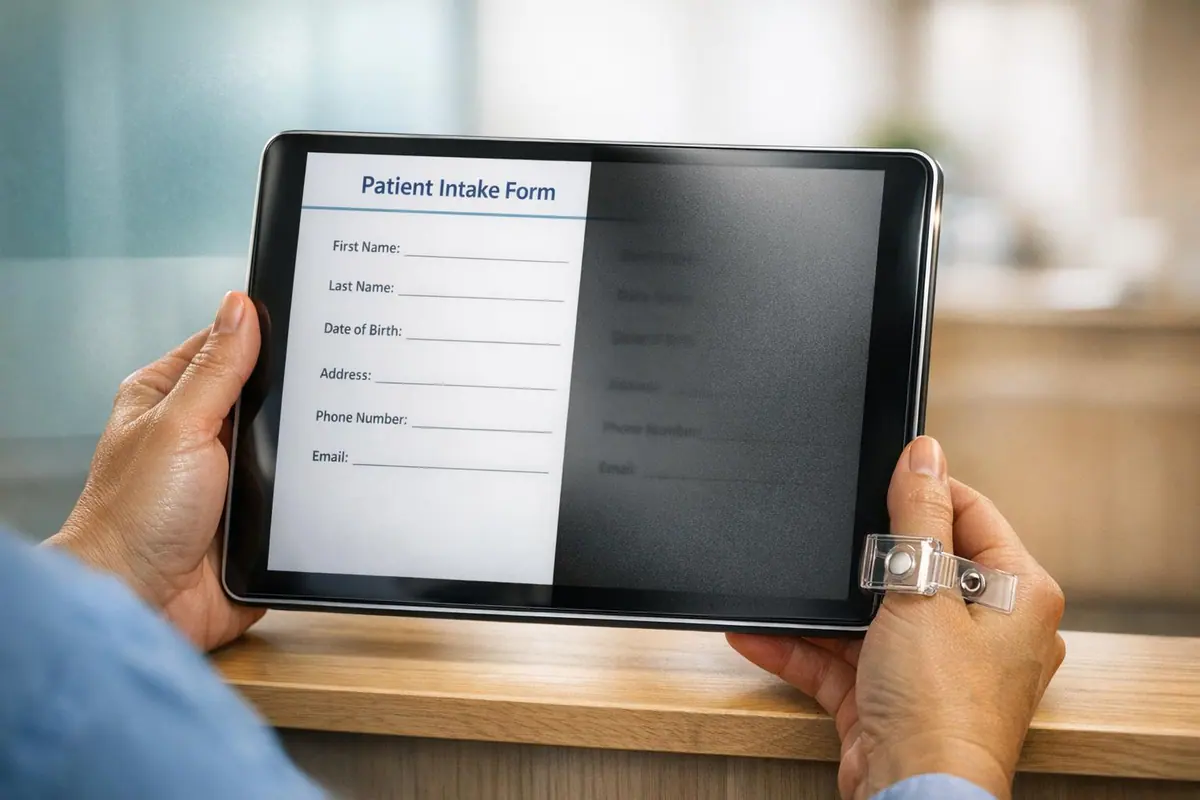
Healthcare forms collect sensitive Protected Health Information (PHI), making compliance with HIPAA (Health Insurance Portability and Accountability Act) critical. Mishandling PHI can lead to fines from $137 to $68,928 per violation, as well as loss of patient trust. In 2022, 344 data breaches in healthcare exposed 78.8 million records, highlighting the risks. This guide explains how to secure patient data, meet HIPAA requirements, and avoid penalties.
Key Takeaways:
- PHI Definition: Includes any health data linked to 18 specific identifiers (e.g., names, Social Security numbers, medical records, IP addresses).
- HIPAA Privacy Rule: Regulates how PHI can be collected, used, and shared. Requires patient rights acknowledgment and limits data collection to the "minimum necessary."
- Compliance Essentials:
- Use encryption (TLS for transmission, AES-256 for storage).
- Implement access controls (role-based permissions, multi-factor authentication).
- Maintain audit logs for all PHI access and modifications.
- Secure Business Associate Agreements (BAAs) with third-party vendors managing PHI.
- Common Pitfalls: Collecting unnecessary data, using non-compliant tools without a BAA, and failing to train staff on HIPAA requirements.
Action Steps:
- Audit forms for unnecessary PHI fields.
- Ensure all tools handling PHI have signed BAAs.
- Train staff on HIPAA compliance and patient privacy rights.
- Regularly review and update security measures (encryption, access controls, audit logs).
By following these steps, healthcare organizations can protect patient data, maintain compliance, and build trust.
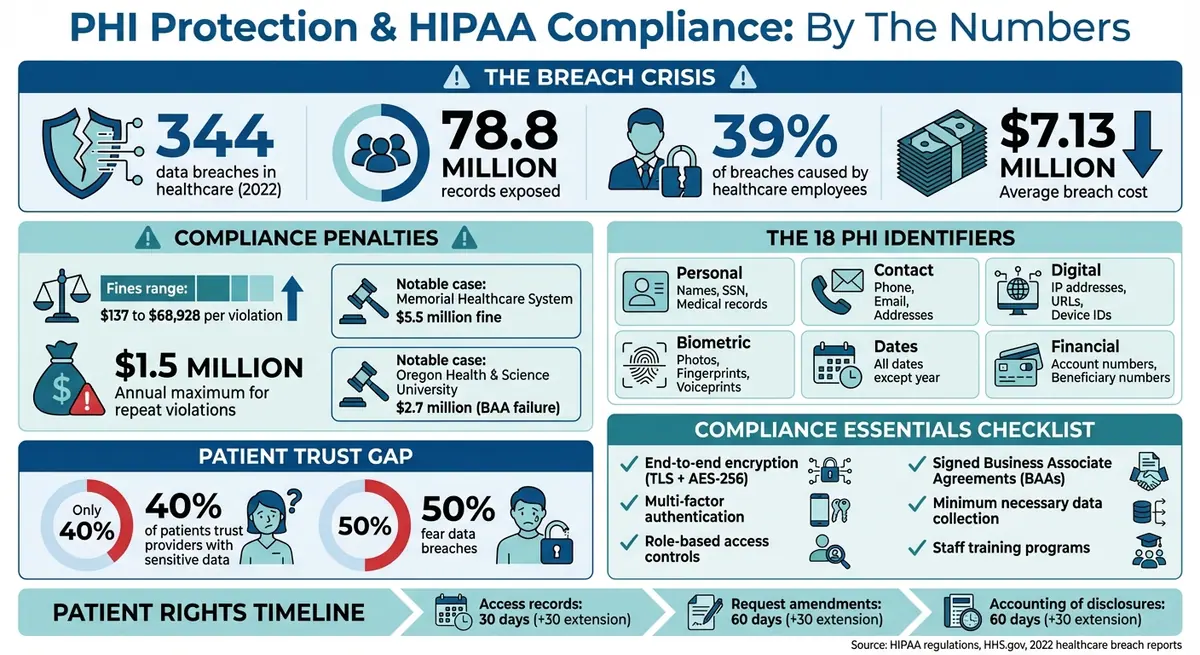
HIPAA Compliance Statistics and PHI Protection Requirements for Healthcare Forms
What is Protected Health Information (PHI) | HIPAA Training
sbb-itb-5f36581
What is Protected Health Information (PHI)?
Protected Health Information, or PHI, refers to any health-related data that can be linked to an individual’s identity, health condition, care, or payment details. This includes personal information like a patient’s name, date of birth, diagnosis, treatment plans, and insurance information. However, data is only considered PHI when it’s connected to specific identifiers.
"Protected Health Information, often referred to as PHI, represents any identifiable health-related data that is preserved or transmitted in any format or medium by a Covered Entity or its Business Associate." - HIPAAtizer
The Health Insurance Portability and Accountability Act (HIPAA) regulates PHI through its Privacy and Security Rules. These rules apply to Covered Entities, such as healthcare providers, health plans, and clearinghouses, as well as their Business Associates - third-party vendors that manage PHI on their behalf. The Privacy Rule outlines how PHI can be used and shared, while the Security Rule focuses on protecting electronic PHI (ePHI), which is often collected through tools like online forms, patient portals, and telehealth platforms.
Healthcare data is incredibly sensitive - and highly valuable. In fact, it’s often worth more than credit card information on the black market. Mishandling PHI can result in fines, legal trouble, and a loss of patient trust. Alarmingly, healthcare employees are responsible for 39% of all medical data breaches, often because they don’t fully understand which types of information are protected.
There are 18 specific identifiers that, when linked to health information, classify it as PHI under HIPAA. For example, a list of vital signs isn’t PHI on its own. But if those vital signs are paired with a patient’s name or medical record number, they become protected. Healthcare forms frequently combine identifiers with medical data, whether it’s for patient intake, appointment scheduling, or telehealth consent.
| Category | Specific Identifiers |
|---|---|
| Personal Details | Names, Social Security numbers, Medical record numbers |
| Contact Info | Phone numbers, Fax numbers, Email addresses, Street addresses |
| Digital Identifiers | IP addresses, Web URLs, Device identifiers/serial numbers |
| Biometrics/Images | Full-face photos, Fingerprints, Voiceprints |
| Dates | All dates related to an individual (birth, admission, discharge) except the year |
| Financial/Legal | Health plan beneficiary numbers, Account numbers, Certificate/license numbers |
| Other | Vehicle identifiers (license plates), any other unique identifying code |
Understanding what qualifies as PHI is essential for ensuring compliance with HIPAA. Next, we’ll look at how the HIPAA Privacy Rule impacts healthcare forms.
HIPAA Privacy Rule Requirements for Healthcare Forms
Understanding the HIPAA Privacy Rule
The HIPAA Privacy Rule sets a federal standard for how healthcare providers handle Protected Health Information (PHI) collected through forms and other methods. While its main goal is to protect patient privacy, it also gives patients specific rights over their health data. This rule applies to Covered Entities - like healthcare providers, health plans, and clearinghouses - as well as their Business Associates who process PHI on their behalf.
"HIPAA was established in the US in 1996 to help navigate through such threats, safeguarding patient medical information and enforcing the ramifications of non-compliance." - Pratik Ghela
For healthcare forms, the Privacy Rule outlines when and how patient data can be collected. For standard uses such as treatment, payment, or healthcare operations, PHI can typically be used without additional consent. However, for non-standard purposes - like marketing, research, or sharing data with third parties - written patient consent is required. This distinction is crucial when developing forms like intake documents, consent forms, or telehealth questionnaires.
Key Compliance Requirements
To comply with the Privacy Rule, healthcare forms must meet several specific requirements:
- Notice of Privacy Practices (NPP): Patients must receive a written explanation of how their data will be used, stored, and shared. This notice is typically provided during their initial visit and should be acknowledged via a signature or checkbox on the intake form.
- Minimum Necessary Rule: Forms should only collect the PHI needed for their intended purpose. For instance, a telehealth consent form doesn’t need to request a Social Security number unless it’s essential for billing or identification. Regularly reviewing forms to remove unnecessary fields is a simple way to stay compliant.
-
Patient Rights: Patients have legal rights related to their health information, and these rights must be respected throughout the lifecycle of the forms. For example, patients can:
- Access their records within 30 days of a request.
- Request corrections within 60 days.
- Revoke prior authorizations at any time.
Your forms should clearly outline these rights. For instance, include statements like: "By submitting this form, you consent to [Practice Name] collecting and storing the health information provided for treatment, payment, and healthcare operations."
Here’s a quick breakdown of key patient rights and response timelines:
| Patient Right | Response Timeline | Regulatory Citation |
|---|---|---|
| Right of Access | 30 Days (+30-day extension) | 45 C.F.R. § 164.524 |
| Right to Amend | 60 Days (+30-day extension) | 45 C.F.R. § 164.526 |
| Accounting of Disclosures | 60 Days (+30-day extension) | 45 C.F.R. § 164.528 |
- Administrative and Technical Safeguards: Protecting PHI requires robust safeguards. These include:
- Role-based access controls.
- Staff training on HIPAA compliance.
- Signed Business Associate Agreements (BAAs) with any third-party form builder or cloud storage provider.
- End-to-end encryption for data in transit and at rest.
- Unique user IDs for authentication.
- Audit logs to track every instance of PHI access.
It’s critical to avoid using any digital form tools for PHI collection unless a BAA has been signed. This is a non-negotiable requirement to ensure compliance.
Identifying PHI in Healthcare Forms
PHI, or Protected Health Information, is created when health data is tied to any of HIPAA's 18 identifiers. For example, if a patient’s diagnosis is linked to their name, date of birth, or medical record number, it becomes protected under HIPAA regulations.
"If someone can tell by reading the information in the form that John Smith... has a fever, that form contains PHI and is subject to HIPAA regulations." - HIPAAtizer
Recognizing where PHI appears in healthcare forms is essential for ensuring proper safeguards are in place. Let’s explore how specific types of forms collect this sensitive data.
New Patient Intake Forms
New patient intake forms are a treasure trove of PHI. They typically combine several identifiers - like full name, date of birth, Social Security number, and insurance details - with comprehensive health information, such as medical histories, current medications, allergies, and emergency contacts. These forms also include administrative and financial details, such as insurance policy numbers and payment authorizations, which HIPAA classifies as PHI when tied to healthcare services.
Because these forms collect such a wide range of sensitive information, they are a critical focus for HIPAA compliance efforts.
Telehealth Consent Forms
Telehealth consent forms gather PHI in ways that reflect the nature of virtual care. In addition to basic identifiers like names and contact details, these forms often capture digital identifiers, such as IP addresses and device serial numbers. When these digital markers are connected to a patient’s consent for remote care, they become protected under HIPAA.
These forms also document a patient’s understanding of the risks and benefits of virtual care, revealing personal healthcare decisions and treatment plans. Ensuring that telehealth forms address privacy risks specific to remote care is an important part of compliance.
Mental Health Assessment Questionnaires
Mental health questionnaires collect some of the most sensitive PHI, including details about psychological symptoms, substance use, and treatment goals. Tools like the PHQ-9 or GAD-7 generate scores that reflect a patient’s mental health status, making every field on these forms subject to HIPAA protections.
Given that healthcare employees account for 39% of medical data breaches, safeguarding mental health records is especially critical. Protecting this information not only ensures compliance but also fosters trust, encouraging patients to share openly during assessments. Using conditional logic - such as skipping irrelevant questions for certain patients - can reduce unnecessary data collection and improve the overall patient experience.
Understanding how PHI is gathered in these specific forms is key to maintaining HIPAA compliance across all aspects of healthcare operations.
Core Elements of HIPAA-Compliant Forms
Building on HIPAA's requirements, these key elements ensure that forms - whether paper or digital - are both secure and patient-focused. These components are essential to maintaining compliance and protecting sensitive information.
"Maintaining HIPAA compliance is not just about following the law - it's about building trust with your patients by demonstrating a commitment to their privacy." - Mick Essex, Growth Team Lead, POWR
HIPAA-compliant forms must meet six critical requirements: encryption/security, access controls, audit trails, data minimization, privacy practices acknowledgment, and signed BAAs (Business Associate Agreements). Missing any of these can result in penalties ranging from $100 to $50,000 per violation. Repeat violations could lead to annual fines as high as $1.5 million.
Secure Data Collection
To protect Protected Health Information (PHI), forms should use end-to-end encryption, such as SSL/HTTPS for data transmission and AES encryption for storage. Access should be tightly controlled with role-based permissions, unique user IDs, and multi-factor authentication. For added security, implement one-time password (OTP) verification via email or phone to confirm the identity of the person submitting the form.
Another key practice is conditional logic - only display questions relevant to the patient’s situation. For instance, a general intake form shouldn't include mental health-related questions unless the patient indicates they need those services. This approach not only reduces unnecessary data collection but also creates a smoother experience for patients.
While technical measures safeguard data, patient rights and privacy notifications play an equally important role in compliance. These empower patients by keeping them informed about how their data is handled.
Patient Rights and Notifications
Every healthcare form must include or be paired with a Notice of Privacy Practices (NPP) acknowledgment. This document outlines how PHI is used, the protections in place, and how patients can exercise their rights under HIPAA. Include a checkbox or signature field to confirm that patients have read and understood this notice.
If PHI is being collected for purposes beyond treatment, payment, or healthcare operations - like marketing or research - you must obtain explicit written authorization. These forms should clearly explain what information will be used, include an expiration date, and inform patients of their right to withdraw consent at any time.
Patients should also be reminded of their rights, such as accessing their records within 30 days or requesting corrections within 60 days. While forms don’t need to directly enable these actions, they should clearly communicate that these rights exist and provide instructions for exercising them. Patients can also request confidential communications, access disclosure logs, or amend their records as part of their rights under HIPAA.
| Component | HIPAA Requirement | Implementation Method |
|---|---|---|
| Data Security | Technical Safeguards | End-to-end encryption and secure web forms |
| Access Control | Security Rule | Unique user IDs and multi-factor authentication |
| Patient Rights | Privacy Rule | Notice of Privacy Practices (NPP) acknowledgment |
| Third-Party Risk | Administrative Safeguards | Signed Business Associate Agreement (BAA) |
| Data Minimization | Minimum Necessary Standard | Field-specific data collection limited to essential info |
| Accountability | Audit Trails | Automated logging of all PHI access and edits |
Automated audit trails are another critical safeguard. These systems log every interaction with PHI, including who accessed it, when, and any changes made. This tamper-proof documentation is vital for audits and helps detect breaches quickly. In 2022 alone, the healthcare industry faced 344 reported data breaches, with one incident compromising 78.8 million private records. A strong audit trail system can help your organization avoid becoming part of these alarming statistics.
Technical Safeguards for PHI Collection and Storage
The HIPAA Security Rule mandates technical measures to protect electronic PHI (ePHI) from unauthorized access, whether during transmission or while stored. These safeguards work alongside administrative and physical controls to ensure comprehensive protection. In 2020, the average cost of a data breach climbed to around $7.13 million. Alarmingly, healthcare data often holds more appeal to cybercriminals than even credit card information.
Three core components - encryption, access controls, and audit logging - are essential for safeguarding patient data throughout its lifecycle. Encryption, while technically "addressable" under HIPAA (allowing for alternatives in certain cases), remains the cornerstone for securing PHI. Properly encrypted data that is intercepted typically doesn't require breach notifications, as it becomes unreadable to unauthorized individuals. These safeguards are critical to maintaining compliance across digital platforms.
End-to-End Encryption
Encryption offers protection for PHI in two key states: in transit (when being transmitted) and at rest (when stored). For transmission, use TLS 1.2 or 1.3 protocols. For storage, AES-256 encryption is the gold standard.
"Encryption is the primary method of achieving this for data in motion and data at rest." - American Speech-Language-Hearing Association
To ensure encryption keys remain secure, store them in a Hardware Security Module (HSM) or use a trusted Key Management Service (KMS). Keep these keys separate from the encrypted data. Federal standards require the use of FIPS 140-2 or 140-3 validated cryptographic modules for both data storage and transmission. For particularly sensitive information, such as Social Security numbers or mental health details, consider adding application-level or column-level encryption for extra security.
Access Controls and Authentication
Access controls are vital to ensure that only authorized individuals can view or modify PHI, following the "minimum necessary" principle. This is especially critical given that healthcare employees are responsible for 39% of all medical data breaches. Implement Role-Based Access Control (RBAC) to align permissions with job functions.
Assign unique identifiers to every user, and pair them with Multi-Factor Authentication (MFA) for remote and privileged access. Opt for hardware keys or app-based one-time passwords rather than SMS, which can be intercepted. Enforce strong password policies with complex requirements and regular updates. To further protect data, set automatic logoffs and session timeouts for unattended workstations.
Conduct quarterly reviews of user access rights and immediately disable accounts when employees leave or change roles. Document the PHI contained in each system to manage permissions effectively and ensure compliance with the "minimum necessary" standard. Audit logs play a complementary role by tracking all interactions with PHI.
Audit Logs and Monitoring
Audit logging is just as critical as encryption and access controls for maintaining HIPAA compliance. These logs create an unalterable record of all PHI interactions. Systems should log key details such as user IDs, timestamps, source IP addresses, and specific actions like login attempts, data exports, privilege changes, or health record modifications.
Centralize logs in a Security Information and Event Management (SIEM) system using immutable formats like WORM storage to prevent tampering and support efficient monitoring. Define alert rules for unusual behaviors, such as access during off-hours, abnormal data transfers, or repeated failed login attempts. High-severity alerts should be reviewed daily, and regular audits can help identify potential insider threats or compromised accounts. Use cryptographic hashes and digital signatures to ensure data integrity, and implement File-Integrity Monitoring (FIM) to detect unauthorized changes to health records.
Additionally, maintain regular offsite backups and test restoration processes to ensure accurate recovery using checksums. Verified, encrypted backups stored separately from primary systems are essential for both business continuity and patient safety.
Business Associate Agreements (BAAs) for Form Tools
As part of a solid strategy to protect PHI, securing a Business Associate Agreement (BAA) is non-negotiable when working with third-party form tools. A BAA is a legally required contract that ensures these tools comply with HIPAA standards. It governs any third party that creates, receives, maintains, or transmits electronic PHI on behalf of your healthcare organization. According to HHS.gov:
"Before permitting a business associate to create, receive, maintain, or transmit ePHI, a regulated entity must have in place a contract or other written arrangement... that complies with the requirements."
This agreement spells out the provider's obligations to implement safeguards - administrative, physical, and technical - to protect patient data. Since the 2013 HITECH Act, Business Associates can face direct penalties for failing to comply with the HIPAA Security Rule. Financial penalties for missing or inadequate BAAs have ranged from $31,000 to as much as $2.7 million, with Oregon Health & Science University incurring the maximum fine in 2016.
Many standard tools, such as basic Google Forms or website builders, don’t automatically offer BAAs unless you’re on a specific enterprise or healthcare-tier plan. You should never allow any tool to process PHI without a signed BAA in place. These agreements must include key provisions like breach reporting (usually within 10 days), subcontractor compliance requirements, and protocols for PHI destruction.
To ensure secure data handling, the BAA should also require the form tool provider to obtain similar compliance agreements from any subcontractors they use - such as cloud hosting services like AWS or Azure. Steve Alder, Editor-in-Chief of HIPAA Journal, highlights the risks:
"If a covered entity fails to conduct due diligence to ensure a business associate is HIPAA-compliant prior to entering into an agreement, and a breach of unsecured PHI subsequently occurs, the covered entity may be considered liable for the breach."
It’s crucial to retain all BAAs and related security assessments for at least six years. Regularly review these agreements - ideally every year - to address changes in federal regulations, state laws, or the features of your chosen tools. For instance, using Google Workspace instead of personal Gmail ensures compliance within the scope of the BAA. This diligent approach to managing BAAs works hand-in-hand with technical and administrative safeguards, creating a comprehensive compliance framework for PHI management.
Best Practices for PHI Handling in Digital Forms
Protecting patient data requires consistent, practical measures. These practices not only safeguard sensitive information but also help maintain HIPAA compliance.
Minimize Data Collection
Only collect the PHI necessary for treatment, payment, or healthcare operations. Before adding a field to any digital form, ask yourself: Is this information absolutely required? For example, a general feedback survey doesn’t need names or birth dates. By anonymizing forms, you can often exclude them from HIPAA requirements entirely.
Use conditional logic to show only the questions relevant to the user. Instead of a one-size-fits-all intake form, create department-specific templates - for Dermatology, Orthopedics, Pediatrics, etc. - to avoid gathering irrelevant medical history. When drafting authorization forms, define clear expiration events like "90 days from signature" or "upon completion of surgery recovery" to limit prolonged access to patient records.
These steps not only reduce unnecessary data collection but also lay the groundwork for better risk management.
Regular Risk Assessments
Frequent evaluations help ensure your forms stay compliant with changing regulations. Conduct security risk assessments at least once a year or whenever there are updates to federal or state laws, or changes in your digital workflows. During these assessments, review every form field to eliminate outdated or unnecessary data points. Run test submissions to confirm that access logs are functioning properly and encryption is correctly configured.
Staff Training and Awareness
Training is one of the cornerstones of HIPAA compliance. Well-informed staff play a crucial role in limiting data collection and safeguarding PHI. With only 40% of patients trusting healthcare providers with sensitive information, demonstrating a strong commitment to security is more important than ever. Every team member must understand their role in handling PHI securely and adhering to the "minimum necessary" rule.
Require all employees to sign a HIPAA training acknowledgment to document their understanding. Training should include critical topics like role-based access controls, secure use of digital tools, breach recognition, and the exact steps for incident response. Update these materials annually, ensuring everyone knows who to contact and what procedures to follow in case of a data breach. Additionally, administrative staff must never share PHI with third-party form providers unless a signed Business Associate Agreement is in place.
Common Mistakes and Compliance Risks
Healthcare organizations, even with robust safeguards in place, can still fall into traps that jeopardize the protection of Protected Health Information (PHI). Missteps like misconfigured access controls or failing to sign Business Associate Agreements (BAAs) can lead to serious compliance breaches. The latest breach statistics reveal just how critical these risks are.
One of the most serious errors is using third-party form tools without a signed BAA. As the MakeForms team emphasizes:
"No BAA = no HIPAA compliance, regardless of features."
A common misconception is that encryption alone guarantees HIPAA compliance. Without a signed BAA, an organization remains liable if a vendor mishandles patient data. Memorial Healthcare System experienced this firsthand, paying $5.5 million after failing to enforce proper access controls, which allowed employees to access patient records without valid reasons.
Lax access controls also leave PHI vulnerable to misuse. Alarmingly, healthcare employees account for 39% of all medical data breaches. One high-profile case involved UCLA Medical Center, where inadequate restrictions led to unauthorized access to Britney Spears' medical records. The fallout? The termination of 13 employees and the suspension of six physicians. This incident highlights how critical role-based permissions are in safeguarding sensitive information.
Other frequent pitfalls include transmitting data without proper encryption (such as failing to use TLS during form submissions), collecting more PHI than necessary for treatment or billing, and neglecting to include consent checkboxes for privacy notices. Additionally, organizations often overlook that items like IP addresses, full-face photos, and geographic details smaller than a state are classified as PHI under HIPAA's 18 identifiers. Such oversights can invite audits and hefty penalties from the Department of Health and Human Services (HHS).
Beyond financial penalties, these mistakes can cause lasting reputational harm. With only 40% of patients trusting healthcare providers to safeguard their sensitive data and 50% fearing breaches, a single compliance failure can shatter patient trust. As Mick Essex, Growth Team Lead at POWR, points out:
"Maintaining HIPAA compliance is not just about following the law - it's about building trust with your patients by demonstrating a commitment to their privacy."
Reform Features for PHI Compliance
Reform simplifies the process of meeting HIPAA requirements by offering tools designed to securely handle Protected Health Information (PHI). With a focus on technical safeguards, Reform ensures that healthcare organizations can collect and manage PHI with confidence. The platform uses end-to-end encryption, employing AES-256 for data at rest and TLS 1.2 or higher for data in transit, to keep sensitive patient information secure at all times.
To further bolster security, Reform includes multi-factor authentication (MFA), role-based permissions, and automatic session timeouts, reducing the risk of unauthorized access. Additionally, Reform tracks every action with detailed audit logs, which are directly tied to its form builder. These logs monitor form submissions, access patterns, and data changes, creating a clear accountability trail that aligns with HIPAA compliance standards.
For legal compliance, Reform provides a signed Business Associate Agreement (BAA), fulfilling a key HIPAA requirement.
Feature Comparison Table
Here’s a breakdown of how Reform’s plans support essential compliance features:
| Feature | Basic Plan ($15/mo) | Pro Plan ($35/mo) | Done for You (Custom) |
|---|---|---|---|
| End-to-End Encryption | ✓ | ✓ | ✓ |
| Unlimited Responses | ✓ | ✓ | ✓ |
| Conditional Logic | ✓ | ✓ | ✓ |
| Email Support | ✓ | ✓ | Priority Support |
| Team Access & Permissions | ✗ | ✓ | ✓ |
| File Uploads | ✗ | ✓ | ✓ |
| Custom CSS & JavaScript | ✗ | ✓ | ✓ |
| Incomplete Response Tracking | ✗ | ✓ | ✓ |
| Pro Integrations (HubSpot) | ✗ | ✓ | ✓ |
| Expert Form Design | ✗ | ✗ | ✓ |
Integration and Customization Support
Reform integrates effortlessly with critical healthcare systems, such as Electronic Medical Records (EMR) platforms and CRMs like HubSpot and Salesforce. These integrations ensure PHI remains secure during data transfers by using encrypted channels and adhering to signed BAAs.
For organizations using the Pro Plan, customizable CSS and JavaScript provide the flexibility to adapt forms to specific compliance workflows. Whether it’s adding consent checkboxes, creating custom validation rules, or building multi-step forms that collect only the necessary PHI, these features allow for precise adjustments without sacrificing security. For those needing a fully tailored solution, the Done for You plan delivers expertly designed forms crafted to meet healthcare compliance needs.
Conclusion
Protecting PHI isn’t optional - it’s a responsibility that safeguards both patients and your organization. The stakes are high, with breaches posing significant risks and penalties.
Employees are responsible for 39% of breaches, and only 4 in 10 patients feel confident in their providers' ability to protect their data. Non-compliance can lead to fines ranging from $137 to $68,928 per penalty, with repeat offenses reaching up to $1.5 million annually. Beyond financial repercussions, violations can result in criminal charges, civil lawsuits, and long-term corrective action plans that can disrupt your operations for years.
"Maintaining HIPAA compliance is not just about following the law - it's about building trust with your patients by demonstrating a commitment to their privacy." - Mick Essex, Growth Team Lead, POWR
To strengthen compliance, focus on the essentials: apply the Minimum Necessary Rule to limit the PHI you collect, perform regular risk assessments, and automate compliance processes wherever feasible. Ensure that any third-party tools managing PHI are covered by a signed Business Associate Agreement (BAA).
Reform simplifies this process with features like end-to-end encryption, multi-factor authentication, detailed audit logs, and a signed BAA. These tools help reduce human error and make compliance easier to manage.
Take action by auditing your forms for the 18 PHI identifiers, confirming all vendors have signed BAAs, and providing thorough training for your team. With these measures in place, you can meet HIPAA requirements, protect patient data, and deliver a secure, seamless experience.
FAQs
Do IP addresses count as PHI on healthcare forms?
Yes, IP addresses can be classified as Protected Health Information (PHI) under HIPAA - if they are collected through healthcare-related websites or apps. Why? Because an IP address can potentially connect an individual to specific healthcare services, making it personally identifiable information.
This means that healthcare providers, organizations, or any covered entity must treat IP addresses with the same level of care as other sensitive data to comply with HIPAA's privacy and security rules. Mishandling such information could lead to breaches of patient confidentiality and regulatory penalties. Always ensure proper safeguards are in place to protect this data.
What should a HIPAA-compliant BAA include for form vendors?
A HIPAA-compliant Business Associate Agreement (BAA) should clearly define several key elements, including:
- Permitted uses and disclosures of PHI: Specifies how Protected Health Information (PHI) can be used or shared by the vendor.
- Safeguards to protect PHI: Details the measures the vendor must implement to ensure the security and confidentiality of PHI.
- Breach reporting obligations: Outlines the vendor’s responsibility to report any breach of PHI promptly.
- Terms for data access and deletion: Covers the procedures for accessing or securely deleting PHI when required.
These components are essential to ensure the vendor adheres to HIPAA regulations and manages sensitive information responsibly.
How long should we keep HIPAA audit logs for form submissions?
HIPAA mandates that audit logs be kept for a minimum of six years. However, certain state laws may enforce longer retention periods - sometimes up to ten years. To stay compliant, it's crucial to review both federal regulations and the specific requirements of your state.
Related Blog Posts
Get new content delivered straight to your inbox

The Response
Updates on the Reform platform, insights on optimizing conversion rates, and tips to craft forms that convert.




Drive real results with form optimizations
Tested across hundreds of experiments, our strategies deliver a 215% lift in qualified leads for B2B and SaaS companies.
