
.webp)
10 Tips for HIPAA-Compliant Consent Forms


Creating HIPAA-compliant consent forms is essential for protecting patient privacy and avoiding legal issues. A strong form ensures patients understand how their health information will be used and safeguards your practice from compliance risks. Here’s a quick breakdown:
- Include Required Elements: Specify details like what PHI is disclosed, who receives it, and the purpose of the disclosure.
- Use Plain Language: Write at an eighth-grade reading level for clarity.
- Explain Patient Rights: Clearly outline how patients can revoke consent.
- Be Specific: Avoid vague terms like "all records"; define exact data and timeframes.
- Add Statements on Conditioning and Redisclosure: Inform patients about risks and if signing affects their care.
- Ensure Secure Signatures: Use tamper-proof electronic or handwritten signatures.
- Set Expiration Dates: Define when the authorization ends or tie it to an event.
- Build in Data Security: Encrypt data and use access controls to protect PHI.
- Use No-Code Tools: HIPAA-compliant form builders simplify the process.
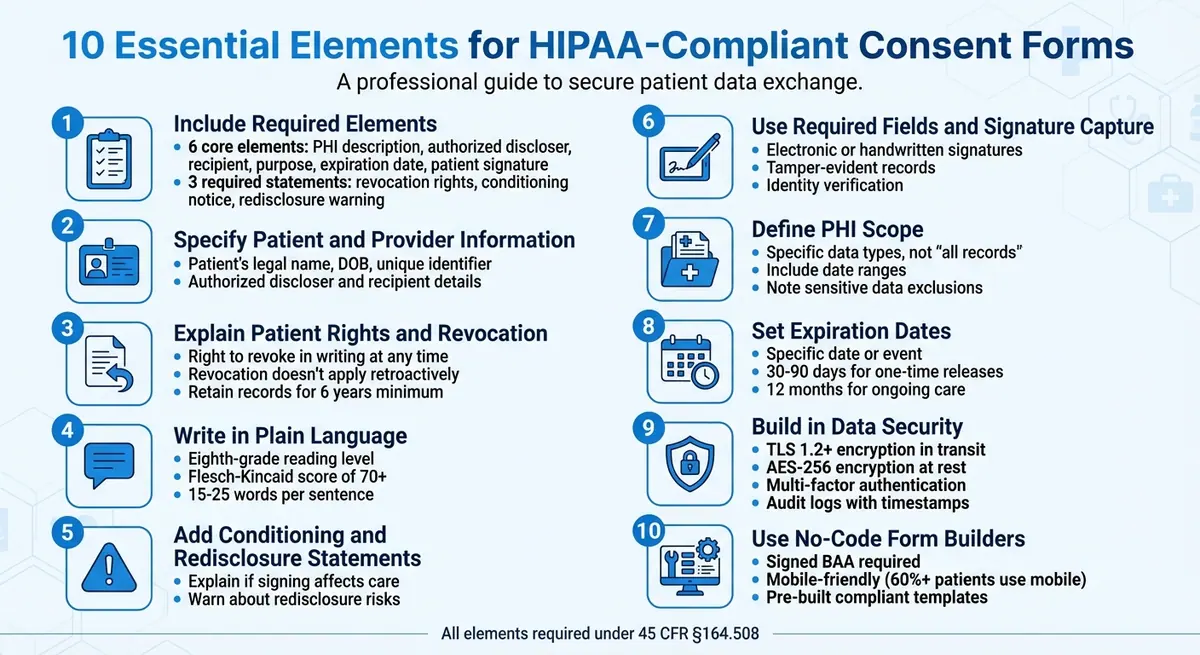
10 Essential Elements for HIPAA-Compliant Consent Forms
1. Include Required Authorization Elements
HIPAA Compliance Requirements
Creating a HIPAA-compliant authorization form involves including specific, legally mandated details. To meet these requirements, your form must include six core elements:
- A detailed description of the Protected Health Information (PHI) being disclosed
- The name of the person or entity authorized to make the disclosure
- The identity of the recipient of the information
- A clear explanation of the purpose for the disclosure
- An expiration date or event for the authorization
- The patient’s signature along with the date
Additionally, three key statements are required:
- A statement explaining the patient’s right to revoke the authorization in writing
- A notice clarifying whether treatment or benefits are contingent on signing the authorization
- A warning about the potential for re-disclosure, which may result in the loss of HIPAA protection
"The 'minimum necessary' standard does not apply to disclosures made pursuant to a valid authorization, [but] you should still narrow the description to only what is needed to fulfill the stated purpose." - Kevin Henry, HIPAA Expert, AccountableHQ
Avoid vague terms like "all records." Instead, be specific about the data being disclosed, such as lab results within a particular date range, imaging studies, or billing records. When setting expiration dates, opt for a specific calendar date or a defined event, like "end of research study", to avoid ambiguity.
Always use a standalone HIPAA authorization form. This ensures patients clearly understand they’re making a deliberate decision about their PHI. Additionally, you are required to retain signed authorizations and any written revocations for a minimum of six years from the date of creation or the last effective date.
Including these detailed elements not only ensures compliance but also helps patients feel informed and secure about their choices regarding their health information.
sbb-itb-5f36581
2. Specify Patient and Provider Information
HIPAA Compliance Requirements
Make sure to include the patient's legal name, date of birth, and a unique identifier to avoid any mix-ups. Additionally, clearly identify the authorized discloser - this could be your practice, a specific physician, or a provider group - and the intended recipient, whether that's a specialist, an insurance company, or a family member. By clearly defining these roles, you create a form that is both accurate and easy to understand.
Clarity and Readability for Patients
Once you've listed the necessary identification details, focus on presenting the information in a way that patients can easily follow. Steer clear of vague terms when naming individuals or organizations. For instance, instead of saying "healthcare providers", specify something like "Dr. Sarah Martinez, Cardiologist at Valley Medical Center" or "Blue Cross Blue Shield of California." This level of detail ensures patients know exactly who will access their Protected Health Information and for what purpose.
Use visual elements to make the form more accessible. Add distinct headings and leave plenty of white space to emphasize key sections like "Patient Information", "Authorized to Share", and "Authorized to Receive." Stick to a 12-point font and maintain 1-inch margins for better readability.
If the form is particularly long, consider including a brief summary at the top that highlights the key parties involved. This can make it easier for patients to grasp the essential details without feeling overwhelmed.
The Different Types of HIPAA Privacy Forms
3. Explain Patient Rights and How to Revoke Consent
When creating a consent form, it's crucial to include clear explanations of patient rights and the process for revoking consent. This ensures transparency and compliance with legal requirements.
HIPAA Compliance Requirements
Patients must be informed that they can revoke their authorization in writing at any time, as mandated by 45 CFR § 164.508(b). However, the form should clarify that revocation does not apply retroactively to disclosures made before the written request is received. Additionally, it should note that revocation might not be possible if the authorization was a condition for obtaining insurance coverage.
"A covered entity must permit an individual to revoke an authorization provided under this section, at any time, provided that the revocation is in writing." - 45 CFR § 164.508(b)
Patients should also be reminded of their rights as outlined in the Notice of Privacy Practices. Including this information ensures patients are fully aware of their rights and how to exercise them.
Clarity and Readability for Patients
Revocation instructions should be written at an eighth-grade reading level, using short, straightforward sentences. Clearly outline where patients should send their written revocation, such as a specific mailing address, a secure email, or the Privacy Officer's contact information. Avoid hiding this information in dense paragraphs - dedicate a separate section with a heading like "How to Revoke Your Consent" for easy visibility.
For example, you could include a simple note like:
"Revoking consent does not affect disclosures made prior to the receipt of your request."
Use clear formatting, such as bold headings, to make these instructions stand out.
Ease of Implementation and Customization
To ensure compliance and maintain trust, designate a staff member to manage revocation requests. This person should log the date the request is received and verify whether any disclosures occurred before the revocation took effect. Delayed responses can result in compliance issues and operational challenges.
Once a revocation is processed, promptly provide the patient with written confirmation, including the effective date. This not only builds trust but also creates a clear compliance record. Remember to retain all signed authorizations and revocations for at least six years from the date of creation or the last effective date, as required by law.
4. Write in Plain Language
Building on the foundation of clear patient rights and proper identification, using plain language is key to ensuring patients fully understand their consent.
HIPAA Compliance Requirements
HIPAA mandates that authorization forms must be written in plain language, as outlined in 45 CFR 164.508. This isn't just a recommendation - it's a legal requirement. Patients should easily grasp what information will be shared, with whom, for what purpose, for how long, and how they can revoke their authorization.
"The authorization must be written in plain language. Your goal is clarity: a reasonable person should understand what will be disclosed, to whom, for what purpose, for how long, and how to revoke." – Kevin Henry, HIPAA Compliance Expert, AccountableHQ
To ensure readability, use tools like the Flesch-Kincaid readability calculator (available in Microsoft Word). Aim for a score of 70 or higher to confirm that your document is easy to understand. Scores below 29 are flagged as very confusing. This requirement underscores the importance of using straightforward language that everyone can follow.
Clarity and Readability for Patients
To meet these plain language standards, focus on simplifying both the terminology and sentence structure in your forms.
Replace technical terms with everyday words. For instance:
- Use "blood draw" instead of "venipuncture."
- Write "about" instead of "approximately."
- Opt for "share" rather than "disclose."
If technical terms like PHI (Protected Health Information) are unavoidable, define them immediately. For example, "PHI means your health information that identifies you".
Stick to active voice and keep sentences concise, ideally between 15 and 25 words. Limit paragraphs to 3–5 sentences for better readability. For example, say, "We will share your medical records with your insurance company", instead of, "Your medical records will be shared with your insurance company."
Avoid outdated or overly formal phrases like "You hereby agree" or "the undersigned." For formatting, use 12-point sans-serif fonts like Arial or Calibri, stick to 1-inch margins, and align text to the left. Adding clear, question-based headings - such as "What are the risks?" - can also help patients navigate the document more easily.
| Complex Term | Plain Language Alternative |
|---|---|
| Venipuncture | Blood draw |
| Approximately | About |
| Revoke | Take back / Cancel |
| Disclose | Share |
| Remuneration | Payment |
| Expiration | End date |
Ease of Implementation and Customization
In 2023, UCSF simplified its consent forms to enhance patient understanding and speed up study approvals. They introduced "locked" IRB-approved statements that cannot be modified, ensuring plain language standards are consistently upheld.
Before finalizing your consent form, ask someone without a medical background to review it and answer questions about the content. You can also use the teach-back method during the consent process: have patients explain the form in their own words to confirm their understanding.
Finally, consider integrating prefilled form fields and digital signature tools to further strengthen compliance.
5. Add Statements on Conditioning and Redisclosure
When drafting HIPAA authorizations, it's crucial to include clear and concise statements about conditioning and redisclosure. These elements ensure compliance with HIPAA regulations and provide patients with the transparency they need to make informed decisions.
HIPAA Compliance Requirements
HIPAA authorizations must include two specific statements: one addressing conditioning and another about redisclosure. Here’s what each entails:
-
Conditioning Statement: This explains whether signing the authorization affects a patient's treatment, payment, enrollment, or benefits. In most cases, treatment or payment cannot be conditioned on signing the form. However, exceptions exist, such as research-related treatments or services designed solely to generate PHI for a third party. Even if no conditioning applies, you must state:
"Your treatment, payment, enrollment, or eligibility for benefits will not be conditioned on whether you sign this authorization." -
Redisclosure Notice: Patients should be informed that once their PHI is shared with entities not covered by HIPAA, it may be redisclosed and lose its protections under the HIPAA Privacy Rule. As Kevin Henry, a HIPAA Specialist at Accountable, explains:
"Your authorization must warn about redisclosure risks: once PHI is disclosed to a recipient that is not subject to HIPAA, it may be re-shared and may no longer be protected by the HIPAA Privacy Rule. This transparency is essential to informed patient consent."
For substance use disorder records governed by 42 CFR Part 2, additional redisclosure restrictions apply. These distinctions should also be clearly noted to avoid confusion.
Clarity and Readability for Patients
To ensure patients fully grasp these statements, make them easy to find and understand. Avoid burying them in dense legal jargon. Instead, use clear section titles like "Does signing affect my care?" and "What happens after sharing?" to guide patients to these critical points.
Additionally, when describing the PHI being shared, be as specific as possible. For example, instead of saying "all medical records", clarify with phrases like "office visit notes from October 2025" or "blood test results from your annual physical." This level of precision not only builds trust but also helps patients better assess the implications of redisclosure.
6. Use Required Fields and Signature Capture
HIPAA Compliance Requirements
Once you've established clear form language and defined patient rights, the next step is ensuring proper consent capture through required fields and secure signature processes.
For a HIPAA authorization to be valid, it must include the patient's (or their personal representative's) signature and date. The signing authority of the representative also needs to be documented. Electronic signatures are acceptable under HIPAA, provided your process verifies the signer's identity, confirms their intent, and creates a tamper-evident record. Kevin Henry, HIPAA Specialist at Accountable, explains:
"A HIPAA authorization must be signed and dated by you or your personal representative to be valid. That signature can be handwritten or electronic, as long as it meets valid signature criteria."
Make sure your forms include specific fields for patient ID, details of the protected health information (PHI), authorized parties, the purpose of disclosure, and an expiration date.
Clarity and Readability for Patients
Using required fields such as checkboxes and clearly labeled sections makes it easier for patients to select specific options rather than agreeing to vague, broad language. For instance, instead of offering a single checkbox for "all medical records", provide detailed options like "office visit notes from October 2025" or "exclude behavioral health records." This level of detail not only ensures transparency but also builds trust by helping patients fully understand what they’re authorizing.
If you're combining a HIPAA authorization with another document, such as a research consent form, create separate, clearly labeled sections with distinct signature lines for each. This separation clarifies that authorizing PHI use is a separate decision from participating in a study. By organizing forms this way, you help patients make informed choices while also setting the stage for secure digital signature capture.
Ease of Implementation and Customization
No-code form builders simplify the process of setting up required fields and signature capture. Use conditional logic to show additional or sensitive fields only when necessary for specific workflows. This keeps forms concise and aligns with the "minimum necessary" principle.
Automate the process further by sending patients a PDF copy of their completed forms immediately after submission. This not only streamlines operations but also provides patients with clear records of their consent.
Security and Data Protection Features
Once forms are completed, lock the content and store a hash to ensure the data remains tamper-evident. A robust system should also maintain a detailed audit trail, recording timestamps, IP addresses, and the identity verification method used (e.g., multifactor authentication or secure links).
To protect patient data, encrypt information in transit using TLS 1.2 (or higher) and encrypt data at rest with AES-256. These measures safeguard sensitive information and ensure compliance with HIPAA standards.
7. Define the Scope of Protected Health Information
HIPAA Compliance Requirements
HIPAA requires that consent forms clearly specify the exact Protected Health Information (PHI) to be disclosed. Avoid vague language like "all records ever" - instead, detail the specific types of data being requested.
PHI refers to any identifiable health information linked to a patient’s past, present, or future physical or mental health, healthcare services, or payment for those services. It becomes PHI when paired with identifiers, as outlined previously. Kevin Henry, a HIPAA Specialist, emphasizes the importance of precision:
"Identify the information to be used or disclosed in specific, meaningful terms. For instance, specify details like 'complete cardiology records from January 2023–present'."
This level of detail ensures patients understand exactly what information they are authorizing to share, meeting both compliance standards and patient expectations.
Clarity and Readability for Patients
When describing PHI, use simple, everyday language to ensure patients can easily understand. Replace broad terms with specific options, such as checkboxes for "laboratory results and diagnostic imaging only" instead of "all medical records". This gives patients greater control over what they share.
Include details like date ranges (e.g., "January 1, 2024–December 31, 2024"), service types (e.g., "records related to physical therapy for knee surgery"), or document categories to limit the scope of the disclosure. For sensitive information - such as behavioral health notes, HIV test results, or genetic testing - clearly state whether such data is included or excluded from the authorization. This transparency not only builds trust but also ensures patients are fully informed about their choices. By addressing these specifics, you empower patients to make decisions confidently, which is a cornerstone of HIPAA-compliant consent.
Ease of Implementation and Customization
To meet these requirements effectively, structure the PHI section with clear headings, specific checkboxes, and plenty of white space for better readability. Include fields that allow patients to opt in or out of particular categories, such as "share labs" or "exclude mental health/SUD records". This design not only simplifies the process for patients but also creates better audit trails, especially when using digital consent systems.
Make sure the data description aligns with the purpose of the request. Explaining why specific information is needed helps patients understand the rationale behind the request and reinforces its legitimacy. For records related to Substance Use Disorder (SUD), ensure compliance with the stricter 42 CFR Part 2 regulations by describing the information in a "specific and meaningful fashion". This approach balances legal compliance with patient empowerment, creating a more transparent and trustworthy process.
8. Set Expiration Dates and Revocation Instructions
HIPAA Compliance Requirements
According to 45 CFR 164.508, every authorization must include a clear expiration date or a specific event tied to the individual or the purpose of the disclosure. Vague terms like "no expiration" are not acceptable. Additionally, patients must be informed of their right to revoke authorization in writing at any time, except for actions already taken based on the original consent.
Your authorization form should clearly outline how patients can revoke their consent. This includes providing a specific contact method - such as a mailing address, secure email, or patient portal link - and listing any exceptions to revocation. For instance, if the authorization was necessary for obtaining insurance and other laws allow the insurer to dispute a claim, this must be stated. As Kevin Henry, a HIPAA expert at Accountable HQ, points out:
"The authorization must be written in plain language. Your goal is clarity: a reasonable person should understand what will be disclosed, to whom, for what purpose, for how long, and how to revoke."
This emphasis on clarity ensures patients can easily comprehend and act on the revocation process.
Clarity and Readability for Patients
Use specific dates or events to define the expiration of an authorization. For example, in the case of one-time record releases, an expiration period of 30–90 days works well. For ongoing care coordination, you might use terms like "until the end of active treatment" or specify a 12-month timeframe. For research studies or legal matters, tie the expiration to an event, such as "end of the research study" or "conclusion of the appeal", to avoid confusion.
To simplify revocation, include a dedicated "How to Revoke" section on your form. Use bold headings and leave plenty of white space to make this section stand out. Specify the exact details - such as the mailing address, email, or patient portal instructions - where revocation requests should be sent. Make it clear that revoking consent does not affect information already disclosed. Write these instructions at an eighth-grade reading level, using everyday language to ensure they are accessible to all patients. These steps also make it easier to integrate the process into digital platforms.
Ease of Implementation and Customization
For patient portals, consider adding a "Revoke" button that allows patients to submit a digital signature and automatically timestamps the request for audit purposes. This feature simplifies the process for patients and enhances internal documentation. Establish a protocol to promptly notify relevant staff, release-of-information teams, and business associates when a revocation is processed.
Digital systems should verify the patient’s identity, capture their intent, and maintain a tamper-evident audit trail for compliance. Always provide patients with a copy of the signed authorization - whether in paper or electronic form - so they have the revocation instructions on hand. Once a revocation is received, update your internal systems immediately and stop any future uses or disclosures based on the original authorization.
9. Build in Data Security Features
HIPAA Compliance Requirements
The HIPAA Security Rule sets clear guidelines for safeguarding electronic Protected Health Information (e-PHI). To ensure your consent forms meet these standards, you’ll need to implement TLS 1.2 or higher for data in transit, AES-256 encryption for data stored at rest, and maintain tamper-evident audit logs that track user actions and timestamps. These steps are essential for protecting sensitive patient data and keeping your forms compliant.
Before handling any PHI, make sure to sign a Business Associate Agreement (BAA) with any third-party form builder or e-signature platform. Use role-based access controls (RBAC) to limit dashboard access to only the necessary personnel, and enforce multi-factor authentication (MFA) for anyone accessing patient submissions. As Kirsten Peremore from HIPAA Times points out:
"The HIPAA Security Rule 'requires covered entities to maintain reasonable and appropriate administrative, technical, and physical safeguards for protecting e-PHI.'"
Security and Data Protection Features
Encryption and audit logs are just the start when it comes to securing patient data. To go further, consider using cryptographic hashing or checksums to detect unauthorized changes to signed records. Set up automatic logout after short periods of inactivity to prevent unauthorized access. Additionally, design your forms with conditional logic so that sensitive fields only appear when absolutely necessary, collecting the minimum required information for each patient’s situation.
Other essential measures include verifying signer identity through knowledge-based authentication or secure links. Set up alerts to flag unusual activity, like bulk downloads or logins from unfamiliar locations. For devices accessing forms, enable remote wipe capabilities to protect data if the device is lost or stolen. Lastly, maintain robust backup and disaster recovery plans to ensure data availability in case of system failures.
A comprehensive Security Risk Analysis is also critical. This analysis should cover your entire form ecosystem - APIs, integrations, and even email notifications - to identify and address any vulnerabilities. By taking these steps, you can create a secure, compliant environment for managing sensitive patient information.
10. Use No-Code Form Builders for Compliance
HIPAA Compliance Requirements
No-code form builders make it easier to create HIPAA-compliant consent forms. One key requirement? A signed Business Associate Agreement (BAA). This agreement ensures the vendor is legally obligated to protect Protected Health Information (PHI) and report any security breaches. As HIPAAtizer puts it:
"A Business Associate Agreement (BAA) is non-negotiable for any HIPAA online form builder."
Before you start collecting real patient data, make sure the BAA is fully executed.
Ease of Implementation and Customization
No-code platforms allow healthcare teams to design secure, mobile-friendly forms using simple drag-and-drop tools - no IT expertise required. Derek Strauss, COO of Tellescope, explains:
"An online form is HIPAA-compliant if it encrypts data, enforces access controls, securely disposes of PHI, and includes a signed Business Associate Agreement (BAA)."
Features like conditional logic are especially handy for consent forms. They let you show or hide fields based on patient responses, ensuring you only collect the information you truly need. Many platforms also provide pre-made templates with essential HIPAA elements, such as expiration dates, revocation instructions, and disclosure purposes. Plus, customization options - like adding your organization's colors, fonts, and logos - help maintain a professional look and feel for patients. Alongside this flexibility, these tools include advanced security measures to keep data safe.
Security and Data Protection Features
HIPAA-compliant form builders go beyond basic encryption. They use AES-256 encryption for data at rest, TLS 1.2 or higher for data in transit, and tamper-evident audit logs that track actions with timestamps and user IDs . Additional safeguards include multi-factor authentication (MFA) for admin access, role-based access controls to limit who can view submissions, and session timeouts to prevent unauthorized access. Tamper-evident electronic signatures ensure the integrity of patient-signed forms.
Given that over 60% of patients use mobile devices , it’s crucial to test your forms on iOS, Android, and tablets. Also, avoid accidentally sending PHI to non-compliant tools like basic CRM systems or standard Google Analytics. Platforms like Reform simplify compliance by offering HIPAA-ready infrastructure, complete with built-in security features and integrations with compliant CRM systems. These measures not only ensure your consent forms meet HIPAA standards but also help build trust with your patients.
Conclusion
Crafting HIPAA-compliant consent forms revolves around three core priorities: meeting regulatory standards, using clear and straightforward language, and ensuring strong security measures. To be valid, every authorization must include key elements like patient and provider identifiers, a clear outline of the protected health information (PHI) being shared, the purpose of the disclosure, an expiration date, and the patient’s signature.
But compliance isn’t just about checking boxes. As Kevin Henry, a HIPAA Expert, explains:
"The authorization must be written in plain language. Your goal is clarity: a reasonable person should understand what will be disclosed, to whom, for what purpose, for how long, and how to revoke."
The HIPAA Privacy Rule mandates plain language because true informed consent only happens when patients fully grasp what they’re agreeing to. Writing at an eighth-grade reading level, using active voice, and keeping sentences concise helps patients make informed decisions about their health data. This approach not only ensures compliance but also builds trust, reduces staff workload, and empowers patients to take control of their PHI.
Modern tools now make compliance easier than ever. No-code platforms offer pre-built HIPAA-compliant templates paired with automated security features like AES-256 encryption, tamper-evident audit logs, and multi-factor authentication. For example, Reform provides a HIPAA-ready framework with tools that allow healthcare providers to create professional, branded consent forms through simple drag-and-drop interfaces - no coding required. With over 60% of patients completing forms on mobile devices, these platforms ensure smooth performance across iPhones, Android devices, and tablets.
Before collecting any patient data, it’s critical to establish a Business Associate Agreement (BAA) with your form builder vendor - this is a legal must-have. Additionally, test forms on various devices, use conditional logic to gather only the necessary information, and automate the process of sending signed copies to patients. By focusing on compliance, patient comprehension, and data security, healthcare providers can confidently create consent forms that safeguard both patient trust and legal integrity.
FAQs
When do I need a HIPAA authorization vs a general consent form?
A HIPAA authorization is required when sharing protected health information (PHI) for non-standard purposes, such as providing information to researchers or employers. On the other hand, a general consent form is used for routine disclosures permitted under HIPAA, like those related to treatment, payment, or healthcare operations. Essentially, HIPAA authorization comes into play when PHI is disclosed outside of these standard scenarios.
What makes an e-signature HIPAA-compliant and tamper-proof?
A HIPAA-compliant e-signature must include robust security measures to safeguard Protected Health Information (PHI). Essential features include encryption, which ensures data remains secure during transmission, audit trails that document signing activities and timestamps, and authentication protocols to confirm the identity of the signer and block unauthorized access. Additionally, tamper-proof e-signatures rely on detailed audit logs to track every action and ensure that documents cannot be altered after they are signed. These safeguards are critical for maintaining compliance, protecting sensitive information, and ensuring the legal validity of signed documents under HIPAA guidelines.
How do I handle revocations already in progress?
To manage in-progress revocations effectively, make sure patients can revoke their authorization in writing at any time, as outlined by HIPAA regulations. Once a written revocation is received, update records immediately to halt any further disclosures. Keep a clear record of the revocation process and notify the relevant staff to ensure compliance and safeguard patient privacy. Adding an 'Allow Revocation' option to your forms can simplify and speed up this procedure.
Related Blog Posts
Get new content delivered straight to your inbox

The Response
Updates on the Reform platform, insights on optimizing conversion rates, and tips to craft forms that convert.



Drive real results with form optimizations
Tested across hundreds of experiments, our strategies deliver a 215% lift in qualified leads for B2B and SaaS companies.
