
.webp)
Best Practices For Cookie Consent Sync



Key Takeaways:
- What It Is: Sharing user consent preferences across platforms so tools act consistently.
- Why It Matters: Prevents data loss, maintains compliance, and protects user trust.
- Risks of Errors: Broken attribution, reduced conversions, and legal penalties.
- Privacy Laws: GDPR (opt-in), CCPA/CPRA (opt-out), and others require strict compliance.
- How to Implement: Use a CMP, block non-essential scripts until consent is given, and ensure real-time updates.
Quick Steps to Get Started:
- Choose a reliable CMP that supports Google Consent Mode and IAB TCF standards.
- Configure scripts to respect consent states before activation.
- Sync preferences across devices and systems.
- Maintain detailed audit logs of user consent actions.
- Test your setup regularly to catch and fix errors.
Proper cookie consent sync isn't just about compliance - it's essential for accurate tracking and building trust with users.
Consent Mode v2: What you need to know and setup with Cookiebot
sbb-itb-5f36581
Privacy Regulations That Govern Cookie Consent Sync
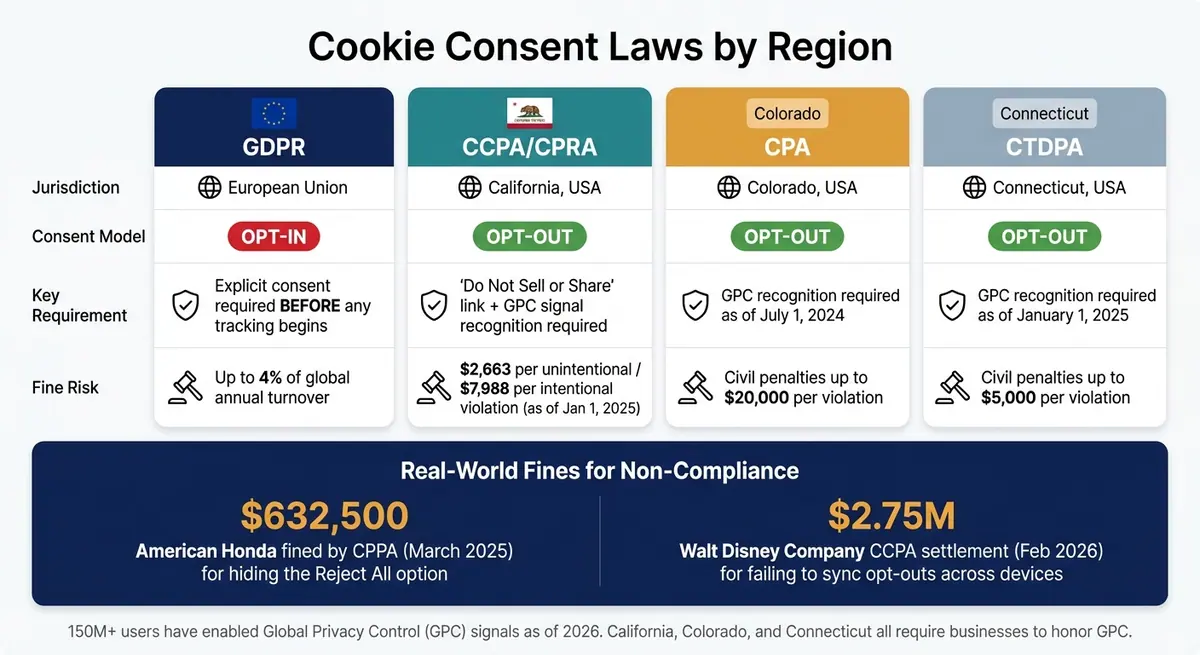
Cookie Consent Laws by Region: GDPR vs CCPA/CPRA vs U.S. State Laws
Key Privacy Laws to Know
When it comes to cookie consent, two major privacy laws stand out: GDPR and CCPA/CPRA. GDPR, which applies across the European Union, requires users to explicitly opt in before any non-essential tracking occurs. In contrast, California's CCPA/CPRA permits cookies to load by default but mandates an easy-to-find opt-out option that updates all systems immediately upon selection.
| Regulation | Jurisdiction | Consent Model | Key Requirement |
|---|---|---|---|
| GDPR | European Union | Opt-in | Explicit consent before any tracking |
| CCPA/CPRA | California, USA | Opt-out | "Do Not Sell or Share" link + GPC recognition |
| CPA | Colorado, USA | Opt-out | GPC recognition required as of July 1, 2024 |
| CTDPA | Connecticut, USA | Opt-out | GPC recognition required as of January 1, 2025 |
U.S. state laws also emphasize the importance of providing symmetrical choices. For example, under CCPA § 7004, "Reject All" options must be as prominent as "Accept All." Designs that bury rejection options can lead to penalties. This is why many brands are switching to multi-step forms to balance compliance with user experience. In March 2025, American Honda faced a $632,500 fine from the California Privacy Protection Agency (CPPA) for offering a one-click "Allow All" button while hiding the rejection option within a preferences menu.
Another critical element is Global Privacy Control (GPC), a browser signal that automatically communicates a user's opt-out preferences. California, Colorado, and Connecticut require businesses to honor GPC signals, and California now insists on visible confirmation that the signal has been processed. With over 150 million GPC users reported as of 2026, ignoring this signal poses a major compliance risk.
These detailed requirements highlight the need for customized consent synchronization strategies that align with regional laws.
Staying Compliant Across Multiple Jurisdictions
Managing consent across varying jurisdictions is essential to maintain compliance and ensure accurate real-time lead generation. With over 20 U.S. states enforcing their own privacy laws, a one-size-fits-all consent banner simply doesn’t work anymore. The solution? Geo-targeted consent rules. By using IP-based geolocation, businesses can serve tailored consent experiences. For example, EU visitors would see an opt-in banner, while California residents would encounter an opt-out mechanism with a clear "Do Not Sell or Share" link.
Another crucial aspect is cross-device synchronization. For logged-in users, any opt-out must apply across all devices linked to their account. In February 2026, The Walt Disney Company faced a $2.75M settlement, the largest CCPA fine to date, because a user who opted out on a web browser was not opted out on their Roku or Hulu apps.
"Consumers shouldn't have to go to infinity and beyond to assert their privacy rights." - Rob Bonta, California Attorney General
The stakes are high when it comes to non-compliance. Starting January 1, 2025, fines for violations under CCPA are $2,663 per unintentional violation and $7,988 for intentional ones. Unlike earlier versions of the law, there’s no longer a mandatory 30-day window to fix issues before penalties kick in.
"The industry continues to see increasing amounts of litigation in the realm of cookies, scripts, pixels, and web beacons. A successful consent strategy supports privacy compliance while also driving the business forward; these are not mutually exclusive pursuits." - Kyle Comstock, Privacy Expert, Seamless.AI
Best Practices for Setting Up Cookie Consent Sync
Using a Consent Management Platform (CMP)
A Consent Management Platform (CMP) serves as the foundation for managing cookie consent effectively. It simplifies the process by automating cookie scanning, displaying banners tailored to specific locations, and transmitting consent signals to tracking tools in real time.
When selecting a CMP, ensure it supports Google Consent Mode v2 and IAB TCF 2.2, as these are essential for meeting current regulatory requirements. Keep in mind that Google Consent Mode v2 became mandatory for traffic within the European Economic Area starting in March 2024.
| CMP | Best For | Starting Price |
|---|---|---|
| Cookiebot | Small businesses needing automated scanning | Free for up to 50 subpages; paid plans start at $12/month |
| CookieYes | Startups and blogs | Free for up to 100 pages; paid plans start at $10/month |
| Osano | U.S.-focused compliance (CCPA/CPRA) | Several hundred dollars per month |
| OneTrust | Large enterprises | Custom pricing, typically in five figures annually |
After setting up your CMP, configure it to block all non-essential scripts until explicit consent is received. This ensures that analytics and marketing tags only activate after users agree. You can achieve this by modifying your script tags (e.g., changing them to type="text/plain") or by using your tag manager’s consent triggers to check the consent state before running other tags.
Additionally, embed consent options directly into your forms to secure compliance during lead generation.
Adding Consent Collection to Your Forms
To stay compliant, integrate consent collection into your lead generation forms. This ensures that non-essential tracking only activates after users explicitly submit their information. Avoid pre-ticked boxes - users must actively select their preferences. For added transparency, allow users to manage cookies individually, such as accepting analytics cookies while rejecting marketing ones, instead of forcing an "Accept All" option.
Platforms like Reform can simplify this process. With real-time integrations into CRM and marketing tools, Reform ensures that data flows downstream only after proper consent is captured.
"The regulation requires that refusing cookies must be as easy as accepting them - meaning a single-click 'Reject All' button must be equally prominent as 'Accept All.'" - Chimaka Ikemba, Privacy & Compliance Writer
Also, avoid using <noscript> tags in your tracking scripts. These tags can bypass your consent mechanisms if JavaScript is disabled, which directly violates GDPR regulations. Removing them ensures your data collection respects user consent and remains compliant.
Keeping Consent Preferences Updated in Real Time
Once you’ve set up consent collection, it’s critical to keep preferences updated dynamically. Any changes users make to their consent should immediately sync across all connected systems. Your CMP should automatically push updates to your tag manager and active scripts whenever preferences are modified.
To manage this, use dynamic script loading by assigning consent category attributes. This disables scripts until users provide approval. Pair this with a centralized consent database that stores key details like consent ID, timestamp, anonymized IP address, and specific user choices. This setup ensures synchronization and provides a reliable audit trail.
Finally, make it easy for users to update their consent at any time. A floating icon or footer link that reopens the consent panel fulfills GDPR requirements and aligns with growing expectations under U.S. state laws. While the standard consent duration is six months, some jurisdictions may require re-consent as often as every three months. These steps complete the framework for a robust, real-time cookie consent synchronization system.
Monitoring and Validating Cookie Consent Sync
Metrics to Track Sync Performance
Keep a close eye on your consent capture rate and sync success rate through your CMP dashboard. High-performing systems typically maintain a 99.8% compliance rate and achieve around 75% user consent, often by using optimized lead forms that prioritize user experience. If you notice a sudden drop in these metrics, it could point to issues like a broken banner or a misconfigured trigger.
Once you’ve identified potential problems, follow up with thorough quality checks to address any errors.
Handling Errors and Quality Checks
One frequent issue with sync failures is a race condition where tags fire before the CMP initializes the consent state. You can identify this in GTM Preview Mode by checking if tags appear in the "Tags Fired" list before the CMP initialization tag runs. To fix this, configure your CMP tag with the "Consent Initialization – All Pages" trigger in GTM. Also, ensure the default "denied" consent state is set synchronously in the <head> before the GTM snippet loads.
To confirm that consent signals are passing correctly, use your browser's Network tab to check for the gcs parameter in outgoing requests. A value of G111 means consent is granted, while G100 indicates it is denied. If a user accepts cookies but you still see G100, the sync process has failed somewhere.
"Don't assume consent is working because the banner shows up. Use consent debugging to verify CMP implementation." - CookieScript
For accurate testing, use an incognito window after clearing all storage to prevent cached values from hiding issues. Run navigator.globalPrivacyControl in the browser console to ensure your site respects Global Privacy Control (GPC) signals. Additionally, confirm that consent cookies are set at the root domain (e.g., .example.com) to ensure preferences carry over across subdomains.
Proper error handling and testing are essential for maintaining the audit trails required for regulatory compliance.
Keeping Audit Trails for Compliance
Monitoring performance is just one part of the puzzle - having proof of consent is equally critical. Under GDPR Article 7, data controllers must demonstrate that users gave consent before processing their data.
Audit logs should include:
- Timestamp: The exact date and time of the consent action.
- User Identifier: A pseudonymized identifier, like a hashed IP or session ID.
- Consent Context: The policy version and banner configuration shown.
- Action Taken: What the user selected (e.g., "Accept All" or specific toggles).
- Withdrawal Log: Details of when and how consent was revoked.
Here’s an example of what your audit log should capture:
| Required Log Component | What It Captures | Why It Matters for Audits |
|---|---|---|
| Timestamp | Exact date and time of the interaction | Proves consent occurred before data processing began |
| User Identifier | Hashed IP, session ID, or account ID | Links the action to a pseudonymized individual |
| Consent Context | Policy version and banner configuration shown | Documents what the user was informed of |
| Action Taken | Buttons clicked or toggles enabled | Demonstrates an unambiguous affirmative action |
| Withdrawal Log | Date and method of consent revocation | Confirms the organization honored the user's right to withdraw |
Store these logs securely, limit access to authorized personnel, and ensure your CMP allows on-demand exports for reviews by Data Protection Authorities (DPAs). Running quarterly cookie audits can help confirm that non-essential scripts stay blocked until consent is given and that logs are accurate and consistently generated.
Conclusion and Next Steps
Why Privacy-First Practices Matter
Getting cookie consent synchronization right isn’t just about staying on the right side of regulations - it’s a strategy that can directly boost your business. Consented users are 2 to 5 times more likely to convert compared to unconsented users. On the flip side, low consent opt-in rates can hurt your ability to measure campaigns, optimize spending, and grow revenue effectively. Real-time synchronization doesn’t just keep you compliant - it helps you fine-tune campaign performance.
Regulations are evolving, and authorities are cracking down harder on non-compliance. For instance, France’s CNIL and Sweden’s DPA have already issued fines to websites that use design tricks to nudge users toward “Accept” while making rejection more difficult.
How to Get Started
Turn these insights into action by improving your consent approach. Begin with a thorough audit of your current setup. Ensure that your "Accept All" and "Reject All" buttons are visually identical in size, color, and contrast. Also, make sure your site recognizes Global Privacy Control (GPC) signals, as enforcement efforts are ramping up in states like California, Colorado, and Connecticut.
From there, prioritize these steps:
- Use a reliable CMP: Choose a consent management platform that integrates with your lead generation form templates to enable real-time synchronization.
- Strengthen audit trails: Ensure your system logs consent data accurately for compliance purposes.
- Streamline workflows: If you’re using tools like Reform, take advantage of built-in integrations to automatically pass consent data into your CRM. This eliminates the need for manual fixes.
FAQs
How do I sync cookie consent across web, mobile, and apps?
To ensure consistency in cookie consent across multiple platforms, you’ll need a real-time synchronization system with a central consent ledger. This ledger acts as a single source of truth, streamlining consent management.
Here’s how to make it work:
- Compact JSON Schema: Use a lightweight JSON format to store consent data. This keeps the system efficient and easy to manage.
- Local Caches with Real-Time Sync: Implement local caching for faster access, paired with real-time server synchronization methods like websockets to keep data updated across platforms.
- Enforce Consent in Server APIs: Build consent enforcement directly into server-side APIs to ensure compliance at every level of interaction.
To enhance user trust and meet compliance standards, follow these best practices:
- Clear User Prompts: Make consent requests straightforward and transparent.
- Audit Events: Record all consent-related actions for accountability.
- User-Friendly Options: Allow users to easily update or export their preferences, giving them full control over their data.
By combining these strategies, you can create a seamless and compliant experience for users across all platforms.
What’s the safest way to stop tags from firing before consent loads?
To ensure the highest level of data protection, it's best to implement a consent initialization trigger that defaults all consent settings to "denied". This way, no tags are fired until the user explicitly provides their consent, effectively preventing any data from being collected without permission.
What consent details should I log to prove compliance?
To stay compliant with GDPR, CCPA, and similar privacy regulations, it's crucial to log key consent details. This includes tracking what data users agreed to share, when they gave their consent, and how that consent was collected. Maintaining thorough records of these actions ensures you're prepared to demonstrate compliance if needed.
Related Blog Posts
Get new content delivered straight to your inbox

The Response
Updates on the Reform platform, insights on optimizing conversion rates, and tips to craft forms that convert.



Drive real results with form optimizations
Tested across hundreds of experiments, our strategies deliver a 215% lift in qualified leads for B2B and SaaS companies.
