
.webp)
How to Sync Consent Across Devices and Domains



Syncing user consent across devices and domains is essential for ensuring compliance with privacy laws like GDPR and improving user experience with multi-step forms. Without proper synchronization, users face repeated consent banners, risking frustration and regulatory violations. Here's a quick breakdown:
- Why It Matters: U.S. households average 17 connected devices, and global users juggle 3.6 devices daily. Unsynced consent leads to compliance risks and user dissatisfaction.
- Legal Requirements: GDPR Article 7(3) mandates that withdrawing consent must be as easy as giving it. Additionally, the ePrivacy Directive and U.S. state laws require businesses to honor opt-out preferences across all platforms.
- Key Challenges: Identifier inconsistency, anonymous-to-authenticated transitions, security risks, and technical delays can disrupt consent synchronization.
- Solution: Use a Consent Management Platform (CMP) with centralized storage, server-side APIs, and secure user identification methods like hashed emails or JWTs.
This guide explains how to set up a robust consent management system to meet legal standards, reduce user frustration, and maintain trust.
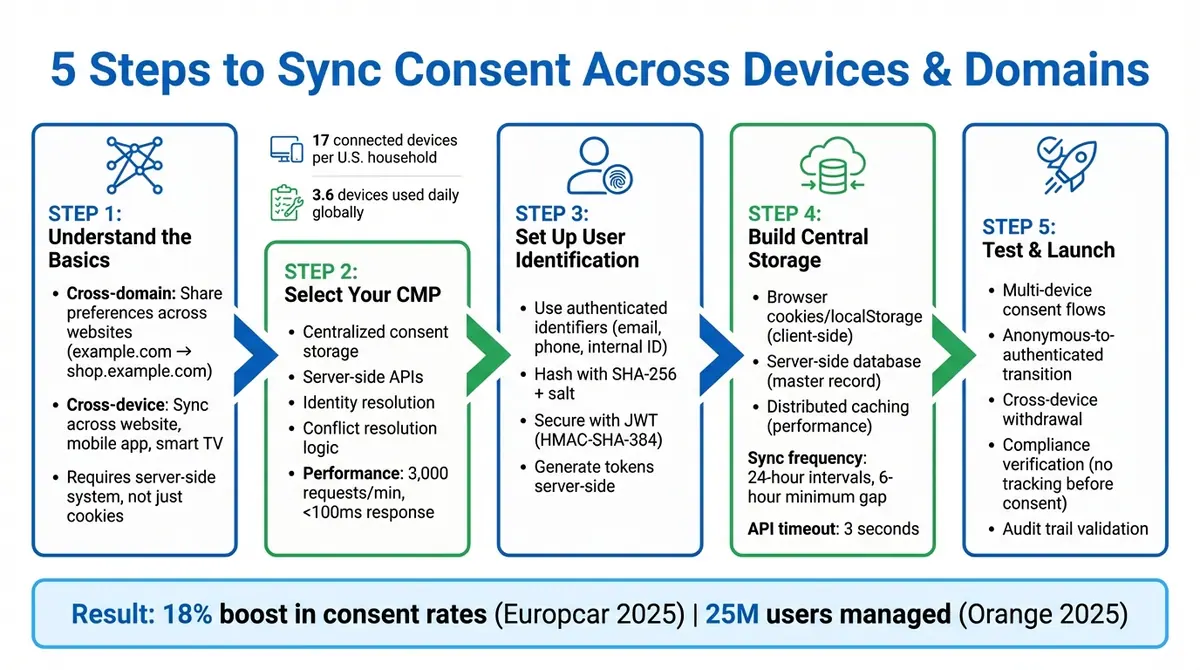
5-Step Process for Cross-Device Consent Synchronization
Ensighten CC - Cross-domain | Cross-device Consent

sbb-itb-5f36581
Step 1: Cross-Device and Cross-Domain Consent Basics
To sync consent effectively across devices, it's important to understand the systems at play. Cross-domain consent allows you to share user preferences across your websites or subdomains - like example.com and shop.example.com - using "group cookies". This method doesn't require users to log in. On the other hand, cross-device consent synchronizes preferences across completely different devices - such as a website, mobile app, or smart TV - using a unique, authenticated identifier like a hashed email or secure user ID.
Here's the catch: browser cookies, which are often client-side, can't be accessed by mobile apps, TV platforms, or email systems. Relying only on these cookies leaves gaps in your consent system. To truly align user preferences across devices, you need a server-side system. This system stores consent in a centralized cloud profile tied to each user's identifier. When a user logs into a new device, the Consent Management Platform (CMP) retrieves their centralized consent profile. This setup ensures compliance with the strict legal frameworks governing consent.
Legal Requirements for Consent Synchronization
Consent synchronization systems must meet stringent legal standards. Under GDPR and the ePrivacy Directive, consent must be freely given, specific, informed, and unambiguous. Users must actively opt in. The ePrivacy Directive doesn't just apply to cookies - it extends to any data accessed from a user's device, including browser fingerprinting. GDPR Recital 30 emphasizes this point: "Natural persons may be associated with online identifiers provided by their devices, applications, tools and protocols... This may leave traces which... may be used to create profiles of the natural persons and identify them".
In a cross-device setup, if a user opts out on one device, that choice must apply to all devices where they are logged in. The only exception is for "strictly necessary" cookies, such as those enabling login sessions or shopping carts.
Regulatory enforcement is becoming tougher. For instance, France's CNIL can impose fines of up to €20 million for ePrivacy violations, while Ireland's Data Protection Commission can issue fines reaching €5 million. A study conducted in 2025 revealed that 97% of EU apps were still violating regulations, often by using dark patterns like making "Accept All" buttons more prominent than "Reject All" options.
Common Challenges in Cross-Device Consent
One of the biggest hurdles is identifier inconsistency. Without a persistent, unique identifier, it becomes difficult to link users across platforms. This makes authentication essential for cross-device synchronization.
Another challenge is handling the transition from anonymous to authenticated users. When an anonymous user logs in, you must decide whether the consent tied to their authenticated profile overrides the current session's preferences - or vice versa - based on legal requirements and user expectations.
Security is another critical factor. Transmitting user identifiers over public networks requires strong safeguards, such as secure tokens like JSON Web Tokens (JWT) or salted hash digests, to prevent unauthorized access to consent profiles.
Finally, technical latency can disrupt the process. If the system takes too long to sync - typically beyond a 3-second timeout - it might default to showing a consent banner or rely on local data, leading to an inconsistent user experience. For example, in March 2025, Orange, France's leading telecom operator with over 25 million monthly users, implemented centralized cross-device consent management for its web, mobile, and TV platforms. This move boosted overall consent rates by 10% and eliminated repeated banner requests across devices.
Step 2: Selecting Consent Management Tools
Picking the right Consent Management Platform (CMP) is essential for managing consent across devices and domains effectively. Many tools fall short when it comes to handling the complexities of modern consent requirements. A CMP should go beyond basic cookie banners, ensuring user preferences are applied consistently across your entire tech ecosystem. Here's what to look for in a CMP and how it can address these challenges.
Key Features to Look for in a CMP
A strong CMP should include centralized consent storage - a cloud-based system that keeps all user preferences in one unified location. This ensures that consent records remain consistent across digital touchpoints. Without centralized storage, consent data becomes fragmented, increasing the risk of compliance issues and unauthorized data processing.
Server-side consent APIs are another critical feature. Relying solely on client-side tools can lead to vulnerabilities. A server-side approach provides tamper-proof records and allows real-time updates to downstream systems like CRMs and email marketing platforms.
Identity resolution is equally important. Your CMP should connect various identifiers - cookies, device IDs, hashed emails, and internal account IDs - into a unified identity graph. This ensures users are recognized across platforms like web, mobile, and connected TV. Secure authentication methods, such as JSON Web Tokens (JWT), allow profile synchronization without exposing sensitive information.
A good CMP also includes conflict resolution logic. For instance, when a user logs in on a new device, the system should determine whether to prioritize existing server-side consent or new anonymous local consent. The platform should handle high-performance demands, such as processing up to 3,000 requests per minute with response times under 100 milliseconds.
Finally, look for downstream signal distribution. This feature automatically generates and sends compliance signals - like Global Privacy Platform (GPP) strings - to adtech APIs and SDKs. As FLLR Consulting highlights:
"Consent is only meaningful if it changes system behavior. A banner that collects preferences but does not block data collection is worse than useless".
With these features in place, your CMP can effectively manage user consent while ensuring compliance.
How Reform Supports Consent Synchronization
While Reform isn't a dedicated CMP, it offers tools that align with cross-device synchronization strategies, making it a valuable asset for creating seamless, compliant consent processes. Reform’s conditional routing feature allows you to guide users through dynamic, multi-step consent forms that adapt to their preferences in real time.
For example, you can design forms that collect privacy preferences and adjust workflows based on user choices. If someone opts out of marketing communications, Reform can trigger a specific workflow to reflect that decision, ensuring immediate updates to the user experience.
Reform also integrates with popular CRMs and marketing automation tools like HubSpot, Salesforce, and others through Zapier. This ensures that consent preferences captured through Reform forms are instantly reflected in downstream systems, helping to avoid compliance gaps.
Additionally, Reform’s email validation and lead enrichment features enhance compliance by ensuring accurate and verified contact information. This minimizes the risk of sending communications to invalid addresses or misidentified users, keeping your processes both efficient and compliant.
Step 3: Setting Up Cross-Device User Identification
Once you've chosen your CMP, the next step is creating a unified user identifier to sync consent across all devices. This ensures that when a user updates their privacy preferences on one device, those changes automatically apply to others. This setup is vital for maintaining consistent consent management and adhering to privacy regulations. After establishing unique IDs, the focus shifts to securely linking user profiles.
Methods for Creating Unique User IDs
To link user consent across devices, use authenticated identifiers such as email addresses, phone numbers, or internal IDs during login. Many systems start with an anonymous device ID, which later connects to a verified identifier once the user logs in. This process creates a unified identity graph, enabling seamless consent synchronization.
To safeguard user privacy, it's essential to hash these identifiers before sharing them with your CMP. Hashing algorithms like SHA-256 transform plain-text data into irreversible strings, protecting sensitive information from third-party access. As Secure Privacy explains:
"The key is that this ID is only used for privacy management - not for tracking your behavior or building advertising profiles" – Secure Privacy
For added security, include a salt and expiration timestamp when hashing identifiers to prevent replay attacks. Perform this hashing server-side to ensure encryption keys remain secure.
Linking User Profiles Securely
With unique identifiers in place, you can use JSON Web Tokens (JWTs) to securely transmit these identifiers between your backend systems and your CMP. JWTs should be generated server-side and include the unique user ID in the sub (subject) claim, signed using HMAC-SHA-384. To enhance security, encrypt the identifier within the JWT using a method like AES-KWP before signing the token. This layered approach ensures both confidentiality and integrity. As OneTrust advises:
"As a security best practice, we recommend generating the JWTs server-side" – OneTrust
Pass the unique identifier and its authentication token to your CMP script before initialization. This ensures the correct consent state is loaded immediately, avoiding redundant prompts or visual "flicker," which is a key part of creating high-converting lead forms. Additionally, when a user logs out, reset the identifier to an empty value. This prevents the previous user's consent settings from being applied to the next user, maintaining privacy and security.
| Component | Implementation | Security Benefit |
|---|---|---|
| Identifier Hashing | SHA-256 with salt | Protects sensitive user data |
| JWT Authentication | sub claim with HMAC signature |
Ensures token authenticity |
| Server-Side Generation | Backend token creation | Keeps encryption keys secure |
| Logout Function | Reset identifier to empty string | Prevents cross-user data contamination |
Step 4: Building Centralized Consent Storage
After securing user identification in Step 3, the next step is to create a centralized repository that acts as the definitive source for all consent preferences. Unlike browser cookies, which can't sync across devices or domains, this server-side database ensures that consent decisions are stored, updated, and accessed consistently across your entire digital ecosystem.
The architecture typically includes multiple storage layers: browser cookies or localStorage for quick client-side access, a server-side database (like Supabase or your CMP's cloud) for the master record, and distributed caching to optimize performance. This setup provides fast response times while safeguarding data accuracy. To meet performance standards, ensure your consent API can handle up to 3,000 requests per minute with response times under 100ms.
A well-organized consent record should include details like the unique consent ID, an anonymized IP address (masking the last octet, e.g., 192.168.1.123 becomes 192.168.1.0), a timestamp, the page URL, user agent, the consent method used (e.g., "accept_all"), and a JSON object with granular category states for marketing, analytics, and other purposes. This level of detail creates a strong audit trail, which is crucial for demonstrating compliance to regulators.
Configuring Central APIs or Cloud Profiles
Once your centralized storage is set up, the next step is to configure your consent API to synchronize and enforce preferences. This API acts as the link between user devices and your central database. For example, when a user logs in on a new device, your application sends the user identifier and JWT to the API, which retrieves and applies stored preferences - eliminating the need for repeat consent banners.
Server-side enforcement is key. As Cookie.Solutions advises:
"Enforce consent in server APIs; never trust the client flag alone" – Cookie.Solutions
This means your backend systems must verify consent status before processing any data. Relying solely on client-side JavaScript flags is risky, as they can be manipulated by users.
To ensure consistency with authenticated user data, implement merge strategies and webhooks that synchronize updates across all systems. For the "anonymous-to-authenticated" transition, decide whether the server profile or the anonymous session's consent takes precedence. Many organizations adopt the "most restrictive consent wins" policy to avoid processing data without proper authorization.
Additionally, set up webhooks to immediately propagate consent changes to downstream systems like your CRM, email platform, and analytics tools. This prevents compliance gaps. For example, a study revealed that 23% of email subscribers who opted out through a CMP still received campaigns because the opt-out signal never reached the email platform.
Syncing Consent Across Domains
Synchronizing consent across domains requires careful planning. When users move between domains within your ecosystem (e.g., from your main website to a subdomain or partner site), their consent preferences should transfer seamlessly.
Typically, set sync frequency to 24-hour intervals, with a minimum gap of 6 hours. To avoid delays, implement a 3-second timeout for the central API. If the API doesn't respond in time, the SDK should fall back to locally cached data instead of blocking page loads.
For Reform users, consent captured on one domain automatically applies to forms on other domains, ensuring a consistent user experience and compliance. For instance, if a user opts out of marketing emails on your main site, that preference is immediately respected on landing pages and partner sites - maintaining trust throughout the customer journey.
Your API should also return specific status codes to handle various scenarios:
- 200: Successful profile retrieval
- 204: Cross-device sync not active for the user
- 304: No changes in consent since the last check
- 401: Authentication failures
This structured approach simplifies troubleshooting and ensures reliable consent management across your digital presence.
These steps set the stage for thorough testing and a successful system launch in the next phase.
Step 5: Testing and Launching Consent Synchronization
With centralized storage and APIs set up, it's time to thoroughly test consent synchronization. This step ensures there are no errors, compliance is upheld, and preferences sync smoothly across devices.
Testing Multi-Device Consent Flows
To standardize your testing environment, use multi-step form design principles to simplify the user experience, test with Google Chrome in incognito mode, disable VPNs, and turn off ad blockers or GPC/DNT signals. This prevents existing cookies and settings from interfering with how the consent banner behaves.
Use developer tools to monitor network calls and verify API behavior. Look for consent-related endpoints, such as:
https://consent-api.onetrust.com/v1/preferences?syncgroup=
These calls confirm that cross-device synchronization is functioning. Pay attention to API response codes:
- 200: Successful sync
- 204: Sync inactive
- 304: No changes detected
- 401: Authentication issues
Next, test the anonymous-to-authenticated transition. Set consent preferences while logged out, then log in to see how the system handles the change. Depending on your setup, the system should either replace anonymous preferences with server-stored data or retain the most recent timestamped consent. Additionally, confirm that logging out resets the unique identifier, reverting the device to an anonymous state with default consent values.
Check that purpose matching logic works as intended. For example, the banner should only remain hidden if the synced profile aligns perfectly with all purposes required by the current property. If a new purpose (like "Purpose Z") is introduced on a second device, the banner must reappear - even if synchronization is functioning correctly. This ensures users are informed of updated consent requirements.
Once syncing works across devices, shift your focus to verifying compliance and user rights.
Verifying Compliance and User Rights
Compliance testing ensures your system meets legal standards. Under the ePrivacy Directive, no non-essential tracking scripts should execute before users interact with the consent interface. Use browser network logs to verify that no device identifiers or tracking pixels are sent within the first 200 milliseconds of page load.
"The execution of tags or pixels that are not absolutely necessary for the functioning of a website require explicit consent from the user."
Ensure that withdrawing consent is as simple as granting it. GDPR Article 7 and ePrivacy regulations require a "Reject All" or "Withdraw" button to be as prominent and accessible as the "Accept All" button. For example, France's CNIL fined Google €325 million in September 2025 for making rejection unnecessarily difficult by requiring more clicks to refuse consent than to accept it.
Test cross-device withdrawal by opting out on one device and logging in on another. The opt-out should immediately sync to the second device.
"Withdrawal must propagate completely - and be tested, not assumed."
Finally, audit your consent records to confirm every change generates a timestamped entry. Each record should include purpose-level details, jurisdiction, and the specific version of the privacy notice presented. This audit trail is critical for demonstrating compliance to regulators. Tools like Privacy Inspector or Google Tag Assistant can help verify that non-essential trackers only activate after explicit consent is granted.
Once testing confirms that your consent system meets both technical and legal requirements, publish the latest configuration to staging or production. This ensures any changes made in the CMP dashboard are properly reflected before the system goes live.
Conclusion
Syncing consent across devices and domains isn't just a regulatory box to check - it’s also a chance to strengthen user trust. The five steps outlined in this guide offer a straightforward approach: grasp the legal requirements, select the right tools, implement unique user identifiers, establish centralized storage, and thoroughly test before rolling out.
This streamlined consent management process - from client-side cookies to server-side APIs - tackles key compliance challenges. Moving from client-side cookies to server-side consent APIs is critical for managing user preferences across multiple platforms. As Secure Privacy puts it:
"A cookie banner captures consent once. A privacy preference center maintains it continuously - across sessions, channels, and devices".
This shift transforms consent from a one-time transaction into an ongoing relationship, distinguishing compliant organizations from those risking regulatory issues.
Reform simplifies this process by automating consent synchronization across all digital environments. With centralized storage, timestamped audit trails, and smooth integration into your marketing tools, Reform removes the technical hurdles while giving you precise control over compliance. By reducing consent fatigue, users only need to set their preferences once, and those preferences follow them across every interaction.
For example, in 2025, Europcar adopted synchronized consent management and experienced an 18% boost in consent rates and a 12% rise in collected events. Similarly, Orange successfully manages consent for 25 million monthly users across its web platforms, mobile apps, and TV boxes through centralized synchronization.
It’s equally important to ensure that withdrawals are handled with the same precision as opt-ins. Your system must sync opt-outs in real time across all platforms. When users see their privacy choices respected consistently, they’re more likely to engage with your brand on their own terms.
FAQs
What’s the difference between cross-domain and cross-device consent?
The key difference lies in how user consent is managed. Cross-domain consent connects user preferences across various websites owned by the same organization, allowing users to navigate without being asked for consent repeatedly. On the other hand, cross-device consent ensures that user preferences are synchronized across multiple devices - like smartphones, tablets, and desktops - offering a consistent experience no matter which device or browser is used. Both methods depend on a cloud-based user profile to ensure compliance and ease of use.
How do I link consent for anonymous visitors once they log in?
When dealing with anonymous visitors who later log in, the key is to link their consent preferences to a user profile. Here's how it works: a profile is created to store their consent choices. Once the user logs in, their unique ID is used to update the consent management platform (CMP) with these preferences. The CMP then uses this ID to retrieve the profile across different devices and domains, ensuring that consent settings stay consistent and compliant. This approach not only simplifies the user experience but also keeps consent records accurate and up-to-date.
How can I sync opt-outs across devices without exposing user data?
To ensure opt-outs are consistent across devices while safeguarding user privacy, consider using a consent management system. These systems securely store user profiles in the cloud, associating consent preferences with a unique user identifier. When a user logs in or is recognized, the system retrieves and synchronizes their preferences. This approach keeps opt-out settings consistent across devices without exposing personal data, striking a balance between convenience and privacy.
Related Blog Posts
Get new content delivered straight to your inbox

The Response
Updates on the Reform platform, insights on optimizing conversion rates, and tips to craft forms that convert.




Drive real results with form optimizations
Tested across hundreds of experiments, our strategies deliver a 215% lift in qualified leads for B2B and SaaS companies.
