
.webp)
Age Verification Under GDPR and CCPA


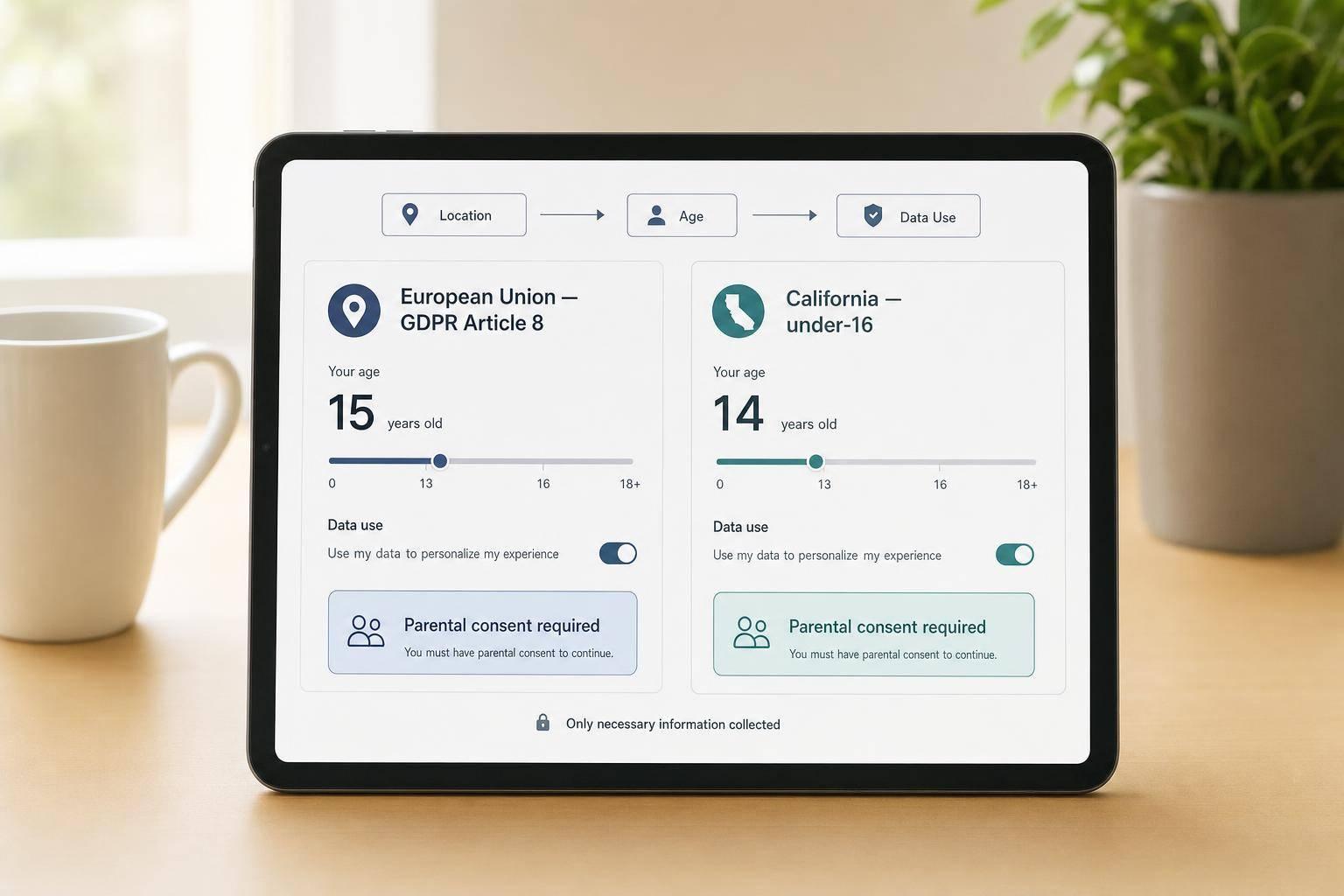
If you send the wrong user into the wrong consent flow, you can end up with a major compliance problem. The fix is simple in principle: I route people by location, age, and data use before I ask for consent.
Here’s the short version:
- Under GDPR Article 8, I check whether the user is old enough to consent in their country. If not, I need parental consent.
- Under CCPA/CPRA, the rule is narrower. If I have actual knowledge a California user is under 16, I need opt-in before I sell or share their personal information.
- For users under 13 in California, that opt-in must come from a parent or guardian.
- If I can’t tell which EU country applies, the safer fallback is age 16.
- I should collect the least amount of age data possible, keep it out of marketing systems, and store only a pass/fail result when I can.
- A 2025 review found that 72% of nearly 900 sites and apps used age checks that were easy to get around.
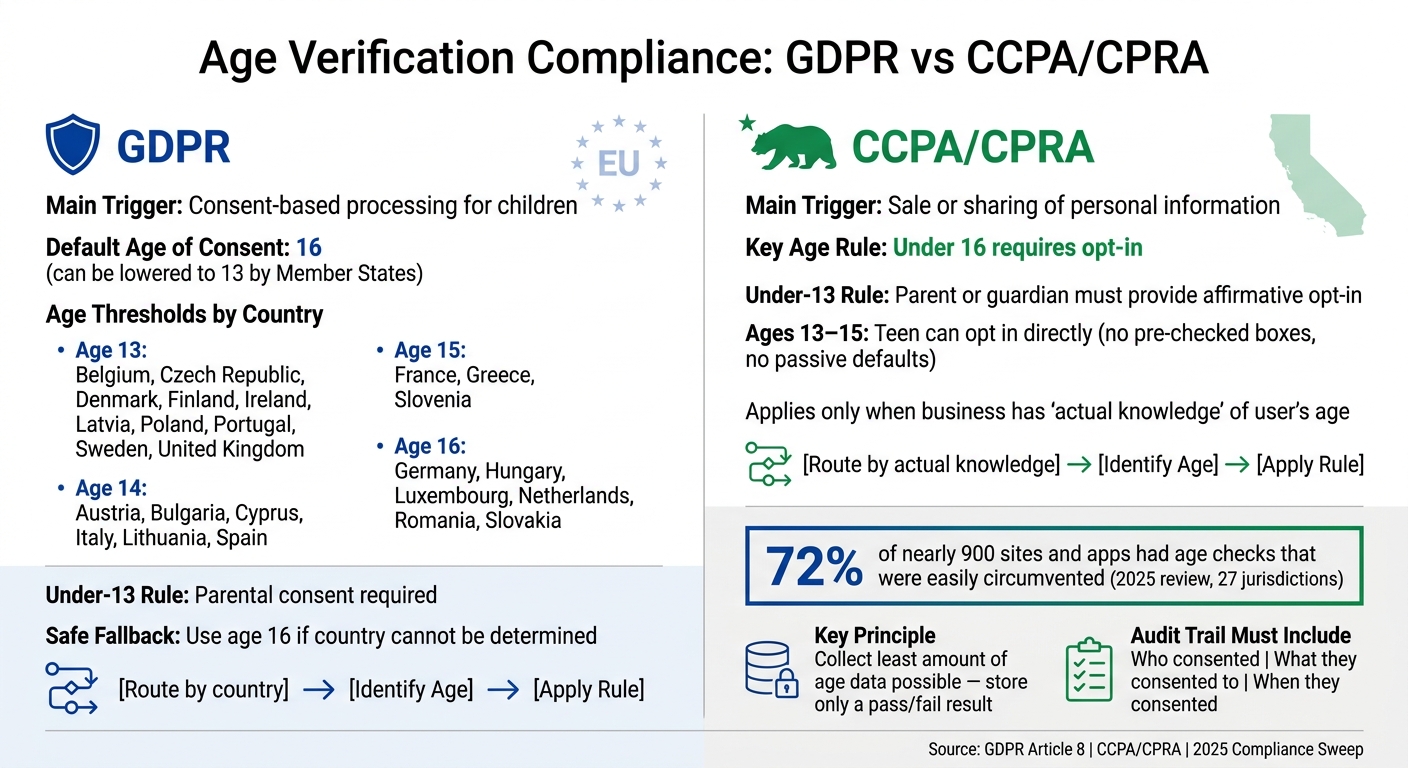
GDPR vs CCPA Age Verification Rules: Side-by-Side Compliance Guide
Quick comparison
| Topic | GDPR | CCPA/CPRA |
|---|---|---|
| Main trigger | Consent-based processing for children | Sale or sharing of personal information |
| Key age rule | Country-level digital consent age: 13 to 16 | Under 16 needs opt-in |
| Under-13 rule | Parent path if below local age threshold | Parent or guardian must opt in |
| Ages 13–15 | Depends on country | Teen can opt in directly |
| Safe flow design | Route by country + age | Route by actual knowledge + age |
In other words: I don’t need one global age gate. I need a routing system that sends each person to the right notice, consent, and verification path with a short audit trail to back it up.
sbb-itb-5f36581
1. When age verification is required and which age thresholds apply
Age verification is required in two main cases:
- Under GDPR Article 8, when you rely on consent in a flow that serves children
- In California, when a business has actual knowledge that it is selling or sharing data from a user under 16
The split matters. GDPR is about consent-based processing for children. California is narrower. It applies only to the sale or sharing of personal information.
For mixed-audience sites, don’t guess based on who you think the site is for. Route users by jurisdiction and age.
GDPR child consent ages by country
GDPR sets the default digital age of consent at 16, but Article 8 lets EU Member States lower that age to 13. So the rule changes by country. A 14-year-old can consent in Ireland, for example, but not in Germany.
For GDPR flows, the next move is simple: map the user’s country to that country’s digital consent age. Use jurisdiction-based routing. If you can’t pin down location with enough confidence, use the strictest EU threshold: 16.
Here’s how the thresholds break down across key markets:
| Age Threshold | Countries |
|---|---|
| 13 years | Belgium, Czech Republic, Denmark, Finland, Ireland, Latvia, Poland, Portugal, Sweden, United Kingdom |
| 14 years | Austria, Bulgaria, Cyprus, Italy, Lithuania, Spain |
| 15 years | France, Greece, Slovenia |
| 16 years | Germany, Hungary, Luxembourg, Netherlands, Romania, Slovakia |
There’s one carve-out worth noting. GDPR Recital 38 generally does not require parental consent for preventive or counseling services offered directly to children, such as mental health helplines.
California uses a different test. It does not use a country-by-country consent age. Instead, under-16 data sale or sharing triggers an opt-in rule.
CCPA and CPRA thresholds for users under 16
California splits protections for minors into two age bands.
For users under 13, a parent or legal guardian must provide affirmative opt-in before a business can sell or share that child’s personal information. The business must also take reasonable steps to verify that the parent or legal guardian is the one authorizing consent.
For users ages 13 to 15, the minor can give that opt-in directly. But the action still has to be explicit and affirmative. In plain English, that means no pre-checked boxes and no passive defaults.
If you know a California user is under 16, send them through the right opt-in flow before any sale or sharing happens.
2. How to choose the lawful basis and match it to the form flow
Once you know the age threshold that applies, the next step is choosing the lawful basis for the check itself. Those two things do different jobs. The age threshold tells you who needs to be checked. The lawful basis explains why you're allowed to run the check at all.
When to use consent, legitimate interests, or legal obligation
Pick the basis based on the reason you collect age data.
Use legal obligation when a law requires the age check.
Use legitimate interests when the check helps protect children from harm and no law directly requires it. If you rely on this basis, write down why the check is needed and complete a balancing test. That way, you can show your interest in running the check does not override the user's rights.
Do not use consent for the check itself when the check only determines whether valid consent can be obtained.
Keep age-check data separate from marketing and analytics uses
This part matters more than it may seem. A lawful basis only holds up if your form flow keeps verification data in its own lane.
Collect only the data you need for the check. Delete verification data after the check is done. Keep it out of marketing, CRM, and analytics systems.
In Reform, send the verification result to a restricted compliance log and keep it separate from CRM fields. The result should be a simple pass/fail signal, not a raw date of birth. Delete scans, facial outputs, and parent ID records right after verification.
3. How to build notices and data-minimized age checks into the form
Write clear notices for adults, teens, and parents
The age-check notice needs to be clear, fit the person reading it, and appear before you collect anything.
For GDPR, explain what you collect, why you collect it, who gets it, and how long you keep it. And do it in plain language a child can follow. For CCPA/CPRA, say that users have the right to opt out. For minors ages 13 to 15, also explain the opt-in right. For children under 13, spell out the parental-consent path.
Reform's multi-step forms and conditional routing make this easier. You can show the right notice copy based on a user's age band, then display only the fields that band needs. That keeps the form tighter and cuts extra data collection.
Just as important, avoid nudge tactics. Don't push children to share more data than needed or steer them toward less private settings.
Once the notice is in place, send each visitor into the right age-check branch.
Choose a proportionate verification method
After the notice, run the age check itself. The goal is simple: use the least intrusive method that can still confirm the right age band. In plain English, start light and add more checks only when the risk calls for it.
| Method | Assurance Level | Data Minimization | Intrusiveness | Best Fit |
|---|---|---|---|---|
| Self-Declaration | Low | High | Low | Lowest-risk content, basic newsletters |
| Email Confirmation | Low/Medium | High | Low | Basic account creation |
| Third-Party ID Check | High | Medium | High | High-risk services, regulated goods |
| Zero-Knowledge Proof | High | Very High | Low | Highest-privacy use cases |
A practical setup is the waterfall method. Start with self-declaration. If the stated age clashes with other signals, move to a stronger check. That keeps friction lower for most people while adding more scrutiny where it matters.
Use a verification step that returns only a pass/fail result.
4. How to build parental consent and teen opt-in flows step by step
After the age gate, send each person into the right path based on age and jurisdiction.
GDPR parental consent below the local digital consent age
If a user is below the local digital consent age, stop the child-facing flow and move them to a verifiable parental consent step. At that point, the flow should stop collecting the child’s data until that step is finished.
Ask for a parent or guardian’s contact detail, then send a plain-language notice. That notice should explain what data you collect, how you use it, and whether you share it. Only resume the flow after the parent gives authorization. Also, use this step for one job only: to confirm parental authorization.
The verification method should fit the risk level of the service. Low-risk services may use an email confirmation loop. Higher-risk services may need stronger checks, such as:
- Payment verification
- Signed attestation
- Video or phone verification
- Government ID
- A verified third-party check
Once authorization is confirmed, delete the parent-verification data.
CCPA under-13 parental opt-in and 13 to 15 self-opt-in
California follows a separate path for minors. Under CCPA/CPRA, users under 13 need affirmative authorization from a parent or guardian before you collect, sell, or share their personal information. This rule applies only when you know the user is under 16 and the action involves sale or sharing. For users ages 13 to 15, the teen must actively opt in before any sale or sharing.
Keep child and teen flows separate. Self-declaration by itself is not enough when you know the user is under 13. Approved verification methods include:
- A credit card check with parental notification
- A toll-free call
- A video conference
- A signed statement under penalty of perjury
Set up branching, retention, and audit trails in Reform
Use conditional routing to split adult, teen, and parent paths. In Reform, set rules so users above the threshold move into the standard flow, users below it go to the parental contact step, and teens in the 13–15 range see the self-opt-in screen.
The logic is simple: age result → branch → notice → authorization → log.
Use integrations to store the verification outcome, consent status, and date separately from your marketing and analytics systems. Parent-contact data should not go into marketing CRM fields.
For audit trails, keep the record tight:
- Who consented
- What they consented to
- When they consented
Delete any temporary verification data right after the check.
Conclusion: A checklist for compliant age verification
If your form already routes users by age and jurisdiction, use this final checklist to check the flow.
First, confirm whether GDPR Article 8 or California’s under-16 opt-in rules apply. Then use country-based routing to apply the right local limit on its own instead of falling back to one global age. Document the lawful basis you rely on, and write notices in plain language the target age group can understand.
Use the least intrusive method that fits the risk. A 2025 sweep of nearly 900 websites and apps across 27 jurisdictions found that 72% had age-assurance measures that were easily circumvented, mostly because teams relied on self-declaration alone. Trigger parental consent only when a user falls below the limit that applies to them, and keep that consent record separate from your marketing data.
Keep a simple audit trail:
- Who consented
- What they agreed to
- When they agreed
That sequence - age check, branch, notice, consent, log, delete - is the full compliance loop.
FAQs
Do I need age verification for every user?
No. You need age checks when you have actual knowledge that a user is a minor, or when children are likely to use your service.
Under COPPA and GDPR, a simple self-declared age isn't enough for minors. If your service is aimed at children, or your data shows children are using it, you need age assurance that fits the risk and protects privacy. For users under 13 in the U.S., or below the age set by the relevant EU member state, you must get verifiable parental consent before collecting personal data.
What counts as actual knowledge under CCPA/CPRA?
Under the CCPA and CPRA, actual knowledge is not formally defined. In plain terms, it usually means a business can’t look the other way when children under 13 or minors ages 13 to 16 are using its services.
Once a business knows minors are on its platform, that can trigger compliance duties. That includes verifiable parental consent for children under 13 and opt-in rights for minors ages 13 to 15.
How can I verify age without collecting birth dates?
Use threshold-based checks, like asking people to pick an age band instead of entering their full date of birth.
You can also use age estimation tools, independent third-party verification services, or cryptographic proofs such as zero-knowledge tokens.
The idea is simple: confirm that someone meets a threshold like 18+ without keeping their exact birth date on file. That helps support data minimization.
Related Blog Posts
Get new content delivered straight to your inbox

The Response
Updates on the Reform platform, insights on optimizing conversion rates, and tips to craft forms that convert.



Drive real results with form optimizations
Tested across hundreds of experiments, our strategies deliver a 215% lift in qualified leads for B2B and SaaS companies.
