
.webp)
CCPA Opt-In Consent for Minors: SaaS Guide


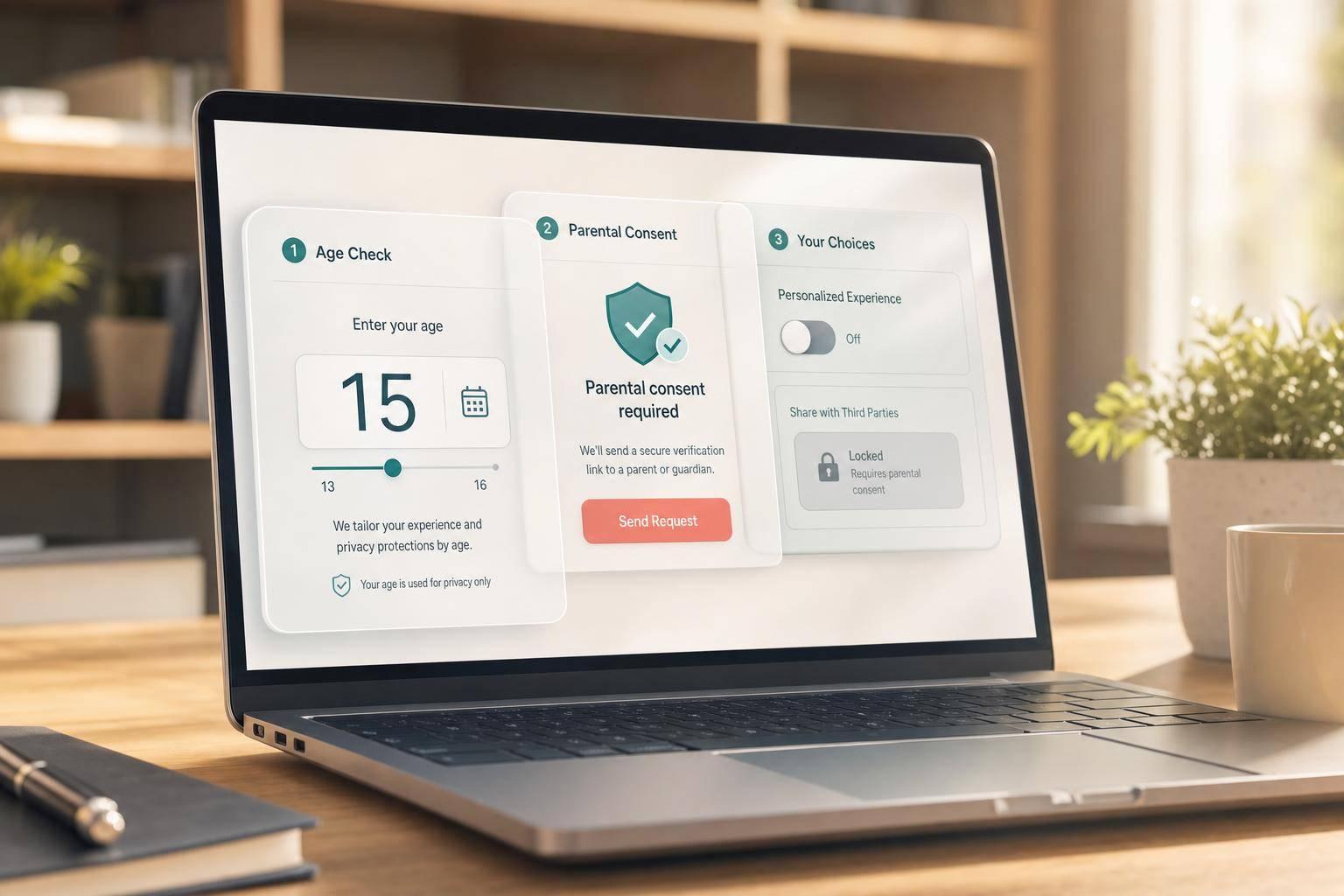
If I know a user is under 16, I need opt-in before any third-party sharing starts. That means before CRM syncs, enrichment, pixels, or ad-platform transfers. Under 13 needs parent or guardian approval. Ages 13–15 can opt in on their own. Age 16+ stays in the normal opt-out model. And with penalties up to $53,088 per violation, a bad form flow can get expensive fast.
Here’s the short version:
- Ask age first: use Under 13, 13–15, or 16+
- Do not collect lead data first if the age path is still unknown
- Split consent by age:
- Under 13 → parent or guardian approval
- 13–15 → minor gives direct opt-in
- Hold all third-party transfers until consent is confirmed
- Store proof: age band, who consented, method, text shown, timestamp, form source, and status
- Send edge cases to review if age, consent, or verification is missing or unclear
A privacy policy checkbox alone is not enough for a minor’s third-party sharing flow. I need a separate yes/no step for that, plus form logic that keeps every outside transfer in a Blocked state until the record is cleared to move.
This article walks through the form setup, the two minor consent paths, the systems to pause, and the records I should keep.
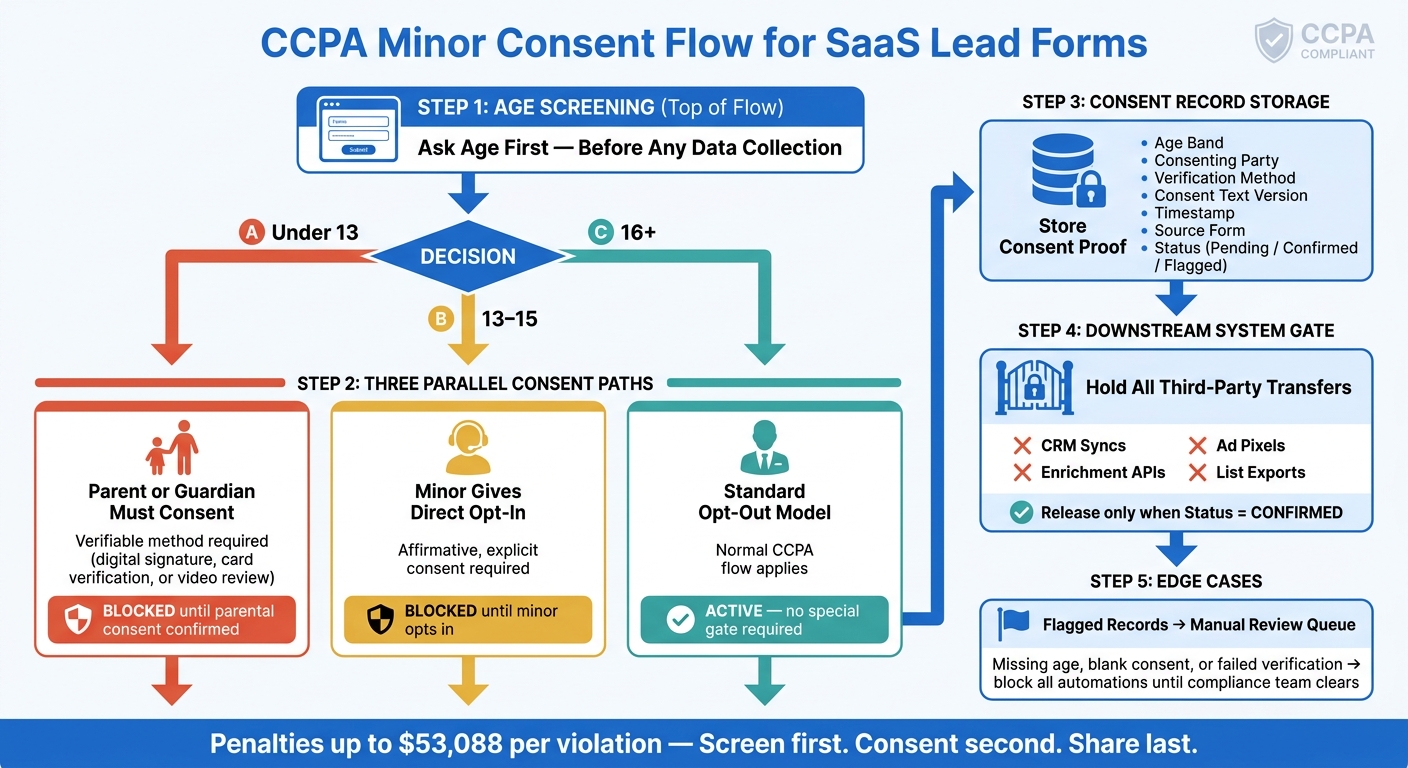
CCPA Minor Consent Flow: Age-Based Opt-In Process for SaaS Lead Forms
Children’s Privacy in 2026: Age Gating Isn’t Enough | Children's Privacy U.S. Requirements
sbb-itb-5f36581
When CCPA Opt-In Applies to Minors
Once age screening shows that a user is a minor, the next step is simple: check whether any third-party sharing would start. Under CCPA, "sharing" includes disclosing personal information to a third party for cross-context behavioral advertising, even if no payment is involved. So if a lead form sends data to ad pixels, audience syncs, enrichment tools, or similar third-party integrations, consent has to come first.
Age Bands Under CCPA: Under 13 vs. Ages 13 to 15
CCPA splits minors into two age groups, and each group follows a different consent path.
| Age Band | Who Consents? | Data Sharing Status |
|---|---|---|
| Under 13 | Parent or legal guardian | Blocked until verifiable parental consent is obtained |
| 13 to 15 | The minor (user) | Blocked until the minor affirmatively opts in |
For users under 13, a plain checkbox doesn't cut it. The consent step must verify that the adult is a parent or legal guardian.
For users ages 13 to 15, the minor can consent without a parent. But that consent still needs to be affirmative and explicit, and it must be recorded before any data is sent downstream.
That age split decides where the form sends the user next.
When This Rule Applies in a Lead Form Flow
The trigger is actual knowledge: once you know the user is a minor, the opt-in flow applies. That's why the age-screening question should come first in a multi-step form and stay neutral, before any other form field is collected.
In a typical SaaS lead form flow, the age check needs to happen before any downstream syncs are allowed to run. If a submission is set up to send data to a CRM, an enrichment tool, or an ad pixel, those connections should remain blocked until the user's age band and consent status are confirmed.
After that, the form must block every sharing step until consent is captured.
What Counts as Selling or Sharing in SaaS Lead Capture
In SaaS lead capture, every third-party place a form submission can go should be treated as part of the sharing flow. When someone submits a name and email, that data can be sent to several systems right away. Map each system now, because every one of them can become a sharing point.
Lead Forms, Tracking Tools, and Integrations That Can Trigger the Rule
The form itself isn't the only compliance touchpoint. Common triggers include:
- Marketing pixels that pass submission data to ad platforms
- CRM syncs that send contact records on submit
- Lead enrichment tools that receive email addresses
- Analytics scripts that capture form inputs or device IDs
- Live chat tools that collect data on their own
Treat any tool that receives the submission at send time as part of the sharing flow. If a destination gets the submission before opt-in, it needs to stay blocked.
Why Pre-Sharing Controls Matter More Than After-the-Fact Fixes
Once data hits a third-party system, the sharing has already taken place. Deleting a record from your CRM later, or removing a contact from an ad audience, doesn't erase the first transfer.
That's why suppression logic needs to stop sharing at the exact moment of submission, not later down the line. If a minor's age is flagged during the form flow, every API call, pixel fire, and CRM sync tied to that submission should be held until a valid opt-in is on file. That system map shows where the consent gate needs to sit in the form flow. Using multi-step forms can help manage this logic by isolating age verification before data is shared.
How to Build a Minor Consent Step Into Your Lead Form
Build the gate into the form before you collect any lead data.
Place Age Screening Before Any Data Sharing Step
Put age screening at the very start of the form flow. Before you ask for a name, email address, or any other personal information, ask the user to choose an age band.
Use these three options:
- Under 13
- 13–15
- 16+
Don’t show any personal-data fields until the user picks an age. Keep the wording neutral. In plain terms, don’t nudge people toward 16+. That helps keep minors out of later fields until the right consent path is set.
Route Under-13 and 13-to-15 Users Through Separate Consent Paths
Once age is confirmed, multi-step form logic takes over.
| Age Band | Who Consents | Next Step |
|---|---|---|
| Under 13 | Parent or legal guardian | Guardian's contact info + verification step |
| 13 to 15 | The minor directly | Minor's info + affirmative opt-in checkbox |
If the user is under 13, the form should switch right away to the parent or guardian path. That means collecting the guardian’s contact information instead of the child’s. Under 13 requires a verifiable parent or guardian approval method. You can use a digital signature, card verification, or video review.
If the user is 13 to 15, the minor should see their own affirmative opt-in step before any data-sharing fields turn on. Use conditional routing to pause CRM and enrichment syncs until the right consent state is confirmed. After the form branches the right way, record consent and block every downstream sync unless that consent state allows it.
Use Clear U.S. English Consent Language and Visible Form States
Tie the consent language directly to the compliance flow. The wording needs to create a valid opt-in before any sharing starts.
Use plain U.S. English:
"I authorize the sharing of my personal information for [purpose]. I can opt out anytime in the Privacy Center."
Make each form state easy to see. Keep Submit disabled until consent is finished. Use simple status labels: Blocked, then Ready.
Record Consent and Block Workflows Until Opt-In Is Confirmed
Once the multi-step form design sends a minor down the right consent path - under 13 or 13–15 - record that choice right away. Then keep every downstream workflow on hold until that consent record is in place.
Store the Fields That Prove Who Consented and When
You need a paper trail. If consent is questioned later, these fields show who agreed, how they agreed, and when it happened. For each minor lead, capture them at the moment of submission:
| Field | What to Capture |
|---|---|
| Age Band | Under 13 / 13–15 / 16+ |
| Consenting Party | Minor (13–15) or parent/guardian (under 13) |
| Verification Method | Digital signature, card verification, or video review |
| Consent Text Version | Exact language shown at the time of submission |
| Timestamp | Date and time of opt-in confirmation |
| Source Form | Form URL or ID |
| Status | Pending / Confirmed / Flagged |
| Third-party sharing consent | Separate yes/no field for third-party sharing |
That last field is a big deal. General consent does not cover third-party sharing. If data may be shared with third parties for advertising or other non-essential purposes, that approval must be separate and specific.
Hold CRM Syncs, Enrichment, and Exports Until Opt-In Is Confirmed
Every minor lead should start in Pending. Only move it forward when consent changes to Confirmed. Until then, no CRM sync, no enrichment call, and no list export.
Here’s how each form step should connect to the system action behind it:
| Lead-Form Step | Compliance Purpose | System Action |
|---|---|---|
| Age Screening | Identify regulatory path | Route to the right consent flow or block collection if age is skipped |
| Consent Capture | Obtain affirmative authorization | Log the timestamp and consent text version; set status to Pending |
| Parental Verification | Confirm legal authority for under-13 leads | Trigger manual review or a verification method |
| Sharing Suppression | Prevent unauthorized data sale or sharing | Disable CRM sync, enrichment APIs, and tracking pixels |
| Record Storage | Create auditable proof | Store consent status, consenter identity, and source form |
Keep all downstream scripts paused until the Confirmed flag is written. That includes tracking pixels and any automation that would send the record outside the form system.
Add Internal Checks for Legal Review and Edge Cases
Some submissions won’t line up neatly. An entered age might clash with other form data. A verification step might time out. A consent field might come through blank. That’s why you need a Flagged status built into the workflow.
Any record with unclear age data, incomplete verification, or a missing consent field should go to a manual review queue - not auto-approved, and not quietly discarded. Block all automations for flagged records until a compliance team member clears them.
For under-13 consent, log a dependable verification method. Keep that record locked until the legal review passes.
Conclusion: A Simple Minor Opt-In Compliance Flow for Data Sharing
CCPA minor opt-in compliance is pretty simple when you strip it down: check whether the rule applies, split the process by age, screen for age before any data is shared, record consent, and stop downstream workflows until that consent record is confirmed. That’s the flow SaaS teams need to put in place.
There are two different paths here. Under 13 follows one consent path. Ages 13 to 15 follow another. If you skip age screening or treat both groups the same, you leave a compliance gap.
If you use Reform, keep all of this inside one flow. Reform can handle age screening, conditional routing, and blocked integrations in a single no-code setup.
Build the gate before the data moves. Screen first, consent second, share last.
FAQs
What counts as actual knowledge under CCPA?
Under the CCPA, actual knowledge is not spelled out in the law. The rules kick in when a business has actual knowledge that it is collecting personal information from children under 13 or from minors ages 13 to 16, but the term itself is not formally defined.
That leaves a gray area. One big question is whether businesses should look to COPPA standards to decide where this line sits. At the same time, a business can’t just look the other way. If it knows children use its website, that awareness may be enough to trigger compliance duties.
Can I collect a minor’s email before consent is confirmed?
No. If you know a user is under 13, you need verifiable parental consent before you collect their email address or any other personal information.
Start with a neutral age screen at the top of the form. If the user says they are under 13, stop collecting data until a verified parent or guardian gives permission.
What proof should I keep for minor opt-in consent?
Keep time-stamped consent records. That record should include the exact privacy notice version the person saw when the data was collected.
You should also document a clear process for checking that the person agreeing to the sale of a minor’s data is the parent or legal guardian.
Acceptable methods include:
- Signed consent forms made under penalty of perjury
- Credit card verification
- In-person or video communication with trained staff
- Checks against government databases
Related Blog Posts
Get new content delivered straight to your inbox

The Response
Updates on the Reform platform, insights on optimizing conversion rates, and tips to craft forms that convert.



Drive real results with form optimizations
Tested across hundreds of experiments, our strategies deliver a 215% lift in qualified leads for B2B and SaaS companies.
