
.webp)
How Predictive Lead Scoring Works in Real Estate



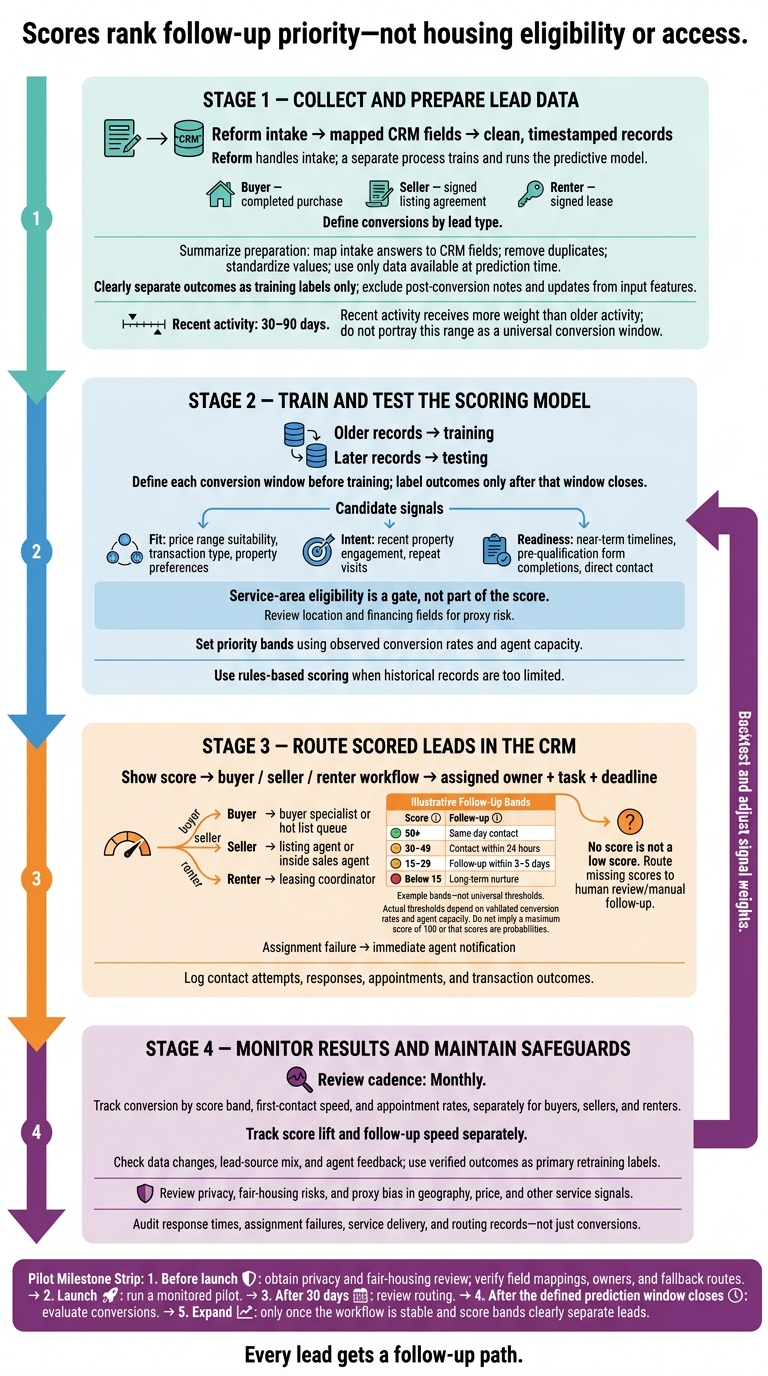
Predictive lead scoring helps you decide whom to contact first - not who gets housing services. I start by defining a conversion for each lead type: a completed purchase, signed listing agreement, or signed lease. Then I use past CRM records and recent activity, often from the last 30–90 days, to estimate conversion likelihood.
Here’s the process I follow:
- Prepare the data: Map intake answers to CRM fields, remove duplicates, and exclude information recorded after the scoring date. Reform handles intake - not model training.
- Train and test: Test on later records and set follow-up bands based on conversion rates and agent capacity. Use rules-based scoring when historical records are too limited.
- Route follow-up: Assign an owner and deadline, with a manual path for missing scores.
- Check results: Review conversions, response times, privacy, and fair-housing risks monthly.
My rule: <u>every lead gets a follow-up path</u>. I begin with a monitored pilot, review routing after 30 days, and judge conversions only after the chosen prediction window closes.
How Predictive Lead Scoring Works in Real Estate
Step 1: Collect and Prepare Lead Data
Map Lead Data to CRM Fields
Map intake answers, engagement events, CRM activity, and public property data to fixed CRM fields. Maintain a field dictionary that records each field’s source, format, and update time.
Treat the fields below as candidate inputs - not defaults. Collect only service-related data. Review sensitive fields and proxies, especially location, budget, and financing, for fair-housing risk. The selected fields will form the training set for Step 2.
| Data input | Predictive use | CRM fields |
|---|---|---|
| Transaction type | Separate buyer, seller, and renter records | Lead_Type |
| Requested location | Check geographic fit with service areas | Target_Market, Preferred_Zip |
| Budget or price range | Match leads to the right inventory segment | Budget_USD |
| Financing status | Candidate signal of buyer readiness | Financing_Ready |
| Transaction timeline | Measure stated readiness | Move_In_Date |
| Browsing activity | Measure recent property interest | Web_Activity_Score |
| Saved searches | Identify sustained search activity | Saved_Search_Count |
| Engagement | Identify high-intent signals for immediate priority routing | Last_Engagement_Type |
| Outcomes | Use as training labels only | Conversion_Status, Conversion_At |
| Ownership | Support seller lead qualification | Current_Owner |
| Estimated equity | Candidate seller signal; treat it as an estimate | Property_Equity_Est |
| Property type | Identify specialization needs | Property_Type |
Store money as numeric USD values. Give recent actions more weight than older ones. Repeat visits within the same price range signal sustained intent.
Collect Structured Lead Data With Reform
Structured forms keep CRM fields consistent from intake. Use Reform multi-step forms and conditional routing to ask only relevant questions.
Map buyer budget and financing answers to Budget_USD and Financing_Ready. Map seller ownership answers to Current_Owner, and renter budget and move-in-date answers to Budget_USD and Move_In_Date.
Reform handles intake; a separate process trains and runs the predictive model.
Reform offers email validation, spam prevention, and CRM integrations. Before launch, check field mappings and review enrichment fields before importing them.
Clean Records and Prevent Data Leakage
Deduplicate contacts and standardize location and property-type values so the model trains on clean records. Keep service-area and price-range checks separate from the score. Record disqualification reasons separately, too - a disqualification isn't the same as a low score.
Preserve source timestamps as you prepare the dataset for model training in Step 2. Use only data available at prediction time. Later outcomes remain labels; post-conversion notes and updates must stay out of training.
sbb-itb-5f36581
How Predictive AI Helps Real Estate Investors Find Better Seller Leads
Step 2: Train and Test the Scoring Model
Define each conversion window before training, and label outcomes only after that window closes. Train on older records and test on later ones, using the buyer, seller, and renter conversion goals defined earlier. Build features only from data available on the scoring date. After training and testing, use the scores to route leads in the CRM.
Choose Fit, Intent, and Readiness Signals
Build signals from the cleaned CRM fields in Step 1. Group candidate inputs into three categories: fit covers price range suitability, transaction type, and property preferences; intent covers recent property engagement and repeat visits; and readiness covers near-term timelines, pre-qualification form completions, and direct contact.
Use service-area eligibility as a gate, not part of the score. Review location and financing fields for proxy risk, and let historical outcomes show which signals best predict conversions.
Validate Scores and Set Priority Bands
Test scores on later records. Then set priority bands based on observed conversion rates and how many leads agents can handle. Check that higher bands convert better, and track response rates when agents contact high-scoring leads. Use these bands to route follow-up:
For example, score 50+ can trigger same-day contact, 30–49 can trigger contact within 24 hours, 15–29 can trigger follow-up within 3–5 days, and below 15 can stay on a long-term nurture list.
Understand Model Benefits and Limits
Sparse or inconsistent records weaken scores, so keep human review available - especially when lead data is missing. Give recent behavior more weight than old static history. Actions from the last 30 to 90 days should count more than older activity.
Use these controls to keep scores stable as behavior changes.
| Capability | Potential Benefit | Limitation | Safeguard |
|---|---|---|---|
| Prioritization speed | Helps agents rank follow-up quickly | Sparse or inconsistent records weaken scores | Keep human review and manual overrides available |
| Learning from new data | Can reflect changing behavior and market shifts | Old static data can skew results | Refine the model monthly against actual close data |
| Behavioral tracking | Highlights active intent | Single actions can overstate readiness | Weight recent activity more heavily and require multiple signals for high scores |
Those limits shape CRM routing and overrides in Step 3.
Step 3: Route Scored Leads in the CRM
Turn the priority bands from Step 2 into CRM workflows, owner assignments, and follow-up tasks. Route each lead as soon as the model assigns a score.
Set Up Buyer, Seller, and Renter Workflows
Select the buyer, seller, or renter workflow based on lead type. Save the score, then assign the lead using the workflow below.
| Lead Type | Candidate Inputs | High-Intent Actions | Routing Destination | Next Tasks |
|---|---|---|---|---|
| Buyer | Location, budget, financing status, timeline | Viewing 3+ properties, mortgage pre-qual form | Buyer specialist or hot list queue | Immediate call, schedule showings |
| Seller | Ownership, equity, property condition | FSBO or expired listing, valuation request | Listing agent or inside sales agent | Listing presentation, market analysis |
| Renter | Move-in date, price range, property needs | Application submission, tour request | Leasing coordinator | Verify readiness, schedule tour |
Use this same routing logic to assign owners and set task deadlines.
Assign Follow-Up by Priority Band
Make priority bands more than labels: give each lead an assigned task and a deadline. Use the bands from Step 2 to set follow-up timing: same-day, within 24 hours, within 3–5 days, or long-term nurture.
Scores should determine outreach speed, not whether someone gets service. Log contact attempts, responses, appointments, and transaction outcomes.
Handle Missing Scores and Routing Issues
No score is not a low score. Unscored leads still need a workflow - even if it's manual. If your CRM doesn't support automated scoring, assign a team member to review new inquiries weekly using a standard rubric. Keep unscored leads on a long-term nurture list until their behavior changes.
Update scores when new form submissions, email opens, or property page views come in. If an assignment fails, send an automated notification to alert the right agent immediately.
Keep these routing logs and activity records for the performance check in Step 4.
Step 4: Monitor Results and Maintain Safeguards
Once routing is live, check that scores still predict action and conversion.
Measure Conversion and Follow-Up Results
Track score lift and follow-up speed separately. For buyers, sellers, and renters, measure conversion by score band, first-contact speed, and appointment rates. Check whether higher-scoring leads convert more often and get faster contact. If they don’t, revise the scoring logic.
Review results monthly and compare closed deals with the original scores. When a score range falls short, backtest the model and adjust the signal weights.
Check Data Changes and Agent Feedback
Watch for seasonal shifts, declining conversion rates, changes in the lead-source mix, and signals with too much or too little weight. Keep fit factors separate from behavior so you can distinguish lead-source problems from changes in intent. Gather agent feedback, but use verified outcomes, such as closed deals, as the primary retraining labels.
Document Privacy and Fair-Housing Controls
Use the same monitoring data to check that the model remains lawful and explainable.
Document what sets follow-up priority, when scores update, and which routing actions they trigger. Review excluded protected characteristics and check for proxy bias in geography, price, and other service signals.
Scores rank follow-up priority - not housing eligibility or access. Give every score band a documented follow-up path and keep routing audit trails. Audit response times, assignment failures, and service delivery - not just conversions.
Conclusion: Predictive Lead Scoring Launch Checklist
Use this checklist to verify data, scoring, routing, and compliance as you move from monitoring to a controlled pilot launch.
- [ ] Goals and windows: Define the conversion outcome and deadline for each lead type, using recent activity from the past 30–90 days.
- [ ] Historical records: Check that closed, lost, and withdrawn labels are consistent so you can backtest the model.
- [ ] Fields and mapping: Verify that lead type, location, price range, and timeline flow into the correct CRM fields.
- [ ] Data validation: Check the form for errors and confirm that data passes from the form to the CRM.
- [ ] Model and bands: Confirm that higher score bands convert better, then use those results to set follow-up deadlines.
- [ ] Ownership and fallbacks: Assign one owner and one backup route to every buyer, seller, or renter queue.
- [ ] Outcomes and compliance: Confirm that contact attempts and final outcomes are logged. Obtain privacy and fair-housing review before launch.
Run a monitored pilot first. Review routing after 30 days, but measure conversion only after the defined window closes. Expand once the workflow is stable and score bands clearly separate leads.
FAQs
How much historical data do I need to start?
Some systems can start with just 40 qualified and 40 disqualified leads [2][3]. More advanced models typically need 12–24 months of historical data, ideally with at least 200 closed-won and 200 closed-lost deals [4].
Six months is often cited as the minimum for effective results, while two years provides the most accurate model training. Keep your data clean, standardized, and complete to avoid inaccurate predictions [2][3].
How can I tell whether scores or faster follow-up drive conversions?
Compare conversion and response rates across score bands: 50+, 30–49, and below 30. Do high-scoring leads contacted within 15 minutes to 1 hour generate more meetings than lower-priority leads? Also monitor Sales Acceptance Rate - how often reps act on “hot” scores.
Track conversions and pipeline progression by score over time. If high-scoring leads aren’t converting as expected, adjust score thresholds or follow-up SLAs.
How do I check my scoring model for fair-housing bias?
Check your training data and algorithms for bias regularly. Historical data can carry past prejudices or leave some groups underrepresented. Use more diverse training datasets and involve stakeholders from different backgrounds in model development.
Adjust algorithms to prevent discriminatory outcomes by limiting the weight given to attributes that could drive those results. As the market changes, keep tracking performance and updating scoring criteria to maintain accuracy and treat people equitably.
Related Blog Posts
Get new content delivered straight to your inbox

The Response
Updates on the Reform platform, insights on optimizing conversion rates, and tips to craft forms that convert.




Drive real results with form optimizations
Tested across hundreds of experiments, our strategies deliver a 215% lift in qualified leads for B2B and SaaS companies.
