
.webp)
Input Validation Patterns: OWASP for Forms



Bad form validation does two things at once: it creates security risk and pollutes your data. If I had to boil this article down to the core idea, it would be this: validate every field by allowlist, enforce checks on the server at every step, sanitize only when needed, and encode on output every time.
OWASP’s approach is simple in practice:
- Treat all input as untrusted
- Set field-by-field rules for type, length, format, and range
- Reject bad input early instead of trying to “fix” it
- Re-check data in multi-step forms, drafts, webhooks, APIs, and CRM syncs
- Encode output by context so stored data does not turn into XSS later
The article also makes a key point that many form teams miss: hidden fields, query params, cookies, headers, and webhook payloads need the same checks as visible form fields. And the stats help show why this matters: one cited study found that input validation could stop 83% of SQL injection attacks and 65% of XSS attacks in tested apps.
What I like here is the clear split between three jobs:
- Validation = decide whether input matches the field rule
- Sanitization = clean free text only when the business must keep it
- Output encoding = escape data before rendering or sending it
That distinction keeps teams from making a common mistake: thinking a field is “safe” just because it passed validation.
A few takeaways stand out to me:
- A name field should not be treated like a comment box
- Numeric, boolean, and enum fields need strict type checks, not loose casting
- Multi-step forms need server-side validation on each step and again on final submit
- Saved drafts should be stored as untrusted data
- Free-text and rich-text inputs need tight limits and careful handling
- Email-related fields should block
\randto help stop header injection - Integration boundaries are new trust boundaries, so data must be checked again before CRM writes or automation triggers
In short: this article is not just about blocking attacks. It is also about keeping routing, reporting, and CRM records clean by making each field accept only what it should.
If you build lead forms, product sign-up flows, or multi-step intake forms, this is the part to copy: one shared schema, strict server checks, clean failure responses, and logs that help you spot patterns fast.
Understanding the Principles of OWASP in Cybersecurity | Google Cybersecurity Certificate
sbb-itb-5f36581
Allowlist-First Validation Patterns for Form Fields
Use allowlists: define the exact characters, lengths, and patterns a field accepts, then reject everything else. Blocklists are brittle, and attackers get around them. Once the field rules are set, map common form inputs to exact formats.
Use Field-Specific Allowlists Instead of Generic Text Acceptance
Every field on a form has a job. That job should shape its validation rules. A company name field does not need the same character set as a message field. Treating both like generic text is where teams often get into trouble, especially when multi-step forms beat static ones for complex data collection.
For each field, define three things:
- the allowed character set
- the allowed length
- the allowed values or pattern
A first name field might allow only letters, spaces, hyphens, apostrophes, and periods where they make sense. A team-size selector should map to a fixed set of buckets, such as 1–5, 6–20, and 21–100, instead of taking any number. A state field should accept only valid U.S. postal abbreviations such as CA, NY, and TX, which OWASP uses as a canonical allowlist example.
Normalize to UTF-8 before validation, then validate, then store. Once the field rules are set, map common form inputs to exact formats.
Apply Structured Validation for Common U.S. Form Fields
After you’ve defined character sets, the next layer is format validation for fields that follow predictable patterns. This is where structure matters.
| Field | What to Validate | Example Format |
|---|---|---|
| ZIP Code | 5 digits, or 5+4 with hyphen | 90210 or 90210-1234 |
| U.S. Phone | Digits plus optional +, spaces, (), -; normalize and validate length, such as 10 digits for standard numbers or 11 with a country code |
(415) 555-0100 |
| Syntax checks with a well-tested library; normalize the domain to lowercase | user@company.com |
|
| Date | MM/DD/YYYY structure, then semantic check | 08/06/2026 |
| Currency (USD) | Digits, one decimal point, optional thousands separators, optional leading $; convert to numeric type and enforce range limits | $1,250.00 |
For email, validate syntax, normalize the domain, and keep both the original and canonical forms for comparison and recovery flows.
Syntax tells you the value looks right. Business rules tell you whether it belongs in this workflow.
Add Business-Rule Checks on Top of Syntax Checks
After syntax passes, apply workflow rules. A value can pass every format check and still be wrong for the task at hand.
Common cases are age minimums, quantity caps, and date limits. A date of birth that results in an age under 18 should be rejected or sent into an eligibility flow. A quantity may be fine by format but still go past your inventory ceiling. A booking form should reject past dates even if the date itself is valid.
Geographic limits are another everyday example. A U.S.-only shipping form should reject syntactically valid state codes that fall outside the allowed region, even if the two-letter value passes the format check.
Use syntax checks first, then business-rule checks to stop values that are valid in form but not allowed in the workflow. That helps keep valid-looking data from sliding into downstream systems with the wrong meaning.
Length, Type, and Format Checks Across Multi-Step Forms
After syntax checks, enforce length, type, and payload limits before you store or pass form data to another system. Pattern checks only tell you whether input looks right. OWASP validation also checks length, type, and range on every step.
Set Minimum and Maximum Lengths, Ranges, and Payload Limits
Every field needs clear lower and upper bounds. A first name field might allow 1 to 50 characters. A free-text message field might stop at 1,000 or 2,000 characters. An internal notes field may need an even smaller cap so oversized payloads don't spill into downstream systems.
Numeric fields need the same guardrails. A seat-count field should accept whole numbers only from 1 to 500. A monthly budget in USD should allow decimals from $0 up to a set maximum. Date fields also need boundaries. For example, an event booking form might accept dates from today through 12 months out, and reject anything outside that window before storage or processing.
Reject oversized request bodies with HTTP 413. For file uploads, cap both file count and file size. That helps cut denial-of-service risk and keeps request handling steady.
The same server rules apply whether the value comes in through one submit or is spread across several steps.
Validate and Convert Data to the Correct Type Before Use
Incoming form data arrives as strings. Before any business logic runs, the server needs to convert each value to the right server-side type - and reject the input if that conversion fails.
Here are two plain examples:
- An employee count field should parse to an integer, enforce a minimum of 1, and reject anything with a decimal or any non-numeric character.
- A preferred meeting date should convert to a date/time object and normalize to one server-side time zone before storage.
In both cases, the converted value - not the raw string - is what should be stored and used.
Reject malformed input instead of coercing it. If "42abc" gets silently cast to 42, the app accepted input it should have refused.
An empirical analysis found that 35% of parameters vulnerable to XSS are numeric, enumeration, or boolean types, and 68% of parameters vulnerable to SQL injection are also simple types - meaning type and range validation is often missing precisely where it is most straightforward to implement.
Type conversion by itself isn't enough. Each step still needs server-side validation.
Validate Every Step and Every Saved Draft on the Server
Validate each step on the server. Then, on final submit, recheck the full payload as one object. That's how you catch cross-step rules, like answer combinations that must match or totals that must stay inside a set range.
Saved drafts need the same treatment. Store them as untrusted data and revalidate when the user comes back. Hidden fields and conditional fields should be treated as attacker-controlled on every step. And if the form changes path based on earlier answers, that routing should never let a later field skip required validation.
Apply the same server-side rules to every step and every saved draft.
If a field must allow free text, sanitize it before storage and encode it before output.
Sanitization, Output Encoding, and Safe Failure Handling
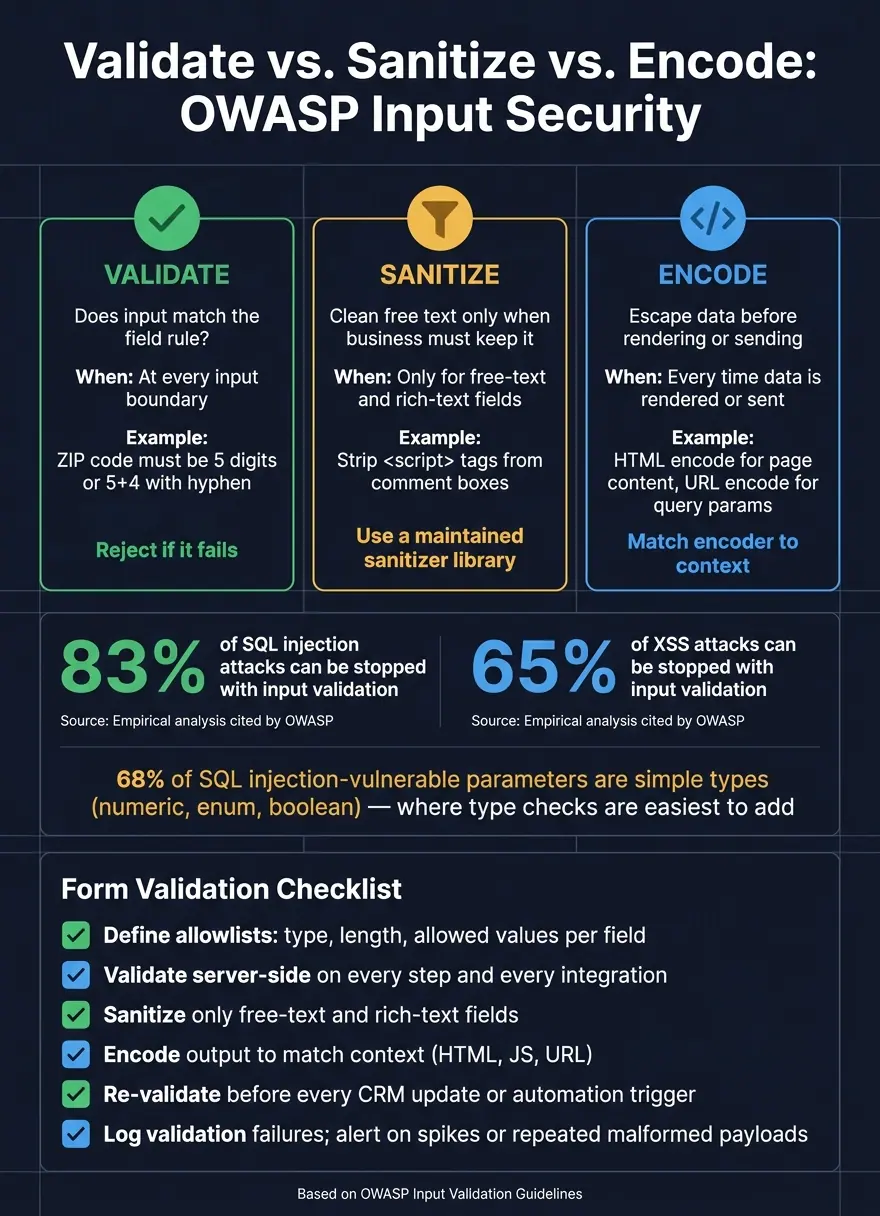
Validate vs. Sanitize vs. Encode: OWASP Input Security at a Glance
Validation does not make input safe.
A value can pass your allowlist and length checks and still do damage if you render it without encoding or if you sanitize it too loosely. Once a field passes validation, the next risk is how the app stores it and shows it later. The rule is simple: validate first, sanitize only when needed, and encode every output.
When to Validate, Sanitize, and Encode
After validation, sanitize free text when needed and encode it everywhere you render it. Output encoding is not a one-and-done step. You apply it each time data is rendered or sent, and the encoder has to match the context: HTML encoding for page content, JavaScript encoding for inline scripts, and URL encoding for query parameters.
If you skip that step because the data already passed validation, you're setting yourself up for stored XSS later in production. That's how teams get burned: the input looked fine at the front door, then turned into code at render time.
Handle Free-Text, HTML, and Email Inputs Safely
For comment boxes, message fields, and support requests, set a hard server-side cap for each free-text field. Treat control characters and null bytes with suspicion. If a field does not need HTML, don't allow it. Store the raw text and encode it on output so <script> is handled as text, not code.
When rich text is actually needed, use a maintained sanitizer with a small allowlist of safe tags and safe link schemes. Remove all event handler attributes, block javascript: and data: URL schemes, and strip inline styles that can be abused. Don't try to patch this with custom regex filters. That's a trap. Browsers and sanitizers don't always parse HTML the same way. Rich text should be the exception. Plain text should stay plain text and get encoded on output.
Email flows need their own guardrails. SMTP header injection happens when user input includes CRLF sequences (\r) that slip extra headers or recipients into an outgoing message. Reject any input with \r or before it reaches a mail header, and use a structured mailer API so user input never lands in raw header strings. Those same failure-handling rules should follow the data into any downstream system that reuses form input.
Reject Invalid Input Cleanly and Log Suspicious Patterns
When a submission fails validation, return a 4xx HTTP status with structured 4xx errors keyed to field IDs. Tell users exactly what to fix - for example, enter a valid U.S. ZIP code such as 94105 or 94105-1234 - without exposing internal logic, stack traces, or which security rule caused the rejection. If the payload is plainly malicious, reply in a generic way and don't echo the dangerous input back to the user.
On the backend, log every validation failure with enough context to spot attack patterns: timestamp, IP address, endpoint, and which fields failed. Watch per-IP failure rates, and look for repeated attempts with changing payloads, oversized submissions, or inputs that contain known attack signatures like <script> in non-HTML fields.
Validation in Integrations and a Checklist to Keep Rules Consistent
Re-Validate Data in Webhooks, APIs, and CRM Syncs
Validation can't stop after someone hits submit.
You also need to check data again in webhooks, CRM syncs, enrichment calls, APIs, and any other downstream write. That means checking presence, type, length, range, and allowed values every time data moves into another system. The best way to do that is to use one authoritative schema across the UI, integrations, and callbacks so rules don't drift.
Webhook payloads also need sender verification. Use HMAC signatures to confirm the payload came from the expected source and to catch tampering in transit. This matters more than a lot of teams think. Missing validation at integration boundaries has led to major breaches.
Once those guardrails are in place, teams need a short, usable checklist so the same rules get applied across every layer.
A Short Implementation Checklist for Form Teams
Use this checklist to keep validation aligned across forms and integrations.
| Area | Action |
|---|---|
| Field definitions | Define allowlists first with type, length, and allowed values for each field |
| Server-side enforcement | Validate every step and every integration payload server-side |
| Sanitization | Sanitize only when needed |
| Output encoding | Encode output for the specific context every time data is rendered |
| Integrations | Re-validate type, length, required fields, and allowed values before CRM updates or automation triggers |
| Monitoring | Log validation failures and alert on spikes, repeated malformed payloads, unexpected field shapes, or unexpected data types |
If you use Reform, tie these rules to multi-step logic, conditional routing, webhook integrations, and submission and validation events so enforcement stays the same from start to finish.
Conclusion: The Core OWASP Patterns to Keep
Every downstream system is another trust boundary. So check data again, encode on output, and keep the same rules everywhere that data goes.
FAQs
Why isn’t client-side validation enough?
Client-side validation helps, but it’s not enough on its own. Browser checks can be bypassed, turned off, or tampered with.
That’s why you should never trust user input. Validate everything on the server too, and include security checks there as well. This helps keep your data clean and protects your system from corruption, unauthorized access, and injection attacks.
What’s the difference between validation, sanitization, and output encoding?
Validation checks whether input matches the expected format, type, and length before the system processes it. If it doesn't, the system rejects it.
Sanitization strips out or changes content that could cause harm. Output encoding makes data safe to display by converting special characters, so user input is handled as text instead of code.
Why should drafts, hidden fields, and webhooks be treated as untrusted?
They can all carry malicious input or be changed along the way. The main rule is simple: never trust user-controlled data.
That applies to any data that sits outside direct server-side control, including drafts, hidden fields, webhooks, backend feeds, extranet sources, and client-side submissions. Every one of those inputs should be validated on the server.
Client-side checks still have a place, but they can be bypassed. So on their own, they aren't enough.
Related Blog Posts
Get new content delivered straight to your inbox

The Response
Updates on the Reform platform, insights on optimizing conversion rates, and tips to craft forms that convert.




Drive real results with form optimizations
Tested across hundreds of experiments, our strategies deliver a 215% lift in qualified leads for B2B and SaaS companies.
