
.webp)
How to Verify Data Integrity in Web Forms


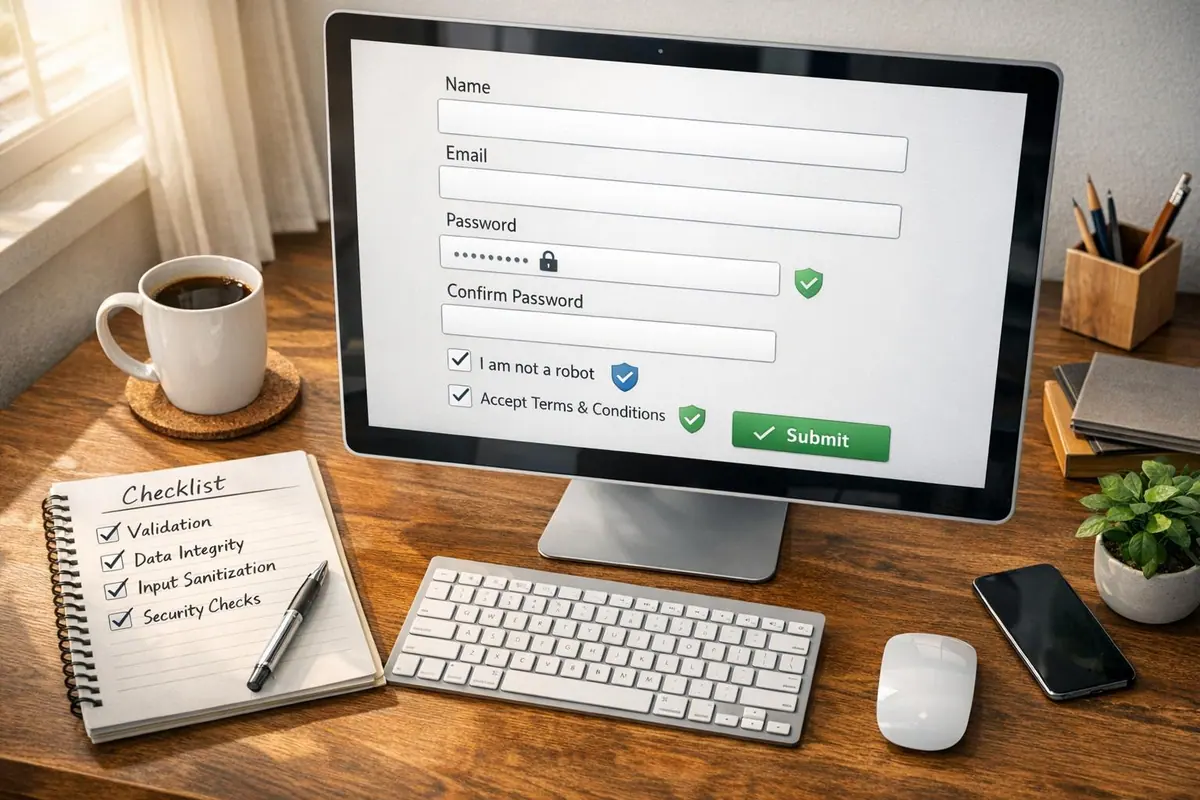
When users submit data through web forms, ensuring its accuracy and reliability is critical. Data integrity ensures the information stays correct and trustworthy from submission to storage. Here's how you can achieve this:
- Validation Types: Use syntactic validation (format checks, e.g., ZIP codes) and semantic validation (logical checks, e.g., start date before end date).
- Client-Side Validation: HTML5 attributes (like
required,pattern) and JavaScript can catch errors early, but they aren't secure on their own. - Server-Side Validation: Treat all user input as untrusted. Validate and sanitize data to prevent injection attacks and logical errors.
- Secure Data Transmission: Use HTTPS/TLS to encrypt data and prevent tampering during transfer. Add HMAC signatures for extra protection.
- Third-Party Integrations: Validate data before and after sending to external systems. Use timestamps, nonces, and idempotency keys to prevent replay attacks or duplicates.
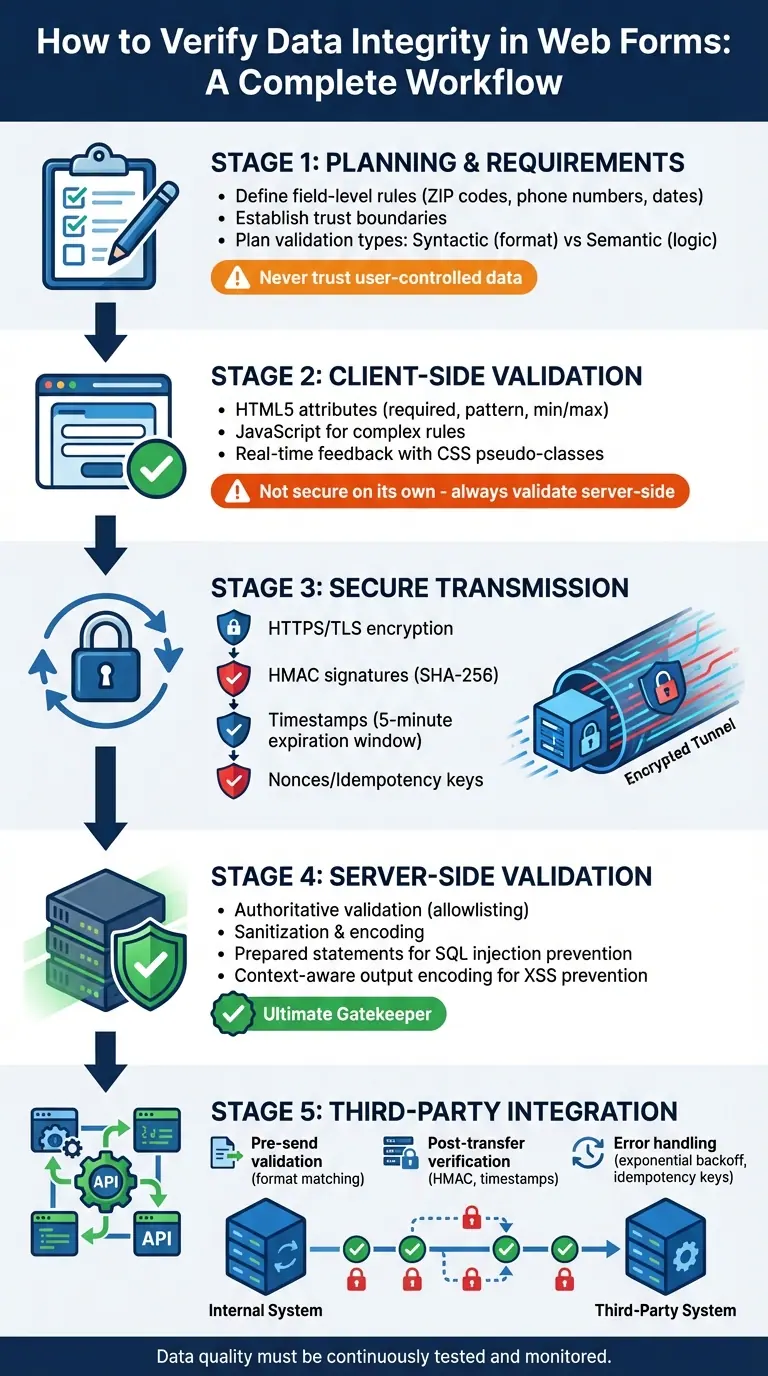
Complete Data Integrity Verification Workflow for Web Forms
Form Validation and Sanitization with Javascript and Python
Planning Data Integrity Requirements
Before diving into coding, it's critical to define clear and valid data specifications. This step involves determining required fields, acceptable formats, and how different fields interact with one another. Without a solid foundation, validation rules can become inconsistent, leading to errors and allowing flawed data to slip through. These early planning efforts are essential for setting up effective validation and security measures.
Defining Field-Level Rules
Once requirements are outlined, it's time to establish specific validation rules for each field. For example:
- ZIP Codes: Use the regular expression
^\d{5}(-\d{4})?to handle both standard 5-digit ZIP codes (e.g.,90210) and the extended ZIP+4 format (e.g.,90210-1234). - State Selection: Instead of allowing free-form text, use a predefined list of the 50 U.S. state abbreviations (e.g., AL, AK, AZ). This prevents invalid entries from sneaking into your system.
- Phone Numbers: Validation should account for various formats like
(555) 123-4567,555-123-4567, or555.123.4567. Use the HTML5type="tel"attribute for user-friendly input, but strip separators server-side before processing. - Dates: HTML5 date inputs submit data in the ISO 8601 format (
YYYY-MM-DD), even though U.S. users typically see dates displayed asMM/DD/YYYY. - Currency Fields: Ensure proper formatting with a dollar sign, two decimal places, and amounts falling within expected transaction ranges.
Cross-field relationships also matter. For instance, if you're collecting both state and ZIP code, validate that the ZIP code matches the selected state. This type of semantic validation goes beyond basic checks, catching logical errors that simple pattern matching might miss.
Establishing Trust Boundaries
Every point where data is transferred poses a potential risk. These trust boundaries must be identified and treated with care. As OWASP advises:
"Data from all potentially untrusted sources should be subject to input validation, including not only Internet-facing web clients but also backend feeds over extranets, from suppliers, partners, vendors or regulators".
The user's browser, or client side, should always be considered untrustworthy. Users can disable JavaScript, tamper with requests using developer tools, or even craft custom HTTP requests that bypass your client-side validation entirely. The network layer is also vulnerable, making HTTPS/TLS encryption essential to protect data during transmission.
The server represents the first truly trusted boundary, where robust validation must occur. Even third-party APIs and external data feeds should be treated as untrusted, as they can be compromised or send malformed data.
A well-known example drives this point home:
In 2011, the TimThumb vulnerability infected hundreds of thousands of websites because the script incorrectly trusted URLs from domains like blogger.com or flickr.com.
This incident underscores why data from external sources should never be trusted based solely on the source's reputation. Establishing these boundaries ensures that strict validation measures are applied where they’re needed most.
Validation and Integrity Checks
To ensure data integrity, both syntactic and semantic validation must work hand-in-hand. Syntactic validation enforces proper structure, such as formatting Social Security Numbers as XXX-XX-XXXX, requiring 10-digit phone numbers without separators, or adhering to RFC 5321 standards for email addresses. Semantic validation, on the other hand, ensures the data aligns with business logic, such as verifying that users are over 18 for age-restricted registrations or ensuring start dates occur before end dates.
| Check Type | Description | U.S. Format Example |
|---|---|---|
| Syntactic | Structural/Pattern matching | ZIP Code: 12345-6789 |
| Syntactic | Data Type | Phone: 10 digits (no separators) |
| Semantic | Business Logic | Age: Must be 18+ for registrations |
| Semantic | Field Correlation | State/ZIP: ZIP code matches state |
While client-side validation improves user experience, it offers no real security. As the W3C emphasizes:
"Client-side validation alone does not ensure security; therefore data needs to be validated on the server-side as well".
Always replicate client-side validation rules on the server. The server acts as the ultimate gatekeeper, ensuring data integrity and security.
Implementing Client-Side Validation
Client-side validation helps catch errors early, making the user experience smoother. However, as MDN emphasizes, it's not a standalone solution and must always be paired with server-side validation:
"Client-side validation should not be considered an exhaustive security measure! Your apps should always perform validation, including security checks, on any form-submitted data on the server-side as well as the client-side." - MDN
HTML5 Built-In Validation
HTML5 provides handy attributes that enforce rules at the field level without needing JavaScript. For example, the required attribute ensures a field can't be left empty, while input types like email or url automatically verify proper formatting. To handle custom formats, such as phone numbers, you can use the pattern attribute with regular expressions.
For numeric inputs, attributes like min, max, and step define acceptable ranges and increments for values like numbers, dates, or times. Text fields can use minlength and maxlength to set character limits. Browsers also offer real-time feedback using CSS pseudo-classes like :valid and :invalid, allowing you to style fields based on their validation state.
Moreover, semantic input types like tel or number trigger tailored virtual keyboards on mobile devices, making data entry easier and reducing mistakes. While these built-in tools are powerful, more complex validation scenarios often require JavaScript.
JavaScript for Complex Rules
JavaScript expands on HTML5 validation by handling more advanced logic, such as cross-field dependencies or unique rules. The Constraint Validation API provides methods like checkValidity() and setCustomValidity() to implement custom checks. Always clear previous errors using setCustomValidity("") before applying new error messages.
For example, JavaScript is ideal for verifying that a ZIP code matches a selected state or ensuring a "confirm password" field matches the original password. You can use the input event for real-time feedback and the blur event for final checks. To suppress default browser error messages and take full control of styling, add the novalidate attribute to your <form> element.
For accessibility, connect input fields to error messages using aria-describedby and ensure error containers include aria-live="polite" so screen readers announce updates. It's critical to align client-side and server-side validation to prevent discrepancies that could frustrate users when the server rejects data the browser accepts.
Handling U.S.-Specific Formats
When working with U.S.-specific data formats, validation requires extra attention. For phone numbers, using type="tel" activates a numeric keypad on mobile devices, while a pattern like [0-9]{3}-[0-9]{3}-[0-9]{4} ensures the input follows the standard format. To accommodate user preferences, allow separators like spaces, dashes, or dots, and use JavaScript to clean up the input before processing.
Dates often present challenges for U.S. users, who expect the MM/DD/YYYY format. While HTML5 date inputs submit data in ISO 8601 format (YYYY-MM-DD), browsers handle the display conversion automatically. For monetary values, use type="number" with step="0.01" to allow cent-level precision.
The key is to balance strict validation with user-friendliness. Accept a variety of input formats on the client side, then standardize the data before submission. This approach minimizes user frustration while ensuring clean, consistent data for processing.
Securing Data During Transmission
Once client-side validation is complete, it's crucial to securely transmit form data to avoid interception or tampering. Without proper safeguards, attackers could intercept, read, or even modify sensitive information.
Using HTTPS/TLS for Secure Transfer
To protect form submissions, always use HTTPS with TLS. As MDN explains:
"Transport Layer Security (TLS) provides assurances about the confidentiality, authenticity, and integrity of all communications, and as such, should be used for all inbound and outbound website communications."
TLS ensures data encryption, authenticates communication via digital certificates, and maintains data integrity using a Message Authentication Code (MAC).
Redirect all HTTP traffic (port 80) to HTTPS (port 443) and configure the Strict-Transport-Security (HSTS) header with includeSubDomains and preload options. For the max-age directive, aim for at least six months (15,768,000 seconds), though two years (63,072,000 seconds) is even better. This setup ensures browsers connect exclusively via HTTPS, blocking downgrade attacks where attackers might force insecure connections.
TLS 1.3, introduced in 2018, enhances security by reducing handshake round trips, enforcing ephemeral keys for perfect forward secrecy, and eliminating outdated ciphers like MD5 and SHA-1. Even if a server's private key is compromised in the future, past sessions remain secure due to these protections.
These transport-layer defenses establish a strong foundation for additional measures, such as application-level integrity checks.
Transport-Level Integrity Verification
While TLS secures data in transit, application-layer signatures add an extra layer of protection for critical data transfers, such as webhooks or API requests. A widely used method is HMAC (Hash-based Message Authentication Code) with SHA-256. Here’s how it works: the sender hashes the payload with a shared secret and includes the resulting signature in a header. The receiver then recomputes the hash to confirm the data hasn’t been altered.
When implementing HMAC verification, always sign the raw request body rather than parsed JSON. Parsing can introduce changes, like altered whitespace, that may cause signature mismatches even if the data remains the same. To further enhance security, use constant-time string comparison functions to prevent timing attacks, where attackers exploit response times to guess valid signatures.
Additionally, verify that the resource name in the response matches the expected value. This ensures the data corresponds to the intended object.
While signatures are effective, additional steps are necessary to address replay attacks.
Preventing Replay Attacks
Replay attacks occur when attackers reuse captured valid requests, something HTTPS alone cannot prevent.
A common defense is including a UNIX timestamp in the signed payload. Reject any request where the timestamp deviates by more than 5 minutes from the server’s current time. This time limit ensures that intercepted submissions quickly become useless. Include the timestamp in the HMAC signature calculation (e.g., timestamp + ":" + request_body) so any tampering with the timestamp invalidates the signature.
For even tighter security, consider using nonces (numbers used once) or idempotency keys - unique identifiers for each request. Store these identifiers in a fast database like Redis and reject any request with a previously used ID. This guarantees that a specific request is processed only once, even within the 5-minute window.
Treat shared signing secrets like passwords: rotate them every 90 days or immediately if a compromise is suspected. Some implementations take this further by using tokens that expire in as little as one second, making them nearly impossible to reuse.
| Security Measure | Primary Purpose | Implementation Method |
|---|---|---|
| HTTPS/TLS | Encryption & Privacy | Server-side certificate configuration |
| HMAC (SHA-256/512) | Integrity & Authenticity | Shared secret + payload hashing |
| Timestamps | Replay Protection | Signed header with 5-minute expiration window |
| Nonces/Idempotency | Duplicate Prevention | Unique ID tracking in a fast database |
sbb-itb-5f36581
Server-Side Validation and Integrity Checks
Even with secure transmission protocols in place, your server must serve as the ultimate gatekeeper for data integrity. While client-side validation can improve user experience, it’s far from foolproof. Tools like browser developer consoles make it easy for attackers to bypass these checks, leaving server-side validation as the only reliable safeguard.
Authoritative Validation on the Server
As highlighted in the Django Security Documentation:
"The golden rule of web application security is to never trust user-controlled data."
Every piece of data sent to your server - whether from a genuine user or a potential attacker - should be treated as untrusted until validated.
Server-side validation typically operates on two levels:
- Syntactic Validation: This ensures the data adheres to the correct format. For example, checking that a U.S. ZIP code is exactly five digits or confirming an email address matches a standard format.
- Semantic Validation: This goes deeper, verifying that the data makes logical sense within the context of your application. For instance, ensuring a start date comes before an end date or that an age falls within a specified range.
The best way to approach validation is through allowlisting, where you explicitly define acceptable inputs rather than trying to block malicious ones. Denylists are less effective because attackers can easily introduce new variations. For example, instead of blocking special characters in a username field, you could define a pattern like ^[a-zA-Z0-9]{3,16}$, which only allows alphanumeric characters and enforces a length between 3 and 16 characters.
Tools like schema-based validation libraries (e.g., Zod, Joi) can simplify this process. These libraries let you define a blueprint for your data, specifying structure, types, and constraints. By centralizing validation logic - such as through middleware in frameworks like Express - you can ensure consistency across endpoints while reducing repetitive code. Once data is validated, it’s crucial to sanitize and encode it to guard against injection attacks.
Sanitization and Encoding
After validating data, the next step is to sanitize and encode it to neutralize potential injection threats. These processes ensure that user-provided data is safe to handle and display.
- Sanitization: Removes or alters malicious characters before processing the data.
- Encoding: Converts special characters into safe formats that cannot be executed as code.
For example, to prevent SQL injection, use prepared statements or parameterized queries. These techniques separate SQL commands from user input, ensuring that malicious data cannot alter the intended query. Instead of embedding user input directly into a query string, placeholders like ? can be used, allowing the database driver to safely handle the input.
To protect against Cross-Site Scripting (XSS), implement context-aware output encoding. This means encoding data based on where it will appear - whether in HTML, JavaScript, or CSS. For instance, converting <script> to <script> before rendering prevents browsers from executing potentially harmful scripts. If your application accepts rich HTML content (e.g., from a WYSIWYG editor), use a specialized sanitization library to strip out unsafe elements while preserving legitimate ones.
Additionally, normalize input to UTF-8 to avoid exploits involving different character sets. Functions like trim() and escape() can further clean data before it is stored or processed.
| Technique | Primary Goal | Threat Prevented | Example Action |
|---|---|---|---|
| Parameterized Queries | Separate data from executable commands | SQL Injection | Use placeholders like ? in SQL queries |
| Output Encoding | Convert data to a safe display format | XSS | Encode < as < and > as > |
| Sanitization | Clean data for safe processing | XSS, Command Injection | Strip <script> tags or trim whitespace |
| Canonicalization | Normalize to a standard format | Obfuscation Attacks | Convert all input to UTF-8 before validation |
Structured Error Responses
Once data is sanitized and encoded, it’s essential to provide clear feedback when validation fails. Users need actionable error messages that guide them to fix their input without revealing sensitive system details. Use standard HTTP status codes like 400 (Bad Request) or 422 (Unprocessable Entity) to indicate malformed requests.
Field-specific error messages can significantly improve user experience. For example, instead of a generic response, return a structured object detailing the issue, such as:
{"errors": {"email": ["Invalid email format"]}}. This allows client-side applications to highlight the specific field and provide targeted feedback.
For traditional HTML forms, redirect users back to the form with error messages displayed, and repopulate valid inputs to save users from re-entering correct data. For AJAX requests, return a JSON response with the appropriate status code, enabling the frontend to update dynamically without requiring a full page reload.
Finally, ensure that any user-provided data echoed in error messages is properly encoded to prevent XSS attacks. To make error messages accessible, use attributes like aria-live="polite" on error containers so screen readers can announce validation results to visually impaired users.
Maintaining Integrity with Third-Party Integrations
Ensuring data integrity doesn’t stop at server-side validation - it extends to every third-party system you integrate with. Whether it’s CRMs, marketing platforms, or analytics tools, each external system introduces the potential for errors. These systems often have unique constraints, and mismatches can lead to truncated fields, rejected records, or corrupted data. To maintain integrity, you need to be just as vigilant with external integrations as you are with your internal processes.
Validating Data Before Sending
Before transmitting data to third-party systems, it’s essential to ensure that it aligns with their specific requirements. For example, a company name that fits neatly into your database might exceed the character limit of a CRM, leading to unwanted truncation. Similarly, a phone number formatted as (555) 123-4567 might be rejected by a system that only accepts digits.
To avoid such issues, map each form field to the constraints of the receiving system. This includes checking string lengths, numerical ranges, and required formats. For instance, if a third-party database requires U.S. ZIP codes in the format ^\d{5}(-\d{4})?, validate the data against this pattern before sending it - even if your internal system allows a broader range of formats.
Use a strict allowlist approach for validation, similar to server-side checks. This ensures compatibility with third-party systems while avoiding unnecessary rejections of legitimate data, such as names containing apostrophes or hyphens.
To further reduce risk, practice data minimization. Instead of sending sensitive information like personally identifiable information (PII) to every integration, transmit only what’s necessary, such as a unique identifier like an orderId. Let the third-party system retrieve additional details securely via an API if needed.
Post-Transfer Verification
Even after data is successfully sent, there’s no guarantee it arrived intact. Issues like network corruption, middleware errors, or bugs in the third-party system can compromise data integrity. This is where post-transfer verification becomes crucial, especially for critical integrations.
Verify that the returned resource name or ID matches the expected value. This step ensures the data was linked to the correct record and wasn’t mistakenly merged with another due to a race condition or duplicate detection.
For webhook-based integrations, where third-party systems send data back to you, validate the HMAC signature included in the request headers. For example, platforms like HubSpot might send a header such as X-HubSpot-Signature-v3, which you can verify using your shared secret. Always use constant-time comparison functions to protect against timing attacks.
Additionally, implement timestamp validation to guard against replay attacks. Include a Unix timestamp in your data transfers, and configure the receiving system to reject payloads older than five minutes. This prevents attackers from reusing intercepted requests to trigger duplicate actions.
Error Handling for Third-Party Failures
Even with robust validation and verification, third-party integrations can fail. Systems may go down, networks might time out, or APIs could hit rate limits. Without proper error handling, these failures can lead to data loss or duplicate records.
Automate retries for transient errors using exponential backoff. Start with a short delay - such as one second - and double it with each retry (e.g., 2 seconds, 4 seconds, 8 seconds). Be sure to cap the number of retries to avoid infinite loops during prolonged outages.
To prevent duplicate records, use idempotency keys. Assign a unique identifier to each data transfer and include it in your request. If the third-party system receives the same key multiple times, it will process the request only once, even if retries occur due to network issues.
If checksums don’t match, retry the operation. As noted in Google Cloud KMS documentation:
"If a decryption operation results in mismatched checksums, design your application to retry the operation a limited number of times, in case of transient problems."
If checksum errors persist after multiple retries, log the issue with full details - such as timestamps, payload hashes, and error messages - and alert your team for manual investigation.
Lastly, maintain a comprehensive log of all integration attempts. Record details like event types, source IPs, timestamps, signature validation results, and error messages in a secure, immutable logging system. This audit trail will be invaluable for troubleshooting and ensuring the integrity of your integrations.
Using Reform to Verify Data Integrity

While server-side validation and third-party integration checks are crucial for maintaining data integrity, your form serves as the frontline defense. Reform's no-code platform allows you to enforce validation, block spam, and monitor data quality - all before submissions reach your backend systems or CRM. By configuring these features effectively, U.S. businesses can minimize issues like incomplete, malformed, or fraudulent entries. This proactive approach complements the server-side and third-party validation methods discussed earlier.
Configuring Field Validation in Reform
Reform offers robust field-level validation tools that let you define required fields, data types, and format constraints. For U.S.-specific inputs, you can configure numeric fields to accept only valid 5- or 9-digit ZIP codes, enforce a 10-digit phone number format (with an optional "+1" country code), and ensure date fields follow the MM/DD/YYYY format with realistic date ranges. Currency fields can be set up to allow only numeric inputs with two decimal places, clearly labeled as "USD ($)" for clarity.
To reduce errors, you can break down address fields into structured components, which improves data accuracy and boosts match rates when syncing with verification or enrichment tools. For enterprise lead forms, conditional logic can be used to require fields like "Annual Budget (USD)" or "Legal Entity Name" only when specific options are selected. This way, you capture critical data for high-value workflows without overwhelming all users.
If you're on Reform's Pro Plan, custom JavaScript event handlers offer even more flexibility for real-time validation. For example, the onInput event can check if an email address belongs to a corporate domain - rejecting personal Gmail addresses on B2B forms and displaying a custom error message as the user types. The onPageSubmitted handler runs after the user clicks submit but before the data is sent to your backend, allowing you to clean up whitespace, format strings, or perform cross-field checks to catch potential issues early.
Improving Integrity with Spam Prevention and Email Validation
Reform also helps combat spam and invalid email submissions. Its spam prevention features - like hidden honeypot fields, behavioral checks, and IP-based filters - can block or flag suspicious entries before they are stored or synced to your CRM. For public forms or cases where analytics show unusual spikes in submissions from a single IP or non-U.S. regions, stricter spam settings can be enabled to maintain data quality.
Email validation in Reform ensures that addresses are syntactically correct, come from existing domains, and aren't from known disposable email providers. This guards against invalid submissions, like those missing an "@" symbol, containing typos in popular domains, or using throwaway addresses often associated with bots or low-intent users. For U.S.-based email campaigns, this feature improves deliverability, reduces bounce rates, and ensures sales and support teams have reliable contact information in their CRMs and helpdesks. Combining email validation with required consent checkboxes also keeps your contact data both compliant and high-quality.
Monitoring Data Quality with Real-Time Analytics
Reform's real-time analytics provide insights into field error rates and drop-off points, enabling you to refine validation rules or adjust helper text as needed. For instance, if a field like "Annual Revenue (USD)" or "Phone Number" shows a high error rate - say 30% - you can tweak validation rules, clarify field labels, or switch to a more structured input, such as a dropdown for revenue ranges. If users frequently abandon a step requiring full address details, consider marking "Street Address 2" as optional or adding helper text with clear examples.
For deeper insights, the onValidationFailed event handler (available on the Pro Plan) logs instances where users struggle with specific fields. This helps identify whether rules are too restrictive or unclear. If analytics reveal a spike in spam-blocked entries after launching a new paid campaign, you can tighten filters or add a light CAPTCHA while ensuring legitimate U.S. users aren't discouraged. By treating Reform's dashboard as a vital part of your data quality strategy - not just a conversion tool - you can strike a balance between maintaining data integrity and delivering a smooth user experience. This steady refinement improves both lead quality and the reliability of your captured data.
Conclusion
Ensuring data integrity in web forms involves a combination of client-side validation, secure data transmission, robust server-side checks, and continuous monitoring. As Mick Essex and Gaukhar Murzagaliyeva explain:
"Ensuring data integrity involves protecting the data from unauthorized access, corruption, or theft while maintaining its originality and trustworthiness".
For U.S.-based businesses managing sensitive customer data, this comprehensive approach is essential - not just for compliance with regulations like CCPA and HIPAA, but also for fostering trust with customers.
The foundation of this process lies in dual-side validation. On the client side, HTML5 and JavaScript provide immediate feedback to users, while server-side validation ensures data is thoroughly checked to block malicious inputs. Techniques like proper sanitization and encoding are critical for preventing vulnerabilities such as SQL injection and cross-site scripting. For third-party integrations, using webhook signatures with SHA-256 HMAC guarantees that submitted data remains secure and unaltered as it moves into systems like CRMs or marketing platforms. These measures collectively strengthen the protection of your data from the moment it’s submitted to when it’s stored.
However, maintaining data integrity doesn’t stop there. It requires ongoing monitoring. Monte Carlo Data highlights the importance of this, stating:
"Data quality must be continuously tested".
Real-time analytics play a key role here, helping businesses track error rates, pinpoint drop-off areas, and detect suspicious activity in submissions before they affect lead quality or downstream systems.
Reform takes these principles and simplifies their implementation. With features like built-in field validation, spam prevention, email verification, and secure webhook signatures, Reform offers an all-in-one solution. Instead of piecing together multiple tools or writing custom validation code, businesses can easily configure U.S.-specific format rules, monitor data quality through real-time dashboards, and ensure every submission meets high integrity standards. Reform’s approach emphasizes quality over quantity when it comes to leads. As the company puts it:
"At Reform, we understand that successful marketing isn't just about collecting leads - it's about collecting the right leads that convert".
FAQs
What’s the difference between client-side and server-side validation in web forms?
Client-side validation happens directly in the user's browser, offering immediate feedback when a form field is filled out incorrectly or when the form is submitted. This is typically achieved through HTML attributes like required or type="email" and JavaScript, ensuring inputs match the expected format. While this approach enhances the user experience by minimizing delays, it’s not foolproof. Users can bypass it by disabling JavaScript or modifying the form request, which is why it should never be your sole validation method.
Server-side validation, on the other hand, occurs after the form data reaches your backend. This layer ensures that all inputs are thoroughly examined, regardless of any manipulations on the client side. It’s crucial for enforcing rules like proper email formatting, valid numerical ranges, and, most importantly, safeguarding against exploits such as SQL injection or cross-site scripting (XSS). Platforms like Reform combine the convenience of client-side validation with the security of robust server-side checks, ensuring both a seamless user experience and the protection of your data.
How can I protect web form submissions from replay attacks?
To guard against replay attacks, make sure every form submission is both unique and time-sensitive. This can be achieved by incorporating a signed timestamp or a nonce (a one-time random token) with each request. The server should then validate that the timestamp falls within a short, acceptable time frame - usually just a few seconds or minutes - and confirm that the nonce hasn’t been reused.
You can enhance protection by taking these additional steps:
- Encrypt data with HTTPS during transmission to prevent interception.
- Validate server-side signatures to ensure the request's integrity.
- Set expiration times for tokens or timestamps, limiting their period of validity.
These measures work together to block attackers from intercepting and resending form data, keeping submissions secure and trustworthy.
Why should web forms use both syntactic and semantic validation?
Syntactic validation focuses on ensuring that user inputs adhere to a specific format. For instance, an email address must include the correct structure, dates should follow the MM/DD/YYYY format, and numeric fields should only contain valid digits. This type of validation helps catch basic mistakes early, minimizes unnecessary server requests, and gives users immediate feedback.
Semantic validation, on the other hand, checks whether the input is meaningful within the context of your business rules. For example, it ensures a start date comes before an end date, a price stays within a reasonable range (like $0–$10,000), or that an individual’s age is at least 18 years old. This step is crucial for maintaining data accuracy, safeguarding your systems, and avoiding potential security risks from invalid inputs.
Combining syntactic and semantic validation creates a solid safety net: syntactic checks handle formatting errors, while semantic checks confirm the data is logical and appropriate. With Reform’s form builder, you can streamline this process using built-in tools for both types of validation, ensuring quality data without the need for extra coding.
Related Blog Posts
Get new content delivered straight to your inbox

The Response
Updates on the Reform platform, insights on optimizing conversion rates, and tips to craft forms that convert.



Drive real results with form optimizations
Tested across hundreds of experiments, our strategies deliver a 215% lift in qualified leads for B2B and SaaS companies.
