

ISO 27001 Incident Report Template


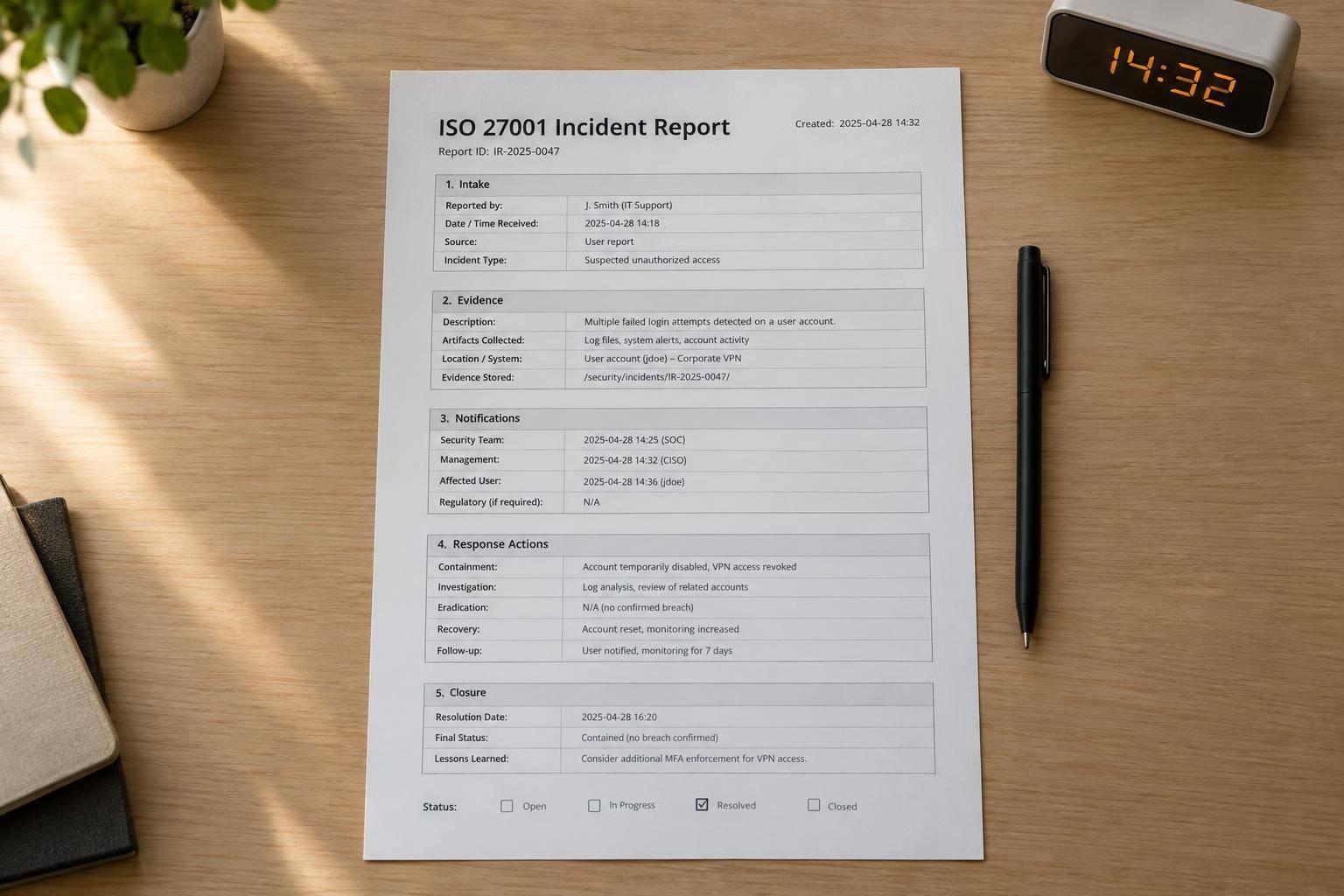
An ISO 27001 incident report should keep the facts, response steps, and closure decisions in one record. For a SaaS form incident, start with the dates, affected forms and data, detection source, severity, and owner. Mark unknown details as “not yet determined.”
This template covers impact assessment, evidence handling, notification decisions, response timelines, corrective actions, and closure approval - including checks for connected systems and downstream data copies.
ISO/IEC 27001 does not require a fixed report format. This template supports the five 2022 Annex A controls A.5.24–A.5.28, but a completed report alone does not establish compliance. It must sit within a working information security management system.
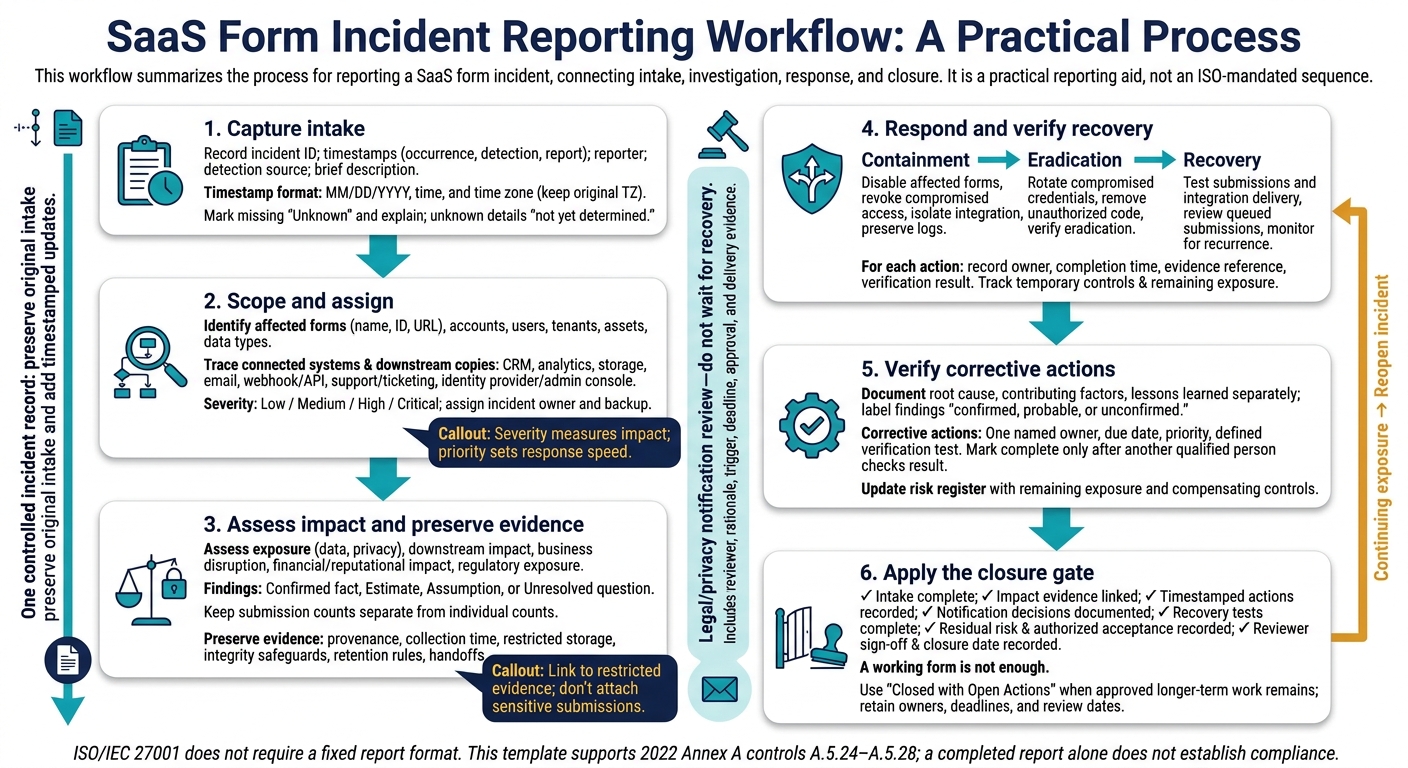
ISO 27001 Incident Report Workflow
Security Incident Report Template | TrustTalks - Ep 34 | Security and GRC Podcast
sbb-itb-5f36581
ISO 27001 Incident Report Template: Intake Checklist
Use a single controlled incident record. Preserve the original intake entries and add timestamped updates.
Record Dates, Reporter, and Detection Source
Enter dates as MM/DD/YYYY, time, and time zone, such as 11/16/2026, 2:30 p.m. EST. Keep the original time zone. Mark missing timestamps "Unknown" and explain why they’re unavailable.
| Check | Field | Entry |
|---|---|---|
| ☐ | Incident ID | ____________________ |
| ☐ | Occurrence date and time | ____________________ |
| ☐ | Detection date and time | ____________________ |
| ☐ | Report date and time | ____________________ |
| ☐ | Unknown timestamps and reason unavailable | ____________________ |
| ☐ | Reporter and contact information | ____________________ |
| ☐ | Detected by (person or system) | ____________________ |
| ☐ | Reporting channel | Email / ticket / phone / chat / monitoring alert / other: ____________________ |
| ☐ | Detection source | User report / security monitoring / form analytics / CRM alert / vendor notification / audit / other: ____________________ |
| ☐ | Brief description | ____________________ |
| ☐ | Suspected cause (unconfirmed) | ____________________ |
Identify Affected Forms, Systems, and Data
Record exact asset identifiers - not just a form’s display name. Keep incident type separate from data type. Don’t store passwords, full payment-card numbers, or unnecessary personal information in the incident record.
| Check | Field | Entry |
|---|---|---|
| ☐ | Form name, ID, and URL | ____________________ |
| ☐ | Version or last deployment date | ____________________ |
| ☐ | Workspace, account, or business unit | ____________________ |
| ☐ | Environment | Production / staging / development / other: ____________________ |
| ☐ | Affected accounts, users, tenants, or assets | ____________________ |
| ☐ | Affected geographic areas, if known | ____________________ |
| ☐ | Connected systems | CRM: ____________________; analytics: ____________________; storage: ____________________; email: ____________________; webhook/API: ____________________; support/ticketing: ____________________; identity provider or administrative console: ____________________ |
| ☐ | For each destination | Integration/account: ____________________; record or event ID: ____________________; synchronization status: ____________________; owner: ____________________ |
| ☐ | Incident type | Malicious submissions or spam / unauthorized access / excessive permissions or access violation / misconfiguration or unintended exposure / account takeover / data integrity issue / availability or denial-of-service issue / third-party or vendor incident / lost or compromised credential / other: ____________________ |
| ☐ | Data types | Name and contact details / credentials or authentication data / uploaded files / payment-related data / health, financial, government ID, or other sensitive data / marketing preferences or behavioral data / internal business information / no data exposure confirmed / unknown - investigation pending: ____________________ |
| ☐ | Data activity | Viewed / copied / altered / deleted / blocked / submitted / unknown: ____________________ |
| ☐ | Exposure assessment | Suspected / confirmed / ruled out / pending: ____________________ |
Use these fields to route the incident to the right owner and severity level.
Assign Severity, Owner, and Status
Follow your organization’s severity criteria. Severity measures impact; priority sets response speed. Fill in verified findings only when evidence supports them. Send notification decisions to qualified legal or privacy personnel.
| Check | Field | Entry |
|---|---|---|
| ☐ | Initial severity | Low / Medium / High / Critical |
| ☐ | Priority and response target | ____________________ |
| ☐ | Severity rationale | ____________________ |
| ☐ | Incident owner and backup | ____________________ |
| ☐ | Escalation contacts | Technical: ____________________; legal/privacy: ____________________; communications: ____________________; management/vendor: ____________________ |
| ☐ | Status | Open / Investigating / Contained / Recovering / Monitoring / Closed |
| ☐ | Escalation required | Yes / No / Pending |
| ☐ | Escalated to | ____________________ |
| ☐ | Escalation date and time | ____________________ |
| ☐ | Privacy or legal review requested | Yes / No |
| ☐ | Customer or user notification considered | Yes / No / Pending |
| ☐ | Regulator, law enforcement, insurer, vendor, or partner notification considered | ____________________ |
| ☐ | Decision | Notify / Do not notify / Defer pending investigation |
| ☐ | Decision rationale | ____________________ |
| ☐ | Approver and approval date | ____________________ |
| ☐ | Notification deadline or requirement identified | ____________________ |
After completing intake, record impact and evidence.
Impact and Evidence Checklist
Assess Data Exposure and Business Impact
Turn intake details into verified impact findings. For form submissions, connected systems, and downstream copies, label each finding as Confirmed fact, Estimate, Assumption, or Unresolved question. Link confirmed facts to evidence and estimates to calculations. Assign each unresolved question an owner and deadline. Keep submission counts separate from individual counts.
Track downstream copies separately so the assessment covers connected systems - not just the original form.
| Impact Dimension | Impact | Affected Asset | Severity | Evidence | Owner |
|---|---|---|---|---|---|
| Data exposure | Record exposure status, affected fields, submission counts, individual counts, and information status | Form, submission records, and storage location | Assessed level and rationale | Logs or forensic evidence | Named incident owner |
| Privacy | Record sensitive data involved and potential harm to individuals | Affected fields and datasets | Assessed level and rationale | Data classification and exposure findings | Named privacy owner |
| Downstream impact | Record affected vendors, integration destinations, and downstream copies in connected systems | Connected accounts and systems | Assessed level and rationale | Delivery logs and vendor findings | Named integration owner |
| Business disruption | Record interruption duration, affected form workflows, and dependent business processes | Form and dependent business process | Assessed level and rationale | Availability logs and support records | Named business owner |
| Financial and reputational impact | Separate confirmed losses in USD from forecasts; record complaints and documented customer effects | Revenue stream or customer relationship | Assessed level and rationale | Cost records and customer communications | Named finance or communications owner |
| Regulatory exposure | Record potentially applicable duties and unresolved questions about applicability | Affected data and jurisdictions | Pending legal/privacy review | Legal review reference | Named legal/privacy reviewer |
Preserve Evidence and Assess Notification Duties
For every log export, alert, screenshot, or token, record its source, storage location, collector, collection time, access limits, retention rule, integrity safeguards, and every handoff. Link to restricted evidence; don’t attach sensitive submissions.
Use the evidence record to support notification decisions. Base severity and notification decisions on the evidence available when the decision is made. Record the reviewer, approval time, legal or contractual basis, triggering facts, deadline, channel, and reason for notifying, not notifying, or deferring. Name the relevant MSA or SLA clause, and have legal or privacy personnel confirm each deadline and trigger. Track materiality review separately from contractual notice deadlines.
For U.S. public companies, the SEC’s four-business-day disclosure window generally starts when materiality is determined - not when the incident is detected.
Response Actions and Timeline Checklist
Use preserved evidence to log each response step as it happens in one controlled incident record. Include detection time, first response time, time to first response, responders, actions, decisions, reasons, and resulting status. Add the time zone to every timestamp.
Track Containment, Eradication, and Recovery
For each item, record the owner, completion time, evidence reference, and verification result. Mark skipped actions as Not applicable and explain why. Keep containment, eradication, and recovery separate in the record.
- [ ] Containment: Disable affected forms, revoke compromised access, isolate integrations, and preserve logs.
- [ ] Eradication: Rotate compromised credentials, remove unauthorized code, and verify eradication.
- [ ] Recovery: Test submissions and integration delivery, review queued submissions before release, and log recurrence monitoring.
- [ ] Remaining exposure: Record temporary controls, their owners, and unresolved risks during recovery.
Log Response and Notification Events
Use this timeline as a fill-in template. Record notifications and no-action decisions, along with recipients, deadlines, approval status, delivery method, and delivery evidence. Include all applicable internal, customer, data-subject, and external notices.
| Timestamp | Event or Action | Person or System Responsible | Evidence Reference | Decision | Resulting Status |
|---|---|---|---|---|---|
| Detection time | Detection and acknowledgment | Detecting system and named responder | Alert or intake reference | Escalation decision, decision-maker, and reason | Investigating or escalated |
| First response time | First containment or response | Named responder | System log or change record | Chosen action and rationale | Contained or response underway |
| Action time | Containment, eradication, or recovery step | Named action owner | Change record and verification result | Approver and rationale, including restoration approval | Contained, remediation underway, or recovery underway |
| Decision/delivery time | Notification sent, deferred, or not required | Sender and approving reviewer | Approved notice and delivery record | Recipients, method, deadline, approval status, and reason | Pending approval, sent, deferred, or not required |
Record SaaS Form Controls Used
If the form platform helped detect or limit the incident, explain how. For Reform incidents, record whether spam prevention, email validation, or conditional routing helped detect or limit the event. Log the settings in use, changes made, and observed results.
Link to the report from a separate incident register. Keep sensitive response details out of that register.
Follow-Up and Closure Checklist
Once recovery stabilizes, use this checklist to track fixes and close the incident record.
Assign and Verify Corrective Actions
Document the root cause, contributing factors, and lessons learned separately. Label each finding confirmed, probable, or unconfirmed, and back it with evidence. Set fix priorities based on data sensitivity, exposure, and recurrence risk. Where relevant, address form settings, permissions, validation, spam prevention, logging, monitoring, integrations, procedures, and training.
Use the follow-up log below with MM/DD/YYYY dates. Give each action one named owner and define its verification test before assigning it. Mark an action complete only after another qualified person checks the result.
| Action | Owner | Due Date | Priority | Status | Completion Evidence | Verification Date | Approver |
|---|---|---|---|---|---|---|---|
| Restrict form and integration permissions | [Name] | [MM/DD/YYYY] | [High/Medium/Low] | [Open/In progress/Complete] | Allowed and denied access test results | [MM/DD/YYYY] | [Name] |
| Retune validation and spam prevention rules | [Name] | [MM/DD/YYYY] | [High/Medium/Low] | [Open/In progress/Complete] | Legitimate and abusive submission test results | [MM/DD/YYYY] | [Name] |
| Tune logging coverage and alert thresholds | [Name] | [MM/DD/YYYY] | [High/Medium/Low] | [Open/In progress/Complete] | Controlled-event test confirming log capture and alert delivery | [MM/DD/YYYY] | [Name] |
After verification, update the risk register with the remaining exposure and compensating controls. Keep a reference to that update in the follow-up log.
Approve Closure and Schedule Reviews
Once corrective actions are verified, move toward closure. Before closing the incident, document any residual risk using the impact findings and supporting evidence.
Closure gate: Check that intake fields, impact evidence, timestamped actions, notification decisions, and recovery-test results are complete. Record the incident owner, residual risk, authorized risk acceptance, reviewer sign-off, closure date, and final status. A working form is not enough - the documentation and recovery criteria must also be complete.
Use Closed with Open Actions when approved longer-term work remains. Keep the owners, deadlines, and review dates in the log. Schedule a review within days of a major incident, plus checkpoints for overdue actions. Reopen the incident if evidence shows continuing exposure, and use recurring findings to improve controls and training.
FAQs
When should I treat form spam as a security incident?
Treat form spam as a security incident when a sudden spike in junk submissions suggests your spam controls have failed or bot behavior has changed. Investigate right away to check whether the activity bypasses security policies or points to a more malicious attack.
Review audit logs for attempted security violations, validation failures, and unusual submission patterns. Treat these findings as potential security events that need escalation and documentation.
How long should I retain incident reports and evidence?
Keep audit logs for at least 12 months. Set incident report retention periods to meet your organization’s privacy regulations and legal obligations, and keep clear, documented audit trails.
Include incident reports and supporting evidence, such as system logs and approval tickets, so auditors can trace what happened. Check that vendor retention schedules also meet your organization’s requirements and regulatory obligations.
What incident evidence should I request from my SaaS provider?
Ask for their formal incident response plan. It should define severity levels, name a security contact, and commit to breach notification within 72 hours of confirmed impact.
Also request:
- A current SOC 2 Type II report or ISO/IEC 27001 certification that covers your service, locations, and integrations.
- Business continuity and disaster recovery (BC/DR) summaries with documented recovery point objective (RPO) and recovery time objective (RTO) targets for form capture and CRM sync, plus proof that backups are encrypted and tested.
Related Blog Posts
Get new content delivered straight to your inbox

The Response
Updates on the Reform platform, insights on optimizing conversion rates, and tips to craft forms that convert.

Drive real results with form optimizations
Tested across hundreds of experiments, our strategies deliver a 215% lift in qualified leads for B2B and SaaS companies.
