
.webp)
Lead Enrichment for Real-Time Lead Scoring



If you want fast lead routing without long forms, enrich the lead at submit and score it right away. I’d keep the form short, add company and contact data in 2–5 minutes, and score leads using four inputs: company fit, role, email quality, and location.
Here’s the short version:
- I’d use expert form strategies to limit fields, because form conversion drops from 23.1% on 3-field forms to 11.4% on 7-field forms and 6.9% on forms with 10+ fields.
- I’d use enrichment to fill in missing data like industry, employee count, revenue band, seniority, country, state, and time zone.
- I’d score leads on a 0–100 scale based on:
- Firmographic fit
- Role and seniority
- Email quality
- Geo and territory fit
- I’d route high-score leads to sales at once, send mid-score leads to SDR review or nurture, and keep low-score leads out of the sales queue.
- I’d make sure field mapping is clean, because scoring breaks when enriched values do not match CRM values.
- I’d add fallback rules so if enrichment fails, the form shows manual fields instead of passing blank data into scoring.
A few score examples make the model easy to understand:
- A target industry lead might get +20
- A company with 201–1,000 employees and more than $10 million in revenue might get +25
- A VP or C-level contact might get +25
- A valid business email might get +25
- A free email like Gmail might get -10
- A generic mailbox like
info@might get -20 - A lead in a priority U.S. state like California, New York, or Texas might get +15
The main idea is simple: collect less, enrich the rest, score fast, and route with fixed rules. That gives sales a cleaner lead record and helps marketing keep form friction low.
| Area | What I’d use it for | Example impact |
|---|---|---|
| Firmographic data | ICP fit | Industry, headcount, revenue, funding |
| Role data | Persona fit | VP/C-level scores higher than IC |
| Email data | Lead quality | Business email scores higher than free or invalid email |
| Geo data | Fit + routing | State, country, time zone, territory assignment |
If I were building this flow, I’d keep the model simple first, tie score bands to routing, and only then add more rules.
Inbound Lead Enrichment with Clay (Core 4 Use Cases, Pt 4)

sbb-itb-5f36581
How the enrichment-to-scoring pipeline works
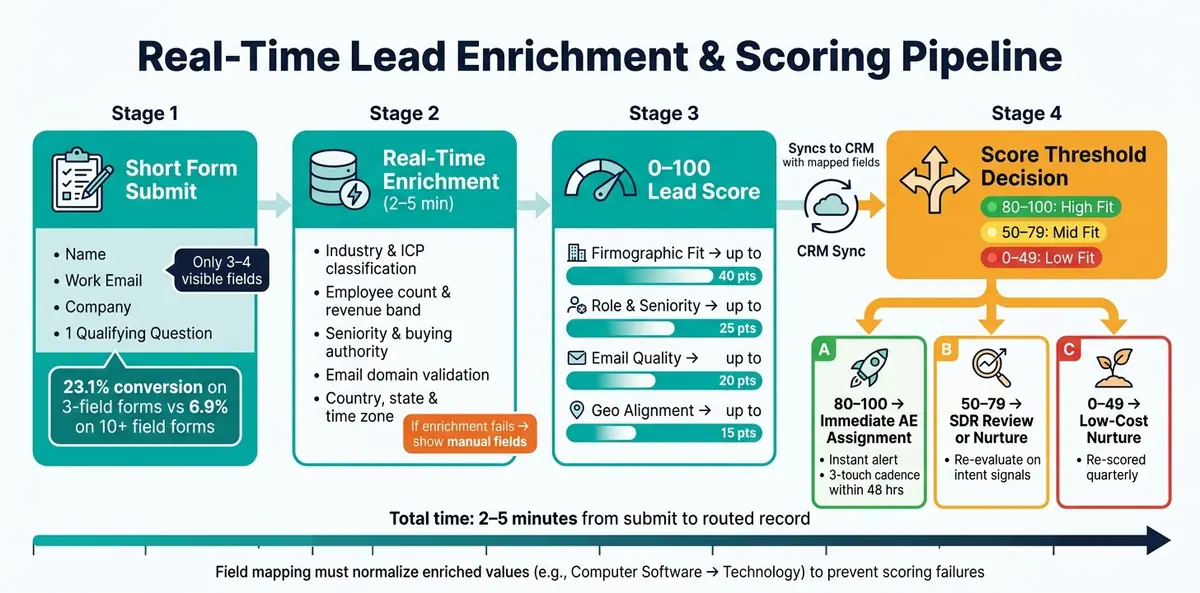
Real-Time Lead Enrichment & Scoring Pipeline: From Form Submit to Sales Route
From submit to route, the flow is pretty simple: capture a few fields, enrich them using identifiers like an email domain or IP address, write that data back to your CRM or automation platform, and then run lead qualification and routing rules before a rep ever sees the record. But this only works if you set the groundwork first. Your ICP, field map, and field ownership need to be defined up front.
Field mapping and data flow into CRM and automation tools
Field mismatches are one of the main reasons scoring breaks.
Say an enrichment provider sends back a raw industry value like Computer Software or Information Technology & Services, but your CRM scoring rule is looking for Technology. If you don't have a lookup table to translate one value into the other, the rule won't fire.
That same issue shows up across the rest of your enriched data too. To keep scoring steady, store:
- employee count as both an exact number and a scoring band
- revenue in USD plus a band
- email status as a fixed value set
- seniority as a normalized picklist
That setup helps scoring rules stay stable and run the same way across thousands of leads, without constant manual cleanup.
Once your fields are mapped the right way, the main risk left is delay or failed enrichment.
Latency, reliability, and routing expectations
The full sequence - from form submit to an enriched, scored, and routed record - usually finishes within 2 to 5 minutes. That's fast enough for same-day routing and follow-up.
If enrichment fails to return a value for a field your model depends on, the form should fall back to manual entry. Otherwise, the scoring model may run on a null value, and that's where things start to go sideways.
Once the pipeline is running on time, the next step is figuring out which enriched fields should actually change the score.
Which enrichment fields change score logic
At submit, only three enriched signal types should change score logic: firmographic, email/role, and geo. Each one serves a clear job.
Firmographic data shows ICP fit. Email and role data show persona fit and buying authority. Geo data drives territory routing. These signals should update the score before routing starts.
Firmographic data: industry, employee count, revenue, and ICP fit
Firmographic enrichment pulls company-level attributes and returns a verified employee count, a standardized industry taxonomy, estimated annual revenue in USD, funding stage, and headquarters location.
These fields sit at the center of ICP fit scoring. Revenue works much like employee count. A lead from a company doing more than $10 million in annual revenue should score differently from one at a startup doing less than $1 million. Funding stage adds another filter. A Series B or C SaaS company with a funding event in the last 12 months can trigger a hot account flag and go straight to an Account Executive, while a bootstrapped micro-business moves into a self-serve queue.
| Firmographic Attribute | Score Adjustment | Routing Outcome |
|---|---|---|
| Target industry (Software, Financial Services) | +20 | Mid-Market or Enterprise AE |
| Non-target industry (Education, Nonprofit) | -10 | Marketing nurture only |
| 201–1,000 employees, revenue >$10M | +25 | Enterprise AE, priority queue |
| 51–200 employees | +10 | SDR qualification |
| Fewer than 10 employees | -10 | Self-serve or SMB queue |
| Series B–D, funded in last 12 months | +30 | Immediate SDR call |
| Pre-seed or bootstrapped | +5 | Standard nurture |
In practice, these values usually set account-fit thresholds first.
Email and role data: validation, seniority, and buying authority
Free-text job titles are messy. Enrichment cleans them up into department, function, seniority, and buying authority. C-level and VP roles usually get +25 points, Directors get +15, and Individual Contributors get +5 or less.
If enrichment marks someone as an Economic Buyer or Primary Decision Maker, they can skip the SDR queue and go right to an AE. Email signals carry just as much weight. A verified business domain earns +25 points. A free domain like Gmail gets -10. A generic mailbox like info@ or admin@ drops -20. A disposable or invalid email can trigger suppression right away. A deliverability score of 90+ adds +15.
| Signal Type | Score Adjustment | Routing Action |
|---|---|---|
Valid business domain (company.com) |
+25 | Route to SDR + add to sales sequence |
Free domain (gmail.com), valid |
-10 | Marketing nurture |
| Disposable or invalid email | -50 | Quarantine; block sales routing |
| High deliverability score (90+) | +15 | Standard routing applies |
Generic mailbox (info@, admin@) |
-20 | Flag for review before outreach |
| VP or C-level in target department | +25 | Immediate AE assignment |
| Director, supporting persona | +10 | SDR call + standard sequence |
| Individual Contributor, non-target dept. | 0 to -5 | Marketing nurture only |
Geo data: country, state, time zone, and territory rules
Self-reported location is often inconsistent, so enriched geo data standardizes country, state, city, and time zone. These fields do two things.
First, they affect fit score. Leads in high-priority U.S. states like California, New York, or Texas might get +15 points. Leads from regions where the product is not sold can be downgraded or removed from sales routing altogether.
Second, geo data controls when outreach happens. Time zone data lets teams set SLAs like contact high-priority U.S. leads within 15 minutes during 9:00 AM–5:00 PM local time, while off-hours submissions wait for the next business window. Territory rules based on enriched state and country data also send each lead to the right rep automatically. West Coast leads go to a West Coast AE team. Eastern states go to an East Coast team. No manual review needed.
These enriched fields feed the score thresholds and routing rules in the next section.
Building a scoring model with enriched fields
Once your enriched fields are live, the next step is to turn that data into a score and a routing rule. A simple way to do it is with a 0–100 scale spread across four areas: firmographic fit, contact role and seniority, email quality, and geo alignment.
Start with data from 6–12 months of enriched lead outcomes. Look at which traits performed above your baseline, then assign points based on that lift. From there, tie those weights straight to routing thresholds so scoring and handoff work off the same logic.
Sample scoring structure and routing logic
Here’s a practical starting point for a U.S.-focused B2B team using enriched fields at form submit:
- Firmographic fit (up to 40 points): Target industry, ideal employee band, and estimated annual revenue within your target range.
- Contact role and seniority (up to 25 points): Director, VP, or C-level; Manager or team lead; individual contributor.
- Email quality (up to 20 points): Verified business email and non-free domain.
- Geo alignment (up to 15 points): U.S.-based leads in priority states like California, New York, or Texas; U.S.-based leads outside target states; non-U.S. leads.
Routing tiers should line up with those score bands.
80–100 points gets immediate sales assignment, an instant alert, and a 3-touch sales cadence within 48 hours. 50–79 points moves into the main nurture track, with SDR review only if intent signals jump. 0–49 points goes to low-cost nurture and gets re-scored quarterly.
Form-only scoring vs. enrichment-led scoring
Form-only models depend on whatever the lead types into the form. That can get messy fast. People skip fields, choose vague options, or enter job titles that are hard to classify. The result is uneven data and slower routing.
Enrichment-led scoring works differently. It fills in firmographic, role, email, and geo fields automatically at submit. That keeps the form short while giving the scoring model cleaner inputs.
| Scoring input | Form-only model | Enrichment-led model | Expected impact |
|---|---|---|---|
| Firmographic industry | User selects from a dropdown; often skipped or generic | Enriched from an external database | Fewer misclassified leads; sharper ICP targeting |
| Employee headcount | Optional field; frequently left blank | Enriched employee band (for example, 11–50, 51–200, 201–1,000) | Complete coverage; more reliable ICP scoring |
| Role and seniority | Derived from free-text title; ambiguous | Normalized seniority (Manager, Director, VP, C-level) | Consistent decision-maker identification |
| Email domain type | Not evaluated | Flagged as business vs. free/personal domain | Better suppression rules; fewer wasted SDR touches |
| Geo country and state | Taken from form field; often just "USA" | Enriched exact country, state, and time zone | Accurate territory routing; time-zone-aware follow-up |
| Routing decision | Manual SDR review; subjective prioritization | Automated based on enriched score thresholds | Faster response; consistent SLAs across all leads |
The day-to-day impact is pretty straightforward. With enrichment in place, reps get an objective score and an automated routing action the moment the form is submitted. That means less manual research, less guesswork, and the same scoring logic on every single submission.
Next, use those fields and thresholds inside Reform to collect fewer fields and enrich more at submit.
Putting real-time enrichment and scoring to work with Reform
Using Reform to collect less and enrich more at submit
Reform puts the enrichment-to-scoring workflow right at the form layer. That means leads can reach scoring with cleaner data and less friction.
Once the scoring logic is set, Reform handles data capture. Its lead enrichment feature connects to an enrichment provider at submit time and adds firmographic, role, and geo fields to the lead record before that record moves into downstream systems. Reform can auto-fill and hide fields like company size, industry, seniority, and country, which keeps the form short while still giving the scoring model the inputs it needs.
The setup is simple:
- If enrichment finds a value, hide the field.
- If enrichment fails, show the field for manual entry.
- Use hidden fields for internal routing fields like territory rules or revenue bands.
- Keep the visible form focused on name, work email, company, and one qualifying question.
Email validation and spam prevention also happen at submission. That matters because scoring is only as good as the records behind it. Real-time email validation cuts malformed or invalid submissions before scoring starts. In plain English, if bad records never enter the pipeline, you get fewer false positives and cleaner routing decisions.
After enrichment fills the key fields, routing can happen right away. High-fit leads can go straight to sales, while lower-fit submissions can move into nurture on their own. CRM integrations sync the enriched score into CRM and automation tools with fields already mapped, so reps can see the score, segment, and routing outcome immediately. Real-time analytics then show submit rates, validation failures, enrichment success, and conversion by score band.
Conclusion: The fields and rules that make real-time scoring work
Real-time scoring falls apart when three parts aren't aligned: fast enrichment, clean field mapping, and clear weighting rules across firmographic, email, role, and geo data. Get those pieces in place, and the model can route the right leads fast and with consistency, without forcing manual research on every submission.
There's also a practical upside for both teams. Marketing gets more form completions because the form stays short. Sales gets better context because enrichment fills in the gaps. And the scoring model stays steady because it runs on verified, structured data instead of whatever a lead happened to type into a box. That's the whole point: less friction at the form, more signal in the score.
FAQs
What data should I enrich at form submit?
Add data at form submit so your team gets a clearer picture of fit and intent before a rep even steps in.
Focus on firmographic data such as company name, company size, industry, revenue, and technology stack, along with demographic details like job title, seniority, and location. If you can fill in missing fields from an email address, you can keep forms short and still collect what sales needs. You can also pass that enriched data into hidden fields for backend lead scoring and routing.
What should happen if enrichment fails?
If enrichment fails, use fallback steps to keep the system stable. With Reform, you can set up forms so that if enrichment doesn’t return a value, the related field stays visible and the lead can fill it out by hand.
That way, your scoring model still gets the data it needs to calculate an accurate score.
How do I choose score thresholds for routing?
Choose thresholds based on the metrics that line up with your current customers and your ideal profile. A simple way to do this is to split scoring into fit and behavior.
Fit covers firmographic and demographic details, like company size, industry, job title, or location. Behavior looks at engagement signals, such as page visits, email clicks, demo requests, or repeat visits. That split helps you see not just who the lead is, but also what they’re doing.
Your thresholds shouldn’t stay fixed forever. As your data changes and conversion patterns shift, adjust them. What worked six months ago may not match how buyers move today.
It also helps to use negative scoring to screen out leads that don’t belong in your pipeline, like competitors or students. That way, your team spends less time chasing poor-fit contacts.
From there, watch conversion rates closely and refine the model over time. Lead scoring works best when you treat it like a living system, not a set-it-and-forget-it rule.
Related Blog Posts
Get new content delivered straight to your inbox

The Response
Updates on the Reform platform, insights on optimizing conversion rates, and tips to craft forms that convert.




Drive real results with form optimizations
Tested across hundreds of experiments, our strategies deliver a 215% lift in qualified leads for B2B and SaaS companies.
