
.webp)
Lead Nurturing Content: Complete Guide


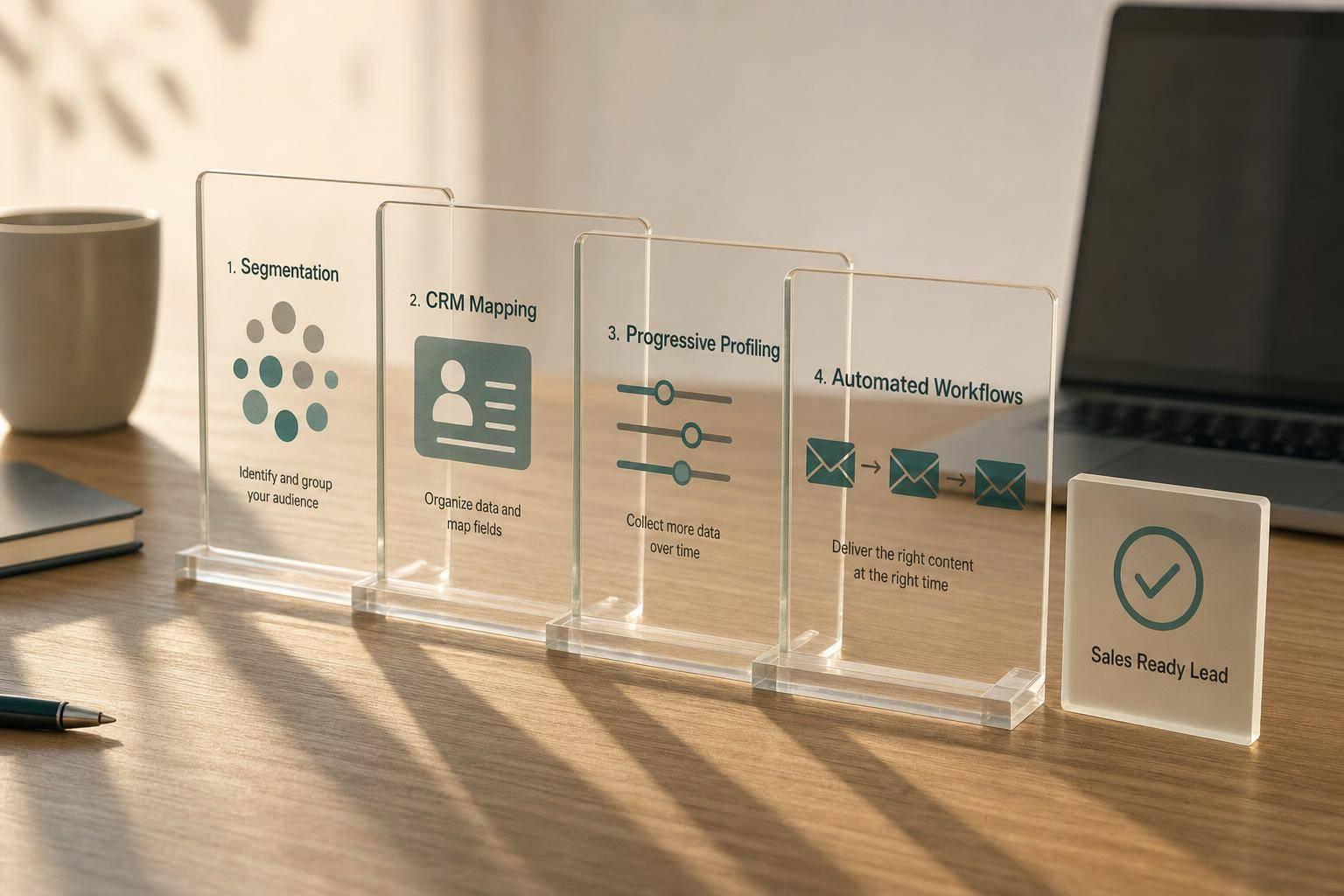
Most leads won’t buy on the first visit, so your content needs to move them step by step toward a sales-ready action. In this guide, I’d boil the system down to four parts: send stage-matched content, collect only the form data you need, use CRM fields to sort and personalize, and set automation rules that react to intent.
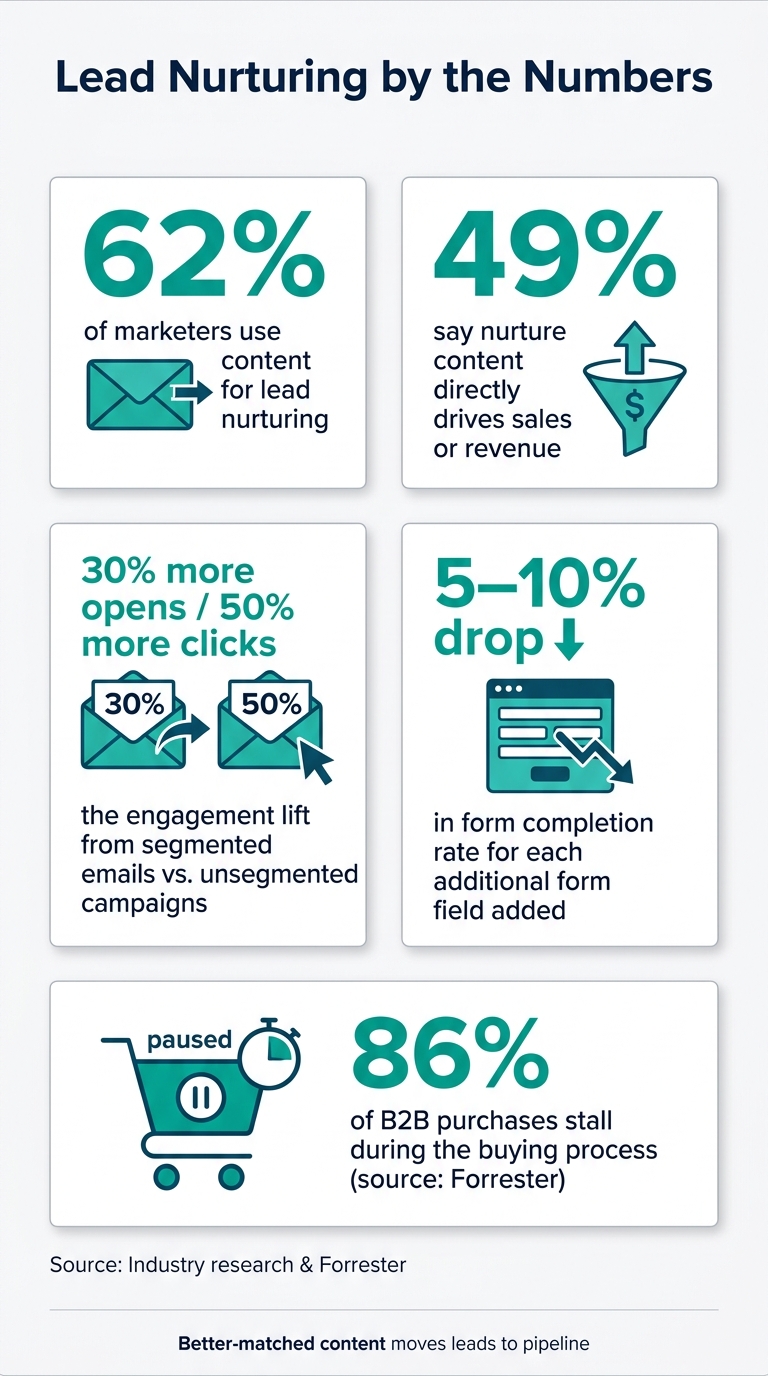
A few numbers make the point fast:
- 62% of marketers use content for lead nurture
- 49% say it drives sales or revenue
- Segmented emails can get about 30% more opens and 50% more clicks
- Each extra form field can cut completion rates by around 5% to 10%
- 86% of B2B purchases stall during the buying process
Here’s the simple takeaway: if I want nurture content to drive pipeline, I can’t just send more emails. I need to:
- Match content to buyer stage
- Segment leads by role, source, behavior, and timing
- Use forms to gather data in small steps
- Trigger the next message based on what people do
- Track qualified leads, opportunities, and revenue instead of just opens
The article also makes one point that matters a lot: content does not work alone. Forms, CRM fields, and workflow rules decide whether the next message fits the lead or misses the mark.
If I were setting up a nurture program today, I’d start with one question: what action should move this lead to the next track, to sales, or out of the sequence? That one decision shapes the whole system.
Lead Nurturing by the Numbers: Key Stats Every Marketer Needs
How Lead Nurturing Works (Automate!)
sbb-itb-5f36581
Segment audiences and map content to CRM data
One nurture sequence can't serve every lead. People come in with different roles, goals, and levels of intent. So if you want each contact to get the next right asset, you need to segment by role, intent, and behavior.
That extra work tends to pay off. Segmented emails can produce about 30% more opens and 50% more click-throughs than unsegmented campaigns. The planning table from the previous section is where this starts to get practical: use it to turn audience data into clear content rules.
The CRM fields that should drive nurture content
Not every CRM field deserves a spot in your nurture logic. Track the ones that actually change the message, offer, route, score, or exit rule.
A simple way to sort them is into six groups:
- Identity: name, email, company, title, seniority, location
- Acquisition: first-touch source, latest source, campaign, referral, landing page
- Interest: topic, product or use case, content downloaded, preferred format
- Lifecycle: subscriber, lead, MQL, SQL, opportunity, customer, disqualified
- Behavioral: pages viewed, emails clicked, forms completed, webinar attendance, demo activity, last activity date
- Qualification: industry, company size, revenue band, buying role, budget range, timeline, consent status, sales owner
Start with the fields that give you the most useful signal early: traffic source, first topic, role or seniority, company-size band, lifecycle stage, and recent activity.
After that, hold each field to a simple test: does it change something? If it doesn't change the message, the offer, the route, the score, or the exit rule, it probably doesn't belong in the workflow.
For example, a contact with a buying timeline of 0–30 days should get implementation plans and proof points. They should not be dropped into a six-part educational series built for someone who's still six months away from picking a solution.
How to use progressive profiling without adding form friction
Every extra form field has a cost. Depending on the audience and form design, each added field can reduce completion rates by about 5% to 10%.
That's why it helps to collect data in layers. Start with the basics. Add firmographics next. Save buying details for moments of high intent.
A good rule of thumb:
- Ask for basic contact info first
- Ask for company details once interest is clearer
- Ask for timeline, current solution, implementation needs, or budget range only when someone requests a demo or pricing
High-intent actions are the right place to ask deeper questions. If someone is asking for pricing, they're telling you they're farther along. That's the time to ask what matters for routing and follow-up.
Use multi-step forms, conditional routing, validation, and integrations to gather more data without making the form feel heavy. Done well, it feels less like paperwork and more like a smooth handoff.
Those fields then become the triggers and tokens used in the mapping below.
Field-to-content mapping for automation
Map each field to a content track, trigger, token, and exit rule.
| CRM Field or Event | Segment Value | Content Track | Automation Trigger | Personalization Token | Workflow Exit Condition |
|---|---|---|---|---|---|
| Job title | Executive | ROI and business-case education | Role is executive or senior decision-maker | {{first_name}} and executive outcome |
ROI guide clicked, reply received, or sales handoff |
| Job title | Technical evaluator | Security, integrations, and implementation | Technical role selected or integration page viewed | {{product_name}} and integration topic |
Technical consultation requested or opportunity created |
| Industry | SaaS | SaaS growth and retention | Industry becomes "SaaS" or a SaaS asset is downloaded | {{industry}} and SaaS use case |
Demo requested or sales-qualified status reached |
| Company size | 1–50 employees | Quick-start and self-serve content | Company-size band is 1–50 | {{company_name}} and team-size context |
Trial activated, purchase made, or disqualified |
| Lead source | Webinar | Recording, recap, and related education | Webinar registration or attendance recorded | {{webinar_name}} |
Attendee clicks a high-intent CTA or becomes MQL |
| Buying timeline | 0–30 days | Decision and implementation content | Timeline is set to 0–30 days | {{timeline}} |
Sales accepts handoff or opportunity is created |
| Behavioral event | Pricing-page visit | Evaluation and sales-support track | Pricing page viewed once or repeatedly | {{pricing_link}} |
Demo request, purchase, or defined inactivity window |
| Behavioral event | No activity for 30 days | Re-engagement track | No qualifying activity for 30 days | {{last_topic}} |
Click, reply, reactivation, or suppression |
Keep field names, allowed values, and trigger definitions in one source of truth. If one team says "SMB" and another says "1–50 employees", reporting gets messy fast.
A clean setup also makes it much easier to compare conversion and pipeline results by segment, instead of judging performance only by opens and clicks.
With segments mapped, the next step is choosing the right asset for each stage.
Choose content by buyer stage and workflow purpose
Pick the asset that fits the buyer’s stage and the job that content needs to do - not the asset your team is most eager to send.
Forrester reports that 86% of B2B purchases stall during the buying process. The fix isn't more content - it's better-matched content.
What to send at awareness, consideration, decision, and re-engagement stages
Each stage lines up with a different buyer question. Your role is simple: answer that question with the clearest, most useful asset you have.
| Buying Stage | Prospect's Question | Suitable Content | Primary Purpose |
|---|---|---|---|
| Awareness | Is this problem real, and does it affect me? | Educational guides, benchmark reports, educational blog posts, checklists, infographics, short videos | Build understanding and establish relevance |
| Consideration | What approaches exist, and which trade-offs matter? | Webinars, assessments, comparison guides, playbooks, industry-specific case studies | Help evaluate options and methods |
| Decision | Will this work for us, and can we justify the cost? | ROI calculators, implementation plans, technical documentation, security FAQs, customer references | Reduce risk and validate fit |
| Re-engagement | Has anything changed since I last looked at this? | Refreshed content, new benchmark data, concise update emails, curated resources, preference-center prompts | Revive interest with genuinely new value |
As buyers get closer to a purchase, your content should get narrower, deeper, and more focused on execution.
And if a lead has gone quiet, don’t send a sales pitch. Send something that gives them a reason to care again: new data, a fresh point of view, or a short update that’s worth opening.
How to document each asset before adding it to a nurture flow
Every asset needs a content record. Without that record, teams tend to send assets in the wrong order or recycle the same ideas.
Use the same segment, stage, and behavior data from your CRM map to tag each asset. A useful content record should include:
- Asset name and URL - the canonical title and location
- Target segment - persona, industry, company size, geography, or account tier
- Lifecycle stage - subscriber, lead, marketing-qualified lead, sales-qualified lead, opportunity, customer, or re-engagement
- Prerequisite knowledge - what the reader needs to already understand
- Learning outcome - what the prospect should know, decide, or do next
- Primary problem or question - the buyer need the asset addresses
- Format and estimated time - for example, a 20-minute webinar or a five-minute checklist
- Related form - the form used to access the asset, including required and optional fields
- Follow-up workflow - the email sequence, wait period, routing rule, and next recommended asset
- Success signal - download, attendance, completion, reply, high-intent click, meeting request, or stage progression
- Owner and review date - the person responsible for accuracy and the next refresh deadline
The related form field matters more than many teams think. An awareness-stage checklist may only need a short form with email, role, and consent where required. A decision-stage ROI assessment is different. There, asking for company size, current process, timeline, or estimated lead volume can make sense because the buyer gets a more tailored output in return.
Reform supports multi-step forms, conditional routing, lead enrichment, validation, analytics, and CRM integrations. That makes it easier to route submissions into the right segment and trigger the right follow-up without manual work.
The learning outcome field matters just as much. Write one sentence that states what the prospect should know, decide, or do after consuming the asset. Then make sure the next asset builds on that outcome instead of saying the same thing again.
If someone skips early-stage content but keeps visiting pricing, technical, or case study pages, automation should move them into a later-stage path. Don’t force every buyer through the same fixed sequence.
Once the right asset is mapped to each stage, the next step is setting up delivery, timing, and exit rules.
Build the email flow, forms, and automation rules
Once your content is mapped to each stage, connect your forms, CRM, and email system so the right person gets the right content at the right time. The stage map only works when each entry point starts the correct email path. And the workflow model you pick decides how those assets trigger, branch, and stop.
A reusable email nurture structure from welcome to re-engagement
Every nurture sequence should teach first, not sell. A clear teaching flow works best, and an eight-step sequence fits most nurture programs:
| Trigger and delay | Learning objective | Primary CTA | Branch or exit rule | |
|---|---|---|---|---|
| Welcome and delivery | Form submission; immediate | Confirm the request and deliver the promised asset | Access the asset | Exit if the contact unsubscribes, the address is invalid, or the lead moves into a more appropriate workflow |
| Foundational education | 2–3 days later | Explain the problem, terminology, and cost of inaction | Read an introductory guide | Branch to a deeper topic after a click |
| Practical instruction | 3–5 days later | Show a process, checklist, or implementation method | Use the checklist or template | Tag contacts who click as engaged |
| Deeper education | 3–5 days later | Address complexity, trade-offs, or technical considerations | Read a detailed resource | Send a lighter educational email if there is no engagement |
| Proof and evaluation | 4–7 days later | Demonstrate results, use cases, or customer evidence | View a case study or comparison guide | Trigger sales-readiness evaluation after a pricing-page visit, demo request, or repeated high-intent click |
| Objection handling | 3–5 days later | Address price, implementation, security, or switching concerns | Review FAQ or evaluation guide | Route repeated high-intent behavior to sales |
| Readiness transition | When intent crosses the threshold | Help the prospect take the next appropriate step | Book a call, request a demo, or take an assessment | Create a sales task and suppress general nurture after handoff |
| Re-engagement | 30–60 days of inactivity | Confirm continued interest and offer preference control | Choose preferences or return to content | Suppress or sunset inactive contacts who remain inactive or opt out |
Start by defining exit events: reply, unsubscribe, qualification, purchase, or sales acceptance. That one step saves you from orphaned contacts and mixed messages later.
When to use linear, behavior-based, or stage-based workflows
Use the table below to match your workflow logic to your audience and the quality of your data.
| Workflow model | Best use case | Advantages | Limitations |
|---|---|---|---|
| Linear sequence | Single asset download, onboarding series, or small audience with similar needs | Fast to build, easy to test, predictable | Can become irrelevant when contacts have different roles or buying stages |
| Behavior-based workflow | Audiences whose clicks, page visits, event attendance, or downloads reveal different interests | Responds to actual intent and prioritizes high-value actions | Requires reliable tracking, clear branch logic, and safeguards against excessive messaging |
| Stage-based workflow | Contacts grouped into awareness, consideration, decision, customer, or re-engagement stages | Aligns education with the buying process and simplifies reporting | Lifecycle stages must be defined consistently, and contacts can receive stale content if stage updates are delayed |
Most teams end up using a mix of all three. But behavior should outrank demographics because it shows current intent.
To stop workflows from colliding, store the current nurture track in a dedicated CRM field and enforce a single active-nurture policy. Each workflow should have a documented priority level, suppression rules for customers and unsubscribed contacts, and a cooldown window - usually 3–7 days - before a contact can enter another non-essential sequence. When a lead is handed to sales, pause marketing nurture right away. Only allow re-entry if the opportunity closes as lost or the sales team sends the contact back to nurture.
Once the workflow logic is in place, the form becomes the trigger point.
How forms and content gating should trigger the workflow
Gate only the assets worth filling out a form for. Then use that form to collect the fields you need for routing and follow-up.
Reform handles the implementation layer here. Its multi-step forms collect only what’s needed at each stage. Conditional routing changes questions based on earlier answers. And abandoned submission tracking saves partial data when someone drops off halfway through the form. Built-in email validation and spam prevention help keep bad records out of your CRM, while native integrations pass clean data into your automation workflows.
After a form is submitted, the workflow should follow the same pattern every time: validate the email, match the submission to an existing contact, normalize values like company size and job title to your CRM’s approved picklist, apply the right lead tag, enroll the contact in the correct nurture workflow, and send the confirmation or asset-delivery email right away. Create a sales task only when the routing rule meets your handoff threshold - not for every single submission.
Here’s how that works across four common conversion points:
| Content asset | Visible form fields | Hidden attribution fields | Lead tag | Nurture workflow | Routing condition | Suppression rule |
|---|---|---|---|---|---|---|
| Introductory guide | First name, work email, role | UTM values, asset ID, landing-page URL | asset_intro_guide |
Awareness education | Start only if consent is valid and no active opportunity exists | Update existing contact; do not create a duplicate |
| Implementation checklist | Name, work email, company, primary challenge | Campaign, referrer, asset ID, timestamp | use_case_implementation |
Practical instruction track | Route by selected challenge; suppress general awareness emails | Add the tag without overwriting lifecycle stage |
| Webinar registration | Name, work email, company, job function | Event ID, campaign, source, registration time | event_webinar_registered |
Event reminders and post-event follow-up | Branch by attended, missed, or canceled status | Do not re-register an existing attendee |
| Demo request | Name, work email, company, company size, timeline, use case | Campaign, landing page, form version, conversion timestamp | high_intent_demo |
Sales handoff or decision-stage track | Assign to sales if fit and intent criteria pass | Pause general nurture; deduplicate by contact and open opportunity |
Before launch, test every path. That includes completion, invalid email, spam, abandonment, duplicate contact, conditional branch, CRM failure, unsubscribe, customer conversion, and sales handoff. It’s a little tedious, sure - but this is the stuff that protects deliverability and gets your tracking ready for the next section.
Measure performance, optimize weak points, and summarize the system
The metrics that connect engagement to pipeline
Once the workflow is live, track downstream metrics to make sure each asset is pushing leads toward qualification and pipeline. The same segments, assets, forms, and workflow branches you set up earlier should also shape your dashboards.
Open rates can point you in a direction, but they’re not enough on their own. Apple Mail Privacy Protection can inflate them. So focus on what happens after the open.
Organize reporting into five layers:
| Layer | What to measure |
|---|---|
| Delivery health | Delivery rate, hard-bounce rate, spam-complaint rate, unsubscribe rate |
| Engagement | Unique click-through rate, click-to-open rate, replies, content downloads |
| Qualification | Form-submission rate, MQL rate, MQL-to-SQL conversion, sales-accepted lead rate |
| Pipeline | Opportunity creation, opportunity value, time from nurture entry to opportunity |
| Revenue and efficiency | Cost per customer, revenue per nurtured lead, email sequence completion rate |
A delivery rate below 95% often points to list hygiene or deliverability issues. On the qualification side, industry reports suggest that 24-hour follow-up converts at 8%–12%, compared with 1%–3% for weekly follow-up. Treat that as a directional industry claim, not a fixed benchmark for every team. Even so, the gap makes a strong case for tight routing rules and fast handoffs.
Report on both rate and volume every time. A high conversion rate from a tiny segment can look good in a slide deck but still add little to pipeline. On the flip side, a lower rate from a larger, better-qualified audience may drive more revenue. Break out every report by acquisition source, persona, content asset, workflow branch, form version, and CRM qualification outcome. Big averages can hide a broken branch or a weak segment.
A practical optimization cycle for lead nurturing content
Use the report to find the first point of friction, then fix that layer before touching anything else. That keeps you from changing five things at once and learning nothing.
When performance drops, diagnose the workflow in order. Low delivery usually points to list quality or authentication problems. Good delivery but weak clicks often means the audience, subject line, or content stage is off. Clicks without form submissions usually signal landing-page friction. Check:
- Field count
- Mobile usability
- Page speed
- Unclear value exchange
- Validation errors
- Whether the form asks for information already stored in the CRM
If submissions come in but sales won’t accept the leads, look at qualification criteria, scoring thresholds, and routing logic. If qualified leads still don’t turn into pipeline, shift the review to sales follow-up speed, offer fit, pricing, competitive position, and opportunity attribution.
After you isolate the problem, test one variable at a time. Write down the hypothesis, the audience, the control version, the test version, the primary metric, and a downstream guardrail before launch. Judge tests by downstream conversion, not opens. And before you call a winner, check what happened farther down the funnel.
Conclusion and implementation checklist
Turn reporting into a weekly, monthly, and quarterly review rhythm. Lead nurturing only keeps working if someone keeps an eye on it. Review delivery failures, broken links, form errors, and routing exceptions weekly. Review engagement and conversion by segment, asset, and branch monthly. Review MQL-to-SQL rates, pipeline influence, content gaps, and workflow architecture quarterly. After any major CRM, form, or automation-platform change, run a full end-to-end test from submission through routing, enrollment, suppression, and reporting.
The full system follows one path: content → form → CRM → automation → revenue. Before you launch - or relaunch - any workflow, confirm that these items are in place:
- Nurture goal and primary downstream outcome are defined
- Audience segments and exclusion criteria are documented
- Required CRM fields, field ownership, and data quality are confirmed
- Content is inventoried and labeled by buyer stage, topic, format, and CTA
- Every form field and form version is mapped to the CRM and the correct workflow
- Entry triggers, delays, branches, suppression rules, exit conditions, and re-entry rules are configured
- Each conversion step is tracked in reporting
- Segment-level dashboards and an attribution model are established
- A single variable is being tested at a time, with downstream results tracked
- If your workflow depends on multi-step forms, conditional routing, lead enrichment, validation, spam prevention, analytics, and CRM integrations, use Reform to keep form-to-CRM data clean
- Owners are assigned and recurring review dates are scheduled
FAQs
How do I choose the right content for each buyer stage?
Match your content to the questions people ask at each stage of the buying process.
- Awareness: educational blog posts, reports, and guides
- Consideration: playbooks, templates, and case studies
- Validation: ROI calculators, webinars, and product tours
- Decision: free trials, demos, and security documentation
Then deliver that content based on what people do - like submitting a form, visiting the pricing page, or downloading a resource - instead of sending it on a fixed schedule.
Tools like Reform can capture that context and route leads by role, company size, and timeline.
Which CRM fields matter most for lead nurturing?
Focus on fields that show both fit and intent: contact info, role, company size, industry, tech stack, product interest, lead source, and timeline or budget signals.
It also helps to track rejection reasons, like the wrong vertical or bad timing. That gives you a feedback loop, so your team can sharpen targeting instead of guessing.
Reform can automatically fill in firmographic details, which helps keep your CRM data clean and ready to use.
When should a lead move to sales or leave a nurture flow?
A lead should leave a nurture flow as soon as they hit the MQL threshold or turn into an active sales opportunity. At that point, automation should pull them out of earlier-stage sequences right away so they don't keep getting content that no longer fits where they are.
They should also be removed if they unsubscribe or if they're handed off to a sales representative for direct outreach.
Related Blog Posts
Get new content delivered straight to your inbox

The Response
Updates on the Reform platform, insights on optimizing conversion rates, and tips to craft forms that convert.



Drive real results with form optimizations
Tested across hundreds of experiments, our strategies deliver a 215% lift in qualified leads for B2B and SaaS companies.
