
.webp)
How to Prevent API Abuse with Throttling


API abuse is a growing threat that can degrade performance, compromise security, and increase costs. Throttling is a key method to control the rate of API requests, protecting your system from malicious attacks like DDoS and credential stuffing, as well as accidental overloads caused by misconfigured clients.
Key Takeaways:
- Throttling Basics: Limits the number of API requests within a set timeframe, often returning HTTP 429 ("Too Many Requests") when exceeded.
- Common Algorithms:
- Token Bucket: Handles bursts effectively, ideal for public APIs.
- Fixed Window: Simple but prone to boundary issues, suitable for internal services.
- Sliding Window: Smooths traffic spikes, great for precise enforcement.
- Implementation Tips: Use load tests to set limits, apply tiered limits (per user, API, or method), and monitor metrics like error rates and resource usage.
- Best Practices: Communicate limits clearly to users, log activity to detect abuse, and adjust policies as traffic patterns evolve.
Throttling is essential for maintaining API performance, ensuring fair resource distribution, and protecting against abuse. By choosing the right algorithm and enforcing limits strategically, you can safeguard your infrastructure while keeping costs predictable.
API Rate Limiting & Throttling Explained 🚦 | Prevent API Abuse & Scale Safely
Common Throttling Algorithms and When to Use Them
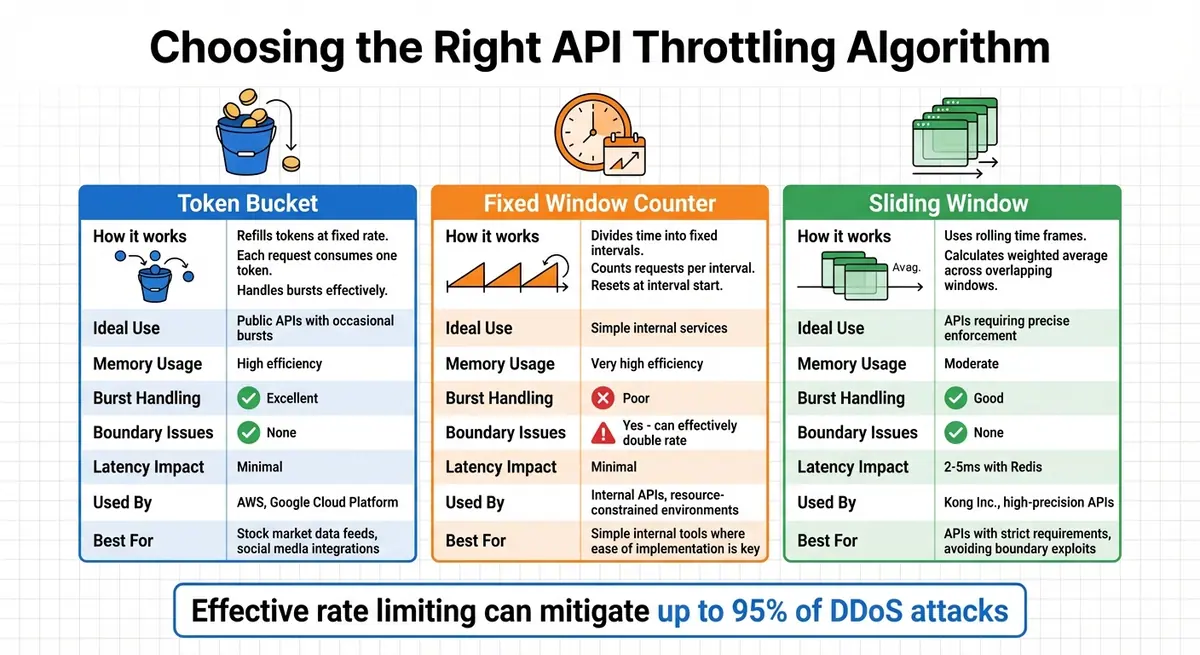
API Throttling Algorithms Comparison: Token Bucket vs Fixed Window vs Sliding Window
Throttling plays a key role in managing API usage and preventing abuse. Different algorithms cater to unique usage patterns, and selecting the right one means striking a balance between performance, accuracy, and resource efficiency. Let’s break down how these algorithms work and their ideal applications.
Token Bucket is widely adopted by platforms like AWS and Google Cloud Platform. It operates by refilling a "bucket" of tokens at a fixed rate. Each request consumes one token, and once the bucket is empty, additional requests are throttled. This method is great for handling occasional traffic surges. The bucket's size determines how much burst traffic can be accommodated, while the refill rate sets the average request throughput. However, if the bucket capacity is too large, users can temporarily exceed the average rate, potentially overloading downstream systems.
Fixed Window Counter divides time into fixed intervals (e.g., one minute) and counts requests within each interval. The counter resets at the start of every new interval. This approach is straightforward and memory-efficient, making it a good fit for internal APIs or resource-constrained environments. That said, it can lead to "boundary issues." For instance, if a user maxes out their limit at the end of one interval, they can immediately make another full set of requests at the start of the next interval, effectively doubling the allowed rate and possibly causing a surge.
Sliding Window algorithms tackle the boundary problem by using rolling time frames instead of fixed intervals. This method calculates a weighted average across overlapping time windows to decide whether a request should be allowed. Kong Inc. highlights this approach as offering a good balance between scalability and performance while avoiding the pitfalls of fixed windows, such as bursting or starvation. Modern Redis implementations of this algorithm add only about 2–5 milliseconds of latency per request.
| Algorithm | Ideal Use | Memory Usage | Burst Handling | Boundary Issues |
|---|---|---|---|---|
| Token Bucket | Public APIs with occasional bursts | High efficiency | Excellent | None |
| Fixed Window | Simple internal services | Very high efficiency | Poor | Yes (can effectively double rate) |
| Sliding Window | APIs requiring precise enforcement | Moderate | Good | None |
Each algorithm serves a specific purpose. Token Bucket is a versatile option, ideal for public-facing APIs that need to accommodate bursts of traffic. Fixed Window is perfect for simpler internal tools where ease of implementation is key. Sliding Window is the go-to choice for high-precision APIs with strict requirements, especially when boundary exploits must be avoided. This precision is vital, as effective rate limiting can mitigate up to 95% of DDoS attacks.
How to Implement API Throttling
Selecting the Right Algorithm
Choosing the right algorithm is crucial for managing your API's traffic effectively. The Token Bucket algorithm is perfect for handling short bursts of traffic while maintaining a steady rate over time. This makes it a great choice for public-facing APIs that experience occasional spikes, such as stock market data feeds or social media integrations.
If you need a consistent outflow rate, the Leaky Bucket algorithm is a solid option. It's commonly used by email services and web crawlers to avoid overwhelming downstream systems or triggering flags. For internal services with minimal memory requirements, Fixed Window is the simplest to implement, though it may allow bursts at boundary conditions.
The Sliding Window algorithm strikes a balance by smoothing out spikes with sliding log accuracy while maintaining the efficiency of fixed-window models. For APIs limited by resources like database connections, threads, or GPU capacity, Concurrent Request Limiting is the way to go. Alternatively, Dynamic Throttling adjusts limits in real-time based on server health metrics, offering flexibility.
Setting Request Limits
After selecting an algorithm, it's time to define request limits to safeguard your resources. Start by running load tests and analyzing historical data to determine capacity and peak usage patterns. Differentiate clients using identifiers like IP addresses, JWT claims, API keys, or custom headers.
Apply limits at various levels:
- Account-level for overall usage.
- API-level for specific services.
- Stage-level for environments like development or production.
- Method-level for resource-intensive operations.
To prevent both short-term spikes and long-term overuse, implement tiered limits across multiple time scales. For example, you could allow 10 requests per second and 1,000 requests per hour.
Communicate these limits clearly to your users. Use standard headers such as RateLimit-Limit (maximum allowed requests), RateLimit-Remaining (remaining requests in the current window), and RateLimit-Reset (time until the quota resets). These headers help clients manage their request rates effectively.
Enforcing and Monitoring Throttling
Once limits are set, enforcement and monitoring are key. Use an API Gateway or Web Application Firewall (WAF) to intercept requests and return HTTP 429 responses when limits are exceeded. Include a Retry-After header in these responses to inform clients when they can safely retry.
For distributed systems, synchronize counters across multiple nodes using a centralized store like Redis. Redis typically adds just 2–5 milliseconds of latency per request. To avoid race conditions in high-concurrency environments, rely on atomic "set-then-get" operations instead of "get-then-set".
"Because of the distributed nature of throttling architecture, rate limiting is never completely accurate. The difference between the configured number of allowed requests and the actual number varies depending on request volume and rate, backend latency, and other factors." - Azure API Management Documentation
Real-time monitoring is essential. Track metrics like peak usage, average requests per user, unusual spikes, and 429 error rates. This data helps you fine-tune policies to distinguish legitimate users from potential attackers. Segmenting metrics by API key or IP address can also identify specific users or bots that may be consuming excessive resources.
sbb-itb-5f36581
Best Practices for API Throttling
Once you've implemented throttling, fine-tuning it with these best practices can boost both performance and security.
Match Throttling to API Capacity
Your throttling limits should align with what your API can realistically handle. Begin with load testing to determine not only the maximum request rate but also the largest request size and processing complexity your system can manage. Testing these factors together helps identify your system's true breaking point.
"Services should be designed to process a known capacity of requests; this capacity can be established through load testing." - AWS Well-Architected Framework
APIs designed for shorter timeouts and smaller payloads can safely support higher throttling limits since they use fewer resources per request. For systems that can tolerate some delay, tools like Amazon SQS or Amazon Kinesis can buffer requests during traffic spikes, helping to avoid crashes.
Once your throttling matches your API's capacity, the next step is handling situations where limits are exceeded.
Handle Exceedances Gracefully
When limits are hit, how you handle it matters. Hard throttling denies requests outright using HTTP 429 responses, which is effective for enforcing free-tier limits or protecting critical infrastructure. On the other hand, soft throttling queues excess requests and processes them at a slower pace, making it a better fit for scalable systems that experience predictable traffic fluctuations.
For added resilience, consider the circuit breaker pattern. This approach temporarily stops requests to downstream services that are struggling under heavy load, preventing widespread failures across your system.
Log Activity and Detect Anomalies
Throttling isn't just about limiting requests; it's also an opportunity to monitor and secure your API. Detailed logging should include endpoints accessed, client identifiers, and request rates to help identify abuse patterns like credential stuffing, price scraping, or card testing.
Instead of relying solely on IP addresses - which can lead to false positives due to shared public IPs through NAT devices - use session-based identifiers like JWT claims or API keys. Anomaly detection systems can take this further by creating separate traffic baselines for different endpoints (e.g., /login versus /reset-password). This allows the system to adapt to legitimate traffic changes, such as those driven by marketing campaigns. For accurate detection, ensure each endpoint is accessed by at least 50 unique sessions within a 24-hour period over a seven-day span.
Monitoring and Adjusting Throttling Over Time
Throttling isn't a "set it and forget it" process. As your user base grows, features expand, and usage patterns shift, traffic behaviors will evolve. Keeping your throttling policies effective means actively monitoring and tweaking them to match real-world demand. Metrics are the backbone of this process, helping you refine your approach in real time.
Track API Usage with Analytics
Start by keeping an eye on key metrics like requests per second (RPS), traffic bursts, and the number of "429 Too Many Requests" errors. These figures reveal whether your limits are overly restrictive or too lenient. Beyond that, monitor system health indicators like CPU load, error rates, and response times to spot when your infrastructure is feeling the strain.
Set up a routine for reviewing this data - daily, weekly, and monthly. This helps you identify peak usage times, establish traffic baselines, and track growth trends. Real-time dashboards are especially useful for catching sudden anomalies, like unexpected traffic surges from specific IPs, which could signal issues like DDoS attacks or scraping attempts. By segmenting data (e.g., by user groups, locations, or business hours), you can fine-tune throttling rules more effectively.
Certain thresholds can signal it's time to tighten limits: CPU usage over 80%, error rates above 5%, or response latency exceeding 500 milliseconds. Dynamic rate limiting, for example, can ease server load by as much as 40% during high-traffic periods while still keeping services available.
Adjust Limits for Traffic Peaks
Some traffic spikes are predictable - think end-of-month reporting or promotional campaigns. For these scenarios, adjust your throttling limits proactively. Use granular rate limits across multiple timeframes (per second, per minute, per day) to handle short-term bursts without sacrificing long-term capacity. For high-impact endpoints like file uploads or complex queries, stricter limits can prevent bottlenecks that might affect the entire system.
Compare Throttling Algorithms
Different throttling algorithms work better for different needs. Here's a quick breakdown:
| Algorithm | Pros | Cons | Use Cases |
|---|---|---|---|
| Fixed Window | Easy to implement; predictable behavior | Can cause spikes at window boundaries | Works for simple traffic patterns and quotas |
| Sliding Window | Smooths traffic flow; avoids boundary spikes | More complex to set up and maintain | Great for high-performance APIs in clusters |
| Token Bucket | Handles bursts well; highly flexible | Requires careful tuning; may allow sustained high rates | Ideal for variable traffic with occasional bursts |
| Leaky Bucket | Keeps request flow steady; smooths spikes | May add latency for bursts; memory-intensive | Best for systems needing consistent traffic flow |
As your API evolves, revisiting these algorithms can help you decide which one fits best - or if adjustments are needed. Many modern APIs now lean toward adaptive systems that dynamically adjust restrictions based on server health and traffic patterns. By leveraging real-time analytics and making regular updates, you can ensure your API stays both resilient and responsive.
Conclusion
Summary of Throttling Benefits
API throttling acts as a safeguard for backend services, databases, and authentication systems, protecting them from sudden traffic surges and malicious attacks. By curbing threats like credential stuffing, brute-force attempts, and scraping, throttling serves as a critical first line of defense.
In addition to security, throttling ensures fair resource distribution, preventing any single client from dominating system resources. It also helps manage costs by keeping usage predictable and supports tiered monetization models by enforcing usage quotas for different service levels.
"API rate limiting is no longer optional - it's essential infrastructure protection." - Paige Tester, Director of Content Marketing, DataDome
For example, Stripe's request rate limiter has blocked millions of problematic requests caused by errant scripts or runaway loops. Its concurrent request limiter was triggered roughly 12,000 times to prevent CPU overload on resource-heavy endpoints. With malicious API attacks up by 137% in 2022 and bot-related incidents increasing by 28% in 2023, the importance of effective throttling has never been clearer.
These benefits highlight the need to implement precise throttling strategies to ensure both API performance and security.
Final Implementation Tips
To make the most of throttling, focus on targeted strategies that balance protection with usability.
- Set granular limits: Apply rate limits across multiple timeframes - per second, minute, and day - to manage both short-term spikes and sustained usage effectively.
- Provide transparency: Include rate limit details in response headers like
X-RateLimit-RemainingandX-RateLimit-Resetso clients can monitor their usage. Use theRetry-Afterheader in 429 responses to guide users on when they can try again. - Test before enforcing: Roll out new throttling policies in "monitor-only" mode to observe their impact without disrupting legitimate traffic.
- Prepare for contingencies: Use kill switches or feature flags to quickly disable limiters if they start blocking valid requests. For distributed systems, rely on centralized data stores like Redis to maintain consistent counters across servers.
- Prioritize critical traffic: During peak loads, deprioritize non-essential requests, such as analytics data, to ensure vital operations like payments are processed without delays.
FAQs
What’s the difference between the Token Bucket, Fixed Window, and Sliding Window algorithms for rate limiting?
The main distinction between these algorithms lies in how they control request limits and manage bursts of traffic.
The Token Bucket algorithm works by allowing tokens, which represent permissions for requests, to accumulate over time. Each request consumes a token, and tokens are replenished at a steady rate. This makes it adaptable to short bursts of traffic, as long as tokens are available. However, it effectively prevents prolonged bursts by limiting the token supply.
The Fixed Window algorithm operates by counting requests within fixed time intervals, such as one minute. Once the interval resets, the count starts over. While simple to implement, this method can lead to traffic spikes at the edges of the time windows, resulting in uneven distribution.
The Sliding Window algorithm takes a more refined approach by tracking requests over a continuously moving time frame. This continuous monitoring smooths out traffic patterns, avoiding spikes at window boundaries and ensuring steadier rate limiting.
To sum it up, Token Bucket handles short bursts well, Fixed Window is straightforward but can create uneven traffic, and Sliding Window offers smoother, more consistent control over request rates.
How do I set the right throttling limits for my API?
To determine the best throttling limits for your API, you’ll need to dive into your traffic patterns. Start by monitoring typical request rates, pinpointing peak usage periods, and understanding how various user behaviors affect your system. This groundwork allows you to set limits that protect your system from overload while ensuring legitimate users enjoy a seamless experience.
You can implement throttling using methods like the fixed window, sliding window, token bucket, or leaky bucket algorithms. These approaches help enforce limits efficiently. Make it a habit to revisit and fine-tune your thresholds as your API usage grows and changes, ensuring your system stays secure, performs well, and keeps users satisfied.
What are the best practices for monitoring and updating API throttling over time?
To keep API throttling effective, start by studying traffic patterns, peak usage periods, and how often requests are made. This helps you set limits that ensure smooth performance, prevent misuse, and leave room for growth.
Keep an eye on key metrics like request rates, error rates, and server load. These indicators help you spot when adjustments are necessary. Implementing dynamic rate limiting - where limits adapt in real time based on traffic and server conditions - can help maintain consistent performance and a good user experience.
Leverage API gateways or monitoring tools to automate tracking and make adjustments as needed. Regularly reviewing analytics ensures your throttling strategy stays aligned with evolving usage trends, keeping your API efficient and responsive.
Related Blog Posts
Get new content delivered straight to your inbox

The Response
Updates on the Reform platform, insights on optimizing conversion rates, and tips to craft forms that convert.




Drive real results with form optimizations
Tested across hundreds of experiments, our strategies deliver a 215% lift in qualified leads for B2B and SaaS companies.
