
.webp)
Top Tools for Monitoring Privacy Compliance



Most sites still get privacy wrong after a user opts out. One figure in the article says only 45% of websites honor data-sharing choices after opt-out, and sites use an average of 34 third-party services.
If I had to boil this guide down, I'd say this: you need more than a cookie banner. I’d look at privacy monitoring in three layers:
- Consent tools for banners, cookie rules, and consent logs
- Runtime monitoring tools for live script, pixel, and tracker checks
- Form-layer tools for consent records at submission and cleaner data handoff to the CRM
The article reviews these tools:
- OneTrust
- CookieYes
- PrivacyEngine
- CHEQ Enforce
- DataGrail
- PrivacyForge
- Reform
What I found most useful is the article’s main test for each tool: what can it see, and what can it stop? That matters because privacy problems often come from tag drift, script changes, session replay, weak GPC handling, or consent details getting lost between the form and the CRM.
A few points stand out right away:
- By early 2026, 15 to 21 U.S. states have broad privacy laws in place
- Teams should recheck sites at least every 90 days
- Static scans miss many trackers loaded through tag managers or SDKs
- Good records should tie consent to the page, time, policy version, and jurisdiction
Technical Overview for Compliance Monitoring
sbb-itb-5f36581
Quick Comparison
| Tool | Main Role | Best For | Watch-Out |
|---|---|---|---|
| OneTrust | Consent management and records | Teams that want one place for consent data across systems | Less focused on deep browser-side checks alone |
| CookieYes | Cookie scans and script blocking | Sites that need banner geotargeting and tracker blocking | Mostly focused on cookie/site tracking layer |
| PrivacyEngine | Consent enforcement and testing | Teams that want to stop data sharing after refusal | Broader workflow depth may vary by setup |
| CHEQ Enforce | Live browser monitoring | Teams that want runtime tracker blocking | More focused on browser activity than form records |
| DataGrail | Script visibility and privacy workflows | Teams that want tracker lifecycle control plus privacy process support | Setup may take more work than lighter tools |
| PrivacyForge | Data-flow mapping across channels | Teams tracing where lead data moves after collection | Less centered on on-page form UX |
| Reform | Form-layer consent and lead handling | Teams that want cleaner lead intake and submission-level records | Does not control site-wide cookie behavior |
So if you run lead-gen pages, my takeaway is simple: pair a consent tool with runtime checks and a form tool. That gives you better control over what fires on-page, what gets submitted, and what moves downstream.
How to Evaluate Privacy Compliance Monitoring Tools
Not every privacy tool handles the same part of the job. Some stop at banner preferences. Others watch live data flows and apply rules across forms, tags, and downstream systems. So when you compare options, focus on two things: what the tool can see and what it can stop across the full workflow. That makes the next step pretty clear: which tools can monitor and enforce compliance across the form, browser, and downstream stack?
Regulatory Coverage, Cookie Controls, and Monitoring Depth
Start with the legal models the tool supports. You want one that fits the consent model your traffic calls for, including U.S. opt-out enforcement and GDPR opt-in flows. If your workflow depends on forms, check whether the tool controls tracking both at submission and after the CRM sync.
Then look at how the tool scans. Static scans only read page source, which means they can miss trackers loaded through tag managers or SDKs. Runtime testing is stronger because it checks live network traffic and can catch cookies, pixels, fingerprinting scripts, and ID syncing as they run.
Two more checks deserve close attention:
- The tool should detect and honor Global Privacy Control (GPC) signals.
- It should also detect session replay tools, since those can create CIPA exposure in California.
Reporting, Integrations, and Administration
Monitoring doesn't help much if you can't prove what happened. For lead generation, the key is evidence that connects consent to the form submission when creating high-converting lead forms and to the systems that received the lead.
For audit readiness, look for timestamped, exportable logs tied to each form submission. Those records should include the jurisdiction inferred from IP, the consent state, and the document version shown at the time of consent. Page-scoped records matter too, because the evidence should reflect the exact page where the interaction took place.
Then check whether the tool can act on its findings. Strong platforms combine page inventories, live visitor data, and active verification so they can catch new scripts added after a scan. Google Tag Manager blocking rules, CRM or helpdesk connectors for DSAR routing, and real-time alerts when a new tracker appears or a page loses protection are all signs of a more mature platform. Automated DSAR workflows can cut privacy operations costs by up to 90% compared with manual ticket-based processes.
For larger U.S. teams, admin controls matter too. Role-based access control (RBAC), SSO/SAML, SCIM, and regional data residency options become more important when multiple sites, brands, or departments share the same compliance workflow.
| Capability | What to Look For | Why It Matters |
|---|---|---|
| Regulatory coverage | CCPA/CPRA, GPC, RDP/LDU, GDPR | Matches rules to the traffic you actually receive |
| Scanning method | Runtime live-traffic analysis, not static only | Catches dynamically loaded trackers |
| Consent logs | Timestamped, exportable, page-scoped | Defensible evidence for audits |
| Tag enforcement | GTM integration with blocking capability | Prevents scripts from firing after opt-out |
| DSAR automation | CRM/helpdesk connectors and deadline tracking | Cuts manual compliance work |
| Access control | RBAC, SSO/SAML, and SCIM | Supports governance across large organizations |
Top Tools for Monitoring Privacy Compliance
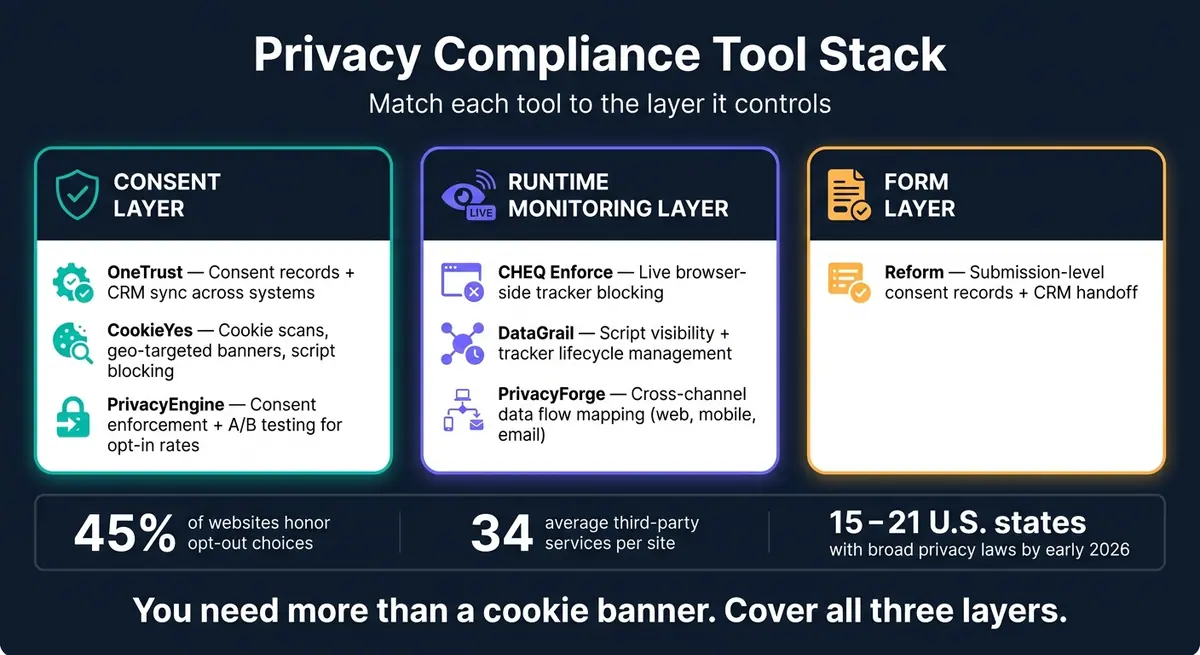
Privacy Compliance Tools Compared: Which Layer Do You Need?
The tools below line up with the browser, governance, and form layers covered above.
OneTrust, CookieYes, and PrivacyEngine
These tools handle different parts of privacy compliance, from consent collection to cookie checks to what happens after a user makes a choice.
OneTrust keeps consent records in one place and applies those consent choices across connected marketing and CRM systems.
CookieYes runs scheduled scans to find hidden trackers and auto-blocks third-party scripts until consent is granted. Its main edge is built-in geo-targeting for consent banners.
PrivacyEngine stops data sharing when consent is refused. One thing that stands out is its A/B testing, which helps teams improve consent acceptance rates.
Additional Runtime Monitoring and Governance Tools
When cookie controls alone don't do the job, these tools watch live scripts and data flows as they happen.
CHEQ Enforce tracks browser-side activity in real time and blocks unauthorized tracking.
DataGrail gives teams a live view of risky scripts and cookies, along with automated lifecycle management for first- and third-party trackers.
PrivacyForge maps consent decisions across web, mobile, and email into real-time data flow maps. That makes it easier to trace where lead data goes after collection.
In plain English, these tools go past the banner. They help teams see what's happening inside the browser and where data moves next.
Reform as the Form-Layer Component
For teams that want compliance control right at the point of entry, a form-layer tool makes sense.
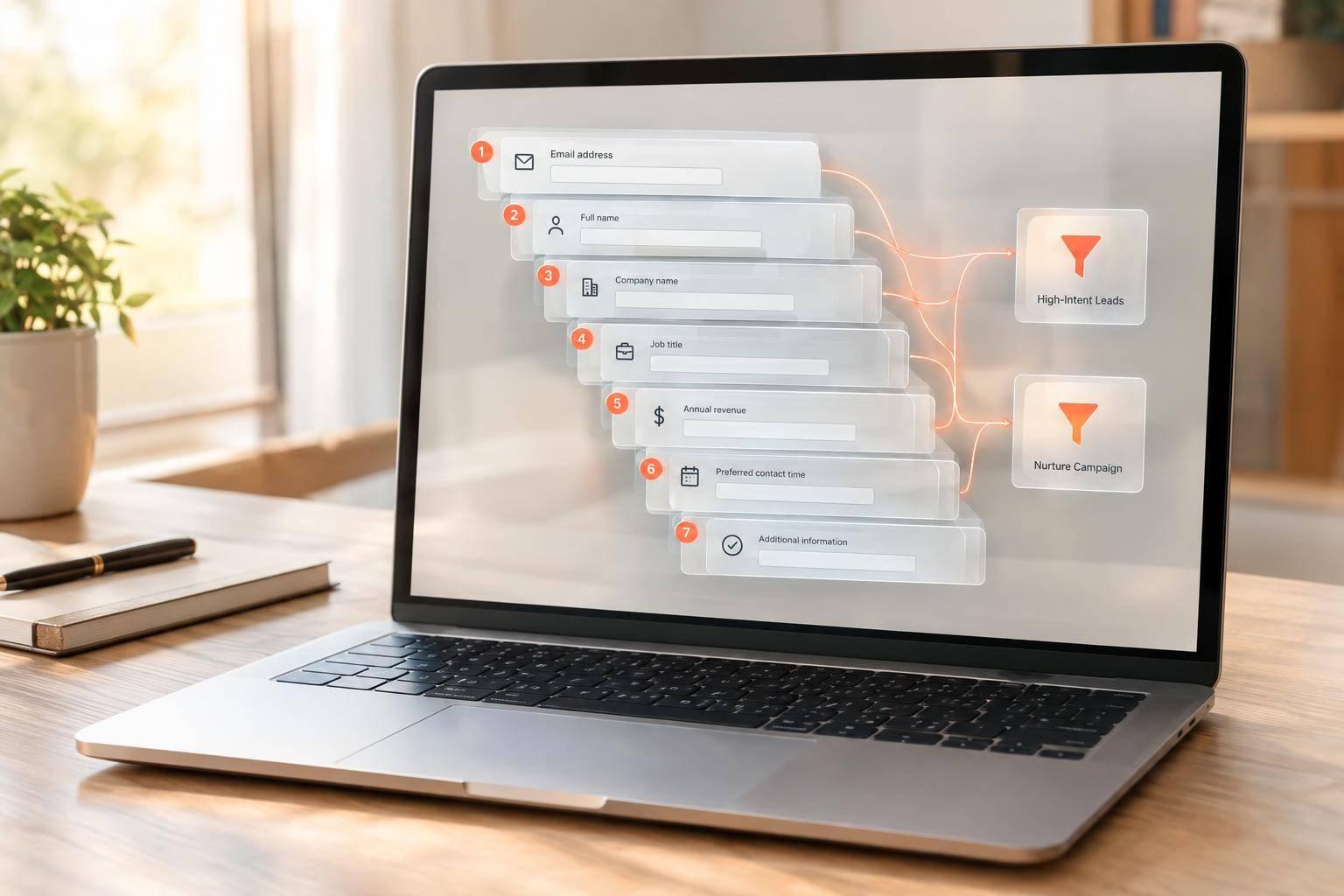
Reform covers the form layer by controlling what data gets collected before submission. It supports multi-step forms with conditional routing, so consent notices and disclosures show up when needed. Real-time analytics show where users drop off. Lead enrichment, spam prevention, and email validation help keep data accurate before it reaches the CRM. HubSpot integration supports a clean handoff into downstream systems.
How to Align These Tools With Form-Based Workflows
Use the tools above by workflow layer, not as one big combined stack.
That matters because form-based privacy work happens in steps. A visitor lands on a page, sees a form, submits data, and that data moves into your CRM. If you treat all of that like one blob, it gets messy fast. And when it gets messy, consent details can slip through the cracks.
Map the Lead Data Lifecycle and Consent Requirements
Privacy compliance starts before the form loads.
Map the full path from landing page to form submission to CRM sync. Look at each handoff closely. If tracking keeps running after someone opts out, consent can break at that point.
You also need to apply the right rule based on the visitor's location at the moment data is collected. Global Privacy Control signals override manual banner choices in 18 U.S. states, so your stack needs to detect and honor those browser-level signals on its own.
Assign the Right Tool to Each Layer
Match each tool to the stage it controls.
| Lifecycle Stage | Primary Tool Category | Key Compliance Check | Key Report/Output |
|---|---|---|---|
| First Visit | Consent management | Geofencing and tracker blocking; GPC signal recognition | Consent log (timestamp, IP) |
| Lead Capture | Form layer | Affirmative opt-in; data minimization | Consent audit trail (timestamp, IP, privacy policy version) |
| Data Transfer | Privacy transfer controls | PII detection in payloads; DPA verification | Data flow inventory (RoPA) |
| CRM Sync | Governance reporting | Consent metadata mapping; purpose-based access | Compliance health score |
| Retention | CRM automation | Auto-archiving cold leads | Deletion completion record |
Use this map to block trackers on the first visit, capture opt-in at the form, and pass consent metadata into downstream systems. That layer-by-layer setup leads into the feature comparison below.
Comparison Summary and Conclusion
Feature Comparison and Tradeoffs by Tool Category
The right pick comes down to which layer you need to watch, control, or document.
| Category | Primary Strength | Key Limitation | Best Fit |
|---|---|---|---|
| Cookie and Tracking Monitors | Runtime behavior analysis, tag suppression, and continuous scans | Strong on technical enforcement, but less suited to DSARs and broader governance | Sites that need to block trackers and verify opt-outs in practice |
| Privacy Automation Platforms | DSAR management, data mapping, policy generation, and audit-ready evidence | Can take longer to implement and may be less focused on deep tag suppression | Legal-heavy teams managing broader privacy operations |
| Form-Layer Tools | Timestamped consent at submission | Does not manage site-wide cookie behavior or general tracking | Teams capturing leads through forms and needing defensible consent records |
The main weak spot is enforcement, not banner setup. A banner can log a user's choice. But if tracking scripts still fire after someone opts out, you still have a compliance hole.
Form-layer tools handle the moment consent is first collected. Reform captures timestamped proof of consent at the point of lead submission.
Key Takeaways for U.S.-Based Teams
For U.S. teams, the day-to-day test is simple: does monitoring stay active after launch? New landing pages, theme updates, and marketing tags added without legal review can slowly create compliance drift. That's exactly what live scans are there to catch.
A defensible audit trail should include:
- A timestamp
- A hashed IP
- The privacy policy version shown at collection
Most U.S. lead-gen teams need three layers: tracking enforcement, consent capture, and audit records. When each tool is matched to the layer it actually controls, compliance is much more likely to hold as your site changes and your stack grows.
FAQs
Why isn’t a cookie banner enough?
A cookie banner by itself isn't enough. Regulators don't see a consent interface alone as proof that you're compliant. What they want is technical proof that a person's choices are being followed in practice.
That means the details matter. If tracking scripts or pixels fire before consent, or if opt-out signals are ignored, you can still end up non-compliant. And here's the catch: teams keep adding new tags and scripts all the time, so compliance can drift unless someone is checking it on a regular basis.
How often should we recheck privacy compliance?
Privacy compliance isn’t a set-it-and-forget-it job. Websites change. Laws change. And small updates can create gaps you didn’t mean to leave open.
A solid starting point is automated scans at least once a week. If you run a high-traffic site or an e-commerce store, daily scans make more sense. For SSL certificates and legal notices, real-time monitoring is the norm.
It also helps to do manual spot checks at least once a month using a clean, incognito browser session. That way, you can see what a new visitor might see, without old cookies or saved settings muddying the picture.
What should a privacy consent record include?
A privacy consent record should show that consent was obtained in a valid way.
That means the record should include:
- A timestamp
- The consent text or privacy policy version the user agreed to
- The user’s IP address
- A link to the exact form version that was submitted
Using a platform like Reform can make this much easier. It helps you collect these details in a consistent way, which is important for compliance.
Related Blog Posts
Get new content delivered straight to your inbox

The Response
Updates on the Reform platform, insights on optimizing conversion rates, and tips to craft forms that convert.



Drive real results with form optimizations
Tested across hundreds of experiments, our strategies deliver a 215% lift in qualified leads for B2B and SaaS companies.
