
.webp)
How Workflow Replication Boosts Lead Nurturing Efficiency



If I build every lead nurture workflow from scratch, I lose time, add errors, and make reporting harder to trust. A better approach is to clone one proven workflow, keep the logic fixed, and change only the audience-specific parts. That can save about 4 hours per workflow and as much as 80 hours a year when the same nurture runs across many segments.
Here’s the short version:
- I keep triggers, delays, branches, scoring, and handoff rules the same
- I change messaging, offers, CTAs, and routing labels by audience
- I use clean form inputs so leads route into the right path
- I track the same metrics across each workflow:
- Entry-to-engagement rate
- Stage progression rate
- Sequence-to-pipeline conversion rate
This matters because disconnected workflows often lead to:
- Broken asset links
- Mixed MQL rules
- Slow updates across teams
- Weak test data
- Sales follow-up delays
A shared template fixes that. It helps me launch nurture programs in less time, keep scoring and sales handoffs aligned, and compare results across audiences without sorting through mismatched workflow versions.
One stat stands out: companies using lead scoring report a 77% improvement in lead generation ROI, and nurtured leads can move through the sales cycle 23% faster.
To make this work, I’d build one master workflow, document all dependencies, set naming rules, and standardize form fields before cloning anything.
How Lead Nurturing Works (Automate!)
sbb-itb-5f36581
Where lead nurturing breaks down across multiple audiences
Managing lead nurturing across multiple audiences isn't just a content issue - it's a system issue. One nurture program can turn into dozens of segment combinations fast, and at that point, manual lead conversions don't scale well. As the number of audiences grows, copying and reusing pieces stops being optional and starts becoming part of the job. That strain shows up in upkeep, data quality, and reporting.
Fragmented workflows add management overhead
When each campaign creates its own workflow, the setup starts to look like a patchwork of separate rules instead of something a team can run without friction. To keep nurtures up to date across audiences, teams have to go back into each workflow one by one every time a cadence or qualification rule changes. And once the logic gets packed with deep if/then branches, even small edits can feel risky. Every new branch makes shared updates harder to apply.
Manual duplication causes errors and inconsistent data
Duplication brings another issue with it: workflows rely on connected assets. One complex nurture can point to 15 to 20 separate objects, including emails, lists, forms, and contact properties. If just one of those references breaks, the workflow can fail quietly or enroll the wrong contacts.
Data issues get worse when workflows define lifecycle stages in different ways. Maybe one workflow marks leads as qualified from a form fill, while another uses lead score. That mismatch chips away at trust in the data across the whole system.
Non-standard structures make optimization harder
When every nurture runs on a different cadence, uses a different number of steps, and measures success in a different way, there's no steady baseline for comparison. Without a shared setup, testing and reporting stop matching up across audiences. Optimization slows down because the workflows aren't built on the same model or judged by the same success metrics.
How workflow replication improves speed, consistency, and reporting
Replication solves the three biggest issues from the last section: slow launches, uneven logic, and messy reporting. You can see the impact in three areas: launch speed, workflow consistency, and reporting quality.
Launch new nurture programs in days, not weeks
Instead of rebuilding triggers, delays, and branches for every audience, teams can clone an existing workflow and swap only the audience-specific assets, such as optimized conversion paths. That cuts a lot of busywork.
Teams that keep a library of 15–25 core templates for lifecycle management, marketing nurtures, sales enablement, and data hygiene can roll out proven logic in minutes. The team spends less time rebuilding the same setup and more time on strategy and customization.
Standardize lead scoring, timing, and sales handoff rules
When every nurture program starts from the same base structure, entry rules, scoring thresholds, and sales handoff triggers stay aligned across audiences. That kind of consistency helps sales and marketing stay on the same page.
It also improves handoff reliability. Companies that use lead scoring see a 77% improvement in lead generation ROI, and nurtured leads have a 23% shorter sales cycle on average.
On the sales side, it helps to standardize the score that moves a lead from Marketing Qualified Lead (MQL) to Sales Accepted Lead (SAL). Pair that with automated alerts that fire the moment a lead crosses that score, and you cut down the lag that often kills warm opportunities. A lead that sits for 48 hours after hitting an intent threshold can lose momentum fast.
Get cleaner data for testing and optimization
Once the workflow structure stays fixed, testing gets a lot cleaner. You can isolate one variable at a time, which makes results easier to compare across audiences. Clone a proven workflow, change just one element, like delay length or CTA, and now you have a controlled setup for A/B testing.
Naming conventions matter here too. A taxonomy like [Category] - [Audience] - [Version] makes each workflow easy to identify and sort. It also makes duplicate or orphan workflows much easier to spot.
For each stage, track these three metrics:
- Entry-to-engagement rate
- Stage progression rate
- Sequence-to-pipeline conversion rate
When those metrics are tracked the same way across workflows, the data becomes much easier to compare across audiences.
How to replicate workflows without losing personalization
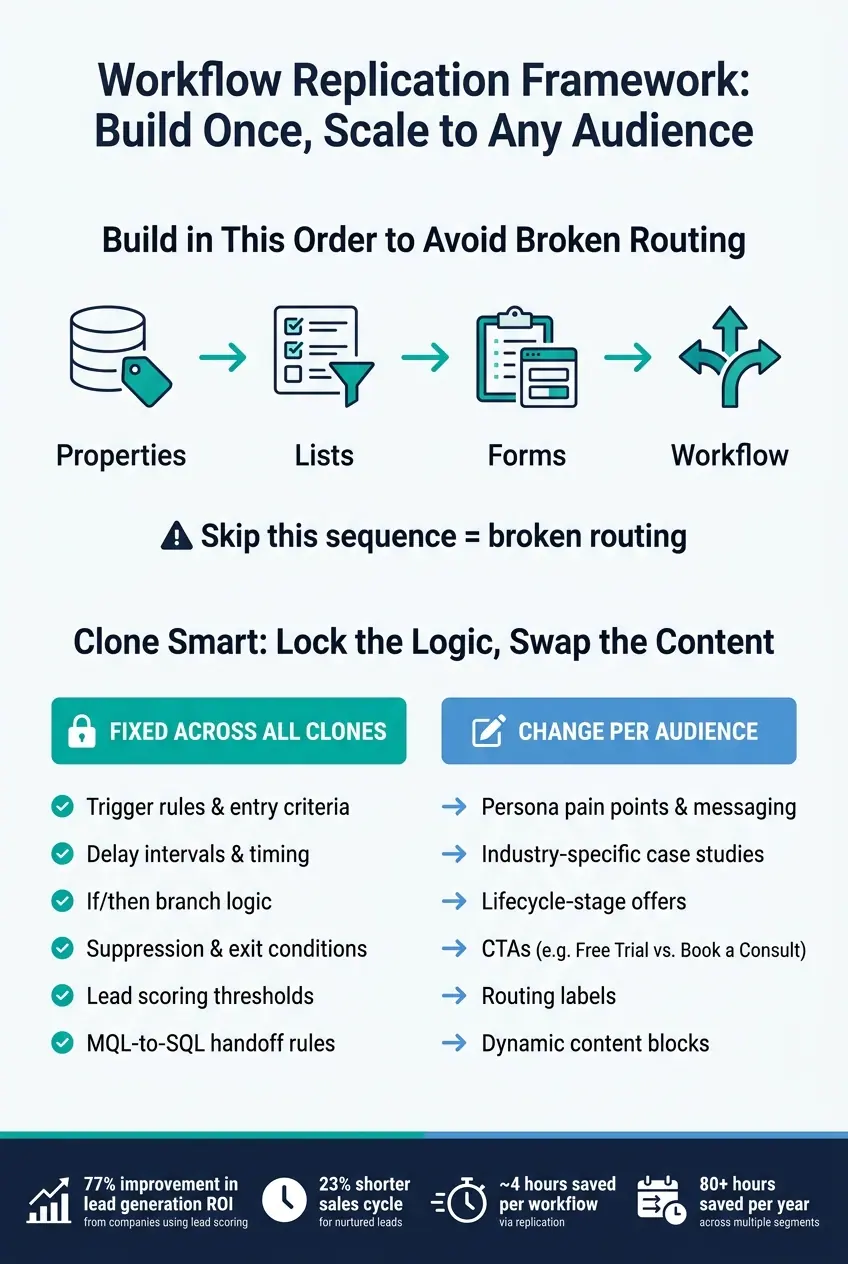
Workflow Replication Framework: Build Once, Scale to Any Audience
Replication works only when you’re clear on what stays fixed and what can change. Get that balance wrong, and things fall apart fast. Some teams rebuild too much and lose the time savings. Others lock down too much and end up sending bland messages that don’t convert.
Build a master workflow template with fixed logic
The next move is simple: separate the workflow’s logic from the parts that should shift by audience.
Your master template is the backbone. Put all the structural pieces here, including delay intervals, if/then branches, suppression checks, exit criteria, and MQL-to-SQL handoff conditions. Then clone that template and change only the audience-specific entry criteria.
Start by documenting dependencies: property names, list IDs, form references, and email templates. Build in this order: Properties → Lists → Forms → Workflow. Skip that sequence, and broken routing is much more likely. Every workflow also needs an exit condition, like a booked meeting, so contacts stop getting nurture emails after they convert.
Naming conventions matter too. Not in a glamorous way, but in the day-to-day, nuts-and-bolts way that keeps your workflow library sortable and easy to audit as it grows.
Customize only the content and offers that change by audience
Once the core structure is set, only a few things should change between clones. Those are the parts that make the message feel relevant: persona pain points, industry-specific case studies, lifecycle-stage offers, and sales CTAs.
For example:
- A SaaS audience might see "Start Free Trial"
- A professional services audience might see "Book a Consultation"
You can also use merge tags or dynamic content blocks to swap paragraphs or images based on a lead’s role or industry. So instead of rebuilding whole email sequences from scratch, you’re changing the content inside a stable setup.
The rule of thumb is pretty straightforward: keep triggers, timing, and handoff logic fixed. Change only content, CTAs, and routing labels.
Use Reform to standardize form inputs and lead routing
Once the template is in place, form quality decides whether routing holds up.
Workflow replication depends on steady inputs at the form level. Top-of-funnel forms shape whether leads move cleanly into the right workflow. If form fields are messy - different labels for the same data, missing company size, or vague role options - routing logic can break down in a hurry.
Reform handles this at the source. Its multi-step forms with conditional routing let you collect role, industry, and company size without dumping too much on the lead all at once. Fields appear only when they make sense, which keeps the form short while still collecting the data your workflows need for routing. Email validation and spam prevention also help keep CRM data clean before workflow logic kicks in.
Clean, consistent form data makes lead-property routing possible. Instead of hardcoding audience names into branches, you can branch on properties like Industry or Company Size. When those values come in clean and consistent from every form submission, one master workflow can read them and route each lead into the right replicated sequence on its own - no manual sorting needed. That’s what makes a single master workflow work across multiple audience branches.
Conclusion: How replication turns lead nurturing into a scalable system
Workflow replication turns lead nurturing from a one-off build into a repeatable system you can use across many audiences. If you rebuild each workflow by hand, you lose time and slow down launches as your number of segments grows.
The idea is pretty simple: the core structure stays the same, while the audience-specific parts change. Start with a proven master template with fixed logic, standard naming, and handoff rules, and each new audience segment can go live in minutes instead of days. That gives you speed, consistency, and easier management across every program you run.
A consistent workflow structure also makes testing and reporting much easier across segments. If every nurture program follows the same setup, you can compare results directly instead of sorting through mismatched workflow versions.
High-converting lead forms ensure clean inputs help replicated workflows stay accurate without manual fixes. When lead properties come in the same way every time, your master workflow can route contacts automatically.
Start with one master template, clone it for your highest-priority segments, and track launch time, MQL conversion rate, and pipeline value. That’s how lead nurturing becomes a scalable system.
FAQs
When should I clone a workflow instead of building a new one?
Clone a workflow when you're reusing the same lead lifecycle logic and only need small tweaks. It's a good fit when you're repeating similar steps across branches or want to use an existing workflow as your starting point.
If the workflow depends on internal outputs or branch references that don't carry over well, cloning can get messy. The same goes for very large workflows. In those cases, it's usually safer to build a new workflow or split the old one first.
Before you switch anything on, review the enrollment logic and run a test.
What parts of a nurture workflow should stay fixed across audiences?
Keep the core workflow logic the same across audiences: use the same primary triggers, sequence actions, delays, and branch structures.
Then tailor the content and the exact settings for each segment. But the base automation pattern should stay consistent, including MQL-to-SQL handoffs and goal-based success states.
How do clean form fields improve lead routing and reporting?
Clean form fields make lead routing and reporting far easier. When your form asks specific qualifying questions, you can sort leads into the right nurture sequence right away, without manual review or guesswork.
That matters because better input leads to better automation. With clear, well-structured fields, segmentation becomes more precise and CRM syncing is less likely to break or create messy records.
Reform supports this with custom field mapping and duplicate handling. In plain terms, that helps keep workflow data clean and consistent, which leads to reporting you can trust and optimization decisions based on solid data.
Related Blog Posts
Get new content delivered straight to your inbox

The Response
Updates on the Reform platform, insights on optimizing conversion rates, and tips to craft forms that convert.



Drive real results with form optimizations
Tested across hundreds of experiments, our strategies deliver a 215% lift in qualified leads for B2B and SaaS companies.
