
.webp)
How Conditional Logic Improves Form Personalization



Conditional logic makes forms smarter by showing only relevant questions based on user input. This reduces frustration, shortens forms, and improves completion rates. For businesses, it means cleaner data and higher conversions. Here's why conditional logic matters:
- Simplifies forms: Users see fewer, more relevant questions, saving time.
- Improves data quality: Only necessary information is collected, reducing errors.
- Boosts completion rates: Shorter, personalized forms keep users engaged.
Examples include skipping irrelevant sections, tailoring thank-you messages, and multi-step forms. Conditional logic transforms forms into efficient, user-focused tools.
How To Use Conditional Logic in Forms
Conditional logic is a core component of multi-step form design, allowing you to create a more focused experience for every user.
sbb-itb-5f36581
Benefits of Using Conditional Logic in Forms
Conditional logic can completely change how users interact with forms while improving the quality of the data you collect. Its advantages shine in three key areas: user experience, data accuracy, and completion rates.
Simpler Forms for Users
Long, cluttered forms are a surefire way to frustrate users. Imagine opening a form with 20 fields, only to realize most of them don't even apply to you. Conditional logic trims the fat, showing users just the fields that matter. That 20-field monster could shrink to only 8 relevant questions, respecting users’ time and making the experience smoother.
"Every irrelevant field you show someone is a small nudge toward the back button."
- Bohdan Khodakivskyi, Founder of Fomr
Features like skip logic take this one step further, allowing users to bypass entire sections that don’t apply to them. The result? A faster, more intuitive form that feels tailored to each person.
Better Data Quality
Irrelevant required fields can lead to bad data - or no data at all. Faced with irrelevant questions, users might abandon the form entirely or enter random answers just to move forward. Conditional logic solves this by ensuring every question feels relevant to the user. For example, a B2B prospect might see enterprise-related questions, while a B2C customer encounters consumer-focused ones.
"Guiding users through a structured flow ensures they provide the correct information and reduces errors."
- QuestionScout Team
This approach ensures cleaner, more reliable data. Imagine a form where a phone number field becomes mandatory only if a user selects the "Call me" option. This way, you're only collecting what’s necessary, reducing friction and improving the quality of your data.
More Completed Forms
Did you know that 67% of forms are abandoned before submission? Lengthy forms are one of the biggest culprits. Conditional logic helps by breaking down long forms into manageable, relevant sections. When users only see what’s applicable to them, they’re more likely to finish the process. This streamlined flow keeps them engaged and makes the experience feel purposeful, not overwhelming.
"The forms that perform best are the ones that feel like they were built specifically for the person filling them out."
- Bohdan Khodakivskyi, Founder of Fomr
This personalized touch can have a big impact. Research shows that 75% of consumers are more likely to buy from brands that offer personalized experiences, and 67% say they spend more when personalization is done well. Since forms are often the first interaction someone has with your brand, making them feel customized sets the stage for a positive relationship moving forward.
How Conditional Logic Personalizes Forms
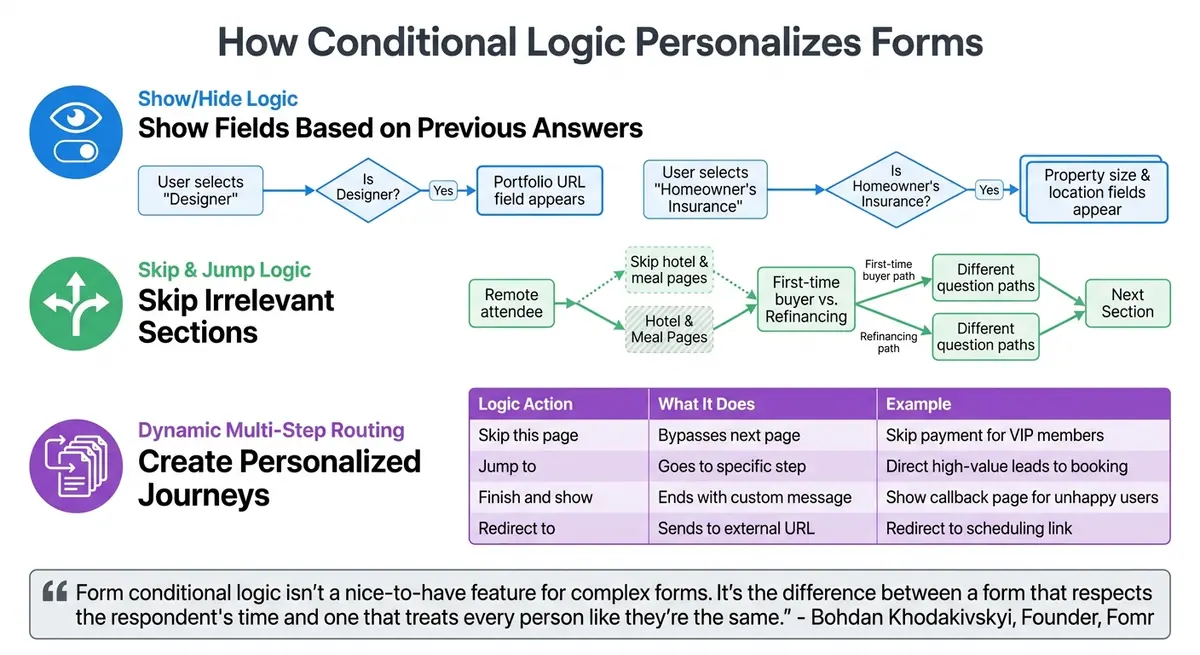
How Conditional Logic Works in Forms: Show/Hide, Skip, and Dynamic Routing
Conditional logic allows forms to adapt on the fly, tailoring the experience by showing only relevant questions and hiding unnecessary ones. This keeps forms streamlined and engaging, making them feel more personalized.
Showing Fields Based on Previous Answers
Show/hide logic works by instantly revealing or concealing fields based on user input. Simple if/then rules ensure that a specific response triggers the display of a related field, keeping the form concise and focused.
For example:
- A job application form might only display a "Portfolio URL" field if the user selects "Designer" or "Creative" as their role.
- An insurance quote form could reveal questions about property size and location only if the user indicates interest in homeowner's coverage.
Skip and jump logic takes this further by creating a tailored journey. For instance, a virtual event registration form might let remote attendees skip pages about hotel preferences and meal options. Similarly, a mortgage application could use early qualifying questions to guide users down different paths - whether they're first-time buyers or refinancing.
This adaptive approach doesn’t just enhance the form experience; it also sets the stage for customized follow-ups.
Customizing Messages for Each User
The personalization doesn’t stop once the form is submitted. Conditional logic can link user responses to tailored thank-you pages using "Finish and show" actions, ensuring that post-submission messages resonate with each individual.
For example:
- A customer satisfaction survey might encourage high scorers to refer others, while offering an apology and a callback request to those who scored lower.
- A lead qualification form could assure enterprise prospects with a "We'll contact you within 2 hours" message, while smaller leads are directed to self-service resources.
This kind of sentiment-based messaging ensures that users feel understood and appreciated, aligning the follow-up communication with their unique experience.
Creating Dynamic Multi-Step Forms
Conditional logic makes multi-step forms even more powerful by allowing dynamic routing. Instead of forcing all users through the same steps, page-level branching adapts the journey based on individual responses. Here’s how it works:
| Logic Action | Action | Example Use Case |
|---|---|---|
| Skip this page | Bypasses the next page if conditions are met | Skip the payment page for VIP members |
| Jump to | Navigates to a specific future page or step | Direct high-value leads to a calendar booking page |
| Finish and show | Ends the form and shows a tailored message | Display a "Request Callback" page for unhappy users |
| Redirect to | Sends users to an external URL upon completion | Redirect enterprise leads to a scheduling link |
This flexibility means high-revenue prospects can be sent straight to a scheduling link, while smaller leads might be routed to educational content. For event registration, conditional logic could present different question sets for in-person and virtual attendees, ensuring each user only sees what’s relevant to them.
"Form conditional logic isn't a nice-to-have feature for complex forms. It's the difference between a form that respects the respondent's time and one that treats every person like they're the same."
- Bohdan Khodakivskyi, Founder, Fomr
Setting Up Conditional Logic in Reform
Now that you understand the perks of conditional logic, here's how to set it up in Reform step by step.
Opening the Form Editor
Start by opening the form you want to customize in your Reform dashboard. Forms in Reform are structured as pages, and conditional logic applies at the page level. Look for the Page settings button on the right side of the page, click it, and then select Logic to open the rule configuration overlay. Keep in mind that advanced features like "Skip this page", "Jump to", "Finish and show", and "Redirect to" may only be available depending on your plan.
Creating Conditional Rules
To set up a rule, begin by defining the trigger question. Then, choose a condition like "is", "is not", "is empty", or "is not empty", and specify the target value. For example, you could create a rule to skip the payment page if a user selects "VIP Member" from a dropdown menu. Use the Add condition button to combine multiple criteria using AND/OR logic. The Add action option allows you to apply different rules to the same page based on different user inputs. To avoid issues like logic loops or dead ends, it’s helpful to sketch out a flowchart of your form’s questions and paths before setting it up in the editor.
Testing Your Form Logic
Once you’ve created your rules, click Save in the bottom-right corner to apply your changes. After that, thoroughly test all possible paths by filling out the form with different responses.
"Test every path... fill it out multiple times, choosing different options each time, to make sure every path works correctly"
- Bohdan Khodakivskyi, Founder of Fomr
Make sure that hidden required fields don’t prevent form submission and that no page ends up completely blank. Every path should guide users to either a "Submit" button or a final "Thank You" page, ensuring there are no dead ends.
Examples of Conditional Logic in Action
Lead Qualification Forms
Conditional logic can make high-converting lead qualification forms more effective by tailoring questions and responses to the user. For instance, role selectors customize the experience by asking CFOs about ROI while IT managers are prompted with questions about technical requirements.
Budget-triggered routing is another powerful tool. Based on the company’s size or investment range, leads can be sent down different paths. High-value enterprise leads might be directed to a "Book a Sales Call" page, while smaller leads are routed to self-service signup forms or automated email sequences. For prospects who don’t meet certain criteria, redirecting them to resources like newsletters or educational libraries ensures they still receive value.
Progressive disclosure simplifies complex options by revealing them step-by-step. For example, if a user selects an "Enterprise Plan", additional options like dedicated account management are shown. However, these extras remain hidden for users choosing a Basic Plan.
Event Registration Forms
Event registration forms also benefit from conditional logic, offering a more personalized experience for attendees.
Attendance mode routing tailors the form based on whether the attendee will participate virtually or in person. Virtual attendees see fields for timezone preferences and platform access, while in-person registrants are prompted for travel plans, hotel arrangements, and meal preferences. If someone selects a networking activity, like "Championship Golf Experience", the form dynamically reveals related options, such as "Pro Golfer's Day Out" or "Morning Tee & Spa".
VIP and membership logic simplifies the registration process for specific groups. For example, VIP attendees can skip payment pages entirely, and existing members are redirected to URLs customized for their membership status.
Quote Request Forms
Quote request forms use conditional logic to prioritize and route leads more effectively.
Qualifying routing starts with an initial question, such as budget or company size, to determine the user’s path. High-value leads might be directed to detailed requirement pages or booking links, while others receive shorter forms or automated guides. For example, selecting "Custom Solution" from a dropdown could reveal a "Project Scope" text box, while standard requests bypass this field entirely.
Tailored outcomes ensure the post-submission experience matches the user’s profile. High-budget leads might be redirected to a Calendly scheduling link, while those with smaller budgets are shown a "Thank You" page featuring a downloadable pricing guide.
These examples highlight how conditional logic transforms static forms into dynamic tools that adapt to user needs, creating more engaging and efficient experiences.
Best Practices for Conditional Logic
Fine-tuning your form personalization strategy starts with mastering some key practices for conditional logic. Here's how to make your forms more effective and user-friendly.
Start with Basic Rules
Instead of diving into complex, multi-layered conditions, begin with one or two straightforward rules. This method allows you to test and adjust your form based on real-world performance. For instance, Clearbit initially used simple qualification questions before introducing multi-step branching. The result? Their completion rates jumped from 42% to 67%.
Before you even touch the form editor, it's a good idea to map out your logic. Use a flowchart or spreadsheet to visualize all possible user paths. Identify key pivot questions, like "How can we help you?", to ensure your form flows smoothly. And remember - hidden fields should never be mandatory.
Keep Conditions Simple
Whenever possible, stick to single-condition rules. Overly complex AND/OR chains can make testing and troubleshooting a nightmare.
Be cautious of circular dependencies, such as when Field A's visibility depends on Field B, and Field B also depends on Field A. To avoid issues, manually test every potential path with different answer combinations. Including options like "Other" or "None of the above" can also prevent users from feeling boxed into irrelevant choices.
Combine with Other Reform Features
Take your forms to the next level by integrating conditional logic with other Reform tools. Pairing conditional routing with features like progress indicators, lead enrichment, and real-time analytics can significantly boost performance. For example, tracking user paths and directing high-value leads to booking pages has been shown to improve completion rates by 15% to 40%. This approach transforms your forms into dynamic, personalized conversations tailored to each visitor's needs.
Conclusion
Conditional logic turns forms into dynamic, personalized experiences that adapt to each user's input in real time. By displaying only the questions relevant to their previous answers, you lighten the mental effort for users, improve the accuracy of the data collected, and boost completion rates by 15% to 30%. The result? Cleaner data, higher conversions, and a more user-friendly experience.
"The beauty of conditional logic lies in its invisibility to users. They simply experience a form that seems to understand their needs, showing exactly the right questions at exactly the right moment." - OrbitForms
Reform makes this process even easier. Features like "Skip this page" to bypass unnecessary sections, "Jump to" for dynamic routing, or "Finish and show" for tailored thank-you messages allow you to create forms that feel truly personalized. These tools are part of Reform's Pro Plan, starting at $35/month or $350/year.
To get the most out of conditional logic, map out your logic flow before building, test every possible path, and combine these rules with other Reform features like progress indicators and real-time analytics. When used effectively, your forms can become powerful tools for qualifying leads, collecting precise data, and guiding users toward the next best step.
Conditional logic isn’t just a feature - it’s what separates a form that values users' time from one that treats everyone the same.
FAQs
When should I use conditional logic in a form?
Adding conditional logic to your forms can make them more dynamic and tailored. By displaying or hiding specific questions based on a user's earlier answers, you can create a smoother, more relevant experience. This approach not only keeps users engaged but also helps you collect more accurate data and boosts the likelihood they’ll complete the form.
How do I prevent hidden required fields from blocking submissions?
When designing forms, it's important to ensure that hidden required fields don't block submissions. To achieve this, set up your form's logic so that required fields are only enforced when they are visible to the user. Using conditional logic, you can make sure hidden fields are bypassed, allowing users to submit forms without unnecessary errors. This method aligns with best practices for dynamic forms, ensuring that only relevant fields are marked as required based on the user's input.
What’s the best way to test every conditional path in Reform?
Testing all conditional paths in Reform is crucial to ensure the form's logic works as expected. Start by simulating different user responses to check every possible flow. Use the "Logic" settings within the form to set conditions, like skipping specific pages or redirecting users based on their answers. Then, manually input various responses to confirm the navigation behaves as intended - whether it's skipping a page, jumping to a particular section, or ending the form at the right point. This step helps guarantee a seamless and accurate experience for users.
Related Blog Posts
Get new content delivered straight to your inbox

The Response
Updates on the Reform platform, insights on optimizing conversion rates, and tips to craft forms that convert.




Drive real results with form optimizations
Tested across hundreds of experiments, our strategies deliver a 215% lift in qualified leads for B2B and SaaS companies.
