
.webp)
Conditional Logic vs. Static Forms: Key Differences



When deciding between static forms and conditional logic forms, the choice boils down to user experience and data quality. Static forms are straightforward, showing the same questions to everyone. They’re easy to create but often feel overwhelming and irrelevant to users, leading to lower completion rates and cluttered data.
Conditional logic forms, on the other hand, are dynamic. They adjust questions based on user responses, making the form feel shorter and more personalized. This approach improves completion rates, ensures cleaner data, and even automates lead segmentation - saving time and effort.
Quick Comparison
| Feature | Static Forms | Conditional Logic Forms |
|---|---|---|
| Structure | Fixed, same for all users | Changes based on user input |
| Field Visibility | All fields shown, no exceptions | Only relevant fields are displayed |
| User Experience | Can feel lengthy and irrelevant | Streamlined and tailored |
| Data Quality | Often incomplete or irrelevant | Accurate and context-specific |
| Lead Segmentation | Manual sorting required | Automated and real-time |
If you need consistent responses from everyone, static forms work well. But if your audience has diverse needs or you want to qualify leads efficiently, conditional logic forms are the better choice.
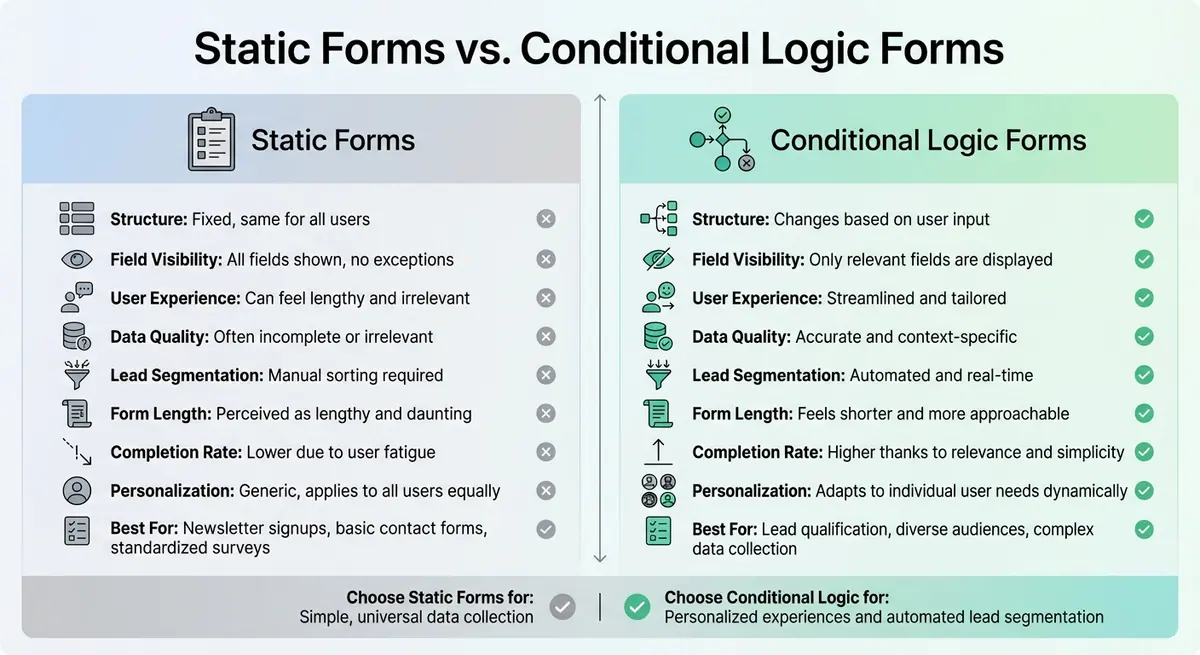
Static Forms vs Conditional Logic Forms: Feature Comparison
Building a form with conditional logic, calculations, multiple actions, & dynamic data using WS Form
sbb-itb-5f36581
What Are Static Forms?
A static form displays all its fields on a single screen, resembling a traditional paper document. Every visitor sees the same layout, regardless of their individual needs or circumstances.
These forms have a fixed design, meaning the fields remain in place no matter how users interact with them. From start to finish, the structure doesn’t change.
However, static forms often feel overwhelming compared to multi-step alternatives. Users are presented with a lengthy, unbroken list of questions, which can be particularly frustrating on mobile devices. Smaller screens make navigation harder, amplifying the sense of clutter.
"The impersonal nature of static forms sends a subtle but powerful message: 'We built this form for everyone, which means we built it for no one in particular.'" – Orbit Forms
This lack of flexibility defines the core characteristics of static forms.
Main Features of Static Forms
Static forms are all about consistency and simplicity. All fields are displayed on one page, with no branching logic, hidden sections, or personalization based on user input. The layout remains unchanged, regardless of who is filling it out.
This simplicity makes static forms easy to create. There’s no need to set up complex "if-then" rules or plan for multiple user journeys. Whether the form is completed by a small business owner or a corporate executive, it looks exactly the same. While this consistency can be an advantage, it’s also a limitation.
One major downside is the cognitive load it places on users. Seeing all questions at once can feel daunting, often leading to procrastination or abandonment, though breaking a long, static form into steps can mitigate this - what experts call the "maybe later" effect. Without features like progress bars or time estimates, users have no way to gauge how much effort the form will require.
Common Uses for Static Forms
Static forms work best for straightforward, universal data collection. Examples include:
- Newsletter signups
- Basic contact forms
- Standardized feedback surveys
In situations where every respondent answers the same questions, there’s no need for conditional logic. The focus is on gathering consistent information from everyone.
What Is Conditional Logic in Forms?
Conditional logic turns forms into responsive tools that adapt in real time to user input. Instead of overwhelming visitors with every possible question, these forms use if-then rules to display only the fields that are relevant based on the user's responses.
Think of it like having a personalized conversation. For instance, if someone selects "Enterprise" from a dropdown menu, the form might reveal questions about procurement processes and budget cycles. On the other hand, choosing "Small Business" could trigger questions focused on immediate implementation needs. This approach ensures users only see what applies to them, making forms feel shorter and easier to complete, while still gathering all the necessary information.
The logic behind this system is simple yet effective. Each rule consists of three main parts: a trigger (the user’s action), a condition (the criteria to evaluate), and an action (what happens next). Operators like AND and OR allow for more complex branching - AND requires all conditions to be met, while OR triggers an action if any condition is satisfied. This setup is especially useful for lead segmentation, as forms can automatically route qualified leads to the right channels based on their input.
"By respecting a user's time and providing a personalized path, you're not just collecting data - you're building trust and making a strong first impression." – AgentsForForms
How Conditional Logic Works
Conditional logic relies on three core components working together to create dynamic, user-friendly forms.
- Triggers: These are the specific actions users take that activate a rule. Examples include selecting an option from a dropdown menu, checking a box, or entering a value (like a budget over $10,000).
- Conditions: This is the "if" part of the equation. It evaluates whether the trigger meets the set criteria, such as checking if the budget exceeds $10,000 or if the industry matches "Healthcare." This evaluation happens instantly as users interact with the form.
- Actions: Once conditions are met, actions are executed. These could involve showing or hiding fields, skipping pages, jumping to different sections, or changing the submit button text. Advanced actions might even redirect users to specific URLs or display customized "Thank You" pages.
| Logic Component | Role | Example |
|---|---|---|
| Trigger | The user action | Selecting "Enterprise" from a dropdown menu |
| Condition | The evaluation rule | If "Account Type" equals "Enterprise" |
| Action | The result | Reveal "Procurement Process" and "Budget Cycle" fields |
Advantages of Conditional Logic
Conditional logic offers several practical benefits that make forms more effective and user-friendly. By hiding irrelevant fields, forms appear shorter and less intimidating, which helps reduce form fatigue and abandonment rates. Users are more likely to finish a form that feels tailored to their needs.
It also streamlines lead qualification. High-value leads - like those from large companies or with substantial budgets - can be immediately routed to sales teams, while smaller prospects may receive automated follow-ups or self-service resources. This ensures that leads are directed to the right place without the need for manual sorting, improving both lead quality and sales efficiency.
Additionally, by showing only relevant questions, respondents are more likely to provide thoughtful and accurate answers. A personalized form experience encourages users to engage more deeply, rather than rushing through irrelevant questions.
For businesses using Reform, advanced logic features like "Skip this page", "Jump to", and "Redirect to" are available with the Pro Plan. These tools allow teams to create complex branching paths without needing to write any code.
These capabilities highlight how conditional logic stands apart from static forms, offering a more dynamic and efficient way to interact with users.
Key Differences Between Conditional Logic and Static Forms
Static forms and conditional logic forms differ significantly in both design and functionality, particularly in how they interact with users and gather data. Static forms rely on a fixed, uniform layout, presenting the same set of questions to every user, regardless of their individual needs. In contrast, conditional logic forms provide a dynamic experience, adjusting questions in real time based on a user’s responses. This approach makes the interaction more relevant and engaging.
By skipping irrelevant questions and eliminating the need for users to input "N/A" or leave fields blank, conditional logic forms ensure the data collected is more precise and easier to act on. Static forms, however, often result in cluttered data riddled with incomplete or irrelevant responses, which can require significant manual effort to clean up.
Another key area of difference lies in lead segmentation. Static forms demand a manual process to sort through submissions and assign leads to the right teams. Conditional logic automates this entirely, qualifying leads on the spot and directing high-value prospects to sales teams while assigning others to follow-up workflows.
Comparison Table
| Feature | Static Forms | Conditional Logic Forms |
|---|---|---|
| Structure | Fixed, uniform list of questions | Dynamic, adjusts based on user input |
| Field Visibility | Displays all fields regardless of relevance | Shows or hides fields based on responses |
| User Experience | Overwhelming and irrelevant | Streamlined, tailored, and engaging |
| Form Length | Perceived as lengthy and daunting | Feels shorter and more approachable |
| Data Quality | Often includes irrelevant or incomplete answers | Captures accurate, context-specific data |
| Completion Rate | Lower due to user fatigue and confusion | Higher thanks to relevance and simplicity |
| Lead Segmentation | Manual process after submission | Automated and real-time qualification |
| Personalization | Generic, applies to all users equally | Adapts to individual user needs dynamically |
These distinctions highlight how conditional logic forms can transform both user experience and data management, ensuring smoother processes and better outcomes.
Effects on Lead Segmentation and User Experience
When comparing static forms to those with conditional logic, the differences extend beyond functionality - they directly impact how leads are segmented and the overall experience users have with the form. These choices can lead to measurable results for businesses.
Lead Segmentation Capabilities
Conditional logic serves as an automatic filter, qualifying and segmenting leads in real time as users fill out the form. For instance, if someone indicates they work at an enterprise-level company, the form can immediately trigger follow-up questions about budgets or implementation timelines. Their submission might then be routed to senior sales reps, while smaller opportunities are directed to self-service tools or email nurturing workflows.
This system doesn't just stop at routing. Real-time segmentation assigns scores to responses, creating a lead scoring system that categorizes prospects as "hot" or "cold" before they even hit the submit button. Additionally, progressive profiling uses known data about a user to ask for only new, relevant information, building a complete lead profile over time through multiple interactions.
These advanced segmentation features also significantly enhance the user experience.
Improving User Experience
Static forms often frustrate users by asking irrelevant questions. For example, a freelancer might be confused or annoyed if asked about enterprise deployment needs.
"Every irrelevant question you force a user to answer is a micro-frustration that accumulates into abandonment." – Orbitforms.ai
Conditional logic eliminates this issue with progressive disclosure, only showing fields that are directly relevant. For example, someone selecting "United States" as their location might see a phone number field formatted for U.S. numbers, while a user from the United Kingdom would see a different format. Similarly, questions about team size might only appear if the user expresses interest in a business plan rather than an individual subscription.
This adaptive design reduces cognitive load by focusing only on what matters to the user. The form feels shorter, easier to complete, and more like a conversation. This thoughtful flow respects users' time and helps build trust right from the start.
When to Use Conditional Logic vs. Static Forms
The choice between conditional logic and static forms depends on your business goals and how you want to collect and organize data. Picking the right form type can simplify the process and help you better understand your leads.
Best Uses for Static Forms
Static forms are perfect for situations where the same information is needed from everyone. Think about a newsletter signup form - usually, all you need is an email address and maybe a name. These forms are straightforward, offering a consistent experience for every user without any extra complexity.
Best Uses for Conditional Logic Forms
Conditional logic forms, on the other hand, excel in scenarios where user needs vary. These forms adapt in real-time based on the answers provided, creating a more personalized experience. For example, on a "Request a Demo" page, the form can change its questions depending on the size of the business. This ensures users only see relevant fields, which not only improves their experience but also enhances the quality of the data you collect.
When deciding which type of form to use, ask yourself: Do you need uniform responses, or does your process benefit from tailoring the experience to individual users? Static forms are great for simple, universal data collection, while conditional logic forms offer a more personalized approach that can refine lead segmentation and user engagement.
Conclusion
Deciding between static forms and forms with conditional logic comes down to choosing the right tool for your business goals. Static forms are ideal when you need the same information from everyone - think newsletter signups or basic contact forms. Their simplicity keeps things efficient and avoids unnecessary complications. This approach directly impacts how you segment leads and how users interact with your forms.
On the other hand, conditional logic forms shine when your audience has diverse needs or when you want to qualify and segment leads on the spot. By tailoring questions based on user responses, these forms turn data collection into a dynamic, personalized experience that values your users' time.
With better segmentation and more accurate, context-rich data, you'll cut down on manual data cleanup and improve your CRM's reliability. Ultimately, your form strategy plays a key role in capturing high-quality leads in a way that feels personal.
So, consider this: Do you need consistent answers from everyone, or would a more tailored experience boost conversions and refine your segmentation? Your answer will guide your next step.
FAQs
How do I know if my form needs conditional logic?
If your form presents the same set of questions to every user, no matter their responses, it might be time to consider conditional logic. This feature adjusts the form dynamically, revealing or hiding questions based on how users answer. The result? A smoother experience that reduces frustration, encourages users to finish, and improves the quality of the data you collect.
If you're noticing high abandonment rates or low engagement, implementing conditional logic could make your form more efficient and tailored to individual users.
Can conditional logic improve lead quality in my CRM?
Conditional logic can play a big role in boosting the quality of leads in your CRM. By customizing questions based on a user's previous answers, you can gather more precise and relevant information. This approach not only reduces incomplete submissions but also creates a smoother experience for users.
When forms are streamlined and tailored, the process naturally filters out less-engaged users. The result? You get a higher number of qualified leads and better data to work with in your CRM.
What’s the simplest way to add conditional logic without making my form confusing?
To make conditional logic easy to use and understand, stick to clear and simple rules that guide respondents effortlessly. For instance, use conditions like choosing a specific answer to trigger actions such as skipping certain sections or displaying customized follow-up questions. Ensure the interface for setting up these actions is intuitive, so the form adjusts naturally based on user input. This keeps the experience smooth, personalized, and free of confusion.
Related Blog Posts
Get new content delivered straight to your inbox

The Response
Updates on the Reform platform, insights on optimizing conversion rates, and tips to craft forms that convert.




Drive real results with form optimizations
Tested across hundreds of experiments, our strategies deliver a 215% lift in qualified leads for B2B and SaaS companies.
