
.webp)
Conditional Routing in AI Lead Scoring Systems



Conditional routing in AI lead scoring systems helps sales teams prioritize leads by automating their distribution based on specific rules and data points. Here's what you need to know:
- What it is: Conditional routing uses "if-then" rules to assign leads to the right sales reps or nurture sequences instantly, based on factors like location, company size, and behavior.
- Why it matters: Companies that respond to leads within an hour are 7x more likely to qualify them. AI-powered systems streamline this process, increasing efficiency and reducing delays.
- How AI helps: AI dynamically adjusts routing rules in real-time, analyzing explicit signals (e.g., job title) and implicit signals (e.g., website activity) to predict conversions with up to 90% accuracy.
- Setup essentials: Accurate data collection, CRM configuration, and clear lead qualification criteria are critical for effective routing.
- Implementation steps: Build a scoring model, set conditional rules, and regularly test and refine the system to ensure high-value leads are prioritized.
I Built an AI System That Scores Every Lead Before My Team Opens Their Laptop
sbb-itb-5f36581
Requirements for Setting Up Conditional Routing
To streamline AI lead routing, it's essential to start with accurate data, a well-configured CRM, and clearly defined rules for high-value leads. These foundational steps set the stage for effective conditional routing.
Data Capture and Validation
Collect key data points across three categories: demographic (e.g., job title, role, seniority), firmographic (e.g., company size, industry, revenue), and behavioral (e.g., urgency, budget, pain points). To maintain accuracy, use tools like email validation and spam filters.
Keep your lead qualification forms concise. Studies suggest forms with 5–8 questions strike the right balance between gathering useful information and maintaining a smooth user experience. Use structured fields like dropdown menus or radio buttons instead of open text boxes. For instance, rather than asking "What's your budget?" in an open field, provide predefined ranges like "$3,500–$7,000" or "$7,000–$15,000". This approach simplifies automatic scoring and minimizes ambiguity.
Additionally, watch for disqualifying signals - such as competitors exploring your product, students seeking free resources, or leads from unsupported regions. Once validated, integrate this data into your CRM by creating custom fields tailored to your needs.
Setting Up Custom Fields and Pipeline Stages
Before launching forms, ensure your CRM is ready to handle incoming data. Create custom fields for metrics like "Lead Score" and "Lead Tier" (e.g., Hot, Warm, Cold). Define pipeline stages, such as Marketing Qualified Leads (MQLs) and Sales Qualified Leads (SQLs), and set scoring thresholds: 70–80+ for Hot leads and 40–79 for Warm leads.
- MQLs: Leads engaged enough for automated follow-ups.
- SQLs: Prospects closely matching your Ideal Customer Profile, requiring immediate sales attention.
These thresholds help you decide whether to prioritize a lead for direct sales outreach, add them to a nurturing sequence, or provide them with self-service resources. With these systems in place, you can refine your lead qualification process further by setting clear criteria.
Defining Lead Qualification Criteria
"The difference between good and great lead generation isn't volume. It's precision." – Orbit AI
Review past closed-won deals to uncover patterns in revenue-driving factors like company size, job title, and behavior. Assign point values (0–25 per question) to the most critical factors, such as budget and decision-making authority, while giving lower scores to less impactful attributes like preferred industries.
Pay attention to language cues in responses. Hot leads often use action-oriented phrases like "I'm responsible for" or mention specific timelines like "this quarter." Warm leads may show interest but lack full budget approval, while cold leads tend to use exploratory language like "just researching" or "looking into options". These insights can guide next steps - whether scheduling a meeting, initiating a nurture sequence, or sending educational resources.
To keep your scoring model effective, review it quarterly. Analyze the performance of closed-won deals and adjust point values based on actual revenue outcomes. This ensures your routing decisions remain aligned with business goals and market trends.
How to Build Conditional Routing Rules
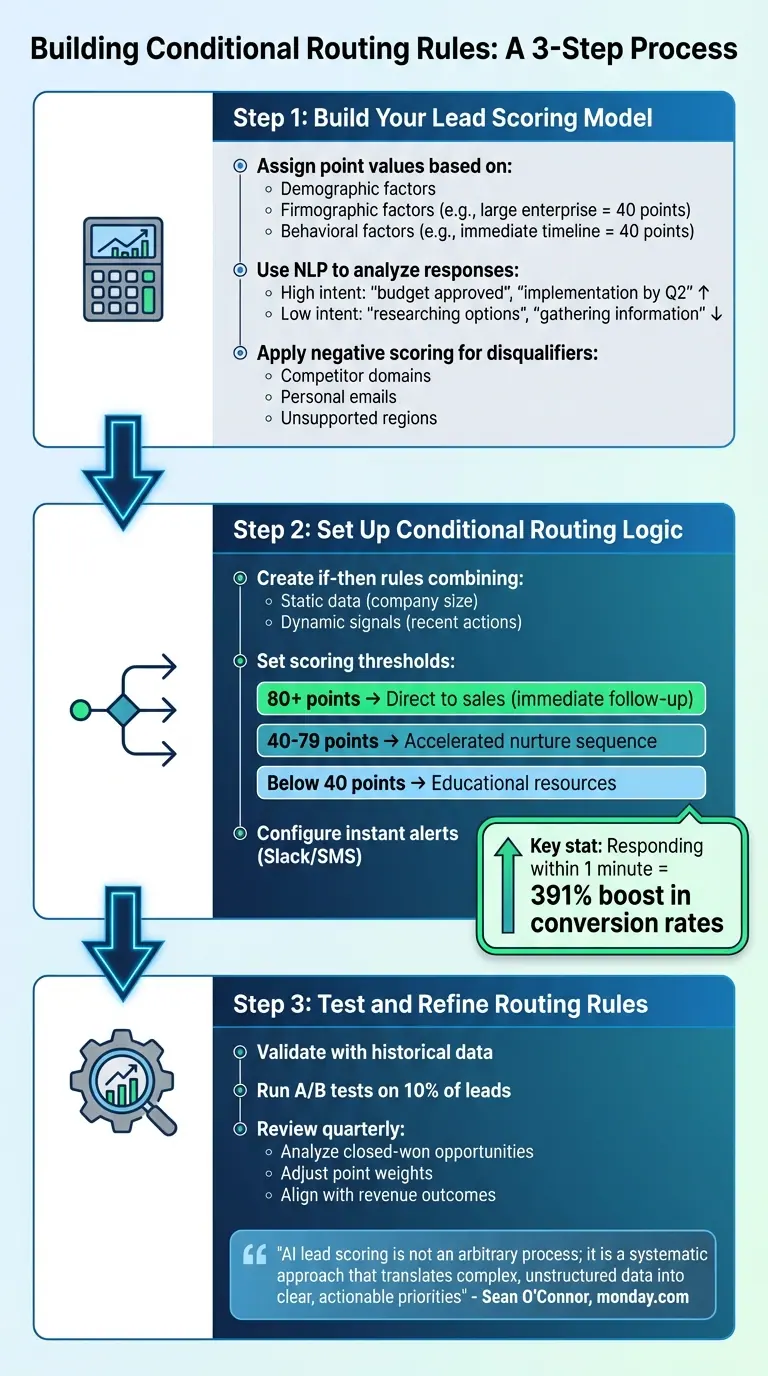
AI Lead Scoring Conditional Routing Implementation Process
Once your CRM is set up and your qualification criteria are in place, the next step is creating routing rules to automatically guide leads to the right destination. This process combines lead scoring, conditional logic, and regular adjustments. The goal? Ensure high-value leads go straight to sales while others are funneled into appropriate nurture tracks.
Step 1: Build Your Lead Scoring Model
Start by designing a scoring system that evaluates leads based on demographic, firmographic, and behavioral factors. Assign specific point values to each criterion depending on how it correlates with revenue potential. For instance, a large enterprise might score 40 points, while an immediate buying timeline could add another 40.
Use Natural Language Processing (NLP) to analyze open-ended responses. Phrases like "budget approved" or "implementation by Q2" can signal strong buying intent, while terms like "researching options" or "gathering information" might indicate lower readiness.
Don’t forget to factor in negative scoring. Deduct points for disqualifiers like competitor email domains, personal email addresses, or leads from regions you don’t serve. This step helps your sales team focus on promising prospects instead of wasting time on unlikely conversions.
Once your scoring model is complete, you’re ready to apply conditional logic to route leads effectively.
Step 2: Set Up Conditional Routing Logic
Now, use your scoring model to create if-then rules that combine static data (e.g., company size) with dynamic behavioral signals (e.g., recent actions). For example, if a lead’s company has over 500 employees, their job title signals decision-making authority (Director or higher), and their response mentions "budget approved", route them directly to sales and create an opportunity at a stage like "Demo Scheduled."
Set thresholds for real-time scoring to automate lead direction:
- 80+ points: Send directly to sales for immediate follow-up.
- 40–79 points: Place into an accelerated nurture sequence.
- Below 40 points: Assign to educational resources.
For your top-tier leads, configure instant alerts via Slack or SMS to ensure responses within minutes. Why is this important? Studies show that responding to a lead within one minute can boost conversion rates by an incredible 391%. Make sure these alerts are detailed - something like "Enterprise prospect, budget approved, competitor mentioned" is far more actionable than a generic "New lead" notification.
Step 3: Test and Refine Routing Rules
Once your routing rules are live, test their effectiveness. Use historical data to validate your logic and run A/B tests on a small percentage of leads (say, 10%) to compare conversion rates. This helps identify any false positives or negatives in your system.
Every three months, review the scoring model by analyzing closed-won opportunities. Adjust point weights as needed to better align with revenue outcomes. Sean O'Connor from monday.com emphasizes this iterative approach:
"AI lead scoring is not an arbitrary process; it is a systematic approach that translates complex, unstructured data into clear, actionable priorities".
Regular reviews ensure your routing rules stay aligned with business goals and continuously improve over time.
Using Reform for Conditional Routing
Reform simplifies lead management by capturing, enriching, and routing leads based on your AI scoring model. From gathering initial data to syncing with your CRM, Reform ensures high-priority leads go straight to sales while others are directed to the right nurture tracks. Let’s break down how Reform streamlines this process.
Capturing Lead Data with Multi-Step Forms
Reform’s multi-step forms use conditional logic to integrate seamlessly with your AI-based lead scoring workflow. These forms are designed to collect essential data without overwhelming prospects. Each step focuses on a specific type of information - like contact details, company data, or buying intent - reducing cognitive load and minimizing the chances of users abandoning the form.
For instance, you can ask about annual revenue early in the process. If a prospect selects "More than $10 million", Reform’s conditional logic can immediately direct them to a VIP scheduling page for direct sales contact. Those selecting "$1 million – $10 million" might see a tailored demo option, while prospects under $1 million could be routed to self-service tools or webinar invitations. To keep users engaged, you can enable a progress bar with custom labels like "Contact Info" and "Company Details" to show them exactly where they are in the process.
Reform’s data enrichment feature (available with the Pro Plan) automatically fills in fields like company size, industry, and location using its ExactBuyer integration. This enriched data feeds directly into your scoring model, saving time and ensuring accuracy. You can also use Form Shortening to hide fields that are pre-filled (with a fallback option if enrichment doesn’t work) and Hidden Fields to capture backend data like AI scores without cluttering the form interface.
Connecting to CRM and Marketing Automation Tools
Reform ensures seamless data flow by mapping form fields directly to Contact, Lead, and Custom Fields in CRMs like Close and HubSpot. This eliminates the risk of fragmented lead records, which could disrupt your routing logic. As Reform’s documentation explains:
"With custom mapping and duplicate handling, you can forget the clunky drop-in form builder your CRM offers."
For added flexibility, Reform supports Webhooks and APIs, allowing you to connect with marketing automation platforms or internal tools. This means you can trigger automated workflows as soon as a lead submits a form - whether it’s creating an opportunity in your CRM, sending a Slack notification to your sales team, or enrolling the lead in a specific nurture sequence based on their score.
Features That Support Lead Scoring
Reform includes tools like email validation and spam filters to ensure only verified, high-quality data enters your system. Even if a prospect abandons a form, the platform captures partial submissions, which can still be valuable for nurturing efforts.
Real-time analytics let you monitor form performance, track drop-offs, and refine your data collection process over time. As Reform notes:
"By enriching forms, you can shorten them, reduce cognitive load, and significantly improve lead generation."
With these tools, you can ensure your conditional routing system operates on accurate, complete data, helping you make better prioritization decisions.
Conclusion
Conditional routing transforms static AI lead scoring into a dynamic, real-time process. By integrating precise data, AI-driven scoring, and smart routing, companies can eliminate the delays and inconsistencies often seen with manual lead qualification. Businesses adopting AI lead scoring have reported conversion rate improvements of 20–30%, with accuracy jumping from 60–70% using traditional methods to 85–90% with AI-powered systems.
Key Takeaways
Building an effective conditional routing system rests on three main pillars:
- Data Collection: Gather both demographic details (like job title, company size, and revenue) and behavioral signals (such as visits to pricing pages, whitepaper downloads, or urgency-related language).
- AI Analysis: Use AI to understand context and differentiate between phrases like "need to implement by Q2" and "just browsing".
- Actionable Scoring: Convert scores into immediate actions using pre-determined routing thresholds.
Reform simplifies this process by collecting enriched lead data through multi-step forms, validating entries to block spam, and syncing directly with your CRM to trigger routing rules instantly. Its conditional logic adjusts the form experience based on user responses, while features like partial submission tracking ensure no valuable lead data slips through the cracks.
Next Steps
Start by auditing your current lead scoring system to spot gaps in data collection. Review form language carefully to distinguish strong buying signals from early-stage interest, and set clear scoring thresholds to determine when leads should be routed to sales versus nurtured further.
For quick implementation of conditional routing, consider Reform's Basic Plan, which includes features like conditional logic, unlimited responses, and essential integrations. If you need advanced capabilities like lead enrichment, team access, and deeper CRM integrations, the Pro Plan is ideal for supporting more complex workflows. With the right tools and a strong data strategy, your sales team can focus on high-value leads while nurturing those that need more time to mature.
FAQs
How do I choose the right lead score thresholds for routing?
When defining lead score thresholds, it's crucial to align them with your team's results and capacity. For example, you might decide to:
- Send leads with 60+ points directly to sales.
- Place those scoring 30–59 points into a nurturing program.
- Assign leads below 30 points to awareness-building efforts.
However, these are just starting points. Tailor thresholds based on your specific lead quality and patterns. Regularly analyze performance data and gather feedback from your sales team. This ongoing adjustment helps ensure leads are routed more accurately and qualified more effectively.
What data should I collect if my form needs to stay short?
To make your form more effective, stick to gathering only the most important details - such as contact information, basic qualifications, and key indicators of buying intent. This approach simplifies the process for respondents while ensuring you have the data needed for accurate lead scoring and routing.
How can I prevent bad or spam leads from skewing AI scores?
To keep spam and low-quality leads from skewing your AI scores, use filtering tools that can block or flag questionable entries. Tools offering spam prevention, email validation, and lead enrichment help ensure that only verified, trustworthy data makes it into your system. Real-time validation methods - like checking if emails are valid or confirming demographic consistency - are especially useful. This way, your AI models can concentrate on authentic prospects, leading to more precise and reliable scoring.
Related Blog Posts
Get new content delivered straight to your inbox

The Response
Updates on the Reform platform, insights on optimizing conversion rates, and tips to craft forms that convert.




Drive real results with form optimizations
Tested across hundreds of experiments, our strategies deliver a 215% lift in qualified leads for B2B and SaaS companies.
