
.webp)
Cookie Banner Mistakes That Break ePrivacy



Most cookie banner failures come down to 4 plain problems: tracking starts before consent, optional cookies are on by default, the reject path is harder than accept, or the wording is too vague.
If you serve EU or UK visitors, I’d check these first:
- Default settings: non-required cookie categories must start off
- Choice design: Accept All and Reject All should be equally easy to click
- Tag behavior: analytics, ad pixels, and replay tools must stay blocked until consent
- Banner wording: users should see clear category names and plain explanations
- Consent withdrawal: settings should stay easy to reopen on every page
- Form pages: conversion pixels and replay tools should stay blocked until consent
The article backs this up with enforcement examples, including fines of €600,000, €150 million, and €325 million, plus the EDPB view that missing a reject option can make consent invalid.
| Risk area | What to check | Safer setup |
|---|---|---|
| Default toggles | Are analytics or marketing already on? | Optional categories start off |
| First-layer choice | Is reject hidden in settings? | Reject All shown next to Accept All |
| Pre-consent tracking | Do tags fire on page load? | Non-required tags wait for consent |
| Cookie labels | Are analytics called “required”? | Categories match actual use |
| Withdrawal | Can users change their mind fast? | Cookie settings link on every page |
| Lead forms | Do pixels fire before consent? | Form tracking waits for opt-in |
Bottom line: I’d judge a cookie banner by what fires in the browser, not by how polished it looks.
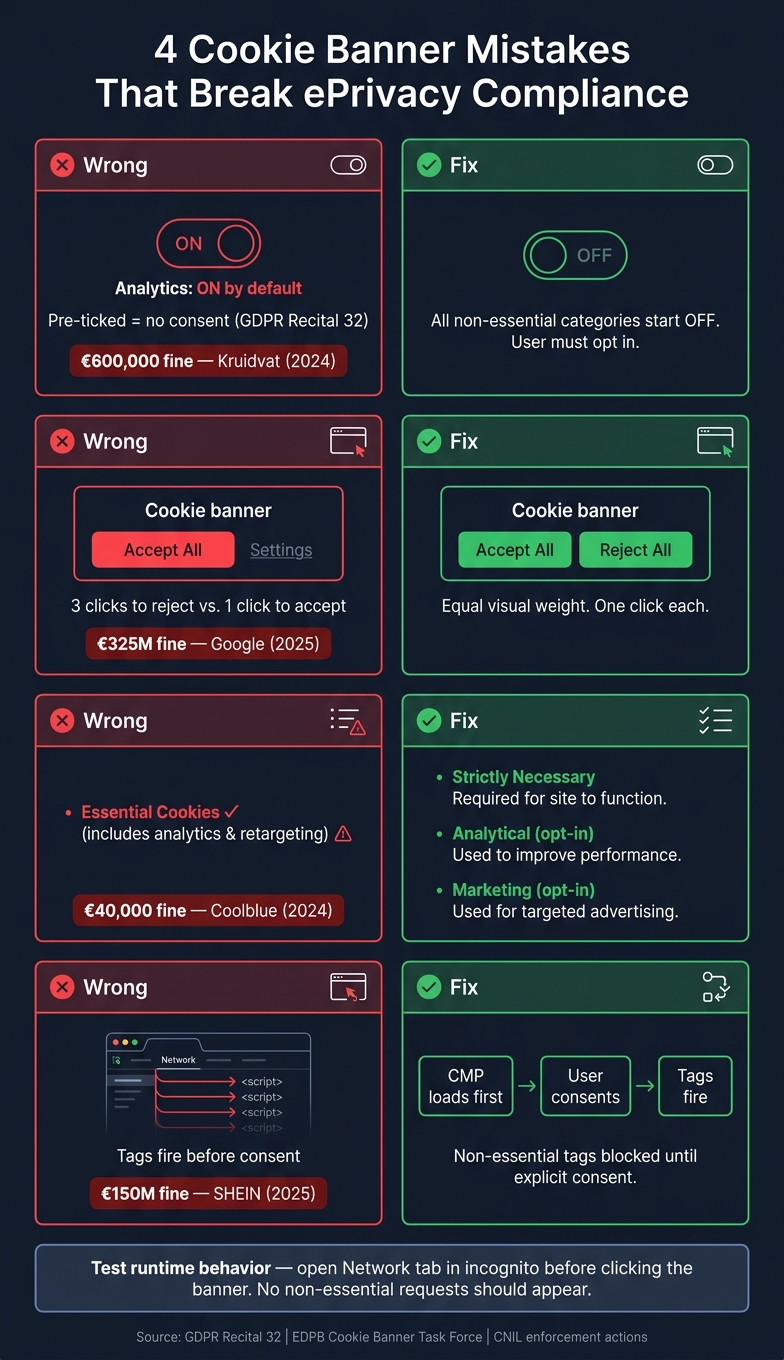
4 Cookie Banner Mistakes That Break ePrivacy Compliance
Mistake #1: Pre-Ticked Boxes and Default-On Toggles
The most common slip-up is simple: a cookie banner turns on non-essential tracking before the user does anything. If an analytics box is already checked or a toggle starts in the On position, that is not consent. The user didn't choose it.
Why Default-On Settings Do Not Count as Consent
GDPR Recital 32 says this plainly:
"Silence, pre-ticked boxes or inactivity should not therefore constitute consent."
So when someone lands on your site and sees analytics already switched on, no choice has been made on their side. You made the choice for them. Regulators treat that as invalid consent, which means it has no legal force. There’s also a technical problem here: tags may fire before the user has a chance to decide.
In 2024, the Dutch Data Protection Authority fined Kruidvat.nl €600,000 for using pre-ticked boxes to collect consent for tracking cookies. The regulator found that this method did not meet the consent standard.
Fix: Start Every Non-Essential Category Off by Default
Every non-essential cookie category should start in the Off position. That includes analytics, marketing, and any other optional category. They stay off until the user turns them on. The only exception is strictly necessary cookies.
It also helps to split optional purposes into separate toggles, such as:
- Analytics
- Marketing
- Other optional purposes
Why does this matter? Because lumping them into one control pushes users into an all-or-nothing choice. Regulators often flag that as a forced bundled choice.
After any redesign, A/B test, CMS update, or tag manager change, check the banner defaults again. Then open the Network tab and make sure no non-essential scripts fire before consent. That’s the clearest way to verify the setup is working. And if the reject option is hidden too, you’re no longer dealing with just one compliance issue.
sbb-itb-5f36581
Mistake #2: Dark Patterns and Hidden Reject Options
Even when your default settings are right, the banner can still push people toward "yes." Regulators call that a dark pattern. And in practice, it blocks free choice just as much as a pre-checked box. The rule is simple: saying no should be just as easy as saying yes.
Banner Designs That Regulators Flag
A common example looks like this: a bright, easy-to-spot "Accept" button next to a dull grey "Settings" link. One feels like the main path. The other feels tucked away. That's not neutral design. It's a nudge.
The same issue shows up in click paths. If a user can accept in one click, but has to dig through several steps to reject, the options are not equal. That extra friction makes refusal harder.
In September 2025, France's CNIL fined Google €325 million for making refusal of personalized advertising cookies much harder than acceptance. In that same stretch, regulators also went after banners that dropped cookies before any user action or kept tracking after users clicked "Refuse all."
So this isn't just about wording. Visual balance and click depth both matter.
Both the CPRA and the EDPB Cookie Banner Task Force make this point clearly. The EDPB says:
"The vast majority of supervisory authorities considered the absence of a refuse, reject or not consent option on any layer to be outside the requirements for valid consent." - EDPB Cookie Banner Task Force Report
There's also a trust issue here. Research from noyb suggests that only 3% to 10% of users actually want to be tracked, yet consent rates in the industry can reach 90% when banners use manipulative design. That's a huge gap. And it's one reason consent fatigue sets in: people click whatever clears the screen fastest.
| Design element | Dark pattern | Compliant design |
|---|---|---|
| Button prominence | High-contrast "Accept" vs. grey "Settings" link | "Accept All" and "Reject All" use identical button styling |
| Click count | One click to accept; three clicks to reject via settings | One click to accept all; one click to reject all |
| Reject placement | Buried in a secondary "Preferences" menu | Placed side-by-side with "Accept" on the first layer |
Fix: Give Accept and Reject Equal Weight on the First Layer
The fix is plain: make Accept All and Reject All match in size, shape, and visual weight. If one is a filled button, the other should be too. Not a text link. Not a faded fallback. Not a smaller option hiding in plain sight.
Click path matters too. "Reject All" should sit on the first layer of the banner, right next to "Accept." It shouldn't be buried in a preferences panel. This matters on mobile as well, where tight layouts often push the reject choice off-screen or hide it inside a menu.
The words on the banner matter too. Skip guilt-based phrasing like "No, I don't want discounts." Regulators flag that kind of language. Neutral labels work better. "Accept All" and "Reject All" are clear, direct, and much easier to defend in an audit.
One more thing: regulators now look at runtime behavior, not just what the banner says. If clicking Reject doesn't stop tracking, the banner still fails. That's where many teams slip up, especially when tags fire before consent or keep firing after someone says no.
Mistake #3: Vague Copy and Mislabeled Cookie Categories
Vague banner copy makes it hard to tell what people are saying yes to. Some banners at least say something direct, like “We use analytics and marketing cookies to track usage and personalize ads.” But most don’t. And if users can’t make sense of the choice, the consent isn’t informed.
Where Banner Copy Usually Goes Wrong
This tends to break down in three places: fuzzy marketing talk, dense legal language, and labels that treat optional cookies as if they were required.
Strictly necessary cookies should cover only core site functions. They do not include analytics or marketing. When optional cookies get labeled as essential, that creates a clear compliance risk. In 2024, the Dutch Data Protection Authority fined Coolblue €40,000 because its banner did not give clear and sufficient information about the types of cookies used and their specific purposes.
On SaaS sites, the labels should match the actual use:
- Product tours: functional
- Demo tracking: analytical
- Retargeting: marketing
Fix: Use Plain Language and Accurate Labels
Once the categories are correct, the copy needs to line up with them exactly. Keep it simple: one short sentence per category. Say what it does, who sets it, and whether data leaves your site. If third-party providers are involved, name them clearly.
- Strictly Necessary - Enables page navigation, secure log-in, and consent-state management. No consent required.
- Analytical - Tracks visitor behavior and traffic sources to improve site performance. Requires consent.
- Marketing - Tracks users across sites to deliver personalized ads and measure campaign ROI. Requires consent.
Even with clear labels, there’s still a problem if tracking begins before the user makes a choice.
Mistake #4: Tracking Before Consent and Weak Withdrawal Controls
A banner can look fine and still land you in trouble.
If tracking starts before a person makes a choice, you're already offside. And if people can't later pull back consent without digging through menus, that creates another problem.
Why Tags That Fire Early Create Immediate Risk
Under Article 5.3 of the ePrivacy Directive, non-essential tags must stay blocked until the user gives consent. Trouble starts when scripts are hardcoded in the page <head>, GTM triggers are set to fire on "All Pages", or CMS plugins drop pixels into the page the moment they're turned on.
This isn't just theory. In September 2025, France's CNIL fined SHEIN €150 million after finding that advertising cookies were placed right away when users landed on the site, before any interaction. The setup also kept reading and placing cookies after users clicked "Refuse all."
Fix: Block Tags Until Consent and Keep Settings Easy to Reopen
Start with load order. Your Consent Management Platform (CMP) should load first and hold back all non-essential tags until the user gives explicit consent. From there, GTM triggers should fire only on consent_granted events, not on "All Pages."
Want a simple gut check? Open an incognito window, load the page, and inspect the Network tab before clicking the banner. If you see any non-essential request, the setup is wrong.
Also, make Cookie Settings easy to find on every page. When someone withdraws consent, active tags should stop at once.
How This Applies to Lead Forms and Conversion Tracking
Lead forms follow the same rule, and this is where teams often slip. Marketing pixels and session replay tools can fire too early, especially on landing page forms where tracking is tied to conversion events.
Block session replay recordings and marketing pixels on forms until explicit consent is on record.
On lead forms, keep cookie consent separate from form opt-ins, and fire marketing pixels only after explicit consent.
Conclusion: A Quick Checklist for Safer Cookie Banners
Cookie banner compliance comes down to what happens at runtime, not just how the banner looks. That’s the part teams often miss. A setup can pass one review, then slip out of line fast after a new pixel goes live or someone tweaks a tag-manager rule.
If your site serves visitors in the EU or UK, check the full picture together: UX, tag behavior, and form tracking. Regulators test what actually fires in the browser. So the banner needs to be checked against live behavior, not copy alone.
Use this checklist to review the four failure points covered above in one pass:
| Check | Safer Result |
|---|---|
| Non-essential categories on load | All off by default; no pre-ticked boxes |
| First-layer reject option | "Reject All" matches "Accept All" in size and visual weight |
| Pre-consent tag behavior | No non-essential tags fire before consent |
| Banner copy | Plain language; accurate purposes |
| Withdrawal controls | Cookie Settings stay easy to reopen |
| Form-related tracking | Marketing pixels stay blocked until explicit opt-in |
Run the review again after new pixels, UX changes, or tag updates. One missed tag-manager trigger can undo the rest.
FAQs
How can I test if cookies fire before consent?
Open an incognito window and load your site without touching the cookie banner. Then check DevTools in the Network tab and the Application tab for Cookies.
If you spot requests to known trackers, or non-essential cookies being set before the user does anything, your cookies or scripts are firing too early.
Which cookies are strictly necessary?
Strictly necessary cookies are the ones a site needs to function or to deliver something the user asked for. Because of that, they don’t need prior consent.
That usually includes things like:
- Session IDs
- CSRF tokens
- Load-balancer cookies
- Security scripts
- Shopping cart features
- Payment features
- Login features
By contrast, analytics, advertising, retargeting, and session recording are not strictly necessary. Those tools need explicit consent before they load.
What should a compliant cookie banner include?
A compliant cookie banner should ask for consent in a clear way and get it through an affirmative action from the user.
That means the first layer should include a Reject All option that is just as visible and just as easy to click as Accept All.
Skip pre-ticked boxes and dark patterns. Use plain language. Don’t treat closing the banner or dismissing it as consent. And make sure people can change or withdraw their choices at any time without a hassle.
Related Blog Posts
Get new content delivered straight to your inbox

The Response
Updates on the Reform platform, insights on optimizing conversion rates, and tips to craft forms that convert.




Drive real results with form optimizations
Tested across hundreds of experiments, our strategies deliver a 215% lift in qualified leads for B2B and SaaS companies.
