
.webp)
Cookieless Analytics Tools: 8 Options Compared



Up to 25% to 45% of standard Google Analytics tracking can be blocked by ad blockers and privacy-first browsers. So if I want traffic data I can still use day to day, cookieless analytics is now a serious option.
Here’s the short version: if I want simple traffic reports, I’d look at Plausible, Fathom, or Simple Analytics. If I need more event detail or e-commerce tracking, I’d look at Matomo. And if I want open-source or self-hosted options, Plausible, Matomo, Umami, and GoatCounter stand out.
This comparison looks at 8 tools based on:
- Tracking method
- Setup time
- Event tracking
- Traffic reports
- Attribution limits
- Hosting and pricing
What I’d keep in mind right away:
- Most of these tools use a daily rotating hash instead of cookies.
- Most give me aggregate, day-level reporting, not person-level tracking.
- Most do not support cross-day journeys, cross-device tracking, or multi-touch attribution.
- Pricing starts as low as $9/month for some hosted tools.
- Matomo takes more setup, but gives me more reporting depth than the lighter options.
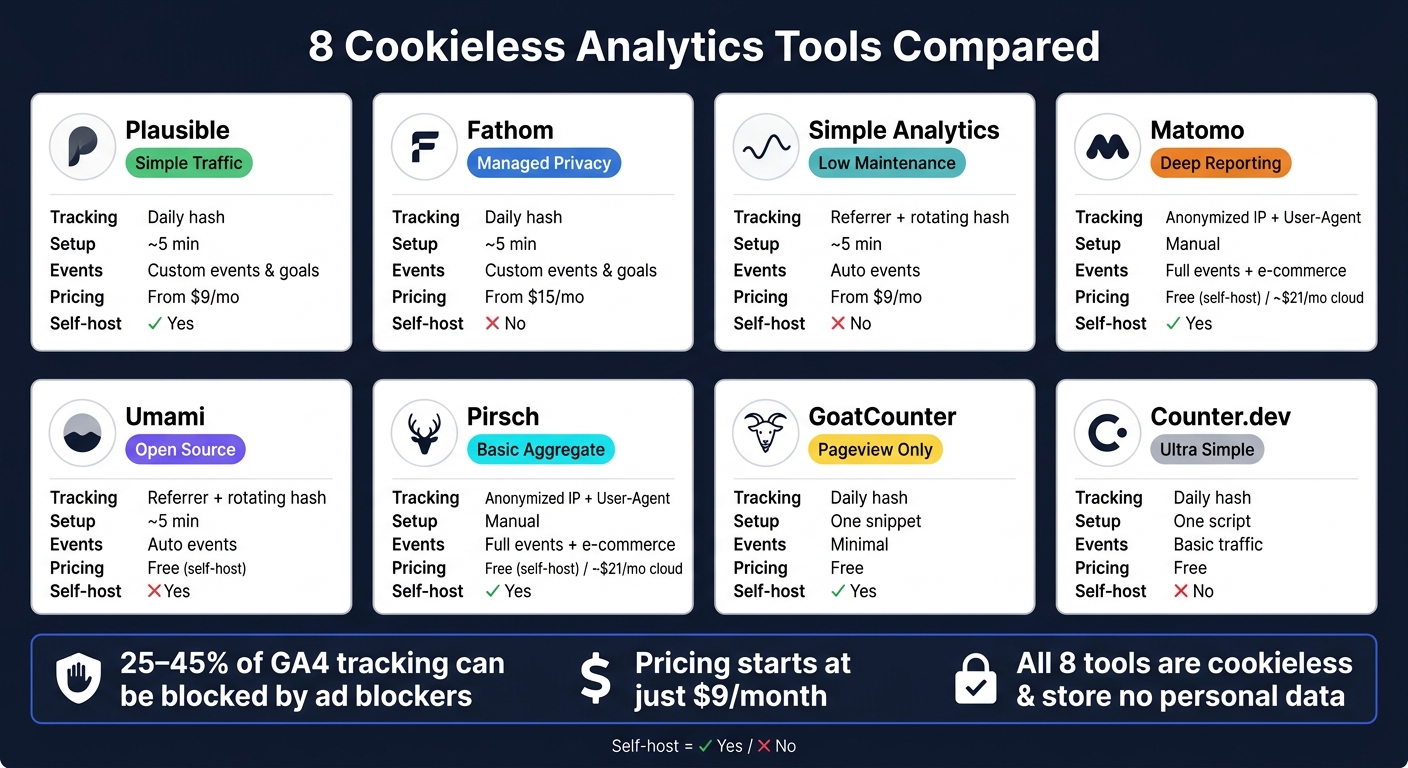
8 Cookieless Analytics Tools Compared: Features, Pricing & Best Use Cases
Cookieless ≠ Privacy-First: I Tested 8 Analytics Tools to Prove It
sbb-itb-5f36581
Quick Comparison
| Tool | Tracking | Setup | Event Depth | Best For |
|---|---|---|---|---|
| Plausible | Daily hash | ~5 minutes | Custom events, goals | Simple traffic reporting |
| Fathom | Daily hash | ~5 minutes | Custom events, goals | Managed privacy-first setup |
| Simple Analytics | Referrer + rotating hash | ~5 minutes | Auto events | Low-maintenance reporting |
| Matomo | Anonymized IP + user agent | More manual work | Full events, e-commerce | Teams that need more detail |
| Umami | Daily hash | Fast on cloud | Custom events | Open-source with light reports |
| Pirsch | Daily hash | Simple script install | Custom events | Basic aggregate reporting |
| GoatCounter | Daily hash | One snippet | Very limited | Basic pageview tracking |
| Counter.dev | Daily hash | One script | Basic traffic data | Very simple traffic reports |
Bottom line: if I care most about ease, I’d start with Plausible or Fathom. If I care most about deeper reporting, I’d pick Matomo. If I just want a light, no-fuss dashboard, Simple Analytics, Umami, Pirsch, GoatCounter, or Counter.dev can fit.
The rest of the article breaks down where each tool fits and what I give up with each one.
1. Plausible Analytics
Plausible is the baseline in this comparison: fast to set up, privacy-first, and made for aggregate reporting. It gives teams traffic data without cookies or persistent identifiers.
Tracking Method
Plausible uses a daily rotating hash built from the IP address, user agent, and domain. After hashing, it discards the IP. Because Plausible counts visitors by day, it can't follow the same person across multiple days.
Setup Time
Setup takes about 5 minutes. You add one JavaScript snippet to your site's <head> tag, and that script is under 1 KB. That's tiny.
If ad-blockers are a concern, Plausible lets you serve the script from a first-party domain. In plain English, that can help reduce blocking.
Event Depth
Plausible supports custom events and goal conversions, so you can track actions like button clicks or form submissions.
But there's a clear line here. Plausible is built for aggregate measurement, not person-level profiling. So you won't get multi-step funnel modeling or deep behavioral segmentation across lots of dimensions.
Attribution and Reports
The dashboard is a single page. It covers the main stuff most teams check every day:
- Unique visitors
- Page views
- Referral sources
- Top pages
- Countries
- Device types
Attribution is referral-based. You can see where visitors came from, but you can't see how several touchpoints worked together before a conversion. It also doesn't support cross-device tracking, multi-touch attribution, or remarketing audiences.
| Feature | Detail |
|---|---|
| Tracking Method | Daily rotating hash (IP + user agent + Domain) |
| Cookie Usage | None |
| Script Size | < 1 KB |
| Setup Time | ~5 minutes |
| Data Hosting | EU (Germany) or self-hosted |
| Personal Data Stored | None (IPs discarded after hashing) |
| Attribution Model | Referral-only |
Cloud pricing starts at $9/month. There's also a free self-hosted Community Edition, though you'll need to cover your own server costs. That makes Plausible a simple baseline for teams that want day-level traffic data without user tracking.
2. Fathom Analytics
Fathom is probably the closest alternative to Plausible in this list. It takes a similar privacy-first approach, keeps tracking cookieless, and stays simple to set up. The main differences come down to hosting and how reports are presented.
Tracking Method
Fathom uses a daily rotating hash built from the visitor's IP address, User-Agent string, and the website's domain. It discards raw IP addresses right after hashing and never stores them. It also collects page URL, referral source, browser, OS, screen size, and country. It does not store names, email addresses, or persistent IDs.
Setup Time
Setup takes a few minutes. You create a site in Fathom, add one script to your page, and it's ready to go. The script is under 2 KB. If ad blockers are an issue, Fathom lets you proxy the script through your own domain, which can cut down on blocking.
Event Depth
Fathom supports custom events and goal tracking, so you can track actions like form submissions or button clicks. That said, it doesn't go very far into user analysis. You won't get multi-day user journeys, cohort analysis, multi-touch attribution, or audience segmentation.
Attribution and Reports
Reports are kept simple on purpose. The dashboard covers the basics: visitors, page views, referral sources, top pages, countries, and devices. Attribution is aggregate-only, with no multi-touch, cohort, or audience segmentation.
| Feature | Detail |
|---|---|
| Tracking Method | Daily rotating hash (IP + User-Agent + domain) |
| Cookie Usage | None |
| Script Size | Under 2 KB |
| Setup Time | ~5 minutes |
| Data Hosting | EU (Germany) + Canada |
| Personal Data Stored | None (IPs discarded after hashing) |
| Attribution Model | Aggregate, referral-based |
Cloud pricing starts at $15/month. There isn't a self-hosted version.
3. Simple Analytics
Simple Analytics uses the same cookieless approach, but puts more weight on automatic tracking and a setup that stays light on consent steps.
Tracking Method
Simple Analytics is cookieless. It uses referrer data and rotating hashes to identify visitors without cookies or persistent IDs, and it does not store personal data. That matters because cookieless tools like Simple Analytics can keep much more traffic data than consent-gated GA4 setups when visitors reject cookies.
Setup Time
Setup is fast. Add one lightweight script, and you're done in about 5 minutes.
The tradeoff is a smaller analytics stack. A compliant GA4 setup can take 15 to 25 hours once CMP work is part of the process.
Event Depth
Simple Analytics comes with automatic event tracking, so teams can track interactions without manual tagging. That's handy if you want less setup work and fewer moving parts.
At the same time, it does not support cross-device tracking, predictive analytics, or raw data export.
Attribution and Reports
Reporting includes page views, referrals, browser type, operating system, screen size, and country and region. Attribution stays aggregate and referrer-based, with no remarketing audience exports.
| Feature | Detail |
|---|---|
| Tracking Method | Referrer-based + rotating hash |
| Cookie Usage | None |
| Script Size | ~2 KB |
| Setup Time | ~5 minutes |
| Consent Banner Required | No |
| Auto Event Tracking | Yes |
| Attribution Model | Aggregate, referrer-based |
Pricing starts at $9/month, or about $108 for the first year.
4. Matomo (Cookieless Configuration)
Matomo is the deepest option in this group. It can run without cookies, but it takes more hands-on setup. So there’s a tradeoff: less simplicity, more control.
Tracking Method
In cookieless mode, Matomo relies on anonymized IP, the User-Agent string, and the website domain. To set that up, you need to disable cookie-setting in the tracking code with _paq.push(['disableCookies']);, turn on IP anonymization, and switch off User ID and cross-site tracking.
Matomo also stands out for its regulatory status. The French data protection authority, CNIL, has recognized Matomo as eligible for a consent exemption when it’s used strictly for audience measurement and configured the right way.
Setup Time
This setup is manual. You need to:
- disable cookies
- enable IP anonymization
- turn off User ID and cross-site tracking
- update your privacy disclosures
Event Depth
Here’s where Matomo pulls ahead of many lighter cookieless tools: it still supports full event and e-commerce tracking even with cookies disabled. That makes it a strong fit for goal tracking and e-commerce analytics.
Attribution and Reports
Matomo gives you broad traffic and audience reporting. In cookieless mode, it works best for audience measurement, but there’s a clear limit: it can’t follow users across days, devices, or sites.
| Feature | Detail |
|---|---|
| Tracking Method | Anonymized IP + User-Agent + domain |
| Cookie Usage | None, when configured |
| Script Size | ~22 KB (full version) |
| Event Tracking | Full events & e-commerce |
| CNIL Exemption | Officially recognized |
| Hosting | Self-hosted or cloud-hosted |
Pricing: self-hosted is free with the Community Edition. Cloud hosting starts at about €19/month (around $21/month).
The next tools go back to lighter setups, but you give up some of these advanced reporting features.
5. Umami
After Matomo’s heavier setup, Umami swings back in the other direction. It keeps things light and open-source.
Umami is a cookieless analytics platform that counts same-day visitors with a daily hash built from IP, user agent, and domain. That means it can measure visits for a single day without using persistent identifiers.
Setup Time
If you use the cloud version, setup takes just a few minutes. If you self-host, you’ll need Node.js and either PostgreSQL or MySQL.
Event Depth
Umami supports custom events, so you can track actions beyond plain pageviews.
Attribution and Reports
Reporting stays at the aggregate level. There’s no cross-day user journey tracking and no multi-touch attribution.
| Feature | Detail |
|---|---|
| Tracking Method | Daily hash from IP + User-Agent + domain |
| Cookie Usage | None |
| Personal Data Collected | None |
| Event Tracking | Custom events supported |
| Cross-Day Tracking | Not supported |
| Hosting | Cloud (minutes) or self-hosted (Node.js + PostgreSQL/MySQL) |
6. Pirsch Analytics
After Umami’s lightweight setup, Pirsch keeps things simple too. The difference is that Pirsch sticks to aggregate-only reporting. It’s built for teams that want basic traffic data without third-party cookies or persistent identifiers.
Tracking Method
Pirsch uses a daily rotating hash, which means it avoids cookies and long-term IDs.
Setup Time
Setup is simple: create a site in the dashboard and add one script.
Event Depth
Pirsch supports custom events, but it doesn’t go very far beyond that. You won’t get deep funnel reporting or cohort analysis.
Attribution and Reports
Pirsch shows live visitor counts, referrals, top pages, geography, and device and browser breakdowns. It does not support cross-day journeys or multi-touch attribution.
So if you just want privacy-safe traffic reporting, Pirsch does the job. If you need deeper user analysis, it’s not built for that.
| Feature | Detail |
|---|---|
| Tracking Method | Daily rotating hash from IP + User-Agent + domain |
| Cookie Usage | None |
| Personal Data Collected | None |
| Event Tracking | Custom events supported |
| Cross-Day Tracking | Not supported |
| Setup Time | Create a site and add one script |
| Pricing | Free tier available; paid plans start at €6/month |
7. GoatCounter
After Pirsch, GoatCounter is even more stripped down. It's open source, cookieless, and made for basic reporting.
GoatCounter is an open-source, cookieless analytics tool for simple traffic measurement. If all you need is a clean read on visits and pageviews, it does the job without much fuss.
Tracking Method
GoatCounter doesn't use cookies or persistent identifiers. Instead, it creates a daily rotating hash from the visitor's IP, User-Agent, and domain, then discards the IP right away.
Setup Time
Setup is about as simple as it gets: one snippet. Add a single lightweight JavaScript snippet to your site, and tracking starts right away.
Event Depth
Event tracking is minimal. That means GoatCounter works best for pageview-level reporting, not funnels or conversion paths.
Attribution and Reports
GoatCounter sticks to aggregate, day-level reporting. You can use it for basic traffic counts, but it doesn't support cross-day journeys or multi-touch attribution. That's fine for lightweight site measurement. It just isn't built for deeper analysis.
Choose it when you want minimal setup and aggregate traffic data, not user-level analytics.
| Feature | Detail |
|---|---|
| Tracking Method | Daily rotating hash from IP + User-Agent + domain |
| Cookie Usage | None |
| Personal Data Collected | None retained; IP discarded after hashing |
| Event Tracking | Minimal; pageview-level only |
| Attribution Model | Aggregate, day-level |
| Cross-Day Tracking | Not supported |
| Setup Time | Single JavaScript snippet |
8. Counter.dev
Counter.dev is the simplest tool in this comparison: cookieless, lightweight, and built for basic traffic reporting.
If you just want to see who visited, where they came from, and what device they used, this is the kind of setup that gets out of the way fast.
Tracking Method
Counter.dev uses a daily rotating hash based on the visitor's IP, User-Agent, and site domain. That hash resets every 24 hours, so the tool only counts same-day visitors.
Setup Time
Add one script to your site.
Traffic Reports
Counter.dev reports page URL, referrals, browser, OS, screen size, and country.
Attribution and Reports
Reporting stays aggregate and day-level. There are no cross-day journeys and no multi-touch attribution.
| Feature | Detail |
|---|---|
| Tracking Method | Daily rotating hash from IP, User-Agent, and domain |
| Cookie Usage | None |
| Personal Data Collected | IP used in the hash, then discarded |
| Event Tracking | Page URL, referral source, browser type, operating system, screen size, and country |
| Attribution Model | Aggregate, day-level |
| Cross-Day Tracking | Not supported |
| Setup Time | Single script drop |
The pros-and-cons section below breaks down those tradeoffs.
Pros and Cons of Each Tool
At this point, the choice comes down to a few plain trade-offs: ease of setup, how deep the reports go, and how much work the tool needs over time.
Plausible and Fathom are the fastest to get live. Matomo and Umami give you more detail, but they also ask for more setup, tuning, and upkeep.
The main trade-off is reporting depth. These tools give you more privacy and a simpler setup, but you give up some visibility into cross-day journeys, cohort analysis, and exact counts for returning users.
For U.S. lead-gen sites, goal tracking is usually the big one. Plausible, Fathom, and Matomo support that out of the box. Matomo makes sense if you also need heatmaps, session recordings, or broader reporting.
The table below turns those trade-offs into a quick selection guide.
| Tool | Pros | Cons | Best Fit |
|---|---|---|---|
| Plausible | Fast setup, open-source, self-hostable | Referral-only attribution, no cross-day tracking | SMBs and SaaS teams wanting simple traffic metrics |
| Fathom | EU-isolated managed hosting, straightforward dashboard | No self-hosted option; no multi-touch, cohort, or cross-device analysis | Teams that want managed privacy-first hosting |
| Simple Analytics | No personal data collected, automatic event tracking | Referral-only attribution; no cross-device or cohort analysis | Minimalist sites with low attribution requirements |
| Matomo | CNIL-recognized consent exemption, heatmaps, full event and e-commerce tracking | Heavier script, manual configuration and ongoing upkeep | Enterprise or public sector needing full reporting control |
| Umami | Open-source, self-hostable, custom event support | Requires technical setup and ongoing maintenance | Developers who want an open-source dashboard with simple hosting options |
| Pirsch | Easy integration, custom event support | Limited integrations | Performance-focused web apps needing basic traffic data |
| GoatCounter | Open source, minimal setup, basic pageview reporting | Minimal event depth | Personal blogs or simple business sites |
| Counter.dev | Minimal setup, aggregate reporting | Minimal event depth | Minimalist projects with basic traffic reporting needs |
Conclusion
Pick the tool based on how deep your reporting needs to go.
For high-level traffic reporting, Plausible, Fathom, and Simple Analytics are the best fit. If you need deeper event tracking and e-commerce data, Matomo stands out. Self-hosting is another big dividing line: Plausible's Community Edition and Matomo both support self-hosting, which gives teams full data ownership and lets them keep data in their own jurisdiction.
The trade-off is pretty clear. You get better privacy and cleaner baseline data, but you give up some visibility into multi-day journeys, remarketing, and exact returning-visitor counts. So the right pick isn't the one with the longest feature list. It's the one that matches the reports your team uses day to day.
FAQs
Do cookieless analytics tools need consent banners?
Not always. A cookieless analytics tool doesn't automatically get you out of consent rules.
If the tool reads data from a user's device under ePrivacy Article 5(3) - for example, through fingerprinting or localStorage-style identifiers - many EU/EEA countries still require prior opt-in through a consent banner.
Only true cookieless setups that avoid device access for analytics may run without a banner, and only when certain conditions are met.
In the U.S., banners are often less strict. Even so, notice requirements and opt-out or GPC rules may still apply.
What data do I lose without cookie-based tracking?
Without cookie-based tracking, you lose user-level detail. That means you can't identify the same person across multiple sessions. So you miss things like persistent user history, returning-user identity, and cross-session journeys.
Cookieless analytics still gives you aggregated, session-based data, including:
- Page views
- Referral/source
- Conversions
- Device/browser
- Screen
- Country
What you don't get are names, emails, or persistent identifiers.
Which cookieless tool is best for e-commerce?
For e-commerce, Attrifast is the best fit.
It’s built for cookieless first-party analytics, supports revenue attribution through Stripe-native joining, and is designed to recover conversion events that cookies or cross-site tracking can miss.
It also offers an EU data residency option, which can help reduce Schrems II exposure.
Related Blog Posts
Get new content delivered straight to your inbox

The Response
Updates on the Reform platform, insights on optimizing conversion rates, and tips to craft forms that convert.




Drive real results with form optimizations
Tested across hundreds of experiments, our strategies deliver a 215% lift in qualified leads for B2B and SaaS companies.
