
.webp)
Best Practices for CRM and Automation Integration



When CRM and marketing automation systems don’t work together, businesses face messy data, duplicate records, and missed opportunities. Integration solves these problems by syncing data, improving lead quality, and boosting efficiency. Companies that connect these tools see benefits like:
- 30–50% higher lead conversion rates
- 20–30% shorter sales cycles
- 211% return on investment
To succeed, follow these steps:
- Set clear goals: Define metrics like response time, data accuracy, and user adoption.
- Prepare your data: Clean, deduplicate, and align fields across systems.
- Choose the right tools: Use built-in integrations or no-code form builders for easy setup.
- Train your team: Teach sales and marketing teams how to use the system effectively.
- Monitor performance: Track key metrics and fix issues early.
Integration isn’t just about technology - it’s about creating a unified system that helps sales and marketing teams work together seamlessly.
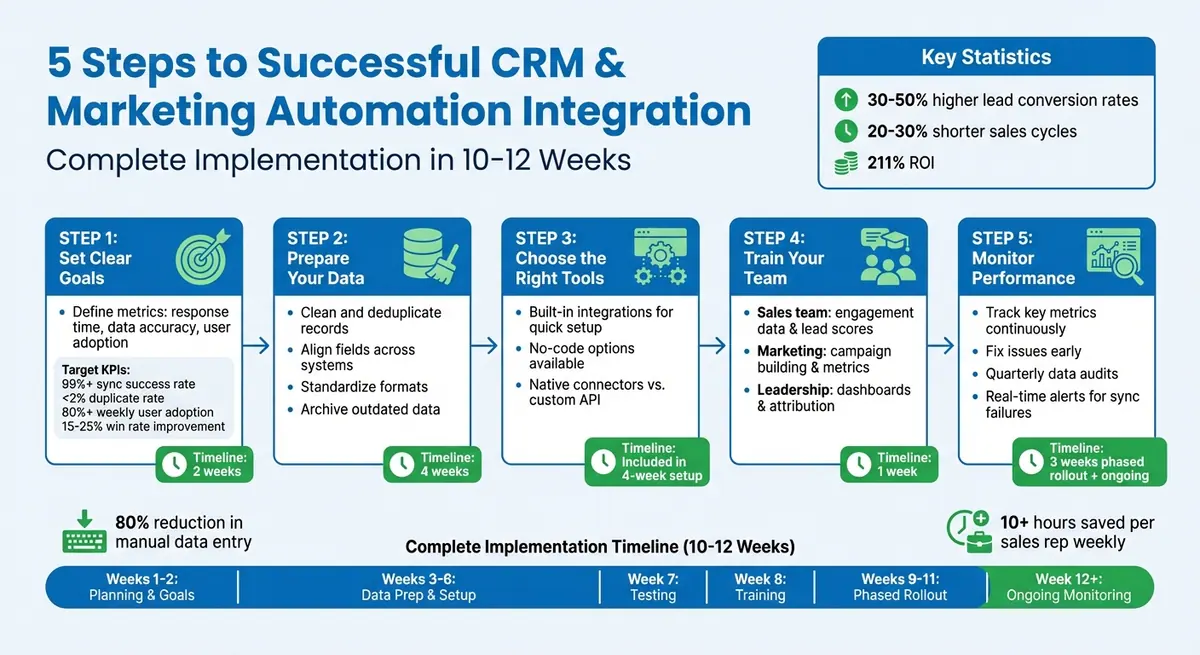
5-Step CRM and Marketing Automation Integration Process with Timeline
Integrating CRM and Marketing Automation: Unifying Data for a Complete Customer View
sbb-itb-5f36581
Planning Your CRM and Automation Integration
Having a clear integration plan is essential to avoid costly mistakes and get your team on the same page. On average, businesses have integrated only 28% of their applications, and 81% of IT leaders admit that data silos hinder their digital transformation efforts. For financial services firms, getting this right can lead to a 30–50% boost in lead conversion rates and shorten sales cycles by 20–30%.
The planning phase focuses on three key areas: defining success, understanding your current technology setup, and creating a realistic timeline with the right team members. Let’s break this down into actionable steps.
Set Clear Goals and Metrics
Start by identifying measurable goals. Are you aiming to improve lead quality, increase revenue, enhance client experiences, or reduce manual tasks? For instance, if faster lead response times are a priority, measure your current response time before starting the integration. If data accuracy is your focus, assess your duplicate rate and the completeness of your data.
Define key performance indicators (KPIs) to track progress. For example:
- Technical performance: Aim for a sync success rate of 99% or higher.
- Data quality: Keep duplicate rates under 2%.
- User adoption: Ensure at least 80% of users are active weekly.
- Business impact: Strive for a 15–25% improvement in win rates.
These benchmarks provide clear targets to evaluate your return on investment. A successful integration can cut manual data entry by 80% and save sales reps over 10 hours each week.
Review Your Current Systems and Tools
Before diving into integration, take stock of your existing tools. Document custom fields, API limits, and sync capabilities for your platforms. Given that the average organization uses over 900 applications, understanding your specific CRM and marketing automation setup is crucial.
Perform a gap analysis to compare your current manual processes with your ideal automated workflows. Determine whether your systems offer native connectors or require custom API development. Native integrations are quicker to set up and need less technical expertise. Also, establish which system will serve as your single source of truth - for example, using your CRM for contact details and your marketing automation platform for engagement data.
"When an integration fails, it's rarely the fault of the API. Success isn't determined by the software you buy; it's determined by the blueprint you create before you ever click 'connect.'" - Trent Little, Evenbound
This preparation ensures you’re ready to coordinate with your team for a smoother implementation.
Build a Timeline with Your Team
Successful integration requires a cross-functional team where each member brings their expertise. Gather stakeholders from marketing operations, sales operations, IT, and executive leadership to cover all bases.
| Role | Primary Responsibility |
|---|---|
| Executive Sponsor | Approves budgets, resolves conflicts, and removes roadblocks |
| Project Manager | Tracks timelines and coordinates activities |
| CRM Administrator | Manages the data model and configures the CRM |
| Marketing Operations | Sets up automation and builds campaigns |
| IT/Security Lead | Reviews compliance, ensures security, and manages APIs |
| Sales Manager | Defines workflows, provides user input, and champions adoption |
Plan for a 10–12 week timeline. Allocate two weeks for planning and goal setting, four weeks for data preparation and technical setup, one week for testing, one week for training, and three weeks for a phased rollout. Start with a pilot group of 5–10 power users to gather early feedback and address any issues before scaling the system across the organization. This phased approach ensures a smoother rollout and allows you to make adjustments based on real-world user experiences. By following this timeline and involving the right team members, you can fully realize the benefits of your CRM and automation integration.
Preparing and Mapping Your Data
Messy data is a surefire way to end up with inaccurate results - commonly referred to as the "garbage in, garbage out" problem. Before connecting your CRM and marketing automation systems, it's essential to clean up your data. Integration amplifies any existing issues, so addressing them beforehand is critical.
Clean and Organize Your Data
Start with a thorough data audit. Look for inconsistent formatting, incomplete records, and duplicate entries in both systems. These problems will only become more pronounced after integration. For example, standardize free-text fields into uniform picklist values for key details like country, state, industry, and lead source. This avoids confusion caused by variations such as "USA", "United States", and "US."
Use deduplication tools to merge duplicate contacts and accounts before syncing your systems. Archive outdated or inactive records to minimize clutter. To fill in missing details, leverage data enrichment tools that can add information like company size or job titles. This ensures that every record syncing between systems is accurate and complete.
To maintain focus on high-value prospects, set up inclusion lists with specific criteria for syncing. For instance, you might only sync records with a certain lead score or those who have completed key actions, ensuring your CRM remains concentrated on qualified leads.
Once your data is clean, the next step is to align field definitions across your systems.
Match Data Fields Between Systems
Develop a field mapping document to ensure consistency. For example, a form field labeled "Company Name" should map directly to the corresponding CRM property, such as "Account Name", to avoid losing data during the integration process.
Standardize formats across the board - use +1XXXXXXXXXX for phone numbers, MM/DD/YYYY for dates, and consistent picklist values. A well-integrated system should achieve a submission-to-CRM success rate of 98% to 100%. Test your integration using edge cases, like special characters, blank required fields, and international addresses, to uncover potential issues.
Decide which system will act as the single source of truth for specific data points. Typically, the CRM handles sales and firmographic data (e.g., account details and job titles), while the marketing automation platform manages behavioral and engagement data (e.g., email activity and website visits).
"Defining a source of truth is a business agreement, not just a technical setting".
You’ll also need to decide if data should flow in one direction to protect master records or bidirectionally for fields like contact names. Finally, configure sync rules to rely on a unique identifier, such as an email address, to prevent duplicate records.
Using Built-In Integrations and Custom Connections
Once your data fields are mapped, the next step is integrating your systems. The quickest way to do this is by leveraging the built-in integrations provided by your CRM and marketing automation platforms. These pre-designed connections handle tasks like authentication, field mapping, and ongoing maintenance, all without requiring advanced technical skills.
Use Native Integration Features
Most major CRM platforms include pre-built connectors that make integration straightforward. For instance, linking HubSpot with Salesforce typically involves installing a managed package from Salesforce's AppExchange, logging in with your integration user credentials, selecting which objects to sync (such as Contacts, Leads, or Accounts), and deciding between one-way or bidirectional data flow for each field. With native connectors, this entire process can be completed in just hours, as opposed to the weeks it might take for custom API development.
These built-in integrations come with several perks. Updates, security patches, and API changes are managed by the vendor, so you won’t need to worry about disruptions after platform updates. Standard fields like Name, Email, and Company are often pre-mapped, speeding up the setup process. Some platforms even enhance usability by allowing you to view data from one system within the other - like showing a HubSpot activity timeline directly inside a Salesforce record.
By enabling smooth data transfer, native integrations can save businesses the 2–3 hours per day often spent on manual data entry between unconnected platforms.
Connect Systems with No-Code Tools
If native integrations don’t meet your needs or you require extra functionality, no-code tools can fill the gap. These tools are especially useful when a native connection isn’t available or when you need to link lead capture forms to your CRM. Platforms like Reform offer customizable, conversion-focused forms that integrate directly with CRMs and marketing automation systems - no coding required. This is ideal for businesses that need branded forms with advanced features like lead enrichment, email validation, and conditional routing, all while ensuring data flows seamlessly into their existing systems.
To ensure everything works correctly, test the integration with a sample of 10 records to verify that data populates the right fields. You can also set up real-time alerts via email or Slack to notify you immediately if a sync fails. These alerts should include critical details like the error message and timestamp, helping you quickly identify and fix issues before they disrupt your workflows.
"When an integration fails, it's rarely the fault of the API. Success isn't determined by the software you buy; it's determined by the blueprint you create before you ever click 'connect.'"
- Trent Little, February 26, 2026
Improving Workflows with Lead Scoring and Personalization
Once your CRM and automation platforms are synced, you can unlock prioritized prospecting and customized messaging. Lead scoring assigns a numerical value to contacts based on their fit and engagement levels, while personalization uses CRM data to tailor campaigns to individual behaviors and preferences. Together, these approaches help you focus on high-potential leads, boosting efficiency and conversion rates.
Set Up Lead Scoring Systems
Lead scoring combines CRM demographic data with automation-driven behavior tracking to profile prospects. For example, firmographic data - like company size, industry, or job title - helps determine if a lead is a good fit. Meanwhile, behavioral data - such as email opens, content downloads, or visits to your pricing page - shows their level of interest. Scores are updated in real time as new data syncs, giving your sales team the chance to engage leads when interest is highest.
AI-driven scoring tools go beyond static, rule-based systems. They analyze hundreds of data points and adapt over time, which can result in over a 50% increase in both lead generation and appointment bookings.
To keep scoring systems accurate, consider implementing score decay. This feature automatically reduces points for inactivity (e.g., subtracting 5 points every 30 days without engagement), ensuring your team focuses on active prospects rather than outdated data. You can also use negative scoring to deduct points for actions like unsubscribing or for attributes that suggest a poor fit, such as competitor email domains. Establish clear thresholds for lead readiness - such as defining 0-30 points as Cold, 31-70 as Warm, and 71+ as Hot. Leads that hit your "Hot" threshold can be automatically routed to sales reps, while lower-scoring leads remain in nurturing workflows.
"The odds of contacting a lead decrease by 100 times if you wait 30 minutes versus 5 minutes." - LeadResponseManagement.org
A great example of this strategy in action comes from Workforce Software. Over six months, the company implemented Demandbase's AI-powered engagement tracking under the guidance of Linda Johnson, their Global Director of Marketing Operations. By focusing on accounts showing high-intent signals, Workforce Software achieved a 121% increase in in-market account engagement.
With refined scoring systems in place, you can now create campaigns that perfectly align with your leads' journeys.
Create Targeted Campaigns Using CRM Data
Once your CRM data and lead scores are updated, you can use them to build campaigns tailored to each prospect's journey. Dynamic segmentation groups leads based on behavior (like browsing history or abandoned carts), demographics (such as industry or company size), and preferences. This ensures your messaging stays relevant and impactful. In fact, financial services firms that integrate CRM with marketing automation report a 30-50% improvement in lead conversion rates and shorter sales cycles by 20-30%.
Behavior-driven triggers can automate timely outreach. For instance, if a lead downloads a whitepaper, you can automatically send a follow-up email with related case studies. Similarly, if a contact visits your pricing page, your CRM can instantly notify a sales rep via Slack or email. These workflows often boost conversion rates by an average of 35%, ensuring no high-intent actions slip through the cracks.
Personalization doesn’t stop after the initial sale. Use purchase data to automate onboarding emails, send loyalty rewards, or celebrate milestones like anniversaries. Dynamic email campaigns powered by CRM data can achieve a 40% open rate and a 20% click-through rate, far outperforming generic messages. Tools like Reform can also help you capture accurate lead data from the start by creating high-converting lead forms, using features like email validation and lead enrichment to ensure your CRM is fueled with high-quality information from the very first interaction.
Monitoring and Maintaining Your Integration
Keeping an integration running smoothly means constant vigilance. Without regular monitoring, even small sync issues or workflow hiccups can snowball into bigger problems, potentially affecting revenue. Routine maintenance ensures your integration stays efficient and protects the time and resources you've invested.
Monitor Key Performance Indicators
Tracking the right metrics is essential to gauge whether your integration is delivering results. Focus on revenue-related KPIs like marketing-attributed revenue and return on investment (ROI) to see if your campaigns are boosting profitability. Pipeline metrics, such as lead-to-MQL and MQL-to-SQL conversion rates, can highlight the effectiveness of your lead scoring and segmentation efforts. Additionally, efficiency indicators like sales cycle length and win rates provide insight into how quickly your teams are closing deals.
But don't stop at high-level numbers - dig into the specifics. Sean Donahue, Director of Email Marketing at Power Digital, stresses the importance of detailed analysis:
"I don't know if we've ever reached a place where we just stop and say, 'OK that's it.'".
He advises closely examining each step in your workflows to identify where engagement might drop off. Keep an eye on engagement metrics like email open rates and click-through rates, and be alert for red flags such as a sudden spike in unsubscribe rates. These could signal issues like over-personalization or excessive automation. Engagement data serves as a critical barometer:
"Engagement tells us everything we need to know. If we're getting too close to the sun with personalization, that is absolutely going to reflect in the data and we'll know to back off.".
By staying on top of these metrics, you can catch potential problems early and make adjustments before they impact your processes.
Fix Integration Problems Early
Proactive monitoring allows you to spot and fix issues before they disrupt your workflows. Regular system audits and error log reviews - ideally done quarterly - can help identify recurring problems like duplicate records, missing field mappings, or delayed syncs. Automated validation rules can also catch discrepancies during the sync process, while periodic data audits ensure your information stays accurate.
Real-time CRM dashboards are another valuable tool, offering instant visibility into system performance and campaign outcomes. Set up alerts for critical metrics, such as data sync error rates or sudden drops in conversion rates, to stay ahead of potential disruptions. Before implementing major updates or new sync rules, conduct user acceptance testing with your sales and marketing teams to identify issues in practical scenarios. For instance, test how unsubscribe requests are processed between systems to ensure compliance, or verify that MQL handoffs properly transfer leads from marketing to sales.
Finally, regular data cleansing - like merging duplicate records and archiving inactive contacts - keeps your system efficient and ensures accurate reporting. These preventive measures help maintain smooth operations and reduce the risk of costly errors.
Training Your Team and Avoiding Common Mistakes
Once your integration is up and running, the next big step is getting your team on board and helping them make the most of it. Even the most advanced system won’t deliver results if your team doesn’t actively use it. Poor adoption can quickly derail your investment.
Train Teams on the Integrated System
Training is not a one-size-fits-all process - it should be tailored to each role. For example:
- Sales teams should learn how to read engagement data and interpret lead scores to prioritize their outreach.
- Marketers need to understand how to build targeted campaigns and analyze performance metrics.
- Leadership should be briefed on dashboards and full-funnel attribution to make informed decisions.
The key is to focus on how the system benefits each role. When sales reps see how it delivers better-qualified leads with detailed context for personalized outreach, they’re more likely to embrace it. Similarly, marketers will engage more when they can clearly demonstrate their impact on revenue.
Use a mix of learning tools to ensure effective training, such as live webinars, recorded sessions, hands-on workshops, and cheat sheets. But don’t stop there - make training an ongoing effort. Regularly include CRM discussions in team meetings and one-on-ones to share successes and address any roadblocks. You can also set up dedicated support channels on platforms like Slack or Teams, with scheduled office hours for quick questions.
This consistent, role-specific training helps your team feel confident and sets them up for success.
Prevent Over-Automation and Isolated Data
Once your team is well-trained, it’s crucial to avoid common automation and data management mistakes. Two big issues to watch out for are syncing unqualified contacts and creating data silos.
To prevent syncing low-quality contacts, use inclusion lists as filters. This ensures that only leads meeting specific criteria - like reaching a certain lead score or lifecycle stage - are added to your CRM. This way, sales teams can focus their efforts on high-value prospects.
Data silos, on the other hand, happen when systems don’t share information effectively. To avoid this, establish a single source of truth. Decide which system owns specific data points. For instance, the CRM is typically best for managing firmographic and sales data, while the marketing automation platform should handle behavioral and engagement data. Before starting the integration, both sales and marketing teams should align on definitions for key terms like MQL (Marketing Qualified Lead) and SQL (Sales Qualified Lead) to ensure seamless transitions.
It’s also important to keep your data clean. CRM data naturally decays at about 25% per year. Schedule quarterly reviews to remove outdated information, clean up duplicates, and standardize fields. This keeps your workflows efficient and your system running smoothly.
Conclusion
Bringing your CRM and marketing automation together is not a one-and-done project - it’s an evolving process that requires thoughtful planning, precise data management, and regular updates. Companies that see the best outcomes treat this integration as a dynamic system that adapts alongside their business needs.
To achieve successful integration, start with clear objectives, ensure accurate data mapping, and choose the right integration method for your setup. Whether you rely on native integrations or no-code tools like Reform to sync form data with your CRM, focus on maintaining high-quality data. This includes improving lead capture forms to minimize drop-offs and using real-time lead routing to respond to prospects faster.
Why does data quality matter so much? Poor data costs businesses roughly $12.9 million annually, and almost 45% of sales reps face challenges due to incomplete data. Performing quarterly or bi-annual data audits can help you catch duplicates, outdated records, and sync errors before they snowball into bigger issues. This keeps your CRM operating as a reliable growth tool.
Beyond efficiency, integration sets your business up for long-term success. Getting your team involved early is key - when employees contribute to planning, they’re more likely to support the system. Offer role-specific training, create feedback channels to identify bottlenecks, and track KPIs to measure tangible results, such as faster sales cycles or higher conversion rates. This often starts with effective lead qualification to ensure your sales team focuses on the most promising opportunities.
FAQs
What data should sync between my CRM and marketing automation platform?
Syncing key fields is essential for keeping your data accurate and actionable. Focus on syncing contact details like name, email, phone number, and company information. Don’t forget to include custom fields that capture preferences, behaviors, or interactions - things like downloads or website activity.
To align marketing and sales efforts, incorporate sales data such as deal stages and lead status. This ensures everyone is on the same page when managing leads.
Make it a habit to validate and map fields regularly. This reduces discrepancies, streamlines workflows, and ultimately boosts lead conversion rates.
How do I prevent duplicate records after integration?
Keeping your CRM free from duplicate records is crucial for maintaining clean and reliable data. Here are some practical strategies to help you achieve that:
- Use CRM Tools for Deduplication: Regularly scan for and merge duplicate records using built-in CRM features or third-party tools. This ensures your database stays organized and accurate.
- Monitor and Validate Data Flow: Keep an eye on how data moves into your CRM. Update settings, validate incoming data, and establish clear processes to maintain high-quality records.
- Accurate Field Mapping: Make sure form fields are mapped correctly and connect forms directly to your CRM. This reduces the risk of manual input errors that often lead to duplicates.
By combining these steps with proper planning and thorough data validation, you can maintain a clean database and improve the efficiency of your CRM system.
When should I use a no-code tool like Reform for integration?
A no-code tool like Reform makes it easy to connect forms with CRM systems, even if you don’t have technical skills. It cuts down on setup time, minimizes manual data entry, and keeps your data updated in real-time. Reform is a great choice if you're looking to simplify workflows, boost data accuracy, and automate tasks - all while keeping things user-friendly and customizable.
Related Blog Posts
Get new content delivered straight to your inbox

The Response
Updates on the Reform platform, insights on optimizing conversion rates, and tips to craft forms that convert.




Drive real results with form optimizations
Tested across hundreds of experiments, our strategies deliver a 215% lift in qualified leads for B2B and SaaS companies.
