
.webp)
CRM Integration Performance: Key Metrics To Track



Your CRM integration could be silently losing leads, costing you time and revenue. If your systems lag or fail, prospects might never reach your sales team. Here's why this matters:
- Speed is crucial: Responding to leads within 5 minutes makes you 100x more likely to connect compared to waiting an hour.
- Data accuracy is key: A submission-to-CRM success rate of 98%-100% is essential to avoid revenue leaks.
- Manual work wastes time: Poor integrations force teams to spend 2–3 hours daily on manual data entry.
The article compares Reform, a tool designed to improve lead quality and sales efficiency, with standard CRM integration tools. Reform focuses on reducing form abandonment, enriching data, and ensuring fast, accurate CRM syncing. Standard tools offer broader integration capabilities but often require more manual work and troubleshooting.
Quick Comparison
| Metric | Reform | Standard CRM Tools |
|---|---|---|
| Conversion Rates | High; reduces form abandonment | Variable; depends on basic form design |
| Data Quality | Ensures clean data upfront | Relies on manual cleanup post-sync |
| Productivity | Saves 2–3 hours daily for sales teams | Reduces manual entry but slower fixes |
| Integration Depth | Focused on lead capture tools | Supports complex workflows |
| Security | Standard protocols for most businesses | Advanced features like HIPAA compliance |
The right choice depends on your priorities. Reform excels at improving lead quality and simplifying workflows, while standard tools are better for complex, multi-department processes.
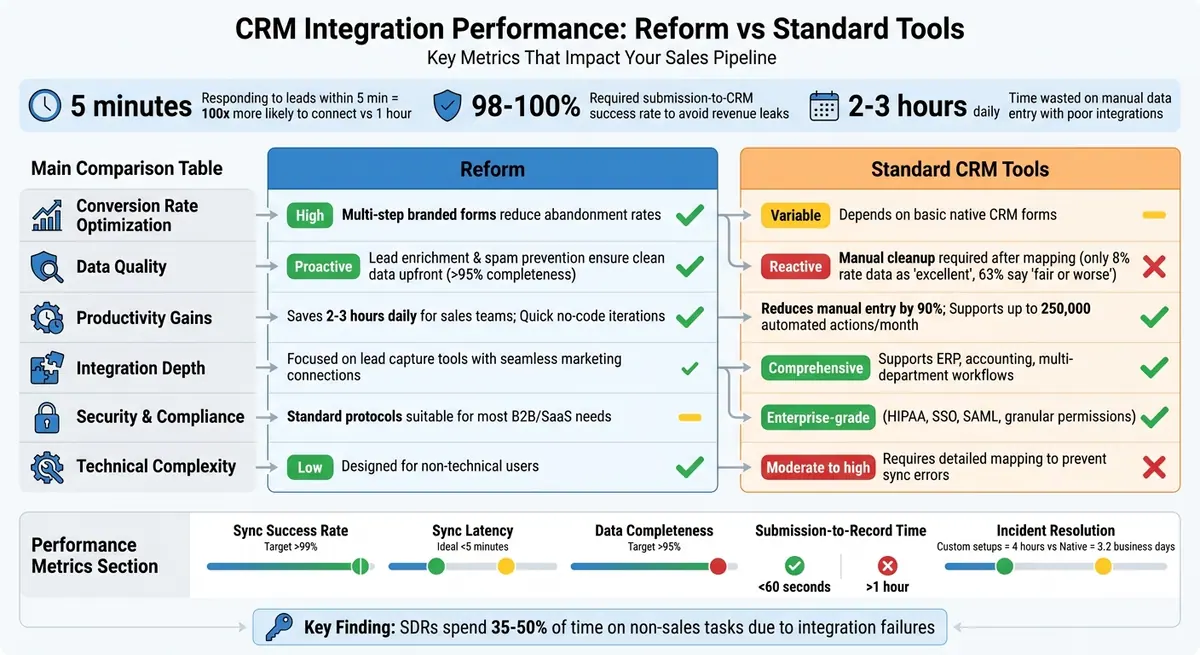
Reform vs Standard CRM Integration Tools: Performance Metrics Comparison
1. Reform
Conversion Rate Optimization
Reform tackles the common issue of form abandonment, which can undermine CRM integration efforts, by ensuring prospects complete forms. Using Zuko Analytics, Reform identifies the specific fields where users drop off, allowing you to fine-tune each step of the form. Its multi-step forms and conditional routing use concise, context-aware questions that reduce friction. This approach not only encourages form completions but also increases the volume of high-quality data entering your CRM.
In short, Reform doesn’t just increase the number of completed forms - it ensures the data you collect is actionable and meaningful.
Data Quality and Accuracy
Once form engagement improves, Reform takes it a step further by enhancing data quality. Through AI-powered profiling, it transforms basic location signals into detailed insights. For example, instead of simply identifying that a prospect is in California, Reform enriches the data with potential business needs tied to that location.
Its built-in spam prevention and lead enrichment features validate email addresses and append company data, ensuring clean and accurate information enters your CRM. This proactive data cleaning process helps maintain a data completeness rate exceeding 95%, all without requiring manual effort. By minimizing errors at the source, Reform guarantees that your CRM receives reliable and actionable data.
Sales Team Productivity
Reform’s direct integrations with CRMs like HubSpot and Salesforce streamline workflows by automating data entry, saving sales teams 2–3 hours every day. When a prospect submits a form, their details are automatically mapped to the correct CRM fields, eliminating manual input. Leads are then qualified and routed to the right sales rep within seconds, a process that increases the likelihood of connecting with prospects by 100 times. With submission-to-record times consistently under 60 seconds, Reform enables sales teams to act on fresh leads, improving critical response time metrics.
Integration Features and Analytics
Reform doesn’t stop at improving data capture and quality - it also enhances integration performance through advanced analytics. The platform offers real-time analytics and tracks abandoned submissions, providing insights beyond standard integration tools. You can see not only if data reaches your CRM but also how prospects interact with your forms.
Its A/B testing capabilities allow you to experiment with and refine form layouts based on conversion data, boosting both completion rates and data quality. Additionally, features like headless forms and custom CSS support ensure consistent data formatting across all channels, reducing errors and improving data mapping reliability. These tools directly contribute to better CRM sync performance and more reliable integrations.
sbb-itb-5f36581
2. Standard CRM Integration Tools
Conversion Rate Optimization
Most standard CRM integration tools are designed to transfer data between systems, but they often overlook improving the process of capturing that data in the first place. These tools typically include native connectors, iPaaS platforms, or custom APIs. While they do a solid job syncing data from completed form submissions, they don't tackle issues like form abandonment or poor user experiences that can stop potential leads from completing forms. As a result, the data pipeline may be smaller but cleaner. At the same time, these tools depend on traditional methods to maintain data quality.
Data Quality and Accuracy
To ensure accurate data, standard integration tools rely on field mapping and deduplication. These processes require detailed documentation to minimize errors. The upsert pattern - which checks for existing records before inserting new ones - further helps prevent duplicate entries. Yet, despite these measures, only 8% of B2B professionals rate their CRM data quality as "excellent", while a staggering 63% consider it "fair" or worse. As the GTMStack team puts it:
"Bad CRM data isn't usually a CRM problem. It's an integration problem. The CRM is only as clean as the data flowing into it".
Sales Team Productivity
Integration tools significantly reduce manual data entry, cutting it by about 90% and saving sales reps an estimated 2-3 hours daily. Features like automated lead routing assign prospects to the right reps based on factors like territory, industry, or lead score, which helps speed up response times. However, native integrations tend to have slower incident resolution times, averaging 3.2 business days compared to just 4 hours for custom setups. This delay can hurt sales engagement and lead conversion rates. When integration issues arise, sales development representatives (SDRs) often spend 35-50% of their time on non-sales tasks, trying to work around these failures. This can result in "silent failures", where leads disappear from the pipeline without the sales team even realizing it.
Integration Features and Analytics
Standard tools also offer basic analytics to monitor performance. Key metrics include:
- Sync success rate: Aiming for over 99%.
- Sync latency: The time it takes for changes to sync between systems, ideally under 5 minutes.
- Data completeness rate: The percentage of records with all required fields filled, with a target of over 95%.
These tools often support bi-directional syncing, include conflict resolution rules, and monitor for issues like unsynced data by tracking record count drift. However, their analytics focus on technical performance rather than user behavior. For instance, they can show whether data made it into the CRM but can't provide insights into why prospects abandoned forms or hesitated during the submission process.
KPI's To Track In Your CRM System
Advantages and Disadvantages
When deciding on a CRM integration approach, it's essential to weigh the trade-offs in areas like conversion optimization, data quality, productivity, integration depth, and security. These factors directly influence how effectively your integration supports and protects your sales funnel. Below, we break down key comparisons to help you evaluate each option.
Reform stands out for its proactive approach to data quality. It enriches leads and blocks spam, ensuring clean data from the start. On the other hand, traditional integrations often require manual data cleanup. For businesses managing complex workflows, such as "order to cash" across multiple departments, standard middleware platforms offer deep, bi-directional synchronization.
Reform’s no-code design empowers marketing teams to refine forms quickly, while standard tools excel in automating up to 250,000 actions per month. As Trent Little from Evenbound aptly puts it:
"The fastest way to amplify chaos in your business is to automate a messy process".
Reform addresses this by reducing form abandonment before automation even begins.
While Reform focuses on seamless, lead-capture–oriented integrations, enterprise-grade platforms prioritize advanced security features like HIPAA compliance, SSO, and SAML, which are critical for larger organizations. Interestingly, 89% of major companies have already adopted digital and AI reform.
Comparison of Key Performance Metrics
| Metric | Reform | Standard CRM Integration Tools |
|---|---|---|
| Conversion Rate Optimization | High; multi-step branded forms reduce abandonment rates | Variable; depends on basic native CRM forms |
| Data Quality | Proactive; lead enrichment and spam prevention ensure clean data upfront | Reactive; manual cleanup often required after mapping submitted data |
| Productivity Gains | High for marketing teams; quick no-code iterations | High for sales teams; supports up to 250,000 automated actions per month |
| Integration Depth | Tailored for lead capture with seamless marketing tool connections | Comprehensive; supports ERP, accounting, and multi-department workflows |
| Security & Compliance | Standard security suitable for most B2B/SaaS needs | Enterprise-grade protocols, including HIPAA, SSO, SAML, and granular permissions |
| Technical Complexity | Low; designed for non-technical users to deploy quickly | Moderate to high; requires detailed mapping to prevent synchronization errors |
Conclusion
Choosing the right CRM integration boils down to your team's priorities and technical capabilities. Reform stands out as a solution for preventing data quality issues from the outset. Its lead enrichment and spam prevention features ensure clean data flows into your CRM right from day one. With the data quality challenges mentioned earlier, starting with accurate information is critical. For marketing teams that need flexibility and quick adjustments, Reform’s no-code design offers high conversion rates through well-optimized, branded forms.
On the other hand, standard CRM tools cater to broader integration needs, especially for businesses with complex workflows. These tools shine in scenarios like managing multi-department processes - such as syncing data across a CRM, ERP, and accounting systems. Middleware platforms handle bi-directional synchronization and automation effectively, though they often require more active management. For organizations needing maximum control, custom API integrations provide tailored solutions and faster troubleshooting, but they come with the trade-off of requiring dedicated engineering resources.
Consider this: SDRs already spend 35–50% of their time on non-selling activities, often due to integration failures. The right integration should ease this burden, not add to it. Reform helps address these inefficiencies by ensuring data accuracy and simplifying lead capture.
To align your integration strategy with your goals, ask yourself:
- Will conditional logic be necessary within the next 12 months? If so, basic native integrations may not suffice.
- Will you process over 10,000 records in a single operation? If yes, custom API solutions might be the better choice.
- Do you lack a dedicated operations person for weekly maintenance? If so, custom code could save time and costs compared to managing intricate iPaaS workflows.
Start by auditing your current lead sources to pinpoint where data quality issues arise. Then, choose an integration strategy that meets your operational needs, rather than defaulting to the simplest option. Better integrations lead to greater sales efficiency by cutting down on manual tasks and speeding up response times.
FAQs
Which CRM integration metrics matter most for revenue?
Metrics closely linked to revenue include customer satisfaction and loyalty measures like NPS (Net Promoter Score), CSAT (Customer Satisfaction Score), and CLV (Customer Lifetime Value). These indicators shed light on how well you're retaining customers and where growth opportunities may lie. Additionally, tracking churn rate is essential to understanding how many customers you're losing over time.
Another important factor is lead response time. Quick follow-ups can significantly boost conversion rates, ultimately contributing to revenue growth.
How can I detect silent lead sync failures fast?
To spot silent lead sync failures quickly, keep an eye on the lead syncing tab for any delays beyond 30–60 minutes or noticeable errors. Since these failures often don't trigger alerts, it's crucial to manually review logs to ensure syncing is working as expected. Regular checks can help you catch problems before they escalate.
What targets should I set for sync latency and success rate?
To ensure smooth real-time or near-real-time data flow, aim for minimal sync latency - ideally within a few seconds to a minute. Additionally, maintain success rates above 99% to guarantee reliable CRM integration and minimize the risk of data loss.
Related Blog Posts
Get new content delivered straight to your inbox

The Response
Updates on the Reform platform, insights on optimizing conversion rates, and tips to craft forms that convert.


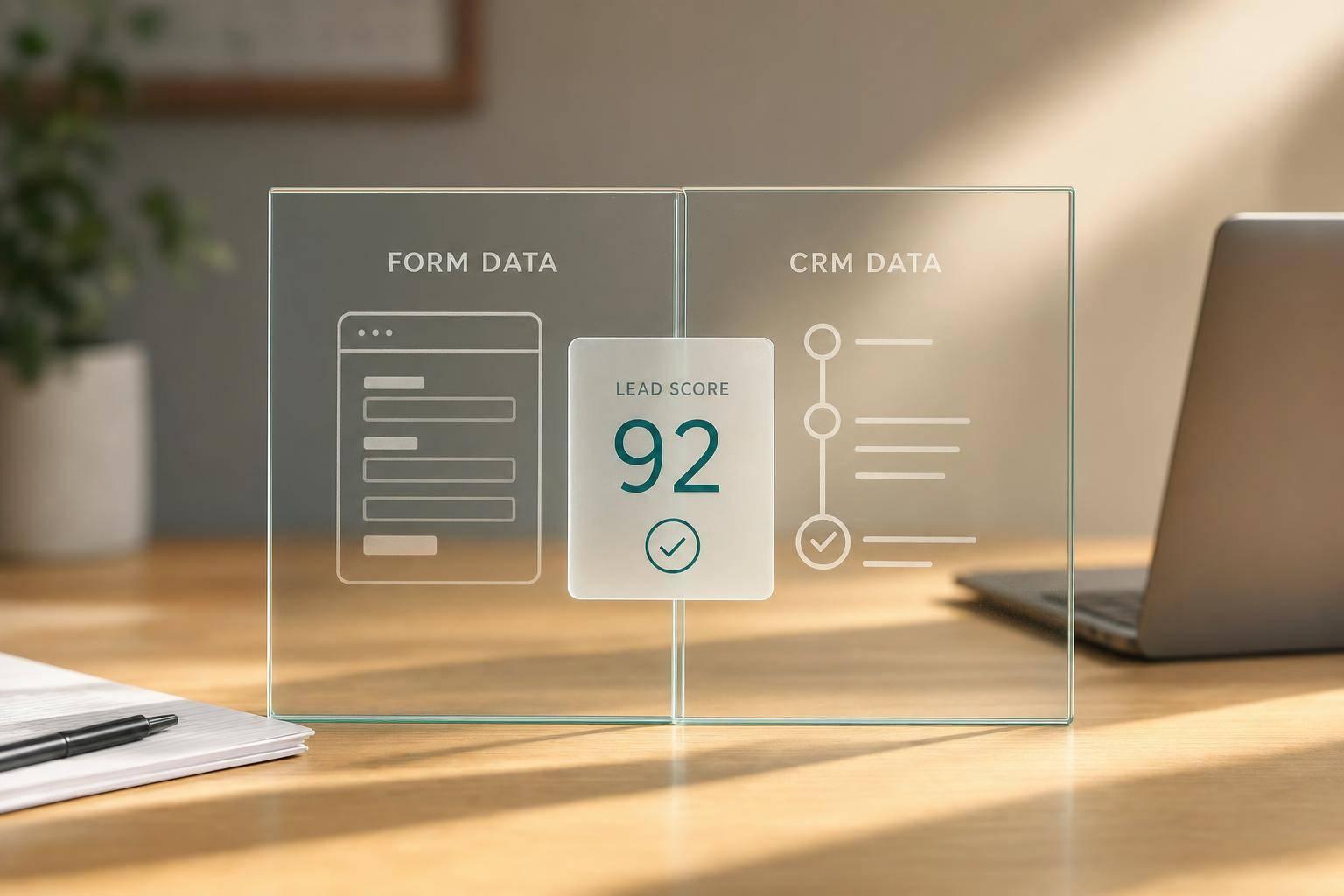

Drive real results with form optimizations
Tested across hundreds of experiments, our strategies deliver a 215% lift in qualified leads for B2B and SaaS companies.
