
.webp)
CRM Integration Challenges Solved by Middleware



When your CRM isn’t receiving lead data from forms or marketing tools, it’s more than just a technical glitch - it’s lost sales opportunities. Slow lead response times (beyond five minutes) can reduce your chances of connecting with prospects by up to 100x. Manual data entry wastes hours, while duplicate or incomplete records confuse sales teams.
Middleware fixes these problems by acting as a bridge between systems, ensuring smooth data transfer, real-time syncing, and error handling. It resolves issues like mismatched field mappings, API rate limits, and silent failures while improving security and scalability. By automating processes and centralizing integrations, middleware saves time, reduces costs, and ensures no lead is left behind.
Key Benefits of Middleware:
- Real-time syncing: Faster lead response times.
- Error handling: Prevents silent failures and data loss.
- Improved data accuracy: Standardizes and validates information.
- Scalability: Handles high lead volumes during peak campaigns.
- Security: Protects sensitive data with encryption and access control.
Middleware doesn’t just connect systems - it ensures your CRM works efficiently, helping you close more deals and optimize your lead management process.
What is middleware? (A guide to software API integrations)
sbb-itb-5f36581
Common CRM Integration Problems
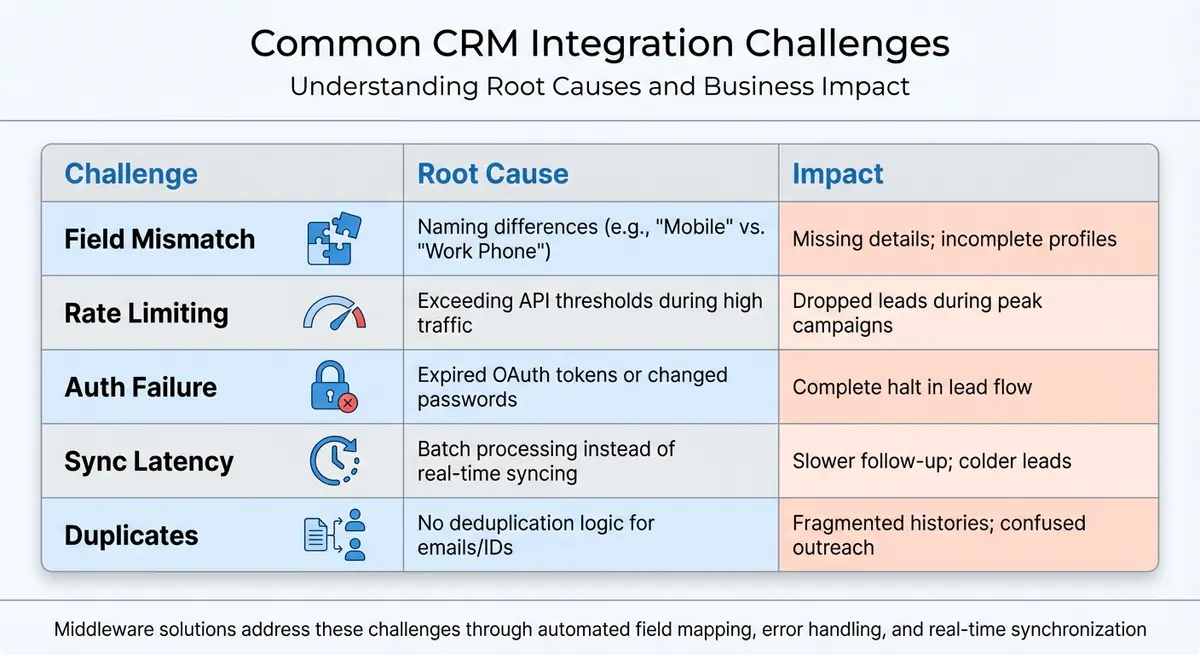
Common CRM Integration Challenges: Causes and Impacts
When your forms and CRM fail to communicate effectively, the issues often follow familiar patterns. Pinpointing these trouble spots early can save you from losing valuable leads.
Data Synchronization Issues
One frequent issue is field mapping mismatches. For example, if your form uses "Company Name" but your CRM expects "Account Name", critical information can be lost, leaving profiles incomplete. Additionally, inconsistencies in formats - like phone numbers written as "+1 555-123-4567" versus "(555) 123-4567" or dates formatted as MM/DD/YYYY instead of YYYY-MM-DD - can cause your CRM to reject submissions outright.
Another problem is duplicate records, which occur when your integration lacks proper deduplication logic. For instance, multiple form submissions might create separate records for the same lead, fragmenting their history and inflating your lead count. If your duplicates exceed 5%, it's a sign that your deduplication process isn't working.
Race conditions can also disrupt synchronization. These happen when two systems - like a mobile app and a web form - try to update the same CRM record simultaneously. Without proper controls, simultaneous updates can overwrite data, causing important information to be lost.
System Compatibility Gaps
Compatibility issues often arise when older CRM systems struggle to integrate with modern platforms. Legacy CRMs may not support newer object models or webhook structures, leading to integration failures. Compounding the issue are API authentication problems, such as expired OAuth tokens or changed passwords, which can cause integrations to fail silently. High-volume campaigns can also trigger API rate limits, resulting in dropped leads.
Integration Complexity
Custom-coded integrations add another layer of difficulty. Every time your CRM updates its API or adds a required field, the code must be manually adjusted - a challenging task for teams without dedicated developers.
Even more frustrating are silent failures. In these cases, your forms might appear to work, displaying thank-you pages as usual, but the data never reaches your CRM. Days can pass before anyone realizes the sales pipeline has gone dry, potentially costing you opportunities.
Data Security Risks
Faulty integrations can expose sensitive customer information during transfer. Without proper encryption or authentication protocols, your business becomes vulnerable to data breaches, putting both your reputation and customer trust at risk.
Scalability and Performance Limitations
Direct connections between systems may work fine under low lead volumes but often fail when traffic surges. Batch processing can help manage high volumes, but it introduces delays that can hurt conversion rates. A delay of even an hour can mean the difference between closing a deal and losing it to a competitor.
Real-time syncing is ideal for quick follow-ups but comes with its own challenges. During traffic spikes, CRM APIs can hit their request limits, triggering "429 Too Many Requests" errors and causing leads to be dropped.
| Challenge | Root Cause | Impact |
|---|---|---|
| Field Mismatch | Naming differences (e.g., "Mobile" vs. "Work Phone") | Missing details; incomplete profiles |
| Rate Limiting | Exceeding API thresholds during high traffic | Dropped leads during peak campaigns |
| Auth Failure | Expired OAuth tokens or changed passwords | Complete halt in lead flow |
| Sync Latency | Batch processing instead of real-time syncing | Slower follow-up; colder leads |
| Duplicates | No deduplication logic for emails/IDs | Fragmented histories; confused outreach |
How Middleware Solves CRM Integration Problems
Middleware serves as a translation layer that seamlessly moves and transforms customer data between different systems. For example, it can automatically convert field names like "Company Name" into "Account_Name" and adjust data formats as needed.
Middleware as a Bridge Between Systems
Middleware works by processing incoming requests, applying business rules and data transformations, and delivering results through APIs or webhooks. It also centralizes error handling and logging, reducing the risk of silent failures. This setup ensures that even if an application's API changes or its data structure evolves, systems can still communicate without the need for extensive custom code updates.
Point-to-point integrations can quickly become overwhelming - connecting five applications might require 10 unique connections, while 10 applications could demand 45. Middleware simplifies this complexity by acting as a central hub for communication. Additionally, many middleware platforms come with pre-built connectors that further streamline and automate the integration process.
Pre-Built Connectors and Automation
Middleware platforms often include native connectors designed to understand the object models and validations of various CRM systems. These connectors can automate business processes, such as routing high-value leads to specific management tiers or halting order fulfillment when a customer's credit limit is exceeded.
"Think of APIs as phone numbers and middleware as the phone system that connects the calls."
- DCKAP Blog
Speed is a critical factor in customer conversions, and middleware helps by reducing the time between data submission and CRM entry. Unlike manual or batch processes that can cause delays, middleware processes data in near real-time, often cutting delays down to just seconds.
Improved Security and Scalability
Middleware also strengthens security and scalability. It ensures reliable data flow even during peak usage times by managing sensitive credentials like OAuth tokens and API keys in a centralized, secure manner. Data is encrypted during transmission, and integration logic can only be modified by authorized users. Features like Role-Based Access Control (RBAC) and immutable audit trails add another layer of security, which is crucial when data breaches can cost businesses up to $4.44 million.
Cloud-native middleware platforms go a step further by offering auto-provisioning and elastic compute capabilities. These features allow systems to scale up quickly during busy periods, such as seasonal surges or regional expansions. Middleware handles API rate limits with queuing and batch processing to avoid data loss, and it uses message queuing to maintain asynchronous communication even if a receiving system is temporarily offline.
"The DCKAP Integrator is something you set up and forget, in 3+ years of using the platform we haven't had outages or any issues with the platform."
- Director of IT - Manufacturing, Gartner Review
Best Practices for Middleware Implementation
Pre-Integration Planning
Before diving into integration, it's essential to prepare thoroughly to avoid synchronization and compatibility headaches. Start by creating a clear map of how data will flow into your CRM. A simple three-column spreadsheet can do wonders here: one column for the form field, another for the destination field, and a third for any data transformation needed. For example, if phone numbers need to switch from a format like (555) 123-4567 to +15551234567, this step ensures you catch those issues early.
Next, pinpoint which CRM fields are absolutely required for a valid record. For instance, if your CRM mandates a company name but your form doesn't collect that information, the integration might fail without warning, and your leads could vanish into thin air. Also, take time to understand how objects in your CRM relate to one another. Should a submission create a contact, a deal, or a company record? Conditional logic can help here - for example, routing enterprise leads to one pipeline while sending SMB leads into an automated nurture sequence.
Get everyone on the same page. Marketing, sales, and IT teams need to align on what success looks like before moving forward. Are you trying to speed up lead response times? Reduce manual data entry? Clear goals prevent miscommunication. A great example is JBGoodwin REALTORS, who implemented multi-step middleware workflows using Zapier, HubSpot, and Gmail in February 2026. Before this, their recruiters spent a quarter of their time on manual data entry. After the change, they boosted recruiting results by 37% year-over-year, proving how middleware can streamline processes and drive results.
Once your plan is solid, you’ll be ready to tackle technical details like security and fallback measures.
Technical Setup and Deployment
Security should be a priority from the start. Use tools like API keys, OAuth 2.0 tokens, or signed webhook payloads to protect data during transmission. To guard against temporary network hiccups or API rate limits, configure retry logic with exponential backoff. This ensures that data is automatically resent if your CRM goes offline for a bit.
Plan for the worst-case scenario by setting up fallback actions. For instance, create a backup system to capture failed submissions so you don’t lose valuable data. Before you go live, test thoroughly. Run edge-case scenarios involving special characters, blank fields, duplicates, and international formats to catch potential issues.
Hidden fields can be a game-changer. Use them to capture UTM parameters, referrer data, and page URLs automatically. This gives your sales team a complete picture of the lead without adding extra work for them.
Once deployed, keep an eye on how the integration performs and be prepared to refine it.
Post-Integration Monitoring and Optimization
After your middleware is up and running, regular monitoring is non-negotiable. Keep an eye on metrics like submission-to-CRM success rates, which should stay between 98% and 100%, and ensure duplicate record rates remain below 5%. Set up automated alerts - through email or Slack - to notify you when error rates spike. Waiting to discover issues manually often means lost leads and missed opportunities.
| Metric | Target Benchmark | Significance |
|---|---|---|
| Submission-to-CRM Success Rate | 98–100% | Indicates overall integration health |
| Duplicate Record Rate | < 5% | Measures how well deduplication logic is working |
| Time-to-CRM Latency | Seconds (Real-time) | Critical for fast sales response |
| Data Completeness | 100% of key fields | Ensures sales teams have the information they need |
It’s a good idea to audit these metrics monthly to catch any dips in performance. For example, in 2026, Veo automated the migration of thousands of leads from social media and email into their CRM using Zapier. This move saved them countless work hours and enabled instant follow-ups on tens of thousands of leads. The quicker you can respond to a lead, the better your chances of closing the deal - sometimes the difference between five minutes and an hour can make or break it.
Finally, keep your documentation up to date. This includes field mappings, change logs, and details on who holds API tokens. If your CRM passwords or security settings change, re-authenticate API connections immediately to avoid silent failures caused by token revocation. Regular upkeep ensures your system keeps running smoothly.
Benefits of Middleware for Lead Management
Middleware isn't just about technical fixes; it directly enhances how businesses handle leads, making processes smoother and more effective.
Better Data Accuracy and Synchronization
One of middleware's standout features is its ability to ensure data accuracy across platforms. It validates and standardizes information flowing between forms, marketing tools, and CRMs. For instance, it checks for required fields, authenticates senders, and reformats data like phone numbers (e.g., converting "(555) 123-4567" to "+15551234567") and dates. It also prevents duplicate entries, ensuring your team works with a clean, real-time data source at all times.
Streamlined Workflows
Middleware takes over repetitive tasks, letting your team focus on more strategic work. Take Veo as an example: they automated the import of thousands of leads each month from social media and email directly into their CRM. This automation saved countless hours of manual work and allowed for timely follow-ups on tens of thousands of leads. Middleware doesn’t just capture and route leads - it enriches their data and ensures they land in the right pipeline, making your processes faster and more efficient.
This level of automation not only saves time but also sets the stage for better returns on investment.
Increased ROI Through Better Lead Management
Quick response times are a game-changer in lead conversion. Middleware ensures leads are transferred to your CRM within seconds, giving sales teams instant access to detailed lead information. This speed enables personalized outreach, which can significantly boost conversion rates. For example, in February 2026, Remote - a global HR platform - used AI-powered middleware to automate help desk ticket triage across various messaging systems. The result? A $500,000 annual savings by prioritizing critical issues more effectively.
Middleware also fills gaps left by native SaaS integrations, which typically cover about 80% of business needs. The remaining 20% - often the most critical - can be addressed with middleware. For instance, if you're using a no-code form builder like Reform (https://reform.app) to capture leads, middleware ensures each submission is properly formatted and transferred to your CRM. This seamless process improves lead quality and increases your chances of conversion.
Conclusion
Connecting your CRM with other tools doesn't have to be a headache. Middleware takes the complexity out of integration by acting as the bridge between your forms, marketing platforms, and customer databases. It handles the heavy lifting - like reformatting data and ensuring security protocols - so your systems can communicate effortlessly.
And the results speak for themselves. Businesses have reported smoother workflows, improved efficiency, and reduced costs by automating processes that were once manual.
These aren't just abstract ideas - they’re real-world outcomes:
"Data integration is the circulatory system of your business. If it's slow, fragmented or fragile, every business initiative suffers, from AI to analytics to customer experience." - Chandni Sinha, IBM Product Marketing Manager
Middleware addresses challenges like data synchronization, security, and scalability head-on. It ensures your data stays accurate in real time, eliminates duplicate entries, and gives sales teams instant access to enriched lead information. For instance, using tools like Reform (https://reform.app), middleware ensures that every lead submission is formatted correctly and ready to go into your CRM.
The payoff? Faster response times, cleaner data, and improved conversion rates. As your business grows and your tech stack becomes more complex, middleware becomes the backbone that keeps everything connected. By tackling integration challenges directly, middleware ensures no lead is missed and every opportunity is optimized.
FAQs
Do I need middleware if my CRM already has native integrations?
If your CRM includes built-in integrations, you might not always need middleware. However, middleware can be a game-changer when dealing with more complex requirements such as ensuring data compatibility, enhancing security, supporting scalability, or creating custom workflows. It acts as a bridge, filling in the gaps and enabling smoother, more customized integrations to align with your business needs.
How can I tell if leads are failing to sync into my CRM?
You can spot lead sync problems by keeping an eye out for delays, mapping errors, failed submissions, or data that is incomplete, duplicated, or missing in your CRM. These issues often hint at unnoticed integration failures. By routinely checking your CRM and integration logs, you can identify and address these problems before they escalate.
What should I monitor to keep CRM integrations reliable at scale?
To keep CRM integrations running smoothly on a larger scale, it's crucial to keep an eye on the data flow for any delays or failures. Regularly check and update field mappings to avoid mismatches as systems change over time. Be prepared to handle common hiccups like sync delays, mapping mistakes, or failed data submissions. Also, ensure your API connections remain stable and secure by double-checking configurations. Staying proactive with monitoring and troubleshooting will help maintain accurate data and seamless integration.
Related Blog Posts
Get new content delivered straight to your inbox

The Response
Updates on the Reform platform, insights on optimizing conversion rates, and tips to craft forms that convert.




Drive real results with form optimizations
Tested across hundreds of experiments, our strategies deliver a 215% lift in qualified leads for B2B and SaaS companies.
