
.webp)
How CRM Sync Boosts Email Campaign ROI


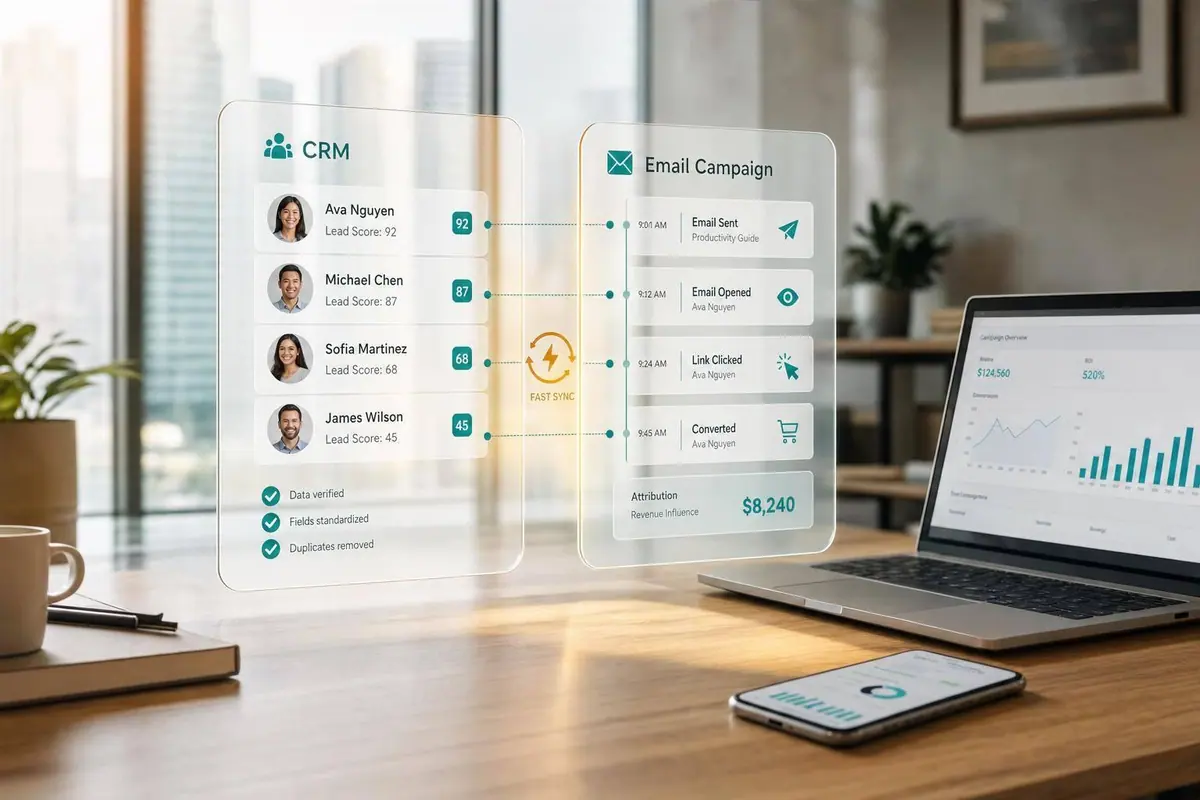
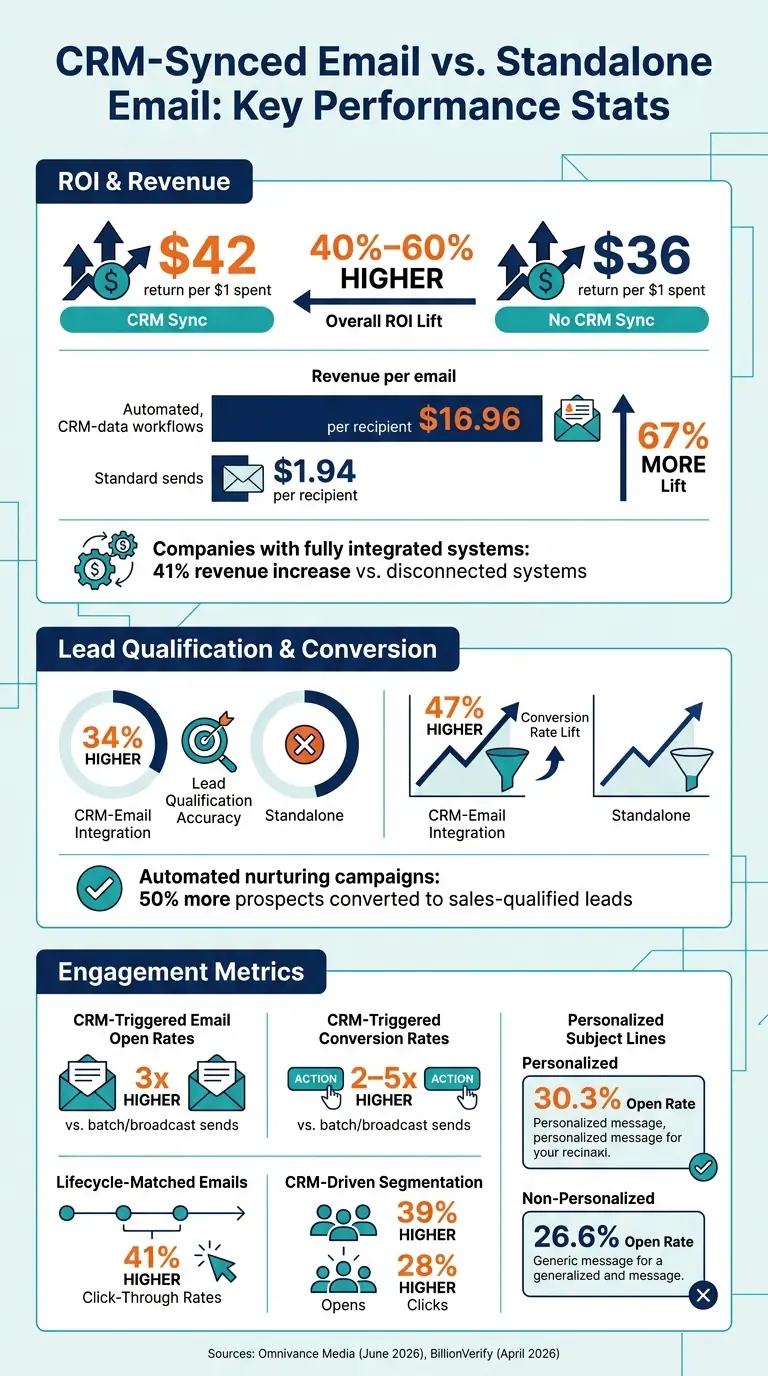
CRM sync helps email make more money. When email tools and CRM records match, teams often see 40% to 60% higher ROI, about $42 back for every $1 spent versus $36 from email run on its own.
Here’s the short version:
- I’d use CRM sync to keep contact data, lifecycle stage, firmographics, behavior, and consent status up to date
- That leads to better segmentation, more accurate lead scoring, and cleaner attribution
- Research in the article links synced setups to 34% higher lead qualification accuracy, 47% higher conversion rates, and 67% more revenue per email
- Trigger-based emails tied to CRM activity can get 3x higher open rates and 2–5x higher conversion rates than batch sends
- The gains depend on clean fields, low sync delay, deduping, and fast unsubscribe updates
What I take from the data is simple: if your CRM and email platform don’t share clean, current data, you send more irrelevant emails, miss buying signals, and make ROI harder to prove.
The article also makes one point that’s easy to miss: bad lead forms can hurt performance long before the email goes out. Typos, bots, stale records, and field mismatches weaken scoring, routing, and reporting from day one.
CRM-Synced Email vs. Standalone Email: Key Performance Stats
What Research Shows About CRM-Connected Email Performance
Lead Scoring and Qualification Gains Reported Across Studies
The clearest pattern in the research is better lead qualification. When email engagement data flows back into the CRM almost in real time, lead scores can reflect what people actually do instead of relying on static profile details. That gives sales teams a better shot at spotting leads that are ready for a conversation.
A June 2026 report from Omnivance Media found that CRM-email integration led to 34% higher lead qualification accuracy than disconnected systems. The same report also found that automated lead nurturing campaigns built on unified customer data converted 50% more prospects into sales-qualified leads.
BillionVerify's April 2026 research points to a similar pattern from a different angle. It found that CRM-triggered sequences - like emails sent after a pricing-page visit or demo completion - deliver 3x higher open rates and 2–5x higher conversion rates than scheduled broadcast campaigns. Why does that happen? Timing. These emails go out when a contact's behavior shows intent, not hours or days later when the moment has passed.
That edge depends on syncing behavior signals back into scoring fast enough to change who sales sees first.
Revenue and ROI Lift Linked to Better Data Alignment
Once scoring gets better, targeting and follow-up usually improve too. And that's where the revenue impact starts to show up.
Companies with fully integrated systems report a 41% increase in revenue compared with those using disconnected systems. Omnivance Media reports a similar pattern, with 47% higher conversion rates and 67% more revenue per email versus standalone platforms.
The difference gets even sharper in automated campaigns. Workflows built on clean CRM data generate $16.96 per recipient, compared with $1.94 for standard email sends. CRM-based personalization also helps open rates, with personalized emails reaching 30.3% versus 26.6% for non-personalized messages.
In plain terms, connected data helps teams send the right message at the right time, and the numbers suggest that pays off.
Still, these gains rely on the basics being in place:
- Clean fields
- Consistent definitions
- Complete sync
sbb-itb-5f36581
How Synced CRM Data Changes Email Results
Segmentation and Personalization Using Lifecycle and Account Data
CRM sync turns static email lists into stage-based targeting. Instead of sending the same message to everyone, teams can group people by lifecycle stage, firmographics, and past engagement.
That shift changes results. Studies report 41% higher click-through rates for lifecycle-matched emails, 39% higher opens and 28% higher clicks from CRM-driven segmentation, and 26% higher opens from personalized subject lines. Put simply, the more your email matches where the buyer is in the journey, the better it tends to perform.
There’s one catch: this only works if behavioral data reaches the CRM fast enough. If that data lags, the message can feel out of step.
Better Timing, Routing, and Follow-Up for High-Intent Leads
CRM sync does its best work when behavioral triggers fire right after a pricing page visit, case study download, or demo request. That kind of fast follow-up matters. If someone shows intent at 10:03 a.m. and your email lands while that interest is still fresh, you have a much better shot than if it goes out a day later.
That timing helps explain why CRM-triggered sequences deliver 3x higher open rates and 2–5x higher conversion rates than scheduled broadcasts.
It also helps with routing. Sales and marketing can react based on what the lead just did, not what they did last week. But speed alone isn’t enough. Weak form inputs and messy field values can drag performance down fast.
More Reliable Attribution From First Touch to Revenue
Synced email events tie clicks, replies, and downloads back to CRM opportunities and revenue. So instead of stopping at opens and clicks, teams can track which campaigns had an effect on pipeline.
That’s a big deal for ROI reporting. An email with flashy engagement numbers might look good on the surface, but if it doesn’t move deals forward, the story changes. Synced CRM data makes that easier to spot.
Of course, attribution is only as good as the data behind it. If CRM records are messy or teams use different definitions for the same stage or source, the numbers start to drift.
Data Quality Requirements for Accurate ROI Gains
Clean Fields, Consistent Definitions, and Consent Integrity
CRM sync only improves ROI when the data underneath it is clean, current, and aligned. If bad records get into the system, those gains fade fast.
A few issues tend to cause the most damage. Field mismatches can send data to the wrong place. Duplicate records can split engagement history across two or more contact profiles. Sync lag can delay triggers and leave outreach outdated by the time it goes out.
Lifecycle stage definitions can also trip teams up. If marketing labels someone an MQL based on one engagement threshold, but sales uses a different standard, reporting starts to drift. Attribution gets messy too, because teams are no longer measuring the same thing.
Consent sync needs close attention. If a contact unsubscribes in your email platform but that status doesn't move back to the CRM right away, that person may still appear eligible for email. That's a problem for both deliverability and compliance. Suppression updates should move both ways within minutes to avoid those issues.
The same idea applies at the point of capture: bad inputs create bad downstream data.
How Form Capture Quality Affects Downstream Results
Forms are often the front door to the CRM, so capture errors don't stay small for long. A typo in an email address, a bot submission, or an invalid domain doesn't just create one bad record. It flows into scoring, segmentation, and follow-up, quietly throwing off results across the board.
That's why capture quality is a revenue issue, not just a cleanup task. Real-time email validation catches typos like "gmal.com" before they enter the CRM. Spam prevention blocks bot submissions that would otherwise skew segmentation and scoring. Lead enrichment adds firmographic data like industry and company size, which lets you keep forms short while still getting the depth needed for lifecycle targeting.
Common sync failures include:
- Field mismatches
- Duplicate loops
- Stale sync
- Suppression lag
- Unvalidated form inputs
Each one chips away at segmentation accuracy and ROI.
How to Measure ROI From CRM-Synced Email Campaigns
Key Metrics: Baseline vs. CRM-Synced Performance
Once you have clean sync in place, the next job is simple: compare results against a disconnected baseline.
You want to track the numbers that show whether better scoring and routing lead to more revenue. Focus on revenue, cost per lead, lead-to-opportunity rate, opportunity-to-close rate, and pipeline influenced. Those are the metrics that tell you if CRM sync is doing more than making dashboards look nice.
Revenue per email is the clearest metric for budget decisions. The formula is straightforward:
CRM-attributed revenue ÷ delivered emails
Use one attribution model and stick with it. In B2B, last-click with a 3–5 day window is a practical default, since it helps trace revenue from the first email to the closed deal. Consistency matters more than the exact model because it keeps marketing and sales reporting aligned.
To isolate impact, use the same metrics before and after sync. A simple way to report results is to break them into three tiers: engagement (opens, clicks), pipeline (email-to-lead rate, campaign-to-opportunity progression), and revenue (revenue per email, customer lifetime value). That setup gives each stakeholder - from marketing to the CFO - a number they can use.
| Metric Category | What to Track |
|---|---|
| Engagement | Open rate, click-through rate |
| Pipeline | Email-to-lead rate, campaign-to-opportunity progression |
| Revenue | Revenue per email, customer lifetime value, ROI per $1 spent |
Conclusion: The Evidence-Based Case for CRM Sync
When email and CRM data connect, targeting gets better, lead qualification becomes more accurate, and attribution can be tracked from the first email to the closed deal. Clean CRM data makes those ROI gains measurable.
FAQs
How often should CRM and email data sync?
It depends on your business goals, technical setup, and how much data you’re moving.
If your team needs to respond to customer behavior fast, a near real-time sync every 5 to 10 minutes can help. That gives people up-to-date data without waiting around.
If immediate updates matter less, a scheduled batch sync every 15 minutes, hourly, or daily is a simpler and lower-cost choice. The right schedule comes down to balancing data freshness with system load and API limits.
Which CRM fields matter most for email ROI?
Focus on CRM fields that show intent, lifecycle stage, and relationship context.
Some of the most useful fields are job title, industry, lifecycle stage, website activity, content downloads, support history, purchase history, deal stage, and subscription status.
These fields help you segment contacts in a way that makes sense. They also help you send timely, relevant offers instead of blasting the same message to everyone.
How do I measure the ROI of CRM-synced email?
Measure CRM-synced email ROI by looking past opens and clicks and focusing on revenue generated. A simple framework helps: look at engagement, pipeline, and revenue, with revenue per email sent as one of the main metrics.
For reporting you can trust, stick with one attribution model, track leads with UTM parameters or CRM source fields, and make sure your CRM data is clean and mapped the right way. Reform can help by syncing form data into your CRM, which makes tracking more precise.
Related Blog Posts
Get new content delivered straight to your inbox

The Response
Updates on the Reform platform, insights on optimizing conversion rates, and tips to craft forms that convert.


Drive real results with form optimizations
Tested across hundreds of experiments, our strategies deliver a 215% lift in qualified leads for B2B and SaaS companies.
