
.webp)
7 CRM Sync Tools for Lead Enrichment


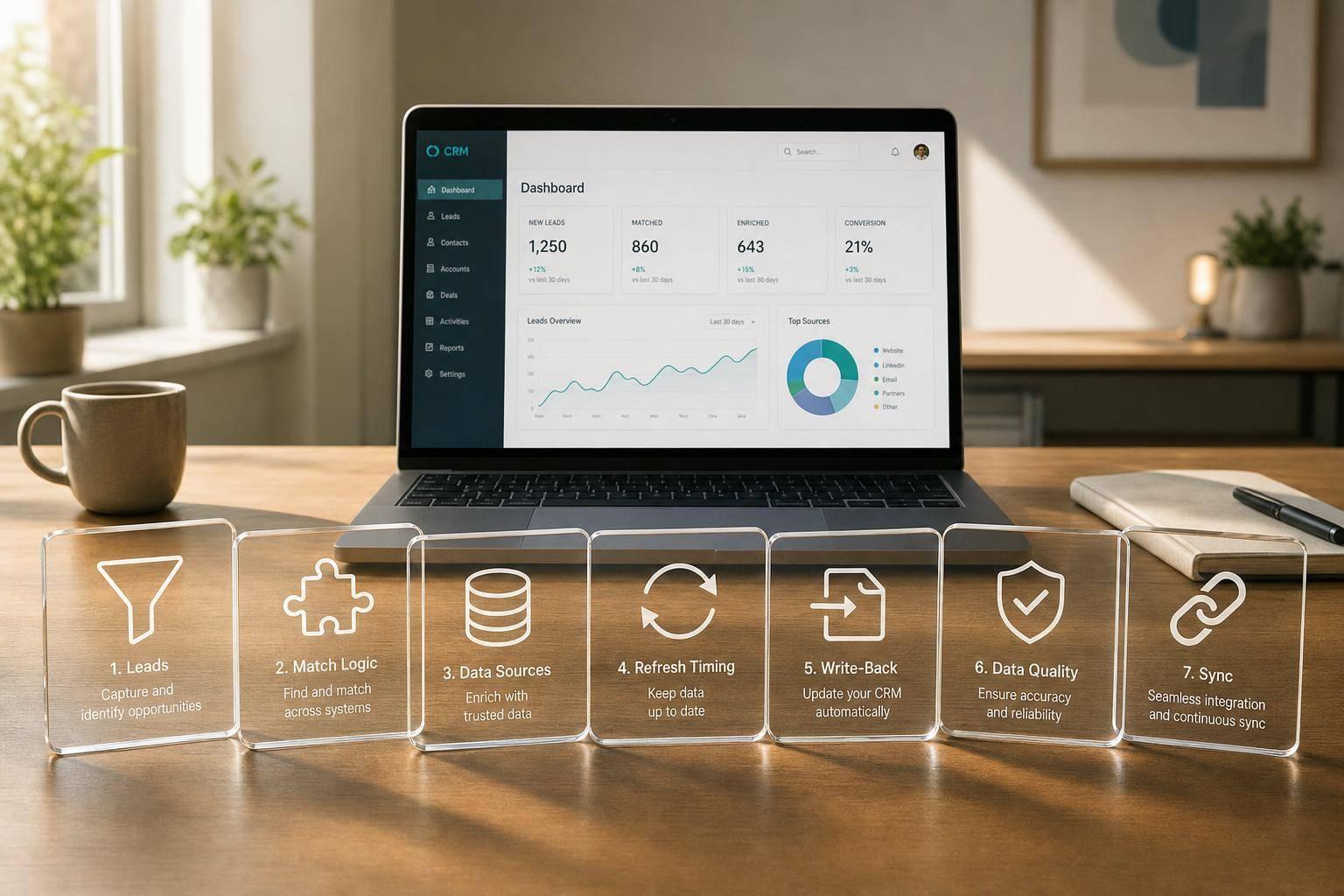
The short answer: if you want lead enrichment data to show up where your team works, you need a tool that does two jobs well: match records correctly and sync fields into your CRM without creating duplicates or bad overwrites.
In this list, I’m looking at 7 tools: Reform, Clay, Apollo.io, ZoomInfo, Cognism, Clearbit / Breeze Intelligence, and LeadIQ. I’m comparing them on the points that matter most: CRM sync depth, data sources, match logic, refresh options, and appended fields. A few stand out for inbound forms, some fit outbound prospecting better, and others are stronger for bulk CRM cleanup.
If I had to boil the article down into a few takeaways, it would be this:
- Reform fits teams that want enrichment via multi-step forms
- Clay fits teams that want multi-source workflows and field control
- Apollo.io fits teams that want a large contact database plus CRM write-back
- ZoomInfo fits teams that want account coverage and tight sync rules
- Cognism fits teams that need EMEA coverage or phone-verified data
- Clearbit / Breeze Intelligence fits teams that want background enrichment for routing and scoring
- LeadIQ fits reps who enrich records during outbound prospecting
One stat that stands out: Apollo says it has 275M+ contacts, 73M+ companies, and a network of 2M+ contributors. That gives you a sense of how much these tools can differ on database scale alone.
LeadCRM Tutorial: Enrich, Sync & Manage LinkedIn Leads in Any CRM (Full Demo)
sbb-itb-5f36581
Quick Comparison
| Tool | Best fit | CRM sync style | Main data strength | Refresh timing |
|---|---|---|---|---|
| Reform | Inbound forms | Native form-to-CRM field mapping | Company and contact basics at submission | Real-time |
| Clay | Multi-source enrichment | Connectors, APIs, CSV, controlled write-back | Firmographic, contact, and source-trace data | Real-time + bulk |
| Apollo.io | Prospecting and list building | Native Salesforce/HubSpot sync | Emails, phones, company data | Real-time + bulk |
| ZoomInfo | CRM cleanup and account targeting | Bi-directional sync with rule controls | Contact, company, tech stack, intent | Scheduled + bulk |
| Cognism | EMEA and phone data | Review-first or auto write-back | Verified emails and phone numbers | Real-time + refresh workflows |
| Clearbit / Breeze Intelligence | Routing and scoring | Auto write-back to records | Firmographic, tech stack, intent | Real-time + batch |
| LeadIQ | Outbound rep workflows | Prospect-to-CRM mapping with dedupe rules | LinkedIn-based contact enrichment | Real-time during prospecting |
So if you’re choosing one of these tools, I’d focus on a simple question first: Do you need enrichment before the lead enters the CRM, right after it enters, or later in batch updates? That one choice will narrow the field fast.
How CRM Sync and Lead Enrichment Work Together
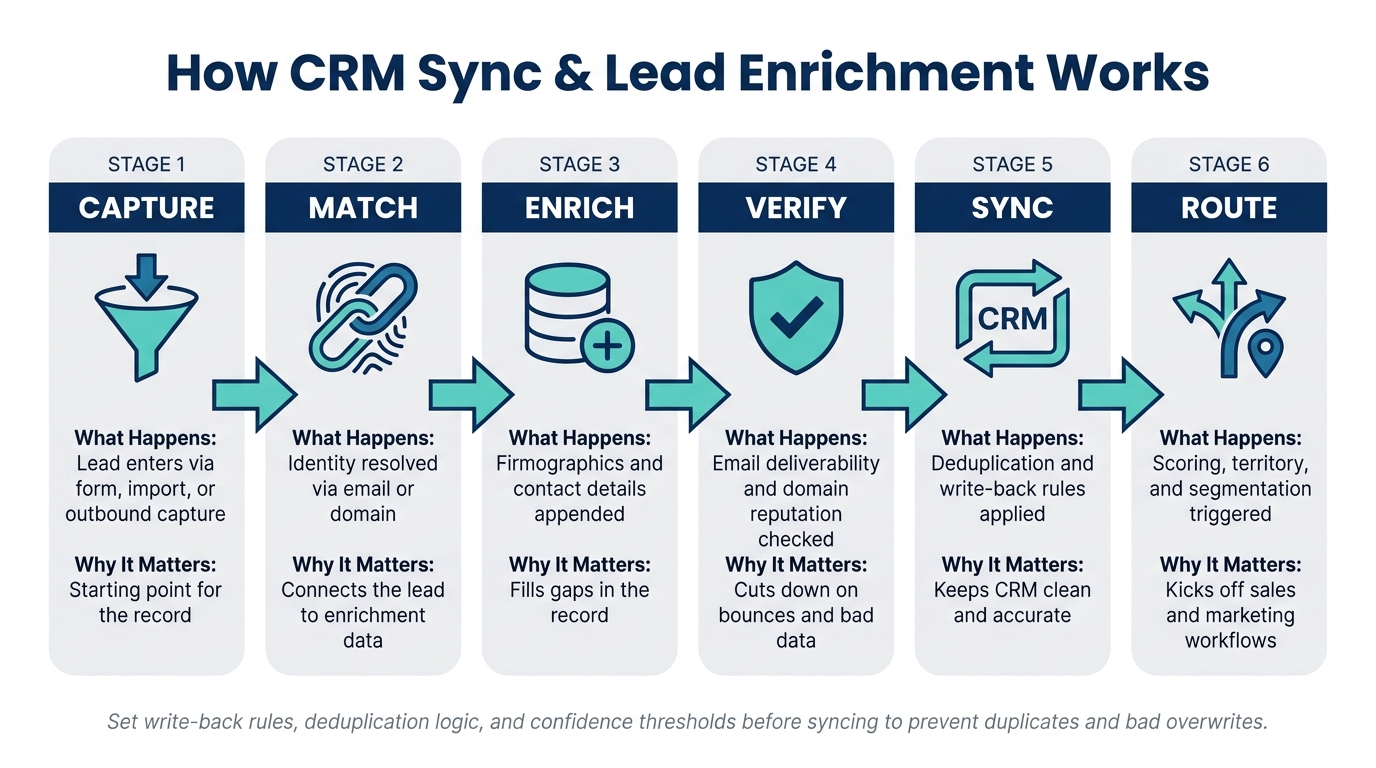
How CRM Sync & Lead Enrichment Works: 6-Stage Workflow
It starts the moment a lead enters your system, whether that happens through high-converting lead forms, a CSV import, or an outbound prospecting import. At that point, the enrichment tool has one job before anything else: figure out who that lead is.
That first step is called identity resolution. The tool takes the incoming record and matches it against third-party datasets using primary identifiers like email address, domain, company name, or job title. When it finds a strong match, it adds the missing details to the record. That can include firmographics such as company size, industry, and tech stack, along with contact data like direct dials and verified email addresses.
Before any of that data lands in your CRM, it passes through verification and formatting. This step checks email deliverability and domain reputation, then maps the enriched fields to your CRM schema so everything fits where it should.
After that, sync controls take over. Write-back rules decide if enriched values should replace data already in the CRM or only fill empty fields. Deduplication rules help stop duplicate records from slipping in. And confidence scores act like a gatekeeper, so only high-confidence matches update your CRM.
| Workflow Stage | What Happens | Why It Matters |
|---|---|---|
| Capture | Lead enters via form, import, or outbound capture | Starting point for the record |
| Match | Identity resolved via email or domain | Connects the lead to enrichment data |
| Enrich | Firmographics and contact details appended | Fills gaps in the record |
| Verify | Email deliverability and domain reputation checked | Cuts down on bounces and bad data |
| Sync | Deduplication and write-back rules applied | Keeps CRM clean and accurate |
| Route | lead qualification, territory, and segmentation triggered | Kicks off sales and marketing workflows |
Next, compare tools by data sources, match logic, field depth, and sync controls.
What to Look For in CRM Sync Tools for Lead Enrichment
Use these criteria to judge whether a tool adds data with accuracy, syncs it without making a mess, and helps with scoring and segmentation. They also give you a simple way to compare the seven tools below.
Data Sources and Verification Coverage
Enriched data is only as good as the sources behind it. A strong tool pulls from multiple third-party datasets, which helps improve fill rates and cut down on bad or missing values.
Verification matters just as much. Good tools check business emails in real time, review domain health, look at deliverability history to help reduce bounce rates, and assign confidence scores so you can decide what gets written back to your CRM. Source and refresh date matter too. They tell you where a field came from and when it was last updated.
Match Logic and Fill Rates
Match logic is the system a tool uses to connect an incoming lead record to enrichment data. The best setups match identity across email, domain, and LinkedIn profile data, then attach the right company and contact details to each record.
Don’t take vendor-reported match rates at face value. Run a test on a sample of your own database first. That gives you a better read on verified deliverability and title match rates before you commit to a full rollout. Better fill rates make scoring, routing, and segmentation much easier to trust. This is a critical step for any lead generation expert looking to scale.
After the tool finds the right record, field depth becomes the next thing that matters.
Field Depth for Scoring and Segmentation
The fields a tool can fill in shape how useful your CRM data will be for scoring and segmentation. On the firmographic side, that usually means company name, website, employee count, annual revenue, industry, sub-industry, and location. On the contact side, look for name, job title, seniority, department, verified business email, direct-dial phone numbers, and LinkedIn profiles.
Technographic and intent signals can take this a step further. They help you segment accounts by current stack and buying behavior, not just static company data.
Sync Controls, Deduplication, and Refresh Timing
Sync timing should match the job you need done.
| Sync Method | Best Use Case | Primary Benefit |
|---|---|---|
| Real-Time (API) | Inbound forms, live prospecting | Immediate routing for inbound leads |
| Scheduled | CRM hygiene, account monitoring | Data freshness for existing records |
| Batch (Bulk) | Historical cleanup, event lists | Efficient processing of large legacy datasets |
Before you sync anything, set your write-back rules, deduplication logic, and confidence thresholds. That helps prevent duplicate records and keeps the tool from overwriting older data you still want to keep.
1. Reform
Reform enriches inbound leads at the moment of submission, before the record lands in your CRM. That matters if your team wants routing and segmentation to begin right at the form, not later in the handoff.
CRM Sync Depth
Reform sends enriched data into your CRM through native integrations and hidden fields. Those hidden fields never appear to the lead, and Reform can fill them in automatically during submission. You map enrichment data to form fields, then push those values into the matching CRM fields.
That sync flow relies on ExactBuyer data behind the scenes.
Enrichment Sources
Reform’s enrichment mostly comes from ExactBuyer. On a paid plan, you can use Reform’s shared API key. If you want more control over the data source, you can connect your own ExactBuyer API key instead.
Match Rate and Refresh Workflow
Enrichment runs in real time during submission. Match rates depend on whether ExactBuyer can identify the lead at that point. If there’s no match, Reform keeps the field visible so the person can fill it out manually. That helps you keep data capture from falling through the cracks.
Firmographic and Contact Fields
| Field Category | Fields Reform Can Append |
|---|---|
| Company Info | Company name, size, industry |
| Contact Details | Name, job title |
| Geographic Info | Country, address |
Reform also offers Form Shortening. It hides fields only when enrichment can fill them, which cuts form friction without giving up data depth.
2. Clay
Clay helps teams run enrichment across several data sources while keeping CRM write-back under control.
CRM Sync Depth
Clay works with CRM sync setups that rely on native connectors, APIs, or CSV bulk uploads, and it maps enriched data to your CRM fields. It also supports write-back rules that stop existing CRM values from being overwritten.
Enrichment Sources
Clay pulls in attributes from multiple third-party providers and uses match rules to improve record matching. It also logs source history, which gives teams a clear audit trail for data quality over time.
That multi-source setup does a few useful things at once. It improves coverage, cuts down on gaps in key fields, and helps keep CRM data cleaner for scoring and segmentation.
Match Rate and Refresh Workflow
Because Clay checks multiple providers at the same time, it can improve fill rates on partial records. That matters when your CRM has missing pieces and your team still needs cleaner data for scoring and segmentation.
Firmographic and Contact Fields
| Field Category | Fields Clay Can Append |
|---|---|
| Company Info | Company size, industry, location, domain |
| Contact Details | Name, title, email, phone, LinkedIn |
| Source History | Source details for auditing data quality |
3. Apollo.io
Apollo combines broad contact coverage with direct CRM write-back, which makes it a solid fit for teams that want data they can use right away.
CRM Sync Depth
Apollo integrates natively with Salesforce and HubSpot. It also supports write-back review before updates go live. That extra review step helps teams check changes before they hit the CRM.
Enrichment Sources
Apollo pulls from its Living Data Network of 2M+ contributors, AI web crawling, and data partnerships. Together, those sources support a database of 275M+ contacts and 73M+ companies.
Match Rate and Refresh Workflow
Apollo supports strong match coverage for verified business emails and direct dials. It also supports bulk backfills and real-time API sync for live lead intake. In plain English, that means teams can fill in older records in batches while also updating new leads as they come in.
That makes company, title, and contact data easier to use for routing, scoring, and segmentation.
Firmographic and Contact Fields
| Field Category | Fields Apollo Can Append |
|---|---|
| Company Info | Company size, industry |
| Contact Details | Name, job title, email, phone number |
4. ZoomInfo
ZoomInfo is a strong fit when you need broad coverage and tight control over what gets written back to your CRM. It offers bi-directional CRM sync for Leads, Contacts, and Accounts. It works best with Salesforce and HubSpot, and it supports new records, write-back, plus standard and custom object mapping.
Enrichment Sources
ZoomInfo pulls data from its community network, web crawling, public records, and news alerts. That mix helps it keep wide company and contact coverage.
Match Rate and Refresh Workflow
Before anything is written back, ZoomInfo matches records using identity resolution and confidence scores. It also runs deliverability checks and domain health reviews to cut down on bounces. On top of that, suppression lists and write-back rules let teams decide which updates should reach the CRM. In practice, that helps with routing, scoring, and account segmentation.
Firmographic and Contact Fields
Those controls support the fields most teams care about:
| Field Category | Fields ZoomInfo Can Append |
|---|---|
| Contact Details | Email, phone number, job title |
| Company Info | Company size, industry, geography |
| Technographics | Tech stack data |
| Intent Signals | Buying intent indicators for scoring, routing, and segmentation |
5. Cognism
Cognism is a strong choice for teams selling into EMEA or for anyone who needs phone-verified contact data. It connects with Salesforce and HubSpot, and it gives teams a simple but useful choice: stage updates for review or send them straight into the CRM. That mix matters when you want better control over what gets written back.
CRM Sync Depth
Cognism gives RevOps teams control over how enriched records move into the CRM. You can review updates first or let them write back automatically. If your team cares about data quality but doesn't want extra busywork, that flexibility helps.
Enrichment Sources
Cognism pulls data from a global database, public records, and social profiles. It also offers Diamond Data, which adds manually verified mobile numbers. For sales teams working outbound, that's often the big draw.
Match Rate and Refresh Workflow
Its refresh workflow helps keep contact and account records current. That makes it easier to segment by region, title, revenue, and tech stack. In practice, that means cleaner lists and fewer dead ends when reps start prospecting.
Firmographic and Contact Fields
Cognism commonly appends these fields:
| Field Category | Fields Cognism Can Append |
|---|---|
| Contact Details | Verified business emails, direct phone numbers, Diamond Data mobile numbers |
| Company Info | Company size, industry, revenue, geographic location |
| Technographics | Tech stack data |
These fields help with lead routing, account scoring, and region-based segmentation.
6. Clearbit / Breeze Intelligence
Clearbit / Breeze Intelligence is a good fit for teams that want enrichment running in the background all the time. New leads can be updated in real time, and older records can be filled in with batch backfills.
CRM Sync Depth
It automatically writes enriched data into contact and company records. That means routing, scoring, and segmentation can stay up to date without extra manual work.
Enrichment Sources
It uses third-party datasets along with match rules, confidence scores, and source metadata to control what gets written back. It also includes verification steps for email deliverability and domain health, which helps cut down on bad data and lower bounce risk.
Match Rate and Refresh Workflow
Real-time API enrichment helps with live prospecting, while bulk enrichment fills in missing data across older CRM records.
Firmographic and Contact Fields
Typical appended fields include:
| Field Category | Fields Appended |
|---|---|
| Contact Details | Business email, phone number, job title |
| Company Info | Company name, industry, company size, geographic details |
| Technographics | Tech stack signals |
| Intent | Intent signals |
These fields can feed routing rules, score models, and segment filters.
7. LeadIQ
LeadIQ helps sales teams pull in and fill out prospect data during outbound prospecting. That makes it a strong fit for outbound teams that clean up lead records while they work.
CRM Sync Depth
Like the other tools on this list, LeadIQ sends enriched data into the CRM. But its strong point is prospect capture.
LeadIQ maps enriched prospect data to CRM schemas, then uses write-back and deduplication rules to control which updates make it into the CRM. That matters because without those checks, reps can end up dumping messy or duplicate records into the system.
Enrichment Sources
LeadIQ mainly matches LinkedIn profiles to CRM records and fills in missing attributes for outbound prospecting.
Match Rate and Refresh Workflow
LeadIQ works best during live prospecting. Email verification and scoring happen before data is written to the CRM, which gives reps a chance to work with cleaner records upfront instead of fixing them later.
Firmographic and Contact Fields
The main value here is cleaner contact data for routing, scoring, and outbound segmentation.
| Field Category | Fields Appended |
|---|---|
| Contact Data | Business email, phone, title |
| Firmographic Data | Company size, industry, location |
| Identity Matching | LinkedIn URL, confidence score |
These fields improve scoring and segmentation by making prospect records more complete.
Comparison Table
Use this table to compare the seven tools at a glance.
| Tool | Best Fit | Supported CRMs | Enrichment Sources | Strongest Data Types | Update Cadence |
|---|---|---|---|---|---|
| Reform | Form-based lead capture | HubSpot | ExactBuyer | Company size, industry, name and job title, geographic info | Real-time enrichment at form submission |
| Clay | Multi-source enrichment workflows | Salesforce, HubSpot, and others | Multi-source aggregation | Firmographics, technographics, intent signals | Real-time and bulk |
| Apollo.io | Database-led prospecting | Salesforce, HubSpot, and others | Community network, AI web crawling, and data partnerships | Emails, phone numbers, firmographics | Real-time and bulk |
| ZoomInfo | Bulk CRM refresh and account-based targeting | Salesforce, HubSpot, and others | Community network, web crawling, public records, and news alerts | Firmographics, technographics, intent signals | Bulk and scheduled refresh |
| Cognism | Contact enrichment before outreach | Salesforce, HubSpot, and others | Global database, public records, and social profiles | Verified contact data, phone numbers | Bulk and real-time |
| Clearbit / Breeze Intelligence | Real-time lead scoring and routing | Salesforce, HubSpot, and others | Real-time API enrichment | Firmographics, technographics | Real-time |
| LeadIQ | Prospect capture and CRM write-back | Salesforce, HubSpot, and others | LinkedIn profile matching and prospect capture | Business email, phone, title | Real-time during prospecting |
Next, look at where Reform fits in a broader enrichment stack.
How Reform Fits into a CRM Enrichment Stack
After looking at sync tools, the next step is figuring out where Reform sits in the enrichment flow.
A lot of CRM enrichment tools kick in after a lead is already sitting in your database. Reform steps in earlier, right when someone fills out a form. That matters. By collecting cleaner data at the form stage, Reform cuts down on incomplete records and gives downstream tools better input to work with.
Reform also includes built-in enrichment through ExactBuyer. It can fill in company details like size and industry, plus job details like title or role. With Form Shortening, Reform hides fields it can fill in on its own, which lowers friction and can help completion rates. If enrichment doesn’t find a match, the field stays on the form so the person can type it in manually.
There’s also Hidden Fields, which let you collect extra data behind the scenes without adding more visible fields to the form. That gives scoring and routing systems more to work with, without making the form feel longer.
When Reform Is the Better Starting Point
For inbound teams, the main win is simple: better data at the point of capture, not just cleaner records later in the CRM.
Reform fits best for inbound-led teams that use multi-step form design for qualification. Cleaner first-party data gives downstream enrichment tools a better match signal and helps cut down on duplicate records. On top of that, conditional routing can use enriched data right away to send high-value leads straight to sales, while mid-tier leads move into nurture flows. In other words, segmentation starts at submission time, not later.
How Reform Works Alongside Database Enrichment Tools
Reform handles the front end of the process, while database enrichment tools handle the follow-up.
Here’s the flow in plain English:
- Reform captures the inbound lead at form submission
- Reform partially enriches that lead right away
- The enriched record is written to your CRM
- A downstream enrichment tool adds more firmographic or technographic fields later
That setup gives you a cleaner record from the start, then adds more depth after sync.
Conclusion
Use the criteria above to choose the tool that fits your lead source, how deep you need the match to go, and how much control you want over syncs.
| Motion | Main Need | Priority |
|---|---|---|
| Inbound | Faster conversion and routing | Real-time enrichment, form shortening, hidden fields |
| Outbound | Verified reach | Verified emails, direct dials, live contact signals |
| RevOps | Cleaner CRM data | Deduplication, field normalization, staged write-back rules |
The best setup connects the capture point to the enrichment layer, then keeps CRM data up to date.
FAQs
How do I choose between real-time and batch enrichment?
Choose based on how fast you need the data and how much of it you need to process.
Real-time enrichment updates data the moment someone submits a form. That makes it the best fit for immediate lead scoring, routing, and personalized follow-up.
Batch enrichment works better when you're dealing with large amounts of older data. It's a good choice for periodic CRM updates or cleaning up legacy databases when instant action isn't needed.
What fields matter most for lead scoring and routing?
Focus on fields that tell you two things fast: is this lead a fit, and who should handle it.
That usually means collecting:
- Firmographics: industry, employee count, and annual revenue
- Role and seniority
- Email quality
- Geography: country, state, and time zone
These fields help you spot ICP fit, gauge buying authority, flag suppression needs, and route the lead to the right sales rep for prompt follow-up.
With Reform, you can collect this data through hidden fields, which keeps the form short without losing the details your team needs.
How can I test match quality before rolling out a tool?
Test the tool on a solid sample from your current database. Check a set of enrichments against contacts you already know well so you can see if the output hits your accuracy targets.
Track key metrics like data completion rate and accuracy against trusted sources. You can also use real-time analytics and A/B testing to compare different setups and spot which fields and settings work best before you lock in your enrichment rules.
Related Blog Posts
Get new content delivered straight to your inbox

The Response
Updates on the Reform platform, insights on optimizing conversion rates, and tips to craft forms that convert.




Drive real results with form optimizations
Tested across hundreds of experiments, our strategies deliver a 215% lift in qualified leads for B2B and SaaS companies.
