
.webp)
Cross-Border Data Training Guide for SaaS



If your team handles EU or UK personal data, cross-border transfer training needs to be tied to daily work - not just legal terms.
I’d boil the article down to this: map every transfer path, train by role, lock down tools and review steps, and keep dated records that match your vendor and transfer files. If you miss any one of those four pieces, training can fail when an audit, customer review, or incident hits.
Here’s the short version:
- Map where data moves across cloud regions, support tools, CRMs, logs, vendors, and remote access
- Train by risk tier, not with one course for everyone
- Teach stop-and-check moments, like new vendors, new regions, exports, or offshore access
- Use approved tools only for forms, support access, sandboxes, and training systems
- Require Legal, Security, and HR review before training changes go live
- Track proof with time-stamped completion logs, scores, attestations, exceptions, and version history
- Refresh on a schedule and on trigger events, such as law changes, vendor changes, or architecture changes
A few points stand out. The article sets 30 days from hire for training completion, calls for annual refreshers for high-risk roles, and uses quiz targets such as 85% to 95% based on the job. It also ties records to transfer registers and vendor reviews, which is what turns training from a policy task into a control you can show.
My takeaway: the best program is simple. Employees should know which tools are allowed, which regions are cleared, and when they must stop and ask for review.
The rest of the article explains how to set scope, build role-based content, pick delivery methods, control training data, and keep records that hold up over time.
Privacy Made Easy Series : Cross Border Transfer
sbb-itb-5f36581
1. Define scope, risk, and ownership before building training
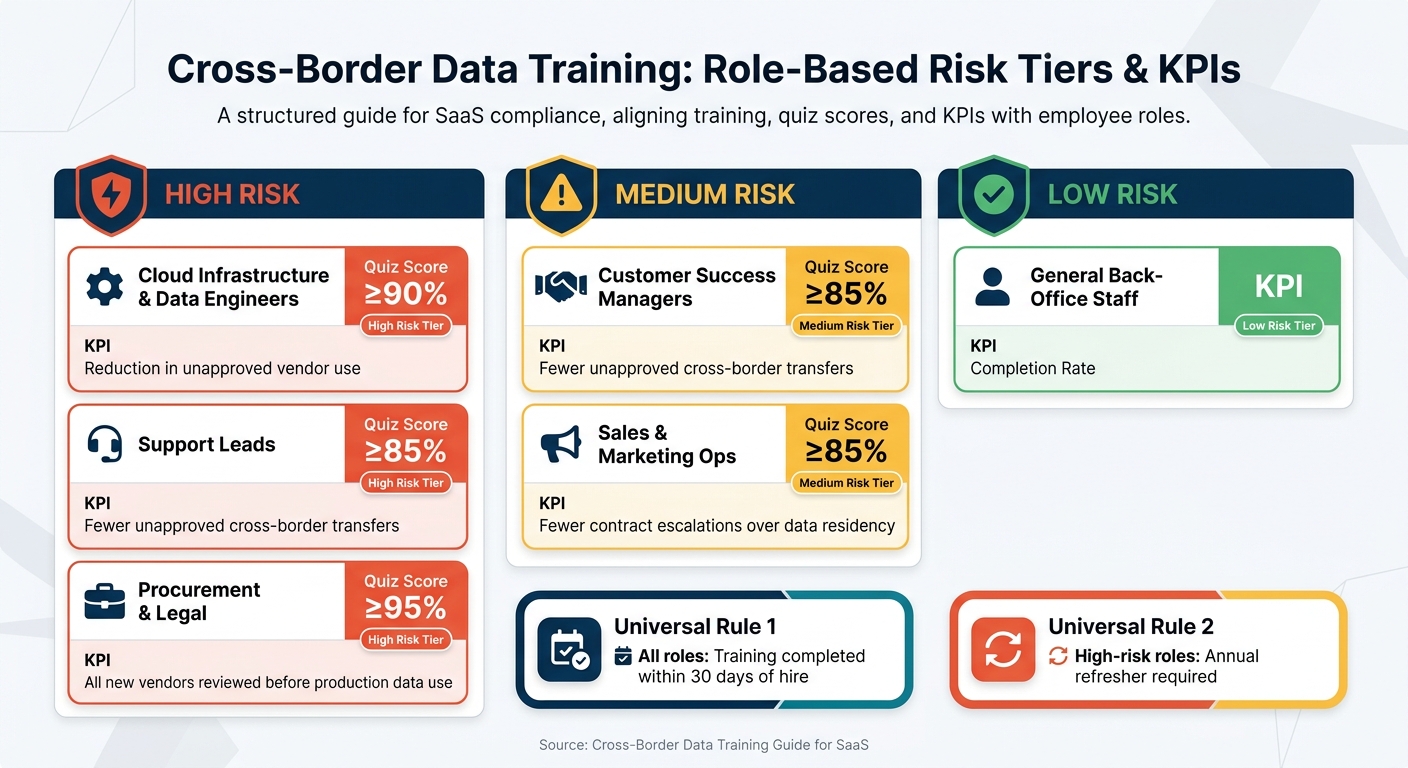
Cross-Border Data Training: Role-Based Risk Tiers & KPIs
Map data flows and identify which transfer rules apply
Before you write a single training module, map where personal data goes. For a U.S.-based SaaS company, that usually means checking cloud regions, support tools, CRM syncs, web forms, vendors, and remote access by offshore teams.
The goal is a working data flow inventory. This should be a living document that shows data sources, processing systems, and destinations. It should also flag the transfer mechanism tied to each flow, such as SCCs, EU-U.S. Data Privacy Framework certification, or an adequacy decision.
Once that map exists, the rule set becomes much easier to sort out. GDPR applies if you serve EU/EEA users. UK GDPR applies if you serve UK users. Other laws may come into play based on where users and systems sit. Customer contracts can make things tighter by adding regional limits or requiring SCCs. Update the inventory whenever you add a vendor or change your architecture.
Use that inventory to decide which teams need deeper training.
Set role-based training targets and KPIs
Use the data-flow inventory to place each role into a risk tier. Not every employee creates the same transfer risk, so the training load should match the job.
All roles complete training within 30 days of hire. High-risk roles refresh annually.
| Role | Risk Tier | Key KPI |
|---|---|---|
| Cloud infrastructure and data engineers | High | ≥90% quiz score; reduction in unapproved vendor use |
| Support leads | High | ≥85% quiz score; fewer unapproved cross-border transfers |
| Customer success managers | Medium | ≥85% quiz score; fewer unapproved cross-border transfers |
| Sales, marketing ops | Medium | ≥85% quiz score; fewer contract escalations over data residency |
| Procurement, legal | High | ≥95% quiz score; all new vendors reviewed before production data use |
| General back-office staff | Low | Completion rate |
Completion rates matter, but they don't tell the whole story. What you want is behavior change. Look for year-over-year drops in unapproved transfer incidents, more pre-implementation check-ins with Legal before new tools go live, and better audit results.
Those tiers should shape the content each team gets next.
Assign a named owner and an approval workflow
Every cross-border training program needs one clear owner. Assign a single person, usually a DPO, privacy lead, or GRC manager, to own the program over time. That person keeps the training roadmap up to date, tracks rule changes, and coordinates revisions across teams.
Three functions should approve updates:
- Legal checks regulatory accuracy and contract duties
- Security makes sure technical examples match the actual architecture and realistic controls
- HR/People Ops handles delivery, LMS setup, and completion records
For each update, the owner drafts the revision, Legal and Security approve it, and HR/People Ops publishes the new version in the LMS.
Once scope and ownership are in place, the next step is to turn those risks into role-based training content.
2. Build training content employees can apply to daily work
Core concepts every employee should know
Use the role tiers and transfer map to keep the base module short and the high-risk modules narrow.
Every employee needs a short, plain-English base before they get into role-specific material. For a SaaS company with cross-border exposure, five concepts cover most of what people need to know.
Personal data is much broader than many employees think. It includes names and email addresses, but also IP addresses, account IDs, usage logs, and any identifier that can be tied back to a real person in your database.
Cross-border transfer means personal data is accessed, stored, or processed in another country. If a contractor in another country views production logs, that's a transfer.
Controller vs. processor is the next concept. Your SaaS company is usually the processor when it handles a customer's end-user data, and the controller when it handles its own employee data. That split changes which duties apply.
Employees should also know that transfer mechanisms - SCCs, adequacy decisions, and BCRs - are the legal tools that make cross-border transfers lawful. They don't need to master the legal details. They just need to know that Legal must confirm the right mechanism.
Last, every employee should know the escalation triggers. If someone is onboarding a new vendor, turning on a new cloud region, exposing logs to a contractor abroad, or using a new marketing tool that collects EU leads, they need to stop and check before moving ahead.
Each concept should do one job: tell employees when to stop, verify, or escalate.
Role-specific modules for engineering, go-to-market, and support teams
Once the base is set, each function should get a focused module tied to the choices that team makes day to day.
Engineering teams need to see that region selection is not just an infrastructure choice. It's also a compliance choice. If EU customer data must stay in EU-designated regions, that rule applies when teams provision databases, storage buckets, and analytics warehouses.
Logging is another high-risk area. Training should show the difference between a compliant log and a non-compliant one. For example:
- A compliant log might use hashed user IDs and truncated IPs
- A non-compliant log might include full email addresses and exact addresses
Employees should also see that routing those logs to a U.S.-based monitoring service can itself create a transfer.
Test data needs a simple rule. Real production data should not appear in dev or staging unless Legal has approved a specific exception and the data is pseudonymized. Synthetic datasets should be the default.
The same basic idea applies to customer-facing teams, but the risk shows up in promises, forms, and tool choices.
Go-to-market teams - sales, customer success, and marketing - share a common risk: making commitments or routing data without Legal approval. Sales and customer success training should include pre-approved language for common questions about data location. It should also make clear that any prospect request for strict data residency terms needs Legal review before anyone makes a promise.
Marketing training should use one direct scenario: a campaign form collects EU prospect data and sends it into a U.S.-based enrichment and email automation stack. The module should show which enrichment vendors are approved, where they store data, and what approval is needed before a new tool is connected to the lead flow.
Support teams face a different kind of risk: access itself is a transfer. Their training should cover four areas: identity verification, field masking, approved remote-access tools, and escalation triggers.
Support staff need to confirm they are accessing the right tenant and that the access is within scope before opening any EU or UK record. They also need to know which fields are masked by default in the approved support tool - such as full payment details, government IDs, and sensitive health data - and what to do if masking fails.
Only designated tools with audit logging turned on are allowed for cross-border support sessions. Using an unapproved screen-share or remote-desktop tool is a policy violation, even if the rep means well.
And if a support request requires exporting EU or UK customer data, viewing data outside the approved tool, or giving access to a third-party vendor, the rep must stop and submit a review request before moving ahead.
Use approved workflows and tools in examples and exercises
Anchor exercises in the exact approval path employees use before any new tool touches personal data.
Training sticks when people recognize the systems they use every day. So build exercises around your actual stack, not made-up examples.
For lead data collection, if your team uses Reform to build campaign forms, the module should walk through how to set up form logic so EU leads are routed into the right downstream systems. It should also show how to add region-specific consent language directly in the form, and how features like email validation and spam prevention cut down the amount of unneeded personal data that enters your CRM in the first place. Then show the full post-submit path and whether each destination is approved.
For vendor requests, keep the rule simple: if a tool changes where personal data is stored or accessed, stop and request review before using it. Show employees exactly where to submit that request, what details they need to include - data types, regions, and processing purpose - and how to check the approval status.
3. Choose delivery methods, set tool limits, and require legal review
Once the content is set, the next step is deciding how people will get it and which tools are allowed.
Match training format to role risk and timing
Not every employee needs the same kind of training. The format should line up with the risk tied to the role and the moment that person is most likely to run into a cross-border decision.
A blended model tends to work best. New hires should complete a baseline e-learning module in their first 30 days. High-risk teams - such as engineering, security, privacy, data engineering, and product managers working on data residency - should attend live workshops where they can work through scenarios and ask questions in real time. Everyone should also get short microlearning refreshers, usually 3 to 10 minutes, before launches, new vendor onboarding, or expansion into a new region.
| Format | Depth | Scalability | Tracking | Best-Fit Audience |
|---|---|---|---|---|
| E-learning | Medium | High | Automated via LMS | All new hires; annual refreshers for high-risk roles |
| Live workshops | High | Low | Attendance logs | High-risk teams such as engineering, security, privacy, and data engineering |
| Microlearning | Low to medium | High | Digital completion | GTM teams; account managers, customer success, and pre-launch or pre-expansion reminders |
The platform matters too, because it handles employee data.
Set limits for LMS platforms, sandboxes, and training data
Your LMS processes employee personal data. So before you roll out any training platform, review it the same way you would any other vendor: check data location, the DPA, and the transfer mechanism.
Use synthetic or anonymized data in quizzes and sandboxes. Do not use real personal data unless there is a clear reason. If a training exercise needs lifelike test data, that exception should require approval from Legal or Privacy, a documented entry in the risk register, and a set deletion timeline.
Sandboxes should also have a few firm guardrails:
- Access controls
- Full audit logging
- Automatic purging schedules
That last point matters more than it may seem. Test data has a way of hanging around if no one sets an end date.
Using raw production data in a training setting can itself create a cross-border transfer. If that happens, log it in your transfer register and tie it to a lawful mechanism.
Once the platform is approved, lock each module behind review and version control.
Build a legal review and version-control process
Legal review should be required for any module that names a jurisdiction, transfer mechanism, or internal template.
Legal or the privacy office should review flagged modules against current law and existing contractual commitments. That helps keep training from drifting out of sync with what the company has already promised customers, vendors, or regulators.
After approval, every module needs a version record. Keep a dated record of what changed, why it changed, and who approved it. Record the approval date in mm/dd/yyyy format. Store those records in one central place - such as an internal wiki, document management system, or LMS content library - with read-only access for auditors.
Annual reviews matter, but trigger-based updates matter just as much. Create a new version when:
- A relevant law changes
- A court decision affects a transfer mechanism
- A key vendor changes its processing locations
- A large customer negotiates specific data residency commitments
Build those triggers into the workflows your teams already use so they don't slip through the cracks. For example, add a training impact check to privacy reviews or architecture reviews.
These controls connect directly to the record-keeping and refresh process that comes next.
4. Keep records, prove compliance, and refresh the program
Training isn't done when someone finishes a module. It isn't done until you can show proof. Once training is approved and versioned, the next step is simple: prove who completed it and when. Regulators, customers, and auditors want dated records. A loose spreadsheet won't cut it.
Track completion, attestations, and exceptions in a verifiable record system
Use system-generated, time-stamped records in an access-controlled system. Your LMS or compliance platform should log, at a minimum:
- Learner name and employee ID
- Role and risk tier
- Module name and version
- Date and time of completion
- Assessment score
- Pass/fail status
Completion logs alone aren't enough. You also need policy attestations - a logged or signed acknowledgment that the employee read and understood the relevant policy at a specific version.
Then there are exceptions. If someone misses a deadline, scores below the pass mark, or gets a formal exception approved by Legal or Compliance, that needs its own record. That record should show who approved it and why.
| Record Type | Owner | Storage Location | Retention Period |
|---|---|---|---|
| Module completion logs | HR / L&D | LMS or HRIS | 3–5 years |
| Assessment scores | HR / L&D | LMS | 3 years |
| Policy attestations | Legal / Compliance | GRC platform or document management system | Duration of policy + 5 years |
| Exception logs | DPO | GRC tool | 5 years |
| Remedial training records | Manager / HR | Employee file or LMS | 3 years |
Store records in an access-controlled system with audit review access. The records should outlast the employee. They should also show why a course was assigned, not just that it was completed.
Connect training records to transfer registers and vendor reviews
These records matter most when they're tied to the transfer register and vendor file. Link training records to transfer registers and vendor reviews. If an auditor asks who has access to a specific cross-border data stream, you should be able to pull the transfer register entry and the training completion records for every person tied to that flow.
In practice, that means tagging modules with the processing activities and regions they cover, then cross-referencing those tags with your Article 30 records of processing. That way, the paper trail lines up.
Say you're onboarding a new sub-processor - maybe an analytics vendor with EU data centers and U.S.-based support staff. The vendor's due diligence file should show that the vendor management team completed the right cross-border vendor risk module before sign-off. That's where training stops looking like a box to check and starts looking like an organizational control you can prove.
Set annual refreshes and trigger-based updates
Use the same record system to log when a law, vendor, or architecture change triggers retraining. Log each refresh event with the trigger, affected roles, module version, and approval date.
You should also document who spotted the trigger and who approved the update. Each logged refresh event should go to a central compliance committee, which decides whether a training update is needed, which roles it touches, and when it goes live.
FAQs
How do we identify every cross-border data transfer?
Map data flows from end to end. Track where personal data comes in, how it moves through your organization, and where it goes next. That includes internal workflows, external transfers, third-party and sub-processor interactions, and automated syncs.
For each transfer, record:
- the source system
- the destination country
- the data categories
- the purpose
- each party’s role
- any onward transfers
This inventory becomes the backbone of your Transfer Impact Assessment. If needed, it also helps you choose the right SCCs.
Which teams need role-based transfer training first?
Start with data controllers, processors, and DPOs. They need a deeper grasp of cross-border rules like GDPR, so they should go first.
After that, train the frontline teams that handle customer data day to day, such as customer service, marketing, and IT. You should also include anyone involved in SCC-related tasks, especially people who manage vendor relationships or deal with data subject requests.
What records should we keep to prove compliance?
Keep a central record of data transfers and training. Include:
- signed SCCs with annexes
- TIAs for each destination country
- proof of safeguards, transfer logs, and ROPA
Keep training records too. That means employee names, completed modules, scores, and policy acknowledgment timestamps. Store those records for at least three years.
You should also document responses to data subject requests and the results of regular audits.
Related Blog Posts
Get new content delivered straight to your inbox

The Response
Updates on the Reform platform, insights on optimizing conversion rates, and tips to craft forms that convert.




Drive real results with form optimizations
Tested across hundreds of experiments, our strategies deliver a 215% lift in qualified leads for B2B and SaaS companies.
