
.webp)
CRM Integration Security: Guide for Lead Sync



If your lead sync is loose, bad data, leaked PII, and audit trouble can follow fast. I’d treat the minimum standard like this: map every data handoff, lock down CRM and API access, keep only the fields and records you need, and log each change from form submit to CRM update.
Here’s the short version:
- Map the full lead path across forms, enrichment tools, middleware, marketing automation, and the CRM.
- Use service accounts and scoped OAuth, not personal logins or broad admin access.
- Limit field sync to only what sales, routing, and scoring need.
- Protect each layer with TLS 1.2+ or TLS 1.3, secret storage, HMAC-signed webhooks, RBAC, and MFA.
- Set retention rules for active, stale, disqualified, and raw submission data.
- Keep audit logs for sync events, config changes, exports, retries, and deletions.
- Review vendors and live integrations on a set schedule so old tokens, old reports, and extra connections don’t sit there for months.
- Have a shutdown plan for token revocation, secret rotation, and flow disablement.
A few numbers make the risk plain: third-party incidents made up about 35.5% of data breaches in 2024, and software and tech vendors accounted for about 35% of those cases. That’s why I’d look at lead sync as a chain, not a single tool.
If I were boiling the whole article down to one idea, it’d be this: <u>every extra field, system, credential, and storage copy adds risk</u>. So the job is to keep the chain short, the permissions tight, and the logs clear.
Avoid Data Breaches in Salesforce: Secure Integration Architecture & Best Practices
sbb-itb-5f36581
Map the Lead Data Flow and Design a Safer Architecture
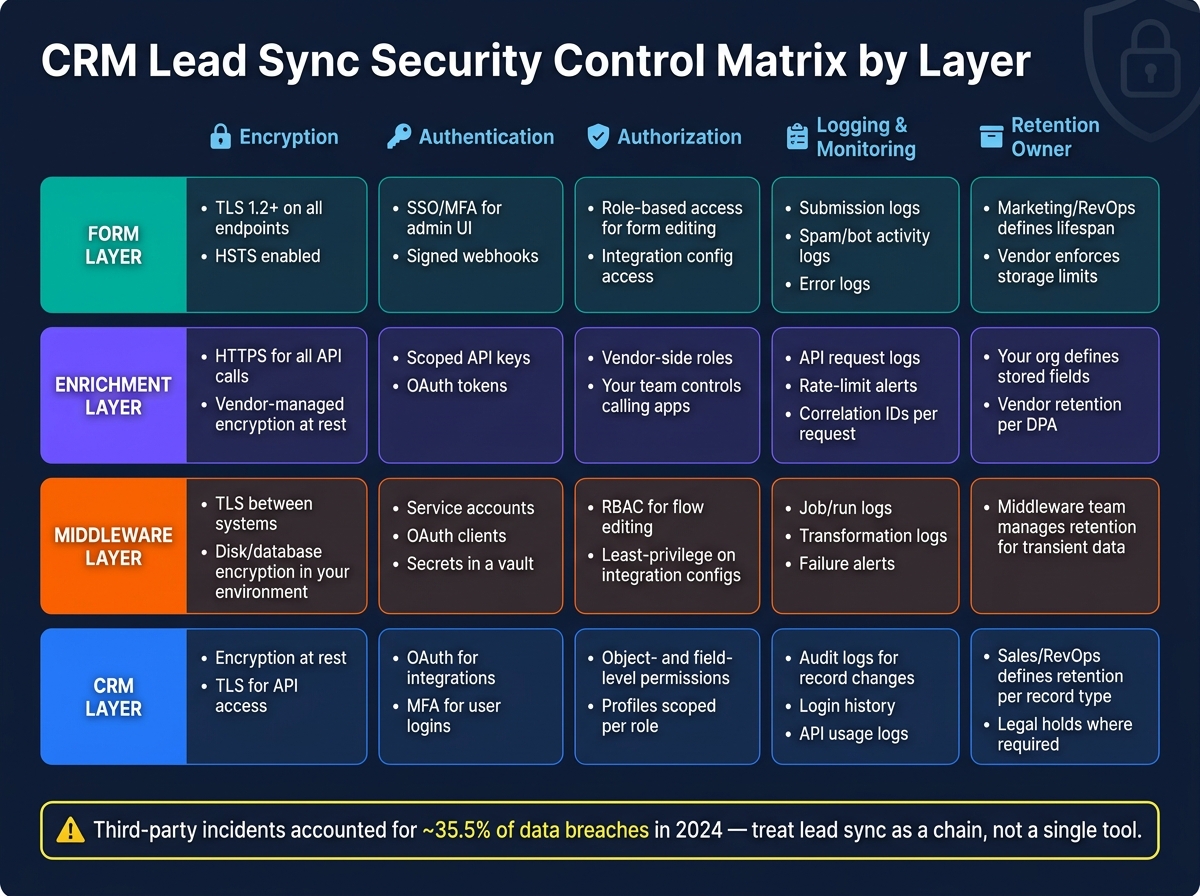
CRM Lead Sync Security Control Matrix by Layer
Start with the inventory from the introduction and trace each trust boundary. Once you can see where data moves, you can assign the right controls at each layer instead of guessing.
Build a Data Flow Diagram and Integration Inventory
Map the full path a lead follows from form submission to the point where someone views or edits the record in the CRM. In most setups, that path runs through the form, backend, enrichment API, middleware, CRM object, and the tools people use day to day.
Each handoff is a trust boundary. That’s the moment data moves into another system and needs clear controls. For instance, when data moves from your form backend to a third-party enrichment API, PII leaves your environment. That boundary should have authentication, field-level scoping, and logging.
For every connection, keep a written inventory. Each entry should include:
- System name and owner
- Business purpose
- Data categories and fields transferred
- Trigger type, such as webhook on submit, scheduled batch, or bidirectional sync
- Destination CRM object
- Credentials in use
- Sync frequency
- Whether the connection is production or sandbox; keep them separate and use distinct credentials
This inventory becomes a core reference point for security reviews and incident response.
Secure the Form, Enrichment, and CRM Layers
Each layer in the pipeline has its own attack surface, so each one needs its own set of controls.
At the form layer, the basics are non-negotiable: TLS 1.2 or higher on all form endpoints, HSTS to stop downgrade attacks, and server-side input validation to catch injection attempts before they move downstream. If forms are embedded in authenticated portals, CSRF tokens add another layer of protection. Spam and bot controls matter here too. This isn’t just about cleaner data. It also helps cut bad submissions and avoid unnecessary enrichment calls. Honeypot fields, rate limiting by IP, and behavioral checks like time-to-complete all help.
At the enrichment layer, stick to strict data minimization. Send only what you need to trigger enrichment, usually an email address or company domain. Then configure the API response to return only the fields needed for qualification or routing, such as company size, industry, country, and title seniority. Skip personal social profiles, detailed behavioral history, or any attribute you can’t tie to a routing or scoring decision. Apply sensitivity labels to each field, such as public, internal, confidential, or restricted, and use those labels to control which systems can store or forward the data.
At the CRM layer, use middleware as the controlled gate instead of allowing direct writes from forms or enrichment tools. Middleware validates data, enforces schema mapping, handles deduplication, and applies routing logic before anything hits the CRM. It also helps ensure transformation rules and routing settings live in auditable configuration, not hard-coded scripts that can change without notice. Webhook payloads should be verified using SHA-256 HMAC signatures to verify payload authenticity. That setup leads directly into the access and API-permission controls covered in the next section.
Security Control Matrix by Layer
Use this matrix to check each layer against the controls it should have.
| Layer | Encryption | Authentication | Authorization | Logging & Monitoring | Retention Owner |
|---|---|---|---|---|---|
| Form | TLS 1.2+ on all endpoints; HSTS enabled | SSO/MFA for admin UI; signed webhooks | Role-based access for form editing and integration config | Submission logs; spam/bot activity; error logs | Marketing/RevOps defines lifespan; vendor enforces storage limits |
| Enrichment | HTTPS for all API calls; vendor-managed encryption at rest | Scoped API keys or OAuth tokens | Vendor-side roles; your team controls which apps can call the API | API request logs; rate-limit alerts; correlation IDs per request | Your org defines which enriched fields are stored; vendor retention per DPA |
| Middleware | TLS between systems; disk/database encryption in your environment | Service accounts; OAuth clients; secrets stored in a secret manager or vault | RBAC for flow editing; least-privilege on integration configs | Job/run logs; transformation logs; failure alerts | Middleware team manages retention for transient data |
| CRM | Encryption at rest; TLS for API access | OAuth for integrations; MFA for user logins | Object- and field-level permissions; profiles scoped per role | Audit logs for record changes; login history; API usage logs | Sales/RevOps defines retention per record type; legal holds where required |
Control Access, Authentication, and CRM API Permissions
Once you’ve mapped your data flow and put controls around each layer, the next step is simple: decide who can read, write, or move lead data. Every integration should have a named owner and a documented data flow. That way, access is traceable, each integration has a clear audit trail, and permission boundaries don’t get blurry.
Use Service Accounts, OAuth, and Secure Secret Storage
Use a dedicated integration account, scoped OAuth tokens, and a secret manager. Rotate credentials on a fixed schedule, and revoke them at once when ownership or scope changes.
Limit CRM Access to the Exact Objects and Fields Needed
Restrict each integration to the exact CRM objects, fields, and write actions it needs. If a tool only needs to update lead status, it shouldn’t be able to touch account records or pull extra fields “just in case.” Tight permissions keep mistakes smaller and make reviews a lot easier.
Authentication Options for CRM Integrations Compared
Use the CRM auth method that supports least privilege, short-lived credentials, and fast revocation.
These permissions control who can write lead data; the next step is defining how long that data stays and how each sync is logged.
Set Retention Rules, Logging, and Audit Trails for Lead Data
Tight access controls help, but they don't solve the whole problem. If your CRM holds lead records long after they stop serving a business purpose, you're carrying extra risk for no good reason. The fix is pretty simple: decide what to keep, write down why, set a time limit, and log what happens at each step. Once access is locked down, retention and logging decide how long lead data stays exposed and how easily you can trace each sync.
Define What to Keep, for How Long, and Why
Not all lead data has the same shelf life. Sort it by business value, then apply clear retention windows. Every extra copy extends the exposure window.
Active leads linked to open opportunities should stay in your CRM for the full sales cycle, plus a buffer. Stale leads with no meaningful activity for 12 months or more usually have less conversion value, and keeping full PII past that point adds breach risk without much payoff. Disqualified leads - spam submissions, test entries, or contacts that clearly don't fit your ideal customer profile - should have the shortest retention window.
Raw submission payloads need even tighter handling. Treat them as short-term records. Set Reform submission retention to 30–90 days, then purge the raw payloads. Aggregated analytics like conversion rates and channel performance can stay much longer, even indefinitely, once they're properly anonymized, because individual identities can't be recovered from them.
Log Record-Level Sync Activity and Configuration Changes
Log every data movement and config change using one shared schema. In plain terms, you want a clean trail from form submission to CRM update.
That includes the submission receipt: submission ID, timestamp, form name, and source channel. It also includes enrichment events, such as the provider used, the fields requested and returned, and whether the response changed the record. Track field transformations too, including the original value, transformed value, and rule ID. For CRM write operations, log whether the action was a create or update, which fields changed, the integration client identity, and whether the write succeeded or failed, along with error codes.
Exports, bulk reads, and warehouse syncs need logging too. Capture the actor, purpose, timestamp, and record count. Failures and retries should get their own entries with reason codes like rate limit, validation error, or timeout. That way, during an incident review, you can spot patterns instead of piecing the story together afterward.
Configuration changes matter just as much as data events. Log OAuth scope changes, token revocations, credential rotations, routing rule edits, and field mapping updates in a separate audit log. Each entry should include actor identity, timestamp, and before-and-after snapshots. Deletion or anonymization events should also be logged with the record identifier, timestamp, actor, method, and justification, so you can show when and why a lead left the system.
Some CRM audit trails keep configuration history only for a short time, so export those logs on a regular schedule.
Use a consistent schema - JSON with standard field names is a solid choice - and centralize the records in a SIEM or log management platform. Common retention targets for many U.S. teams are 12–24 months for authentication and configuration change logs and up to 36 months for administrative actions in higher-risk environments.
Lead Record Types Mapped to Retention Actions
| Record Type | Retention Period | Required Action | Business Justification |
|---|---|---|---|
| Active lead (open opportunity or recent engagement) | Full sales cycle plus buffer, often 18–24 months | Retain | Pipeline reporting, revenue attribution, renewal support |
| Stale lead (no engagement for 12+ months) | 12–18 months from last activity | Anonymize (remove email, phone, IP; keep firmographics) | Data minimization; low conversion value |
| Disqualified lead (spam, test, outside your ideal customer profile) | 90–180 days | Delete or mask sensitive fields | Reduces PII storage with no pipeline value |
| Raw submission payload | 30–90 days post-delivery | Purge raw payload; retain normalized CRM record | Limits breach surface in the transient processing layer |
| Aggregated analytics (conversion rates, channel data) | Indefinite | Retain (anonymized) | Long-term trend analysis; no individual identities recoverable |
Run a quarterly review to make sure your automated retention jobs are firing and producing the expected results. Pick a small sample of lead IDs, trace each one across your form platform, enrichment tool, and CRM, and check that the logs are complete enough to rebuild what happened across the sync chain. This review helps keep retention settings lined up with your written policy and any shifts in U.S. state privacy law. Use that review to check the encryption, RBAC, and vendor controls covered next.
Run Compliance Checks and Ongoing Security Reviews
Use your quarterly review to confirm the controls that keep your lead sync stack compliant. Use the same sampled lead IDs from the retention review so you can trace the entire sync path, end to end.
Check Encryption, RBAC, Logging, and Vendor Assurances
A solid compliance check looks at four areas: transport security, access control, logging, and vendor documentation.
For transport security, confirm that every connection in the stack - forms, enrichment tools, middleware, and CRM - uses TLS 1.2 or higher, with TLS 1.3 preferred. Also verify that stored lead data and logs are encrypted at rest. That includes internal handoffs between message queues and ETL stages, not just public-facing endpoints.
For access control, make sure service accounts can reach only the objects and fields they need. Keep admin rights tight. And require MFA for anyone who can change integrations or routing rules.
Logging needs a close look too. Your stack should record authentication events, integration changes, credential changes, and record-level sync activity in centralized audit trails that you can export and review. Don’t just assume it works. Make a controlled config change, then confirm the log shows the right user, timestamp, and event details.
During your annual vendor due diligence cycle, ask every tool in the lead sync stack for current SOC 2 Type II reports or ISO 27001 certifications. Review each data processing agreement for clear breach notification timelines and subprocessor disclosures. Then check security whitepapers or trust center pages for details on encryption, access control, logging, and incident response.
A few warning signs should get your attention fast:
- Outdated compliance reports
- Vague claims like industry-standard security with no specifics
- No way to delete or anonymize lead records on demand
Then match those vendor records against your live integration inventory.
Keep a live inventory of every connected tool, data direction, auth method, data touched, and owner. Reconcile it every month against live configs so you can spot unauthorized integrations. Ownership should be clear: marketing ops for forms and enrichment, RevOps for CRM integrations, and IT/security for policy and incident response. If you use Reform, include its forms, admin users, and downstream integrations in that same inventory.
Prepare for Token Revocation, Secret Rotation, and Flow Shutdown
If a token is compromised, the order matters: revoke the affected tokens first, rotate all related secrets second, and disable the affected flows last.
Revoking tokens centrally - through your CRM’s OAuth app settings or your identity provider - cuts off access right away. Rotating secrets means updating credentials everywhere they were used: the form builder, enrichment connector, CRM, and any middleware between them. Flow shutdown should be precise. Turn off the specific integration or automation rule, not the full pipeline, so unrelated processes can keep running.
Before you touch anything, export authentication events, integration runs, and API logs to immutable storage. Then capture a snapshot of current integration settings, including scopes, routing rules, and field mappings.
After containment, figure out which lead records the compromised credential touched. Filter CRM logs by the service account or integration user and review every create, update, or export during the incident window. Tag those records so sales and support know which ones may be affected.
Then notify security, RevOps, and marketing leadership with one short summary covering:
- What happened
- What is confirmed
- What is still unknown
- What actions were taken
Keep that communication in one channel. If updates start flying around in five places, confusion usually follows.
Run a tabletop exercise at least once a year where a simulated token compromise triggers the full revocation, rotation, and shutdown sequence. Afterward, verify that logs and audit trails stayed intact the whole time. This kind of drill tends to expose weak spots early - for example, finding out that only one person knows how to revoke a certain OAuth app.
Conclusion: The Minimum Security Standard for Lead Sync
The minimum standard comes down to six things: map the data flow, collect only the data you need, enforce least-privilege access, secure every API credential, apply consistent retention rules, and keep tamper-resistant logs that cover the full sync chain from form submission to CRM record. Clear ownership, a written policy, and a recurring review cadence help keep those controls in line as the stack changes.
FAQs
What’s the safest way to connect forms, enrichment tools, and a CRM?
Use a least-privilege setup with encryption built in from the start. For user-delegated access, go with OAuth 2.0 and keep permissions tight with fine-grained scopes and short-lived tokens. Use API keys or machine auth only for server-to-server sync.
Enforce TLS 1.2/1.3. Never store tokens or API keys in plaintext. Validate inputs before CRM writes. Verify webhook or API payloads with signatures. And keep logging in one central place, with 12-month audit retention and real-time alerts.
Which lead fields should we sync, and which should we avoid?
Sync only the lead fields your CRM needs for the job at hand. Before anything gets written to the CRM, check each field at every integration step for:
- Presence
- Type
- Length or range
- Allowed values
Keep the payload tight. Skip free-text fields and internal notes unless there’s a clear need for them.
You should also leave out:
- Uploaded documents or IDs
- Payment data
- Auth or integration tokens
- Sensitive PII that isn’t needed
If a field doesn’t have a clear purpose, don’t sync it.
How often should we review tokens, logs, and live integrations?
Review them on a set schedule and again after any material change.
Keep centralized API logs for at least 12 months. Set up real-time alerts for unusual activity. Then review:
- Weekly: logs and integrations
- Monthly: API usage and field mappings
- Quarterly: high-risk areas
- Annually: a full audit
For tokens, don’t log raw values. You should also monitor rotation and revocation as part of ongoing integration security.
Related Blog Posts
Get new content delivered straight to your inbox

The Response
Updates on the Reform platform, insights on optimizing conversion rates, and tips to craft forms that convert.



Drive real results with form optimizations
Tested across hundreds of experiments, our strategies deliver a 215% lift in qualified leads for B2B and SaaS companies.
