

What data improves predictive lead scoring?



Predictive lead scoring works best with form answers, website and email activity, CRM outcomes, and company data. Start with one clear goal, such as predicting qualified opportunities or closed-won deals.
Each data source answers a different question:
- Fit: Do service needs, budget, timing, and buying role match the firm's services?
- Intent: Do recent page visits, meaningful replies, and consultation requests show buying interest?
- Past outcomes: Which lead patterns resulted in qualified opportunities or customers?
- Company details: Can enrichment fill gaps in industry, employee count, or location?
Clean the records, keep unknown answers separate from poor-fit answers, and exclude anything learned after scoring. Then test on later leads: does the model beat simple rules when ranking the top 10% or 20%? Keep inputs that improve results - not just inputs that are easy to collect.
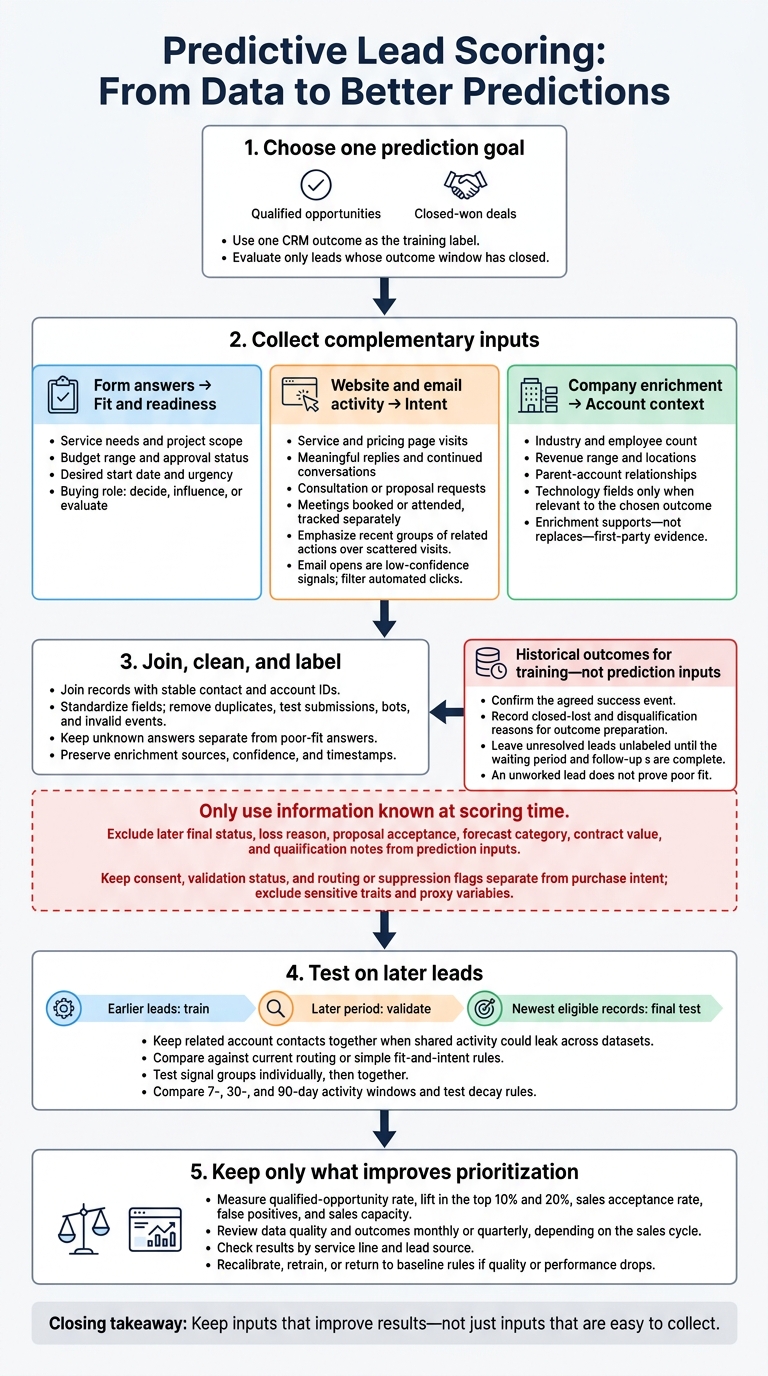
Predictive Lead Scoring: From Data to Better Predictions
Which form answers help qualify service leads?
Ask about service needs, budget, timing, and buying role
Focus on expert form strategies that show service fit and buying readiness. Give leads structured choices for service type, scope, budget, and timing. These answers set the baseline score, which behavior data can then refine.
| Signal category | Field | What it measures | Scoring value | Recommended use |
|---|---|---|---|---|
| Fit | Requested service and problem | Whether you can meet the need | High when tied to services you deliver | Ask early and route to the right team |
| Fit | Project scope | Delivery requirements | Helps when complexity affects qualification | Ask only for scope details that matter |
| Fit | Service territory | Eligibility by geography | Matters when geography affects delivery | Ask when location changes eligibility |
| Fit | Job title, department, buying role | Account relevance and involvement in decisions | Title alone does not prove authority | Ask whether they decide, influence, or evaluate |
| Readiness | Budget range and approval status | Commercial fit and available funding | Use when minimum deal size matters | Offer budget bands, with “unsure” and “prefer not to say” as separate options |
| Intent | Desired start date and urgency | Readiness to move forward | Strong when tied to closed deals | Separate near-term plans from research |
Contact preferences help route leads; they shouldn't affect scores. Validation, spam status, and consent serve data-quality and compliance needs - not as signs of purchase intent.
Unknown budget is not the same as low budget. Keep unanswered fields separate from explicit budget responses. Ask about current providers or systems only when replacement, migration, or integration affects the service. When possible, use reliable enrichment to fill in company size and industry.
Collect and validate form data with Reform
Reform supports multi-step forms and conditional routing. That lets you start with basic questions and show relevant follow-ups later. Ask for service needs and contact details before budget or detailed scope. Show system questions only for migration-related work, and location-count questions only for multi-location services.
Use Reform’s email validation and spam prevention to reduce unusable submissions. Lead enrichment can fill in known company details. Keep validation status, consent, enrichment source, and timestamps separate from intent fields. Collect missing details on later visits only when you can reliably identify returning leads.
Clean, consistent form inputs help keep scoring accurate. Historical outcomes show which answers predict qualified opportunities or revenue. Once the form data is clean, add website and email signals.
sbb-itb-5f36581
Which website and email actions suggest buying intent?
Track page visits, form activity, and consultation requests
Form answers help establish fit. Behavior shows which leads are taking the next step. Track service, pricing, process, case study, and contact pages separately from blog traffic. Record topic downloads, form starts, completions, abandonments, and consultation or proposal requests. Give recent groups of related actions more weight than scattered visits, and check each pattern against past conversions.
Build features such as service-page visits in the past 7 days, pricing-page visits in the past 30 days, and days since the last meaningful action. Cap repeat counts - for example, at five visits - and filter out bots, duplicate events, and employee traffic. Abandonment isn’t a clear signal: someone may have been distracted or hit a technical problem. Don’t use the target action as an input, and exclude activity recorded after scoring time.
Link events to contacts only through authenticated sessions, known form submissions, or permitted first-party IDs. Store timestamps, contact or account IDs, tracking permissions, and event-quality flags. Leave uncertain matches anonymous. IP-based company matching is an estimate, not proof of identity. Respect tracking choices and applicable privacy requirements.
Give email replies and meetings more weight than opens
Apple Mail Privacy Protection can load tracking pixels even when someone hasn’t read the email. Security scanners can generate clicks, too. Flag clicks on every link immediately after delivery as likely automation, and keep the raw logs. Focus more on meaningful replies, continued conversations, and attended meetings. A rejection or automated reply, though, doesn’t show positive intent.
| Behavior | Likely interpretation | Confidence level | Model treatment |
|---|---|---|---|
| Repeated email opens | Possible exposure or automated loading | Low | Use minimally or exclude |
| Relevant email click | Interest in a specific service or topic | Medium | Filter automation; consider destination and recency |
| Meaningful reply or back-and-forth exchange | Active discussion of needs or sustained evaluation | High | Use reply content, timing, and recent exchanges - not just message count |
| Meeting booked or attended | Concrete sales progression | High | Separate booking from attendance; avoid duplicating the target outcome |
Use behavior to rank current interest, then check deal history to confirm which signals matter.
How do past deals and account data improve predictions?
Connect lead history to deal outcomes
Fit and intent help assess a lead. CRM history shows which leads actually convert. Use one CRM outcome as the training label, and link each lead to the right account, opportunity, service line, and buying-group contacts.
| Category | Records or fields | Purpose and checks |
|---|---|---|
| Training inputs | Service requested, industry, employee count, lead source, buying role | Use information available before prediction; standardize field values |
| Positive outcomes | Closed-won, revenue-producing engagements | Confirm the agreed success event |
| Negative or unresolved outcomes | Closed-lost deals, disqualification reasons, qualified opportunities that stalled | Record why deals stopped; leave unresolved leads unlabeled until the waiting period and follow-up policy are complete |
| Quality checks | Contact and account IDs, stage history, handoff dates, close dates, sales-cycle length | Remove duplicates, reconcile stages, and flag missing or impossible timestamps |
Leave out anything learned after the scoring moment. That includes final status, loss reason, proposal acceptance, forecast category, contract value, and later qualification notes. Rebuild records using historical snapshots or field timestamps so the model sees only what was known at the time.
Count usable wins and non-wins by service line, lead source, company size, and geography - not just total CRM records. If history is thin, use simple fit-and-intent rules instead of many narrowly focused models. Also check whether follow-up and handoffs were consistent. An unworked lead doesn't prove poor fit, and an open or inactive lead isn't automatically a loss.
Fill company data gaps with enrichment
Once you've labeled outcomes, use enrichment to fill account-level gaps in multi-step forms and CRM records. Assess account fit through industry, subindustry, employee count, revenue range, headquarters, serviceable locations, and parent-account relationships. Add growth, hiring, funding, or technology fields only when they help explain the chosen outcome. Customer, partner, competitor, excluded-account, territory, and unsupported-location flags belong in routing or suppression rules - not win-probability scoring.
| Data type | Sources and fields | Strength | Limit |
|---|---|---|---|
| First-party | Forms, CRM, website analytics, and email platform; stated needs, service, budget, timing, page visits, replies, meetings, deal history | Direct evidence specific to your firm | May be incomplete, duplicated, or shaped by uneven follow-up |
| Firmographic | Company websites, public filings, and enrichment; industry, size, revenue, locations, parent account | Establishes account fit and serviceability | Estimates may be outdated or confuse parents with subsidiaries |
| Technographic | Technology detection and customer research; software stack and infrastructure | Shows compatibility and delivery requirements | Coverage varies; installed technology doesn't establish buying intent |
| External intent | Research networks, hiring activity, funding announcements; topic interest and account changes | Adds timing context | Usually inferred at the account level, not proof of an individual buyer's plans |
Store each enriched field's source, collection date, confidence, and update timestamp. Check coverage across segments, and update fast-changing signals more often than stable attributes. When sources conflict, preserve submitted answers and either set field-level source priorities or keep a range for review. Treat unknown data separately from poor fit. Enrichment should support - not replace - first-party evidence such as requests, replies, meetings, budget, and timeline.
How should service firms prepare and test scoring data?
Once the records are clean, check whether the same signals still predict outcomes for later leads.
Choose one outcome and clean the records
Choose one outcome label, and test it only on leads whose outcome window has closed. Focus on fit, intent, and reliable outcomes.
Use stable IDs to join form, website, email, CRM, and enrichment records. Standardize lifecycle stages, service categories, budget ranges, timing fields, and loss reasons. Remove duplicates and test submissions, and flag missing or invalid fields. Keep only information available at scoring time, and exclude sensitive traits and proxy variables.
Test predictions on later leads
With time-safe data in place, check which signal groups improve prediction. Train on earlier leads, validate on a later period, and save the newest records with closed outcome windows for a final test. Keep related account contacts together when shared buying activity could leak across datasets.
Compare the model against current routing or simple fit-and-intent rules. Measure qualified-opportunity rate, lift in the top 10% and 20%, sales acceptance rate, false positives, and sales capacity.
Test each signal group on its own, then test the combined model on the later-lead holdout. After the first validation pass, check which signal windows and segments hold up over time. Compare 7-, 30-, and 90-day activity windows, and test decay rules. Don't assume an old click deserves the same weight as a recent consultation request. A higher email-open rate doesn't prove better lead prioritization.
Review missing fields, duplicates, enrichment matches, score distributions, and outcome rates monthly or quarterly, depending on the sales cycle. Break down results by service line and lead source so averages don't hide weak segments. Set thresholds that trigger investigation, recalibration, retraining, or a temporary return to baseline rules if data quality or performance drops.
Conclusion: Focus on fit, intent, and reliable outcomes
Better predictive lead scoring starts with fit, intent, and outcomes. Pair service need, budget, timing, and buying role with recent website activity, email replies, and consultation requests. Link these signals to reliable CRM outcomes. Then use enrichment to fill gaps in company data, such as industry or employee count.
Use Reform to collect structured qualification answers and validate email addresses before records enter your CRM. Add a field only if it can change qualification, routing, or follow-up.
Test whether each input improves predictions on later leads. If a field adds cost without improving results, leave it out so scoring stays tied to fit, intent, and outcomes.
FAQs
How much historical data do I need to start?
Start with at least 80 historical leads: 40 closed-won and 40 closed-lost deals. To build a stronger model, some approaches suggest using 12 to 24 months of history, with 200 closed-won and 200 closed-lost records. When scaling, 1,000 to 2,000 labeled records are often recommended.
Keep your data clean, standardized, and at least 70% complete. Review your CRM history and prioritize high-quality, relevant outcomes for training.
What if a lead shows strong intent but poor fit?
A lead that shows strong intent but isn’t a good fit should usually stay in a nurture program - not go straight to sales. Keep fit, behavior, and intent scores separate so high activity alone doesn’t trigger a handoff too soon.
Use negative scoring to filter out poor matches, such as leads outside your target industry or service area. That keeps your sales team focused on leads with high potential.
Which form fields should I require without hurting conversions?
Keep your initial form to three to five fields: name, work email, company, and one qualifying question. Ask only for details you can’t collect automatically. Let lead enrichment fill in the remaining company and contact information.
Use multi-step forms to make the process easier, and display any required fields that enrichment can’t fill. Keep scoring data clean and standardized with structured inputs, such as U.S. state or industry picklists.
Related Blog Posts
Get new content delivered straight to your inbox

The Response
Updates on the Reform platform, insights on optimizing conversion rates, and tips to craft forms that convert.



Drive real results with form optimizations
Tested across hundreds of experiments, our strategies deliver a 215% lift in qualified leads for B2B and SaaS companies.
