

7 Lead Routing Rules for Multi-Channel Campaigns



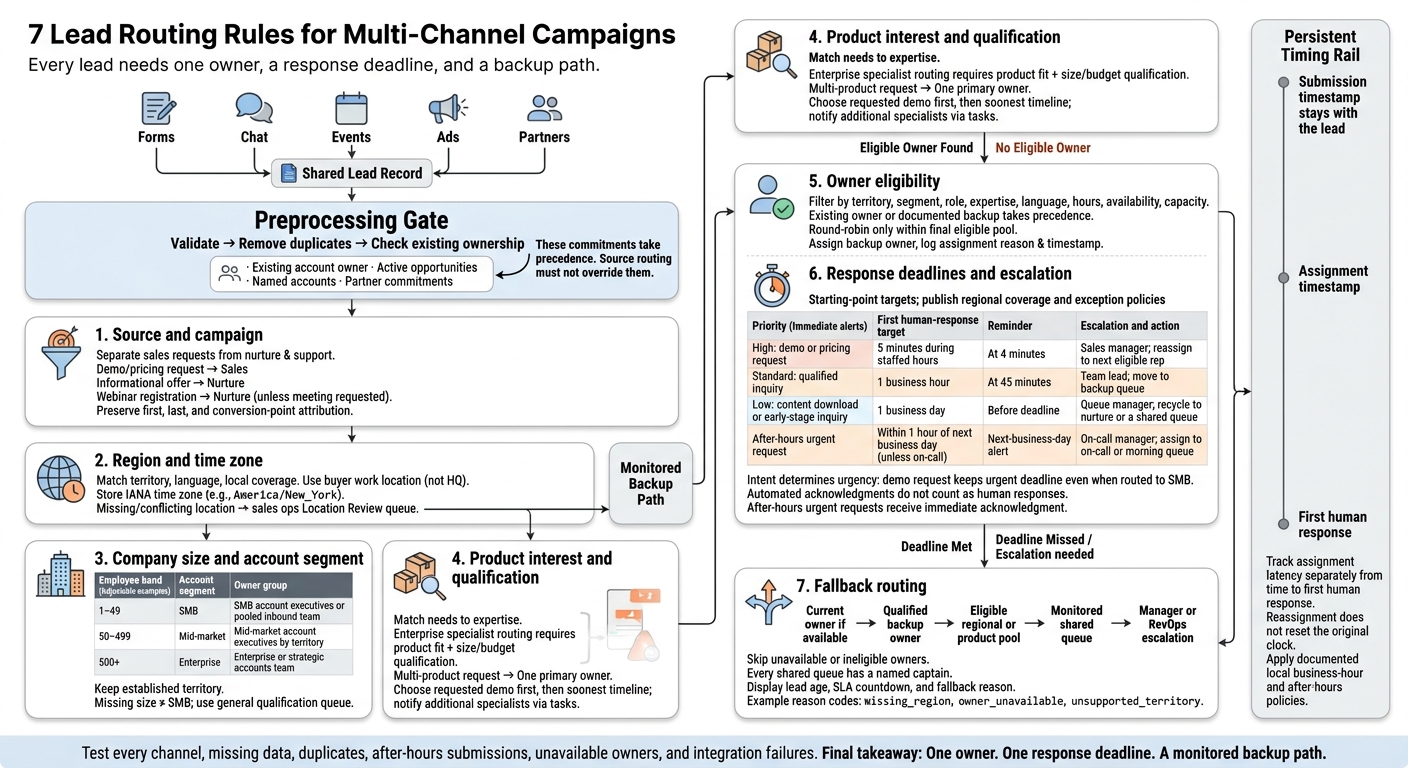
Every lead needs one owner, a response deadline, and a backup path. For demo and pricing requests, a five-minute first human-response target during staffed hours gives teams a clear deadline - not just an assignment.
Leads from forms, chat, events, ads, and partners should follow the same seven rules:
- Source and campaign: Separate sales requests from nurture and support inquiries.
- Region and time zone: Match territory, language, and local coverage.
- Company size and account segment: Choose the right sales team without treating missing data as a small account.
- Product interest and qualification: Match needs to expertise while keeping one primary owner.
- Owner eligibility: Assign only to reps with the right skills, availability, and capacity.
- Response deadlines and escalation: Track time from submission and move missed handoffs to a backup.
- Fallback routing: Send unmatched leads to a monitored queue with a named manager.
Before applying these rules, validate records, remove duplicates, and check existing account ownership. Then test each channel and track assignment time separately from time to first human response.
7 Lead Routing Rules for Multi-Channel Campaigns
Territory Lead Routing Made Easy in Salesforce
sbb-itb-5f36581
Set Routing Fields and Rule Order
Create a shared lead record so leads from high-converting lead forms, chat, events, and partners follow the same routing logic. Include original source (acquisition channel), campaign (marketing initiative), account ID, geography, time zone, company size, product interest, creation time, and owner. Define accepted values, required fields, normalization methods, and fallback values in a routing dictionary. Use controlled state codes, company-size bands, and product names - not free text.
Match records by CRM record ID first, then verified email, account ID, verified company domain, and finally normalized company and contact data. Update reliable matches and send uncertain ones to a review queue. Store source-event and matched-record IDs to prevent duplicate tasks.
Set an authoritative source for each field. Specify when overwrites are allowed and which values must stay. Flag conflicts for review rather than replacing trusted data.
After validation and deduplication, check existing ownership, active-opportunity relationships, named accounts, and partner commitments. Then apply territory, segment, and product-expertise rules. Balance assignments ONLY among eligible owners, assign a backup owner, and send unresolved records to a monitored fallback queue. Log the rule, reason, previous owner, new owner, and assignment timestamp.
Store creation and assignment timestamps separately in UTC. Keep the original event timestamp and IANA time zone, and calculate coverage and business-hour deadlines in local time using daylight saving rules.
Use these fields, precedence rules, and timestamps to set up source-based routing.
1. Route by Source and Campaign
Required Fields
Capture campaign ID, UTM parameters, landing page, referrer URL, request type, webinar and event attendance status, and partner IDs for referrals.
Keep first-touch, last-touch, and conversion-point attribution separate. A later demo request should never erase the original acquisition source. Missing UTMs should trigger an attribution flag - not block a valid sales request.
Assignment Conditions and Precedence
After validating the record, route by source and campaign before applying territory or segment rules. Source routing sets the lead’s starting point.
Use intent to separate sales requests from campaign engagement. Paid-search demo and pricing requests go to sales; informational offers go to nurture. Qualify paid-social leads by their answers, not their channel. High intent can override nurture, but it can’t override account ownership or partner commitments.
Destination and Accountable Owner
Route forms to sales, support, or customer success based on request type. Webinar registrants stay in nurture unless they request a meeting - then they go to sales.
Send event leads to the event owner or regional sales team, referrals to the assigned partner owner, and chats to the first available rep.
Use Reform’s form-level routing to collect source data and send clean records into CRM workflows.
If source rules don’t resolve the lead, move to region and time zone.
2. Route by Region and Time Zone
If source and campaign don’t settle ownership, route by geography next.
Required Fields
Use controlled values for country, state/province, postal code, work location, language, and submission time. Keep work location separate from company headquarters. Apply the same location standard across forms, chat, events, and partner leads to improve lead conversions, and store an IANA time zone.
Example:
America/New_York.
Start with the lead’s stated location, then use verified enrichment. Treat IP location as a backup - not proof.
Assignment Conditions and Precedence
Route by territory, including custom sales territories, then by state/region, time zone, and language. After that, use round-robin assignment among eligible reps who are currently staffed.
Don’t assume company headquarters tells you where the buyer works or when they’re available.
Destination and Accountable Owner
Assign the regional owner. If no owner is available, send the lead to a regional queue with an accountable manager.
For cross-border leads, existing account ownership takes priority, followed by operating location and language coverage. Meet language needs within the territory when possible. Otherwise, use a multilingual backup queue.
Exceptions and Response Deadlines
Send leads with missing or conflicting location data to the sales ops Location Review queue.
For high-intent leads, set a five-minute first-response target during staffed local hours. After hours, send an immediate automated confirmation and schedule follow-up for the next local business day, or use approved on-call coverage. Escalate missed response deadlines to the queue manager.
If geography still doesn’t settle ownership, move to lead qualification by company size and account segment.
3. Route by Company Size and Account Segment
Required Fields
Standardize employee_count, account segment, named-account status, parent-company relationship, and territory across channels. Use the CRM account first, verified enrichment second, and self-reported values last. Store the source, verification date, and confidence level so each decision can be audited.
Assignment Conditions and Precedence
Check existing account and open-opportunity ownership before applying employee bands. Keep named accounts with their designated owner. For other accounts, combine account segment with the established territory. Match parent accounts before subsidiaries, and apply round-robin only within the eligible owner group.
Once geography sets the territory, use company size to select the coverage tier.
| Employee band | Account segment | Owner group |
|---|---|---|
| 1–49 | SMB | SMB account executives or pooled inbound team |
| 50–499 | Mid-market | Mid-market account executives by territory |
| 500+ | Enterprise | Enterprise or strategic accounts team |
Adjust these bands to fit your sales model based on win rate, cycle length, ACV, expansion, and retention. Size should guide coverage, not override intent.
Destination and Accountable Owner
Route each lead to its segment-and-territory owner group - not a global segment pool. Record the owner, owner group, timestamp, rule, segment, and territory in the CRM. A queue manager should own unclaimed leads until a rep accepts them.
Exceptions and Response Deadlines
Give every lead an owner, even if size data is missing or conflicting. Never treat missing size as SMB. Try account matching and enrichment first. If sources disagree, keep both values, follow the source hierarchy, and assign a confidence status.
If no reliable value is available, send the lead to a general qualification queue, flag it for enrichment, and confirm its employee band on the first call.
Start the response clock as soon as an owner is assigned. Set these response targets:
- 5 minutes: Named enterprise accounts.
- 15 minutes: Other enterprise accounts and high-intent mid-market leads.
- 30 minutes: Standard mid-market leads.
- 1 business hour: SMB leads.
If the owner misses the deadline, escalate to the queue manager, then the segment director. Log each handoff.
If company size still doesn’t settle ownership, use product interest and qualification next.
4. Route by Product Interest and Qualification
Required Fields
Collect product interest, use case, budget range, and purchase timeline. Use Reform’s multi-step forms and conditional logic to ask only for answers needed to route the lead.
Assignment Conditions and Precedence
When source, region, and company size don’t resolve routing, use product fit and qualification to choose the right specialist or queue.
Enterprise specialist routing requires product fit plus size or budget qualification. A plan choice alone isn’t enough. Send standard inquiries to the product sales queue and technical needs to a solutions consultant.
Destination and Accountable Owner
For multi-product inquiries, assign one primary owner. Prioritize the requested demo product, then the soonest purchase timeline. Store all selected products, but keep the primary routing product in a separate field. Notify other specialists through tasks rather than competing assignments.
Preserve original_product_interest, original_qualification, raw submission data, and the timestamp. Store later changes separately. Match repeat submissions to the existing contact, append them as activities, and notify the current owner.
Exceptions and Response Deadlines
Send incomplete, conflicting, or “Other” product answers to a staffed qualification queue with a named manager.
Keep the original response clock running when products change or repeat submissions arrive. Escalate overdue inquiries to the backup queue, retaining the original request and assignment history.
5. Assign Leads to Eligible Owners
Required Fields
After source, region, and product fit narrow the team, use rep-level rules to choose the owner.
Check account matches, existing ownership, and open opportunities. Then factor in each rep’s territory, segment, role, product expertise, language, working hours, availability, and current lead load. Eligibility should reflect current status, not just team membership.
Assignment Conditions and Precedence
Once you’ve identified the right pool, filter it to reps who can take the lead now.
If the lead already has an owner, route it to that person or the documented backup before making a new assignment. Otherwise, apply territory, segment, and skill requirements first. Use round-robin only within the final eligible pool.
If the routing system supports capacity-based distribution, set active-lead limits and use current workload to guide assignments. Exclude reps who are inactive, unavailable, at capacity, or unqualified.
Destination and Accountable Owner
Assign the lead directly when a named account owner or specialist is responsible. For unowned leads, use the pool that matches the need: SDRs for qualification, AEs for qualified leads, specialists for expertise, and customer teams for expansion, renewals, or support.
Record the selected rep, pool, assignment reason, and timestamp. Keep one system as the owner source of truth so later syncs cannot overwrite routing.
Exceptions and Response Deadlines
An assignment pool rotates eligible reps. A holding queue keeps leads until assignment is possible. Give each holding queue an owner, coverage hours, an aging report, and an escalation threshold.
Measure response time from submission - not claim time. If a deadline is missed, notify the responsible manager and reassign the lead through the documented backup path.
6. Set Response Deadlines and Escalation Rules
Once a lead has an owner, start a fixed SLA clock.
Required Fields
Store the lead’s creation time, source, campaign, priority, time zone, region, segment, product interest, lead score, assigned owner, backup owner, queue, SLA deadline, and first human response time.
Keep the SLA clock fixed from submission through reassignment. Track automated acknowledgments separately. Only a human call or personalized email should count toward the response target.
Assignment Conditions and Precedence
Set urgency based on intent before applying broad campaign rules. A high-intent demo request should keep its urgent deadline even if company size routes it to the small-business team. Use these targets as starting points.
| Priority | First human-response target | Notification timing | Escalation owner | Reassignment action |
|---|---|---|---|---|
| High: demo or pricing request | 5 minutes during staffed hours | Immediate alert; reminder at 4 minutes | Sales manager | Reassign to next eligible rep |
| Standard: qualified inquiry | 1 business hour | Immediate alert; reminder at 45 minutes | Team lead | Move to backup queue |
| Low: content download or early-stage inquiry | 1 business day | Immediate alert; reminder before deadline | Queue manager | Recycle to nurture or a shared queue |
| After-hours urgent request | Within 1 hour of the next business day, unless on-call coverage exists | Immediate acknowledgment; next-business-day alert | On-call manager | Assign to on-call or morning queue |
Destination and Accountable Owner
The assigned rep owns first contact. If the deadline passes without a response, the backup owner or queue takes over. Managers review breaches, while revenue operations owns timer logic and reporting.
Each alert should show the lead, source, deadline, current owner, escalation reason, and required action. Stop pending reminders after a qualifying response to avoid duplicate outreach. If no one responds by the deadline, move the lead to the monitored queue.
Exceptions and Response Deadlines
Publish staffed hours for each region and state whether weekends and holidays count toward each SLA.
Document whether each exception pauses, cancels, or continues the SLA. Cover invalid contact details, duplicate submissions, spam, suspected fraud, system outages, named-account conflicts, and leads another team is already working.
Require a reason code whenever a lead is rejected, recycled, or manually reassigned. Unresolved leads keep their original submission time and follow the same monitored fallback path.
7. Set a Fallback Path for Unmatched Leads
When earlier rules leave a lead without an eligible owner, send it through this fallback path.
Required Fields
Keep the original source, campaign, submission time, current owner, SLA deadline, fallback reason code, reassignment count, and routing history. Mark missing fields explicitly. Never treat blanks as matches.
After preserving the record, apply the fallback sequence below.
Assignment Conditions and Precedence
Follow this order: current owner if available → qualified backup owner → eligible regional or product pool → monitored shared queue → manager or RevOps escalation. Skip anyone who’s unavailable or no longer matches the territory or product.
Destination and Accountable Owner
Assign a named captain to each shared queue. Display each lead’s age, SLA countdown, and fallback reason. Use separate codes, such as missing_region, owner_unavailable, and unsupported_territory, to distinguish data problems from coverage gaps.
If the lead still has no suitable owner, apply the exception rules below.
Exceptions and Response Deadlines
Fill in a missing region using verified company or billing data or enrichment, or route the lead to a regional pool. Send leads with missing product interest to a general product-trained team. When channel values conflict, keep both raw values, use the trusted source, and send the record to attribution review.
For after-hours submissions, start the SLA at the next business-hour boundary or use a separate after-hours target. Send invalid, duplicate, or suspicious records for review before they re-enter routing.
Test Routing and Track Response Times
Once your routing rules are in place, test them end to end before launch.
Send controlled leads through every entry point: forms, paid ads, organic search, webinars, chat, email, phone, and partner referrals. Record expected and actual results in a shared test matrix. Check source, region, segment, product, and fallback rules across channels, covering territory, time zone, company size, product interest, account match, and owner availability.
Include duplicate submissions, missing or conflicting values, holidays, and after-hours inquiries. Each legitimate lead should reach one owner, who receives a notification with contact details, a clear next step, and a due time. Make sure source and campaign values stay intact through enrichment, deduplication, reassignment, and CRM synchronization.
Next, break one integration and mark one owner unavailable. Check that the fallback path runs, the backup receives notifications, and unresolved records stay visible until someone takes responsibility. Keep the original owner, timestamps, source, campaign, and failure reason for auditing. Confirm that the SLA clock and backup paths still work during the failure.
Track assignment latency and time to first human response separately. Also measure assignment-to-outreach time so you can tell system delays from rep delays. Report median and 90th percentile times alongside SLA breach rate, reassignment rate, notification failures, and fallback-queue age. These metrics help you check assignment speed, owner coverage, and whether fallback handling works as planned.
Review these metrics weekly. Review territory maps, staffing coverage, product ownership, holidays, and field conflicts monthly or quarterly. Retest after any change to forms, campaigns, CRM fields, territories, products, or integrations.
Conclusion: Give Every Lead an Owner and a Deadline
Set a fixed routing order: source and campaign, territory and time zone, account segment, product fit, eligible owner, response deadline, and fallback path. Document each rule’s condition, destination, priority, and exception so there’s a clear way to resolve conflicting matches.
Keep ownership logic in one system to avoid contradictory assignments. The assigned owner is responsible for the first human response, not just the record. If the deadline passes, route the lead to a backup owner, then to a manager-owned fallback queue.
FAQs
How do I resolve conflicting lead routing rules?
Set a strict top-down hierarchy: the first matching rule wins. Check account ownership first. If the lead’s email domain matches an existing customer or open opportunity, send the lead to the designated account owner. Apply segment and territory rules next, followed by capacity-based round-robin.
Use dropdowns to keep inputs consistent and prevent free-text variations from causing rules to skip leads. Add a fallback catch-all queue so no lead stays unassigned.
How do I set realistic lead response targets?
Use a routing matrix to match service-level agreements (SLAs) to each lead’s intent and source. Set response targets of within 5 minutes for high-intent leads and under 1 hour for general inbound inquiries.
Track P95 speed-to-lead - the response time at the 95th percentile - and SLA attainment in your CRM. Aim for at least 80% SLA attainment, and review results weekly. If you miss targets, check for rule drift or overly complex routing. Automate escalation so leads are reassigned when their SLAs expire.
How can I prevent repeated lead reassignments?
Before applying new routing rules, check for existing account owners or active opportunities to protect those relationships. Save repeat form submissions as related activities on the existing record rather than creating new records.
Use stable submission IDs as idempotency keys to prevent duplicate actions during retries. Keep automatic re-enrollment off for existing contacts unless a specific, corrected data value calls for a new routing decision.
Related Blog Posts
Get new content delivered straight to your inbox

The Response
Updates on the Reform platform, insights on optimizing conversion rates, and tips to craft forms that convert.

Drive real results with form optimizations
Tested across hundreds of experiments, our strategies deliver a 215% lift in qualified leads for B2B and SaaS companies.
