
.webp)
Lead Assignment via CRM Integration: Guide



CRM lead assignment should give each lead the right owner - and a deadline for follow-up. I start with three checks: match the submission to an existing record, preserve account ownership unless policy says otherwise, and send unmatched leads to a monitored queue.
In this guide, I cover how to:
- Connect forms, map fields, and prevent duplicate records.
- Use fit and intent scores to set priority, then apply routing rules and backup coverage.
- Notify owners, track response deadlines, and test failed transfers.
- Audit assignments and measure follow-up, conversions, and routing errors.
My rule: <u>track assignment time and first-response time separately</u>. A lead reaching the CRM is only the start; the handoff needs a clear owner, a recorded reason, and a next action.
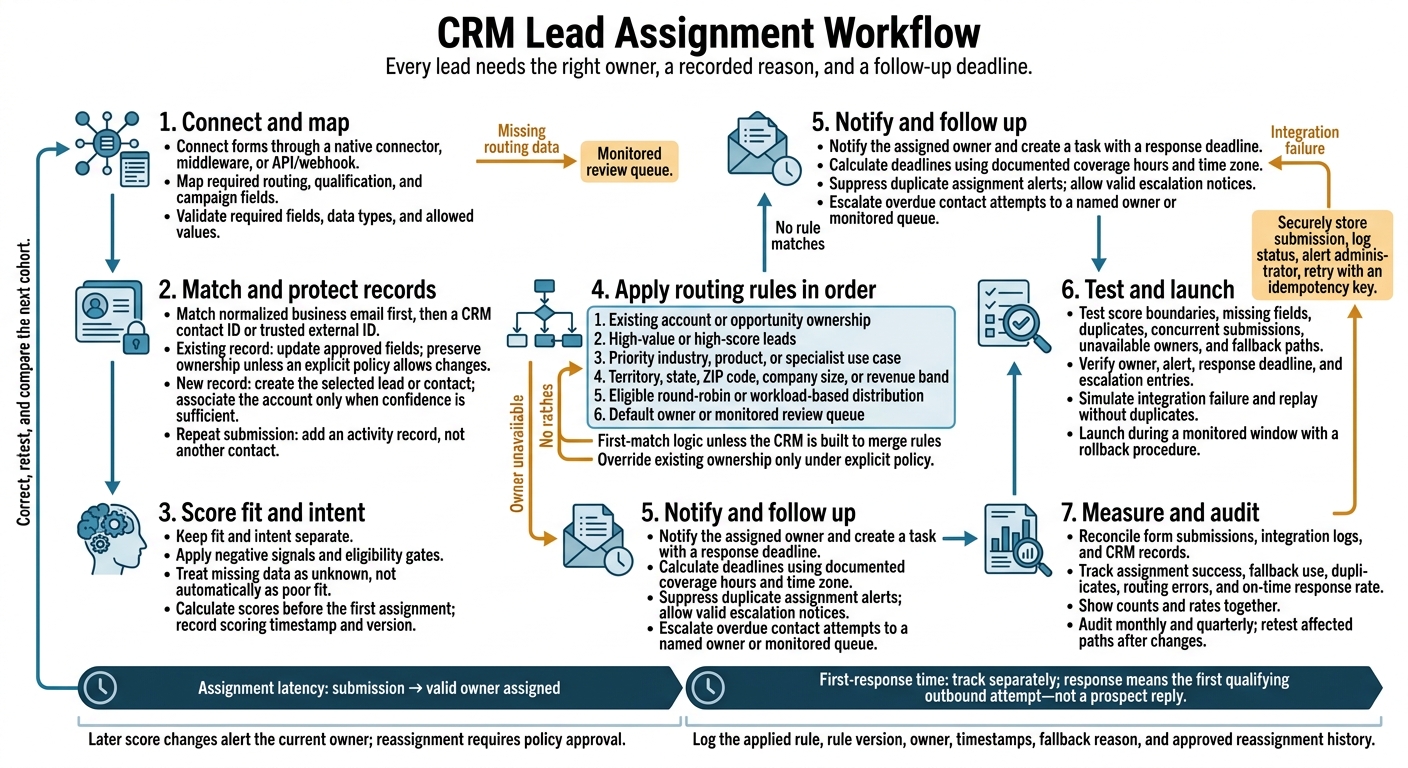
CRM Lead Assignment Workflow
Advanced Zoho CRM Workflow Rules: Automate Lead Assignment, Follow-Ups & Deal Reminders
sbb-itb-5f36581
Connect Your Forms to the CRM
Connect your form to the CRM through a native connector, middleware, or an API/webhook. Before launch, check what the integration can do: which CRM objects it can create or update, which fields it can write, how it matches records and associates accounts, and how it handles rate limits and errors.
Native connectors are simpler, but they support only documented actions. Middleware adds workflow steps - and another system to maintain. Webhooks and APIs give you more control but require authentication, endpoint security, and retry handling.
Once the connection is live, map only the fields needed to route leads and match records.
Collect Routing and Campaign Data
Collect fields that affect assignment or qualification: business email, company, region, size, and product interest. Use controlled choices and conditional steps. For example, ask for a state or ZIP code only when territory rules need it. Enrichment can reduce manual entry, but keep enriched values separate from submitted answers.
Use hidden fields to collect the form name, landing-page path, referrer, UTM source, UTM medium, UTM campaign, UTM term, UTM content, and campaign ID. Store first-touch and latest-touch attribution separately. Because people can edit hidden fields in the browser, never treat them as proof of identity, consent, or authorization.
These fields supply the data for routing and scoring in the next step.
Choose CRM Records and Map Fields
Decide whether submissions should create leads, create or update contacts, associate accounts, or create opportunities. Create opportunities automatically only when the workflow calls for it.
Document each field’s source, destination, type, and purpose, along with its definition, how it gets populated, and its intended use. Check required CRM fields, exact picklist values, character limits, compatible data types, and transformations. Also decide whether blank submissions should leave existing values unchanged.
Your field mapping needs to support record matching, ownership, and territory rules.
| Form field | CRM field | Data type | Required? | Allowed values | Transformation | Routing purpose |
|---|---|---|---|---|---|---|
| Business email | Contact email | Email/text | Yes | Valid business email format | Trim, lowercase, validate domain | Match existing contact and identify spam or personal domains |
| Company | Account/company name | Text | Usually yes | Normalized company name | Trim whitespace; optionally enrich domain | Associate account and support territory rules |
| Country | Country/region | Picklist | Yes | Controlled country list | Map form codes to CRM labels | Regional ownership and compliance routing |
| State | State/region | Picklist/text | Conditional | U.S. state codes or approved regions | Convert full names to approved CRM values | Territory assignment |
| Company size | Employee-count band | Picklist | Yes for qualification | Fixed employee-count bands | Map labels to CRM values or numeric ranges | Segment and score leads |
| Product interest | Product or interest | Picklist/multi-select | Yes | Approved product values | Map display labels to internal values | Product-line routing |
| Form name | Original form/source form | Text | No | Known form identifiers | Populate automatically | Identify workflow and reporting source |
| UTM source/medium/campaign | Campaign attribution fields | Text | No | Validated tracking values | Preserve raw values; optionally normalize case | Campaign and first-touch reporting |
| ZIP code | Postal code | Text | Conditional | U.S. ZIP or ZIP+4 format | Store as text; preserve leading zeros | Territory lookup without numeric truncation |
| Consent | Marketing or processing consent | Boolean/date-time | Where applicable | Yes/No plus timestamp | Store choice and submission timestamp | Compliance and follow-up eligibility |
Use this mapping to supply the routing rules and lead scores that follow.
Validate Data and Prevent Duplicate Records
Set deterministic matching rules: check normalized business email first, then a CRM contact ID or trusted external ID. Use a carefully controlled company-plus-name match only as a fallback.
When a match exists, update approved fields. Preserve the existing owner, lifecycle stage, opportunity data, and consent history unless an explicit business rule allows changes. When no match exists, create the selected lead or contact and associate the account only when confidence is sufficient. For repeat submissions, add an activity record rather than another contact.
Send submissions with missing routing data to a monitored review queue. If processing fails, store the submission securely, log its status, and alert an administrator. Retry with an idempotency key so replaying the submission cannot create duplicates. Before launch, test a controlled failure and confirm that you can replay the submission successfully.
Set Routing Rules and Lead Scores
Use mapped CRM fields to score each lead, then apply ownership rules. Give each task one owner: the form collects data, the scoring engine ranks leads, the CRM assigns ownership, and sales tools send alerts.
Order Rules and Set Fallback Owners
Evaluate rules from the most specific, business-critical condition to the broadest fallback. Start with existing account or opportunity ownership, then check high-value or high-score leads. Next, evaluate priority industries, products, or specialist use cases, followed by territory, state, ZIP code, company size, or revenue band. Then apply eligible round-robin or workload-based distribution. If nothing matches, assign a default owner or monitored review queue.
Use first-match logic unless the CRM is built to merge rules. Send records with blank fields to a monitored review queue, and override existing ownership only when an explicit policy allows it.
Set Distribution Pools and Document Rules
Create separate eligible pools by territory, product, segment, or expertise. Include only representatives who are active, trained, within coverage hours, and allowed to receive new leads. Keep shared queues separate from round-robin pools, and advance round-robin only after an assignment succeeds.
Where supported, workload-based routing can favor the representative with the fewest open or unworked leads. Document exactly how you define workload. For absence coverage, set a start and end time, a substitute owner, and a fallback queue. Use locking to prevent double assignment.
Track versions of the matrix below, including an effective date, rule owner, last test date, and reason for each change.
| Priority | Trigger | Conditions | Assigned owner or queue | Notification | Fallback | Test case |
|---|---|---|---|---|---|---|
| 1 | New submission | Existing account ID and active account owner | Existing account owner | Immediate CRM task and email | Account-review queue | Known customer submits from a different state |
| 2 | New submission | Score ≥80 and valid product interest | Senior product pool | Immediate high-priority alert | Priority queue | High-score lead with all required fields |
| 3 | New submission | Industry = healthcare and product = compliance solution | Healthcare specialist pool | Slack or CRM alert | Industry-review queue | Healthcare lead with missing ZIP code |
| 4 | New submission | State or ZIP maps to an active territory | Territory round-robin pool | Standard assignment alert | Regional queue | Valid ZIP at a territory boundary |
| 5 | New submission | Employee count is within the commercial segment band | Commercial round-robin pool | Standard alert | General queue | Company-size field is blank |
| 6 | New submission | No earlier rule matches | Default monitored queue | Operations alert | Manual review | Unknown industry and invalid ZIP |
| 7 | Duplicate event | - | Existing record owner; suppress duplicate creation | Duplicate notification | Data-quality queue | Same email submits twice |
| 8 | Owner unavailable | Assigned representative is inactive or marked absent | Backup pool or monitored queue | Operations escalation | Sales-ops review | Representative is deactivated during submission |
| 9 | Conflicting rules | More than one rule evaluates true | Highest-priority matching rule | Conflict logged | Manual review | High score conflicts with territory rule |
Thresholds in this matrix are hypothetical and should be validated against historical conversion data.
Choose Fit and Intent Score Inputs
Keep fit and intent separate, then apply negative signals and eligibility gates. Fit measures suitability; intent measures current buying activity. Treat missing data as unknown - not automatically as poor fit.
Fit inputs can include industry, employee count, annual revenue, geography, role seniority, business model, and technology environment. Intent signals include demo requests, pricing-page visits, repeat visits, webinar attendance, high-value content consumption, email engagement, and product interaction.
Negative signals can include an invalid business email, competitor domain, student or job-seeker title, opt-out status, unsupported geography, or a company outside the target segment. Set minimum fit and intent gates so one unusually strong activity can't make up for poor fit. Score intent close to the event, and apply decay so old activity loses weight over time.
| Input | Source | Value or threshold* | Routing effect | Maintenance owner |
|---|---|---|---|---|
| Target industry | Form or CRM account field | +15 fit | Supports sales eligibility | Product marketing |
| Target employee band | CRM or enrichment provider | +10 fit | Selects segment pool | Revenue operations |
| Annual revenue | Form or enrichment provider | Above $10 million | May qualify for enterprise routing | Sales operations |
| Demo request | Form submission | +25 intent | Triggers immediate review | Marketing operations |
| Pricing-page visit | Web analytics | +15 intent | Increases intent priority | Marketing operations |
| Repeat high-value visits within 14 days | Web analytics | +10 intent | May trigger sales alert | Revenue operations |
| Competitor or unsupported domain | CRM or enrichment | −25 | Blocks standard sales routing | Sales operations |
| Student or job-seeker title | Form or enrichment | −20 | Sends to nurture or review | Marketing operations |
| Unsubscribe or invalid contact status | CRM or email platform | −50 | Suppresses outreach | Compliance or marketing operations |
| No activity for 30 days | Engagement system | −10 | Reduces priority; may return to nurture | Revenue operations |
Calculate scores before the first assignment, and record the scoring timestamp and score version. Under a hypothetical policy, high fit plus high intent - or a score of 80+ - gets priority sales handling. Scores of 50–79 enter qualification, while scores below 50 enter enrichment or permitted nurture.
Recalculate intent after new activity and apply scheduled decay. Later score changes should alert the current owner, not reassign the lead, unless policy allows reassignment. Log any approved reassignment with the previous owner, new owner, trigger, timestamp, and reason. Review scoring weights every 60–90 days.
Log each rule hit and score change for later audit. Store assignment outcomes, overrides, and fallback paths for reporting.
Set Sales Alerts and Test the Workflow
Notify Owners and Escalate Missed Deadlines
Once the CRM assigns an owner, notify the rep and start the response clock. Use approved channels and include a direct CRM link, company name, lead source, lead score, key form answers, owner, and response deadline. Suppress duplicate alerts for the same assignment, but let valid escalation notices through.
Calculate deadlines using the coverage hours and time zone in the routing rules. Set escalation paths for overdue contact attempts, routing failures, missing required data, and fallback assignments. Each exception needs a named owner or monitored queue.
Track Ownership and Response Times
Store timestamps to audit assignment latency, first qualifying contact, reassignment, and disposition. A response means the first qualifying outbound attempt - not a prospect reply. Track assignment latency separately from time to first qualifying contact.
Store timestamps consistently. Display dates and times in en-US format with an explicit time zone.
Test Each Assignment Path
Before launch, test every assignment path with alerts in place. Use controlled records to check score boundaries, unavailable owners, duplicate or concurrent submissions, missing fields, fallback routing, and whether existing account owners stay assigned.
Confirm that each result follows the owner, queue, fallback, and priority order in the routing rules. Simulate integration failures and overdue follow-up to check that recovery reaches the correct owner or queue.
For every test, verify the assigned owner, alert, response deadline, and escalation entries. Monitor the rollout closely and keep a documented rollback procedure.
Report on and Audit Assignment Quality
Build an Assignment Quality Dashboard
After launch, check whether routing rules assign leads to the right owner, on time, and with the right outcome. Reconcile form submissions, integration logs, and CRM records - not just assigned leads. Otherwise, failed transfers can drop out of reporting.
Track assignment success, fallback and manual-review use, rejected records, duplicates, missing routing fields, reassignments, assignment time, first-response time, and on-time response rate.
Break down each metric by representative, team, territory, lead source, campaign, form, lead type, and routing rule. Show counts and rates together. Define assignment success as eligible leads that receive a valid owner within the target time, divided by all eligible leads. For on-time response rate, include only leads eligible for a response during the documented business-hours window.
Keep the original lead source, campaign, form name, submission timestamp, assignment timestamp, initial owner, current owner, final owner, applied rule name, rule version, fallback reason, reassignment history, and duplicate or rejection status. Report meetings booked, sales-accepted leads, opportunities created, pipeline, closed-won revenue, and win rate by rule and owner.
Compare similar cohorts by intent, company size, territory, source, stage, and score within the same calendar month. Then track outcomes over 30, 60, or 90 days. Flag small samples rather than ranking them.
Use the same business-hours calendar and time zone across reports. Format dates as M/D/YYYY, include an explicit time zone with times, display revenue as $125,000.00, and use consistent precision for percentages.
Audit Rules and Fix Misrouted Leads
Use dashboard findings to locate rule failures and fix the affected routing paths. Audit monthly and quarterly, and review routing after major changes to multi-step forms, the CRM, territories, staffing, or scoring.
Review every failure and fallback. Then sample successful assignments across rules, sources, territories, and score bands. Compare saved assignment-time inputs with the rule version applied at that time - not today’s field values.
Classify each routing error by its root cause: missing form data, incorrect field mapping, stale territory, rule-order conflict, unavailable representative, duplicate record, integration error, or intentional fallback.
Use an audit scorecard:
| Rule name | Eligible volume | Audited sample size | Correct-assignment rate | Fallback rate | Median assignment time | On-time response rate | Conversion rate | Corrective action |
|---|---|---|---|---|---|---|---|---|
| - | - | - | - | - | - | - | - | - |
Make the denominator visible so stakeholders can tell a trend from small-sample noise. In the corrective action field, identify whether the fix involves mapping, priority, pool, fallback, form, or monitoring.
Give each issue a clear owner:
- RevOps: Investigates rule logic, fallback queues, routing latency, and version history.
- Marketing operations: Checks form fields, campaign values, validation, and missing source data.
- Sales operations: Handles duplicate records and CRM ownership conflicts.
- Sales managers: Address missed response targets, inactive representatives, and capacity problems.
Update the existing record without overwriting the original assignment details. Add the correction timestamp, corrected owner, corrected rule or reason, and contact status - including whether the original owner contacted the lead.
Document each change with its date, reason, approver, affected rules, and expected result. Before release, retest affected paths with representative values, edge cases, blanks, invalid values, existing-account cases, and concurrent submissions. Then compare the next cohort’s assignment accuracy, fallback use, and on-time response rate.
Conclusion: Launch and Maintenance Checklist
With routing rules and audits in place, use this checklist to prepare for launch. Confirm ownership coverage before going live. Every market and submission path needs an owner or queue, a backup, and a response deadline. Check form fields, field mappings, CRM access, record targets, validation, duplicate handling, consent, and campaign attribution.
Set clear expectations for when fit and intent scores become available and how to handle scoring delays. Make sure existing-account ownership takes priority over general distribution. Check rule priority, pool eligibility, capacity, and out-of-office coverage. Verify that each assignment triggers an alert, a task, and an escalation timer.
Test the entire handoff, including integration failures and replay without duplicates. Keep a rollback option that pauses assignment without losing submissions.
Launch during a monitored window with limited volume. For the first several business days, review errors, fallback records, duplicate alerts, and missed response deadlines daily. Match incoming submissions against CRM records so failed transfers stay visible.
Measure success by correct ownership and timely follow-up - not automation uptime. Repeat these checks on a fixed schedule as forms, teams, and territories change. Assign one operations owner to oversee credentials, staffing, rules, and audits.
FAQs
How do I choose realistic lead response deadlines?
Tie service-level agreements (SLAs) to urgency signals and current performance. Aim to respond to high-intent leads in under 5 minutes. Set response targets by channel:
- Demos: 5–15 minutes
- Chat/scheduling: Under 5 minutes
- Paid ads: Under 1 hour
- Events/webinars: 2–4 hours
- Content downloads: About 24 hours
Set a benchmark for the time between submission and assignment. Track SLA attainment and speed-to-lead, and address breaches by adjusting routing, capacity, and escalation or fallback rules.
What should happen while lead scoring is delayed?
Use real-time fallback routing so leads don’t sit unassigned. Send them to a catch-all or overflow path for manual review, or to a named queue. Set business-hours rules to route after-hours leads to a “follow up tomorrow” task or queue.
Keep CRM records assigned whenever possible, with alerts enabled. Set SLA timers and escalation rules to reassign leads when a rep doesn’t respond within the defined window.
When should I switch from round-robin to workload-based routing?
Switch when your team’s structure gets more complex - or when some reps are consistently overloaded while others have little to do. Round-robin works best for small teams of fewer than 10 reps with similar roles and capacity. It doesn’t account for expertise, onboarding status, or differences in lead volume.
Workload-based routing or weighted round-robin can adjust how many leads each rep receives based on their ramp-up period, PTO, or changes to sales territories.
Related Blog Posts
Get new content delivered straight to your inbox

The Response
Updates on the Reform platform, insights on optimizing conversion rates, and tips to craft forms that convert.




Drive real results with form optimizations
Tested across hundreds of experiments, our strategies deliver a 215% lift in qualified leads for B2B and SaaS companies.
