
.webp)
Multi-Channel Lead Routing: Ultimate Guide


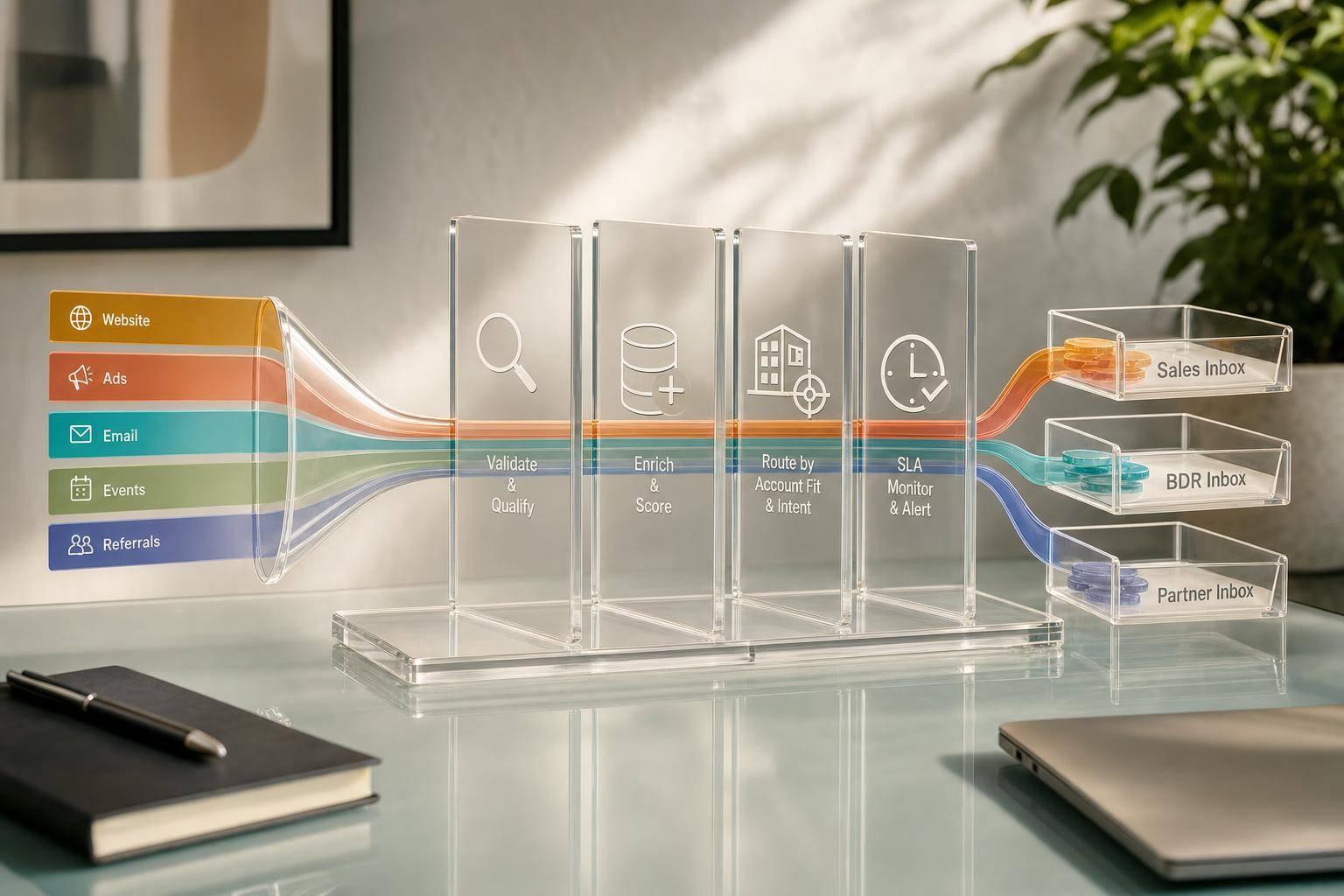
If a lead is not assigned fast, you lose deals. I’d boil this guide down to four things: send every lead into one CRM record, clean the data before routing, route by account/segment/channel rules, and track response time and routing errors every week.
Here’s the short version:
- I make one CRM record the source of truth for forms, chat, ads, outbound, and partner referrals.
- I standardize fields before routing: validate → enrich → standardize → deduplicate → route.
- I put account ownership first, then segment or territory rules, then round-robin inside the matched group.
- I connect fit + intent scoring to priority, so high-intent leads get human follow-up first.
- I use fallback queues, backup owners, and SLA alerts so leads do not sit untouched.
- I review unassigned rate, queue time, assignment accuracy, TTFT, conversion rate, and rep load by channel.
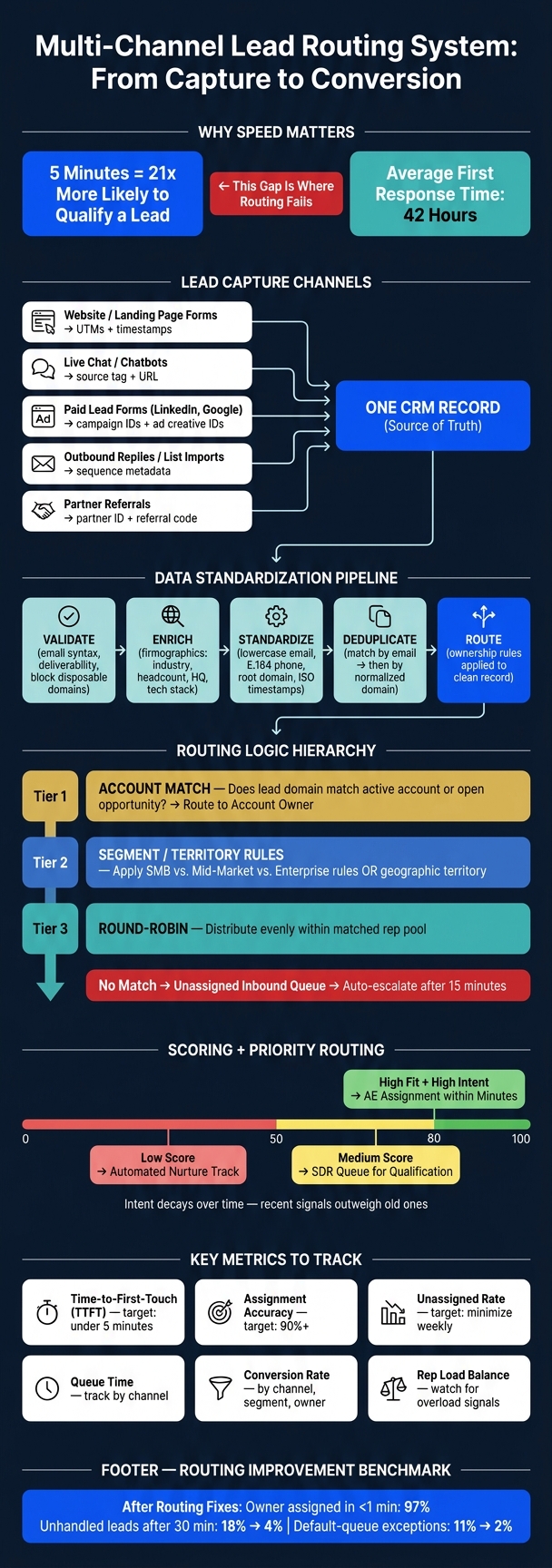
A few numbers stand out. Teams that respond within 5 minutes are 21x more likely to qualify leads than teams that wait 30 minutes. Meanwhile, average first response time has been reported at about 42 hours. That gap is where routing problems show up.
I also take one lesson from the article very seriously: bad input breaks routing. If forms miss company data, UTMs, or partner tags, even good rules fail. That’s why the article ties tools like Reform to better form data, hidden attribution fields, spam checks, and more complete qualification answers at submission time.
So if I wanted a simple plan, it would be this: clean intake, clear ownership, score for priority, and review exceptions on a fixed schedule. That’s the whole system in plain English.
Multi-Channel Lead Routing: Clean Intake to Closed Deal
Mastering Lead Distribution: Advanced Strategies with Google Sheets, Airtable & BigQuery
sbb-itb-5f36581
Map Lead Capture and Data Flow Across Every Channel
Routing only works if every lead first lands in one clean CRM record. From there, every other tool should sync from that record so ownership gets assigned the right way.
How Leads Enter the System from Each Channel
Map every source to the same CRM schema before routing begins. Each channel enters the CRM in a different way, so you need to spell out each path:
- Website and landing page forms: submitted through a form tool into the CRM with standardized fields, timestamps, and hidden attribution data like UTMs and campaign IDs.
- Live chat and chatbots: send contact and company data, plus the chat source tag, URL, and timestamp, into the CRM through a native integration or middleware.
- Paid lead forms (for example, LinkedIn Lead Gen Forms and Google Ads lead forms): passed through an integration or middleware layer that adds campaign IDs, ad creative IDs, and UTMs before the record reaches the CRM.
- Outbound replies and list imports: treated as new lead entries, with the source logged as Outbound and sequence or campaign metadata attached to the record.
- Partner referrals: submitted through shared forms or portals, with partner ID, referral code, and agreement type mapped into CRM fields along with standard contact and company data.
Every channel needs a documented, automated path into the CRM. Manual spreadsheet workflows sound simple, but they create gaps that throw routing off.
Standardize Fields Before Routing Starts
Once each channel lands in the CRM, normalize the fields so every rule reads the same data in the same format. Routing is only as good as the data feeding it.
Here’s the problem in plain English: if one form submits saas as the industry and another submits Software as a Service, a rule looking for SaaS may skip leads it should assign. That’s how leads slip through the cracks.
A practical sequence is: validate → enrich → standardize → deduplicate → route.
The four field groups that matter most for routing are below:
| Field Category | Key Fields | What to Standardize |
|---|---|---|
| Contact | Email, name, phone, job title | Lowercase email, proper name casing, E.164 phone format |
| Company | Company name, domain, industry, size | Strip legal suffixes (Inc., LLC), normalize to root domain, use controlled industry picklists |
| Behavioral | Use case, product interest, form type | Consistent taxonomy and naming across all tools |
| Attribution | UTMs, source tag, campaign ID, timestamp | Enforced picklists for source and medium; ISO timestamps |
Before routing, run three checks: email validation, duplicate detection, and enrichment.
For email validation, verify syntax and deliverability, flag role-based addresses like info@ or support@, and block disposable domains.
For duplicate detection, search by email first, then by normalized domain. If a match exists, merge or link the record instead of creating a new unassigned one.
For enrichment, pull firmographic data such as industry, employee count, HQ location, and tech stack so routing rules can act on complete records.
Timing matters here too. For high-intent submissions like demo requests or pricing inquiries, enrichment should run synchronously so the data is ready within seconds. For lower-intent events like newsletter signups, asynchronous enrichment with a short delay of 5 to 15 minutes keeps costs down without slowing the queue.
Once records are normalized, routing rules can assign ownership without all the annoying edge-case fixes.
Where Reform Fits in the Data Capture Layer

A lot of data quality issues start at the form itself. If a lead enters the CRM with a personal email, no company field, and missing UTMs, routing that record well becomes close to impossible.
Reform tackles this at the point of capture. Its multi-step form design splits more detailed questions - budget range, use case, team size - into separate steps. That helps cut drop-off and leads to more complete responses. Conditional logic shows or hides questions based on earlier answers, so follow-up questions only appear when they make sense.
On the attribution side, Reform lets you set hidden fields that auto-fill from URL parameters and tracking scripts. That includes UTMs, campaign IDs, referrer URLs, and Salesforce Campaign IDs, all of which travel with the submission. Email validation and spam prevention, including honeypot fields, run at submission time, which means low-quality entries get blocked before they hit the CRM. Reform also connects directly with CRM, marketing automation, and enrichment tools, so the validated, attribution-tagged record is ready for routing logic within seconds of submission.
That gives routing rules a clean input for ownership and priority.
Build Routing Logic and Ownership Rules That Work at Scale
Once your records are clean, the next step is to turn that data into ownership rules. Pick a routing model, set a clear order of precedence, and define fallback paths. Since the data is already normalized, routing can assign ownership without someone stepping in to clean things up by hand. These rules should rely on the standardized fields from the previous section.
Choose the Right Routing Model for Each Segment
Start with the simplest model that fits the segment. Then put account matching first.
That order matters. Account matching should happen before anything else, followed by segment or territory rules, and then round-robin inside the matched pool.
| Routing Model | Best Use Case | Strengths | Trade-offs | Typical Owner |
|---|---|---|---|---|
| Territory-based | Field sales with regional coverage | Clear geographic ownership | Uneven volume across regions | AE / Account Manager |
| Segment-based | SMB vs. mid-market vs. enterprise | Reps specialize by deal size | Breaks down with poor firmographic data | Segment-specific SDR / AE |
| Round-robin | High-volume inbound SMB leads | Fast and fair assignment | Ignores skill, capacity, and account history | SDR / Inbound Sales Rep |
| Account-based | Enterprise / named accounts | Preserves relationship continuity | Requires accurate CRM account matching | Named AE / Account Manager |
| Skill-based | Multi-product or technical sales | Matches lead needs to rep expertise | Complex to maintain; create specialist bottlenecks | Solutions Engineer / Specialist AE |
Most teams land on a hybrid model. Account match runs first, then territory or segment rules, then round-robin inside the matched group. It’s a practical setup because it handles most cases without forcing you to write a separate rule for every edge case.
Set Ownership Precedence and Fallback Logic
The most important rule in any routing system is simple: existing account ownership always wins. If a lead’s email domain matches an active customer or an open opportunity, route that lead straight to the account owner.
After account matching, the usual order for new leads looks like this: inbound high-intent leads go to SDRs for qualification, with a clear handoff to an AE once qualification criteria are met. Outbound-generated leads stay with the rep who started the work for a set window, often 30 to 90 days. That protects prospecting effort without creating ownership fights that drag on forever.
Fallback logic matters just as much as the main rule set. Keep it tight:
- Account ownership wins. Any lead that matches an active account or open opportunity routes to that account owner.
- Fallback queue catches unmatched leads. Any lead that doesn’t match a territory, segment, or account should drop into a clearly labeled "Unassigned – Inbound" queue. Unassigned leads should auto-escalate after 15 minutes and move to the fallback queue right away, with a designated owner - usually an SDR team lead or inbound lead manager - responsible for claiming it.
- Backup owner handles failures. If a rep is marked unavailable, routing should skip them and assign the lead to the next eligible rep. You also need a backup owner for system failures so no lead sits unassigned because of an API outage or integration gap.
Apply Channel-Specific Routing Rules
Not every lead source tells you the same story. Forms, chat, ads, outbound, and partner leads each carry different signals, so routing should reflect that. Use the source to decide which signals matter most.
| Channel | Routing Criteria | Default Owner | Escalation Path | Common Failure Point |
|---|---|---|---|---|
| Forms | Company size, state, use case, campaign ID, product interest | Inbound SDR | AE for high-fit, high-intent leads | Hidden fields not passed |
| Chat | Intent classification (sales vs. support), bot qualification outcome | SDR / Live sales chat rep | AE when opportunity is identified | Ambiguous intent; no lead record created |
| Ads | Campaign name, ad group, UTM parameters, offer type | SDR by channel or product line | Named AE for enterprise accounts | No routing rule on launch; UTMs not mapped |
| Outbound | Account tier, sequence name, initiating rep | Initiating SDR or AE | AE on meeting booked | Overlapping prospecting; misaligned account hierarchies |
| Partner | Partner tag, referral ID, agreement type | Channel Manager / Partner AE | Strategic AE for high-value referrals | Missing partner tags; leads treated as standard inbound |
Partner leads need a dedicated priority queue that sits apart from standard inbound, with a tighter SLA than normal form submissions. If partner tags aren’t being passed in a steady way from the referral form or portal, that’s an upstream data capture issue. Fallback logic won’t reliably patch over that kind of gap.
Connect Lead Scoring to Routing and Prioritization
Once ownership rules are set, scoring tells the system which leads need attention now. Routing answers one question: who owns the lead? Scoring answers the next two: should sales get it, and how fast?
When you connect routing and scoring, you cut down slow handoffs and keep reps from wasting time on weak leads. In practice, scoring should feed the same real-time assignment flow described above.
Use Fit and Intent Scores to Decide Routing Paths
Keep fit and intent as separate scores, then use both to decide the routing path.
Fit comes from firmographic data like company headcount, industry, annual revenue, region, job title, and seniority. It doesn't change much over time. Intent comes from behavior, such as pricing page visits, demo requests, chat questions about timelines, ad clicks on high-intent campaigns, and positive outbound replies.
Intent should also decay with time. A pricing page visit from six weeks ago shouldn't carry the same weight as one from this morning. That old signal still means something. It just shouldn't jump the line.
Scoring isn't some side process running in the background. It controls sales eligibility, queue priority, and owner assignment inside the same routing system. Use fit to qualify. Use intent to decide urgency. If a lead falls below the fit threshold, send it to nurture or manual review, even if the behavioral activity looks strong.
A simple starting point looks like this:
- 80 or above on a combined 0–100 scale routes straight to an AE within minutes
- 50–79 routes to an SDR queue for qualification
- Below 50 goes into automated nurture
Use your own conversion data to set those cutoffs. The point isn't to copy a template. It's to match scoring to how your pipeline actually behaves.
Then tie those scores to the signals each channel produces.
Map Scoring Inputs to Channel Signals
Not all lead signals mean the same thing. A demo request from a form shows far more intent than a newsletter signup. A strategic partner referral says much more about fit and buying readiness than a cold ad click.
If you score every channel the same way, your queues fill up fast and reps get pushed toward the wrong leads.
| Data Point | Channel | Scoring Weight | Routing Result |
|---|---|---|---|
| VP or C-suite title | Form | High (Fit) | AE assignment |
| Demo request | Form / Website | High (Intent) | Immediate AE or SDR queue |
| Pricing or comparison page visit | Ads / Web | Medium (Intent) | SDR outreach queue |
| Urgency question or implementation inquiry | Chat | High (Intent) | Immediate sales alert |
| Positive outbound reply | Outbound | High (Intent) | Route to initiating rep or AE |
| Strategic partner referral | Partner portal | High | Priority partner manager queue |
| Newsletter or blog signup | Content | Low (Intent) | Marketing nurture track |
Positive outbound replies and strategic referrals deserve high-priority human handoff. Those aren't the kinds of leads you want sitting in a general queue while the clock ticks.
Better scoring starts with creating high-converting lead forms.
Use Reform to Collect Higher-Signal Scoring Data
Scoring is only as good as the data going into it. If your forms collect just a name and email, but skip role, company size, or use case, your fit score starts out half-blind. Enrichment tools can help, but they won't always fill every gap.
Reform's conditional fields let you ask follow-up qualification questions only when earlier answers make them relevant. That means you can collect more useful qualification data without making the form feel bloated. And multi-step forms can make a longer qualification flow feel easier to finish.
Abandoned submissions also signal intent. Don't let those half-finished forms vanish into thin air. Use that signal to trigger recovery or SDR follow-up.
Report on Routing Performance and Improve the System
Track the Metrics That Show Routing Quality
Once routing rules are live, reporting tells you if they hold up in day-to-day work.
Lead volume on its own doesn't tell you much. You can have 1,000 leads a month and still have a routing problem if half of them sit unassigned for days or go to the wrong rep. That's why it's smarter to track speed, accuracy, coverage, and revenue impact.
Time-to-first-touch (TTFT) is the clearest metric for speed. A Harvard Business Review audit of 2,241 U.S. companies found that the average first response time was about 42 hours.
Speed is only part of the picture, though. You should also watch assignment accuracy: the share of leads routed to the right owner on the first pass. A good target is 90% or more. Alongside that, keep an eye on:
- Unassigned rate
- Queue time
- Conversion rate
- Average deal size
- Rep load balance
Then break those metrics down by channel, segment, and owner. That's where routing weak spots tend to show up. One rule may work fine for inbound forms but fall apart for paid ads. One segment may move fast while another gets stuck in a default queue.
Rep load balance matters more than teams sometimes think. If work starts piling up on a few reps while others have light queues, conversion can slip fast.
Find Failures, Fix Rules, and Review Changes Regularly
Most routing failures stay hidden unless you build reports to bring them to the surface. The point of those reports is simple: figure out where the process breaks - at intake, during assignment, or after handoff.
| Issue Type | Likely Cause | Affected Channel | Business Impact | Corrective Action |
|---|---|---|---|---|
| Duplicate leads | Multiple form submissions or sync issues | Forms, Ads | Conflicting outreach, rep confusion | Run deduplication reports on email/domain; add dedup logic at intake |
| Wrong-owner assignment | Outdated territory rules or missing routing fields | All channels | Misaligned outreach | Weekly audit of new assignments against current routing rules; add a simple routing-issue flag |
| SLA miss | Queue overload, inactive reps, or routing gaps | Forms, Chat | Conversion drops | Set CRM alerts for leads with no activity past SLA; auto-reassign after the threshold |
| Missing routing fields | Required fields skipped or integration not mapping correctly | Ads, Outbound | Routing rules fail; leads fall into fallback queues | Enforce required fields at capture; add enrichment fallback; audit field mapping |
| Broken integrations | API failures or sync errors between tools | Ads, Partners | Leads never enter the CRM; no owner is assigned | Monitor integration error logs daily; set alerts for sync failures |
One routing improvement project showed what this can look like when teams fix the right problems. Owner assignment within 1 minute reached 97%, unhandled leads after 30 minutes dropped from 18% to 4%, and default-queue exceptions fell from 11% to 2% after routing fixes.
What keeps a routing system clean over time isn't a one-off cleanup. It's routine review. A weekly exception review can catch the problems that quietly drag down follow-up:
- Leads without owners
- Leads stuck in default queues
- SLA breaches
- Leads with no activity after assignment
The key is to fix the pattern, not just the single record.
Then use a monthly routing audit to look at fallback frequency, reassignment rate, and whether current rules still line up with your territory and segment setup. Teams change. Segments shift. Routing rules need to keep up.
Conclusion: The Core Parts of a Reliable Multi-Channel Routing System
Reporting only matters if it leads to rule changes.
Reliable routing comes down to a few core parts: clean intake, clear ownership rules, scoring tied to priority, and regular exception reviews. The job isn't just to route leads. It's to keep tuning the rules so leads keep moving to the right person at the right time.
FAQs
How do I start lead routing with messy CRM data?
Start by cleaning up the fields your routing rules depend on. That means using controlled values, sticking to one form layout, and mapping Reform fields into your CRM in a clean, consistent way so enrichment and scoring data lands in the same places your routing logic checks.
Then handle the handoff at form submit. Run real-time enrichment and email validation right away, deduplicate the record, assign a single owner, and keep a catch-all fallback in place that logs the exact reason a record failed to route.
What routing rules should take priority first?
Start with existing account ownership so you don’t create conflict right out of the gate. If the account already belongs to someone, keep it there.
Then apply firmographic or geography-based rules, like territory or industry, to put the lead in the right segment.
Next, route by skill or product specialization. For any leads still left, use capacity filters and tiebreakers like weighted round-robin. Add a fallback rule too, so leads don’t slip through the cracks.
How often should I review routing performance?
Review routing performance on a tiered schedule.
Check these items weekly:
- fallback rates
- distribution balance
- channel performance
Then look at the bigger picture monthly. Review routing accuracy, speed-to-lead trends, overall performance, and cross-channel attribution.
Every quarter, step back and revisit your broader strategy. Audit your routing logic against your organizational structure to make sure the setup still matches how your team works.
Once a year, review your technology stack.
If misses, reassignments, or fallback rates start to climb, update your routing rules fast. Small issues in routing can snowball if they sit too long.
Related Blog Posts
Get new content delivered straight to your inbox

The Response
Updates on the Reform platform, insights on optimizing conversion rates, and tips to craft forms that convert.




Drive real results with form optimizations
Tested across hundreds of experiments, our strategies deliver a 215% lift in qualified leads for B2B and SaaS companies.
