
.webp)
Channel-Based Lead Routing Rules Explained



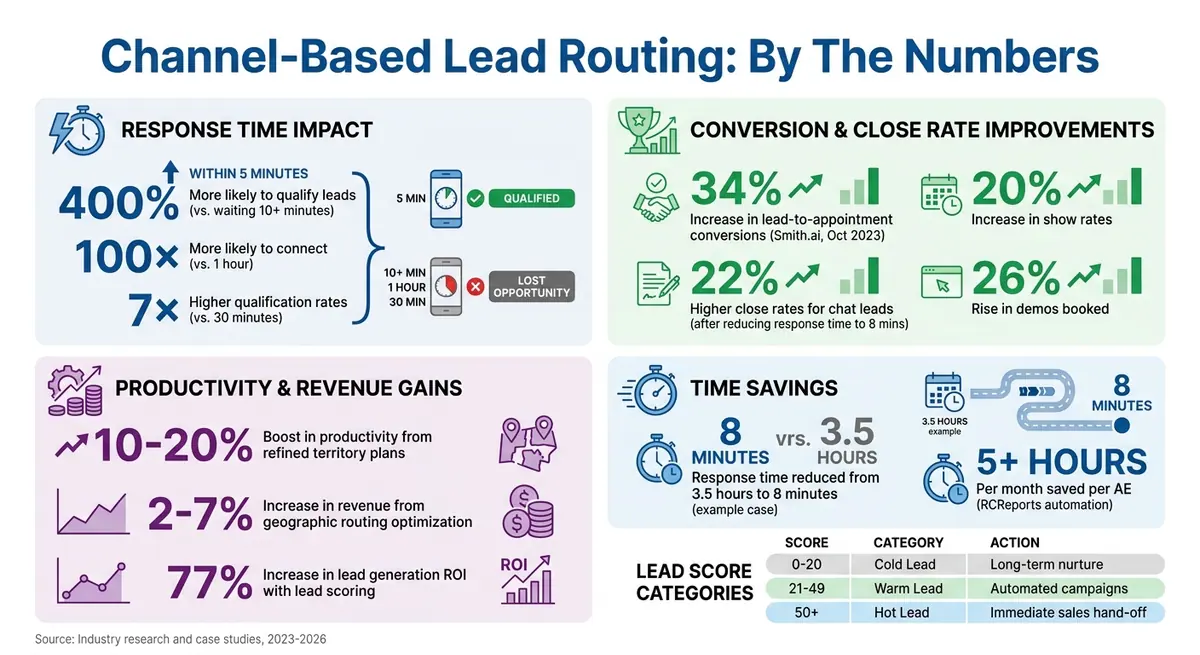
When a lead comes in - whether via a landing page form, demo request, or whitepaper download - how fast you respond determines success. Responding within 5 minutes makes you 400% more likely to qualify leads compared to waiting just 10 minutes longer. Yet many businesses still rely on slow, manual assignments.
Channel-based lead routing automates this process, assigning leads to the right sales rep based on the channel they came from. For example:
- Leads from pricing pages go to experienced reps.
- Webinar sign-ups are routed to SDRs for qualification.
- Chat inquiries are prioritized for immediate response.
This method improves efficiency, reduces delays, and matches leads with reps who have relevant expertise. Companies using automated routing have seen results like:
- 34% increase in lead-to-appointment conversions (Smith.ai, Oct 2023).
- 22% higher close rates for chat leads after cutting response times to 8 minutes.
Key routing criteria include:
- Lead source (e.g., forms, social media, chats).
- Geography (assign reps familiar with local markets).
- Product interest (match leads with specialists).
- Lead score (prioritize high-value prospects).
Channel-Based Lead Routing Performance Statistics and Impact
What Is Channel-Based Lead Routing?
Definition of Channel-Based Lead Routing Rules
Channel-based lead routing is an automated system that assigns incoming leads to the right sales reps or teams based on the marketing channel where the lead originated. By using if/then logic, this system processes leads from sources like form submissions, chat messages, or social media inquiries without requiring manual intervention.
For example, when someone fills out a form on your pricing page, the routing system evaluates key details like the form ID, company size, and location. It then sends the lead directly to the most qualified rep. Traditional methods like manual sorting, round-robin assignments, or first-come-first-served approaches often result in delays and inefficiencies. In contrast, channel-based routing leverages automation to match leads with reps who have the right expertise, work in the appropriate territory, or are available to respond quickly.
The results speak for themselves. In April 2026, a sales team of 15 automated their WhatsApp lead routing process. Before automation, two junior reps manually sorted leads, causing an average 3.5-hour delay before the correct rep even saw the conversation. By implementing automated routing rules based on geography, company size, and product interest, response times dropped to just 8 minutes. Within 90 days, the team saw a 22% increase in the close rate for chat leads. This kind of improvement highlights the importance of tailoring routing rules to fit the unique demands of each channel.
This approach not only saves time but also ensures that leads are handled efficiently, setting the stage for why different channels require their own specific routing strategies.
Why Different Channels Need Different Rules
The way leads behave depends heavily on the channel they come from. Each source provides clues about their intent and urgency. For instance, someone starting a live chat on your website likely expects a rapid response, while a lead downloading an e-book is probably still gathering information. As Armand Farrokh, Founder of 30 Minutes to President's Club, explains:
"The biggest mistake you can make is trying to get an enterprise AE to work [new] e-book leads, then complaining when your time to first touch is 27 days".
The intent and urgency of leads vary by channel. Leads requesting demos or pricing details - often considered "hot" - should go directly to Account Executives. On the other hand, "warm" leads, like those from webinar sign-ups, are better suited for Sales Development Representatives who can qualify them further. Meanwhile, "cold" leads from content downloads are typically routed to marketing nurture campaigns. Chat leads, however, require immediate attention, with routing rules prioritizing speed and ensuring responses within 10 minutes.
Geographic routing and expertise matching add another layer of precision. Leads are sent to reps familiar with local markets, regulations, and time zones, while complex enterprise inquiries are directed to specialists instead of generalists. This precise alignment turns raw leads into a well-qualified sales pipeline, ensuring every inquiry gets the attention it deserves.
sbb-itb-5f36581
How to Automate Lead Routing Inside HubSpot (Step-By-Step Tutorial)
Types of Channel-Based Lead Routing Rules
Once you understand the importance of tailoring rules for different channels, the next step is deciding which criteria to use. Most businesses rely on a mix of these four methods to connect leads with the right sales representatives.
Routing by Lead Source Channel
Lead source routing assigns leads based on their origin - whether it's web forms, social media, third-party integrations, or manual imports. Each channel often demands a specific skill set and response time. For instance, leads from web forms might suit your digital marketing team , provided you are creating high-converting lead forms that capture the right data, while social media inquiries could go to reps skilled in social selling.
In 2023, Smith.ai automated website form routing by integrating HubSpot, Salesforce, and Clearbit data. The outcome? A 34% conversion rate of marketing-qualified leads into appointments, a 20% increase in show rates, and a 26% rise in demos booked.
Routing by Geographic Location
Geographic routing connects leads with sales reps who specialize in specific territories, regions, or countries. This ensures prospects interact with reps familiar with local market trends, languages, and time zones. Geography often forms the foundation of routing models, which can be layered with additional criteria like company size or industry.
Accurate location data is key. Inconsistent entries - like "NY" versus "New York" - can disrupt routing. Using real-time enrichment to standardize location information before it enters your CRM can help prevent leads from landing in a generic queue. Additionally, fallback rules for time-zone mismatches or out-of-office coverage are essential. Companies that refine their territory plans often see a 10–20% boost in productivity and a 2–7% increase in revenue. And don’t forget: responding to leads within five minutes makes you 100× more likely to connect compared to waiting an hour.
Next, let’s look at how routing by product interest can fine-tune the process.
Routing by Product or Service Interest
Product-based routing directs leads to specialists with expertise in the specific product or service the prospect is interested in. This method works well for businesses with diverse or complex offerings. For example, demo requests for enterprise plans might go to senior Account Executives, while webinar sign-ups for niche features could be routed to product experts.
In 2023, RCReports automated demo routing through Salesforce, eliminating manual reassignment. According to Marketing Director Abbie Deaver, account executives previously spent over five hours per month reassigning demos. With automation, demos now go directly to the right Account Executive based on real-time CRM data.
National Instruments added another layer by using a "sales demand" custom object in Salesforce. This tracks actions like webinar registrations and ebook downloads, avoiding duplicate leads and triggering routing only after high-intent actions.
Routing by Lead Score
Lead scoring introduces an additional layer of prioritization. Lead score routing ranks leads based on their readiness to buy by combining behavioral data, demographic details, and explicit actions into a single score. This ensures top-performing reps focus on the most promising leads, while lower-priority prospects enter nurturing workflows.
Teams typically define score ranges to categorize leads: 0–20 for cold leads (moved to long-term nurture), 21–49 for warm leads (enrolled in automated nurturing campaigns), and 50+ for hot leads (immediate hand-off to sales). High scores are assigned to bottom-funnel actions like demo requests or pricing page visits, while negative scores are applied for actions like visiting a careers page or unsubscribing from emails. Adjusting scores for inactivity also keeps sales focused on engaged prospects. Studies show that lead scoring can increase lead generation ROI by 77%.
| Lead Category | Score Range | Recommended Action |
|---|---|---|
| Cold Lead | 0–20 | Move to long-term nurture |
| Warm Lead | 21–49 | Enroll in automated campaigns with relevant content |
| Hot Lead | 50+ | Immediate hand-off for direct outreach |
How to Set Up Channel-Based Routing Rules in Reform
Reform's conditional routing feature allows you to tag and direct leads based on their responses during form submissions. This ensures they are assigned to the appropriate sales rep or team before reaching your CRM. By automating this process, you can reduce response times and improve conversion rates.
Setting Up Conditional Routing
Reform's multi-page forms and form blocks, like dropdowns and radio buttons, make it easy to gather the key details needed for channel-based lead routing. For instance, a field such as "How did you hear about us?" can reveal whether a lead came through social media, paid ads, or referrals.
Once you've added these fields, you can apply conditional logic to route leads based on their answers. For example, if a lead selects "Enterprise Plan" in a product interest dropdown, you can set a rule to send them to a page with a direct scheduling link for senior Account Executives. On the other hand, lower-priority leads might be directed to a self-service page or invited to join a webinar.
To enhance the user experience, you can enable the Progress Bar in Form Settings. This feature shows users where they are in the process with custom labels like "Contact Info" or "Product Details." As Daniel Saks, CEO of Landbase, explains:
"Routing determines response time, and response time determines win rate".
Once your form logic is complete, the next step is integrating your CRM for automatic lead assignment.
Connecting Reform to Your CRM
After setting up conditional routing, connect Reform to your CRM to automate how leads are assigned. Reform supports integration with platforms like HubSpot and tools such as Zapier.
For example, if a lead is tagged as "West Coast" based on their location, your CRM can automatically assign them to the correct regional representative. Keep an eye on API rate limits to ensure smooth data flow. With these integrations in place, leads routed via Reform's logic will seamlessly land in the right queue. This is crucial, considering companies that respond to leads within five minutes are 400% more likely to qualify them compared to those that take 10 minutes.
| Routing Method | Best For | Reform Implementation |
|---|---|---|
| Geographic | Region-specific sales teams | Use a "Location" dropdown and conditional logic to assign leads to the appropriate rep. |
| Product-Based | Multiple product offerings | Use a "Product Interest" field to display tailored resources or scheduling links. |
| Score-Based | High-value lead prioritization | Use qualification questions (e.g., Revenue) to route high-scoring leads to Account Executives. |
Best Practices for Channel-Based Lead Routing
Balancing Channel Data with Sales Team Availability
When it comes to channel-based lead routing, success isn’t just about automating assignments - it’s about keeping your sales team’s workload balanced. If some team members are drowning in leads while others have little to do, even the best routing system will fall short.
To avoid this, layer your routing criteria. Start by filtering leads using channel-specific data like industry, territory, or product interest. Then, add a second layer that factors in rep availability, workload, and time zones. A round-robin approach works well here, ensuring leads are assigned only to reps who are ready to handle them.
This strategy is especially useful during busy periods. For instance, in October 2023, Bryce Kropf, Sales Enablement Manager at Smith.ai, introduced automated routing to improve lead management. By using expert form strategies for instant qualification and routing, the team saw a 34% conversion rate of marketing qualified leads into appointments and a 26% jump in total demos booked. Bryce summed it up perfectly:
"More productivity at scale means more revenue secured, so we consider this a major win".
To prevent overloading your team, set capacity limits - for example, cap each rep at 15 open leads. If someone hits that limit, the system skips them in the rotation until they close some deals. Also, integrate your routing system with team calendars to avoid assigning leads to reps who are in all-day meetings or out of the office.
Creating Reassignment Rules for Delayed Follow-Ups
Timing is everything in lead management. Research shows that reaching out to leads within five minutes instead of 30 minutes can boost qualification rates by up to seven times. To capitalize on this, establish clear Service Level Agreements (SLAs) for different lead types. For instance, hot leads might require a response within five minutes, while general inquiries could have a two-hour window. Use your system to track the "Time Since Assignment" field and automatically reassign leads if they sit unclaimed beyond the SLA.
This approach paid off for RCReports in October 2023 when they integrated Salesforce with their lead routing system. Before automation, Account Executives spent five hours each month manually reassigning leads booked on the wrong calendars. Now, demos are instantly routed to the right owner, saving time and reducing errors. As Marketing Director Abbie Deaver shared:
"Now that we've implemented Calendly's routing feature with Salesforce integration, demos are always booked with the correct AE, reducing friction for both our team and the customer".
To further streamline the process, set up an escalation path. If the primary rep doesn’t claim a lead, reassign it to a backup agent or a fallback queue managed by a team lead. Use instant notifications through tools like Slack or Microsoft Teams to alert the new owner right away. Start with a two-hour reassignment rule for all leads, then shorten the window for high-priority segments as your team’s response times improve.
Measuring Channel-Based Lead Routing Performance
Metrics to Track
To evaluate how well your lead routing is working, focus on a few critical metrics. Start with lead response time - this measures the median time it takes for a sales rep to contact a lead after it enters your system. Studies reveal that responding within five minutes makes you 400% more likely to qualify a lead compared to waiting 10 minutes or longer.
Another key metric is conversion rates by channel. Break down how many leads from sources like paid ads, organic search, or webinars are turning into qualified opportunities. Additionally, assess rep efficiency by comparing the time spent handling leads to the number of leads processed. This can help you determine if slowdowns are due to routing issues or individual performance. As Stan Rymkiewicz, Head of Growth at Default, explains:
"If you're not rigorous about implementing lead routing best practices, you could end up wasting your lead gen investment".
You should also track SLA compliance rates. For instance, if your SLA (service-level agreement) requires high-intent leads to be contacted within 15 minutes, measure how often your team meets this goal. Finally, keep an eye on unassigned or stale leads - those left untouched for 24 hours or more. These can highlight gaps in your routing logic.
By consistently monitoring these metrics, you can fine-tune your lead routing process and improve results.
Improving Your Routing Rules Over Time
Refinement is an ongoing process. Use the metrics you’re tracking to update and improve your lead routing rules regularly. Start with weekly audits to spot unassigned or inactive leads lingering in the system. Every two weeks, use your CRM dashboard to check rep workloads. If some reps are overwhelmed while others have light workloads, adjust your capacity rules to balance the load.
Your sales team can also provide valuable insights. They’re often the first to notice issues like poor lead quality or misrouted leads , often stemming from how you design your lead forms. Implement automated reassignment protocols to ensure leads that sit untouched for 24–48 hours are reassigned. For leads that don’t fit any routing criteria, establish fallback queues managed by team leads. Keep your team aligned by documenting changes to your routing logic in a clear, visual flowchart. Finally, review your routing performance quarterly during business reviews to ensure your rules adapt to new hires, territory shifts, or evolving priorities.
Here’s a quick overview of key optimization steps, how often to perform them, and the metrics to watch:
| Optimization Step | Frequency | Key Metric to Monitor |
|---|---|---|
| Lead Ownership Audit | Weekly | Number of unassigned or "stale" leads |
| Rep Capacity Review | Bi-weekly | Average lead load per rep |
| Routing Logic Review | Quarterly | Conversion rate by channel/rule |
| SLA Compliance Check | Monthly | Time-to-first-touch |
Conclusion
Channel-based lead routing rules reshape how sales teams manage incoming leads, ensuring the right prospect connects with the right team member at the right moment. By automating lead capture and routing across channels like web forms, email, and LinkedIn, you can eliminate the risk of losing valuable leads. On top of that, AI-powered qualification tools gather critical details such as company size, industry, and budget, scoring leads on a 0–100 scale to help your team focus on the most promising opportunities.
Features like direct routing to territory owners and instant notifications significantly improve response times. Centralizing data from multiple sources into a unified pipeline keeps your sales and operations teams on the same page while offering a clear audit trail for ongoing optimization. These enhancements pave the way for smoother implementation and better lead conversions.
Reform simplifies the process further. With conditional routing, CRM integrations, and real-time analytics, Reform allows you to capture and route leads effortlessly - no coding required. Pair it with your CRM, like Salesforce or HubSpot, to automate record creation, territory assignments, and AI-driven lead prioritization, making your sales process faster and more efficient.
FAQs
What routing rules should I set for each lead channel?
To create routing rules that work well for each lead channel, set up clear "if-then" conditions. These rules should assign leads based on specific factors like location, company size, behavior, or form responses. For example, you might route leads from a particular geographic region to a designated sales team or prioritize those with higher engagement levels.
Make sure to define criteria for every channel and revisit these rules regularly to keep them aligned with your goals. This approach helps ensure that high-value leads get the attention they deserve while using automation to streamline distribution and speed up response times.
How can I prevent reps from being overloaded with routed leads?
To keep sales reps from feeling overwhelmed, it's important to use fair and efficient lead routing strategies. Approaches like round-robin distribution or load balancing can help ensure leads are spread out evenly among the team.
Work closely with both sales and marketing teams to establish clear routing rules. This collaboration ensures everyone is aligned on how leads are assigned. Additionally, keep an eye on metrics like lead distribution and response times to spot any imbalances or delays.
Don't forget to have a fallback plan for unassigned leads. This could involve automatically routing them to a backup rep or a shared queue. Lastly, make it a habit to review and tweak your routing strategies regularly. This keeps the process efficient and helps your team stay on top of their workload.
How can I track whether routing is improving revenue?
To determine if lead routing is helping your bottom line, focus on tracking a few key metrics. Start with response times, lead qualification rates, and conversion rates. These indicators can reveal how effectively your routing process is working.
Leverage tools like your CRM or analytics software to compare data from before and after implementing routing rules. For instance, take a closer look at the conversion rates of leads handled through automated routing versus those managed manually. This kind of analysis can highlight which method delivers better results.
It's also important to regularly test and fine-tune your routing criteria. Using the insights from your metrics, you can make adjustments to improve performance and, ultimately, drive more revenue.
Related Blog Posts
Get new content delivered straight to your inbox

The Response
Updates on the Reform platform, insights on optimizing conversion rates, and tips to craft forms that convert.



Drive real results with form optimizations
Tested across hundreds of experiments, our strategies deliver a 215% lift in qualified leads for B2B and SaaS companies.
