
.webp)
How to Collect Lead Data Without Violating Privacy Laws



Collecting lead data while adhering to privacy laws like GDPR and CCPA is critical for avoiding hefty fines, protecting customer trust, and ensuring business growth. Here's what you need to know:
- Privacy Laws to Follow: GDPR (EU) requires explicit opt-in consent, while CCPA (California) allows opt-out by default but mandates transparency. Both stress data minimization and user rights.
- Risks of Non-Compliance: GDPR fines can reach €20M or 4% of global revenue, while CCPA violations can cost up to $7,500 per infraction. Non-compliance also damages customer trust and increases acquisition costs.
- Best Practices:
- Use clear consent mechanisms like unchecked boxes and plain language.
- Collect only necessary data (e.g., name, email) and avoid excessive fields.
- Implement conditional logic to show relevant fields based on user input.
- Simplify opt-out processes and respect user rights to access, correct, or delete their data.
- Secure data with encryption, access controls, and regular audits.
- Tools to Simplify Compliance: Platforms like Reform help create privacy-compliant forms with features like multi-step forms, conditional logic, and real-time analytics.
TECH TALK: Understanding GDPR vs. CCPA: How It Affects Your Business | Part 1 of 3
sbb-itb-5f36581
Privacy Regulations You Need to Know: GDPR, CCPA, and More
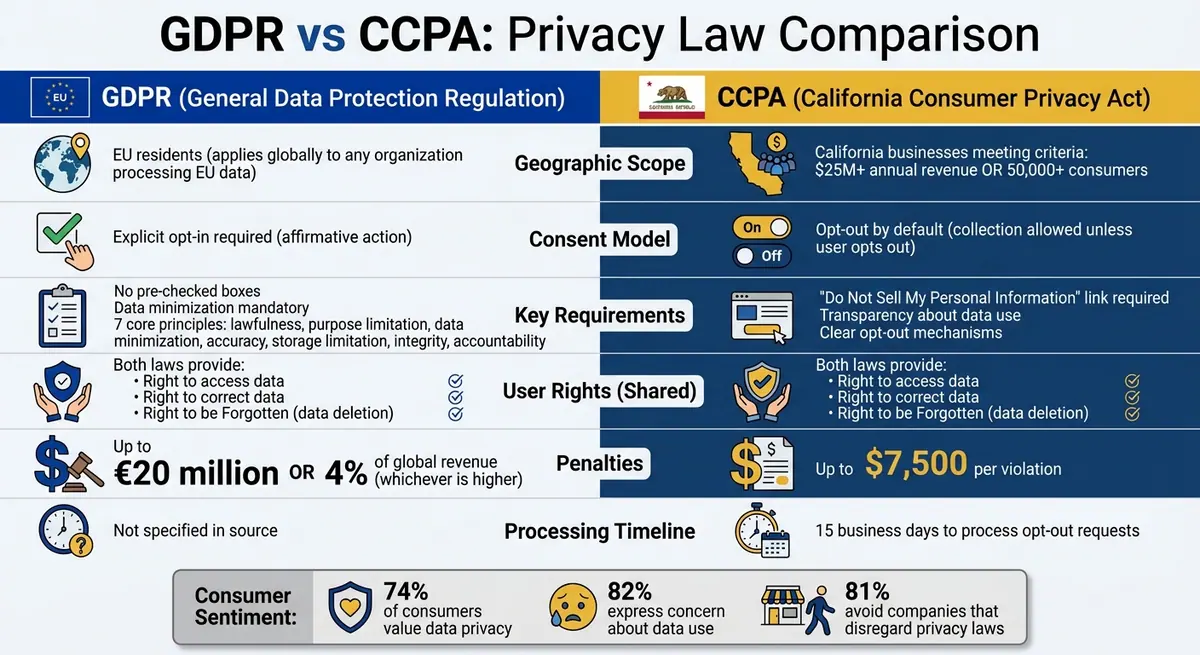
GDPR vs CCPA Privacy Law Comparison: Key Requirements and Penalties
Before setting up lead collection systems, it’s essential to understand the key privacy regulations shaping the landscape. Two major laws stand out: GDPR (General Data Protection Regulation) and CCPA (California Consumer Privacy Act). Both aim to safeguard consumer privacy but differ in how they approach consent and the groups they cover. These principles are crucial for ensuring your lead collection practices align with legal standards.
Core Principles of GDPR and CCPA
Introduced by the European Union in 2018, GDPR applies to any organization that processes data from EU residents, regardless of where the business operates. It’s built on seven principles: lawfulness, purpose limitation, data minimization, accuracy, storage limitation, integrity, and accountability. One key requirement is explicit opt-in consent - organizations must avoid pre-checked boxes, bundled agreements, or hidden terms.
CCPA, on the other hand, targets for-profit businesses operating in California that meet specific criteria, such as earning $25 million or more in annual revenue or handling data from at least 50,000 consumers. Unlike GDPR, CCPA uses an opt-out model, allowing data collection by default but requiring businesses to offer a clear way for consumers to stop the sale or sharing of their information. The CPRA, an amendment to CCPA, added rights like correcting inaccurate data and limiting the use of sensitive personal information.
Both laws empower users with rights like accessing their data, requesting corrections, and invoking the "Right to be Forgotten", which allows individuals to demand the deletion of their personal information. CCPA also requires businesses to include a "Do Not Sell My Personal Information" link if data is sold or shared for advertising. With 74% of consumers reporting that they value data privacy and 82% expressing concern about how their data is used, meeting these requirements isn’t just about compliance - it also aligns with consumer expectations.
How These Laws Affect Your Lead Collection
To comply with these regulations, you’ll need to rethink how you design high-converting lead forms. GDPR prohibits pre-checked boxes and insists on data minimization, meaning you should only collect what’s necessary. For example, asking for a phone number on a newsletter signup form might be considered excessive unless you can clearly justify its purpose. Similarly, CCPA and CPRA stress the importance of collecting only what’s essential and being transparent about how that information is used.
When creating forms, include clear privacy notices that explain why each piece of information is being collected and how it will be used. Use technical safeguards like encryption, pseudonymization, and access controls to protect the data you collect. Also, respect storage limitations by keeping personal data only as long as it’s needed for its intended purpose.
Non-compliance comes with hefty penalties. GDPR violations can result in fines of up to €20 million or 4% of global turnover, while CCPA fines can reach $7,500 per violation. Since GDPR’s requirements are stricter, aligning your practices with its standards can often help you meet CCPA and other regional laws more easily.
Next, we’ll dive into practical tips for designing forms that meet these regulatory requirements.
How to Build Forms That Follow Privacy Laws
Creating forms that comply with privacy laws is essential for protecting user data and building trust while still driving conversions. The goal is to design forms that are transparent, only ask for necessary information, and give users control over their data. Here’s how to do it right.
Getting Clear Consent from Users
Privacy laws like GDPR and CCPA emphasize the importance of clear, informed consent. GDPR requires consent to be freely given, specific, informed, and unambiguous, often through an affirmative action - such as checking a box. CCPA focuses on transparency and providing opt-out options but still calls for clear consent for marketing communications.
A good practice is to use an unchecked, standalone checkbox with simple, clear labeling, such as: "I agree to receive marketing emails (see Privacy Policy)." This approach aligns with GDPR’s granular consent principles and CCPA’s transparency requirements. For example, HubSpot improved compliance and boosted conversion rates by 15-20% through A/B testing language like "Yes, I’d like to receive your newsletter" alongside a link to their privacy policy.
Double opt-in is another effective way to verify consent. This process not only reduces spam complaints by up to 90% but also strengthens your compliance. Make sure your privacy policy is clearly linked near the consent checkbox and written in plain language. The policy should explain how user data is collected, stored, and used, as well as outline user rights. For U.S. audiences, include a CCPA-specific section, such as "Do Not Sell My Personal Information."
Once consent is handled, the next step is to ensure you’re only collecting the data you actually need.
Collecting Only the Data You Need
Privacy laws like GDPR and CCPA enforce data minimization, meaning you should only collect the information necessary for your stated purpose. This not only reduces the risk of breaches but also lowers the chance of costly fines - GDPR violations average $4.45 million per case.
For lead forms, stick to the essentials. In B2B contexts, this often means limiting fields to name, email, and role. Avoid asking for phone numbers unless you have a clear, justifiable reason. For example, you could label fields with descriptions like "Email for follow-up" or "Company size to personalize your demo." Keeping forms simple with just 3-4 fields not only complies with privacy laws but also improves conversion rates.
To ensure you're not over-collecting information, audit your forms every quarter. If additional data is needed, consider using progressive profiling - a method where you gather extra details over time instead of overwhelming users with too many questions upfront. This gradual approach respects user privacy while helping you build a more complete customer profile.
Now, let’s talk about tailoring forms to individual users with conditional logic.
Using Conditional Logic to Show Relevant Fields
Conditional logic helps streamline forms by showing specific fields only when they’re relevant, ensuring unnecessary questions are avoided. For instance, you might display a "Budget?" field only if the user selects "Enterprise" as their company size. This approach not only aligns with data minimization principles but can also increase form completion rates by 30-50%, as reported by form tool benchmarks.
Tools like Reform offer conditional routing features that allow you to implement this functionality without needing code. Pairing this with multi-step forms and lead enrichment tools that auto-fill verified information helps reduce irrelevant data collection while staying compliant with GDPR and CCPA. Many businesses using these techniques have seen a 40% improvement in lead quality.
For example, a B2B webinar signup form used conditional logic to show a "Team size?" field only for HR roles. This adjustment reduced drop-offs by 25% while keeping the form relevant. Similarly, a marketing agency saw 35% more qualified leads by using targeted, purposeful questions while maintaining CCPA compliance.
To make the most of conditional logic, test your forms thoroughly using real-time analytics. According to privacy audits, 60% of non-compliant forms fail due to vague wording or errors in untested logic. Proper testing ensures your forms are both effective and legally sound.
Giving Users Control Over Their Data
Privacy laws like GDPR and CCPA require businesses to provide users with clear ways to opt out, update their preferences, and understand how their data is being used. These measures not only ensure compliance but also help build trust with users.
Let’s explore how to simplify the opt-out process while staying compliant.
Making It Easy to Opt Out
To align user control with a compliant data strategy, make opting out as straightforward as opting in. GDPR mandates that withdrawing consent must be as simple as giving it. Similarly, CCPA requires a "Do Not Sell or Share My Personal Information" link in your website footer and privacy policy - this is legally necessary for California residents.
Under CCPA, opt-out requests must be processed within 15 business days. Additionally, once someone opts out, businesses are prohibited from asking them to opt back in for at least 12 months. The penalties for non-compliance can be steep, with fines ranging from $107 to $799 per affected individual.
Another tool to streamline the process is Global Privacy Control (GPC), a browser-level signal that communicates opt-out preferences automatically across websites. Businesses are legally obligated to honor these signals. To further simplify user control, use multi-step forms and cookie management tools that allow users to opt in or out of specific tracking categories and revoke consent whenever they choose. Automating DSARs (Data Subject Access Requests) and opt-out workflows with dedicated tools can help ensure compliance while reducing manual effort.
While simplifying opt-out options is crucial, providing transparency about how data is used is equally important.
Explaining How You'll Use Their Data
Once users can easily opt out, the next step is to clearly explain how their data will be used. Transparency is a cornerstone of privacy laws like GDPR and CCPA, which require businesses to communicate what data is being collected and why in plain, straightforward language. Connor Snyder, a GRC Subject Matter Expert at Vanta, highlights:
"Both GDPR and CCPA give individuals rights over their personal data and require transparency about what data is collected and how it's used".
For example, specify that users will receive updates like monthly product news or industry tips, and provide a link to a simplified privacy policy. Make sure your privacy policy explicitly outlines CCPA rights for U.S. users.
The American Marketing Association underscores the importance of creating a value exchange:
"Brands should give consumers a good reason to share their personal information both in the moment and over time".
Protecting and Securing Lead Data
After discussing data minimization, the next vital step is ensuring the security of the data collected. Keeping lead data safe from breaches and unauthorized access is essential for both compliance and maintaining customer trust. Regulations like GDPR and CCPA require businesses to adopt technical measures that safeguard data integrity and confidentiality. The stakes are high - by 2025, the average cost of a data breach for U.S. companies is projected to hit $10.22 million, with non-compliance resulting in significant fines.
Storing and Processing Data Securely
Encryption serves as a critical defense mechanism. Encrypt lead data both when stored and during transmission. Additionally, using pseudonymization can add another layer of protection, reducing risks in case of a breach.
Controlling access is equally crucial. Following the ISO 27001 principle of least privilege, restrict team access to only the data necessary for their roles. Implement Role-Based Access Control (RBAC) to assign permissions based on specific job functions, and require Multi-Factor Authentication (MFA) for accessing databases. Tools like Identity and Access Management (IDAM) systems can help manage permissions, while Data Loss Prevention (DLP) tools prevent unauthorized data sharing.
Keep an up-to-date inventory of all services that handle lead data, and ensure you have signed Data Processing Agreements (DPAs) with third-party providers. Supply chain and third-party vulnerabilities accounted for 30% of data breaches in 2025, doubling from the previous year. To mitigate these risks, authenticate all API endpoints, enforce rate limits, and monitor access logs for unusual patterns.
Even with strong security measures, regular audits are necessary to ensure these practices remain effective.
Reviewing and Updating Your Privacy Practices
Securing data is just one part of the equation - ongoing monitoring is essential to stay compliant. Conduct regular audits of your lead generation systems, data storage practices, and consent records to proactively address potential issues. Automated systems can help identify and delete data that is no longer needed, aligning with GDPR's "storage limitation" principle, which requires personal data to be retained only as long as necessary for its intended purpose.
Consider appointing a Data Protection Officer (DPO) to oversee your privacy policies and stay informed about regulatory changes. By 2026, several U.S. states, including Indiana, Kentucky, and Rhode Island, are expected to implement comprehensive privacy laws. Additionally, Colorado's AI law, effective February 1, 2026, will introduce new requirements for businesses using generative AI.
Documentation is critical - privacy laws demand not only compliance but also the ability to prove your compliance with clear records. Test your data deletion workflows regularly to ensure they meet these requirements.
Using Reform for Privacy-Compliant Lead Collection
Reform simplifies the challenge of collecting leads while staying privacy-compliant. As a no-code form builder, it helps businesses adhere to GDPR, CCPA, and other privacy laws while focusing on collecting high-quality leads. By blending privacy safeguards with tools designed to improve conversions, Reform strikes a balance between meeting legal requirements and achieving business goals. This ties back to the earlier point about reducing unnecessary data collection while enhancing the value of the leads you collect.
Reform Features That Support Compliance
Reform includes several features that make compliance easier:
- Multi-step forms: These break down the data collection process into smaller, manageable steps. Consent checkboxes can be strategically placed throughout the form. For instance, Step 1 might capture basic contact details with an opt-in, while Step 3 collects additional information with renewed consent. This design aligns with GDPR's emphasis on specific, freely given consent and supports CCPA's opt-out rights.
- Conditional logic: This feature ensures you only request data relevant to each user. For example, if someone selects "B2B" as their business type, a "company size" field appears. If they choose "B2C", that field stays hidden. This approach follows GDPR's data minimization principle and CCPA's standards by preventing over-collection.
- Spam prevention and email validation: Reform uses tools like honeypot fields and CAPTCHA alternatives to block bots and invalid inputs without frustrating genuine users. Businesses using these features report cutting spam by 95%.
- Form shortening: This feature automatically hides fields that can be filled through data enrichment. For example, if Reform identifies a company name from an email domain, it skips asking the user to input it manually. This reduces effort for users while still gathering complete lead profiles.
How Reform Improves Lead Quality and Conversions
Compliance-focused features don’t just protect privacy - they also enhance lead quality and boost conversion rates.
- Lead enrichment: Reform appends verified public data, like job titles from email domains, after users give consent. This ensures compliance with GDPR and CCPA while improving lead profiles. Businesses using this feature have seen a 40% increase in qualified leads.
- Smart hiding for enrichment: If real-time enrichment doesn’t find specific data, the form keeps the field visible so users can fill it in manually. This prevents incomplete CRM entries. Hidden fields can also collect enrichment data for internal purposes without cluttering the user interface.
- Real-time analytics: Reform tracks metrics like drop-off rates, field completion rates, and consent opt-ins. For example, if you notice 15% of users abandoning at the email field, you can test adjustments to reduce friction. These insights have helped businesses improve conversions by 20-35% while maintaining compliance documentation for audits.
Connecting Reform with Your Marketing and CRM Tools
Reform ensures seamless integration of collected data into your marketing and CRM systems. It connects with tools like HubSpot, Salesforce, Google Sheets, Mailchimp, and Zapier through no-code webhooks. These integrations securely sync consented data with encryption, meeting GDPR and CCPA requirements. You can map fields - such as company name or industry - directly to your CRM, eliminating manual data entry.
Here’s an example: A SaaS company could use Reform’s multi-step form to collect name and email on Step 1, along with a CCPA opt-out link. Conditional logic would display a state field, triggering California-specific privacy notices for users where applicable. The data, once consented, is automatically pushed to HubSpot. This setup not only ensures compliance but also delivers a 28% conversion increase during quarterly audits.
Reform’s Pro Plan ($35/month or $350/year) includes features like data enrichment, form shortening, team access, and advanced integrations with platforms like HubSpot. You can either use Reform’s shared API key for enrichment (powered by ExactBuyer, requiring a paid subscription) or connect your own ExactBuyer API key.
Conclusion
Collecting lead data while respecting privacy laws isn't just about avoiding penalties - it’s about earning trust and strengthening your business. Since 2018, GDPR fines have surpassed €2.7 billion, with 80% stemming from inadequate consent mechanisms in marketing forms. The message is clear: prioritize clear consent, collect only what’s necessary, offer simple opt-out options, and safeguard data with strong security measures.
Adopting privacy-compliant practices can lead to tangible benefits. For example, compliant lead forms report 25% higher completion rates, while non-compliant forms experience a 40% abandonment rate due to privacy concerns. When users feel confident their data is handled responsibly, they’re more likely to share accurate information and engage with your business. Consider this: 81% of consumers say they avoid companies that disregard privacy laws like CCPA.
Tools like Reform make compliance easier. Features such as conditional logic ensure you ask only relevant questions, lead enrichment creates complete profiles without overwhelming users, and CRM integrations keep data secure and organized. Reform users see results - 40% better lead quality thanks to its privacy-focused features. With the right tools, you can achieve compliance and improve conversions at the same time.
FAQs
Do I need consent to collect leads?
Absolutely. Gaining consent is a must when collecting leads, especially under privacy laws like GDPR. This means using clear and explicit opt-in methods, such as checkboxes that are unchecked by default. It's also essential to be upfront about how the collected data will be used.
By following these practices, you're not just staying compliant with regulations - you’re also safeguarding user data and building trust with your audience.
What data should my form avoid asking for?
When designing your form, stick to the essentials - don’t ask for personal details you don’t genuinely need. Avoid including fields that request sensitive information like Social Security numbers, detailed health records, or financial data unless it’s absolutely required for your purpose. Prioritize data minimization by gathering only the information that’s necessary. Also, make sure you’re upfront about what you’re collecting and why, and always secure user consent to stay aligned with privacy laws like GDPR and CCPA.
How do I handle GDPR and CCPA together?
To align with both GDPR and CCPA, it's crucial to adopt practices that satisfy the requirements of these privacy regulations. Start by ensuring transparent data practices - make it clear how user data is collected, stored, and used. Next, always obtain explicit consent for data collection. For instance, use unchecked opt-in boxes to give users a clear choice.
Another key step is enabling users to exercise their rights, such as accessing their data, requesting deletion, or opting out of data sales. These rights empower individuals to take control of their personal information.
Tools like Reform can ease the process. With features like secure, branded forms, consent management, and support for user rights, Reform helps businesses streamline compliance efforts while maintaining professionalism.
Ultimately, the focus should remain on clarity, consent, and respecting users' privacy at every step.
Related Blog Posts
Get new content delivered straight to your inbox

The Response
Updates on the Reform platform, insights on optimizing conversion rates, and tips to craft forms that convert.




Drive real results with form optimizations
Tested across hundreds of experiments, our strategies deliver a 215% lift in qualified leads for B2B and SaaS companies.
