
.webp)
How to Design Privacy-First Forms



Every time someone fills out a form, they trust you with their personal data. Misusing or over-collecting that data breaks trust, reduces conversions, and creates compliance risks. Privacy-first forms solve this by focusing on:
- Collecting only necessary information - keep forms short and simple.
- Clear consent options - use straightforward language and avoid pre-checked boxes.
- Transparency - explain why you’re asking for data and how it will be used.
- Security - encrypt data, use HTTPS, and limit access to sensitive information.
This approach not only respects user privacy but also improves lead quality and boosts form completion rates. By showing users you value their privacy, you build trust and create better long-term relationships.
Want to know how to create these forms? Read on for actionable steps and tips.
Privacy-First Form Design Basics
What Privacy-First Forms Are
Privacy-first forms are all about collecting only the information that's absolutely necessary. They make it clear how the data will be used and ensure it's protected with strong security measures. Instead of overwhelming users with endless fields, these forms focus on the essentials - like asking for just a name and email for a newsletter signup.
This approach ties into the principles of Privacy by Design, which emphasize building privacy into systems from the very beginning rather than tacking it on later. As OneTrust explains, the idea of "full functionality – positive‐sum, not zero‐sum" shows that businesses don’t have to choose between achieving their goals and respecting user privacy - both can be achieved simultaneously.
For businesses in the U.S., adopting a privacy-first approach helps meet legal requirements like the CCPA/CPRA. These laws give California residents the right to know what personal data is being collected and the ability to opt out of its sale or sharing. Similarly, for companies handling data from EU users, GDPR regulations apply, emphasizing the importance of data minimization, explicit consent for marketing, and transparency. The takeaway here? Default to the strictest privacy standards: skip pre-checked marketing boxes, limit data collection to the basics, and clearly explain how each piece of information will be used.
Now, let’s dive into some common mistakes that can derail these efforts.
Common Privacy Mistakes in Forms
One major misstep is asking for unnecessary information. Not only does this discourage users from completing forms, but it also increases legal risks. The Interaction Design Foundation points out that irrelevant data collection harms the user experience and can lead to compliance issues.
Another frequent error is using unclear or vague consent language. Phrases like "By submitting, you agree to our terms" don’t spell out whether users are agreeing to receive marketing emails, share their data with partners, or simply allow processing for a specific transaction. Instead of relying on pre-checked opt-in boxes or assumptions, make sure users actively and clearly consent to each action.
Security is another critical area often overlooked. Forms without visible security indicators - like HTTPS protocols or lock icons - can make users hesitant to share their information. Without safeguards like real-time threat detection or email validation, forms can become easy targets for bots, fraud, and other issues, leading to higher bounce rates.
Fixing these mistakes not only keeps you compliant but also boosts the quality of your leads.
How Privacy Improves Lead Generation
Strong privacy practices do more than just keep your business out of legal trouble - they can actually improve conversion rates and lead quality. Shorter forms that only ask for the essentials feel safer to users, encouraging them to complete the process. When users give their consent willingly, they tend to be more engaged and responsive to follow-up communications.
Privacy-first forms also help weed out low-quality leads. By avoiding forced or unclear opt-ins, you attract people who are genuinely interested in your business. This means cleaner marketing lists and more efficient sales efforts. As Execs In The Know highlights, treating privacy as a trust-building tool and a way to stand out from competitors strengthens user confidence, leading to better customer relationships and stronger performance over time.
Prioritize Privacy by Design: Be Worthy of the Trust of Your Customer
How to Design Privacy-First Forms
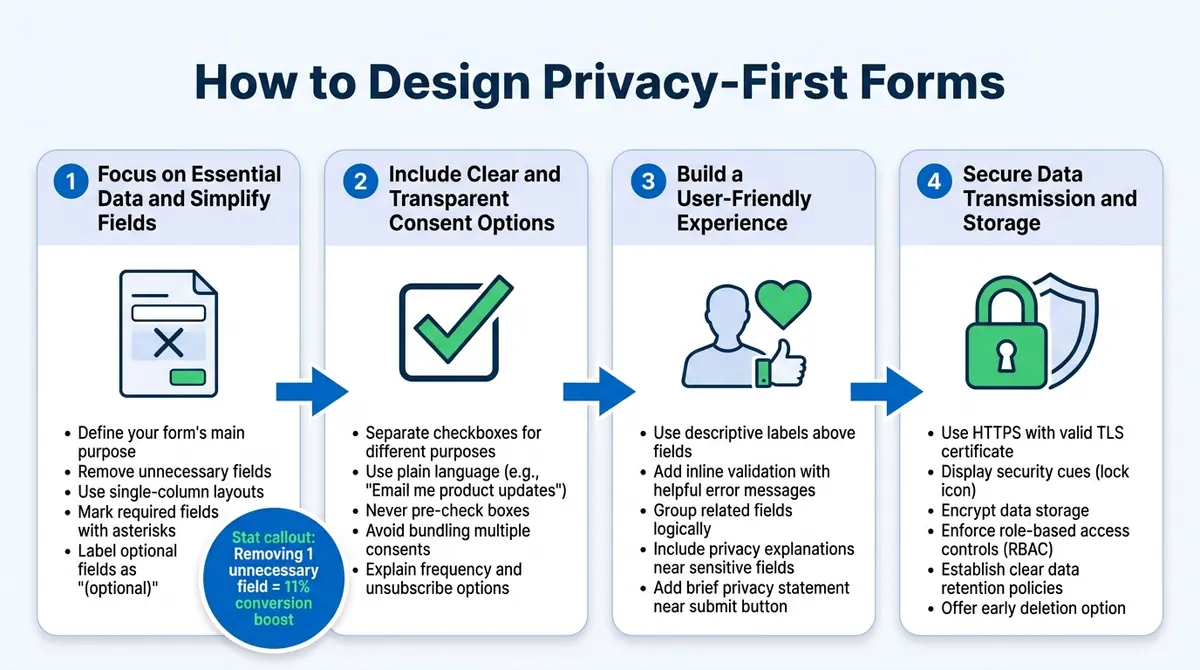
4-Step Guide to Designing Privacy-First Forms
Now that you know why privacy is so important, let’s dive into how to create forms that protect user data while still driving conversions. Here's how you can design forms that respect privacy and encourage users to complete them.
Step 1: Focus on Essential Data and Simplify Fields
Start by defining your form’s main purpose. For instance, a newsletter signup typically only requires an email address. A sales demo request might need a name, work email, company name, and time zone - but not much else. Anything beyond what’s absolutely necessary should be removed.
Ask yourself: What’s the purpose of each field? If it’s not clear, it doesn’t belong. Collecting unnecessary data not only frustrates users but also increases compliance risks. Keep your forms short and sweet. Fields like phone number, job title, or budget might seem helpful, but if they’re not critical, save those for later follow-ups or progressive profiling. Shorter forms often lead to higher completion rates while minimizing the personal data you need to manage.
Use single-column layouts and arrange fields logically, starting with the simplest ones like name and email, before moving to more detailed information. Clearly mark required fields with an asterisk and label optional ones as “(optional)” so users know what’s mandatory.
To keep forms concise while still gathering valuable insights, tools like Reform can automatically pull company details from external sources. This way, you get the data you need without overwhelming users with too many questions.
Once your form is streamlined, it’s time to ensure users give explicit consent.
Step 2: Include Clear and Transparent Consent Options
Break down consent into separate checkboxes for different purposes - like one for essential communications (e.g., order updates) and another for marketing emails. If needed, add a checkbox for tracking or analytics.
Use clear language for opt-in checkboxes, such as “Email me product updates and special offers twice a month.” Avoid pre-checking boxes or using confusing phrasing like double negatives (“Uncheck this box if you don’t want…”). Bundling multiple consents into one checkbox is also a bad idea - it erodes trust and may attract regulatory scrutiny from authorities like the FTC.
Provide a brief explanation of what users can expect, such as how often you’ll contact them, the type of content they’ll receive, and their ability to unsubscribe anytime. Tools like Reform make it easy to configure multiple consent fields with clear labels, helping you stay compliant without needing to code custom solutions.
Step 3: Build a User-Friendly Experience
Use descriptive labels above each field (e.g., “Work email” instead of just “Email”) and avoid relying solely on placeholder text, which disappears as users type. Group related fields together and arrange them in a logical flow that aligns with how people naturally process information.
Add inline validation to provide instant feedback. For example, if a user enters an invalid email, show an error message like “Please enter a valid email, e.g., name@example.com.” This reduces confusion and helps prevent form abandonment.
Include privacy explanations where users might hesitate. For instance, if you ask for a phone number, add a note like, “We’ll only use this to confirm your appointment - no marketing calls.” Near the submit button, include a brief privacy statement, such as: “By submitting, you agree we may use your information to respond to your request. We won’t sell your data. See our Privacy Policy for more details.”
Stick to plain, accessible language and avoid overwhelming users with legal jargon.
Step 4: Secure Data Transmission and Storage
Make sure your site uses HTTPS with a valid TLS certificate to encrypt data as it travels from the user’s browser to your server. Display security cues, like a lock icon, to reassure users.
For data storage, use encryption provided by your database or hosting provider. Enforce role-based access controls (RBAC) so only authorized staff can access submissions. Protect admin dashboards with strong security measures like multi-factor authentication, and log access to monitor who views the data and when.
Establish clear data retention policies for each form type. For example, you might keep marketing leads for 12–24 months of inactivity, after which they’re automatically deleted or anonymized. Let users know about these policies in plain language near the submit button: “We store your information for up to 18 months to follow up on your request, after which it will be deleted or anonymized.” Offer users the option to request early deletion if they prefer.
If managing all these technical details feels overwhelming, privacy-focused tools like Reform can handle much of the heavy lifting. It offers secure storage, access controls, spam prevention, email validation, and real-time threat detection. Reform also integrates with CRM and marketing tools, allowing you to limit where sensitive data is stored and control who can access it. These built-in security features help maintain user trust while keeping your forms compliant and effective.
sbb-itb-5f36581
Building Privacy-First Forms with Reform

Now that we've covered the principles behind privacy-first forms, let’s dive into how Reform helps you bring these ideas to life. Reform combines thoughtful design with powerful tools to create forms that respect user privacy while driving conversions.
Creating Simple, Branded Forms
Reform makes it easy to stick to the essentials. Using templates grounded in data minimization, you can include only the fields necessary for your form’s purpose. For instance, a demo request might ask for just a name, work email, and company size - nothing more.
The platform’s single-column layouts are designed to reduce mental effort, helping users complete forms quickly. You can also customize forms with your logo, brand colors, and fonts, so users recognize your company right away, building trust before they even start typing.
Want to ease users into the process? Multi-step forms let you start with simple, low-friction questions - like email and job role - before moving on to more sensitive details, such as budget or timeline. This approach not only respects user privacy but also improves conversions. In fact, removing just one unnecessary field can boost conversions by 11%, while simplifying a form from 11 fields to 4 has been shown to increase conversion rates by 160%.
Reform also supports conditional routing, showing additional fields only when relevant. For example:
- If a user selects "United States", a state dropdown appears.
- Choosing "Enterprise" as the company size triggers a demo path with budget-specific questions (e.g., "$10,000–$50,000").
- Users opting for "Self-serve" skip extra fields entirely, heading straight to signup.
This smart design collects only what’s necessary, ensuring forms stay efficient and privacy-focused.
"Reform is what Typeform should have been: clean, native-feeling forms that are quick and easy to spin up." - Derrick Reimer, Founder, SavvyCal
Next, let’s talk about how Reform helps you set up clear and compliant consent options.
Setting Up Consent and Compliance
Reform makes it simple to include clear, separate consent checkboxes for different purposes. For example:
- One checkbox for essential communications.
- Another for optional marketing emails.
Each checkbox should use plain, straightforward language, like: "Yes, I’d like to receive product updates by email (you can unsubscribe anytime)."
You can also add a short privacy notice near the submit button, such as: "We use your information to respond to your inquiry and won’t sell your data. See our Privacy Policy for details." Link directly to your full privacy policy for users who want to learn more. Keeping the language conversational and free of legal jargon helps build trust.
Every submission captures detailed consent metadata, including:
- Which checkboxes were selected.
- The exact wording of consent statements.
- The timestamp (e.g., "03/15/2025, 2:37 PM PT").
- The user’s region.
This structured data is invaluable for audits or responding to Data Subject Requests, as it shows exactly what users agreed to and when. You can pass this metadata to your CRM or marketing tools, tagging contacts with their specific permissions.
Reform also allows you to create custom thank-you pages that recap user consent and link to preference management. This approach supports user control and aligns with GDPR and CCPA requirements, reinforcing transparency and trust.
With consent in place, the next step is safeguarding user data.
Protecting User Data
Reform includes features like spam prevention and real-time email validation to ensure you’re only collecting legitimate user information. This aligns with privacy-first principles by reducing the storage of unnecessary or junk data.
In December 2025, Reform introduced real-time threat detection, which uses millisecond risk scoring, behavioral analysis, and threat feeds to block bots and fake submissions at the source. This keeps your lead lists clean and ensures you’re processing only genuine user data.
The platform also provides robust access controls, combining Role-Based Access Control (RBAC), Attribute-Based Access Control (ABAC), Zero Trust principles, and continuous logging. For example:
- Sales reps can access contact details.
- Marketers can work with aggregated or anonymized data.
All form data is transmitted over HTTPS (TLS), encrypting information as it travels from the user’s browser to your server. Embedding forms on secure pages ensures users see the padlock icon, a visual reassurance of your commitment to their privacy.
Testing and Improving Form Performance
Reform’s real-time analytics let you monitor key metrics like view-to-submit conversion rates, drop-off points in multi-step forms, and overall completion rates. These insights help you refine your forms while balancing user trust and lead generation.
For instance, multi-step forms that prioritize privacy often outperform single-page forms asking for everything upfront. Reform’s strategies, tested across hundreds of experiments, have shown a 215% increase in qualified leads for B2B and SaaS companies.
You can also experiment with privacy messaging - testing shorter versus longer explanations near sensitive fields or adjusting the placement of consent checkboxes. Track how these changes impact completion rates, unsubscribe rates, or even customer complaints.
By integrating Reform with your CRM and marketing tools, you can measure lead quality beyond the form itself. Metrics like SQL (Sales Qualified Lead) rate and revenue per lead ensure that prioritizing privacy doesn’t hurt - and may even enhance - the quality of leads you generate. This data-driven approach helps you continuously fine-tune your forms, balancing conversions with the transparency and respect users expect.
"Reform is amazing! You all ship so fast and the design is absolutely fantastic. In the past I’ve always been apprehensive about sending a form but now I love it 👌" - Corey Haines, Co-founder, Conversion Factory
Conclusion
Privacy-first forms are more than just a trend - they’re a way to build trust, improve lead quality, and increase conversions. By collecting only the data you truly need, securing clear consent, providing transparency, and safeguarding user information, you create forms that respect your audience while driving meaningful results for your business.
When users know exactly why you’re asking for their information and trust that it will be handled responsibly, they’re more likely to complete your forms and share accurate details. This not only improves the quality of your leads but also strengthens customer relationships and minimizes legal risks.
Tools like Reform’s no-code platform make it easier to design these privacy-focused forms. Features such as multi-step forms, conditional routing, and built-in privacy tools - like spam prevention and email validation - help you create forms that deliver qualified leads. Plus, seamless integration with your CRM and marketing tools ensures user preferences are respected throughout their journey.
To get started, focus on one key form in your organization. Audit it to remove unnecessary fields, add clear opt-in checkboxes with simple language, and ensure secure data transmission with HTTPS. Track metrics like completion rates, opt-ins, and lead quality to measure the impact. Over time, expand these practices across all your forms - from lead generation to checkout - to deliver a consistent, respectful user experience that sets your brand apart.
FAQs
How do privacy-first forms build trust and improve lead quality?
Privacy-first forms are designed to safeguard users' personal data, creating a sense of trust. By incorporating features such as clear consent options, secure data handling, and effective spam prevention, these forms reassure users that their information is managed responsibly.
This sense of security motivates users to complete forms, leading to more reliable and meaningful leads. When individuals feel their privacy is respected, they’re more inclined to share accurate details, fostering better engagement and stronger relationships with your business.
What mistakes should I avoid when creating privacy-first forms?
When creating forms with privacy in mind, keep things simple. Don’t ask for information you don’t absolutely need - this can overwhelm users and make them less likely to complete the form. Also, make sure your forms are accessible to everyone. Follow accessibility standards like using clear labels and ensuring smooth keyboard navigation.
Another pitfall to avoid is skipping clear consent options or being vague about how you’ll use someone’s data. If users feel you’re not being upfront, it can damage their trust. On top of that, overlooking spam prevention measures and email validation can lead to bad data and poor-quality leads, which ultimately hurts your efforts.
Lastly, don’t forget to use real-time analytics and testing. These tools help you spot and fix problems that could be affecting your form’s performance. Make it a habit to review and fine-tune your forms regularly to keep them secure, easy to use, and effective.
How can I make sure my forms comply with privacy laws like GDPR and CCPA?
To make sure your forms align with privacy laws like GDPR and CCPA, focus on being upfront and giving users control. Clearly explain the type of data you're collecting, why you're collecting it, and how it will be used. Use plain, straightforward language for consent checkboxes, and always give users the option to opt out of non-essential data collection.
On top of that, secure data handling should be a priority. Encrypt sensitive information to protect it from unauthorized access, and ensure only authorized personnel can handle user data. Adding features like real-time email validation and spam prevention can further safeguard data while staying compliant with legal requirements.
By designing your forms with a privacy-first approach, you not only comply with regulations but also earn your users' trust and minimize the risk of hefty penalties.
Related Blog Posts
Get new content delivered straight to your inbox

The Response
Updates on the Reform platform, insights on optimizing conversion rates, and tips to craft forms that convert.



Drive real results with form optimizations
Tested across hundreds of experiments, our strategies deliver a 215% lift in qualified leads for B2B and SaaS companies.
