
.webp)
How to Prepare for Consent Record Audits


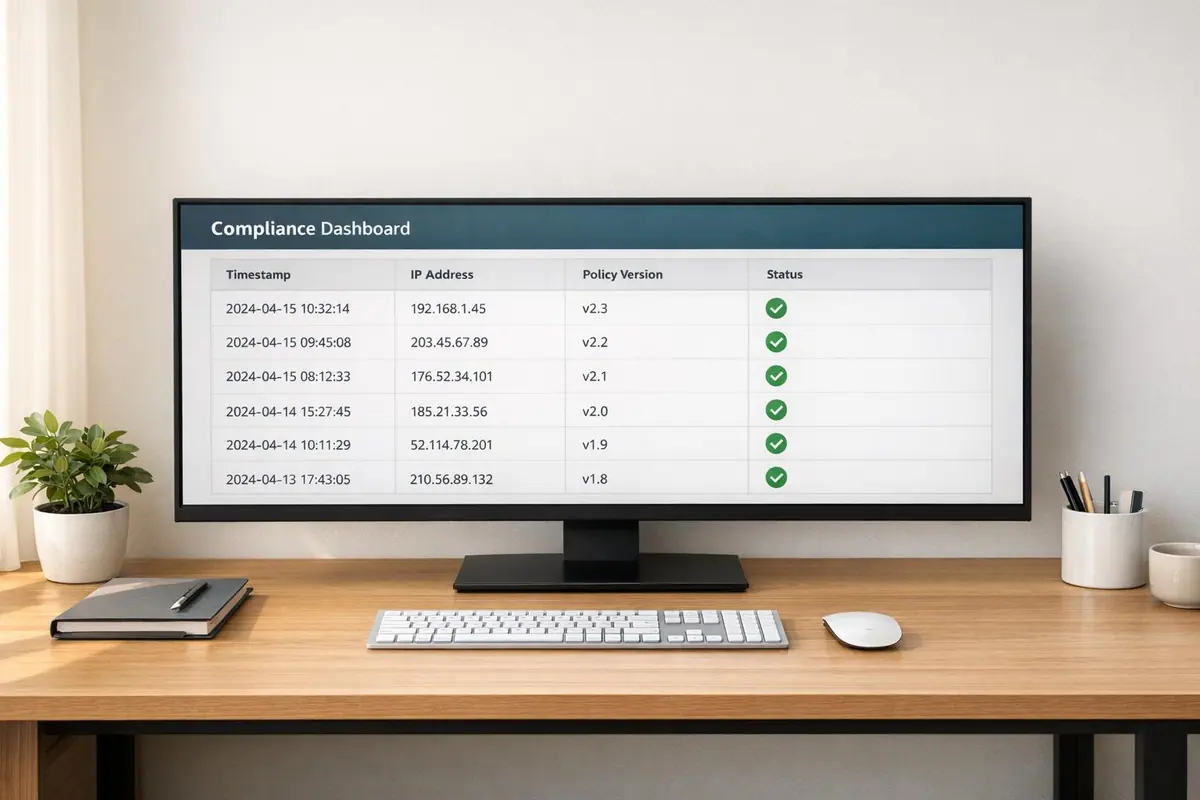
Consent record audits are a must if your business collects customer data. Failing to comply with regulations like GDPR, CCPA, and TCPA can result in fines reaching millions. To avoid this, you need clear, organized, and audit-ready records that prove consent was obtained properly. Here’s how to prepare:
- Know the legal requirements: GDPR requires explicit, opt-in consent with timestamped records, while CCPA allows opt-out by default but mandates clear opt-out options.
- Centralize your records: Store consent data in one place for easy access during audits.
- Document everything: Include who consented, when, how, and what they were told.
- Automate processes: Use tools to validate, log, and manage records efficiently.
- Conduct regular internal audits: Check for missing or incomplete records, and address inconsistencies quickly.
Staying compliant isn’t just about avoiding fines; it builds trust and ensures accountability. Regular audits and proper record management are key to passing inspections and maintaining compliance.
GDPR Compliance Checklist – Audit Requirements Explained
sbb-itb-5f36581
Legal Requirements for Consent Records
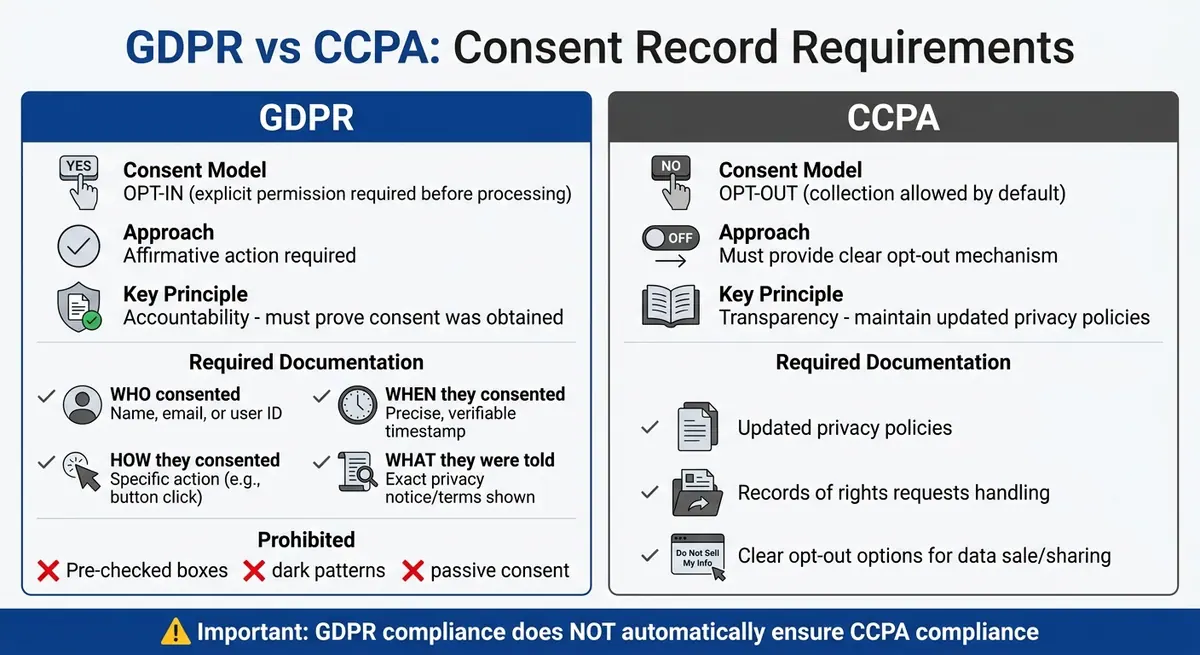
GDPR vs CCPA Consent Record Requirements Comparison
What Consent Records Are
Consent records serve as documented evidence that an individual has agreed to let your business collect and process their personal data. According to GDPR Article 7, businesses (or "data controllers") must demonstrate that a person explicitly consented to data processing. A simple checkbox isn’t enough - what’s required is a full audit trail that can verify consent.
Since consent records qualify as personal data under GDPR, they must meet the same rigorous protection standards. This applies whether you're storing email addresses, user IDs, or hashed IP addresses.
GDPR and CCPA Requirements
The GDPR and CCPA approach consent differently. GDPR mandates opt-in consent, meaning you need clear and affirmative permission before processing most personal data. On the other hand, CCPA follows an opt-out model, allowing data collection by default as long as users have a clear way to stop the sale or sharing of their information.
For GDPR compliance, your consent records must include these four key details:
- Who consented: This could be a name, email address, or user ID.
- When they consented: A precise and verifiable timestamp is required.
- How they consented: The specific action taken, such as clicking a button.
- What they were told: The exact privacy notice or terms they saw at that moment.
Pre-checked boxes or deceptive designs (like dark patterns) don’t meet these standards.
"Where processing is based on consent, the controller shall be able to demonstrate that the data subject has consented to processing of his or her personal data." - GDPR Article 7
The GDPR’s accountability principle places the responsibility squarely on your organization to prove compliance through detailed records and audit trails. By contrast, the CCPA focuses more on maintaining updated privacy policies and documenting how rights requests are handled. Keep in mind, though, that being GDPR-compliant doesn’t automatically mean you meet CCPA requirements.
| Required Element | What to Document | Why It Matters |
|---|---|---|
| User Identifier | Hashed IP, Session ID, or User ID | Links consent to a specific individual |
| Timestamp | Exact date and time of action | Proves consent existed before processing |
| Consent Context | Version of the privacy policy/banner | Shows the specific terms the user saw |
| Action Taken | "Accept All", specific preferences, etc. | Demonstrates clear affirmative action |
| Withdrawal Status | Date and time of revocation | Indicates processing stopped after withdrawal |
Understanding these elements helps clarify the legal complexities and ensures compliance.
Common Compliance Misconceptions
Some businesses mistakenly believe that verbal consent or vague statements like "by using this site, you agree" are sufficient. However, GDPR requires consent to be given through a clear statement or action. Passive actions, like continuing to browse a website, do not meet the standard.
Another common error is trusting third-party data without proper verification. Even if you acquire data from an external source, you’re responsible for proving that valid consent was obtained. This makes due diligence in verifying consent absolutely necessary.
Finally, some companies overlook the need to log consent withdrawals. You must document the exact date, time, and method of revocation to show that data processing ceased immediately. Without these records, defending your practices during an audit becomes difficult.
Knowing and adhering to these legal requirements is essential for staying prepared for audits and ensuring compliance.
Organizing Consent Records for Audits
Centralized Storage Systems
Having a centralized repository for consent data is crucial for smooth compliance and quick responses during audits. Instead of scattering records across multiple systems, centralizing them ensures you can efficiently handle auditor requests. By using API-based real-time lookups, you can retrieve and log queries instantly for audit purposes.
The best centralized systems embed compliance checks directly into your workflow. For example, they allow you to programmatically verify leads against your consent database before making contact. This ensures the record exists, hasn’t been revoked, and aligns with the intended purpose of use. Additionally, all consent events - like DNC scrubs and opt-out requests - should be logged in a tamper-proof format to create a reliable audit trail.
"The companies that manage compliance most effectively use automated systems that integrate compliance checks into every step of their workflow." - LeadCompliant
To ensure your system is audit-ready, perform mock retrieval exercises regularly. Aim to fulfill standard requests in under 20 minutes. If it takes longer, it’s a sign your processes need refinement. This centralized structure lays the groundwork for effective categorization and retention practices.
Categorizing Records
Once your records are centralized, systematic categorization can make audits far more efficient. Start by grouping records based on consent type and purpose - for instance, Prior Express Written Consent (PEWC) for marketing, informational consent, or established business relationships. For GDPR-compliant web-based consent, organize records by cookie categories like Necessary, Functional, Analytical, and Advertisement.
Use standardized naming conventions that align with audit requirements. For example, names like "PEWC_EmailMarketing_Jan2026" or "GDPR_Analytics_Cookies_v3.2" make it easier to identify records. Each record should include metadata such as timestamps, consumer IPs, source URLs, and the exact disclosure text displayed at the time of consent.
Version control is also essential. Keep a record of the specific version of your privacy policy or cookie banner that the user agreed to, along with the vendor list shown at that time. To strengthen your audit trail, store timestamped screenshots or archived versions of impressive multi-step form designs as proof of what the user saw.
Retention Policies and Data Minimization
Maintain consent records for at least five years from the last contact. This duration generally satisfies TCPA, FCC, and FTC requirements, but always confirm the specific retention rules for your industry.
That said, storing data indefinitely isn’t ideal. A "less is more" approach works better - only keep what’s legally required. Holding onto excessive or irrelevant files can complicate audits and increase risk by exposing unnecessary data. Stick to the essentials and remove outdated or redundant records that no longer serve a compliance purpose.
Regularly review your stored records to balance retention with data minimization. Purge records that exceed retention periods to lower storage costs and reduce exposure to potential data breaches.
Conducting Internal Audits
Internal Audit Checklist
Make it a habit to conduct manual audits quarterly. Start by creating high-converting lead forms and sampling consent records to ensure all required elements are present. Export and categorize your subscriber list based on its source to evaluate potential risk levels.
Check that every consent record includes the necessary details. Use session replay tools like TrustedForm or Jornaya to confirm the consumer saw a clear disclosure - not one buried behind hyperlinks. Cross-check the IP address and timestamp on the consent certificate with your inbound call logs to catch inconsistencies or signs of fraud.
Ensure the consumer explicitly consented to hear from a specific entity, not just a vague group of "marketing partners." This is especially important as FCC guidelines tighten in 2025–2026. As part of your audit, test known Do Not Call (DNC) numbers in your system to verify they’re being suppressed correctly.
| Consent Type | Documentation Needed |
|---|---|
| Prior Express Written Consent (PEWC) | Signed form, timestamp, IP, source URL, disclosure text |
| Prior Express Consent | Record of how and when the phone number was provided |
| One-to-One Consent (FCC 2025/2026) | Form screenshot, consent text, complete seller list naming the specific entity |
| Established Business Relationship (EBR) | Transaction records with dates and amounts (valid for 18 months) |
These steps create a strong foundation for identifying and addressing any issues that might arise during your audit.
Finding and Fixing Inconsistencies
Once your records are verified, act quickly to resolve any discrepancies. A staggering 90% of TCPA litigation in 2026 is expected to stem from inadequate consent proof. If you find problems like missing LeadIDs, mismatched IP addresses, or expired consent certificates, immediately suspend the source to mitigate risk.
For records missing critical evidence, you have three options: launch re-permissioning campaigns, segment and restrict those contacts, or delete the data entirely. Keep in mind, re-permissioning campaigns can shrink your mailing list by 60–80%, but they’re essential for maintaining valid consent. Watch out for red flags like leads generated in one state while the IP address shows activity from another state just seconds apart - this often signals fraud.
Don’t forget about the 90-day expiration window for consent certificates. When reviewing older records, confirm they were properly captured and stored at the time of consent. If you notice a drop in consent verification rates or a sudden increase in DNC matches, audit the relevant lead supplier immediately. Proactive action on high-risk records is crucial for staying compliant.
Documenting Audit Results
Use your audit findings to build a solid compliance framework. Document every issue you uncover, its root cause, the corrective actions you took, and how you verified the fix.
"The businesses that get fined are not the ones with imperfect systems - they are the ones with no system at all."
– ConsentTrail
For each lead, create a "compliance bundle" that includes the LeadID, disclosure text, timestamp, IP address, and call recording. This ensures you have immediate proof available if needed during discovery. Keep all consent records for at least five years from the date of last contact.
Finally, share regular reports with senior leadership. These reports should highlight key metrics, issues identified, corrective actions taken, and upcoming compliance tasks. Showing leadership involvement demonstrates a commitment to compliance, which regulators tend to view favorably.
Common Audit Pitfalls to Avoid
Incomplete or Missing Records
One of the most common mistakes businesses make is failing to maintain traceable records, such as a LeadID or Certificate URL, that link a caller to their submitted consent. Interestingly, many lawsuits arise not from a complete lack of consent but from insufficient proof of it.
For example, pre-checked consent boxes are a no-go under TCPA guidelines - they instantly invalidate affirmative consent and will fail any audit. Similarly, vague language like, "By submitting this form, you agree to be contacted", without clearly identifying who will contact the individual or how, is a recipe for compliance issues.
The FCC's "One-to-One Consent" rule, effective January 27, 2025, takes this a step further. Consent must explicitly identify the calling entity; generic terms like "marketing partners" won't cut it. Data mismatches, such as discrepancies between consent records and the contact information used, also weaken your audit defense.
These errors can severely undermine your ability to pass compliance audits.
Relying Too Much on Manual Processes
Another major pitfall is over-reliance on manual processes. While incomplete records are a problem, manual workflows make it even harder to stay audit-ready. Handling high lead volumes manually can cause delays and errors, whereas multi-step lead generation forms streamline data collection, with discovery times of 10–15 minutes per record compared to under five minutes when using automation.
"Manual compliance processes break down quickly when you are handling thousands or tens of thousands of leads and calls per day."
– LeadCompliant
Manual systems are especially prone to errors when cross-referencing critical data points like IP addresses, timestamps, and LeadIDs. For instance, failing to notice a lead generated from a Florida IP but accessed from a California IP within seconds could overlook a clear fraud indicator. Additionally, manual tracking struggles to keep up with tasks like monitoring the 90-day expiration window for consent certificates, a process that automated platforms handle seamlessly. Since the burden of proof for consent always falls on the caller, these inefficiencies can be costly during litigation.
While automation reduces these risks, staying updated on consent requirements is just as important.
Not Updating Consent Practices
Regulations are constantly evolving due to FCC rulings, court decisions, and state laws. The shift to the "One-to-One Consent" rule in January 2025 highlights how quickly businesses can fall behind - those who didn’t update their forms before the deadline now face invalid consent records.
Failing to keep consent practices current means you’ll likely discover non-compliance during litigation, not in a proactive internal audit. And the penalties are steep: TCPA violations range from $500 to $1,500 per call, meaning a campaign with 100,000 non-compliant calls could result in up to $150 million in damages under treble penalties. Beyond that, the FCC can impose fines of up to $23,727 per violation, while the FTC’s Telemarketing Sales Rule carries penalties of up to $50,120 per violation.
To avoid these risks, establish a quarterly review cycle for auditing consent records. Stay on top of regulatory changes by monitoring updates weekly. Maintain a detailed log of consent language changes, including timestamped screenshots of how forms appeared to users. If inconsistencies arise, document the root cause and corrective actions - this "good faith" effort can help reduce penalties during regulatory reviews.
Just like keeping records organized, regularly updating consent practices is essential for maintaining compliance and audit readiness.
Using Reform for Audit Readiness
Reform provides a solution to the common struggles of manual record-keeping and ever-changing consent regulations. Manual processes often lead to compliance risks, but Reform’s no-code form builder simplifies the collection, management, and maintenance of consent records, setting businesses up for audit readiness from day one.
Reform Features for Consent Management
Reform comes equipped with tools designed to tackle the complexities of consent management and audit preparation. For starters, its email validation feature ensures that contact details are accurate before entering your system, reducing the likelihood of data inconsistencies. Spam prevention blocks fraudulent submissions, ensuring that only genuine records are stored.
The platform also uses AI lead enrichment to turn basic contact details into detailed lead profiles, filling in any missing information that might complicate your audit trail. With real-time analytics, you can monitor form performance and data quality, addressing potential issues as they arise.
To strengthen audit readiness, Reform incorporates advanced security measures like Role-Based Access Control (RBAC) and Multi-Factor Authentication (MFA), adhering to ISO 27001 standards. Regular access reviews help identify unauthorized changes early, a significant safeguard considering that 83% of organizations reported at least one insider attack in 2024.
These features collectively improve the integrity of your data and create a unified system that simplifies audit processes.
Integrating Reform with Your Systems
One of the key benefits of Reform is its seamless integration with existing systems, addressing common audit challenges. When consent data is stored across disconnected platforms, it increases the risk of audit issues. Reform resolves this by integrating with tools like CRM and marketing automation software, ensuring that consent record updates are instantly synchronized across all connected systems. This includes capturing timestamps, source verifications, and user attestations for every form submission.
This centralized approach has proven effective, with organizations reporting a 60% reduction in audit findings and a 20% decrease in external professional fees.
"Audit readiness means the organization can prove compliance through accurate records."
– Atlas Systems
By minimizing data silos, Reform ensures that consent records are always up-to-date and accessible.
Example: Passing an Audit with Reform
Imagine a B2B company using Reform to manage consent for sales calls. They can create multi-step forms with conditional routing to customize consent language based on user responses. With spam prevention and email validation, only legitimate entries make it into their system. Meanwhile, AI lead enrichment automatically fills in missing details, ensuring a complete data set.
Thanks to Reform’s CRM integration, every consent record is instantly synchronized, creating a timestamped audit trail that compliance teams can easily access. When an audit request comes in, the team can quickly demonstrate who collected the data, when it was collected, and how it was processed within the organization. Real-time analytics verify consistent consent collection practices, and the streamlined system allows for rapid retrieval of all necessary documentation, cutting down on the manual effort audits typically require.
Reform offers a free trial so businesses can test these features before committing to its plans. Pricing starts at $15/month for the Basic Plan or $35/month for the Pro Plan, which includes team access and advanced integrations.
Conclusion
Getting ready for consent record audits requires a solid understanding of legal regulations like GDPR and CCPA. These laws make it the organization's responsibility to prove that consent was properly obtained. Many TCPA cases arise because companies fail to provide adequate evidence of consent.
To stay compliant, organize consent records so they clearly connect users to their consent events. Include details like timestamps and the exact disclosure text shown at the time of consent. This kind of documentation makes it easier for auditors to verify the timing and specifics of each consent event. Be sure to keep audit records for at least seven years from the date the audit report is released.
Regular audits are crucial. Conduct them every six to twelve months to uncover any gaps between your actual practices and your documented policies. With the FCC's "One-to-One Consent" rule taking center stage in the 2025-2026 regulatory cycle, staying proactive is more important than ever.
Minimize risks by moving away from manual processes that can lead to errors. Automation tools can make compliance much easier. For example, platforms like Reform help by centralizing consent management, automating validation, and seamlessly integrating with your CRM systems. These tools simplify the process and reduce the chances of mistakes.
FAQs
What’s the fastest way to pull a single person’s full consent proof during an audit?
To quickly access consent records, rely on automated systems within your consent management platform. These systems should store detailed evidence, such as timestamps, the method of consent (like a checkbox or signature), and verification data.
Keeping audit trails organized and leveraging real-time analytics simplifies the process of finding and producing consent records. This not only ensures compliance but also saves valuable time during audits.
How can I prove what disclosure text someone saw when they gave consent?
To demonstrate what disclosure text a user encountered, it's crucial to maintain detailed, audit-ready records. This means documenting the exact version of the disclosure text displayed, supported by screenshots or archived HTML files.
Additionally, include contextual details such as:
- Timestamps showing when the text was presented.
- IP addresses to identify the user's session.
- The consent mechanism used (e.g., form submission or email confirmation).
By keeping a version history of all consent forms, you can precisely match a user’s consent to the specific text they reviewed - an essential step for ensuring compliance during an audit.
What should I do if my consent records are missing key details like timestamps or IPs?
If your consent records are missing crucial details like timestamps or IP addresses, it's time to rebuild or fill in the gaps to stay compliant. Start by mapping out every consumer touchpoint, ensuring you’ve documented disclosures and captured essential data such as IP addresses, timestamps, and URLs. Dive into your logs, forms, and system data to piece together any missing information. Once you've reconstructed the records, update your processes to make sure all necessary details are collected moving forward. Regular audits and meticulous documentation can help you stay on track and steer clear of penalties.
Related Blog Posts
Get new content delivered straight to your inbox

The Response
Updates on the Reform platform, insights on optimizing conversion rates, and tips to craft forms that convert.



Drive real results with form optimizations
Tested across hundreds of experiments, our strategies deliver a 215% lift in qualified leads for B2B and SaaS companies.
