
.webp)
Conditional Lead Routing for Real Estate Agencies



Conditional lead routing ensures real estate agencies quickly connect potential buyers with the right agents based on location, budget, or property type. This automated process eliminates delays, boosts lead conversion rates, and enhances client satisfaction. By leveraging tools like Reform, agencies can set up multi-step forms, apply logic-based rules, and integrate with CRMs for real-time lead assignments.
Key Takeaways:
- Faster Lead Response: Automates routing to reduce delays.
- Improved Conversions: Matches leads to agents with relevant expertise.
- Enhanced Client Experience: Ensures tailored, prompt follow-ups.
- Easy Setup: Tools like Reform simplify form creation and CRM integration.
Agencies using this approach report higher efficiency and better sales outcomes, with features like conditional logic and CRM sync driving results. Reform's Pro Plan at $35/month supports advanced routing needs, making it a valuable tool for scaling operations.
Benefits of Conditional Lead Routing for Real Estate
Automating Lead Assignments
Manually distributing leads eats up valuable time that agents could use to close deals. Conditional routing solves this problem by instantly assigning leads based on specific criteria like ZIP code, property type, or budget range. As soon as a lead submits their information, the system evaluates it and directs it to the right agent - no human involvement needed.
"By automating the assignment of leads, agents spend less time on administrative tasks and more time on high-value activities like closing deals." – Sierra Interactive
This approach ensures leads are routed accurately, reducing the chance of misassignments that can derail a sale. It also categorizes leads - hot, warm, or cold - so agents can prioritize their efforts where it matters most. Considering the average real estate agent earns $65,850 annually, spending more time on productive tasks directly boosts earnings. By minimizing errors and optimizing lead routing, automation sets agents up for better conversion rates.
Improving Lead Conversion Rates
Accurate lead assignments don’t just save time - they also improve conversions. When a prospect looking for commercial property is paired with an agent well-versed in zoning laws and investment strategies, the chances of closing the deal go up.
Local expertise plays a big role here too. An agent familiar with a specific neighborhood can speak confidently about property values, schools, and amenities, which builds trust - an essential factor for conversions. For high-intent leads from platforms like Zillow, using a "first-to-claim" routing strategy ensures agents respond quickly.
| Routing Method | Best Use Case | Impact on Conversion |
|---|---|---|
| Geography-Based | Large metro areas with distinct neighborhoods | High; leverages local knowledge and trust |
| Expertise-Based | Niche markets (luxury, commercial, rentals) | High; pairs agents with clients requiring specialized skills |
| Performance-Based | High-value property leads | Maximum; ensures top agents handle critical leads |
| First-to-Claim | High-intent online leads (Zillow, web forms) | High; prioritizes speed in fast-paced markets |
This precision ensures every lead has the best chance of conversion.
Improving Client Satisfaction
Beyond boosting conversions, better routing enhances the client experience. Accurate lead assignments mean faster follow-ups and more personalized service. Automated systems assign leads immediately, ensuring prospects don’t wait - especially important when clients are comparing multiple agents. Instead of languishing in a generic inbox, leads get prompt, tailored attention.
For example, a buyer searching for luxury homes benefits from working with an agent who specializes in that niche. This agent can provide tailored advice and insights that a generalist might miss. Similarly, geography-based routing connects clients with local experts who understand the nuances of their desired neighborhoods, building trust right from the start.
Consistent follow-ups further ensure no lead gets overlooked. This level of attention smooths the buying process and strengthens relationships, laying the foundation for long-term client loyalty.
sbb-itb-5f36581
Real Estate Lead Automation: Build a System
Lead Routing Criteria for Real Estate Agencies
Routing leads effectively ensures that each prospect connects with the agent best equipped to close the deal. By focusing on criteria like location, budget, and property type, agencies can streamline their process, save time, and improve conversion rates. These factors help ensure that leads are matched with the most suitable agent right from the start.
Location-Based Routing
Sorting leads by ZIP code, city, or neighborhood allows agencies to pair prospects with agents who truly know the local market. These agents can provide insights on property values, schools, upcoming developments, and neighborhood features. This is especially critical in large metro areas where market conditions can vary widely from one neighborhood to the next.
Location-based routing also cuts down on inefficiencies. Assigning leads to agents unfamiliar with certain areas wastes time on unnecessary travel and irrelevant discovery calls. By routing leads geographically as soon as they’re captured, agents can respond quickly with tailored, location-specific recommendations.
"A buyer looking at $1.2M homes in Westlake should not be routed to a new agent who works starter homes in the east suburbs. That's not a training issue - that's a routing failure." – Surface Labs
After location, budget is another key factor in aligning leads with the right agents.
Budget Range
Matching leads by price range ensures that prospects are paired with agents who specialize in their market tier. High-value clients, such as those searching for luxury homes or investment properties, benefit from working with agents experienced in those areas. Agencies can use lead capture forms to gather budget details upfront, enabling automated distribution to the most appropriate agent.
Using budget as a routing criterion also prevents mismatches. For instance, pairing first-time buyers with agents who focus on luxury homes can lead to poor experiences on both sides. Budget-based routing aligns with the BANT framework, which assesses a lead’s readiness and potential value.
Property Type
The final layer of refinement comes from categorizing leads by property type. Whether the lead is interested in residential, commercial, investment, or vacation properties, matching them with an agent who specializes in that niche ensures better service. For example:
- A commercial real estate lead may need an agent who understands zoning laws and leasing agreements.
- A luxury residential buyer benefits from an agent with insights into high-end markets and tailored recommendations.
Agencies that focus on specific markets, such as fix-and-flip properties or development projects, can see significant improvements when leads are routed to agents with the right expertise and certifications. Properly matching leads to agents based on property type reduces errors and increases the likelihood of successful conversions.
How to Set Up Conditional Lead Routing with Reform
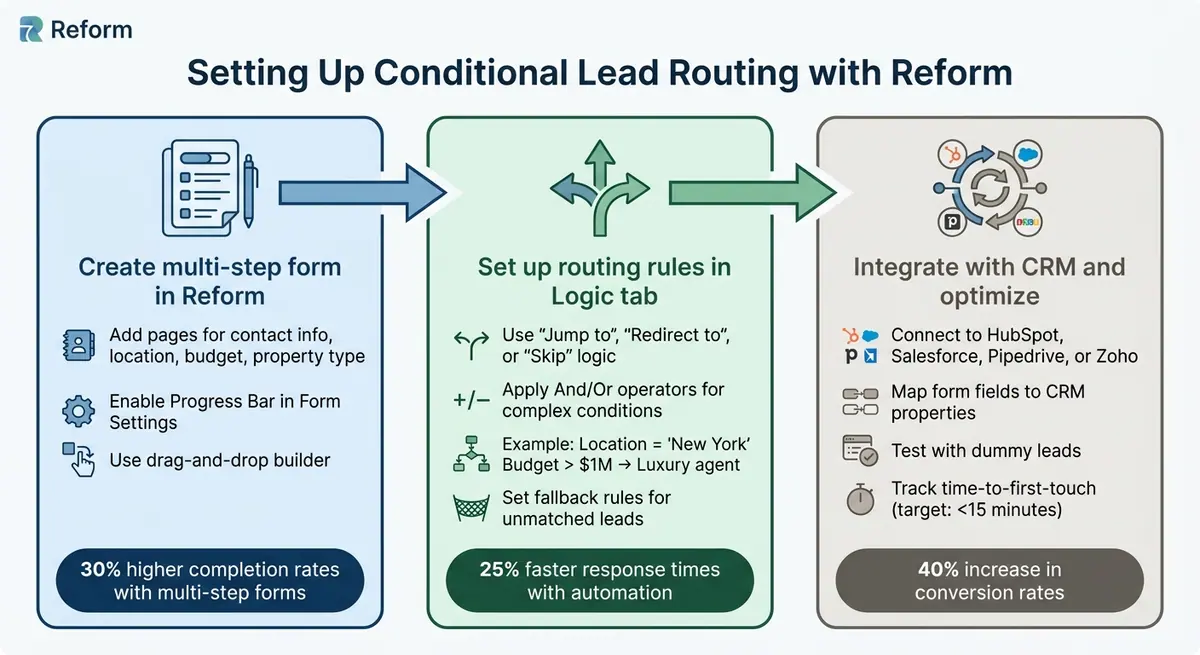
How to Set Up Conditional Lead Routing in 3 Steps
Reform makes it simple to automate lead routing without needing any coding skills. By creating detailed forms, setting up logic-based rules, and linking everything to your CRM, you can ensure leads are routed efficiently for quick follow-up.
Create Multi-Step Lead Capture Forms
Start by logging into Reform, clicking "New Form", and choosing a multi-step template. Use the "Add Page" button to break your form into steps. These steps could include fields for basic contact details, location (via dropdown or address autocomplete), budget ranges (e.g., $200,000–$500,000; $500,000–$1,000,000; $1,000,000+), and property preferences.
The drag-and-drop builder in Reform allows you to easily rearrange fields. To improve the user experience, enable the Progress Bar in the Form Settings and customize page labels. This step-by-step approach helps keep users engaged. In fact, real estate professionals have noted 30% higher completion rates with multi-step forms compared to single-page forms, as users can focus on one detail at a time.
Set Up Conditional Logic for Routing
Once your form is ready to collect data, head to the "Logic" tab to set up routing rules. Select "Page settings" on any step, then click "Logic". For example, you can create a rule like this: if the location is "New York" and the budget exceeds $1,000,000, direct the lead to a luxury agent's Calendly link. Alternatively, use "Jump to" logic to send commercial property leads to a specialized questionnaire while residential buyers continue through the standard flow.
Reform supports complex conditions using And/Or operators. For instance, you could route leads based on criteria like (location is "California" or "New York") and the budget is over $800,000. Don’t forget to set a fallback rule for unmatched leads by assigning them to a default agent. Always test your logic by submitting dummy leads to ensure the routing works as intended. Agencies that automate routing this way often see 25% faster response times.
Once your routing rules are fine-tuned, the next step is integrating your form with a CRM for smooth lead management.
Connect with CRM for Automated Lead Management
After setting up the logic, integrate your form with your CRM. Reform connects directly with platforms like HubSpot, Salesforce, Pipedrive, and Zoho through native integrations or Zapier. Go to the "Integrations" section, authenticate your CRM, and map form fields to CRM properties. For instance, you can link Reform’s "location" field to a custom field in your CRM. Enable webhooks to sync leads in real time so they appear immediately, complete with routing tags.
In your CRM, use workflows to assign leads based on the tags Reform sends. For example, a lead tagged "Luxury-NY" can be routed to your VIP team, triggering a custom email sequence. This automated 24/7 system eliminates manual handoffs, ensuring every lead is handled promptly. Real estate agencies leveraging this integration have reported a 40% increase in conversion rates.
Implementation Steps for Conditional Routing
Follow these steps to make sure every lead is routed effectively, connecting the right agent to the right prospect.
Step 1: Build a Lead Capture Form in Reform
Start by logging into Reform and selecting the "New Form" option to create your lead capture form using powerful form templates. Use the "Add Page" button to break the form into multiple steps, gathering details like contact information, location preferences, and budget. To organize the form, simply drag and reorder fields as needed.
To keep users engaged, enable the Progress Bar in Form Settings. Customize it with your agency’s brand colors and choose how progress is displayed - options include numbers, custom labels (like "Property Details"), or no labels at all. A clear progress indicator can reduce abandonment rates during the qualification process.
Once your form is ready, move on to setting up the routing rules.
Step 2: Configure Conditional Logic for Routing
Go to Page Settings and select "Logic" to define your routing rules. Choose the type of logic that fits your needs:
- "Jump to": Navigate to a specific internal page.
- "Redirect to": Send users to an external URL, like a scheduling link.
- "Skip this page": Bypass unnecessary questions.
- "Finish and show": End the form with a custom message.
Set triggers using the "When" dropdown menu, applying conditions like "is", "is not", or "is empty." For more complex setups, combine criteria with "And" (all conditions must be true) or "Or" (any condition can trigger the action). Use "Add action" to create multiple outcomes based on different answers. Don’t forget to save your configurations and repeat for other routing needs. Keep in mind, these advanced features require Reform's Pro Plan.
With your logic in place, move to the next step to ensure everything works smoothly.
Step 3: Test and Optimize Routing Performance
Run tests with dummy leads to confirm that your routing rules function as expected. Track metrics like time-to-first-touch in your CRM to ensure leads are contacted within 15 minutes - speed is key for higher conversion rates. Weekly reports can help you identify "orphaned" leads - those without an assigned owner or activity within 24 hours. Analyze conversion rates by factors like property type or lead source to determine which rules are the most effective.
"Lead routing isn't a one-time setup. It has to evolve with your team, territory changes, and business priorities." - Angel Palaganas, RevOps Manager
Automate triggers in your CRM to reroute leads if they aren’t claimed or contacted within 24–48 hours. Schedule quarterly reviews to ensure your routing logic aligns with your team’s current capacity and market trends. Make adjustments one rule at a time, measuring the impact on response times or conversions before implementing broader changes.
Reform Pricing and Plans for Real Estate Agencies
Pricing Plan Comparison
Once your routing rules are in place, picking the right pricing plan ensures your automation system runs smoothly.
For agencies that rely on conditional routing, the Pro Plan is a must. It costs $35/month or $350/year (with annual billing). The Basic Plan, priced at $15/month, doesn’t include the conditional logic necessary for routing leads based on criteria like location, budget, or property type.
The Pro Plan includes advanced features like multiple outcome conditional logic, team access, and the ability to track incomplete form responses - perfect for following up with prospects who don’t finish the form.
| Feature | Basic Plan | Pro Plan | Done for You |
|---|---|---|---|
| Price (Monthly) | $15/mo | $35/mo | Custom |
| Price (Yearly) | $150/yr | $350/yr | Custom |
| Conditional Logic | No | Yes (Multiple outcomes) | Included |
| CRM Integrations | Basic (Zapier, Sheets) | Pro (HubSpot, Salesforce) | Full Setup |
| Team Access | No | Yes | Yes |
| Partial Responses | No | Yes (View incomplete) | Included |
This pricing setup is tailored to support dynamic routing strategies, ensuring your forms deliver top performance.
You can try the Pro Plan for free with a 14-day trial. Opting for annual billing saves you 16%, reducing the cost to $350/year instead of $420 with monthly payments. For agencies handling more complex routing - such as managing leads across multiple regions or specialties - the Done for You service offers expert-built solutions at custom pricing.
"Reform is what Typeform should have been: clean, native-feeling forms that are quick and easy to spin up. Reform does the job without a bunch of ceremony."
– Derrick Reimer, Founder, SavvyCal
Conclusion
Conditional lead routing changes the game for real estate agencies by streamlining how they handle incoming prospects. By automatically directing leads based on location, budget, and property type, agencies can eliminate the delays caused by manual processes. This means faster responses and happier clients. Considering that agents spend only 28% of their time selling and 17% on data entry, this approach helps reclaim a significant chunk of their day.
Reform takes this efficiency to the next level. Its multi-step forms gather structured data using decision lists and custom fields, while conditional logic ensures every lead reaches the right agent instantly. With direct CRM integration, leads are automatically funneled into the correct pipeline stage, removing the need for manual updates. Personalized follow-ups, which can increase revenue by 40%, become scalable with Reform's automated routing. This ensures every inquiry gets a tailored and seamless experience.
Getting started is simple. Use Reform's high-quality lead forms and set up routing rules tailored to your market. The Pro Plan, priced at $35/month or $350/year, unlocks conditional logic for smarter routing. Test your rules across various scenarios - residential versus commercial properties, price ranges, and neighborhoods - to ensure leads are assigned quickly and accurately.
The stats speak for themselves: businesses using CRM software paired with structured data capture are 86% more likely to exceed their sales goals. Reform's automation tools not only ensure timely responses but also help turn more inquiries into closed deals.
Take advantage of the 14-day free trial to create your first conditional routing workflow. Focus on capturing key data points early, like budget and preferred location, as these drive the most effective routing paths. And don’t forget to review your routing logic every quarter to stay aligned with market trends.
FAQs
What data should my form collect to route leads correctly?
To make sure leads are routed effectively, your form should collect essential details like geographic location, property type, budget, lead source, and agent availability or expertise. You can also consider factors such as user behavior to improve accuracy and streamline lead management.
How do I prevent leads from going unassigned when rules don’t match?
To prevent leads from slipping through the cracks when no routing rules apply, set up a default assignment or fallback rule in your lead routing system. This way, any unmatched leads can still be directed to a designated team member, a shared queue, or a general pool. A catch-all rule ensures that every lead gets attention, even if they don’t fit into predefined categories.
What metrics should I track to improve my routing over time?
To make lead routing more effective, focus on tracking critical metrics like conversion rates, sales volume, and customer satisfaction scores. These metrics help identify which factors - such as geographic location or property type - are contributing to success. It’s also important to keep an eye on response times, engagement levels, and signals like lead sources (explicit data) and website activity (implicit behavior). By regularly analyzing this data and fine-tuning your routing strategies, you can increase conversions and create a better experience for your customers.
Related Blog Posts
Get new content delivered straight to your inbox

The Response
Updates on the Reform platform, insights on optimizing conversion rates, and tips to craft forms that convert.




Drive real results with form optimizations
Tested across hundreds of experiments, our strategies deliver a 215% lift in qualified leads for B2B and SaaS companies.
