
.webp)
Database Vulnerability Mitigation Guide



Your database is under constant threat. Cyberattacks are up 50% weekly, and the average data breach costs $4.24 million. Even small vulnerabilities - like outdated software or weak passwords - can lead to massive damage, fines, and even business closure.
Here’s what you need to know to protect your database:
- Common Vulnerabilities: SQL/NoSQL injection, misconfigurations, broken access controls, outdated systems, and weak authentication.
- Why It Matters: Non-compliance with regulations like GDPR or HIPAA can result in fines, while insider threats and ransomware attacks are on the rise.
- Key Tools: Use tools like Oracle DBSAT, Microsoft Defender for SQL, or
mysql_secure_installationfor vulnerability scanning. - Mitigation Steps: Apply patches within 48–72 hours, harden databases (e.g., disable unused features, enforce least privilege), and control network access (e.g., restrict IPs, use bastion hosts).
- Monitoring: Real-time alerts and behavioral analytics can detect suspicious activity like unusual query spikes or repeated login failures.
- Incident Response: Have a clear plan to identify, contain, and recover from breaches. Regularly test your response strategy.
Bottom line: Address vulnerabilities now to avoid costly breaches later. Patching, hardening, and proactive monitoring are your best defenses.
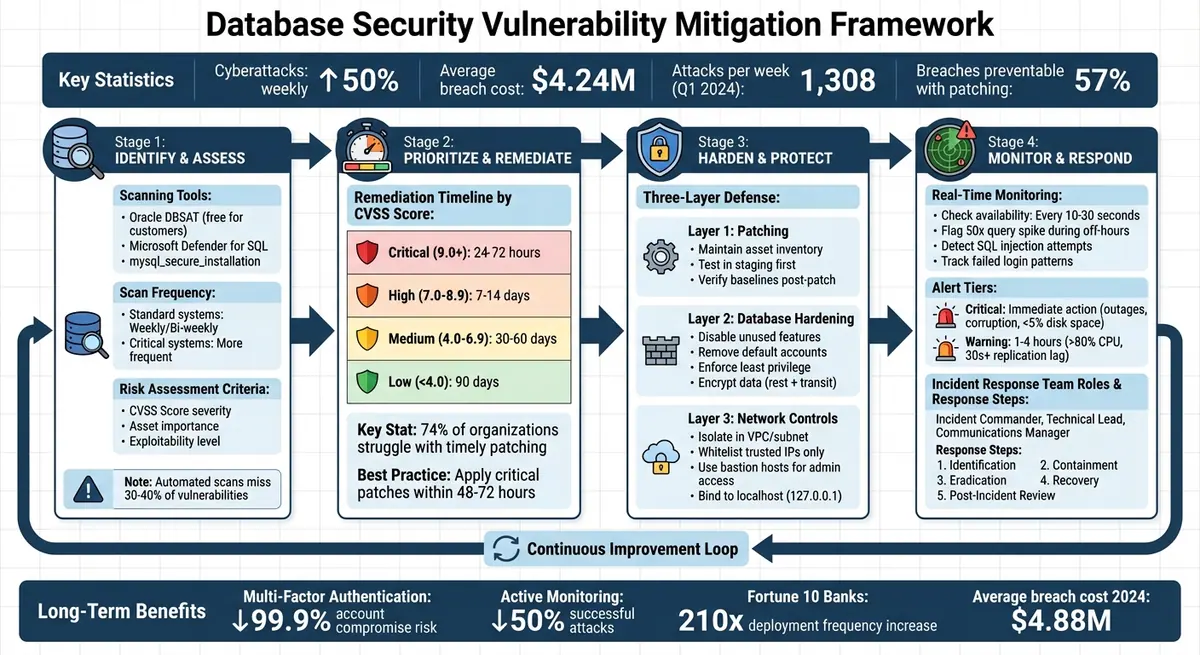
Database Security Vulnerability Mitigation Framework: A 4-Step Process
SQL Server Security: Find & Fix Vulnerabilities in Minutes
sbb-itb-5f36581
How to Identify and Assess Vulnerabilities
Unresolved vulnerabilities are like open doors - they leave your database exposed. That’s why identifying and assessing vulnerabilities is the cornerstone of any solid database security strategy. While modern tools have made it easier and faster to pinpoint vulnerabilities, choosing the right tools and prioritizing their findings is still critical.
Using Vulnerability Scanning Tools
Automated tools such as Oracle's DBSAT, Microsoft Defender for SQL, and mysql_secure_installation are essential for spotting misconfigurations, outdated software, and over-permissioned accounts. These tools provide continuous monitoring across platforms. Robyn Ferreira, Senior GRC Manager at Scytale, emphasizes their importance:
Vulnerability scanning... is essentially a vital front-line defense for your security posture.
Here’s a closer look at these tools:
- Oracle Database Security Assessment Tool (DBSAT): This free, lightweight tool analyzes configurations, user permissions, and sensitive data locations in Oracle databases (version 11.2.0.4 and later). It’s available to Oracle customers with active support contracts.
- Microsoft Defender for SQL: Replacing the older SQL Vulnerability Assessment tool, this service offers real-time threat protection and vulnerability scanning for both cloud-based and on-premises SQL Server resources. It also allows you to create a "Baseline" to mark acceptable configurations, making future scans more focused.
- mysql_secure_installation: A standard script for MySQL and MariaDB users, it helps with initial hardening by removing default databases and accounts.
Consistency is key. Aim to run these scans weekly or bi-weekly, increasing the frequency for critical systems. Tools like Microsoft Defender for SQL streamline the process by highlighting only deviations from your approved baseline configuration, allowing you to focus on actual threats. Oracle reinforces this by stating, "knowing where your database configuration introduces risk is the first step in minimizing that risk".
Once vulnerabilities are identified, the next step is to assess their risk and decide how quickly they need to be addressed.
Performing Risk Assessments
Detecting vulnerabilities is only half the battle. To manage them effectively, you need to understand their context. Not all vulnerabilities pose the same level of threat. For instance, a CVSS score of 9.8 signals a critical issue with severe consequences. Under PCI DSS standards, any vulnerability with a CVSS score above 4.0 is considered a compliance risk if left unpatched. But focusing solely on severity can be misleading. A complete risk assessment should consider:
- Severity: How critical is the vulnerability based on its CVSS score?
- Asset Importance: How vital is the system to your business operations?
- Exploitability: Is the vulnerability actively being exploited or on an internet-facing system?
Automated scans alone can miss up to 30–40% of vulnerabilities, especially those related to business logic flaws or chained attack paths. Manual penetration testing complements automated tools by uncovering these hidden risks. Together, they provide a fuller understanding of your security landscape.
Once vulnerabilities are clearly identified, establish remediation timelines based on their priority. For example:
- Critical issues (CVSS 9.0+): Address within 24–72 hours, especially for internet-facing or high-value systems.
- High-severity issues (CVSS 7.0–8.9): Resolve within 7–14 days.
- Medium-severity issues (CVSS 4.0–6.9): Fix within 30–60 days.
- Low-severity issues: Address within 90 days.
As Lorikeet Security aptly puts it: "Scanning tells you what is wrong. A vulnerability management program ensures something actually gets done about it".
Database Security Mitigation Strategies
After identifying vulnerabilities, the next step is to implement strategies that provide ongoing protection. Three essential approaches - patching, hardening, and controlling network access - can significantly reduce risks.
Applying Patches and Updates
Patching is your primary defense against known vulnerabilities. A staggering 74% of organizations face challenges in applying patches promptly, and 57% of breaches could have been avoided with timely patching. With attackers exploiting vulnerabilities faster than ever, critical patches should ideally be applied within 48–72 hours.
To stay on top of patching:
- Keep an up-to-date asset inventory, including database versions, IP addresses, and system owners, to ensure no system is missed.
- Standardize database platforms where feasible to simplify patch management.
- Test patches in a staging environment before deploying them in production. This step helps catch compatibility issues or performance problems early.
If a patch isn't immediately available, apply compensating controls like tightening firewall rules or disabling risky features to minimize exposure. Always revisit and verify your security baselines after each patch cycle to prevent configuration drift.
Once patching is under control, focus on reducing the attack surface with hardening techniques.
Database Hardening Methods
While patching addresses known issues, hardening proactively reduces potential vulnerabilities. Think of it this way: patching fixes cracks in the wall, but hardening ensures the wall is built without unnecessary openings.
Here’s how to harden your databases:
- Disable unused features: Turn off unnecessary services, ports, and functions. Remove default databases and sample accounts immediately after installation. For example, MySQL users can use the
mysql_secure_installationscript to remove anonymous users, test databases, and remote root access. - Strengthen authentication: Upgrade to modern algorithms like
scram-sha-256for PostgreSQL orcaching_sha2_passwordfor MySQL to protect against rainbow-table attacks. - Least privilege principle: Grant users only the permissions they absolutely need. Rename or remove default admin accounts, and enforce account lockouts after multiple failed login attempts.
- Encrypt sensitive data: Ensure data is encrypted both at rest and in transit using strong TLS protocols. Avoid embedding database credentials in source code - use environment variables or secret management tools instead.
By hardening your database, you significantly reduce the chances of an attacker finding a weak point to exploit.
Controlling Network Access
Even a patched and hardened database can be compromised if it's exposed to insecure networks. Proper network controls are crucial to keeping your database safe.
-
Limit exposure: Avoid public Internet access by isolating databases in secure subnets or Virtual Private Clouds (VPCs). Configure databases to bind only to localhost (127.0.0.1) or specific private IPs. For instance, PostgreSQL's
listen_addressescan be set to "localhost", and MySQL'sbind-addressto 127.0.0.1. - Restrict inbound traffic: Use firewalls or network security groups to allow traffic only from trusted IPs and specific ports. Maintain a strict whitelist for application servers and authorized workstations.
-
Secure administrative access: Route all administrative connections through a bastion host (jump server) to centralize and audit access. Google Cloud emphasizes:
Security isn't a feature - it's an integral part of design - no different than internationalization or accessibility.
- Control client connections: For untrusted systems, require connections through an API that enforces access controls rather than allowing direct database access. For web-based management tools like phpMyAdmin or pgAdmin, protect them with HTTPS, multi-factor authentication, and strict source restrictions.
Monitoring and Responding to Incidents
Once you've implemented patching, hardening, and network controls, the next step is ensuring constant vigilance through monitoring and having a solid response plan. Continuous monitoring is key to spotting threats as they happen. Consider this: in the first quarter of 2024, organizations experienced an average of 1,308 cyberattacks per week, and just one hour of downtime can cost medium or large enterprises over $1 million. When preventive measures aren't enough, real-time detection combined with a robust response plan can act as your safety net. Here's how to monitor effectively and respond swiftly to incidents.
Setting Up Real-Time Monitoring and Alerts
Real-time monitoring tools, powered by behavioral analytics and machine learning, can help you track database availability (every 10–30 seconds) and active connections. These tools are particularly effective for spotting SQL injection attempts (both classic and blind), brute force attacks from repeated failed logins, and unusual access patterns, such as logins from unexpected geographic locations.
To detect potential data exfiltration, flag anomalies like unusually high query volumes or a spike in query activity - say, a 50-fold increase during off-hours. Keep an eye out for commands like xp_cmdshell or OPENROWSET, which attackers often exploit. Built-in tools such as pg_stat_statements for PostgreSQL or performance_schema for MySQL can provide detailed insights into query behavior.
Jon Garside, Executive Director of Product Marketing at New Relic, highlights the importance of monitoring:
Database monitoring gives IT teams the insight they need to proactively make sure databases and the services that use them are optimized for performance, are stable and reliable, and remain secure.
To stay ahead of issues, configure alert tiering. Critical alerts (e.g., database outages, data corruption, or disk space dropping below 5%) demand immediate action. Meanwhile, Warning alerts (e.g., CPU usage exceeding 80% or replication lag over 30 seconds) should be addressed within 1–4 hours. Store audit logs separately to prevent tampering and ensure a clear record of events.
Creating an Incident Response Plan
A well-structured incident response plan guides your team through handling security incidents. Start by cataloging your database assets, forming a Computer Security Incident Response Team (CSIRT), and assigning specific roles like Incident Commander, Technical Lead, and Communications Manager.
Once roles are in place, follow these steps to manage incidents effectively:
- Identification: Look for unusual SQL patterns and repeated login failures.
- Containment: Isolate affected systems and segment the network to limit further damage.
- Eradication: Identify the root cause and remove threats like malware or unauthorized accounts.
- Recovery: Restore operations using a tiered approach, prioritizing critical systems first.
- Post-Incident Review: Analyze what happened, document lessons learned, and update your response plan.
To ensure consistent triage and response, classify incidents by severity using a framework like P1–P4. Regularly test your plan with tabletop exercises, simulations, and penetration testing to ensure your team is prepared. With the average cost of a data breach reaching $4.88 million in 2024, practicing your response plan can significantly reduce downtime and damage.
Key Takeaways
Let’s break down the essential points for maintaining strong database security, building on the strategies discussed earlier.
Summary of Mitigation Methods
Effective database security uses a multi-layered approach. Start by implementing network isolation - place your database in a separate DMZ and limit access to specific hosts. Use encrypted connections with TLSv1.2 or higher, employing modern ciphers like AES-GCM, to avoid transmitting data in plain text. Adopt the principle of least privilege by using non-administrative accounts and granting only the permissions necessary (e.g., SELECT, UPDATE, DELETE).
Database hardening is another critical step. Follow security baselines like CIS Benchmarks, remove default accounts and databases, and ensure database services run under low-privileged user accounts. Store credentials securely in encrypted configuration files outside of the web root. Regular patching and updates are essential to address known vulnerabilities, and active monitoring helps detect and respond to threats swiftly. These practices not only safeguard your data now but also create a foundation for ongoing security improvements.
The Long-Term Benefits of Database Security
The advantages of strong database security extend well beyond immediate risk reduction. For instance, implementing Multi-Factor Authentication can reduce the risk of account compromise by up to 99.9%, while active monitoring has been shown to decrease the likelihood of successful attacks by 50%. Addressing vulnerabilities during development is far more cost-effective than fixing them in production. Additionally, automated audit trails can cut audit preparation times from weeks to just minutes.
Consider this: nine of the Fortune 10 U.S. banks use automated policy enforcement, enabling a 210x increase in deployment frequency while maintaining strict security and compliance. As Liquibase aptly explains:
Database security isn't just a technical requirement. It's a legal and reputational imperative that affects everything from customer trust to regulatory compliance.
FAQs
How do I prioritize which database vulnerabilities to fix first?
When managing database security, it’s essential to prioritize vulnerabilities based on their potential impact and how easily they could be exploited. Start by addressing common issues such as:
- Outdated software: Ensure your database systems are running the latest versions to prevent attackers from exploiting known flaws.
- Misconfigured access controls: Review permissions and access levels to avoid granting excessive privileges.
- Unpatched vulnerabilities: Regularly apply updates and patches to fix security gaps.
- Weak passwords: Implement strong password policies to reduce the risk of brute-force attacks.
To determine which vulnerabilities to tackle first, consider key factors like the importance of the affected asset, current threat activity, and the likelihood of exploitation. By focusing on the most critical risks, you can ensure that your efforts have the greatest impact on securing your database.
What should I do if a critical patch isn’t available yet?
If a crucial patch isn't ready yet, there are steps you can take to minimize risks. Start by limiting exposure - use firewalls to control access and isolate the database from untrusted systems. Strengthen defenses with strict security configurations. Regularly conduct vulnerability assessments and keep an eye out for unusual activity to identify potential threats early. These measures can safeguard your database while you wait for the patch to be released.
What alerts best indicate a database breach in progress?
Some warning signs that could indicate a database breach include multiple failed login attempts, unexpected surges in database activity, or alerts from security tools flagging unusual behavior like odd traffic patterns. Keeping an eye on these indicators can help catch potential breaches early on.
Related Blog Posts
Get new content delivered straight to your inbox

The Response
Updates on the Reform platform, insights on optimizing conversion rates, and tips to craft forms that convert.




Drive real results with form optimizations
Tested across hundreds of experiments, our strategies deliver a 215% lift in qualified leads for B2B and SaaS companies.
