
.webp)
7 Email Events That Update Lead Scores


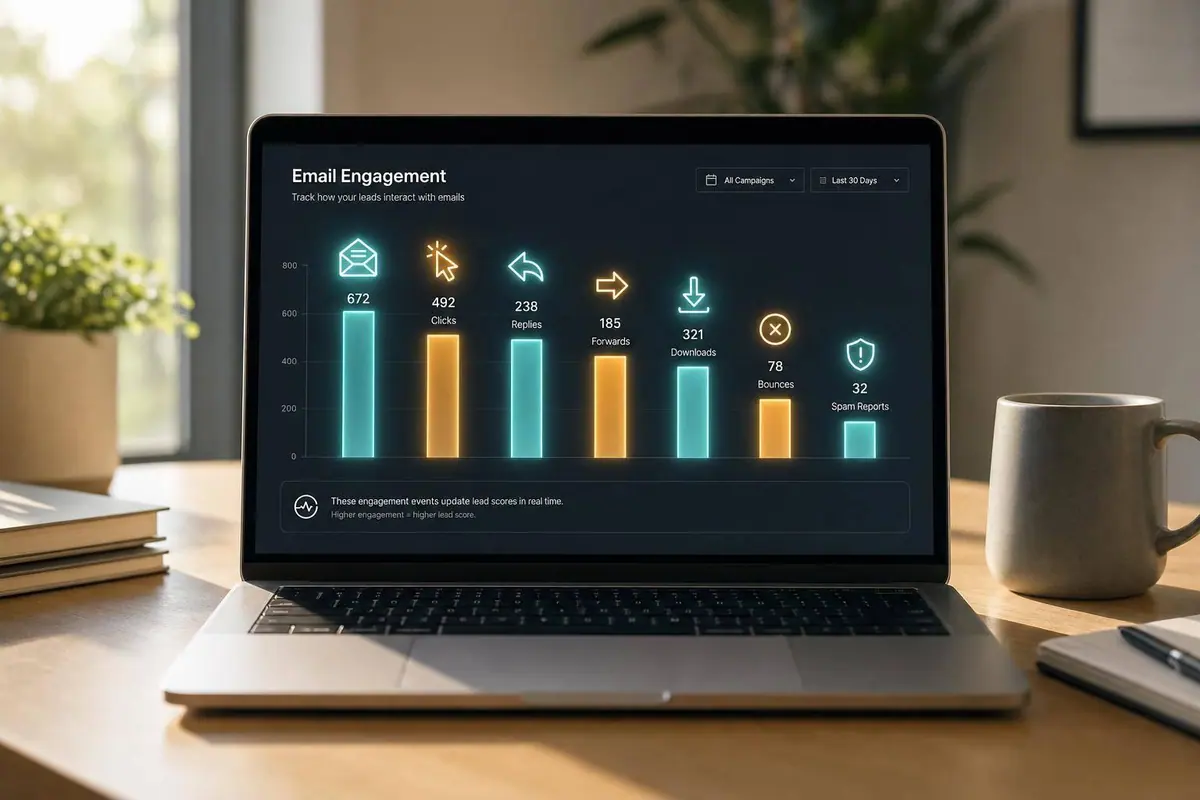
If you want lead scores to mean anything, they need to change the moment intent changes. In this article, I walk through the 7 email-related events that should update a score right away: opens, link clicks, repeat clicks, demo requests, pricing page visits, unsubscribes, and spam complaints or flags.
Here’s the short version:
- Opens are a light signal and should get very few points
- Clicks matter more, but the page clicked matters just as much as the click itself
- Repeat clicks can show stronger interest, especially for pricing, demo, or comparison links
- Demo request forms should add a big score jump because they show direct hand-raise intent
- Pricing page visits often mean the lead is closer to a buying decision
- Unsubscribes should lower the score and stop nurture
- Spam complaints or spam flags should override older positive activity and trigger suppression
I also cover how forms and CRM data make scoring more accurate, why time decay matters, and where teams go wrong when they give too much weight to weak engagement.
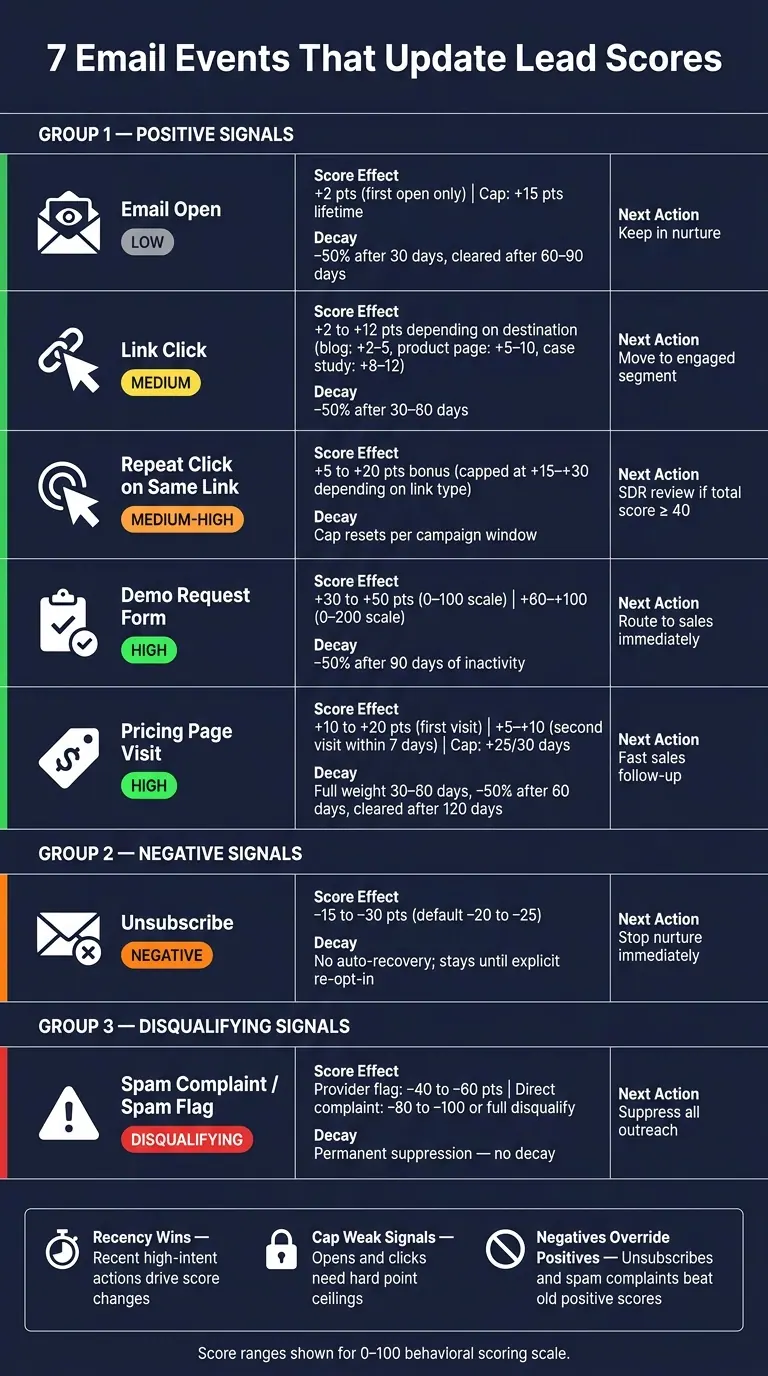
7 Email Events That Update Lead Scores: Intent Levels & Score Ranges
Re-Engage Contacts and Optimize Your Email List with Lead Scoring
sbb-itb-5f36581
Quick Comparison
| Event | Intent level | Typical score effect | What I’d do next |
|---|---|---|---|
| Email open | Low | Small positive | Keep in nurture |
| Link click | Medium | Low to medium positive | Move to engaged segment |
| Repeat click on same link | Medium-High | Extra capped bonus | Review for follow-up |
| Demo request form | High | Large positive | Send to sales |
| Pricing page visit | High | Medium to high positive | Follow up fast |
| Unsubscribe | Negative | Medium negative | Stop nurture |
| Spam complaint / spam flag | Disqualifying | Large negative or disqualify | Suppress outreach |
Bottom line: I’d treat recent high-intent actions as the main driver of score changes, keep caps on weak signals, and make sure negative events beat old positives every time.
How Real-Time Lead Scoring Works Across Email, Forms, and CRM Data
Real-time lead scoring only works when event data reaches the CRM fast enough to change lead priority on the spot. Every action - opens, clicks, repeat clicks, demo requests, pricing-page visits, unsubscribes, and spam complaints - should update one CRM record through integrations, webhooks, or API calls. Once that flow is in place, the scoring model decides which events move the score next.
How Event Data Moves from Email Tools to the CRM
The seven events in this article matter only if each one lands in the CRM soon enough to affect follow-up. If that data shows up late, the score lags behind what the lead is doing right now.
Multi-step form submissions add extra signal here. The fields a contact fills out - job title, company size, and use case - can sharpen scoring in a way email engagement alone can't. A click tells you someone showed interest. A form can tell you who they are and what they want.
How to Separate Positive, Negative, and Disqualifying Events
Not every event should push the score the same way. Some actions show mild interest. Others signal buying intent. And some should stop outreach altogether.
- Opens and first-time clicks are positive, but they show low intent
- Repeat clicks, pricing-page visits, and form submissions should earn more points
- Unsubscribes and long periods of inactivity should lower the score
- Spam complaints, hard bounces, and explicit opt-outs should suppress outreach, not just reduce the score
That last group matters a lot. It helps protect deliverability and keeps your team aligned with compliance rules.
Why Recency Weighting and Time Decay Matter
Timing changes the meaning of an event. A pricing-page visit from this morning should matter more than a few opens from last month. That's the core idea behind recency weighting and time decay.
Recent intent should drive the score first. So opens and clicks usually need less weight than pricing visits and demo requests, especially when those higher-intent actions happened recently.
With the scoring model set, the next step is figuring out which email events should trigger an immediate score update.
1. Email Opens
Intent strength
An email open is a weak positive signal. It shows that your message reached the inbox and sparked a bit of interest, but it does not show buying intent. And because privacy features can inflate open data, opens are noisy by nature. That’s why they belong at the bottom of the scoring ladder.
That said, opens still matter. They can confirm inbox placement, help you sort active contacts from dormant ones, and support other signals when paired with clicks or form submissions.
Recommended score range
Keep open points small. A practical starting point for U.S. B2B teams is +2 points for the first confirmed open per email, with a hard cap of +5 points per 30-day period and no more than +15 points lifetime from opens alone.
That cap matters. Without it, someone who opens every email but never clicks or fills out a form can start to look MQL-ready when they’re not.
Real-time trigger conditions
Only score an open when both of these are true:
- The email is a marketing or nurture message.
- The contact has not already received open points for that same email.
Score only the first open per email. If the open looks privacy-inflated, assign zero points or a minimal +1 once per campaign.
A simple rule works well here: when a contact opens a campaign email and has not received open points in the last 24 hours, add 2 points. Then run a monthly cap check so the score doesn’t pile up.
Decay or suppression rules
Reduce open points by 50% after 30 days with no new engagement, and clear them after 60–90 days. If a negative event happens, clear open points right away.
Once opens are logged, clicks show whether the lead moved past awareness.
2. Link Clicks
Intent strength
If opens show attention, clicks show action.
A link click is a stronger signal than an open because the contact chose to do something on purpose. They didn’t just see the email. They engaged with something inside it.
That said, not every click should count the same way. The destination matters a lot. A click to a blog post or general resource often shows curiosity. A click to a product page, demo page, or comparison page usually points to stronger buying intent.
That’s why many U.S. B2B teams group clicks into low-, mid-, and high-intent tiers. The goal is simple: generic newsletter activity shouldn’t carry the same weight as late-stage research. Repeat clicks and form fills help confirm whether that interest is serious.
Recommended score range
On a 0–100 or 0–200 scale, use the destination to separate light engagement from deeper intent.
| Click Destination | Suggested Points |
|---|---|
| Blog or general content | +2 to +5 |
| Product or feature page | +5 to +10 |
| Case study or ROI content | +8 to +12 |
It also helps to put a cap on total link-click points. Otherwise, highly engaged researchers can cross your MQL threshold from clicks alone.
Real-time trigger conditions
Only score a click when the link is tracked and tied to a known contact. And only count the first click on that specific link within a set window, such as 24 hours or the full campaign period.
You can still log extra clicks on the same link, but don’t score them again.
Exclude clicks on:
- Unsubscribe links
- Preference center links
- Privacy policy pages
- Terms of service pages
- Footer links
These aren’t positive signals.
You should also filter out bot-like bursts, such as every link firing within milliseconds. That pattern often comes from security scanners, not real prospects.
Score the first tracked click only. Treat extra clicks on the same link as repeat behavior, not new intent. The next signal to score is repeat clicks on the same link.
Decay or suppression rules
Use recency-based decay so older clicks lose weight over time. A common setup is to reduce the score impact by 50% after 30 to 60 days with no new engagement, then remove those points after 90 to 120 days.
If a negative event like an unsubscribe or spam complaint happens, clear click points right away.
3. Repeat Clicks on the Same Link
Intent strength
A repeat click on the same link means more than a one-off click. That’s even more true for pricing, demo, or comparison pages.
If someone clicks the same high-intent link three times within 7 days, that can trigger SDR review. Think of repeat clicks as the step between light interest and clear buying intent.
Recommended score range
The main idea is simple: use a pattern bonus, not endless points. Repeat behavior should add a small bonus, and that bonus should have a hard cap.
| Link Type | Repeat-Click Total (2–3 clicks) | Cap |
|---|---|---|
| Blog or general content | +5 to +10 | ~+15 |
| Case study or webinar | +5 to +10 | ~+20 |
| Pricing, demo, or comparison | +10 to +20 | ~+30 |
That cap matters. Repeat clicks by themselves should not move a contact into sales-ready status. To cross that line, the contact should also take at least one downstream high-intent action, such as a form submission or a confirmed pricing page visit.
Real-time trigger conditions
Apply the repeat-click bonus after the second click on the same tracked, high-intent link within a 24-hour to 7-day window. If that activity hits the threshold, update the CRM and send an SDR alert at the same time.
If the same link keeps getting clicks, the next signal to watch is a form submission. To maximize conversions, you should craft killer lead forms that prioritize quality over volume.
4. Demo Request Form Submissions
Intent strength
When someone moves from opening emails to filling out a form, the score should climb a lot faster. A demo request asks the prospect to share contact details and request a talk with sales. That puts demo requests near the top of the scoring model because they show direct buying intent.
Recommended score range
Use +30 to +50 points on a 0–100 scale, or +60 to +100 on a 0–200 scale.
Fit matters most here. Qualified demo requests should get the highest points. Give the top end to submissions from the right role, the right company size, and a business email. Give the lower end to personal-email, student, or off-segment leads.
| Submission Quality | Score Adjustment (0–100 scale) |
|---|---|
| High-fit: target role, company size, business email | +40 to +50 |
| Mid-fit: some matching criteria, business email | +25 to +35 |
| Low-fit: personal email, wrong role, or non-target segment | +10 to +20, or flag for review |
Real-time trigger conditions
When a demo request form comes in, update the CRM score right away. If it happens after another high-intent action within 24–48 hours, add a small bonus of +5 to +10 points.
That score only works if the form data is clean.
Decay or suppression rules
After the first score update, timing rules help keep the signal current. Demo requests should decay slowly. Cut their value by 50% after 90 days of inactivity, and remove it when the opportunity is Closed Lost or Disqualified. Unsubscribes and spam complaints should override old demo-request points.
5. Pricing Page Visits
Why it matters
A pricing page visit is one of the clearest intent signals you can get before a demo request. By the time someone lands there, they’re usually past casual interest and into the part where they’re weighing cost, plans, and ROI. That’s why pricing visits deserve extra weight in your scoring model.
Recommended score range
On a 0–100 behavioral score, give +10 to +20 points for the first pricing visit and +5 to +10 more for a second visit within 7 days. Put a cap of +25 per 30 days on pricing-page activity.
| Visit Pattern | Score Adjustment (0–100 scale) |
|---|---|
| First pricing page visit | +10 to +20 |
| Second visit within 7 days | +5 to +10 additional |
| 3+ minutes on page or calculator interaction | +5 to +10 bonus |
| Cap per 30-day period | +25 max |
Not every visit should count the same. A short bounce may deserve little credit, or none at all. But if someone sticks around, uses the pricing calculator, switches between tiers, or digs into FAQs, that’s a much stronger sign they may be close to buying.
Real-time trigger conditions
Only score pricing visits that tie back to a known lead in the CRM. Trigger the update when a known contact visits /pricing, /plans, or /packages and stays for at least 20–30 seconds. If the visit comes from a bottom-of-funnel email CTA, apply the full score right away and alert the assigned sales rep.
Companies contacting leads within 1 hour were nearly 7x more likely to qualify them than those that waited longer.
After those points are added, they should fade fast unless the lead keeps showing intent.
Decay or suppression rules
Pricing interest cools off fast, so don’t let these points sit at full weight for too long. Treat pricing-page scores as strong for 30–60 days, then cut them by 50% after 60 days and let them fully decay after 120 days if there’s no new high-intent activity.
If the lead is marked disqualified or closed-lost in the CRM, ignore older pricing interactions from that point on. And if a stronger negative signal shows up, it should outweigh older pricing points right away.
6. Unsubscribes
Intent strength
An unsubscribe is a clear negative signal. Most of the time, it points to email fatigue, not a bad account fit. In U.S. B2B scoring models, that difference matters. The best read is strong negative on engagement intent, neutral or unknown on commercial intent.
Recommended score range
Use −15 to −30 points, with −20 to −25 as the default range. That puts unsubscribes in the strong negative tier. They should carry more weight than inactivity, but not as much as spam complaints.
| Signal | Score Adjustment | Severity |
|---|---|---|
| Prolonged inactivity (90+ days) | −10 | Weak negative |
| Unsubscribe | −15 to −30 | Strong negative |
| Spam complaint | −50 or disqualify | Critical |
Real-time trigger conditions
The score should change the moment the ESP marks the contact as unsubscribed. In that same event, you should subtract the points, set the CRM opt-out flag, and pull the contact out of active nurture. Put simply: once outreach stops, scoring should update at the same time.
There is one common exception. If a contact unsubscribes from one list or category but stays active on another, apply about −10 points instead.
Decay or suppression rules
An unsubscribe should not drift back to neutral on its own. The contact stays opted out until they take a clear action to come back, such as filling out optimized lead generation forms, opting back in through a preference center, or sending a direct inquiry.
To avoid double-counting, apply the penalty once per 180 days, so duplicate events or sync errors don’t stack extra deductions. If the contact later submits a high-intent form like a demo request, restore email eligibility and add the positive score tied to that action. At the same time, keep the earlier unsubscribe in the contact history so the team has context.
Spam complaints and spam flags should override this penalty entirely.
7. Spam Complaints and Spam Flags
Intent strength
A spam complaint is one of the strongest negative signals in email-based lead scoring. It matters more than low opens, inactivity, or even an unsubscribe. When someone reports a message as spam, they aren't just fading out. They're actively rejecting the relationship.
Mailbox-provider spam flags carry less weight than direct complaints. Still, they point to reputation damage and can hurt inbox placement across your full list.
Recommended score range
Use disqualification for direct complaints. Save numeric penalties for provider-level flags.
| Signal | Score Adjustment | Severity |
|---|---|---|
| Provider spam flag | −40 to −60 | Strong negative |
| Direct spam complaint | −80 to −100 or disqualify | Disqualifying |
For provider-level flags, pair the numeric penalty with a re-permission required status.
Real-time trigger conditions
Update the score the moment the event is logged, not in the next sync window. Set up your ESP to send complaint feedback loop (FBL) events and spam-marked events to your CRM through a webhook. When the event fires, lower the score, flag the record, and add the address to suppression.
Decay or suppression rules
Unlike most negative signals, spam complaints do not decay. Suppression should stay in place unless the contact takes a documented, compliant action to opt in again, such as submitting a new form with explicit consent language.
For spam flags without a direct complaint, a new consent-based form submission can justify a cautious review, but the contact should stay under watch. If the contact later submits a new form with explicit consent, send them through a re-permission flow first. Only after consent is confirmed should any email-based nurturing start again, and the complaint history should remain visible in the contact record.
After a spam event, only a new consent-based form submission should reopen email scoring. After spam suppression, form submissions become the main way to verify fresh consent and improve score accuracy.
How Forms Improve Score Accuracy After Email Engagement
Forms make email signals sharper because they confirm both intent and fit. An email open or click can show interest. A form adds the missing context: who the lead is and what they want.
Why Form Submissions Usually Outweigh Email Engagement
A form submission is a deliberate step. It asks more from the lead than an email click, and scoring models often reflect that. In one engagement-scoring model, email link clicks earn +3–5 points, while form submissions earn +10–15 points.
That gap makes sense, especially for high-intent forms. A demo request or pricing inquiry usually points much closer to pipeline intent than a simple click. And not all forms should be treated the same way. A newsletter signup and a demo request may both be form fills, but they don't mean the same thing. Different form types should get different scores.
Which Form Fields Should Affect Score Quality
The biggest scoring lift often comes from what the lead shares, not just from the submission itself. A form can tell you far more than someone clicked a button. It can show whether the person has buying power, whether the company fits your ICP, and whether the timing lines up.
| Form Field | Scoring Impact | Why It Matters |
|---|---|---|
| Job title / seniority | High | Identifies decision-making authority (VP, Director, C-suite vs. individual contributor) |
| Company size | Medium–High | Score higher when the company fits your ICP |
| Purchase timeline | High | Within 3 months signals near-term revenue; 12+ months routes to nurture |
| Qualification answers | High | Self-qualification filters that separate active buyers from researchers |
Use validation and spam checks to stop bad submissions before they hit the score model.
Routing questions help leads self-identify intent, which makes it easier to send them straight to sales or into nurture.
How Reform Can Support Real-Time Scoring
These data-quality rules matter most when your form platform pushes updates into the CRM right away. Reform's multi-step forms, conditional routing, lead enrichment, email validation, spam prevention, and CRM integrations can help scores update fast and stay clean.
A Suggested Scoring Matrix for U.S. Teams
Use the event rules above to build a simple starting matrix in your CRM. The table below turns those rules into one scoring model. It also helps fix a common problem: email-only scoring can be weak. Form-based events - especially demo requests and disqualifying answers - give you a much clearer read on intent.
Example Event-to-Score Table
| Event | Starting Range | Intent Level | Recency Rule | Recommended Next Action |
|---|---|---|---|---|
| Single email open | +2 | Low | First open only; decay after 7 days | Keep in nurture |
| Single link click | +5 | Medium | First click per link; decay after 30 days | Add to engaged segment |
| Repeat clicks on same link (within 72 hours) | +10 (capped) | Medium-High | Cap at +10 per campaign; ignore duplicates | Light SDR follow-up if total score ≥ 40 |
| Demo request form submission | +35 to +50 | High | No decay for first 14 days | Route to SDR |
| Pricing page visit from email | +10 to +20 | High | First visit per 7-day window | SDR follow-up once score crosses MQL threshold |
| Additional pricing visits within 7 days | +5 each (max +25/week) | High | Cap resets weekly | Escalate to sales |
| Unsubscribe | −15 to −30 | Negative | Apply immediately | Pause nurture |
| Spam complaint / spam flag | −40 to disqualify | Disqualifying | Apply immediately; permanent suppression | Suppress and review sending |
| Disqualifying form answer | −100 or set to 0 | Disqualifying | Apply immediately | Mark disqualified; exclude from outbound |
Adjust this matrix based on which events line up most often with revenue. Then compare these weights against actual opportunity and closed-won data.
How to Adjust the Matrix Using Conversion Data
The most practical way to tune these numbers is to work backward from outcomes. Pull 6–12 months of CRM data and look for the events that show up most often in the histories of leads that became opportunities or closed-won deals.
Here’s the basic idea: if pricing page visits appear more often in won deals than generic email opens, the pricing visit should get more points. The open should get fewer.
That same logic applies to demo requests and other high-intent actions. If a behavior keeps showing up before pipeline creation or closed-won revenue, give it more weight. Run this comparison every quarter, then shift points toward the events that do the best job predicting revenue.
Over one to two quarters, you’ll usually see MQL-to-opportunity rates settle down as the model starts to match how your buyers act in the wild.
The point isn’t to build a perfect matrix on day one. It’s to build one that gets more accurate each quarter as you feed it real conversion data.
Common Mistakes That Skew Lead Scores
Even a well-built scoring matrix can fall apart when the rules underneath it are off. In most cases, the problem comes from three places: weak signals get too many points, old actions stick around too long, and negative actions don't clear the score when they should. That's how teams end up chasing the wrong leads.
Overweighting Weak Engagement Signals
Email opens are noisy. Giving them too many points can push a weak lead into the priority pile based on passive behavior, not buying intent. Generic link clicks can do the same thing. Someone clicking a weekly newsletter article is not the same as someone checking out your product, and your model shouldn't score those actions the same way.
Keep weak signals on a short leash. Opens should stay capped at 3 to 5 points max, while higher scores should go to actions that show clear intent.
The next issue shows up when repeated activity keeps stacking without limits.
Ignoring Caps, Recency, and Duplicate Events
Without caps, repeated activity can create fake sales urgency and push real buyers down the list. A contact who clicks the same link every week for months can rack up enough points to jump to the top of the SDR queue, while people with real interest sit below them. A cleaner setup is to score only the first click per unique link within the scoring window and set a ceiling for how many points one signal type can add.
Recency matters just as much. Old activity should lose weight fast. If your model doesn't decay older events, stale behavior can keep contacts ranked higher than their current intent supports. When that happens, the score stops reflecting what's going on now.
Failing to Let Negative Signals Override Older Positives
This is where a lot of models quietly break. A contact can build up a strong score over months, then unsubscribe or mark your email as spam - and still stay in active segments if those negative actions don't immediately outweigh the older positives. Unsubscribes and spam complaints are stop signals, not minor deductions.
A practical standard looks like this:
- Unsubscribes should trigger an immediate −20 to −30 point adjustment.
- Spam complaints should disqualify the lead and suppress future sends.
Older positive actions should not outweigh a current unsubscribe or spam complaint.
That is where form data helps clean up the score.
Conclusion
Good lead generation strategies rely on scores that change in real time. Email signals can kick things off, and form submissions add more detail. The key is to weight each event by intent, let negative signals outweigh older positive ones, and use time decay so a recent pricing-page visit matters more than stale activity.
Then test your score bands against opportunity creation rate and win rate. If the score isn’t lining up with closed revenue, change the weights based on what does.
Use intent, recency, and negative signals to define qualification around what a lead is doing right now. That gives you a score based on current buying intent, not old activity.
FAQs
How should I set an MQL threshold?
Set your MQL threshold around the live buying window, not old averages. Why? Because 87% of buying signals happen within 72 hours. If your scoring model leans too hard on past activity, you can miss people who are ready to act now.
That’s why recency and frequency should matter more than raw engagement totals. A lead with a burst of recent activity is often far more likely to convert than someone who piled up clicks weeks ago. If you only look at total engagement, stale activity can pad the score and give you a false read.
It also helps to use negative scoring for disqualifying answers. That way, leads who don’t fit your ICP, budget, or use case don’t keep floating to the top just because they were active.
And don’t treat all actions the same. Fold high-intent triggers like pricing page visits or demo requests into your core scoring model, since those actions usually say a lot more than a generic pageview or email open.
Which events should update scores instantly?
Lead scores should update right away when someone shows strong buying intent, including:
- pricing page visits
- demo requests
- repeated clicks on product content
- unsubscribes
- spam flags
That way, scores stay in step with what prospects are doing right now. And sales teams can spend time on people who are active and more likely to buy. Reform’s real-time journey triggers can send those score updates straight to your CRM.
How often should lead scores decay?
Lead scores should decay on a regular basis. If they don’t, old inactive leads can keep looking qualified long after their actual intent window has closed.
The exact timing depends on your sales cycle. But the main idea is simple: negative scoring keeps lead scores tied to current behavior, not actions from weeks or months ago. It doesn’t remove leads from your system. It just moves them down the priority list until they engage again.
Related Blog Posts
Get new content delivered straight to your inbox

The Response
Updates on the Reform platform, insights on optimizing conversion rates, and tips to craft forms that convert.




Drive real results with form optimizations
Tested across hundreds of experiments, our strategies deliver a 215% lift in qualified leads for B2B and SaaS companies.
