
.webp)
Form Spam Problems Anomaly Scores Help Solve



Form spam is not just inbox clutter. It wastes sales time, dirties CRM data, and sends bad leads into routing and follow-up. In many teams, reps spend 20% to 40% of their time sorting junk, and some reports say 38% of form submissions are invalid or bot-made.
Here’s the short version:
- Basic form checks are not enough, especially when using static layouts. They only test whether a field was filled in, not whether the lead is safe to route.
- Spam hurts more than response time. It can trigger automations, skew reports, create duplicate records, and send leads to the wrong rep.
- Anomaly scoring adds a risk check before CRM sync. It looks at behavior, data quality, and network signals to decide whether to pass, hold, or stop a submission.
- Risk bands work better than a simple yes/no spam rule. Low-risk leads can go straight to sales, medium-risk leads can wait for review, and high-risk leads can stay out of the CRM.
- The goal is simple: keep SDRs focused on real buyers, cut junk records, and protect reporting.
A good way to think about it: lead scoring asks, “Could this person buy?” Anomaly scoring asks, “Is this submission even legit enough to trust?”
If I had to sum up the whole article in one line, it would be this: use anomaly scores as a filter between your form and your CRM so bad submissions do not start sales work in the first place.
The main form spam problems anomaly scores help solve
Junk leads and fake demo requests that waste follow-up time
Once spam slips past basic validation, it can look real enough to land in the sales queue. That means SDRs and AEs end up chasing fake names, throwaway email addresses, and bot-fired demo requests as if they were real deals.
On paper, the lead looks fine. In practice, reps spend time researching the account, checking LinkedIn, and sending outreach before they realize the lead is junk. One estimate puts SDR research and outreach at 15–20 minutes per lead. Do that over and over across repeat spam submissions, and the lost time stacks up fast.
And the cost isn't limited to rep time.
Flooded inboxes, CRM clutter, and broken reporting
Each form submission can set off a chain reaction: alerts, tasks, Slack messages, and new CRM records. When a bot attack or spam burst hits, that chain can fire hundreds of times.
At that point, teams start tuning out alerts, including the ones they should see. Real leads get buried under noise. Meanwhile, bad submissions create duplicate records and invalid contacts, which chips away at reporting and attribution.
It’s a bit like a smoke alarm going off all day. After a while, people stop reacting, even when there’s an actual problem.
Bad routing and mis-prioritized leads
Routing systems run on whatever shows up in the form: location, company size, industry, and job title. If that data is false, the routing logic still acts on it.
A fake executive title, an inflated employee count, or a geography that doesn’t match can send a bad lead into the wrong territory, assign it to the wrong owner, or drop it into the wrong sequence. A fake enterprise lead might get pushed into an enterprise queue, while a real SMB prospect sits there waiting.
At scale, this clogs routing queues with non-opportunities and slows first response for actual buyers. That’s exactly the kind of problem anomaly scores should catch before the submission touches routing or follow-up workflows.
That’s why submissions need a risk check before routing and follow-up begin.
sbb-itb-5f36581
How to Prevent Spam Bot Submissions | Strategic HubSpot Tutorial

How anomaly scoring works on form submissions
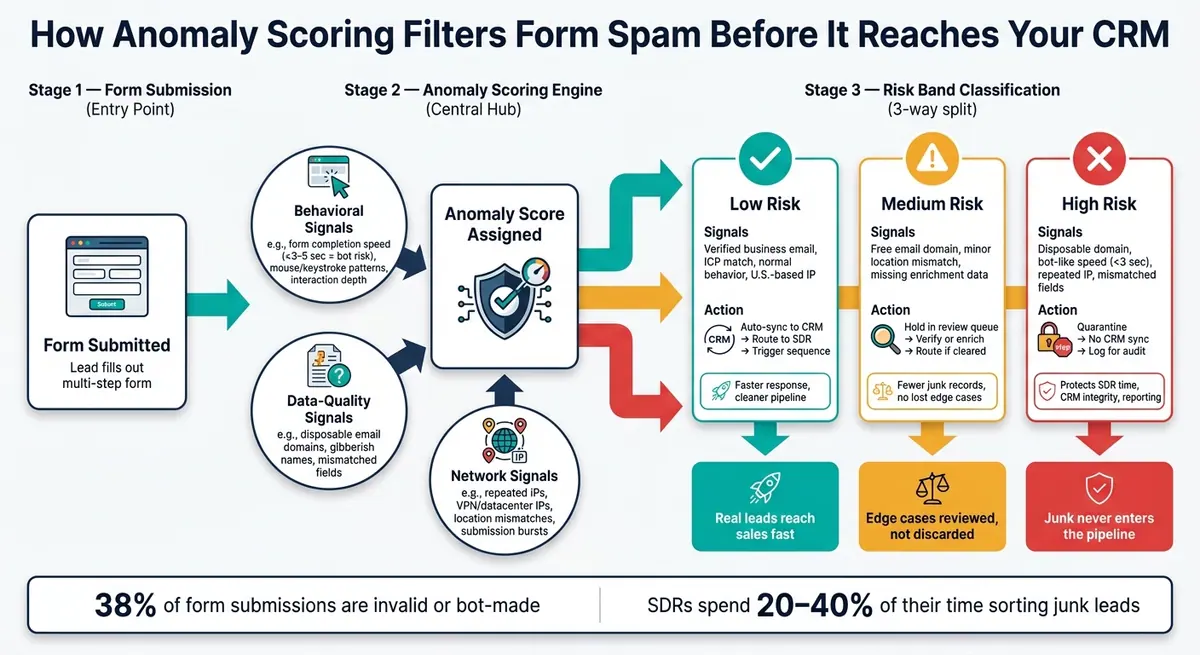
How Anomaly Scoring Filters Form Spam Before It Reaches Your CRM
Anomaly scoring sits between a form submission and your CRM as a risk check. Before a record gets passed to sales or synced into the CRM, the system checks it for unusual patterns and assigns a risk level. That score decides what happens next: route it, hold it, or block it. In plain English, anomaly scoring is the gatekeeper between a form fill and sales follow-up.
That matters because fake demo requests and bot bursts can look like normal leads at first glance. The score is what calls them out.
Lead scoring vs. anomaly scoring
Lead scoring and anomaly scoring do two different jobs.
Lead scoring ranks buying potential. It uses details like job title, company size, and engagement history to help teams focus on prospects that are already in the funnel.
Anomaly scoring checks whether a submission looks real in the first place. It looks for signs of fraud, automation, or low-quality data before the record ever gets near sales.
| Lead Scoring | Anomaly Scoring | |
|---|---|---|
| Primary goal | Identify high-value prospects | Identify spam, bots, and fraud |
| Data used | Job title, company size, engagement history | IP address, submit speed, text patterns |
| Outcome | Prioritizes follow-up | Determines whether the record is real |
A lead can match your ideal profile and still be spam. On the flip side, a real lead can look safe but still not be ready for sales.
Once you split legitimacy from buying intent, the next piece is the signals behind the score.
Signals that separate low-risk from high-risk submissions
Anomaly scoring usually pulls from three signal groups.
Behavioral signals look at how someone moved through the form. If a multi-field form gets completed in under 3–5 seconds, that's a strong bot sign. Low interaction depth, odd mouse or keystroke patterns, and jumping straight to submit can all push the risk level up.
Data-quality signals look at what was entered. Gibberish names, fake company names, malformed phone numbers, disposable email domains, and mismatched details can all point to a bad submission. For example, a personal email paired with an enterprise title and a foreign company name can look off even when every required field is filled out.
Network signals check where the submission came from. Repeated activity from the same IP, bursts of submissions in a short period, IPs tied to VPNs or data centers, and mismatches between claimed location and network location are all red flags. When several submissions cluster around the same source, the risk level goes up, even if each one looks complete on the surface.
These inputs help stop junk before it hits the inbox, CRM, or routing rules.
Why a risk score is more useful than a simple spam flag
A simple spam filter gives you two choices: allow or block. That sounds neat, but it falls apart fast in practice. Not every suspicious submission carries the same level of risk. Some are just incomplete or odd. Others are plainly automated.
That’s why different risk bands are more useful. A tiered risk score - low, medium, high - lets teams respond in proportion to the threat. Low-risk submissions can go straight to sales. Medium-risk ones can move into a review queue or get enriched before routing. High-risk ones can be blocked or quarantined before they create a CRM record.
This setup matters because a hard block can throw away real leads that happened to trigger one suspicious signal. Risk bands cut down that risk while still keeping junk out of the pipeline. The score doesn’t just spot a problem. It tells you what to do next: route, hold, or block the submission before follow-up begins.
How to use anomaly scores before follow-up starts
Once the score is in place, the next step is simple: turn it into a workflow. A score by itself doesn't do much. It only matters when it triggers an action: route low-risk leads, review medium-risk ones, and quarantine high-risk submissions.
Set clear actions for low-, medium-, and high-risk submissions
Each risk band needs a clear response. If it doesn't, the score just sits there while junk keeps flowing to sales.
| Risk Band | Typical Signals | Recommended Action | Impact |
|---|---|---|---|
| Low risk | Verified business email, ICP match, normal behavior, U.S.-based IP | Auto-sync to CRM, route to SDR, trigger standard sequence | Faster response time, cleaner pipeline, better pipeline accuracy |
| Medium risk | Free email domain, minor location mismatch, missing enrichment data | Hold in a review queue; verify or enrich before routing | Fewer junk records without discarding edge-case opportunities |
| High risk | Disposable domain, bot-like speed, repeated IP, mismatched fields | Quarantine; no CRM sync; log for audit and model tuning | Protects SDR time, CRM integrity, and reporting accuracy |
This mapping turns a risk score into an actual response. Low risk moves right away. Medium risk pauses for review. High risk stays quarantined.
Set a fast response SLA for low-risk inbound leads. For medium-risk leads, a 24-hour review window gives RevOps time to verify the record without letting real deals go cold. High-risk submissions should never show up in a sales queue.
Cut CRM clutter and routing mistakes with pre-sync filtering
Filtering before CRM sync stops bad records from setting off automation, sending leads to the wrong rep, and creating cleanup work later. Once a bad record gets into the CRM, it can throw off territory assignments and force manual fixes. Filtering upstream cuts that off before it spreads.
A plain rule works well here: "If risk band = high, do not create a lead or contact - store the submission in a quarantine log only." That keeps routing logic clean because only low-risk and reviewed medium-risk leads enter assignment workflows. Sales reps stop getting accounts reassigned because of spam, and round-robin distribution stays fair.
Measure impact with practical metrics
Track the right numbers over a rolling 30-day window and you'll see whether the workflow is doing its job - and whether your thresholds need tuning.
- Spam rate: High-risk submissions ÷ total submissions. This shows what share of traffic is being filtered out.
- Quarantine accuracy: What percentage of quarantined submissions are confirmed spam vs. mistakenly blocked? This shows whether the model is too aggressive.
- SDR time saved: Multiply the average time spent triaging one junk lead - typically 5–10 minutes - by the number of high-risk submissions that never reached the CRM. Express this in hours per month.
- Valid meeting rate: The share of form submissions that result in a confirmed, real buying conversation. This should go up after filtering is in place.
- CRM hygiene: The proportion of new contacts and accounts that pass basic integrity checks - valid email, standardized company name, complete required fields, and low duplicate creation rates.
Use these metrics to tune thresholds before enforcing the rules in the form layer.
Applying anomaly-aware form design with Reform
Reform features that support better risk detection
Once you’ve set your risk bands, the next move is simple: build forms that give you cleaner signals. Reform makes that possible without custom code. Marketing and sales ops teams can use structured multi-step fields, email validation, spam prevention, and lead enrichment to feed a risk-based process before anything syncs to the CRM.
Multi-step forms add a bit of friction for bots and low-effort submissions, but they still let qualified traffic through. That small design choice helps sharpen the split between low-, medium-, and high-risk leads. Conditional logic helps too. If someone selects "Personal project", Reform can send them to a self-service path instead of a demo request. That keeps the sales queue cleaner without throwing away legit interest.
Email validation, honeypot fields, rate limiting, lead enrichment, and real-time analytics each add their own signal. Together, they surface things like:
- Triggered honeypots
- Disposable domains or addresses
- Submission bursts
- Firmographic mismatches
Those signals can feed straight into anomaly detection before routing even starts.
A simple workflow for sorting submissions with Reform
With those signals in place, the workflow is pretty direct. The idea at each stage is to keep suspicious submissions out of the sales motion until someone checks them.
| Step | Action | Reform Feature |
|---|---|---|
| Capture | Structured multi-step fields with required qualification data | Multi-step forms, conditional logic |
| Validate | Check email domain, block disposable addresses, detect bots | Email validation, spam prevention |
| Route | Send low-risk to CRM, medium-risk to review, high-risk to quarantine log | Conditional routing, webhooks |
| Sync | Push only qualified or reviewed leads to downstream tools | Native CRM integrations, integration filters |
High-risk submissions can log to a webhook and stay out of CRM sync. Only low-risk leads, plus medium-risk leads that pass manual review, move into assignment workflows. That helps protect automated sequences and keeps pipeline reports cleaner.
Conclusion: Keep sales focused on real opportunities
The payoff isn’t just better filtering. It’s cleaner routing from the first submission forward. Anomaly scoring keeps junk leads out of the CRM and gets real leads to sales faster. Pair that with Reform’s validation, spam prevention, conditional routing, and integration filters, and the whole process works without custom development.
FAQs
How is anomaly scoring different from lead scoring?
Anomaly scoring acts like a protective filter. It spots bot traffic, spam, and junk submissions by looking at technical behavior, such as how a form was filled out and when it was submitted. The goal is simple: keep bad data out of your CRM.
Lead scoring does a different job. It helps qualify real prospects by ranking them based on intent, fit, and engagement, so sales knows who to contact first.
What signals make a form submission look high risk?
High-risk submissions often show patterns that don’t line up with normal human behavior. They can also point to poor lead quality.
Common signs include:
- Bot-like interactions
- Forms finished far too fast to look natural
- Suspicious email data, such as disposable, invalid, or generic addresses
Anomaly scores can also flag repeated validation errors, high-friction interactions, or mismatched data that suggests the lead isn’t a legitimate prospect.
Where should anomaly scoring happen before CRM sync?
Anomaly scoring should happen at submission, before the record reaches your CRM.
When you check signals like typing, mouse movement, and session data in real time, you can catch spam or low-quality entries early. Reform then applies email validation, spam prevention, and lead enrichment right after submission, which helps prevent bad routing and CRM clutter.
Related Blog Posts
Get new content delivered straight to your inbox

The Response
Updates on the Reform platform, insights on optimizing conversion rates, and tips to craft forms that convert.




Drive real results with form optimizations
Tested across hundreds of experiments, our strategies deliver a 215% lift in qualified leads for B2B and SaaS companies.
