
.webp)
LinkedIn Lead Gen Forms vs. Traditional Web Forms


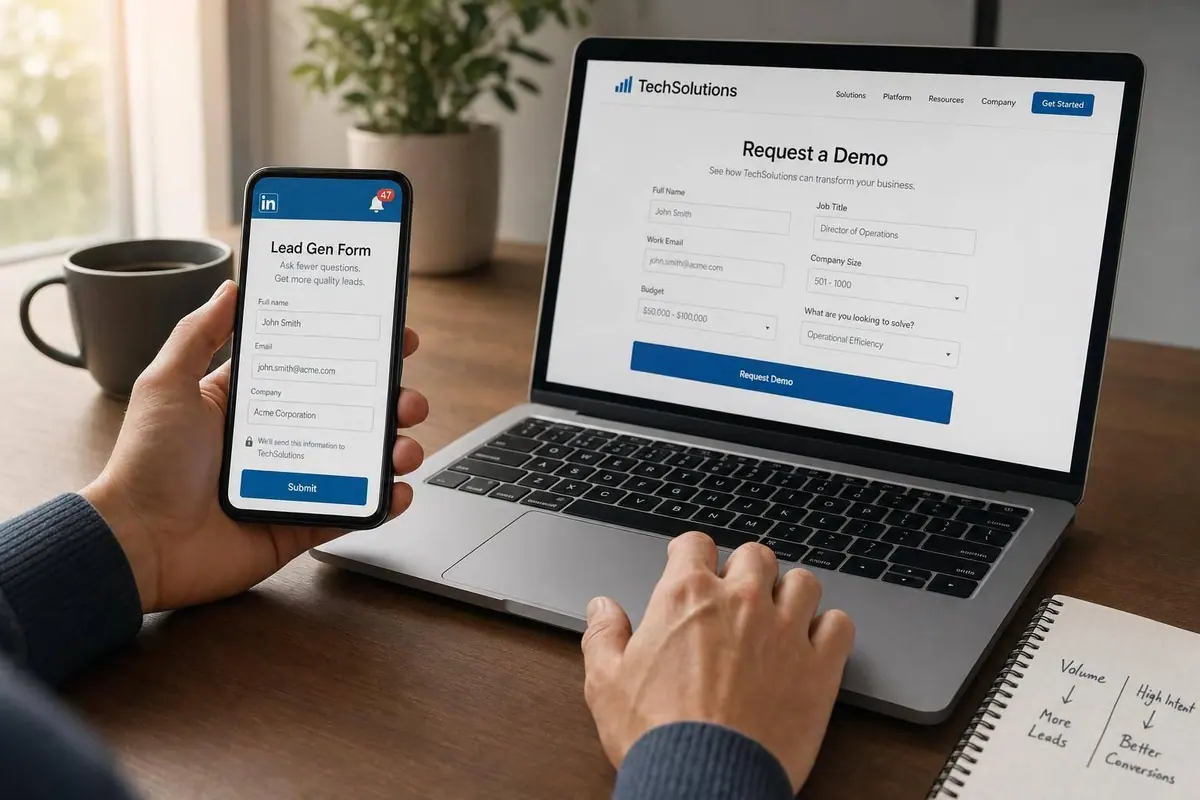
If you want more leads, LinkedIn Lead Gen Forms usually win. If you want better sales-ready leads, web forms often do better.
Here’s the short version: LinkedIn forms often convert at 10% to 15%, while landing page forms tend to convert at 2% to 5%. But landing page leads often turn into SQLs at 22% to 35%, versus 12% to 22% for LinkedIn forms. So more form fills does not always mean more pipeline.
What I’d keep in mind:
- LinkedIn Lead Gen Forms cut steps and work well for TOFU offers like webinars, ebooks, and newsletters
- Web forms add steps, but they often screen for stronger buying intent
- LinkedIn gives you less control over layout, flow, and tracking
- Web forms give you more room for testing, routing, analytics, and qualification
- Mobile matters a lot because many LinkedIn form submissions happen on phones
Bottom line: I’d use LinkedIn forms for volume and web forms for high-intent offers like demos, trials, and consultation requests.
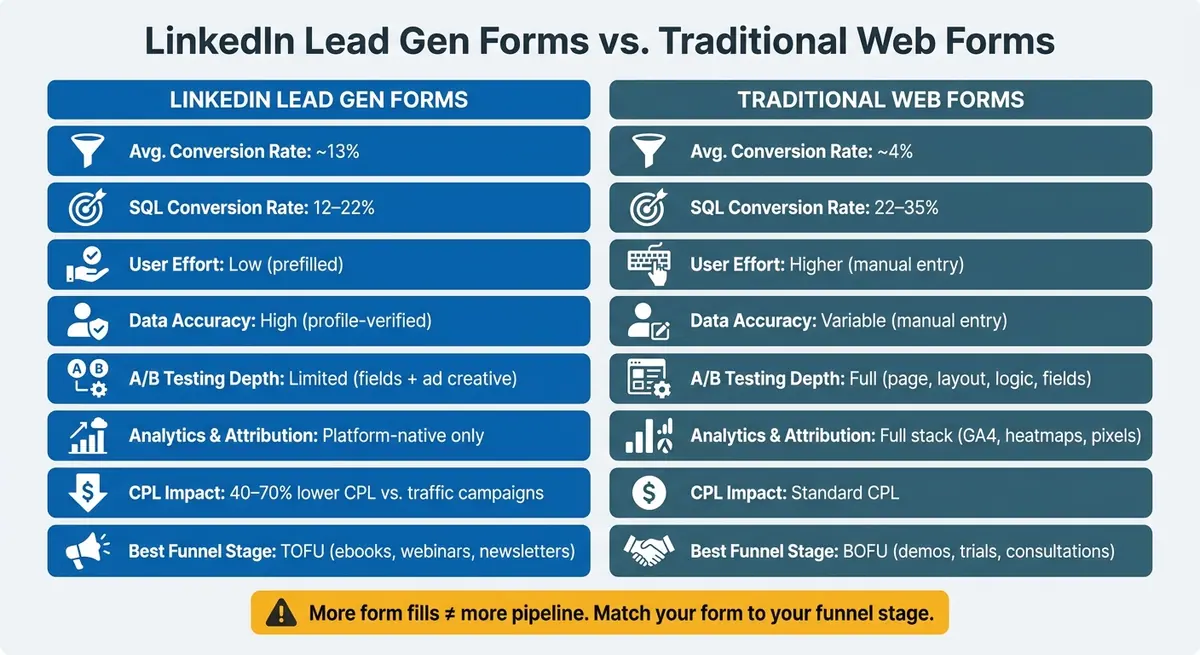
LinkedIn Lead Gen Forms vs. Web Forms: Conversion & Quality Stats
Lead Gen Forms vs Landing Pages on LinkedIn 2026: B2B SaaS Decision Framework
sbb-itb-5f36581
Quick Comparison
| Criteria | LinkedIn Lead Gen Forms | Web Forms |
|---|---|---|
| Where the form lives | Inside LinkedIn | On your site or landing page (where you can design the perfect landing page form) |
| User effort | Low | Higher |
| Avg. conversion rate | ~13% | ~4% |
| SQL rate | 12%–22% | 22%–35% |
| Lead intent | Lower on average | Higher on average |
| Data entry | Prefilled from LinkedIn profile | Manual entry |
| Data issues | Old profile data, personal emails | Typos, junk entries |
| Testing options | Limited | More testing options |
| Analytics | Mostly LinkedIn reporting | GA4, pixels, heatmaps, on-site tracking |
| Best use case | TOFU lead volume | BOFU qualification |
If I were choosing between them, I wouldn’t ask, “Which form gets more submissions?” I’d ask, “Which form gets the kind of lead my sales team can close?”
LinkedIn Lead Gen Forms: Fast Capture, Less Control
LinkedIn Lead Gen Forms live inside LinkedIn itself. When someone clicks your ad, the form opens right there in the feed and pulls in profile data like name, job title, company, and email. The user checks the prefilled fields and submits without leaving the app. You set up and manage these forms in Campaign Manager, and you can send submissions to major CRMs or export them. You can also add custom qualifying questions, which is a key part of lead qualification, but the format stays pretty tight. That speed can drive more form fills, but it also changes the kind of person who submits.
Why LinkedIn forms often convert at higher rates
LinkedIn Lead Gen Forms usually convert at 10% to 15%, compared with 2% to 5% for standard landing pages. The reason is simple: fewer steps. There’s no page load, no typing everything by hand, and no jumping from the feed to a separate page. Lead Gen Forms can also lower CPL by 40% to 70% compared with traffic-to-landing-page campaigns. For top-of-funnel offers like ebooks or webinars, that can be a big plus.
Still, a higher conversion rate doesn’t automatically mean better pipeline.
Where lead quality can break down
The tradeoff is lower intent. If someone submits while scrolling, there’s a good chance they didn’t spend much time looking at the offer or thinking through your positioning before they tapped submit. You can see that in performance data: SQL rates for Lead Gen Forms are often 20% to 40% lower than rates from landing pages.
There are a couple of other issues too:
- Because the form pulls from profile data, it may collect old job titles or personal email addresses.
- You have limited control over design and flow. No custom layouts, no brand colors, and no multi-step logic.
That’s where standard web forms start to pull ahead.
Traditional Web Forms: More Friction, More Qualification Power
Web forms add friction. But that friction often does something useful: it filters for stronger intent.
Those extra steps can work like a qualification gate. People who take the slower path are often more serious, and that tends to show up later in the funnel. Landing page SQL rates often land between 22% and 35%, compared with 12% to 22% for LinkedIn Lead Gen Forms. Leads from landing pages also tend to close at 10% to 15% higher rates.
Why web forms can produce more qualified leads
A landing page gives you space to set the stage before asking for contact details. You can show case studies, testimonials, pricing signals, and detailed product benefits so visitors can size things up for themselves before they even reach the form.
That creates a different frame of mind than a pre-filled native form. Typing answers by hand takes a bit more effort, and time on page adds another layer of filtering. Casual browsers often drop off, while the people who stick around are more likely to want what you're offering.
How to reduce drop-off on web forms
If you go with web forms, the goal isn't to remove all friction. It's to cut the friction that doesn't need to be there.
A few tweaks can make a big difference:
- Multi-step forms break the process into smaller choices, which makes the form feel less heavy.
- Conditional logic shows follow-up questions only when they fit, so people don't get stuck answering things that don't apply.
- Removing just one unneeded field can lift conversions by 10% to 20%.
Mobile performance matters too. A 1-second delay in page load time can cut conversions by 7%. Fast pages and tap-friendly layouts aren't nice extras. They're table stakes.
On the data quality side, field-level validation and spam prevention help keep bad data out of your CRM without making things harder for real leads. Reform supports multi-step forms, conditional routing, lead enrichment, spam prevention, email validation, and CRM integrations without code. That helps keep bad data out of your CRM and cuts cleanup work for sales.
LinkedIn Lead Gen Forms vs. Traditional Web Forms: Head-to-Head
The choice comes down to a simple tradeoff: LinkedIn cuts friction, while web forms do a better job screening for intent.
Lead quality: profile accuracy vs. buying intent
LinkedIn Lead Gen Forms usually win on data completeness. Because the fields are pre-filled with profile data, job titles and email addresses tend to be more reliable than details typed in by hand. With web forms, people make typos, use personal emails, or enter junk data.
But that extra effort on a web form can work in your favor. When someone slows down and types out their information, that often signals stronger buying intent.
So the split is pretty clear: LinkedIn tends to improve data completeness, while web forms tend to show stronger intent.
That same tradeoff carries into conversion performance.
Ease of use and conversion rates
LinkedIn Lead Gen Forms average about 13% conversion, compared with roughly 4% for standard landing pages. That gap makes sense. LinkedIn keeps people inside the platform, and the pre-filled fields remove a lot of friction.
A web form can still create a smooth experience, especially if you use multi-step flows or conditional logic. But unlike LinkedIn forms, that setup usually takes more work to plan, build, and test.
Still, conversion rate is only part of the story. What happens after the lead comes in matters just as much.
Data control, testing, and attribution
This is where web forms have a clear edge.
With a landing page, you can run full A/B tests on headlines, page structure, layouts, and form fields. You can also track on-site behavior like scroll depth, click paths, and heatmaps. LinkedIn Lead Gen Forms don't give you that same level of control. Testing is mostly limited to form fields and ad creative.
There’s also a measurement gap. Web forms plug into GA4, remarketing pixels, and your on-site analytics stack. LinkedIn forms mostly stay inside LinkedIn’s reporting layer.
| Factor | LinkedIn Lead Gen Forms | Traditional Web Forms |
|---|---|---|
| Avg. conversion rate | ~13% | ~4% |
| SQL conversion rate | 12–22% | 22–35% |
| Data accuracy | High (profile-verified) | Variable (manual entry) |
| A/B testing depth | Limited (fields + creative) | Full (page, layout, logic) |
| Analytics & attribution | Platform-native only | Full stack (GA4, heatmaps, pixels) |
Which Form Type Fits Your Campaign Goals
Once you see the tradeoffs, the choice gets pretty simple: match the form to the funnel stage and the kind of intent you're trying to catch.
When LinkedIn Lead Gen Forms are the right choice
LinkedIn Lead Gen Forms make the most sense when speed and lead volume matter more than deep qualification. They're a strong fit for top-of-funnel offers like ebooks, benchmark reports, webinar registrations, and newsletter signups. Use them for TOFU offers when volume matters more than qualification.
Because the form lives inside LinkedIn and comes prefilled, it works well for early-stage audience capture. There’s less friction, so more people are willing to submit.
When your goal moves from simple capture to deeper qualification, web forms start to make more sense.
When web forms are the right choice
Web forms are a better fit for BOFU offers. For demo requests, consultation bookings, and free trials, the landing page can do some heavy lifting before the form even shows up. A prospect who reads your case study before submitting is often more ready for sales than someone who taps a prefilled LinkedIn form.
Web forms also give you fuller attribution and onsite analytics. Reform supports multi-step flows, conditional routing, lead enrichment, and real-time analytics for progressive qualification.
Conclusion: Choose based on revenue quality, not form fill volume
For U.S. B2B teams, the clearest rule is this: use LinkedIn for TOFU capture and web forms for high-intent BOFU conversions. LinkedIn tends to drive more fills. Web forms tend to drive stronger pipeline.
The real question isn't which form converts more - it's which form produces pipeline your sales team can actually close. Choose the form that matches the revenue goal, not the one that gives you the most fills.
FAQs
Which form type is best for demos?
For demos, web or landing page forms are usually the better pick than LinkedIn Lead Gen Forms.
Demo requests sit at the bottom of the funnel. At that stage, people usually need more context, more trust, and a bit more qualification before they hand over their contact details.
That extra step often leads to better-qualified demo requests.
Can LinkedIn leads be better qualified?
Yes. Add custom qualifying questions to your forms, like company size, budget, or pain points, to screen out poor-fit contacts before they hit your CRM.
You can also improve lead quality by sending opportunity data back through the Conversions API. That gives LinkedIn more signal, so it can optimize for prospects who turn into opportunities. Targeting warm audiences can help too.
Should I use both form types together?
Yes. Most B2B marketing programs work better when they use both at the same time, based on funnel stage and campaign goals.
Use LinkedIn Lead Gen Forms for top-of-funnel campaigns where volume matters most, such as whitepaper downloads, webinar registrations, or newsletter sign-ups. They reduce friction and make it easier for people to convert.
Use traditional landing page forms for mid- and bottom-of-funnel offers, such as demo requests or pricing discussions, where buyer intent is higher and extra context matters more.
Related Blog Posts
Get new content delivered straight to your inbox

The Response
Updates on the Reform platform, insights on optimizing conversion rates, and tips to craft forms that convert.


Drive real results with form optimizations
Tested across hundreds of experiments, our strategies deliver a 215% lift in qualified leads for B2B and SaaS companies.
