
.webp)
5 Best Tools for Shopify Form Integration



Shopify form integration simplifies e-commerce operations by automating data collection and syncing it with your store. This article reviews five tools to help you choose the best option for your needs:
- Reform: A no-code form builder with advanced customization, multi-step forms, and conditional logic. Pricing starts at $15/month.
- Shopify Native Forms: Free, built-in tool for basic lead capture with direct integration into Shopify.
- Zapier: Automation platform linking third-party forms (like Google Forms, Typeform) to Shopify. Plans start at $19.99/month.
- Typeform: Conversational forms with dynamic logic, ideal for engagement. Starts at $25/month.
- Google Forms with Zapier: Budget-friendly option for basic data collection and syncing via Zapier. Google Forms is free; Zapier plans are required for Shopify integration.
Quick Comparison:
| Tool | Integration Method | Key Features | Best For | Pricing (USD) |
|---|---|---|---|---|
| Reform | Embed/App/API | Multi-step, conditional logic, branding | Advanced customization | $15–$35/month |
| Shopify Native Forms | Built-in | Basic fields, auto-sync with Shop Pay | Simple lead capture | Free |
| Zapier | Middleware Automation | API-based triggers and actions | Complex workflows | $19.99+/month |
| Typeform | Embed/App/API | Conversational design, logic jumps | Engagement-focused forms | $25–$83/month |
| Google Forms + Zapier | Embed + Middleware | Basic themes, branching logic | Budget-friendly basic integration | Free + Zapier plans |
Choose a tool based on your technical needs, budget, and desired features. For simplicity, Shopify Native Forms works well, while Reform or Typeform suit businesses needing advanced features. Zapier is best for connecting multiple platforms, and Google Forms is ideal for cost-conscious users.
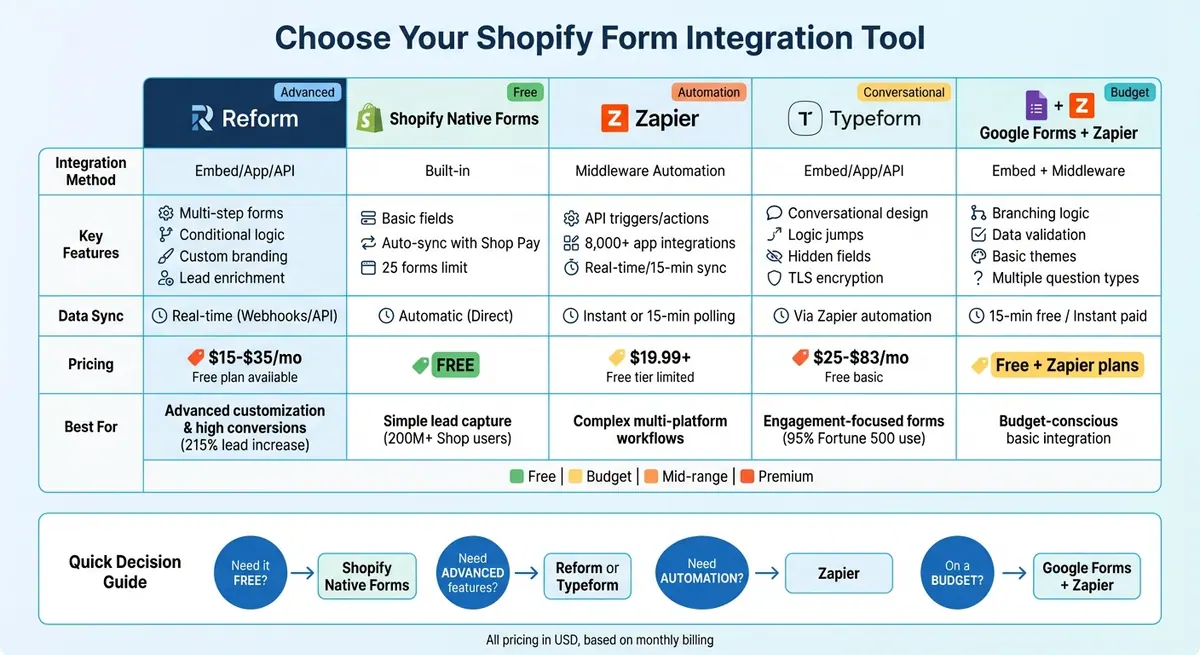
Shopify Form Integration Tools Comparison: Features, Pricing, and Best Use Cases
How To Integrate Custom Forms in Shopify (2026 Tutorial)

How Shopify Form Integration Works
Integrating forms with your Shopify store can be done in a few different ways, depending on your needs and technical expertise. Here are the three main approaches:
- Shopify's Native Forms App: This is a straightforward option for adding popup or inline forms to your store without any coding.
- Third-Party Form Builder Apps: These apps allow you to create and embed custom forms on your store pages using app embeds or auto-generated code.
- Automation Platforms: Tools like Zapier can connect external form solutions to your Shopify store by setting up triggers and actions.
These methods help merchants simplify lead collection and personalize customer experiences. For instance, integrated forms are often used to build email and SMS marketing lists. Product quizzes can guide shoppers to items based on their preferences, while customer surveys collect feedback and first-party data, such as birthdays or product interests.
If you're operating in the U.S., it's crucial to stay compliant with data privacy regulations. Always get explicit consent before sending marketing messages, and ensure customers can access, correct, or delete their personal information. Shopify’s native Forms app is designed to collect data in a privacy-compliant way. Including a link to your Privacy Policy near the form is a smart move. As Shopify puts it: "Collect, own, and leverage customer information thanks to a centralized, compliant platform."
Each integration method requires specific setup steps to ensure secure and efficient data handling. For instance, enabling the 'Forms' toggle lets you add popups or inline forms to your store. If you're using automation tools like Zapier, you'll need to grant the appropriate API permissions. Payment forms should use secure gateways like Stripe or PayPal, and spam protection tools like reCAPTCHA are essential to protect customer data.
Shopify Forms allows up to 25 active forms per store. It even checks if a customer's email is linked to a Shop account, enabling one-click discounts for over 200 million Shop users. However, the app does have limitations - it doesn’t support multi-step forms or conditional logic. This is why many merchants opt for third-party form builders to meet more complex needs.
1. Reform
Reform is a no-code form builder designed to help Shopify merchants create high-performing, branded forms that drive conversions. It offers complete control over form design and data management, making it a powerful tool for capturing leads. Here's how Reform integrates seamlessly with your Shopify store.
Integration Options (Embed/App/API)
Reform provides flexible integration methods to suit a variety of technical setups. You can embed forms in your Shopify store using a code snippet, iframe, or go headless for maximum design flexibility. The headless option is especially useful for developers who want full control over the form's appearance and behavior, ensuring it aligns perfectly with both standard Shopify setups and custom builds.
Customization and Advanced Features
Reform makes it easy to design forms that reflect your brand. With no coding required, you can customize forms to match your brand’s colors and logo. For those who want more control, custom CSS and code can be added to create a tailored experience. The platform supports multi-step forms and conditional logic, allowing you to guide users through different paths based on their answers.
Other useful features include:
- "Finish Later" Option: Allows users to save their progress and return to complete the form later.
- Abandoned Submissions: Captures partial responses even if users don’t finish the form, giving you another chance to engage potential leads.
- Built-in Tools: Includes lead enrichment, spam prevention, and real-time email validation to ensure you collect accurate and valuable data.
Real-Time Data Sync with Shopify
Reform ensures smooth data transfer to your CRM and marketing tools using webhooks and APIs. With custom mapping and duplicate handling, your data remains clean and organized. You can also integrate Reform with Zapier to automate tasks like creating customer records or draft orders immediately after a form submission. Additionally, Reform offers direct integrations with popular platforms like HubSpot, Salesforce, Notion, Google Sheets, and ConvertKit, expanding its functionality even further.
Pricing (in USD)
Reform offers a range of plans to fit different needs:
- Free Plan: No credit card required.
- Basic Plan: $15/month (or $150/year), includes unlimited responses, conditional logic, custom thank-you pages, and essential integrations.
- Pro Plan: $35/month (or $350/year), adds features like team access, file uploads, incomplete response tracking, custom CSS/JavaScript, and advanced integrations with HubSpot and Salesforce. A 14-day free trial is also included with the Pro plan.
Reform provides a flexible, feature-rich solution for creating and managing forms that help Shopify merchants capture and manage leads effectively.
2. Shopify Native Form Options
Shopify provides a built-in tool for collecting customer information through its Shopify Forms app, available for free in the Shopify App Store. With a user rating of 4.2 out of 5 stars from 508 reviews, this app offers a straightforward solution for basic lead capture needs. Here's how it integrates with your Shopify store and what features it offers.
Integration Method (Embed/App)
The Shopify Forms app offers several ways to integrate forms into your store:
- Popup Forms: Activate the "Forms" app embed toggle in the Theme Editor under "App embeds" to enable popups.
- Inline Forms: Embed forms directly into specific sections of your theme by pasting a unique 6-digit Form ID into a theme block.
- Dedicated Landing Pages: Create custom URLs to host standalone forms.
The app also allows you to create up to 25 forms per store, giving you flexibility for different campaigns or purposes.
Form Customization and Logic Features
While the customization options are functional, they are somewhat limited. You can tweak brand colors, titles, descriptions, and success messages to align with your store's branding. The app supports standard fields like email and name, as well as custom fields such as birthday, phone number, or product interest. However, it does not support conditional logic or multi-step forms, which may limit its use for more complex lead capture needs.
For international stores, the app supports over 20 languages. You can either manually translate fields or use the auto-translate feature for supported languages, making it easier to connect with a global audience.
Data Sync Capabilities with Shopify
One of the app's strengths is its seamless data integration with Shopify. Form submissions automatically create or update customer profiles in your Shopify admin, removing the need for manual data entry. Additionally, automatic customer tagging helps you segment leads right away, which is particularly useful for triggering marketing automations, such as welcome emails or SMS campaigns.
If you're offering a discount code through the form, it’s automatically saved to the customer’s Shop account. This discount is then applied at checkout when using Shop Pay, which benefits over 200 million Shop users.
Pricing (in USD)
The Shopify Forms app is completely free to install and use on any Shopify plan. There are no transaction fees for collecting lead data. Plus, Shopify Email includes 10,000 free emails per month, making it an economical option for small businesses looking to grow their customer base.
3. Zapier
Zapier serves as a no-code tool that connects third-party form applications to Shopify using automated workflows known as "Zaps." It bridges the gap between your favorite form tools - like Google Forms, Typeform, or Jotform - and your Shopify store through API-based triggers and actions. With integrations for over 8,000 apps, Zapier offers a flexible way to streamline your processes.
Integration Method (Embed/App/API)
Zapier employs an App-based integration approach, leveraging API connections to automate data exchange between your forms and Shopify. Each Zap includes a Trigger (such as a form submission) and an Action (like creating a customer profile in Shopify). Setting up your first workflow is quick, with most users completing it in under six minutes.
For added functionality, Zapier Interfaces provides a drag-and-drop form builder. This feature complements its API integrations, offering a complete form-to-Shopify solution in one platform. These forms can initiate automated workflows instantly, ensuring real-time data transfer to Shopify.
Data Sync Capabilities with Shopify
Zapier syncs form submissions to Shopify using two methods: Instant triggers for real-time workflows and polling triggers that run every 15 minutes. This allows you to automate tasks such as creating or updating customer profiles, generating new orders with line item details, adding tags to customer profiles, and even creating blog posts based on form responses.
The integration also works in reverse. Shopify events - like a paid order, an abandoned cart, or a new customer - can trigger actions in other apps. This two-way sync makes it easy to share Shopify data across various marketing and CRM tools, providing a seamless experience for businesses. Zapier's flexible pricing model ensures you can scale these capabilities to fit your needs.
Pricing (in USD)
Since Shopify is a Premium app on Zapier, you'll need at least the Professional plan, which starts at $19.99/month (billed annually), to use the integration.
For more advanced needs, the Team plan (starting at $69/month) supports up to 25 users with shared workflows, while the Enterprise plan offers custom pricing for unlimited users and advanced admin controls. Zapier uses a task-based pricing system, where each successful data transfer counts as one task. If you exceed your monthly task limit, the platform automatically switches to pay-per-task billing at 1.25x the base cost to ensure uninterrupted service.
sbb-itb-5f36581
4. Typeform
Typeform creates conversational, dialogue-style forms, trusted by 95% of Fortune 500 companies for collecting data and driving engagement. When paired with Shopify, it streamlines customer data collection and automates order management.
Integration Method (Embed/App/API)
Typeform offers multiple integration options with Shopify, making it easy to embed forms into your store. You can use a standard embed by pasting code via the "Show HTML" button or opt for a full-screen Liquid template for a more immersive experience. For backend automation, Zapier can sync form data with Shopify, though it requires a Premium account.
Form Customization and Logic Features
Typeform stands out with its customization capabilities. Features like logic jumps allow forms to adapt dynamically based on user responses, while hidden fields enable personalized experiences. The "Recall Information" feature further enhances interactivity by referencing earlier answers. To ensure security, Typeform uses TLS 1.2 encryption for data in transit and AES-256 encryption for stored data.
Data Sync Capabilities with Shopify
With Zapier automation, Typeform responses can directly trigger Shopify actions. For example, you can create new customers, generate orders, update product listings, or even publish blog posts. It also supports workflows like inventory adjustments and creating draft orders. Additionally, Shopify events - such as new orders, customers, or products - can trigger actions within Typeform, making operations smoother and more efficient.
Pricing (in USD)
Typeform offers a free plan for basic testing. Paid plans start with the Basic plan at $25/month (billed annually), which includes 100 responses per month and unlimited forms with basic logic. The Plus plan costs $50/month (billed annually), removing Typeform branding and supporting up to 1,000 responses with three user accounts. The Business plan, priced at $83/month (annual billing), allows for 10,000 responses and five users. For businesses needing more, Growth plans range from $166 to $291/month (billed annually), adding features like video questions and advanced tracking integrations.
"We just hosted a virtual event for 60,000 people using Typeform for the bookings." – Becca Ravenna, Senior Director, Corporate Sales and Partnerships, Barry's
5. Google Forms with Zapier Integration
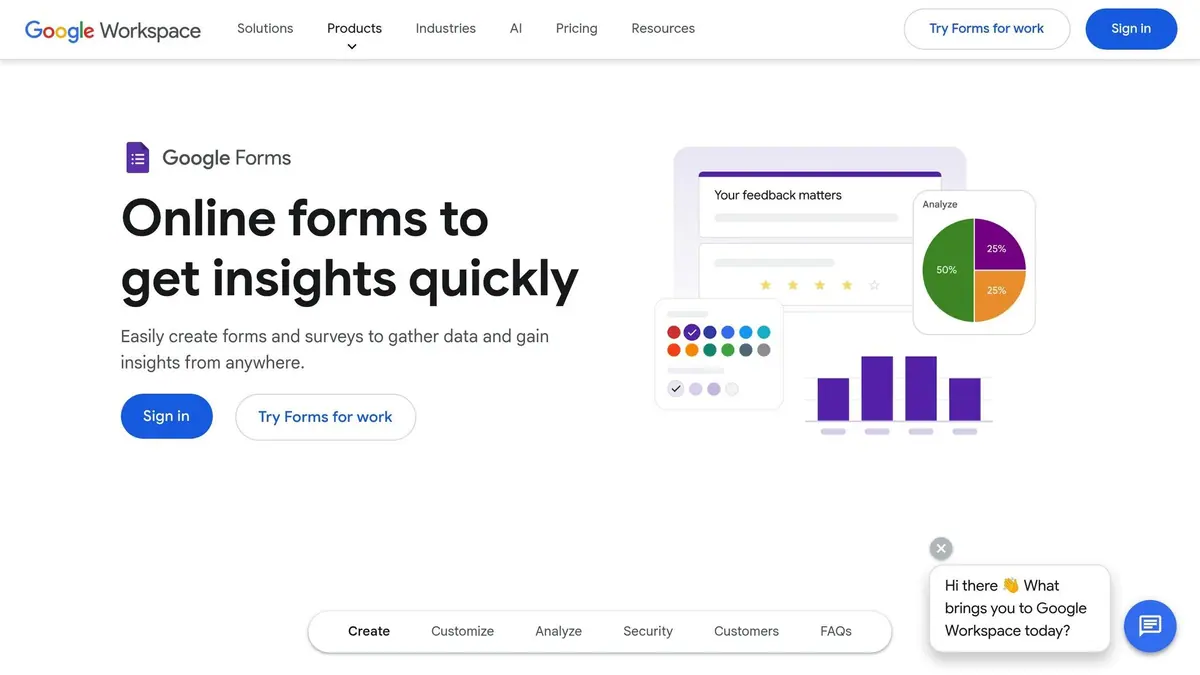
Google Forms offers a no-cost, straightforward solution for Shopify merchants who need basic form functionality without additional expenses. While Google Forms doesn’t directly integrate with Shopify, Zapier steps in as the connecting tool, making it possible to link the two platforms. This setup is ideal for businesses already using Google Workspace or those exploring automation options before committing to pricier tools.
Integration Method (Embed/App/API)
This integration relies on Zapier's visual builder, allowing you to connect Google Forms with Shopify without any coding skills. You can embed your Google Form using a link or iframe and then use Zapier to sync responses with Shopify. For example, you can set up a trigger like "New Form Response" and pair it with Shopify actions such as "Create Customer" or "Create Order." From there, map the form fields to the appropriate Shopify data fields.
Form Customization and Logic Features
Google Forms provides simple customization tools, like themes and colors, to align with your brand. It supports multiple question types, including multiple-choice, dropdowns, linear scales, and text fields. You can also use branching logic to guide respondents through different sections based on their answers. Data validation rules ensure accurate customer input. While these features work well for straightforward forms, Google Forms lacks the advanced branding and design options that dedicated Shopify form builders provide.
Data Sync Capabilities with Shopify
Using Zapier, Google Forms responses can automatically trigger actions in Shopify, such as creating or updating customer records, generating orders, adding products, publishing blog posts, or updating inventory levels. On Zapier’s free plan, the system checks for new form data every 15 minutes, while premium plans offer instant data syncing. You can also use the "Find Customer" action to avoid duplicate records or apply automation to format responses before syncing them to Shopify. This integration ensures smooth data mapping across customers, orders, and products, streamlining workflows and improving efficiency.
Pricing (in USD)
Google Forms is completely free for personal use, and Google Workspace for businesses starts at $12 per month. Zapier offers a free tier for basic automation, but Shopify integrations are classified as "Premium" features, requiring a paid subscription beyond the free plan. Zapier also provides a 14-day trial for premium features, letting you test the integration without upfront costs. This combination is budget-friendly for merchants, though the 15-minute sync delay on Zapier’s free plan may not meet the needs of businesses requiring real-time updates.
Comparison Table
The table below highlights the features and pricing of various tools to help you choose the right Shopify form integration for your needs.
| Tool | Method | Customization Options | Sync | Best Use Case | Pricing (USD) |
|---|---|---|---|---|---|
| Reform | Embed code integration | No-code builder with multi-step forms, conditional routing, and custom branding | Real-time sync with lead enrichment, spam prevention, email validation, and CRM tools | Conversion-focused forms with advanced customization and analytics | $15/mo (Basic), $35/mo (Pro) |
| Shopify Native Forms | Built-in theme editor | Basic theme options, popup and inline forms, discount offers | Direct sync with Shop Pay (200M+ users), automatic discounts, and email/SMS list growth | Simple lead capture and email list building for Shop Pay users | Free |
| Zapier | Middleware automation | No direct form builder; connects external forms to Shopify | Automated triggers and actions (e.g., Create Customer, Update Inventory); instant sync | Complex workflows linking multiple platforms without coding | Free tier available; paid plans |
| Typeform | Embed code or iframe | Conversational design, logic jumps, and custom branding | Requires Zapier for Shopify sync | Engaging forms that reduce survey fatigue and boost completion rates | Paid plans (pricing varies) |
| Google Forms with Zapier | Embed link/iframe + Zapier | Basic themes, colors, branching logic, and data validation | Via Zapier: Create/update customers, generate orders, and update inventory | Budget-friendly option for basic data collection | Free (Google Forms); Zapier plans |
This comparison shows that Reform is ideal for businesses focused on conversions and branding, while Shopify Native Forms is perfect for simple lead capture. For those needing automation, Zapier excels in connecting tools without direct Shopify integration. Meanwhile, Google Forms provides an affordable choice for basic data collection. Notably, Zapier's automation setup is quick - most users complete a Zap in under six minutes.
Conclusion
If you're just starting out and need a free, straightforward way to capture leads, Shopify Native Forms is a solid choice. For those juggling multiple platforms, Zapier simplifies automation and keeps everything running smoothly.
For businesses focused on maximizing conversion rates and maintaining a cohesive brand image, Reform stands out. As Derrick Reimer, Founder of SavvyCal, explains:
"Reform is what Typeform should have been: clean, native-feeling forms that are quick and easy to spin up. Reform does the job without a bunch of ceremony".
Reform's approach has proven results, delivering a 215% increase in qualified leads for B2B and SaaS companies. It's a powerful option for those prioritizing high-conversion strategies.
On the other hand, if you're aiming for a more conversational approach, Typeform is a great fit. Its one-question-at-a-time design is ideal for longer surveys and interactive quizzes. For those on a tighter budget, Google Forms with Zapier provides a practical solution for basic data collection, though it lacks professional templates and built-in payment integrations found in more advanced tools.
When choosing the right form builder, consider your specific needs. Features like file uploads, conditional logic, or multi-step forms often require third-party tools. For businesses managing complex workflows - like wholesale orders or job applications - investing in platforms with advanced customization and real-time analytics can make a significant difference. With nearly half of companies identifying online forms as their top conversion driver, selecting the right tool can have a direct impact on your success.
FAQs
What are the advantages of using a third-party form builder instead of Shopify's built-in forms?
Using a third-party form builder can give Shopify merchants access to features that go far beyond what Shopify's native forms offer. These tools often integrate effortlessly with systems like CRMs, email marketing platforms, and other business tools. This means you can enjoy perks like automated email responses, lead enrichment, and real-time data syncing - all of which save time and cut down on manual tasks.
They also come with advanced design and workflow capabilities, including multi-step forms, conditional logic, spam prevention, and real-time analytics. With these features, you can create beautifully branded, high-converting forms without needing to touch a single line of code. Many of these tools also support secure payment collection, automatic lead recovery, and seamless embedding on Shopify pages, improving the user experience and driving more sales.
For example, a no-code tool like Reform makes it easy to design customizable forms. With features like email validation, conditional routing, and integrations with your marketing tools, Reform’s drag-and-drop interface helps ensure your forms are optimized for both conversions and data accuracy.
How can Zapier help connect non-Shopify forms to a Shopify store?
Zapier is a no-code platform that seamlessly connects third-party form apps with your Shopify store. By creating a trigger (like “When a new form response is submitted”) and linking it to a Shopify action (such as creating a customer or adding an order), you can automate tasks without needing any coding skills.
To make things even easier, Zapier offers pre-built templates for common workflows, so you can set up integrations in no time. With compatibility for over 8,000 apps, you can expand your workflows to include tools like email marketing platforms or CRMs, all while maintaining top-tier security and compliance standards. Zapier’s free plan includes essential features, while premium tiers unlock advanced automation and scalability options to grow alongside your business.
What should I look for in a Shopify form integration tool?
When selecting a form integration tool for your Shopify store, ease of use should be at the top of your list. A good tool will let you embed forms effortlessly without requiring coding knowledge. This not only saves you time but also ensures everything works smoothly right out of the gate.
Next, focus on features that improve conversion rates and maintain data accuracy. Look for options like multi-step forms, conditional logic, spam protection, email validation, and real-time analytics. If your forms need to handle payments, make sure the tool supports secure, PCI-compliant payment processing with trusted providers such as Stripe or PayPal.
Lastly, think about customization, pricing, and customer support. The ability to align forms with your brand - using your colors and logo - helps create a seamless shopping experience. Opt for a tool with clear pricing and dependable support, so it can scale with your store as your business grows.
Related Blog Posts
Get new content delivered straight to your inbox

The Response
Updates on the Reform platform, insights on optimizing conversion rates, and tips to craft forms that convert.




Drive real results with form optimizations
Tested across hundreds of experiments, our strategies deliver a 215% lift in qualified leads for B2B and SaaS companies.
